
12 Island Browser Competitors to Know in 2026


What Is the Island Browser?
The Island Browser is a Chromium-based enterprise browser that gives organizations control over the workforce’s browsing environment. It addresses security, compliance, and data leakage concerns by rearchitecting how web browsers handle sensitive enterprise workflows.
Island allows IT and security teams to define policies that govern user activities, restrict risky actions, and control data exfiltration within the browser itself, rather than relying solely on network or endpoint controls.
Island browser’s competitors include platforms that enable secure remote work platforms like Venn and Parallels, secure browser solutions like Seraphic and Prisma Browser, zero trust solutions like Zscaler and Netskope, and browser isolation solutions like Microsoft Purview and Cisco Umbrella.
Go Beyond the Browser. Secure All Apps.
Learn how Venn secures both browser-based AND locally installed apps on unmanaged devices.

In this article:
Key Limitations of Island Browser
Island Browser offers robust security and control features, but several serious limitations affect both administrators and end users, leading organizations to seek alternatives. These limitations were reported by users on the G2 platform:
- Policy management complexity: Administrators may find it difficult to manage policies when multiple rules appear similar but have subtle differences. The current method of prioritizing policies based on their order can lead to confusion and makes troubleshooting more complex.
- Incomplete RDP feature set: The built-in RDP client lacks some of the functionality available in the Microsoft desktop RDP client. This can limit its usefulness for workflows that rely on full-featured remote access.
- Limited search and troubleshooting tools: The management console’s search functionality is limited, and the user activity map lacks options to filter or refresh data by time frame. When policy violations occur, the browser does not always explain the cause in enough detail to support troubleshooting.
- Performance and responsiveness issues: Users have reported slow browsing performance, lag during tab switching, and occasional compatibility problems. These issues can disrupt productivity, particularly in fast-paced work environments.
- Restricted customization for end users: End users may experience frustration due to the strict security controls and limited ability to customize the browser to suit personal preferences.
- Sales and contract transparency: Some users have cited unexpected additional fees after contract signing, suggesting that the sales process could benefit from greater clarity and alignment with the quality of the technical support experience.
Understanding Island Alternatives
Island competes across several overlapping categories. Each category addresses enterprise browser security and remote access from a different architectural angle. Understanding these models helps organizations choose the right fit based on risk tolerance, device strategy, and user experience requirements.
Secure Workspace Solutions
Secure workspace platforms focus on isolating corporate applications and data from personal device environments. Rather than replacing the browser alone, they create a controlled workspace that separates work and personal activity on the same endpoint.
In BYOD scenarios, these platforms often use enclave-style isolation. A secure, company-managed workspace runs locally on the user’s device but remains logically separated from personal files and applications. Corporate data is encrypted, isolated, and governed by centralized policies.
Key characteristics of secure workspace solutions include:
- Logical separation of work and personal environments
- Encrypted storage for corporate files
- Controlled data movement (copy/paste, downloads, screenshots, peripheral use)
- Secure tunneling for corporate network traffic
- Remote wipe of business data without affecting personal content
- Compliance support for regulated industries
Unlike VDI, secure workspaces run applications locally, reducing latency and improving performance. Unlike enterprise browsers, they protect both web-based and locally installed business applications, not just browser sessions.
Secure Enterprise Browsers and Platforms
Secure enterprise browsers embed security controls directly into the browser layer. They enforce policies on web usage, SaaS access, file uploads/downloads, clipboard actions, and browser extensions.
These solutions often support cross-browser enforcement or provide a hardened enterprise browser. They are designed to protect browser-based workflows without requiring full device management or virtual desktops.
Typical capabilities include:
- Browser-level data loss prevention (DLP)
- Phishing and malicious site protection
- Shadow SaaS visibility
- Extension control
- Granular session controls per user or device
This approach works well for organizations that rely heavily on SaaS and web apps, but it may not protect native desktop applications unless combined with other controls.
Zero Trust and Secure Web Gateways
Zero trust and secure web gateway platforms secure access at the network and identity layer. Instead of focusing on the browser itself, they broker access between users and applications based on identity, device posture, and context.
These platforms typically provide:
- Identity-aware access to internal apps
- Full TLS inspection
- Microsegmentation
- Cloud access security broker (CASB) capabilities
- Data protection across web and SaaS traffic
They are well suited for organizations modernizing legacy VPN architectures. However, they do not inherently control in-browser user behavior unless combined with browser or endpoint controls.
Browser Isolation and Data Loss Prevention (DLP)
Browser isolation and DLP solutions aim to prevent data leakage and malware execution during web sessions. Isolation technologies run web content in remote containers, streaming a safe rendering to the user. DLP platforms monitor and control sensitive data movement across endpoints, networks, and cloud services.
Common capabilities include:
- Remote browser isolation (RBI)
- Inline DLP for uploads, downloads, and copy/paste
- AI-assisted data classification
- Monitoring of SaaS and AI tool usage
- Policy-based blocking or user coaching
These solutions are often layered on top of existing browsers and networks. They provide strong content inspection and data governance but may introduce complexity depending on deployment architecture.
Notable Island Browser Competitors and Alternatives
Secure Workspace Solutions
1. Venn

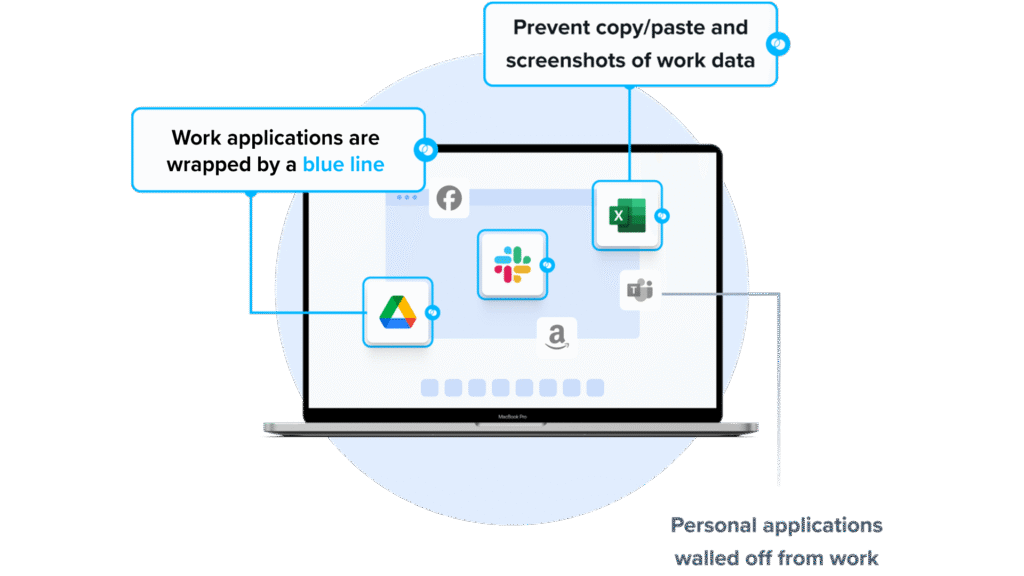
Venn is a notable Island Browser alternative for organizations that need to secure company data on unmanaged or BYOD computers. Unlike Island Browser, Venn protects both browser-based AND locally installed apps within a company-controlled Secure Enclave on the user’s device, delivering native browser and application performance without lag or latency.
Unlike Island, which restricts users to the browser, Venn runs apps locally on the endpoint while isolating them from personal activity. Blue Border™ visually distinguishes work from personal use, helping users stay productive while ensuring IT maintains control over business activity. Venn supports turnkey compliance with HIPAA, PCI, SOC, SEC, and FINRA, making it ideal for regulated industries with remote or contract-based workforces.
Key Features Include
- Secure Enclave technology: Encrypts and isolates work data on personal devices, both for browser-based and local applications.
- Zero trust architecture: Uses a zero trust approach to secure company data, limiting access based on validation of devices and users.
- Visual separation via Blue Border: Visual cute that distinguishes work vs. personal sessions for users.
- Supports turnkey compliance: Using Venn helps companies maintain compliance with a range of regulatory mandates, including HIPAA, PCI, SOC, SEC, FINRA and more.
- Granular, customizable restrictions: IT teams can define restrictions for copy/paste, download, upload, screenshots, watermarks, and DLP per user.
To see Venn in action, book a demo here.
2. Parallels Secure Remote Workspace
Parallels Secure Remote Workspace is a browser-based platform that enables secure access to remote desktops, SaaS, legacy applications, and file servers without requiring local installations. Built around zero trust principles, it provides secure, audited, and policy-driven access from any device through different web browsers.
Key features include:
- Zero trust security: Default secure access with built-in MFA, session auditing, and context-aware controls based on network and location.
- RDP to HTML5 translation: Enables remote desktop access via browser without RDP clients, improving security and compatibility.
- Multi-device and OS support: Works on various browsers, across Windows, macOS, Linux, iOS, and Android platforms.
- Granular access management: Policies for SaaS, legacy apps, and file servers, with IdP integration and SIEM support.
- Fast, agentless deployment: No installation required on client devices; suitable for rapid onboarding of contractors or remote teams.
Source: Parallels
3. Cameyo by Google
Cameyo by Google is a web-based virtual app delivery (VAD) solution that enables organizations to run traditional client-based applications directly in the browser. Instead of delivering full virtual desktops, Cameyo virtualizes individual applications and makes them available as web apps, including progressive web applications (PWAs).
Key features include:
- Virtual app delivery (VAD): Delivers individual Windows and client-based applications through the browser without full virtual desktops.
- Web-based access: Converts legacy applications into web-accessible apps, including PWAs, with no VPNs required.
- Zero trust architecture: Reduces attack surface by isolating apps from endpoints and networks, protecting against ransomware and brute-force attacks.
- Lower cost than VDI: Reduces operational costs compared to VDI and DaaS by simplifying management and infrastructure.
- Full app functionality: Users access full desktop versions of applications with consistent behavior across devices and platforms.
Secure Enterprise Browsers and Platforms
4. Seraphic
Seraphic is an enterprise browser security solution that embeds a lightweight enforcement layer into the browser, enabling organizations to secure web access across both managed and unmanaged devices without forcing users to switch browsers or alter their workflows. It provides protection against phishing, credential theft, malware, zero-day exploits, malicious extensions, and data leakage.
Key features include:
- Cross-browser protection: Secures any major browser without requiring browser replacement.
- Lightweight inline enforcement: Injects policy controls directly into the browser for real-time threat prevention and data protection.
- Deep activity visibility: Monitors user actions such as form inputs, file uploads/downloads, clipboard use, and extension behavior.
- Defense against advanced threats: Blocks phishing, malicious sites, zero-day exploits, credential theft, and malicious browser extensions.
- Unified policy management: Allows centralized, granular control over user, device, data, and application-level rules.
5. Prisma Browser

Prisma Browser is a secure enterprise browser natively integrated with SASE (secure access service edge), built to extend zero trust access and full web protection across both managed and unmanaged devices. It addresses security challenges such as data loss prevention, GenAI visibility, and secure remote access without the complexity of traditional VDI or VPN solutions.
Key features include:
- SASE-native browser: Integrates with Palo Alto Networks’ SASE platform to extend security policies to every browser session.
- Zero trust access: Applies access and data protection controls for both corporate and personal devices, with no need for VPNs.
- Complete web protection: Blocks AI phishing, malicious URLs and files, zero-day exploits, and browser-based attacks through integrated protection modules.
- GenAI and shadow AI control: Provides visibility into AI tool usage and prevents unsanctioned data exposure via GenAI applications.
- Faster onboarding: Enables rapid and secure access for new employees and contractors, reducing onboarding time and operational costs.
Source: Prisma Browser
6. LayerX

LayerX is a browser security platform that transforms a browser into a secure enterprise workspace. It provides visibility, risk analysis, and adaptive policy enforcement to protect against a range of browser-borne threats, including phishing, credential theft, GenAI misuse, data leakage, malicious extensions, and shadow SaaS usage.
Key features include:
- Cross-browser security: Supports all major browsers, applying uniform security controls without requiring browser replacement.
- Granular policy enforcement: Enforces risk-based policies per user, device, app, or data type, with actions ranging from monitor to block.
- User activity monitoring: Tracks browsing behavior, text input, file transfers, copy/paste actions, and more for oversight.
- Zero disruption deployment: Deploys without changes to the user experience, software stack, or network infrastructure.
- Centralized management console: Provides control over browser policy settings, usage monitoring, and auditing across the organization.
Source: LayerX
Zero Trust and Secure Web Gateways
7. Zscaler Zero Trust Exchange

Zscaler Zero Trust Exchange is a cloud-native security platform that replaces traditional network and perimeter-based models with a zero trust architecture. Built on the principle of least-privileged access, it brokers direct, one-to-one connections between users, applications, and devices based on identity, context, and policy without ever placing users on the network.
Key features include:
- Zero trust access broker: Establishes identity-aware, policy-driven connections between users and apps without exposing the network.
- Full TLS/SSL inspection: Inspects all traffic (including encrypted sessions) for malware, data leakage, and other threats.
- Application microsegmentation: Prevents lateral movement by isolating apps from the internet and limiting access to verified users only.
- Cloud-native architecture: Designed for mobility, cloud workloads, and modern enterprise use cases without relying on legacy hardware.
- Integrated data protection: Detects and protects sensitive data at rest, in use, and in motion across all connected services.
8. Netskope One
Netskope One is a cloud-native platform that unifies networking and security services into an integrated SASE architecture. It combines key security service edge (SSE) components such as secure web gateway, cloud access security broker, zero trust network access, and firewall-as-a-service under a common engine and policy framework.
Key features include:
- Unified SASE platform: Consolidates SWG, CASB, ZTNA, FWaaS, and SD-WAN with a single engine, console, and policy model.
- Zero Trust Engine: Applies adaptive, identity- and context-aware policies that evolve with changing risk conditions.
- Real-time threat and data protection: Delivers inline inspection and prevention across cloud, web, and private app traffic, powered by AI and DLP capabilities.
- Cloud-native infrastructure: Runs on the global NewEdge network with over 75 regions and 4,000 peering partners, ensuring low-latency performance from different locations.
- AI-powered risk scoring: Continuously evaluates over 75,000 cloud and SaaS apps using 50+ attributes for precise risk assessments.
Source: Netskope One
9. Cloudflare ZTNA
Cloudflare Access is a cloud-native zero trust network access (ZTNA) solution that replaces traditional VPNs with a faster, more secure way to manage access to internal applications, infrastructure, and AI tools. It applies least-privilege access controls by verifying user identity and device posture before granting access, eliminating the need to place users on the network.
Key features include:
- Granular access control: Enforces context-aware, least-privilege access based on user identity, device posture, and application sensitivity.
- VPN replacement: Provides secure access to internal apps without exposing the network or relying on legacy VPN infrastructure.
- Simplified deployment: Uses lightweight software connectors and one-time integrations to reduce complexity and speed up rollout.
- Unified policy management: Centralizes access control across SaaS, self-hosted, and non-web applications through a single zero trust framework.
- Eliminates lateral movement: Prevents attackers from moving between systems by isolating access to specific applications.
Browser Isolation and DLP
10. Microsoft Purview DLP

Microsoft Purview Data Loss Prevention (DLP) is a cloud-native solution that unifies the discovery, classification, and protection of sensitive data across Microsoft 365, endpoint devices, browsers, networks, and AI apps like Microsoft Copilot. It enables organizations to prevent unauthorized sharing or use of sensitive information.
Key features include:
- Cross-platform coverage: Protects sensitive data in Microsoft 365, endpoints, browsers, networks, and third-party AI tools.
- AI and Copilot protection: Extends DLP controls to Microsoft 365 Copilot and unmanaged AI agents to prevent unintended data exposure.
- Centralized policy management: Configure and enforce data loss prevention policies from a single interface in the Microsoft Purview portal.
- Cloud-delivered and scalable: Cloud-native architecture allows fast deployment and scaling across the organization.
- Adaptive, ML-driven controls: Uses machine learning to classify data and apply policy actions dynamically based on risk context.
Source: Microsoft Purview
11. Cisco Umbrella
Cisco Umbrella is a cloud-delivered security platform that provides DNS-layer protection and expands into an SSE solution through Cisco Secure Access. Designed to stop threats before they reach users or the network, Umbrella combines threat intelligence from Cisco Talos with a unified, scalable architecture.
Key features include:
- DNS-layer security: Blocks malicious domains, IPs, and URLs before connections are made, preventing threats at the earliest possible stage.
- Secure web gateway (SWG): Enforces acceptable use and inspects traffic for threats beyond DNS, including advanced malware and cloud app risks.
- Cloud access security broker (CASB): Provides visibility and control over SaaS app usage, with inline DLP and AI-powered protections for generative AI tools.
- Firewall-as-a-service (FWaaS): Offers cloud-based firewall capabilities for layer 3/4 traffic filtering without traditional appliances.
- Data loss prevention (DLP): Protects sensitive data in motion across cloud apps and web traffic to prevent leaks and unauthorized sharing.
Source: Cisco Umbrella
12. Trellix DLP
Trellix Data Loss Prevention (DLP) is a data security platform to protect sensitive and proprietary information across endpoints, networks, storage, and cloud environments. It combines data discovery, classification, and enforcement with monitoring and user coaching, offering centralized policy management and built-in compliance tools.
Key features include:
- End-to-end coverage: Protects data across endpoints, networks, cloud storage, and removable devices with consistent policy enforcement.
- Discovery and classification: Identifies and classifies sensitive data across 400+ file types, storage systems, and databases.
- User coaching and just-in-time feedback: Warns or blocks users attempting risky actions, with options for justification and education.
- Real-time event monitoring: Tracks DLP violations as they occur, aiding in faster investigation and response.
- Unified policy management: Enables centralized creation and deployment of DLP policies from a single console.
Source: Trelix
Conclusion
The rise of enterprise browsers and secure access platforms reflects a shift in how organizations approach endpoint and data security in distributed environments. These solutions embed security directly into the browsing experience or access layer, enabling granular control over user behavior, application usage, and data movement without relying on legacy perimeter defenses. When evaluating options, organizations should consider their existing infrastructure, risk profile, and operational needs to choose a solution that balances security, usability, and manageability in support of a zero trust strategy.
