
Zscaler DLP: Solution Overview, Pros/Cons and Top 5 Alternatives


What Is Zscaler?
Zscaler Data Loss Prevention (DLP) is a cloud-native security solution that secures sensitive data across web, SaaS, email, and endpoints using a unified policy engine. It prevents data leakage by monitoring, blocking, or encrypting sensitive information during transfer (inline) or at rest, even without a direct network connection via Zscaler Client Connector.
Unlike traditional security appliances that rely on network perimeters, Zscaler operates in the cloud and enforces security policies regardless of user location or device. This approach is especially useful for organizations with distributed workforces, as Zscaler can deliver consistent protection whether users are on-premises, remote, or mobile.
The platform provides a range of security services, including secure web gateways, firewall-as-a-service, cloud access security broker (CASB), and data loss prevention (DLP). Zscaler’s architecture is built to scale globally, offering low-latency security inspection and threat prevention.
It integrates with identity providers and supports granular policy controls, enabling organizations to manage security across SaaS, web, and private applications without deploying physical hardware.
Implement Zero Trust on Unmanaged Laptops – Without Zscaler
Discover how to protect company data on unmanaged laptops without Zscaler.
Zscaler DLP Solutions
Web and Email DLP
Zscaler’s web and email DLP capabilities enforce data protection across internet-bound traffic to prevent accidental or malicious data exposure. These features inspect web uploads, email attachments, and cloud app usage in real time, using a unified policy framework across users and devices.
The platform applies data classification and policy enforcement inline, identifying sensitive information such as personally identifiable information (PII), financial data, and intellectual property. Zscaler DLP policies can block, allow, or coach users based on content and context, such as user identity, destination, or risk level, without requiring endpoint software or traffic backhauling to a data center.
Endpoint DLP
Zscaler Endpoint DLP provides data protection across user devices through a single agent that operates regardless of network or location.
The solution enforces centralized DLP policies on endpoints, enabling real-time control over sensitive data across channels such as USB drives, network shares, printers, and cloud storage apps including Dropbox, Box, and OneDrive. Organizations can apply existing DLP policies to endpoint devices to maintain consistency across environments.
Zscaler includes dashboards, automated workflows, and forensic data to support incident response. Security teams can monitor data movement, classify sensitive information, and investigate incidents from a single platform. The platform consolidates endpoint, inline, and cloud data protection into one system.
Key Limitations of Zscaler DLP
Zscaler DLP has several practical limitations that organizations should consider when planning deployment and operations. These limitations were reported by users on the G2 platform:
- Geographic restrictions on traffic: Some regions impose restrictions on Zscaler cloud nodes due to high traffic volume from shared public IP addresses. This can lead to connectivity issues or service blocks in certain geographies.
- Policy configuration complexity: The policy engine can be difficult for new administrators to manage. Misordered or overlapping rules may result in unintended behaviors, such as shadowed policies that do not trigger.
- Challenging initial setup: Deploying Zscaler DLP, especially in larger environments, can be time-consuming. Initial configuration, SSL inspection setup, and policy tuning require planning and technical expertise.
- Limited log retention and troubleshooting visibility: Logs in the portal are retained for 30 days unless streamed to an external SIEM. Available traffic logs may be too high-level to trace and debug subtle data flow issues.
- Performance during peak times: Users may experience latency during periods of high traffic, and some applications require manual configuration to function correctly.
- High cost for full feature access: Zscaler operates on a per-user licensing model and is considered a premium solution. Costs can increase for organizations with large user bases or those requiring advanced features.
- Limited UI and policy conflict detection: The interface lacks features such as a built-in policy conflict checker. This increases the likelihood of creating conflicting or redundant rules.
Notable Zscaler Alternatives
1. Venn

Zscaler delivers strong network security, and many organizations use it alongside Venn. But Zscaler was never built to secure business activity on BYOD laptops. It can’t separate work from personal use on an unmanaged device, and its controls touch the entire machine, creating user friction, slowing adoption, and often leading to shelfware. And once data leaves the Zscaler cloud perimeter (for example, copied from a local app), it’s no longer protected.
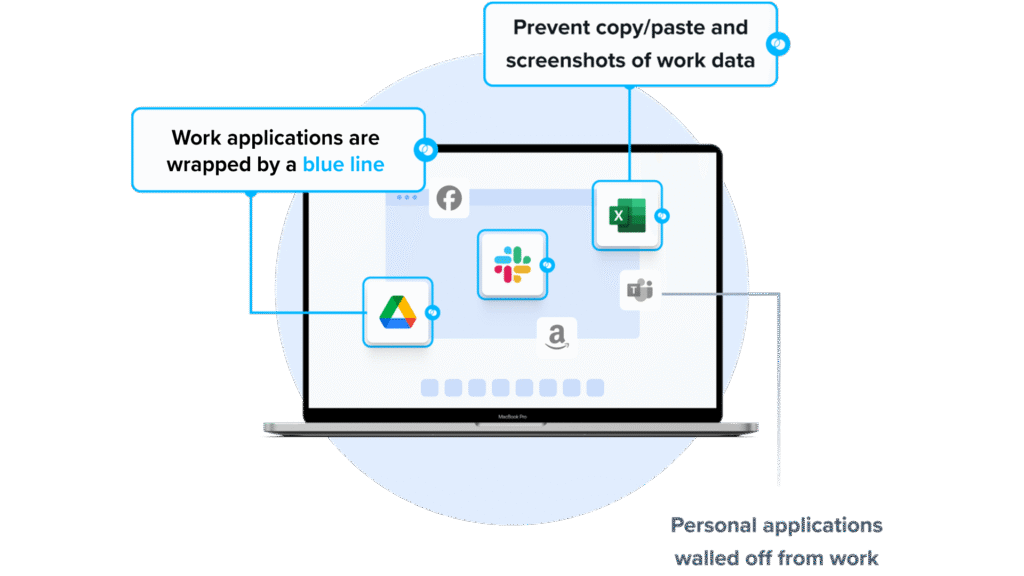
Venn’s Blue Border™ fills that gap. Similar to an MDM solution but designed for laptops, Venn creates a company-controlled secure enclave where all work data lives encrypted, access is managed, and business apps run locally with no latency. Everything inside the Blue Border is governed and compliant. Everything outside remains fully personal and private.
Key features include:
- Granular, customizable restrictions: IT teams can define restrictions for copy/paste, download, upload, screenshots, watermarks, and DLP per user.
- Secure Enclave technology: Encrypts and isolates work data on personal Mac or PC computers, both for browser-based and local applications.
- Zero trust architecture: Uses a zero trust approach to secure company data, limiting access based on validation of devices and users.
- Visual separation via Blue Border: Visual cue that distinguishes work vs. personal sessions for users.
- Supports turnkey compliance: Using Venn helps companies maintain compliance on unmanaged Macs with a range of regulatory mandates, including HIPAA, PCI, SOC, SEC, FINRA and more.
2. Microsoft Purview DLP

Microsoft Purview Data Loss Prevention is a cloud-delivered solution that helps organizations detect and prevent the unauthorized use, sharing, or transfer of sensitive data across their digital environment. It provides policy-based protection for data in Microsoft 365, on endpoint devices, in browsers and networks, and in AI-driven tools like Microsoft 365 Copilot.
Key features include:
- Unified policy management: Create, manage, and enforce DLP policies for supported environments, including Microsoft 365, endpoints, browsers, and networks, from a single interface in the Microsoft Purview portal.
- Broad coverage across data ecosystems: Protect sensitive data across cloud services, devices, and AI tools such as Microsoft 365 Copilot and third-party AI apps.
- Cloud-native architecture: Delivered and managed in the cloud, reducing the need for on-premises infrastructure.
- Machine learning–driven classification: Use ML-based controls to analyze content, classify sensitive data, and apply enforcement based on context and user behavior.
- Support for sensitive information types (SITs): Use built-in, custom, and trainable classifiers to identify data such as PII, financial records, or intellectual property across environments.
Source: Microsoft Purview DLP
3. Forcepoint DLP

Forcepoint Data Loss Prevention secures sensitive data and supports compliance across hybrid environments. It combines data classification, contextual risk analysis, and centralized policy control to prevent data breaches in real time. It supports cloud and on-premises deployment. Forcepoint DLP includes over 1,700 prebuilt classifiers and policy templates.
Key features include:
- Policy library: Includes over 1,700 predefined classifiers and templates to support regulatory requirements such as GDPR and HIPAA across 80+ countries.
- Context-aware risk adaptation: Monitors user behavior and context to assess risk levels and adjust policies.
- Unified policy management and reporting: Configure, enforce, and report on DLP policies across cloud apps, email, web, and endpoints from a single dashboard.
- Real-time incident detection and blocking: Detects and blocks sensitive data movement in real time across user activities and devices.
- AI-driven automation and generative AI security: Uses AI and automation for incident handling and controls for generative AI tools.
Source: Forepoint DLP
4. Symantec DLP
Symantec Data Loss Prevention is an enterprise solution that protects sensitive data across endpoints, networks, storage, and the cloud. It enables organizations to discover, monitor, and secure confidential information wherever it resides or moves. The platform uses content-aware detection technologies and enforces policies through a central console.
Key features include:
- Enterprise-scale discovery and monitoring: Scans data across endpoints, file shares, databases, and cloud apps such as Office 365, Google Workspace, and Salesforce.
- Content-aware detection: Uses exact data matching (EDM), indexed document matching (IDM), described content matching (DCM), file-type detection, and optical character recognition (OCR).
- Unified policy framework: Centralized policy management for enforcement across cloud, web, email, and endpoint environments.
- Data usage monitoring: Tracks data being downloaded, copied, emailed, or transferred across devices and channels; can notify users or block actions based on policy.
- Remediation capabilities: Supports automated workflows such as blocking, quarantining, encryption, and file redirection. Integrates with tools such as ServiceNow for incident handling.
5. Trellix DLP
Trellix Data Loss Prevention protects sensitive data across endpoints, networks, storage, and the cloud. It provides data discovery, classification, and policy enforcement from a single management console. Trellix DLP includes predefined policies and reporting capabilities. The platform supports over 400 file types and includes user coaching, justification prompts, and forensic support.
Key features include:
- End-to-end protection across threat vectors: Secures data from endpoints to the cloud by monitoring user actions, network traffic, and storage locations.
- Data discovery and classification: Identifies and classifies sensitive data across workstations, servers, network shares, and databases, supporting over 400 file types with optional OCR.
- Monitoring and enforcement: Tracks and blocks policy violations as they occur, with user notifications and justification prompts.
- Centralized policy and event management: Manage DLP policies, deployment, and compliance reporting through a unified console.
- User coaching and behavior control: Prompts users when risky actions are detected to enforce policy requirements.
Source: Trelix
Learn more in our detailed guide to Zscaler alternatives
Conclusion
Data loss prevention strategies must account for cloud services, remote users, and unmanaged devices. Organizations should evaluate whether they need network-based inspection, endpoint-level enforcement, or workspace isolation to reduce data leakage risk. The right approach depends on workforce distribution, regulatory requirements, and how corporate data is accessed and stored across environments.
