
Unified Endpoint Management Software: Top 7 Options and Alternatives

What Is Unified Endpoint Management Software?
Unified Endpoint Management (UEM) software is a centralized platform that enables IT teams to monitor, secure, and manage diverse devices, including laptops, desktops, smartphones, tablets, and IoT, across various operating systems (Windows, macOS, iOS, Android, Linux) from a single console. It merges Mobile Device Management (MDM) and client management tools to enforce policies, deploy applications, and patch systems, enabling remote work and BYOD security.
Key features and capabilities:
- Centralized management: A single dashboard to monitor and manage all device types, reducing complexity.
- Device security and compliance: Enforces security policies, manages OS updates/patches, and enables remote troubleshooting.
- Application and content management: Distributes apps, manages app catalogs, and secures corporate data on user devices.
- Support for diverse deployments: Handles Bring Your Own Device (BYOD), Corporate-Owned Personally Enabled (COPE), and Kiosk modes.
- Automation and remote access: Utilizes AI-powered scripting for automation and allows remote device locking or wiping.
This is part of a series of articles about endpoint security
Better Endpoint Security for Contractors – on Unmanaged Devices
Discover the top solutions for providing secure remote access to contractors on unmanaged laptops. No shipping hardware, no VDI.
In this article:
Key Features and Capabilities of Unified Endpoint Management Software
Centralized Management
Centralized management enables the administration of a range of endpoint devices through a single management interface. This unified dashboard allows IT administrators to provision, update, and troubleshoot devices efficiently, regardless of the operating system or form factor. Features such as remote device enrollment, policy deployment, and real-time monitoring are simplified, minimizing the need for multiple tools or siloed workflows.
The benefits of centralized management extend to improved visibility and control. Administrators can quickly generate reports, track the health status of devices, and ensure compliance from one place. This holistic view simplifies large-scale management and allows for rapid response to incidents or compliance issues.
Device Security and Compliance
Device security and compliance are fundamental capabilities of UEM solutions. These platforms provide a suite of security features such as device encryption, remote wipe, password enforcement, and vulnerability management to protect organizational data. Automated compliance checks and alerting mechanisms ensure devices meet regulatory or internal security policies, reducing the risk of data breaches or costly violations.
With more endpoints connecting from various locations, maintaining regulatory compliance becomes more challenging. UEM software addresses this by enforcing standardized security configurations and allowing administrators to monitor for deviations in real time. If a device is found to be non-compliant, actions can be automated, such as isolating the device from the network or triggering a security workflow.
Application and Content Management
Application and content management within UEM platforms enables organizations to control what software and data can be accessed and distributed across endpoints. IT teams can push, update, or remove applications remotely, as well as configure permissions and restrictions according to user roles or device types. This prevents the proliferation of unauthorized or outdated software and maintains consistency in application versions across the organization.
Content management extends to securing corporate data on both company-owned and personal devices. UEM solutions offer features like containerization, data loss prevention, and secure content distribution, which allow sensitive business information to be accessed without risking exposure to personal apps or devices.
Support for Diverse Deployments
UEM platforms are engineered to support an array of deployment scenarios, including Windows, macOS, Android, iOS, Linux, and rugged or IoT devices. This flexibility is necessary for organizations with heterogeneous device landscapes and hybrid workforces that utilize various device types and operating systems.
Support for different deployment models, such as on-premises, cloud-based, or hybrid, further enhances adaptability. UEM platforms often integrate with existing IT infrastructure and services, supporting scalability as organizational needs change. This ensures businesses can adapt to evolving endpoint trends and workforce mobility without disrupting continuity or having to retool their management strategy.
Automation and Remote Access
Automation in UEM reduces the manual workload for IT teams through features like automated patch management, policy enforcement, and scheduled compliance checks. These automation tools help ensure devices stay up to date with the latest security patches and software versions without requiring direct intervention. Automated workflows can also respond to security incidents, such as isolating compromised devices or running diagnostic scripts.
Remote access capabilities allow administrators to provide support and manage endpoints without physical contact. Whether deploying software, troubleshooting issues, or resetting credentials, IT staff can act swiftly across distributed environments. This accelerates response times and reduces downtime and is especially critical in supporting remote or hybrid work arrangements where users may be geographically dispersed and not regularly on-site.
Challenges of UEM in a BYOD Environment
While UEM provides tools to manage BYOD (Bring Your Own Device) environments, implementation comes with several technical and operational challenges. Managing personally owned devices alongside corporate assets introduces complexity around control, privacy, and security.
Key challenges include:
- Device diversity and OS fragmentation: BYOD environments involve a wide range of devices and operating systems, often with different versions and customizations. Ensuring consistent policy enforcement, application compatibility, and feature availability across this fragmented landscape is difficult and can lead to uneven user experiences or security gaps.
- Limited control over personal devices: UEM solutions must balance corporate control with user autonomy. Organizations cannot fully lock down or monitor personal devices the same way they would with corporate-owned hardware. This limits enforcement of certain policies (e.g., full device wipe, app restrictions) and may reduce overall control over sensitive corporate data.
- User privacy concerns: Monitoring or managing personal devices raises legal and ethical concerns around employee privacy. Users may resist device enrollment if they fear IT can access personal data or location information. UEM platforms must clearly separate corporate data from personal content and provide transparent policies to maintain trust.
- Data security and leakage risks: BYOD increases the risk of data leakage, especially when corporate apps or files coexist with personal ones. Without proper data segregation (e.g., containerization or app-level encryption), sensitive information can be unintentionally exposed through personal apps, cloud services, or unsecured networks.
- Enrollment and user compliance: Getting users to enroll their devices in the UEM system can be a hurdle. Some may opt out, delay updates, or disable management agents. Inconsistent participation undermines security coverage and reduces the effectiveness of the UEM strategy.
- Policy complexity and exceptions management: Applying uniform policies across all BYOD devices isn’t always feasible. Exceptions may be needed based on device type, OS version, or user role, which increases policy complexity and administrative overhead. IT must balance security needs with usability and minimize friction for end users.
- Application compatibility and support limitations: Certain business-critical apps may not function properly on older or non-standard personal devices. Supporting a wide range of devices also increases help desk load, as IT teams must troubleshoot problems across unfamiliar hardware and software combinations.
Notable UEM Alternatives
The following solutions are modern alternatives to UEM that can address many of the challenges above in a BYOD environment.
1. Venn
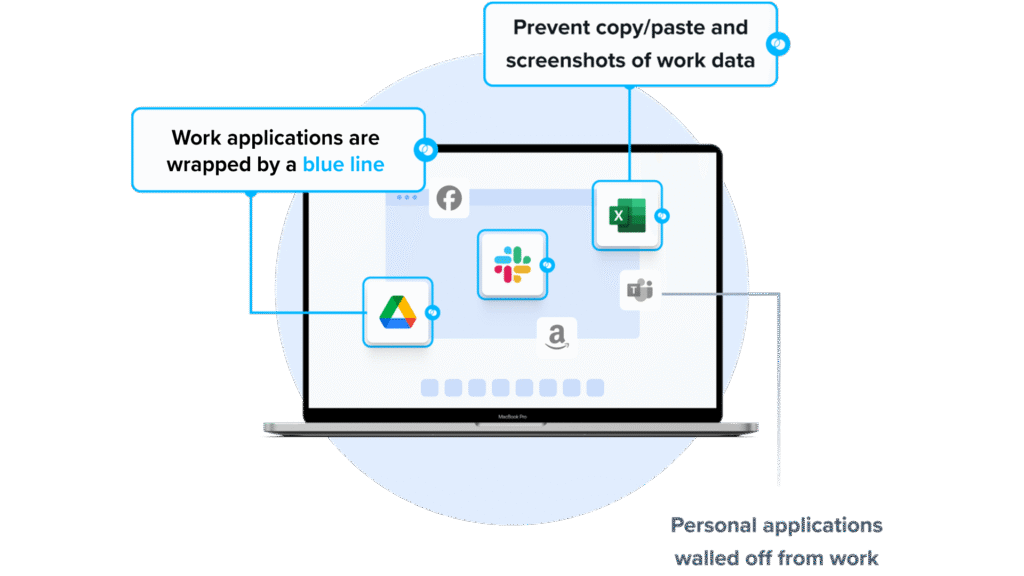
Venn’s Blue Border™ extends enterprise-grade endpoint security to BYOD and unmanaged laptops used by contractors, remote employees, and third-party workers. Unlike traditional UEM solutions, which require full device enrollment, Venn governs only access to sensitive company data and applications through its secure enclave, without impacting the device’s configuration. Inside the enclave, data is encrypted, access is controlled, and work activity is visually separated from personal use, keeping corporate information secure while respecting employee privacy.
Key security controls include:
- Blocking copy/paste between work and personal apps
- Restricting file downloads and use of external storage
- Preventing or watermarking screenshots
- Enforcing consistent protections across both browser-based and local applications
You can book a quick demo here.
2. Soliton Secure Workspace
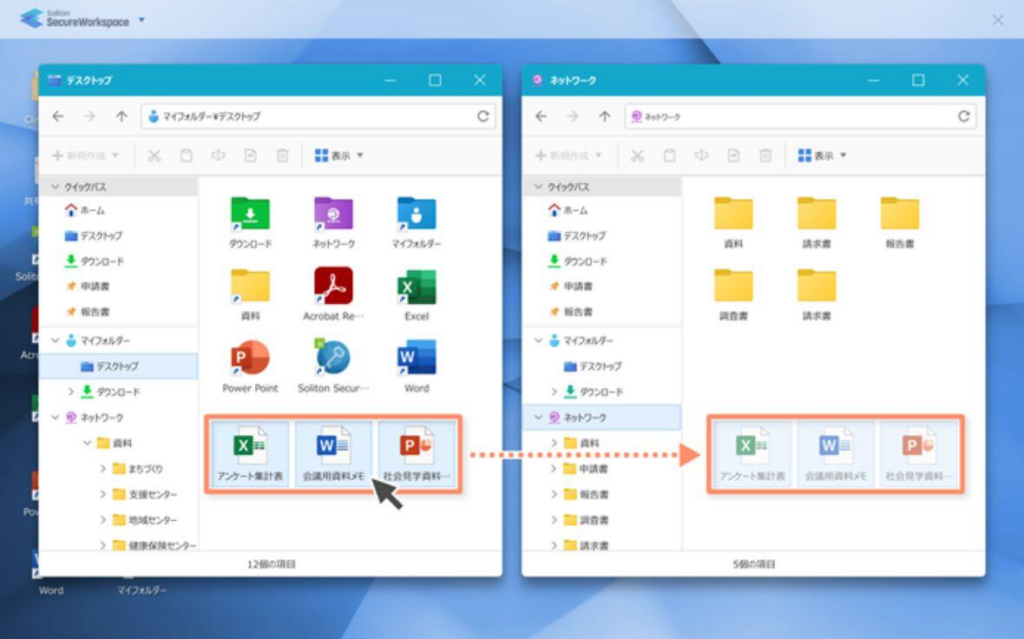
Soliton Secure Workspace provides a locally executed, isolated business environment on personal Windows PCs. It is designed as an alternative to VPN, VDI, or terminal server models, focusing on separation of corporate and personal environments without requiring full endpoint control. Corporate applications run inside a contained workspace.
Key features include:
- Local execution: Runs directly on the Windows device to avoid network-dependent latency associated with VDI or remote desktops.
- Workspace isolation: Separates business and personal environments to prevent cross-access and reduce malware exposure.
- No local data persistence: Prevents permanent storage of sensitive business files; data can be erased upon logout.
- Zero trust alignment: Supports compliance requirements such as GDPR and NIS 2 through controlled access and isolation.
- Secure gateway access: Provides access to on-premise file and application servers without requiring traditional VPN configuration.
Source: Soliton
3. Parallels RAS

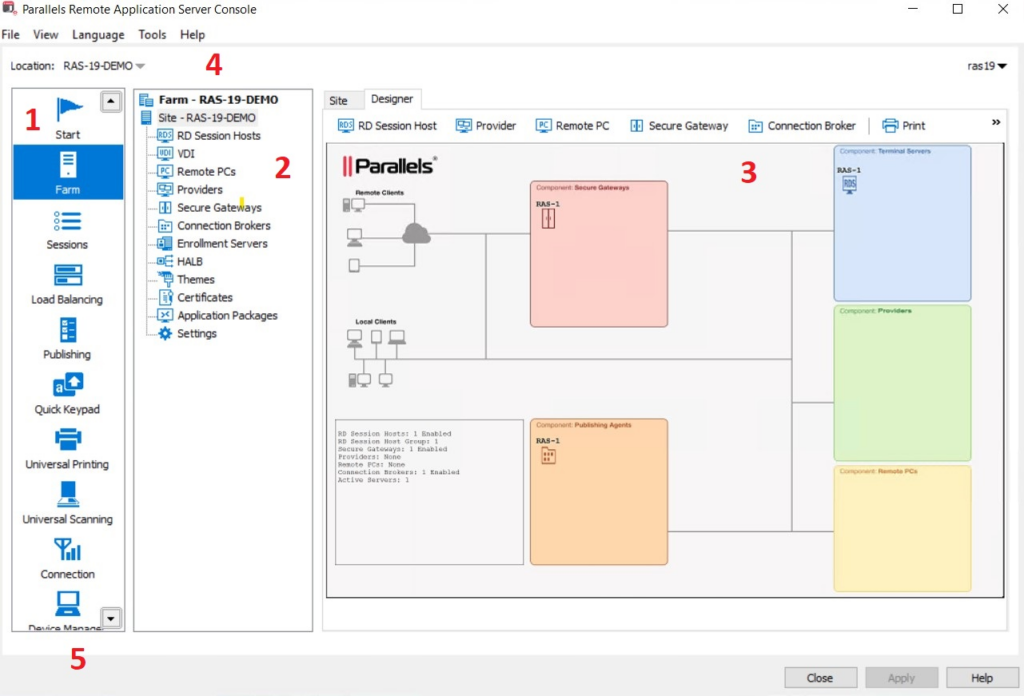
Parallels Remote Application Server (RAS) is a virtual application and desktop delivery platform that enables organizations to provide secure remote access to applications and desktops from a centralized infrastructure. It supports hybrid, on-premises, and public cloud deployments, allowing IT teams to deliver virtualized resources to users on any device.
Key features include:
- Hybrid and multi-cloud deployment: Supports on-premises, private cloud, Azure Virtual Desktop, AWS EC2, and hybrid environments without platform lock-in.
- Virtual app and desktop publishing: Delivers centralized applications and desktops to users across devices and operating systems.
- Single management console: Provides unified administration for app publishing, load balancing, gateway configuration, access control, and reporting.
- Cross-platform client access: Enables access from Windows, macOS, Linux, iOS, Android, and HTML5 web browsers.
- Integrated security controls: Supports SSL/TLS 1.3 encryption, FIPS-140-2 compliance, built-in MFA, SSO integration, and auditing.
Source: Parallels
Notable UEM Software Solutions
Here are some popular options for traditional unified endpoint management.
4. Microsoft Intune
Microsoft Intune is a cloud-based UEM solution that helps organizations manage and secure devices, applications, and data across a wide range of platforms. Integrated with Microsoft 365, Intune enables IT teams to reduce complexity by managing all endpoints from a single console, whether they’re Windows PCs, macOS devices, mobile phones, or frontline tools.
Key features include:
- Cross-platform management: Manage Windows, macOS, iOS, Android, and frontline devices from a single cloud-based interface.
- Zero trust enforcement: Apply identity-driven access controls and compliance policies to ensure secure data access.
- Automated provisioning and configuration; Simplify device setup with remote configuration, reducing deployment time and errors.
- Mobile application management (MAM): Protect corporate data on personal devices without full device enrollment using app-level controls.
- AI-powered configuration: Use intelligent baselines to optimize environments and reduce manual setup work.
Source: Microsoft Intune
5. IBM MaaS360
IBM MaaS360 is an AI-powered unified endpoint management platform to simplify and secure the management of mobile and desktop devices. It enables centralized control of endpoints through a single dashboard, offering quick setup and integrated security out of the box. It supports hybrid and frontline workforces by automating device onboarding, enforcing compliance, and detecting threats in near real time.
Key features include:
- Centralized endpoint management: Manage smartphones, tablets, laptops, and purpose-built devices from a unified platform with automated policies and simplfiied administration.
- Mobile threat defense: Continuously monitor and remediate mobile threats with integrated threat detection and real-time security dashboards.
- Watson AI integration: Leverage AI-driven analytics to detect anomalies, accelerate threat response, and improve endpoint oversight and performance.
- Automated device setup and configuration: Reduce setup time with automated provisioning and policy enforcement, especially beneficial for SMBs and remote teams.
- Industry-specific use cases: Supports compliance and operational needs across healthcare, finance, retail, and supply chain environments.
Source: IBM MaaS360
6. ManageEngine Endpoint Central
ManageEngine Endpoint Central is a unified endpoint management and security (UEMS) platform that helps organizations manage, secure, and support endpoints across diverse environments. It brings together IT operations and security into a single console, offering automated patching, remote troubleshooting, device management, data loss prevention, and ransomware protection.
Key features include:
- Automated patching across platforms: Deploy security patches automatically for Windows, macOS, Linux, and third-party applications to reduce vulnerabilities and ensure compliance.
- Asset management: Track hardware and software assets, monitor license usage, and detect configuration changes.
- Mobile device management: Centralize the management of mobile apps, devices, and content while enforcing compliance and data security.
- Remote troubleshooting: Resolve endpoint issues quickly with real-time remote access and diagnostics tools.
- Ransomware and threat protection: Detect, respond to, and prevent ransomware attacks with root cause analysis and multi-layered security controls.
Source: ManageEngine
7. Hexnode UEM

Hexnode UEM is a cross-platform unified endpoint management solution to simplify control over diverse endpoints while preparing organizations for future IT challenges. It supports management of desktops, mobile devices, IoT hardware, wearables, and kiosks from a single console. It integrates seamlessly with identity providers, offers compliance enforcement, and includes automated OS and patch management.
Key features include:
- Cross-platform device management: Manage Windows, macOS, Linux, Android, iOS, wearables, IoT devices, and VR endpoints through one unified platform.
- Automation-driven workflows: Define and automate complex tasks such as app deployment, remote lock, and configuration changes using trigger-based workflows.
- Kiosk and IoT management: Lock down devices into single or multi-app kiosk mode and manage commercial displays, smartwatches, and niche IoT hardware.
- Zero-touch OS and patch management: Automatically push operating system updates and security patches, ensuring devices stay compliant without manual intervention.
- Integrated identity and access control: Sync with identity providers like Azure, Okta, and Google to enforce user-based access controls and compliance across devices.
Source: Hexcode
Criteria for Evaluating Unified Endpoint Management Software
When selecting a unified endpoint management (UEM) solution, organizations must consider a range of functional, operational, and strategic factors. A good UEM platform should not only meet current needs but also scale with evolving device environments, security threats, and compliance requirements.
Below are key and unique considerations when evaluating UEM software:
- Platform and device coverage: Ensure the solution supports all major operating systems and device types used within your organization, including desktops, laptops, mobile devices, rugged endpoints, and IoT. Broad platform coverage reduces management silos and future retooling.
- Security and compliance capabilities: Look for built-in support for data encryption, remote wipe, threat detection, and compliance reporting. Check if the platform integrates with enterprise security tools (SIEM, CASB, etc.) and supports compliance mandates relevant to your industry.
- Deployment flexibility (cloud, on-premises, hybrid): Some UEM tools are cloud-native, while others support on-prem or hybrid deployments. Choose based on your IT strategy, data sovereignty needs, and existing infrastructure.
- Integration with identity and access management (IAM): Evaluate whether the UEM integrates with identity providers (e.g., Azure AD, Okta, Google Workspace) to enforce user-based policies, support conditional access, and enable Zero Trust security models.
- Automation and policy enforcement: Advanced automation features can simplify routine tasks like patching, onboarding, and remediation. Assess how easily policies can be created, scheduled, and enforced across device types and user groups.
- Remote support and troubleshooting tools: Consider whether the UEM includes real-time remote control, diagnostics, and self-healing capabilities. These are critical for managing distributed or remote workforces without user disruption.
- Scalability and performance: The solution should scale to support thousands of endpoints with minimal performance degradation. Look for architecture designed for high availability and load distribution.
- User experience and non-intrusiveness: Assess how the tool impacts end-user experience, especially in BYOD environments. Features like app containerization, role-based access, and user privacy controls help maintain a balance between security and usability.
- Reporting, analytics, and dashboards: Strong reporting tools enable compliance tracking, asset visibility, and operational decision-making. Look for customizable dashboards and automated report generation.
- Vendor support and ecosystem integration: Evaluate the vendor’s support model, documentation, and training resources. Check for integrations with other enterprise systems such as ITSM, EMM, endpoint detection and response (EDR), and configuration management databases (CMDBs).
These criteria provide a framework for comparing UEM products and aligning them with organizational goals, technical requirements, and regulatory landscape.
