
Best Zero Trust Solutions: Top 12 Options in 2026


See Venn first in Google Search
Add as a preferred source on Google
TL;DR: Zero trust solutions verify every user and device before granting least-privilege access to apps and data. Best for BYOD data protection: Blue Border; best for ZTNA at scale: Zscaler; best for SASE: Prisma Access; best for identity-first zero trust: Okta.
What Are Zero Trust Solutions?
Zero trust solutions are cybersecurity frameworks and technologies that operate on the principle of “never trust, always verify.” Instead of trusting devices or users inside a network perimeter, they enforce least-privileged access and continuous authentication for every request, whether it originates inside or outside the organizational perimeter.
This is a shift away from traditional models that established a trusted internal network and concentrated defenses at the perimeter. Because modern attacks routinely bypass perimeter defenses and move laterally inside networks, zero trust applies granular controls on identity, access, and data flow, using principles such as least privilege and continuous validation. With cloud adoption, remote work, and the growing use of mobile and BYOD devices, traditional boundaries are less relevant, making zero trust essential for risk mitigation.
Zero trust is not a single product but an operating model that requires integration across several layers of your tech stack:
- Identity and access management (IAM): Authenticates users and enforces multi-factor authentication (MFA). Leading providers include Okta and Microsoft Entra ID.
- Zero trust network access (ZTNA) and SSE: Replaces legacy VPNs by connecting users directly to specific applications rather than the entire network. Top solutions include Zscaler and Palo Alto Networks.
- Privileged access management (PAM): Secures highly sensitive admin accounts and removes standing privileges. Established providers include CyberArk.
What practitioners are using and watching:
- Open-source tools: Options like OpenZiti and Open Policy Agent are widely used to build customizable zero trust architectures, including app-embedded access where services keep no listening ports on the underlay network.
- Standards and legacy complexity: Broader enterprise adoption can be slowed by the work of standardizing OpenID Connect and deploying FIDO2 across legacy systems.
- Implement zero trust on unmanaged laptops: discover how to implement zero trust on unmanaged laptops, without VDI or managing the entire device.
Implement Zero Trust on Unmanaged Laptops
Discover how to implement zero trust on unmanaged laptops – without VDI or managing the entire device.
In this article:
Types of ZTNA Solutions
BYOD and Device Enforcement
BYOD-focused ZTNA solutions emphasize securing access from unmanaged or partially managed devices. They enforce policies based on device posture, such as OS version, patch level, encryption status, and presence of security tools, before allowing access to applications.
These solutions often use agent-based or agentless approaches to assess device trust in real time. They enable organizations to safely support personal devices while limiting risk through conditional access, session restrictions, and continuous monitoring of device behavior.
Zero Trust Solutions Based on ZTNA
ZTNA solutions are designed specifically to deliver identity-based, application-level access without relying on legacy VPN infrastructure. They provide direct-to-application connectivity through secure brokers, ensuring that users only access explicitly authorized services rather than the broader network.
These platforms are typically cloud-native and integrate tightly with identity providers, enabling scalable policy enforcement across distributed environments. While they offer strong security and simplified access control, they may require integration effort when replacing existing VPNs or supporting legacy applications.
Identity and Access Management (IAM) Focused Solutions
Identity and access management (IAM) solutions implement zero trust by making identity the primary control point for access decisions. Rather than relying on network location, these platforms continuously verify users, devices, and contextual risk signals before granting access to applications or data.
Core capabilities typically include single sign-on (SSO), multi-factor authentication (MFA), conditional access, identity governance, and lifecycle management. IAM-focused zero trust platforms are well suited for organizations looking to centralize authentication across cloud and on-premises environments while enforcing consistent least-privilege policies.
Zero Trust Solutions at a Glance
The table below summarizes the key differences between the solutions covered in this list. We explore each of them in more detail in the sections that follow.
| Category | Solution | Best For | Key Strengths | Things to Consider |
| BYOD and Device Enforcement | 1. Blue Border by Venn | Securing company data on unmanaged and BYOD laptops | Local secure enclave with DLP, encryption, and AI governance | Performance can lag on some lower-spec devices |
| BYOD and Device Enforcement | 2. Citrix Device Posture | Enforcing device compliance checks before granting access | Real-time posture checks with CrowdStrike and Intune integration | Cloud service depends on stable internet connectivity |
| BYOD and Device Enforcement | 3. Workspace ONE | Unified endpoint management across all major operating systems | Conditional access, compliance policies, and per-app VPN | Complex setup with a steep learning curve |
| Zero Trust and ZTNA Solutions | 4. Zscaler Zero Trust Exchange | Cloud-delivered zero trust access for users, apps, and workloads | Proxy architecture with full TLS/SSL inspection and DLP | Complex setup and steep learning curve |
| Zero Trust and ZTNA Solutions | 5. Palo Alto Networks Prisma Access | Cloud-delivered SASE with ZTNA for the hybrid workforce | Integrated ZTNA, SWG, CASB, and firewall with threat prevention | Complex initial setup and management overhead |
| Zero Trust and ZTNA Solutions | 6. NordLayer Zero Trust | ZTNA and business VPN for distributed teams | Quick deployment, network segmentation, and IAM integrations | Limited advanced configuration options |
| Zero Trust and ZTNA Solutions | 7. ThreatLocker | Deny-by-default application control on endpoints | Allowlisting, ringfencing, and least-privilege controls | Steep learning curve and policy tuning effort |
| Zero Trust and ZTNA Solutions | 8. Fortinet Zero Trust Access | Zero trust access for users, devices, and IoT endpoints | Per-session app access with device posture via FortiClient | Client connection drops reported by some users |
| IAM Focused Solutions | 9. Microsoft Entra ID | Identity and access management across cloud and on-prem | SSO, MFA, and Conditional Access with M365 integration | Complex configuration and confusing licensing tiers |
| IAM Focused Solutions | 10. Okta Zero Trust | Identity-powered zero trust across an app ecosystem | SSO, adaptive MFA, and a large integration network | Higher cost with add-on features at scale |
| IAM Focused Solutions | 11. JumpCloud | Cloud directory unifying identity, access, and devices | SSO, MFA, and cross-OS device management in one platform | Device management less deep than dedicated MDMs |
| IAM Focused Solutions | 12. Cisco Duo | MFA and device trust for zero trust access | Adaptive MFA, SSO, and device health checks | Push and access depend on internet connectivity |
Key Features of Zero Trust Solutions
Continuous Verification of Identities and Devices
Continuous verification lies at the heart of zero trust, requiring systems to authenticate users and devices at every access attempt, not just at initial login. This means that even after initial authentication, users must prove their identity and the integrity of their device each time they try to access resources. By checking credentials, device health, and access context, organizations limit the chances of compromised accounts or devices moving laterally within the network.
Implementing continuous verification requires integrating identity providers, endpoint security, and monitoring systems to provide real-time decision-making. Automated workflows check for suspicious activities, out-of-date security patches, or non-compliant device configurations, prompting re-authentication or access denial as needed.
Least Privilege Access Enforcement
Enforcing least privilege means users and devices receive only the access necessary for their roles or functions, nothing more. By limiting each entity’s permissions, even if an attacker compromises an account, their access to critical systems and data is minimized. Zero trust solutions implement this through granular access policies, segmenting resources and continuously evaluating whether access still aligns with business needs.
Regular review and adjustment of permissions are vital to least privilege enforcement. Zero trust solutions offer automated policy management, which enables organizations to adapt quickly to changes in user responsibilities or business processes. This reduces the attack surface and curbs the impact of insider threats or credential misuse.
Context-Aware Risk Assessment
Zero trust frameworks incorporate context-aware risk assessment, analyzing a broad range of variables before permitting access. This goes beyond standard identity checks, considering aspects like device health, user location, time of request, and the sensitivity of sought resources. By dynamically evaluating risk, systems can prompt for additional validation or restrict access when anomalies are detected.
Sophisticated zero trust solutions leverage machine learning and analytics to improve risk assessments. They identify behavioral patterns, flag unusual activity, and respond adaptively to potential dangers, such as access attempts from unfamiliar locations or at odd hours. This level of contextual analysis helps organizations make nuanced access decisions.
Multi-Factor Authentication (MFA)
Multi-factor authentication (MFA) requires users to provide at least two forms of evidence to verify their identity, significantly reducing the likelihood of unauthorized access due to compromised credentials. In a zero trust architecture, MFA acts as a fundamental defense, often required whenever users attempt to access sensitive applications or resources.
Typical factors include something users know (password), something they have (token or device), and something they are (biometric data). Zero trust solutions differentiate themselves by deploying adaptive MFA that responds to contextual risk indicators. For example, access attempts from unknown devices or networks may trigger stricter MFA challenges.
Zero Trust Network Access (ZTNA) and Microsegmentation
Zero trust network access (ZTNA) replaces legacy VPNs and perimeter-based controls with granular policies that grant access to specific resources, not entire networks. This means users or devices only see and interact with the applications they are authorized for, drastically limiting lateral movement if credentials are compromised. ZTNA typically authenticates every session and incorporates identity, device health, and context before granting resource access.
Microsegmentation further improves security by dividing networks into small, isolated segments. Each segment enforces its own access controls, making it harder for attackers to pivot within the infrastructure.
Encrypted, Least-Exposed Connections
Zero trust solutions mandate end-to-end encryption for all connections, both at rest and in transit. This ensures that sensitive data remains protected from eavesdropping or interception, even on unsecured networks. Encryption standards such as TLS and IPsec are enforced across all channels, with regular updates to protocols and keys to address evolving threats.
Least-exposed connections also limit network exposure, so services are not broadly visible or accessible to unauthorized entities. Techniques like just-in-time access and one-time, ephemeral connectivity further restrict potential attack vectors. Applications and workloads are not reachable by default and only become accessible after strict validation.
Endpoint and Device Trust Enforcement
Device trust enforcement involves assessing and validating the security posture of endpoints before granting them resource access. Zero trust solutions verify device characteristics, configurations, patch status, and the presence of required security agents. Devices that fail to meet baseline security requirements are automatically quarantined or blocked from network access, mitigating the risk from compromised or outdated hardware.
Continuous monitoring of device status helps organizations detect anomalies and rapidly isolate suspicious endpoints. Automated remediation workflows can prompt users to update software, install patches, or enable security controls before they regain access.
Notable Zero Trust Solutions
How we selected these tools: We shortlisted zero trust solutions based on their ability to verify identity and device posture, enforce least-privilege access, and protect data across users, endpoints, and applications.
BYOD and Device Enforcement
1. Blue Border

Best for: Securing company data on unmanaged and BYOD laptops
Strengths: Local secure enclave with DLP, encryption, and AI governance
Things to consider: Performance can lag on some lower-spec devices
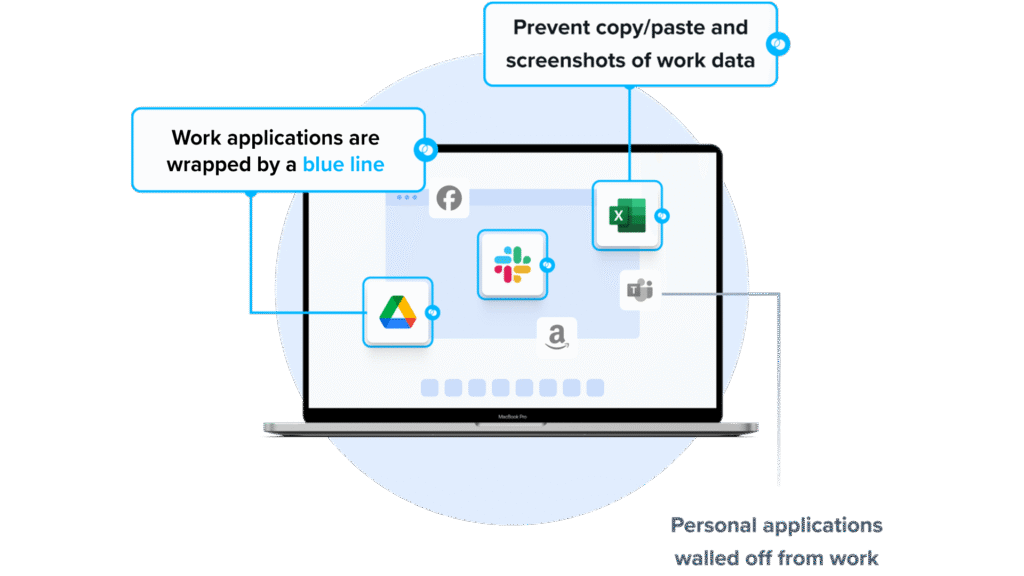
Blue Border secures work on any PC or Mac by installing a company-controlled secure enclave on the user’s computer. Inside the enclave, company data and applications are encrypted and access is managed, while personal activity on the same device stays outside it.
Work applications run locally within the enclave rather than through virtualization or a remote host. IT governs company data, data loss prevention, and approved AI tools inside the boundary without taking over the whole device. Users can be onboarded on any device, and company data can be removed with a remote wipe when they leave.
Key features include:
- Secure enclave on any device: Blue Border installs a company-controlled enclave on a user’s PC or Mac where work data is encrypted and access is managed, keeping business activity separate from personal use on the same machine.
- Local application performance: Work applications run locally inside the enclave at native speed rather than being streamed or hosted, so there is no virtualization layer between the user and their apps.
- Data loss prevention controls: IT can set DLP policies that govern copy/paste, printing, downloads, screen capture, and screen sharing within the enclave.
- AI workflow governance: Administrators control which AI tools and workflows can reach company data inside the enclave, blocking unauthorized access through clipboard, file upload, copy/paste, and screen capture.
- Onboarding and remote wipe: Users can be onboarded on any device in minutes, and an instant remote wipe removes all company data from the enclave when they leave.
- Compliance coverage: Encryption, DLP, and work/personal isolation support HIPAA, PCI, SOC 2, SEC, FINRA, NAIC, and GDPR requirements.
Limitations (as reported by users on G2):
- Performance on some devices: Some users report the secure enclave can feel slow at times, with occasional decreased speed when opening certain applications.
- Application stability: A few users have noted occasional stability issues with specific applications such as Outlook.
- Support scheduling: Support is handled through a shared queue, so users cannot book time with a specific support representative in advance.
2. Citrix Device Posture

Best for: Enforcing device compliance checks before granting app access
Strengths: Real-time posture checks with CrowdStrike and Intune integration
Things to consider: Cloud service depends on stable internet connectivity
Citrix Device Posture is a capability within Citrix SecurAccess ZTNA (formerly Secure Private Access) that checks the security posture of an endpoint before a session is established. It assesses factors such as antivirus status, operating system updates, and other compliance requirements, then classifies the device as compliant, non-compliant, or denied.
Based on that classification, access can be granted, restricted, or blocked, and it is continuously re-evaluated during the session. It works across managed and unmanaged devices and feeds the broader zero trust access controls in the Citrix platform.
Key features include:
- Device posture assessment: Real-time checks evaluate a device’s security state, including antivirus status and OS updates, before granting access to applications.
- Device classification: Endpoints are classified as compliant, non-compliant, or denied, with access adjusted accordingly, such as partial access for non-compliant devices.
- Third-party integrations: Device Posture integrates with tools like CrowdStrike and Microsoft Intune, alongside generic and vendor-specific checks.
- Contextual access: Posture results feed adaptive, context-based access decisions that also consider user identity, location, and network trust.
- Continuous monitoring: After a session starts, the device state is monitored, and access can be revoked if posture or context changes.
- Managed and unmanaged devices: Agent-based and agentless, browser-based options support both corporate and BYOD endpoints.
Limitations (as reported by users on G2):
- Internet dependency: Users report the service requires constant internet access and that performance can degrade when connectivity fluctuates.
- Session performance: Some users note slow session response times and occasional connection drops on limited bandwidth.
- Application coverage: Reviewers mention that not all web applications are fully supported.
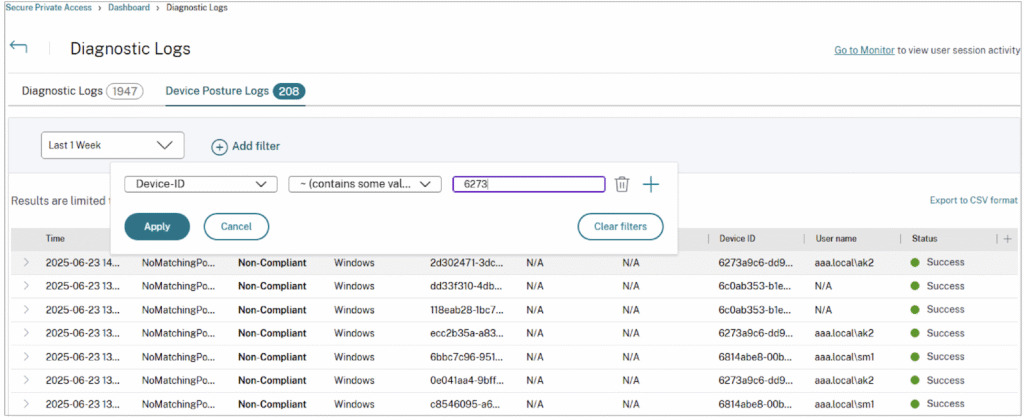
Source: Citrix
3. Workspace ONE
Best for: Unified endpoint management across all major operating systems
Strengths: Conditional access, compliance policies, and per-app VPN
Things to consider: Complex setup with a steep learning curve
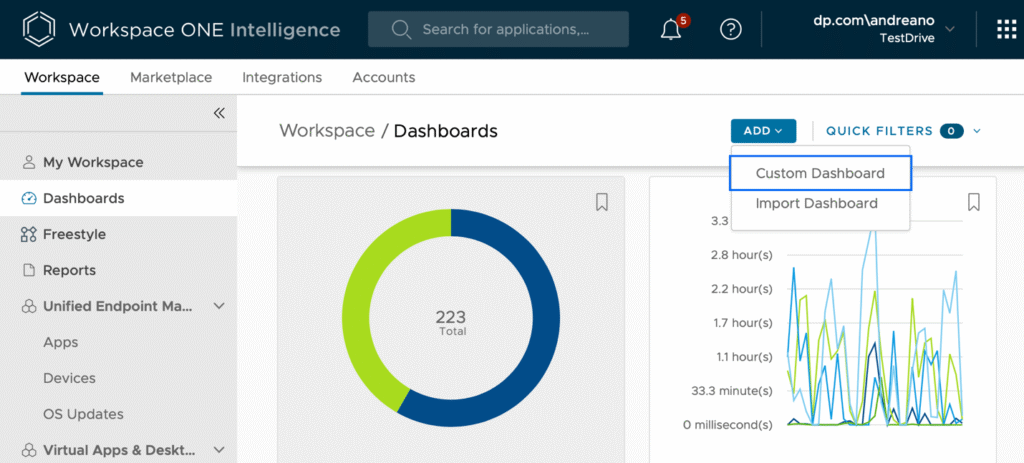
Omnissa Workspace ONE UEM (formerly VMware Workspace ONE) is a cloud-native unified endpoint management platform that manages desktops, mobile, rugged, server, and specialty devices from a single console. It supports Windows, macOS, iOS, Android, Linux, and ChromeOS across corporate-owned, shared, and BYOD devices.
IT teams use it to configure, secure, and update endpoints, enforce compliance, and control application access. Conditional access and device posture checks determine whether a device can reach corporate resources, and automation handles onboarding and remediation.
Key features include:
- Cross-platform endpoint management: A single console manages mobile, desktop, rugged, server, and specialty devices across all major operating systems.
- Conditional access and compliance: Access controls based on device state, user role, and risk signals block noncompliant endpoints and trigger remediation.
- Device posture checks: Posture checks and policy enforcement run from the first connection so only compliant devices reach corporate resources.
- Per-app VPN: Workspace ONE Tunnel provides per-app VPN connectivity, restricting data flows to authorized apps and users.
- IT orchestration and automation: Low-code and no-code workflows through Freestyle Orchestrator automate onboarding, app deployment, and remediation.
- Automated patch management: OS and application updates for Windows, macOS, and mobile can be automated to reduce vulnerability exposure.
- Application lifecycle management: A unified app catalog with SSO through Omnissa Access delivers and updates apps across device types.
Limitations (as reported by users on Gartner Peer Insights):
- Setup complexity: Reviewers describe a steep learning curve and a detailed setup process better suited to larger environments.
- Policy inheritance: Some users note that top-down policy inheritance can make it tricky to avoid unintended impact on device groups.
- Support transitions: Following the moves from VMware to Broadcom to Omnissa, some users report inconsistency in technical support.
Source: Omnissa
Zero Trust and ZTNA Solutions
4. Zscaler Zero Trust Exchange

Best for: Cloud-delivered zero trust access for users, apps, and workloads
Strengths: Proxy architecture with full TLS/SSL inspection and DLP
Things to consider: Complex setup and steep learning curve
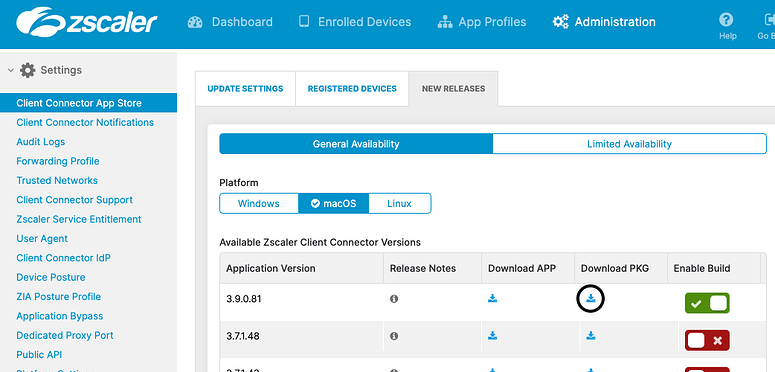
The Zscaler Zero Trust Exchange is a cloud-delivered platform that brokers one-to-one connections between users, workloads, IoT/OT, and B2B partners and the applications they are authorized to reach. Built on a proxy architecture and the principle of least-privileged access, it terminates and inspects every connection, including encrypted traffic, before granting access.
Access is based on identity, context, and business policy, and applications sit behind the exchange rather than being exposed to the internet. Policy is enforced in real time on a per-session basis for each request.
Key features include:
- Proxy-based inspection: A proxy architecture terminates every connection and performs full TLS/SSL inspection at scale before brokering access.
- Attack surface reduction: Applications are hidden behind the exchange so they are not discoverable or reachable from the public internet.
- Direct-to-app connectivity: Users connect directly to specific applications rather than to the network, which limits lateral movement.
- Identity and context verification: The platform confirms user, device, or workload identity through third-party identity providers and evaluates context before access.
- AI-based risk assessment: Risk is scored using signals such as user behavior, device posture, destination, and content.
- Data protection: Inline and out-of-band controls identify and protect sensitive data across SaaS, IaaS, PaaS, email, and endpoints.
Limitations (as reported by users on G2):
- Deployment complexity: Some users describe the deployment model as complex, citing API key exchanges and an involved setup.
- Learning curve: Reviewers note a difficult learning curve for both administrators and end users.
- Documentation and training: Users report that training and documentation can be insufficient for fully using the platform.
- Configuration control: Some note limited control over certain settings and configurations.
Source: Zscaler
5. Palo Alto Networks Prisma Access

Best for: Cloud-delivered SASE with ZTNA for the hybrid workforce
Strengths: Integrated ZTNA, SWG, CASB, and firewall with threat prevention
Things to consider: Complex initial setup and management overhead
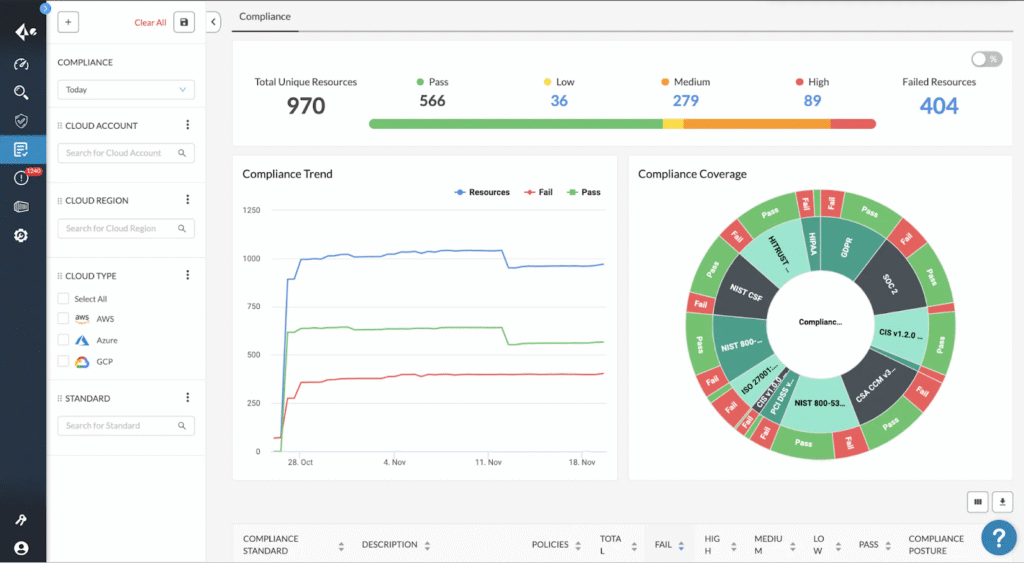
Prisma Access is Palo Alto Networks’ cloud-delivered secure access service edge (SASE) platform that combines networking and security to protect users, applications, devices, and data. Its zero trust network access enforces least-privileged access to applications and removes implicit trust to reduce the attack surface.
The platform folds in secure web gateway, cloud access security broker, firewall as a service, and remote browser isolation capabilities. Threat prevention is powered by Palo Alto’s Precision AI and threat intelligence, and management is centralized in a single console.
Key features include:
- Zero trust network access: ZTNA enforces least-privileged access to applications and removes implicit trust without the complexity of traditional VPNs.
- Secure web gateway: Real-time web protection filters and inspects traffic to guard users against web-based threats.
- CASB and data protection: SaaS security posture management, inline, and API-based controls provide visibility and control over applications and sensitive data.
- Firewall as a service: Cloud-native network security applies threat prevention, application control, and zero trust policies across the network.
- Remote browser isolation: An isolation channel between users and remote browsers keeps web-based threats away from endpoint devices.
- Unified agent and management: The Prisma Agent connects users across SASE and firewall deployments, managed from a single console.
Limitations (as reported by users on G2):
- Setup complexity: Reviewers report that initial setup and onboarding can be complex and time-consuming, particularly for teams new to Palo Alto.
- Management overhead: Some users find day-to-day management bulky compared with other vendors.
- Support and renewals: Users mention support can be inconsistent and that contract renewals may involve steep price increases.
Source: Prisma Access
6. NordLayer Zero Trust
Best for: ZTNA and business VPN for distributed teams
Strengths: Quick deployment, network segmentation, and IAM integrations
Things to consider: Limited advanced configuration options
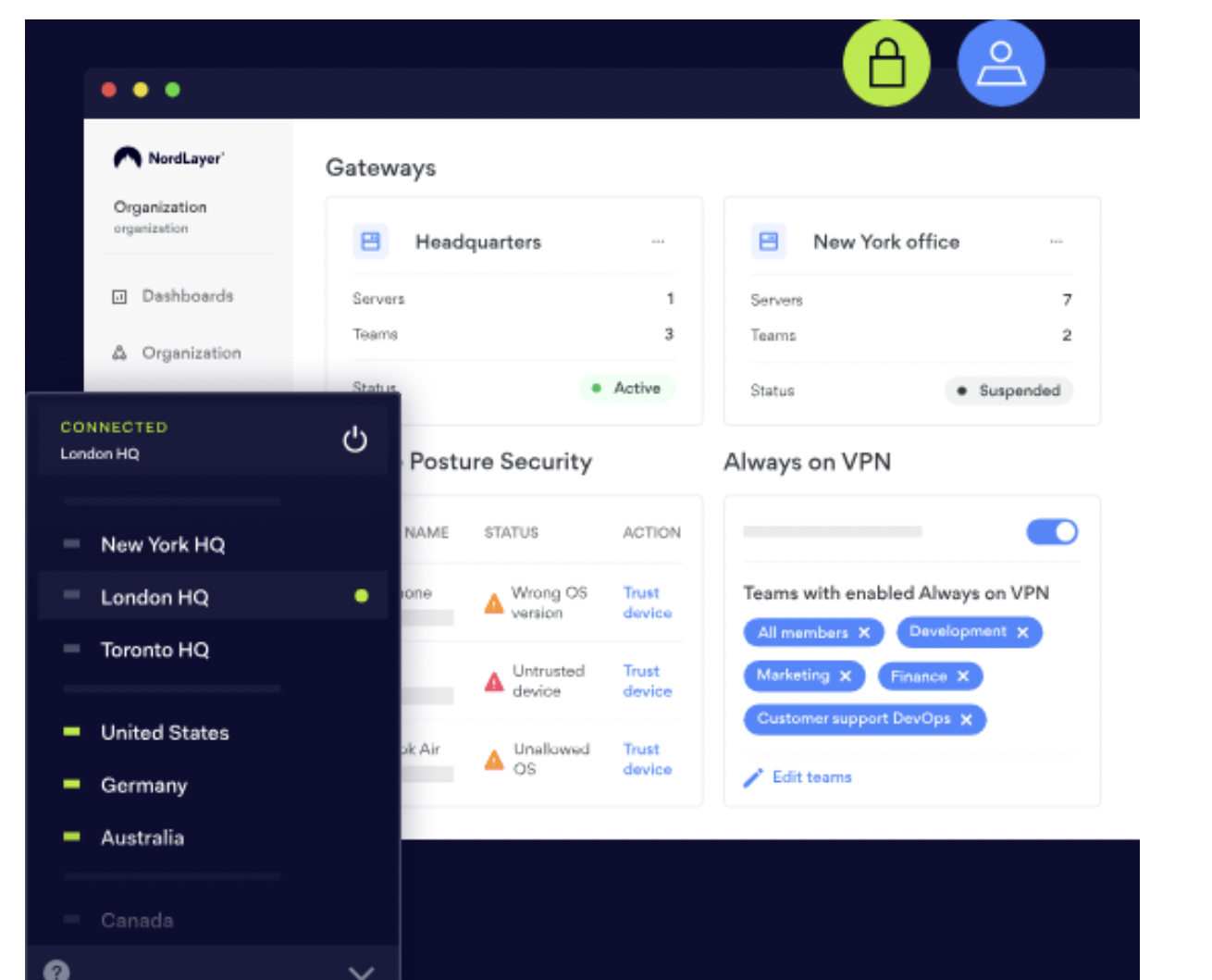
NordLayer is a security service edge platform from Nord Security that applies zero trust network access alongside business VPN, secure web gateway, and firewall-as-a-service capabilities. Access is granted through a trust broker only after verification of identity, context, and policy compliance, so users reach specific applications rather than the whole network.
It supports network segmentation up to the application layer and integrates with identity providers such as Entra ID, Okta, JumpCloud, and Google Workspace. Deployment is hardware-free and cloud-based.
Key features include:
- Zero trust network access: A trust broker grants access to specific applications only after verifying identity, context, and policy compliance.
- Network segmentation: Segmentation can be enforced up to layer 7 to tighten security around individual resources.
- Identity provider integrations: SSO works with providers including Entra ID, Okta, OneLogin, JumpCloud, and Google Workspace.
- Authentication options: SSO, two-factor authentication, and biometric authentication are available for verifying users.
- Virtual private gateways: Dedicated gateways and fixed IPs provide controlled entry points to company resources.
- Device posture controls: Features such as jailbroken device detection help restrict access from noncompliant devices.
Limitations (as reported by users on G2):
- Advanced configuration: Users report that advanced configuration options are limited for deep or custom networking rules.
- Split tunneling setup: Some find configuring features like split tunneling complex.
- Connection stability: Occasional connection drops are reported on unstable networks, and some advanced features require higher-tier plans.
Source: NordLayer
7. ThreatLocker
Best for: Deny-by-default application control on endpoints
Strengths: Allowlisting, ringfencing, and least-privilege controls
Things to consider: Steep learning curve and policy tuning effort
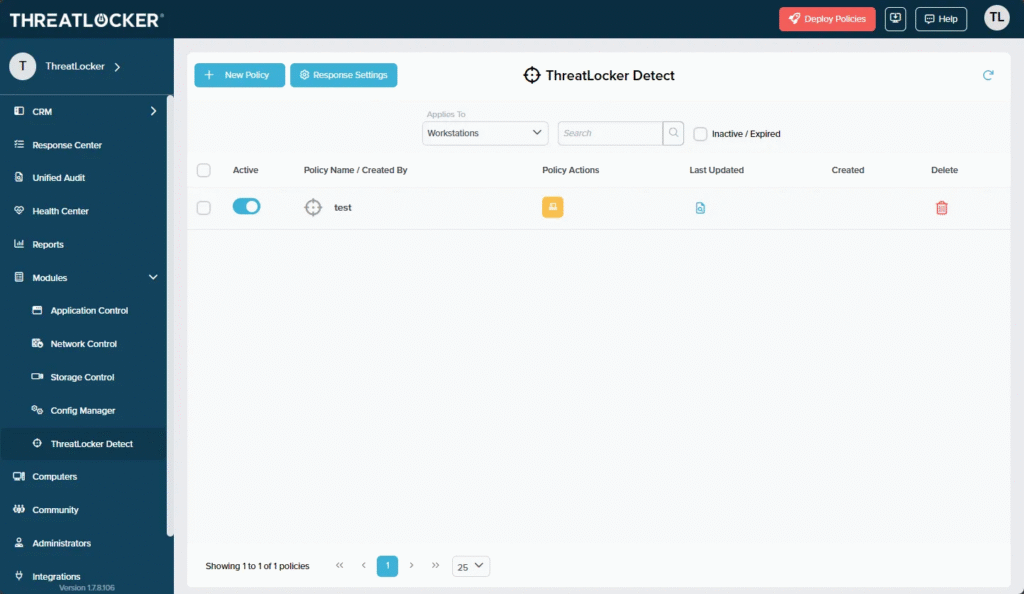
ThreatLocker is a zero trust endpoint protection platform built around a deny-by-default, allow-by-exception model, so only explicitly approved software can run. Its application allowlisting blocks unapproved applications, including ransomware and unknown code, while ringfencing limits what approved applications can do and access.
The platform adds controls for network access, storage devices, privileged access, and endpoint firewalling from a single console. It also provides EDR-style real-time threat detection and patch management.
Key features include:
- Application allowlisting: Only explicitly approved applications run, blocking unapproved software, ransomware, and unknown code by default.
- Ringfencing: Policies restrict how approved applications interact with each other, files, the registry, and the internet to limit exploitation.
- Zero trust network access: Host-based policies define who can connect and when, and block traffic unless explicitly allowed.
- Privileged access management: Administrators can allow specific applications to run with elevated rights without granting users local admin privileges.
- Storage device control: Policy-driven control governs access to USB, network shares, and local storage with full auditing.
- Detection and response: EDR real-time threat detection can isolate compromised machines, supported by a 24/7 response team.
Limitations (as reported by users on G2):
- Learning curve: Users report a steep learning curve, especially for smaller teams without dedicated IT staff.
- Configuration effort: Initial policy tuning and configuration can be time-consuming and complex.
- Administrative noise: The deny-by-default model can generate frequent approval requests until policies are tuned.
- macOS coverage: Some users note the macOS version lags behind Windows in functionality.
Source: ThreatLocker
8. Fortinet Zero Trust Access
Best for: Zero trust access for users, devices, and IoT endpoints
Strengths: Per-session app access with device posture via FortiClient
Things to consider: Client connection drops reported by some users
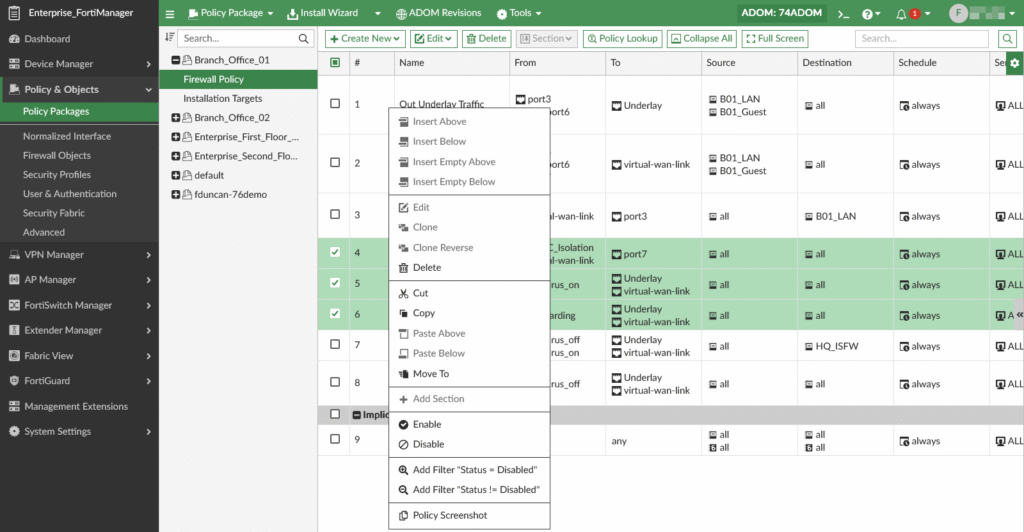
Fortinet Zero Trust Access is a set of solutions that continuously verify users and devices as they access corporate applications and data. Rather than assuming a device on the network should have broad access, it grants access on a per-session basis to individual applications only after users and devices are verified, applying the same model whether users are on or off the network.
FortiClient acts as the fabric agent providing endpoint visibility and ZTNA, while FortiAuthenticator and FortiToken handle authentication and MFA. IoT and endpoint devices are identified and secured as they enter the network.
Key features include:
- Continuous verification: Users and devices are verified continuously as they access applications, with per-session access to individual apps.
- FortiClient fabric agent: FortiClient provides endpoint visibility, control, and ZTNA connectivity, integrating with the Fortinet Security Fabric.
- Authentication and SSO: FortiAuthenticator delivers centralized authentication, SSO, certificate management, and guest management.
- Multi-factor authentication: FortiToken adds a second authentication factor without additional hardware.
- Device posture checks: Device identity and security posture are established through FortiClient EMS before access is granted.
- IoT and device protection: Unknown IoT endpoints and devices are identified and secured as they enter the network.
Limitations (as reported by users on Gartner Peer Insights):
- Connection stability: Some users report frequent disconnects without a clear error explanation, sometimes requiring network resets.
- Latency: Reviewers note latency can make access over VPN feel slow, which complicates troubleshooting on low-bandwidth connections.
- Client issues: A few users mention the client can install duplicate drivers, causing network issues, with limited troubleshooting visibility.
Source: Fortinet Zero Trust
Identity and Access Management Focused Solutions
9. Microsoft Entra ID
Best for: Identity and access management across cloud and on-prem
Strengths: SSO, MFA, and Conditional Access with M365 integration
Things to consider: Complex configuration and confusing licensing tiers
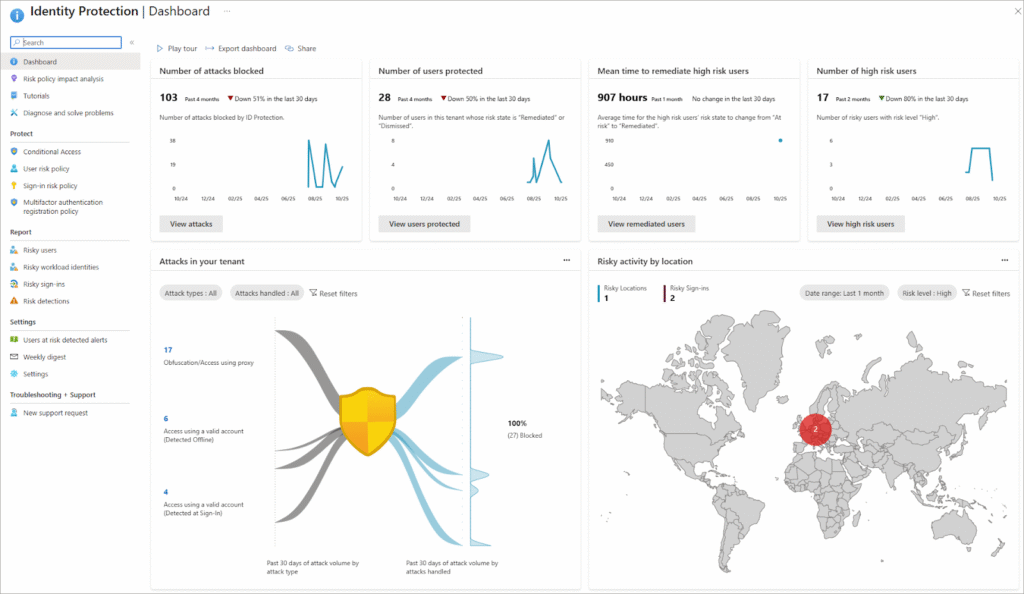
Microsoft Entra ID (formerly Azure Active Directory) is Microsoft’s cloud-based identity and access management service that connects users to applications, devices, and data. It provides single sign-on, multi-factor authentication, and Conditional Access policies to enforce adaptive, zero trust access based on user, device, location, and risk signals.
It also handles unified identity management for internal and external users and covers identity governance through provisioning, access packages, and access reviews. It integrates closely with Microsoft 365 and Azure as well as third-party applications.
Key features include:
- Single sign-on: Users access internal and third-party applications with one set of credentials.
- Multi-factor authentication: MFA adds adaptive protection to sign-ins across the environment.
- Conditional Access: Access decisions consider user, device, location, and sign-in risk to enforce least-privilege, zero trust policies.
- Unified identity management: A single platform manages users, groups, and access across cloud and on-premises environments.
- Identity governance: Provisioning, access packages, and access reviews manage the identity and access lifecycle.
- Passwordless and self-service: Passwordless sign-in and self-service password reset reduce credential reliance and helpdesk load.
Limitations (as reported by users on G2):
- Configuration complexity: Users report complex configuration and administration, with a learning curve for Conditional Access and policies.
- Licensing clarity: Advanced features such as Identity Protection and Privileged Identity Management require higher-tier licenses, and the tiers can be confusing.
- Cost: Some users find the platform expensive, especially for advanced features.
- Fragmented portal: Reviewers note settings spread across old Azure AD and newer Entra portals, and troubleshooting can be time-consuming.
Source: Microsoft Entra ID

10. Okta Zero Trust

Best for: Identity-powered zero trust across an app ecosystem
Strengths: SSO, adaptive MFA, and a large integration network
Things to consider: Higher cost with add-on features at scale
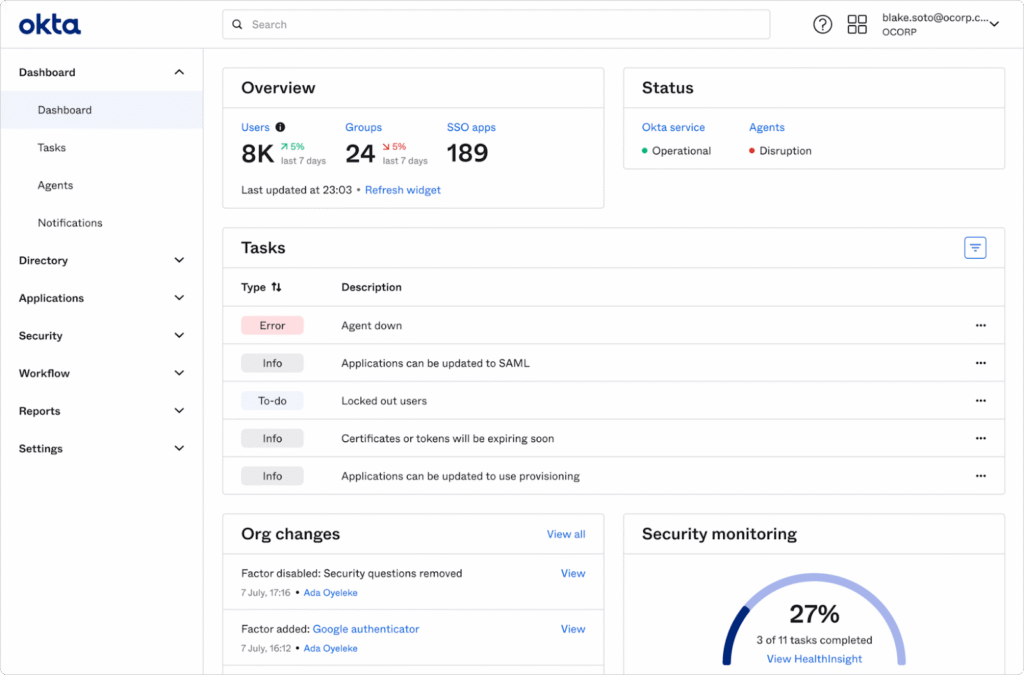
Okta approaches zero trust through identity, positioning identity as the control layer for securing access to applications, data, and infrastructure. Its platform centralizes single sign-on, multi-factor authentication, and lifecycle management across cloud and on-premises applications, and it integrates broadly through the Okta Integration Network.
Adaptive, risk-based policies adjust authentication strength based on context such as device and location. Okta connects with other security tools to unify a zero trust approach rather than acting as a single feature.
Key features include:
- Single sign-on: Centralized SSO gives users access to their applications from one dashboard with one login.
- Adaptive multi-factor authentication: MFA policies can be based on risk and device type to control authentication strength.
- Lifecycle management: Automated provisioning and deprovisioning tie access to joiner, mover, and leaver events.
- Broad integrations: The Okta Integration Network provides pre-built connections to a large catalog of applications.
- Risk-based access: Conditional and risk-based policies adjust access dynamically based on context.
- Identity threat protection: Threat detection monitors for identity-based attacks and unusual sign-in behavior.
Limitations (as reported by users on G2):
- Cost at scale: Users report that pricing climbs as users grow and that several capabilities are sold as separate add-ons.
- Setup complexity: Initial setup and advanced policy configuration can require technical expertise.
- Single point of failure: An outage or MFA delay can affect access to many connected applications at once.
- Troubleshooting: Some users find debugging authentication issues time-consuming and custom integrations cumbersome.
Source: Okta Zero Trust
11. JumpCloud

Best for: Cloud directory unifying identity, access, and devices
Strengths: SSO, MFA, and cross-OS device management in one platform
Things to consider: Device management less deep than dedicated MDMs
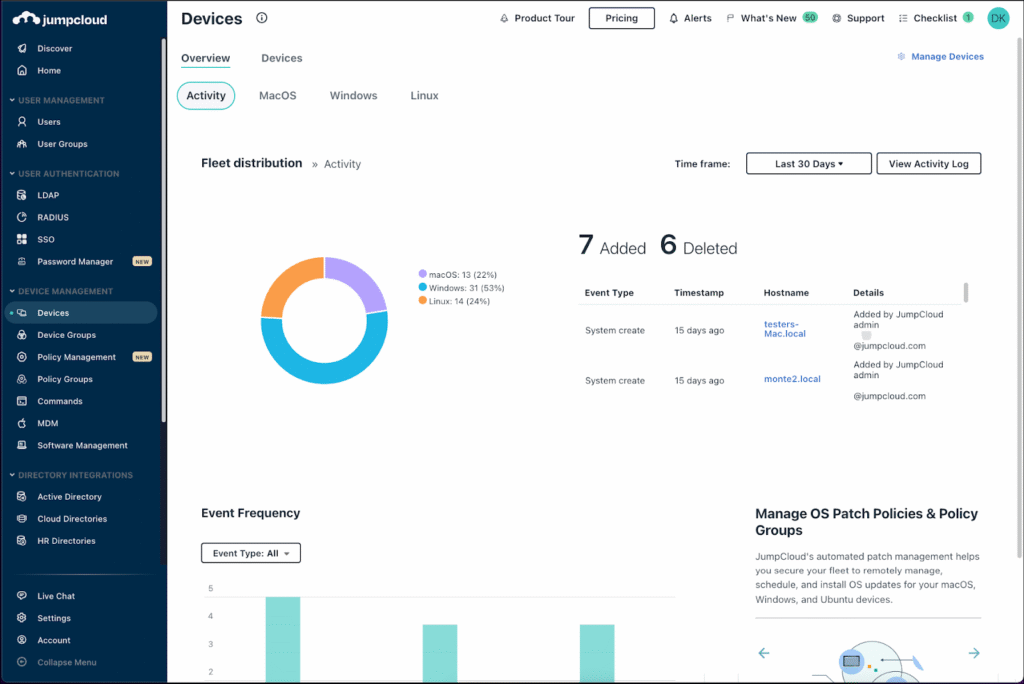
JumpCloud is a cloud directory platform that unifies identity, access, and device management in a single console. It centralizes user identities and provides single sign-on, multi-factor authentication, cloud LDAP, cloud RADIUS, and conditional access, positioning itself as a cloud-based alternative to on-premises Active Directory.
On the device side, it manages Windows, macOS, and Linux systems along with Apple MDM and Android endpoints, plus patch management and remote access. It also includes privileged access management and SaaS management.
Key features include:
- Cloud directory: A cloud-based directory centralizes user identities across operating systems and applications.
- Single sign-on and MFA: SSO and multi-factor authentication secure access to applications and systems.
- Cross-platform device management: Unified endpoint management covers Windows, macOS, and Linux, plus Apple MDM and Android EMM.
- Conditional access: Access is granted based on device and identity conditions, tied to verified company devices.
- Directory protocols: Cloud LDAP and cloud RADIUS extend authentication to legacy and network resources such as Wi-Fi.
- Privileged and SaaS management: Privileged access management and SaaS discovery and access control are included in the platform.
Limitations (as reported by users on G2):
- Device management depth: Users note device management is less advanced than dedicated tools like Intune, Jamf, or Kandji.
- Reporting: Built-in reports can be shallow, often requiring exports for deeper analysis.
- Policy granularity: Some find policy controls feel all-or-nothing and hard to scope to a single user.
- Learning curve: Configuring advanced features carries a learning curve.
Source: JumpCloud
12. Cisco Duo

Best for: MFA and device trust for zero trust access
Strengths: Adaptive MFA, SSO, and device health checks
Things to consider: Push and access depend on internet connectivity
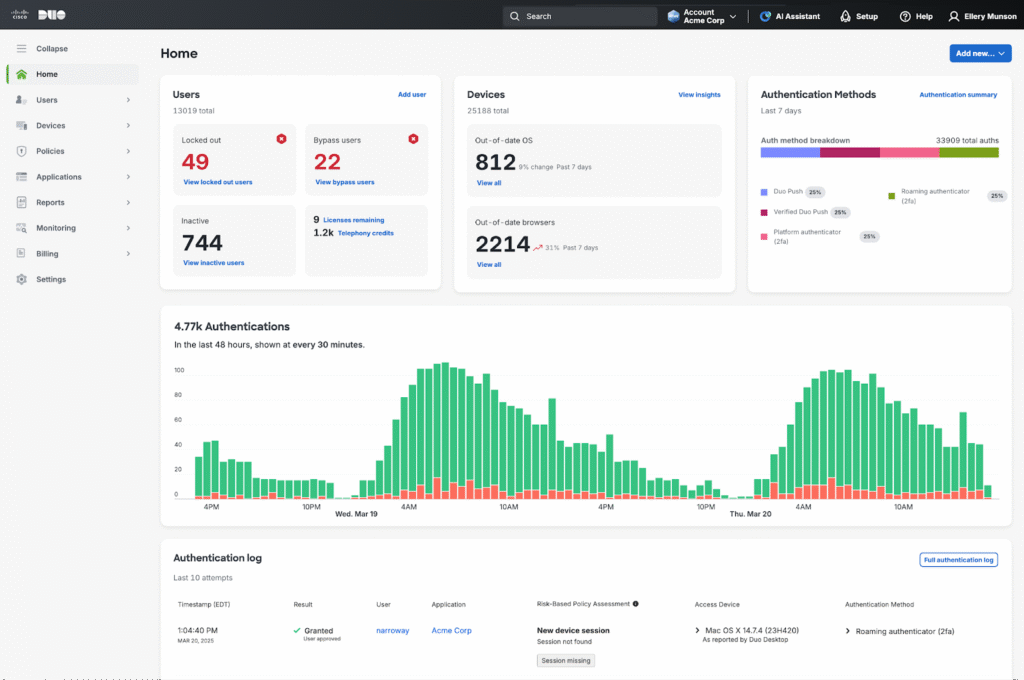
Cisco Duo is an access management solution that supports a zero trust strategy by establishing and continuously verifying trust in users and devices before granting access. It authenticates users with multi-factor authentication, including push, passwordless, and phishing-resistant options, and verifies device health through trusted endpoint policies.
Adaptive, risk-based policies adjust access requirements in response to risk signals, and access can be granted to applications without a VPN. Duo works across managed and unmanaged devices, including BYOD.
Key features include:
- Multi-factor authentication: Duo verifies users with push, passwordless, and phishing-resistant MFA options.
- Device trust: Trusted endpoint policies apply device posture checks and block access from devices that fall out of compliance.
- Single sign-on: Cloud-based SSO reduces password usage and gives users access to applications from one login.
- VPN-less remote access: Users can reach SaaS and private applications without a traditional VPN.
- Adaptive access policies: Risk-based authentication adjusts security requirements dynamically based on user and device behavior.
- Continuous verification: Session trust analysis and signals monitor risk during an established session, not just at login.
Limitations (as reported by users on G2):
- Internet dependency: Users report that push notifications and authentication depend on connectivity, which can lock users out during outages.
- Notification delays: Push notifications can be delayed on slow connections.
- Cost: Some find Duo expensive compared with free or Microsoft MFA options.
- Reporting: A few users note reporting and analytics are basic, sometimes requiring an external SIEM.
Source: CISCO Duo
Considerations for Choosing Zero Trust Solutions
Selecting a zero trust solution involves evaluating how well it aligns with your organization’s existing infrastructure, security goals, and operational needs. Not all solutions are created equal; some focus heavily on identity, while others specialize in network controls, endpoint visibility, or data protection. Below are key considerations to guide your selection:
- Integration with existing infrastructure: Choose a solution that integrates seamlessly with your current identity providers, cloud environments, endpoint management systems, and security tools. Poor integration can increase complexity and reduce the effectiveness of zero trust policies.
- Scalability and deployment flexibility: Evaluate whether the solution can scale with your organization’s growth and support hybrid or multi-cloud environments. Consider deployment models (cloud-native, on-premises, or hybrid) that best fit your operational model.
- Granular policy control: Ensure the solution allows fine-tuned control over access policies based on user roles, device state, location, and behavior. Look for support for just-in-time access, adaptive authentication, and detailed segmentation.
- Continuous monitoring and visibility: Effective zero trust requires continuous assessment of user and device behavior. Look for solutions that provide real-time monitoring, anomaly detection, and integration with SIEM or XDR platforms for threat response.
- Identity and access management capabilities: Strong identity capabilities, such as multi-factor authentication, single sign-on, and identity governance, are foundational. Prioritize vendors with mature IAM offerings that enforce identity verification at every access point.
- Support for device posture assessment: Ensure the platform can assess device health, security compliance, and trust levels before granting access. This is essential for environments with BYOD, remote users, or unmanaged devices.
- Data protection and compliance: Consider how the solution handles data encryption, access logging, and governance controls. Support for regulatory compliance (e.g., HIPAA, GDPR, SOC 2) may be critical, depending on your industry.
- User experience and admin usability: Security shouldn’t come at the expense of usability. Select solutions that balance strong protection with a smooth user experience and offer intuitive interfaces for IT and security teams.
- Vendor support and ecosystem: Evaluate the vendor’s support model, documentation, and community. A strong partner ecosystem and third-party integrations can enhance the solution’s value and adaptability.
By aligning these considerations with your organization’s security maturity and risk profile, you can select a zero trust solution that delivers long-term resilience without unnecessary complexity.
Related content: Read our guide to zero trust security

Any worker. Any laptop. Any AI workflow. Fully secured.
Schedule a demo to see how Blue Border® secures company data and apps without shipping laptops, running VDI, or managing personal endpoints.