What Is Blue Border™? How Venn’s Secure Enclave Works
The Answer to the Contractor BYOD Security Problem
Most IT leaders didn’t set out to build a third-party access security problem. It happened gradually. A few remote employees started working from personal laptops. Then contractors joined from across the country — or the world. Then the request came in to get everyone productive quickly, without waiting on hardware procurement or standing up a virtual desktop environment.
Now the workforce is distributed, the devices are unmanaged, and the security team is left deciding between two uncomfortable options: ship company laptops to everyone (expensive, slow, logistically painful) or deploy VDI (technically complex, notoriously frustrating to use, and still costly to run). Neither option fits the reality of modern BYOD security.
Blue Border™ is Venn’s answer to that problem. Blue Border™ is patented technology that creates a company-controlled secure enclave directly on the user’s own PC or Mac — protecting work apps and data locally, without virtualizing the desktop or managing the whole device.
This article explains exactly what Blue Border™ is, how it works under the hood, and what it means in practice for IT teams and the people they support.
The Problem Blue Border™ Was Built to Solve
Why personal devices are now the norm, not the exception
The shift to personal and unmanaged devices isn’t a trend that’s about to reverse. By late 2024, 67% of companies had formal BYOD policies in place — up from 51% just one year earlier. Contractors, remote employees, and offshore teams are working on the devices they already own, and most organizations have accepted that this is how distributed work functions now.
The problem isn’t the device. The problem is what happens to company data on that device when there’s no reliable control layer in place. Nearly half of organizations reported data breaches linked to unsecured personal devices in the past year. High-profile examples underscore how real the risk is: the 2025 breach at Marks & Spencer was traced to a contractor’s personal device. The Snowflake incident involved a contractor endpoint compromised by malware. In the Coinbase breach, third-party contractor access enabled insider-driven exposure affecting tens of thousands of customers.
Each of these incidents had the same structural problem at its core: company data was accessible on a device the organization didn’t control.
What legacy approaches get wrong
The traditional responses to this problem each carry their own costs. Issuing company laptops gives IT full control, but it doesn’t scale for global contractor workforces. Shipping delays, customs, hardware procurement timelines, and the ongoing cost of provisioning and retrieving devices make it unsustainable as a primary strategy.
VDI has long been the alternative. Centralize the desktop, stream it to any device, keep the data off the endpoint. In theory, the logic holds. In practice, VDI performance problems consistently get in the way. Applications are slow to load. Video conferencing degrades. Every keystroke and screen refresh has to travel back and forth to a data center — a model that was already dated before hybrid work became standard.
Blue Border™ was built to do something none of these approaches accomplish cleanly: protect work without touching the personal side of the device.
What Is Blue Border™? The Core Concept Explained
The secure enclave — what it is and what it isolates
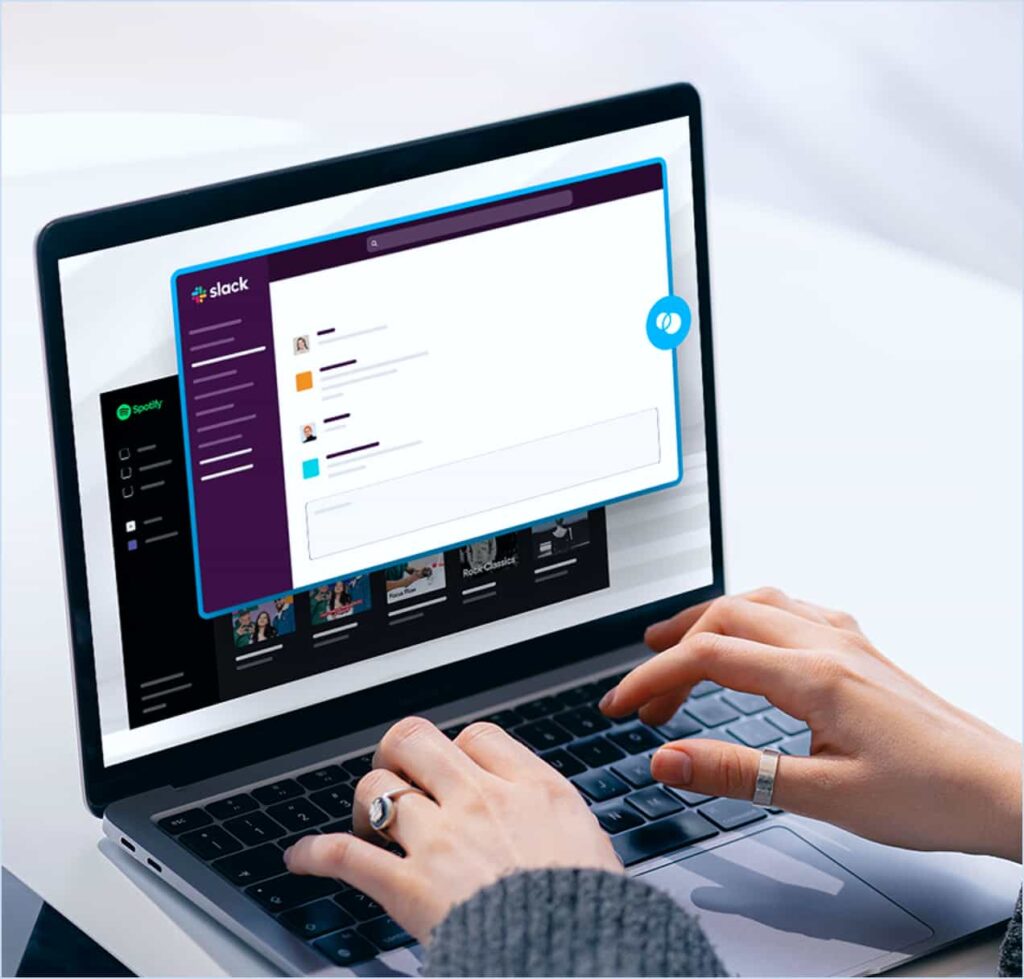
At its core, Blue Border™ is a secure enclave — an isolated, encrypted environment that runs locally (no hosting, streaming or virtualization) on the user’s PC or Mac. When Venn is installed, it creates a company-controlled workspace that separates business activity from personal activity at the application level. Work stays inside the enclave. Everything else on the device stays outside it.
Think of it as a firewall built around the application itself. Once a work app is running inside Blue Border, company policies govern what can happen inside that session and what can happen to the data within it. The personal side of the machine — personal files, browsers, applications, activity — remains entirely untouched and inaccessible to the organization.
The visual indicator — why the blue line matters
When a user launches a work application through Venn, it opens with a visible blue line surrounding the window. That border isn’t cosmetic — it’s a clear, persistent signal to the user that this application is now operating inside the company-controlled workspace. Users always know which applications are governed by company policy and which are their own.
Application-level policy controls — what IT can actually enforce
Inside the Blue Border, IT has precise control over how company data moves. IT can allow copy and paste between work applications while blocking it from a work app to a personal one. File save locations can be restricted. Upload and download permissions can be scoped. Screenshots can be blocked. Endpoint DLP for unmanaged devices runs inside the enclave, enforcing data loss prevention at the session level — not at the device level.
How Blue Border™ Works Under the Hood
Onboarding and the identity layer
Onboarding a new user through Blue Border™ is straightforward. IT shares the Workspace agent via a link. The user installs it on their own PC or Mac. At login, they authenticate through the organization’s existing identity provider and complete MFA. Once device security requirements are verified — antivirus status, OS version, and other posture checks — the user is presented with the work applications assigned to them by IT.
From the user’s perspective, the experience is immediate and familiar. There’s no remote desktop to wait for, no VPN to configure separately, no learning curve on a new interface. Apps open locally, at native speed, in windows they already recognize — with a blue border indicating they’re inside the secure workspace.
The encrypted Venn Disk — work data storage and isolation
Blue Border™ works alongside an encrypted Venn Disk on the device. This is where work files, application profiles, browser session data, and other work-related metadata are stored — isolated from the personal side of the machine and only accessible inside the enclave. When an employee or contractor leaves, IT can remotely wipe the Venn disk without affecting the user’s personal files or applications.
Network separation — work traffic vs. personal traffic
Traffic from work applications routes through Venn’s secure gateway, separate from the user’s personal internet traffic. Work traffic through the gateway supports static IP addresses, enabling IP-based access controls and conditional access policies — critical for organizations in regulated industries that need network-level verification for certain systems without adding a separate VPN layer.
What Blue Border™ Means for IT and End Users
For IT: control without managing the whole device
Blue Border™ gives IT teams meaningful control over company data on devices they don’t own. Policy enforcement, DLP, application-level governance, access controls, and compliance monitoring all operate inside the enclave — without requiring enrollment, configuration, or visibility into the personal side of the machine.
There are no devices to provision, ship, image, or retrieve. There’s no virtual desktop infrastructure to operate and scale. Onboarding a new contractor can happen the same day. Offboarding is a remote wipe from the admin console. Secure remote access becomes a software deployment, not a hardware or infrastructure project.
For users: native performance and genuine privacy
Applications run locally, on the actual hardware in front of the user, so there’s no latency tied to network conditions or remote server load. Video conferencing works as expected. Personal activity stays genuinely private. The organization has no visibility into what the user does outside the Blue Border — no access to personal files, no monitoring of personal browsing, no logging of activity outside the work environment.
Onboarding, offboarding, and remote wipe
A hyper-growth AI platform that had been shipping laptops internationally found that Blue Border™ enabled same-day onboarding for contractors worldwide — eliminating the hardware shipping cycle that had made it impossible to match the pace of incoming work. Contractors authenticated through Okta, accessed their assigned applications inside Blue Border, and were productive on day one. Offboarding follows the same logic: when an engagement ends, IT executes a remote wipe of the Venn disk, removing all company data without touching the user’s personal device.
IT and security leaders evaluating Blue Border™ often arrive with an existing solution in place — or at least a shortlist of familiar alternatives. The following questions address the most common comparisons head-on, with answers written to reflect how each technology actually works in a BYOD environment.
What Is the Difference Between Blue Border™ and UEM or MDM for Laptops?
Unified Endpoint Management (UEM) and Mobile Device Management (MDM) tools were built to manage company-owned devices. When applied to BYOD laptops — devices the organization doesn’t own — they create a fundamental mismatch: the platform requires full device enrollment to function, which means IT gains access to personal files, applications, and activity alongside company data. For most employees and contractors, that’s unacceptable. For organizations, it creates a compliance problem in regions with strong privacy regulations, and a practical problem when employees resist enrollment or find workarounds.
Blue Border™ operates on a different principle: work-scoped control rather than full-device management. Instead of enrolling the endpoint, Venn installs a lightweight agent that creates a governed enclave limited to work applications and work data. IT has precise control — DLP enforcement, application permissions, access policy, remote wipe capability — but that control applies exclusively to what happens inside the Blue Border. The personal side of the device is never enrolled, never monitored, and never touched.
The practical difference shows up in adoption. Because Blue Border™ doesn’t require device enrollment or impose restrictions on personal activity, users accept it without pushback. There’s no opt-out problem, no shadow IT risk from employees bypassing a tool they find intrusive, and no legal exposure from enforcing enterprise policy on a privately owned machine.
For organizations that manage company-issued laptops at scale, UEM or MDM may still be the right tool for those devices. But for contractors, remote employees, and BYOD workforces using their own PCs or Macs, Blue Border™ secures company data without the enrollment overhead, privacy concerns, or employee friction that full device management creates.
How Does Blue Border™ Compare to VDI and DaaS for Securing Remote Work?
Virtual Desktop Infrastructure (VDI) and Desktop as a Service (DaaS) solve the BYOD security problem by removing the data from the device entirely — everything lives in a hosted environment that’s streamed to the endpoint. That’s a legitimate security architecture, but it’s one that trades data isolation for significant operational overhead and a persistently poor user experience.
The core issue is how applications are delivered. VDI routes every interaction — every keystroke, every screen update, every video frame — through a remote server. Performance is entirely dependent on the quality of the network connection between the user and the data center. In stable, high-bandwidth environments, the experience can be acceptable. In the real world — where contractors connect from home networks, co-working spaces, and international locations — it consistently degrades. Video conferencing is a particular pain point: VDI was never designed to stream a video call through a virtual desktop session.
Blue Border™ keeps work applications running locally on the user’s actual hardware. There is no remote rendering loop. A contractor in Manila and a contractor in Manchester get the same native performance from the same machine, regardless of network conditions. A global aircraft manufacturer that had tested VDI for more than 7,000 remote workers found that the lag and compatibility issues made it unworkable; after deploying Blue Border™, contractors were running work applications at full performance from day one.
Beyond performance, VDI requires infrastructure to operate — servers, storage, licensing, ongoing management, and the specialized IT expertise to run it at scale. Cloud-hosted DaaS shifts the cost structure but doesn’t eliminate it. Blue Border™ is a software deployment with no backend infrastructure. There’s nothing to provision, scale, or maintain on the server side. For a detailed comparison, see Venn vs. VDI for unmanaged devices.
Where VDI still makes sense: for organizations that need a full centralized desktop environment — centralized imaging, standardized configurations, legacy thick-client applications that can’t be installed locally — VDI remains a viable model. What it isn’t a good fit for is securing a distributed BYOD workforce where the goal is data protection, not full desktop delivery.
Can a VPN Secure Company Data on Personal Laptops? How Is Blue Border™ Different?
A VPN encrypts the network tunnel between the user’s device and the corporate network. It does exactly what it’s designed to do: protect data in transit. What it does not do is protect data on the device itself, govern how applications handle company information, isolate work activity from personal activity, or enforce any data loss prevention once the data lands on an unmanaged endpoint.
That distinction matters enormously in a BYOD environment. When a contractor on a personal laptop connects via VPN and downloads a sensitive file, that file now exists on an unmanaged device with no controls over where it goes next. If the device has malware, the VPN did nothing to stop it from capturing keystrokes or exfiltrating data. If the contractor copies a file to a personal cloud drive, the VPN has no mechanism to prevent it. The tunnel is secure. The endpoint is not.
Blue Border™ addresses the endpoint problem that VPN ignores. Work traffic from Blue Border applications routes through Venn’s secure gateway — providing the network-level separation that a VPN would otherwise handle — while also enforcing application-layer controls over what users can do with company data inside those applications. The two capabilities operate together: secure traffic routing plus data governance at the source.
There’s also a user experience dimension. VPNs route all traffic through a centralized point of presence, which introduces latency and bottlenecks — particularly during video calls and large file transfers. It’s a common enough problem that many users disable their VPN when performance becomes an issue, which eliminates even the network protection. Blue Border™ uses split-tunnel routing: work traffic goes through the secure gateway, personal traffic uses the user’s local internet connection directly. Users get native performance for everything they do, with no reason to work around the security layer.
VPNs remain a useful component of a layered security architecture, particularly for secure access to internal systems. But for organizations whose primary concern is protecting company data on unmanaged BYOD laptops, VPN alone is not a sufficient answer — and pairing VPN with Blue Border™ is more effective than relying on VPN in isolation.
What Can Blue Border™ Do That an Enterprise Browser Can’t?
Enterprise browsers are a reasonable answer to a specific problem: securing web-based and SaaS application access on unmanaged devices. If your entire workforce operates exclusively through a browser — using only web apps, never locally installed software — an enterprise browser can provide meaningful policy enforcement, DLP controls, and session-level governance within that environment.
The limitation is scope. An enterprise browser governs what happens inside the browser. It has no visibility into, or control over, locally installed applications running outside it. For many workforces, that’s a significant gap. Zoom, Microsoft Office, SAP, Slack, CAD tools, developer environments, and ERP platforms are not web applications — they’re installed locally and run natively on the device. Work that happens in those applications is completely outside the control of any enterprise browser, regardless of how well-configured that browser is.
Blue Border™ secures the entire work environment — browser-based applications and locally installed applications alike. When a user opens Chrome inside the Blue Border, it’s a governed, policy-enforced browser session. When they open Zoom or Excel or SAP, those applications also run inside the enclave with the same DLP policies, copy/paste restrictions, file control, and data isolation applied. There’s no gap between what happens in the browser and what happens everywhere else.
There’s also a change management consideration that enterprise browsers consistently underestimate. Asking users to switch from their preferred browser — Chrome, Safari, Edge — to a new enterprise-mandated one is a meaningful behavioral change that generates resistance. Users who find the new browser limiting or unfamiliar tend to route work around it: using personal browsers, working in unapproved applications, or finding other workarounds that eliminate the security benefit entirely.
Blue Border™ doesn’t require users to change browsers or restrict them to browser-only workflows. They can continue using Chrome, access both web apps and installed software, and work exactly as they did before — with all of that activity now inside a governed, isolated environment. Security is enforced at the enclave level, not the application level, so it applies consistently regardless of how the user is working. For organizations whose workforces rely on installed apps alongside SaaS, enterprise browsers as a standalone solution leave too much unprotected.
Protect the Work. Not the Whole Device.
Blue Border™ offers a way through the tradeoffs that have made securing a distributed workforce so difficult. It’s not about controlling the device. It’s about creating a precise, governed environment for work — one that runs locally, performs natively, and keeps personal activity exactly where it belongs: private.
For IT and security leaders managing remote employees, contractors, and BYOD programs, that distinction matters. The goal was never to manage the laptop. It was to protect company data. Blue Border™ does that — without VDI, without shipping hardware, and without asking users to give up privacy on devices they own.
If you’re evaluating how to secure work on unmanaged devices, see what Blue Border™ looks like in practice. Request a demo and we’ll walk through your specific environment and use case.
Questions about how Blue Border™ fits your current stack? Explore how VDI works, the BYOD security landscape, and Venn’s full comparison library in the Learn Hub and our main menu.

Scott Lavery
SVP Marketing
More Blogs