
Island Browser: Features, Cost, Limitations and Alternatives [2026]


What Is Island Enterprise Browser?
Island Enterprise Browser is a Chromium-based web browser for enterprise environments. It focuses on security, compliance, and centralized control, differentiating it from consumer-focused browsers like Chrome, Firefox, or Safari. Island integrates with existing IT and security infrastructure to give organizations granular visibility and management over employee browser activity, enabling secure access to internal and external web applications.
Unlike standard browsers, Island embeds security features directly into the browser, eliminating the need for numerous third-party extensions or workarounds. This architecture allows IT teams to enforce policies such as data loss prevention, conditional access, web filtering, and authentication at the browser level. Island aims to centralize browser security, making it a component of zero trust architectures and remote work enablement.
Go Beyond the Browser. Secure All Apps.
Learn how Venn secures both browser-based AND locally installed apps on unmanaged devices.

In this article:
Key Features of the Island Browser
Island Enterprise Browser integrates capabilities directly into the browser, combining security, access control, and user experience features into a single, manageable platform. Unlike traditional browsers that rely heavily on add-ons or third-party tools, Island delivers these capabilities natively, offering IT and security teams visibility and control across devices and environments.
Here are the key features offered by Island Browser:
- Conditional access controls: Apply fine-grained access rules based on user identity, device posture, network conditions, location, and application. These policies are enforced directly in the browser, ensuring consistent protection across all devices and environments.
- Device management: Monitor and manage the browsers running on endpoints across the organization, allowing IT teams to enforce security configurations and update settings remotely.
- Application automation: Automate repetitive browser tasks and workflows by automating application interactions within the browser.
- Zero trust network access (ZTNA): Provide secure, policy-driven access to internal applications without requiring traditional VPNs, aligning with zero trust principles.
- Web threat defense: Native protections against a wide range of web-based threats, including phishing, malware, session hijacking, and other browser-level exploits.
- Data protection: Controls to prevent data leakage via copy/paste, downloads, screenshots, or printing (customizable based on user role or data sensitivity).
- User behavior analytics: Monitor user activity to detect anomalies and policy violations, providing actionable insights to security teams.
- Privileged access security: Secure and monitor access to sensitive resources by privileged users, helping reduce risk from insider threats or compromised accounts.
- Built-in productivity tools: Enhance user efficiency with integrated features like an AI writing assistant, clipboard management, ad/tracker blocking, and geolocation anonymization.
- Browser customization: Tailor the browser interface and behavior to match organizational needs or user preferences, enabling a familiar and optimized experience.
- Password management: Support for secure credential storage and autofill, reducing friction for users while maintaining control over authentication flows.
- Employee experience optimization: Design browser environments that reduce distractions and support productivity, while ensuring users remain within policy boundaries.
- Cross-platform availability: Island is available on major desktop platforms including Windows, macOS, Linux, and Chromebooks.
- Mobile support: Fully supported on iOS, iPadOS, and Android, enabling consistent policy enforcement on mobile devices.
- Extension compatibility: Compatible with extensions from Chrome, Edge, Safari, and Firefox, giving organizations flexibility to support existing tools.
Island Browser Pricing on AWS Marketplace
Island Enterprise Browser pricing is not publicly available. However, the solution is offered through the Amazon Web Services (AWS) Marketplace, which can give an idea of its cost for enterprises.
On the AWS Marketplace, a 12-month contract, including both the Island browser and the centralized management console, costs $250,000. This fee covers a specific quantity of use, defined by a contract “dimension.” This typically refers to a measurable unit, such as the number of users or allocated storage.
The contract includes a fixed number of these units, and access to the software is tied to these limits. Buyers can customize their contract by adjusting these quantities during purchase. Once the contract expires, so does access to the licensed entitlements unless the agreement is renewed.
This pricing provides entitlement to use the platform for the full contract period. It’s important to note that this fee covers only the software; any infrastructure costs on AWS (such as compute or storage for associated services) are separate and must be estimated using tools like the AWS Pricing Calculator.
Learn more in our detailed guide to Island Browser pricing
Island Browser Limitations and Challenges
While Island Enterprise Browser brings control and security to the browser layer, there are some limitations and challenges that organizations should be aware of. These limitations were reported by users on the G2 platform:
- Incomplete RDP feature set: The built-in remote desktop (RDP) client lacks some of the capabilities found in Microsoft’s native desktop RDP client, which may limit its effectiveness in certain enterprise use cases.
- Lag and performance issues: Users have reported occasional sluggishness during tab switching and general browsing, which can negatively impact productivity.
- Limited management console functionality: The admin console’s search capabilities are currently limited, and the user activity map lacks advanced filtering or time-based views, reducing visibility during investigations or audits.
- Opaque policy violation messages: When a user action is blocked due to policy enforcement, the system often gives generic error messages without detailed reasoning, making it harder to troubleshoot or refine policies.
- Strict security frustrates end users: While security is a core strength, some users find the rigid controls intrusive or overly restrictive.
- Extension compatibility tradeoffs: Despite support for major browser extensions, switching entirely to Island can feel like a significant adjustment, particularly for users who rely heavily on Chrome or Firefox in their personal workflows.
- Adoption resistance: Because Island represents a shift from familiar browsers, end-user onboarding can require extra support, training, and communication to drive acceptance.
- Sales and pricing transparency: Some customers have experienced unexpected additional fees post-contract, suggesting a need for greater transparency and collaboration during the sales process.
- Slow troubleshooting and support delays: Although the support team is generally responsive, resolving technical issues can still take longer than expected, particularly for complex environments or policy-related problems.
Alternative Approaches to Island Browser
While the enterprise browser model introduces centralized security and control, it also creates friction for end users. Switching to a new browser disrupts familiar workflows, reduces productivity, and introduces a learning curve that many employees resist. Not to mention, many employees have workflows that exist beyond the browser, with daily reliance on downloaded apps like Zoom, Slack, Microsoft Outlook, etc. For organizations looking to secure browser activity without forcing behavioral change (which often creates user pushback and shadow IT workarounds), several alternative approaches are gaining traction.
Secure Workspace Solutions
Secure workspace tools isolate business applications and data within a controlled environment on the user’s existing device. Instead of replacing the browser, they create a secure perimeter (or a secure enclave) in which approved apps and websites run, so companies can enforce policies like data loss prevention, session isolation, and access control within a virtual boundary.
This approach enables organizations to implement zero trust principles without interfering with personal usage or requiring endpoint management. It also simplifies BYOD scenarios, since the secure workspace can coexist with personal apps without cross-contamination risks.
Augmented Browser Security
Augmented browser security platforms enhance existing browsers with enterprise-grade controls and monitoring without requiring users to switch browsers. These solutions typically inject policy enforcement, telemetry, and threat prevention directly into browsers like Chrome or Edge through lightweight agents or runtime instrumentation.
This method allows organizations to protect users in their natural workflow, preserving performance and familiarity while enabling IT to enforce granular policies. It reduces friction, accelerates deployment, and supports hybrid work by covering unmanaged or personal devices.
Virtual Desktop Infrastructure (VDI) and Desktop-as-a-Service (DaaS)
VDI and DaaS solutions provide secure browser access by hosting user sessions on centrally managed virtual desktops. All web activity occurs within a cloud-based or on-premises virtual environment, isolated from the local machine. This ensures data never leaves the enterprise perimeter and allows for strict policy enforcement.
While VDI/DaaS offers security and centralization, it comes with tradeoffs in cost, complexity, and user experience. Latency, performance variability, and the need for continuous connectivity can hinder productivity, especially for remote or mobile users.
Notable Island Browser Alternatives and Competitors
Secure Workspace
1. Venn

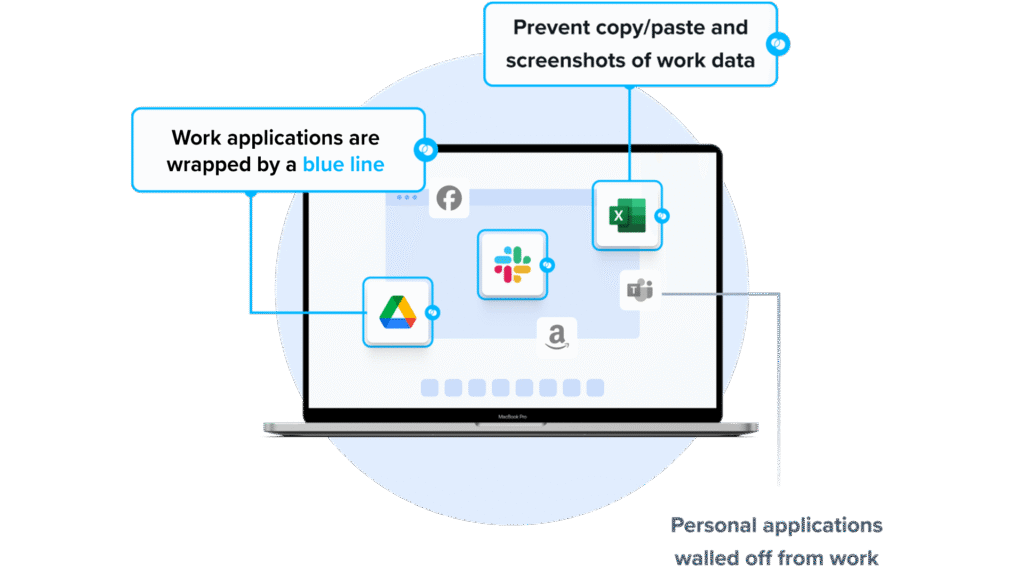
Venn is one of the most notable Island Browser competitors for organizations that need to secure company data on unmanaged or BYOD computers. Unlike Island Browser, Venn protects both browser-based AND locally installed apps within a company-controlled Secure Enclave on the user’s device, delivering native browser and application performance without lag or latency.
Unlike Island, which restricts users to the browser, Venn runs apps locally on the endpoint while isolating them from personal activity. Blue Border™ visually distinguishes work from personal use, helping users stay productive while ensuring IT maintains control over business activity. Venn supports turnkey compliance with HIPAA, PCI, SOC, SEC, and FINRA, making it ideal for regulated industries with remote or contract-based workforces.
Key Features Include
- Secure Enclave technology: Encrypts and isolates work data on personal devices, both for browser-based and local applications.
- Zero trust architecture: Uses a zero trust approach to secure company data, limiting access based on validation of devices and users.
- Visual separation via Blue Border: Visual cute that distinguishes work vs. personal sessions for users.
- Supports turnkey compliance: Using Venn helps companies maintain compliance with a range of regulatory mandates, including HIPAA, PCI, SOC, SEC, FINRA and more.
- Granular, customizable restrictions: IT teams can define restrictions for copy/paste, download, upload, screenshots, watermarks, and DLP per user.
To see Venn in action, book a demo here.
2. Parallels Secure Remote Workspace
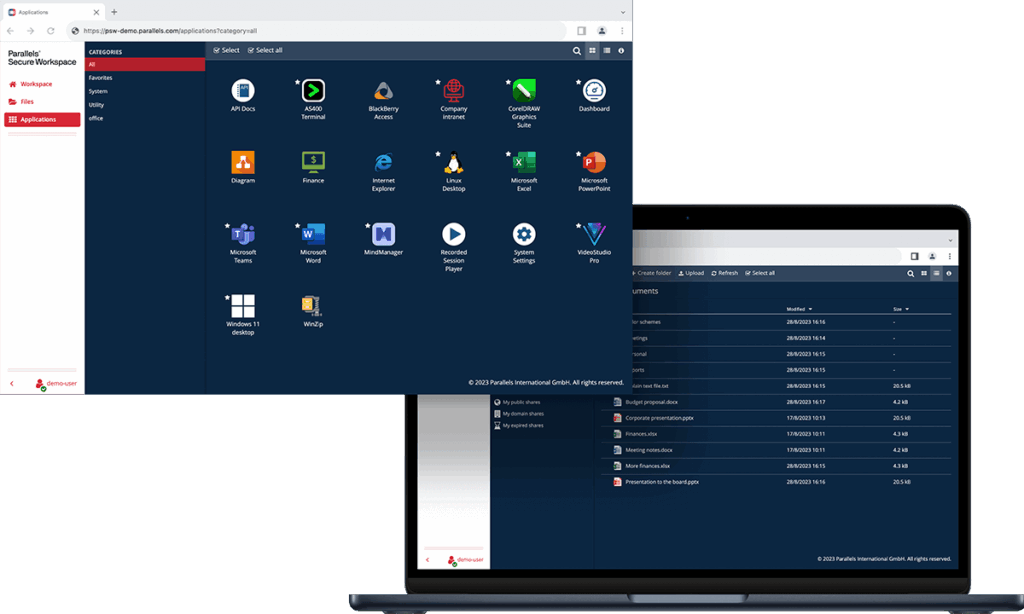
Parallels Secure Remote Workspace delivers a browser-based workspace for accessing Windows or Linux apps and desktops, SaaS, web applications, and file servers from any device. It adds zero trust controls, audited access, and MFA.
Key features include:
- RDP to HTML5 gateway: Translates RDP and xRDP streams into HTML5, enabling access to server-based apps and desktops from any browser without endpoint agents, while adding security and collaboration capabilities.
- Built-in multi-factor authentication: Supports TOTP and HOTP, integrates with commercial platforms, and allows administrators to enforce MFA based on location or establish time-bound browser trust policies.
- Granular controls and auditing: Provides usage audit, anomaly detection, session recording, and SIEM support, with context-aware enforcement based on network conditions and controls on user actions.
- Aggregate legacy and web resources: Consolidates Windows or Linux apps and desktops via RDP, SaaS through single sign-on, web applications, and file servers into a browser-based workspace accessible from devices.
- Rich HTML5 experience: Works in any browser on any device, with proprietary RDP-to-HTML5 technology, multi-screen support, smartcards, virtual printing, in-app notifications, and personalized workspace for end users.
- Contractor and BYOD access: Enables secure access for contractors and unmanaged devices without installing clients, providing browser-based work with session sharing and file sharing configured per users or groups.
- Lightweight, multi-tenant architecture: Deploys as a virtual appliance across hypervisors and clouds, supports multi-tenancy and open APIs, and scales by adding appliances to increase capacity as user counts grow.
Source: Parallels
3. Cameyo by Google
Cameyo by Google is a virtual app delivery solution that brings client-based applications to the web without traditional virtual desktops. It converts legacy apps into progressive web apps and integrates with Chrome Enterprise and ChromeOS.
Key features include:
- Virtual app delivery model: Delivers client-based applications as web apps without traditional virtual desktops, enabling access through the browser with no VPNs and simplifying deployment and management for IT teams.
- Zero-trust architecture: Separates applications from the device and devices from the network, applying isolation principles that limit exposure versus traditional desktop delivery and align security controls with web-first operations.
- Progressive web applications: Converts legacy applications into progressive web apps accessible from the app shelf, providing desktop version functionality through the browser across device types.
- Cross-device compatibility: Provides consistent access to applications from anywhere without new client software, enabling people to work across application and device types using familiar interfaces within the browser.
- File system and storage access: Enables virtualized apps to open, save, and edit files using the local device file system or cloud storage providers, subject to administrative policy controls.
- Chrome Enterprise integration: Works with Chrome Enterprise so application delivery benefits are embedded in the enterprise browser, allowing access to business-critical applications from any device through a managed browser experience.
- ChromeOS enablement: Integrates with ChromeOS to bring client-based applications to a web-first operating system, supporting organizations transitioning devices while retaining access to required legacy software through the browser.
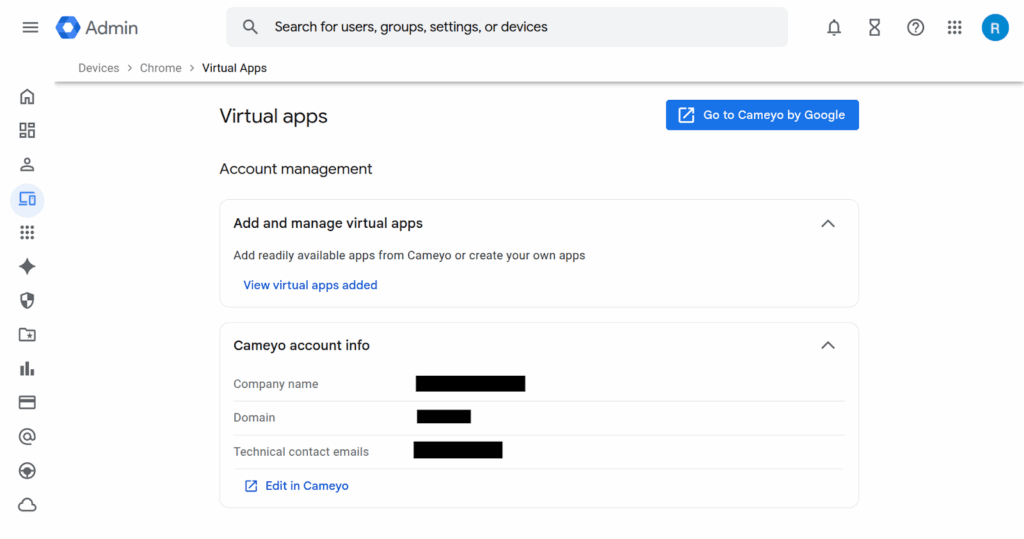
Source: Google
Augmented Browser Security
4. Seraphic Security

Seraphic Security is a browser security platform that turns existing browsers into secure enterprise browsers with a single agent. It adds real-time threat prevention, granular data controls, AI governance, and secure access across devices and environments.
Key features include:
- Single agent across browsers: Deploys once to gain visibility and control over activity in Chrome, Edge, Firefox, Safari, and others, without requiring users to switch browsers or accept reduced performance.
- Real-time threat prevention: Blocks phishing, malware, and advanced browser-based attacks in real time, enforcing protections natively in the browser rather than relying on extensions, traffic redirection, or network-layer integrations.
- Data loss prevention controls: Applies granular policies over uploads, downloads, clipboard usage, screen sharing, and printing within the browser to minimize unauthorized data movement while preserving application usability.
- AI visibility and governance: Monitors how users and AI tools interact with SaaS, data, private apps, and identity systems, enforcing access controls with guardrails, audit trails, and malware prevention for AI-related workflows.
- Secure remote access: Enables secure access to corporate applications from any location or device without traditional VPN or VDI, using browser-level policy enforcement to simplify connectivity and reduce operational complexity.
- Electron application protection: Extends threat prevention, data protection, and access control to Electron-based desktop applications using the same JavaScript-based agent architecture as in-browser protections.
- Ecosystem integrations: Integrates with existing SSO and identity providers, SIEM, EDR, sandboxing, and content disarm and reconstruction tools, supporting broader security operations and telemetry collection.
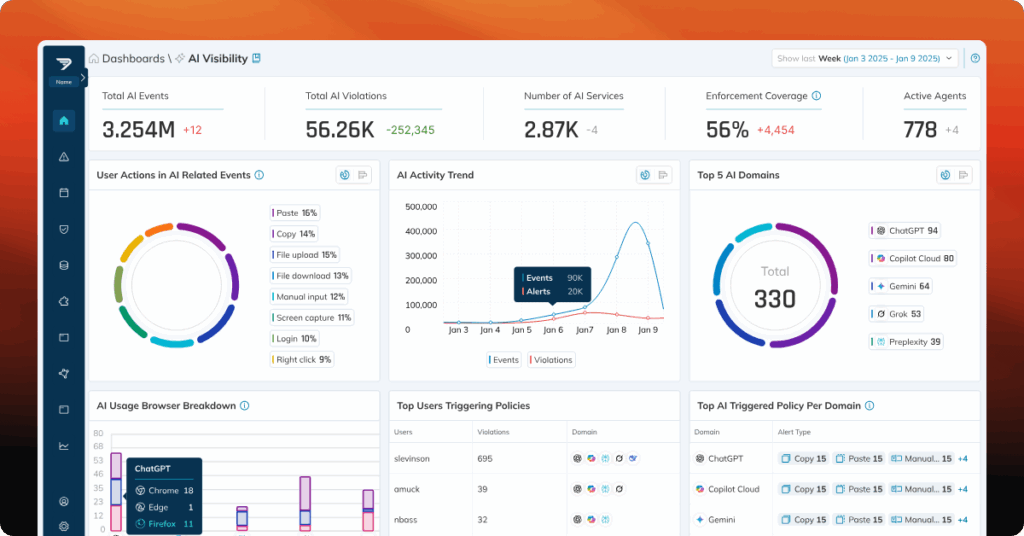
Source: Seraphic Security
5. Amazon WorkSpaces Secure Browser

Amazon WorkSpaces Secure Browser is a fully managed, cloud-based browser solution that provides secure access to internal applications, SaaS platforms, and the public internet without exposing corporate data to the local device. It runs entirely in the AWS cloud and streams an encrypted browser session to the user’s local device, enabling data protection and centralized policy enforcement.
Key features include:
- Remote browser streaming: Delivers an isolated browser session from the AWS cloud, streaming encrypted pixels to the user’s device to prevent local data exposure.
- Data protection by design: Corporate data never reaches the end-user’s device, reducing risk of data exfiltration and supporting strict compliance needs.
- Centralized security controls: Enforce granular browser policies, monitor user activity, manage access logs, and control device/network trust from a central console.
- No specialized client required: Runs in the user’s existing browser, eliminating the need to install or manage custom clients or VPNs.
- BYOD-friendly: Enables secure access from personal devices, supporting cost-effective remote work initiatives without sacrificing security.
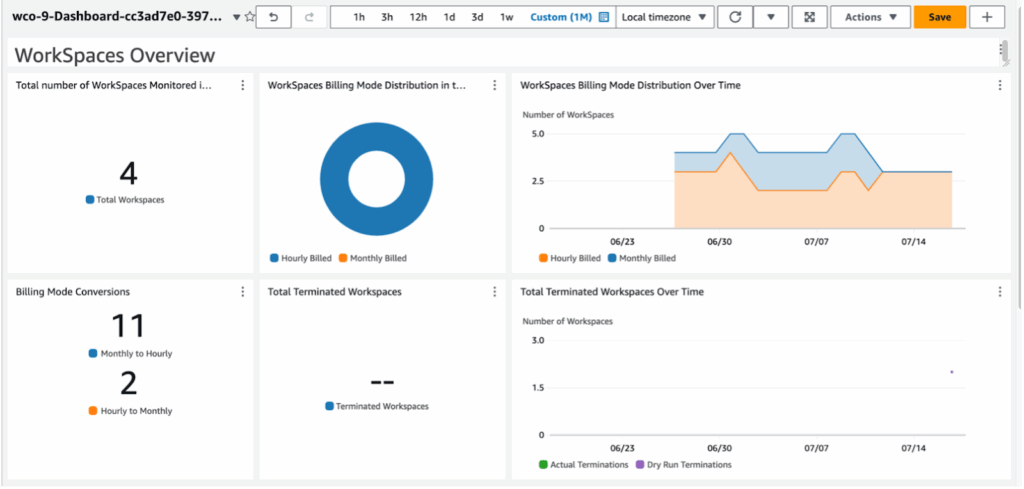
Source: Amazon
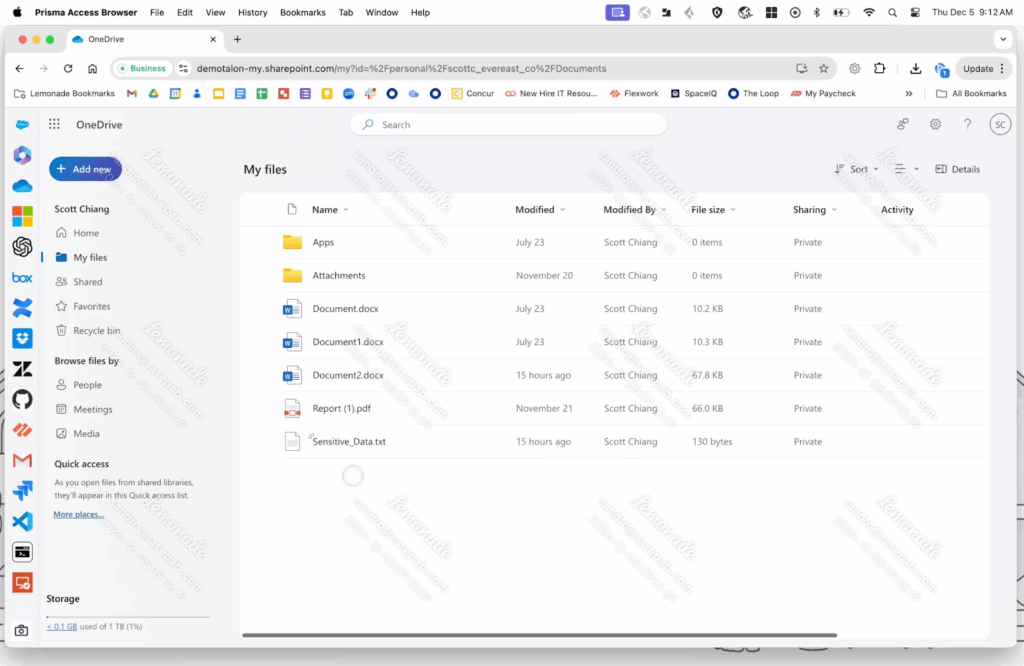
6. Prisma Access Browser
Prisma Access Browser from Palo Alto Networks is a secure, enterprise-grade browser intended to extend SASE (Secure Access Service Edge) protection directly to the endpoint. Unlike traditional browsers, Prisma Access Browser is natively integrated with the broader Palo Alto Networks security ecosystem, enabling zero trust enforcement across both managed and unmanaged devices.
Key features include:
- SASE-native integration: Connects to Palo Alto Networks’ SASE platform, enabling unified policy enforcement, threat prevention, and secure access from any device.
- Zero trust access control: Applies granular, identity-aware access policies to enforce least privilege access to enterprise applications and data.
- Secure BYOD enablement: Protects corporate data on personal devices without requiring full device control, suitable for organizations embracing hybrid or flexible work.
- GenAI and shadow IT protection: Monitors and controls usage of generative AI tools, blocking unapproved apps and preventing data leaks in AI interactions.
- VDI replacement: Offers a more cost-effective and simpler alternative to traditional VDI setups.
Source: Palo Alto Networks
VDI/DaaS
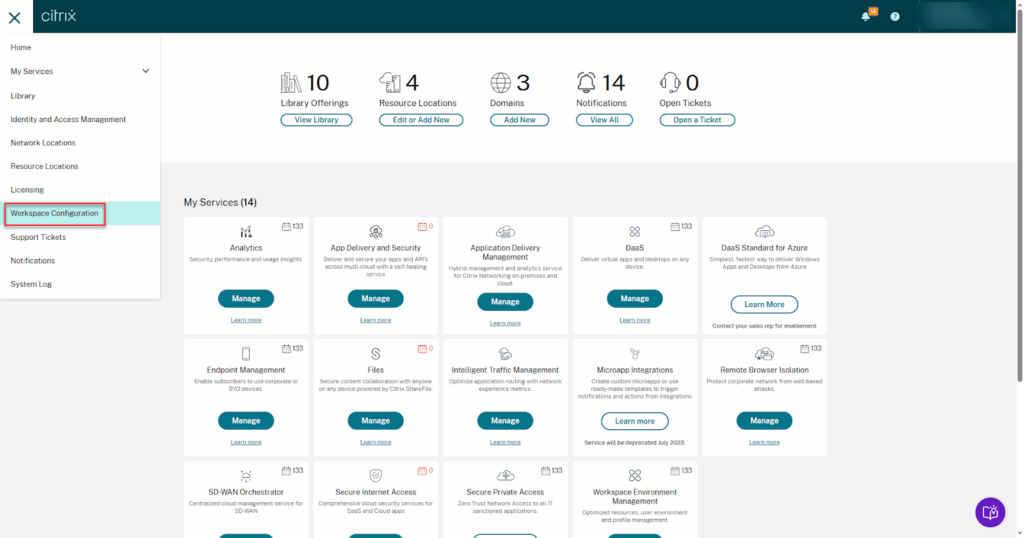
7. Citrix DaaS

Citrix DaaS provides app and desktop virtualization with a cloud-managed control plane and hybrid, multi-cloud deployment. It centralizes administration while enabling anywhere access to virtual apps and desktops across resource locations and platforms.
Key features include:
- Hybrid multi-cloud deployment: Manages workloads across on-premises datacenters and public clouds including Azure, AWS, and Google Cloud, plus hypervisors such as XenServer, Hyper-V, Nutanix AHV, and VMware vSphere.
- Cloud-managed control plane: Citrix manages delivery controllers, databases, licensing, and access services in Citrix Cloud, eliminating most on-premises component setup and centralizing brokering, authentication, and load balancing.
- Studio web console: Configure, manage, and monitor deployments from a web-based console, including search, machine catalogs, delivery groups, and quick deploy workflows, with support for service APIs and PowerShell automation.
- Monitoring and analytics: Use the Monitor console for real-time and historical session data, including HDX traffic visibility, to troubleshoot issues and support end users across zones and resource locations.
- Cloud Connector communication: Cloud Connectors provide the communications channel between Citrix Cloud and resource locations, acting as a proxy for delivery controller functions, with recommendations for redundancy in each location.
- Identity and access options: Supports identity through Active Directory, Microsoft Entra ID, Citrix Gateway, or Okta; Gateway provides TLS-secured external access when users connect from outside the corporate firewall.
- Citrix Managed Azure option: Offers a Citrix-managed Azure subscription to host workloads, with curated compute types, persistent or non-persistent machines, supported Windows and Linux images, and connectivity to existing customer resources.
Source: Citrix
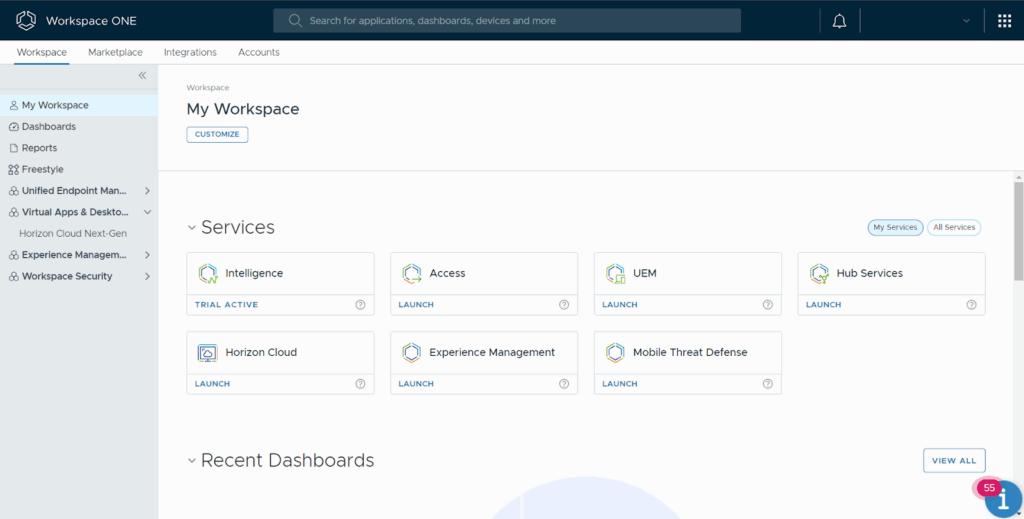
8. Omnissa Horizon

Omnissa Horizon 8 delivers virtual desktops and applications across on-premises, hybrid, and public cloud environments. It includes SaaS management services, application lifecycle tools, and features to optimize performance, visibility, and security.
Key features include:
- Flexible deployment options: Delivers desktops and apps on-premises, in hybrid configurations, or in public clouds with Horizon on Amazon WorkSpaces Core, Microsoft Azure, and Google Cloud, managed through SaaS services.
- Modern management: Uses Instant Clone Technology and Dynamic Environment Manager to deploy personalized virtual desktops and applications with policy control and configuration management.
- Application lifecycle management: Delivers and manages applications at login or on demand across VDI, DaaS, and published app environments using App Volumes layering and ThinApp application packaging.
- Optimized user experience: Provides workstation-class performance, rich graphics, and optimized voice and video to improve responsiveness and media handling for remote sessions across environments.
- End-to-end visibility: Offers monitoring and actionable insights on customizable dashboards with Omnissa Intelligence to assess performance and troubleshoot issues affecting users and workloads.
- Use case scalability: Scales access for contractors, seasonal workers, students, and mergers or acquisitions; supports burst capacity, business continuity, and application co-location through hybrid cloud flexibility.
- Security and compliance: Uses centralized data storage and granular policies to protect sensitive information and support compliance requirements across deployments and environments.
Source: Omnissa
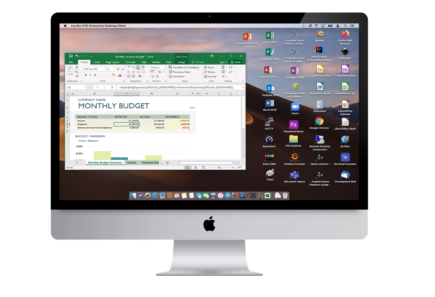
9. Inuvika OVD Enterprise

Inuvika OVD Enterprise is a Linux-based platform for virtual desktops and applications, delivering Windows and Linux apps across diverse hypervisors and clouds. It emphasizes simplified administration, zero trust controls, and concurrent-user licensing.
Key features include:
- Cross-hypervisor and cloud support: Deploys on vSphere, KVM, Nutanix AHV, Hyper-V, Proxmox VE, and VergeOS, and runs in AWS, Google Cloud, Microsoft Azure, or other public or private clouds.
- Concurrent-user licensing: Subscriptions are based on concurrent users rather than named users or devices, enabling environments to align licensing consumption with actual simultaneous usage needs.
- Integrated secure gateway: Includes an enterprise secure gateway, removing the need for separate gateway products, and does not require Microsoft SQL Server licenses for core platform operation.
- Zero trust and MFA: Implements zero trust principles with access controls, multi-factor authentication, native Duo support, and SAML2 identity provider compatibility, with encryption applied to all transferred data.
- Delivery options and user experience: Provides access through a web portal, shared or dedicated desktops, or integrated local apps, with USB device redirection and optimized video streaming, including native support for Microsoft Teams and Zoom.
- Simplified administration: Managed through a single web console; installs on Linux; supports quick installation and upgrades, using resource containerization to increase density and streamline ongoing operations.
- Cost-focused architecture: Linux-based efficiency packs more users per application server and reduces Windows server licensing; concurrent licensing and included gateway contribute to lower total cost of ownership.
Source: Inuvika
Conclusion
Enterprise browsers like Island reflect a shift toward embedding security and compliance directly into the browser itself, rather than relying on external layers of protection. This browser-centric approach supports zero trust initiatives, improves visibility, and reduces the complexity of managing remote or hybrid workforces, especially where sensitive data and cloud applications are involved.
