
12 Island Browser Competitors to Know in 2026


See Venn first in Google Search
Add as a preferred source on Google
Island Browser alternatives secure work and company data across managed and unmanaged devices. Best for: Venn for BYOD security without VDI, Prisma Browser for a SASE-integrated browser, LayerX for browser-agnostic control, and Zscaler for zero trust access.
What Is the Island Browser?
The Island Enterprise Browser is a secure browser that wraps work inside strict IT controls, and it faces top alternatives like Blue Border by Venn, Palo Alto Networks Prisma Browser, and LayerX. These platforms help IT teams enforce security and block data leaks across both managed and unmanaged devices.
Island allows IT and security teams to define policies that govern user activities, restrict risky actions, and control data exfiltration within the browser itself, rather than relying solely on network or endpoint controls.
Island browser’s competitors include platforms that enable secure remote work platforms like Venn and Parallels, secure browser solutions like Seraphic and Prisma Browser, zero trust solutions like Zscaler and Netskope, and browser isolation solutions like Microsoft Purview and Cisco Umbrella.
Because the browser has become the main gateway to corporate applications and data, choosing the right Island alternative increasingly depends on how well a platform addresses today’s fastest-moving risks. Rising browser-centric threats, the spread of unsanctioned GenAI tools, and the push toward zero trust are reshaping what buyers expect, and the categories below reflect how each approach responds to that pressure.
Island’s top competitors and alternatives include:
- Palo Alto Networks Prisma Browser: An enterprise-grade secure browser with built-in zero trust access and data loss prevention (DLP) to block unauthorized downloads.
- Venn: Instead of isolating activity only in a browser, Venn creates a Secure Enclave on the device to lock down both browser-based and locally installed applications.
- LayerX: A browser extension and security platform that turns any standard browser, like Chrome, into a controlled corporate browser by monitoring user actions in real time.
- Parallels Secure Workspace: A browser-based platform that delivers secure access to remote desktops, SaaS, and legacy apps without VPNs or endpoint agents.
- Zscaler Zero Trust Exchange: A cloud-native platform that brokers identity-aware access between users and apps, replacing perimeter-based VPN models.
Island alternatives take a few different approaches:
- Managed browsers (Chrome, Edge): Require less IT setup and integrate well with existing office software, but may need third-party plug-ins to match Island’s heavier security.
- Secure enclaves (Venn): Let employees use regular desktop software, like Excel, while keeping that data isolated from personal files, rather than forcing everything onto a webpage.
- Browser extensions (LayerX): Attach to a browser you already use, adding strict data rules without forcing a switch to a completely new browser.
Go Beyond the Browser. Secure All Apps.
Learn how Venn secures both browser-based AND locally installed apps on unmanaged devices.

In this article:
Key Limitations of Island Browser
Island Browser offers robust security and control features, but several serious limitations affect both administrators and end users, leading organizations to seek alternatives. These limitations were reported by users on the G2 platform:
- Policy management complexity: Administrators may find it difficult to manage policies when multiple rules appear similar but have subtle differences. The current method of prioritizing policies based on their order can lead to confusion and makes troubleshooting more complex.
- Incomplete RDP feature set: The built-in RDP client lacks some of the functionality available in the Microsoft desktop RDP client. This can limit its usefulness for workflows that rely on full-featured remote access.
- Limited search and troubleshooting tools: The management console’s search functionality is limited, and the user activity map lacks options to filter or refresh data by time frame. When policy violations occur, the browser does not always explain the cause in enough detail to support troubleshooting.
- Performance and responsiveness issues: Users have reported slow browsing performance, lag during tab switching, and occasional compatibility problems. These issues can disrupt productivity, particularly in fast-paced work environments.
- Restricted customization for end users: End users may experience frustration due to the strict security controls and limited ability to customize the browser to suit personal preferences.
- Sales and contract transparency: Some users have cited unexpected additional fees after contract signing, suggesting that the sales process could benefit from greater clarity and alignment with the quality of the technical support experience.
Understanding Island Alternatives
Island competes across several overlapping categories. Each category addresses enterprise browser security and remote access from a different architectural angle. Understanding these models helps organizations choose the right fit based on risk tolerance, device strategy, and user experience requirements. Enterprise browsers act like a secure wrapper around your web activity, much like a security guard standing at the door of your web apps that stops users from taking screenshots, copying text, or downloading sensitive files to personal folders.
The Shift Toward Browser-Centric Security
The way employees work has made the browser the new frontline for enterprise security. Industry research shows workers now spend the vast majority of their workday inside a browser, accessing SaaS and cloud applications, which turns it into the primary control point for protecting corporate data.
This shift is fueling rapid adoption of the tools covered in this guide. Analysts estimate that fewer than one in ten organizations has deployed a secure enterprise browser today, but roughly a quarter are expected to add at least one such technology within the next few years to close gaps in remote access and endpoint security.
Much of this momentum comes from bring-your-own-device and third-party work, where installing traditional endpoint agents is impractical for privacy or maintenance reasons. Browser-based and enclave approaches let organizations enforce policy on unmanaged devices without taking over the whole machine.
Secure Workspace Solutions
Secure workspace platforms focus on isolating corporate applications and data from personal device environments. Rather than replacing the browser alone, they create a controlled workspace that separates work and personal activity on the same endpoint.
In BYOD scenarios, these platforms often use enclave-style isolation. A secure, company-managed workspace runs locally on the user’s device but remains logically separated from personal files and applications. Corporate data is encrypted, isolated, and governed by centralized policies.
Key characteristics of secure workspace solutions include:
- Logical separation of work and personal environments
- Encrypted storage for corporate files
- Controlled data movement (copy/paste, downloads, screenshots, peripheral use)
- Secure tunneling for corporate network traffic
- Remote wipe of business data without affecting personal content
- Compliance support for regulated industries
Unlike VDI, secure workspaces run applications locally, reducing latency and improving performance. Unlike enterprise browsers, they protect both web-based and locally installed business applications, not just browser sessions.
Secure Enterprise Browsers and Platforms
Secure enterprise browsers embed security controls directly into the browser layer. They enforce policies on web usage, SaaS access, file uploads/downloads, clipboard actions, and browser extensions.
These solutions often support cross-browser enforcement or provide a hardened enterprise browser. They are designed to protect browser-based workflows without requiring full device management or virtual desktops.
Typical capabilities include:
- Browser-level data loss prevention (DLP)
- Phishing and malicious site protection
- Shadow SaaS visibility
- Extension control
- Granular session controls per user or device
This approach works well for organizations that rely heavily on SaaS and web apps, but it may not protect native desktop applications unless combined with other controls. Increasingly, these platforms are adding AI-specific security features, such as controls over how employees interact with generative AI tools, reflecting a broader market shift toward governing AI usage directly in the browser.
Zero Trust and Secure Web Gateways
Zero trust and secure web gateway platforms secure access at the network and identity layer. Instead of focusing on the browser itself, they broker access between users and applications based on identity, device posture, and context.
These platforms typically provide:
- Identity-aware access to internal apps
- Full TLS inspection
- Microsegmentation
- Cloud access security broker (CASB) capabilities
- Data protection across web and SaaS traffic
They are well suited for organizations modernizing legacy VPN architectures. However, they do not inherently control in-browser user behavior unless combined with browser or endpoint controls. As organizations retire legacy VPNs, these platforms are also converging with browser and endpoint controls into unified secure access strategies, giving teams a single way to enforce identity- and context-based policies across web and SaaS traffic.
Browser Isolation and Data Loss Prevention (DLP)
Browser isolation and DLP solutions aim to prevent data leakage and malware execution during web sessions. Isolation technologies run web content in remote containers, streaming a safe rendering to the user. DLP platforms monitor and control sensitive data movement across endpoints, networks, and cloud services.
Common capabilities include:
- Remote browser isolation (RBI)
- Inline DLP for uploads, downloads, and copy/paste
- AI-assisted data classification
- Monitoring of SaaS and AI tool usage
- Policy-based blocking or user coaching
These solutions are often layered on top of existing browsers and networks. They provide strong content inspection and data governance but may introduce complexity depending on deployment architecture. Demand for these controls is rising as unsanctioned generative AI use grows, with data leakage through GenAI tools now ranking among the top data-security concerns and much of that usage happening through personal accounts that bypass corporate oversight.
Island Browser Competitors at a Glance
The table below summarizes the key differences between these Island Browser alternatives. We explore each solution in more detail in the sections that follow.
| Category | Solution | Best For | Key Strengths | Things to Consider |
|---|---|---|---|---|
| Secure Workspace Solutions | Blue Border | Securing work and data on unmanaged or BYOD PCs and Macs | Company-controlled secure enclave that runs work apps locally | Some users report performance lag on lower-spec devices |
| Secure Workspace Solutions | Parallels Secure Workspace | Browser-based access to legacy apps, desktops, and files | Clientless HTML5 workspace deployed as a virtual appliance | Limited support for local peripherals in browser sessions |
| Secure Workspace Solutions | Cameyo by Google | Delivering legacy Windows and internal apps to the browser | Virtual App Delivery that publishes apps as progressive web apps | Local peripherals and graphics-heavy apps have limits |
| Secure Enterprise Browsers and Platforms | Seraphic | Turning existing browsers into secure enterprise browsers | JavaScript-engine agent that works across any browser | Some capabilities beyond browsers are still maturing |
| Secure Enterprise Browsers and Platforms | Prisma Browser | A secure browser integrated with the Prisma SASE platform | Chromium browser with data controls and threat prevention | Positioned within the broader Prisma Access platform |
| Secure Enterprise Browsers and Platforms | LayerX | Adding security to existing browsers via an extension | Agentless extension that works across any browser | Detailed policy options require setup time |
| Zero Trust and Secure Web Gateways | Zscaler Zero Trust Exchange | Cloud-native zero trust access for users, workloads, and devices | Proxy architecture with full TLS/SSL inspection at scale | Deployment and tuning can be complex for smaller teams |
| Zero Trust and Secure Web Gateways | Netskope One | Converged SASE and data security on one platform | Unified engine, client, and private security cloud | Broad feature set brings a steeper learning curve |
| Zero Trust and Secure Web Gateways | Cloudflare Access | Zero trust access to private apps as a VPN replacement | Clientless and client-based access on a global network | Advanced configuration can have a learning curve |
| Browser Isolation and DLP | Microsoft Purview Data Loss Prevention | Preventing data loss across Microsoft 365 and endpoints | Unified DLP policies across apps, devices, and browsers | Value is closely tied to the Microsoft ecosystem |
| Browser Isolation and DLP | Cisco Umbrella | DNS-layer security that blocks threats before connection | Cloud-delivered protection that deploys in minutes | Advanced features can be complex to configure |
| Browser Isolation and DLP | Trellix Data Loss Prevention | Protecting sensitive data across endpoints, network, and cloud | Discovery, classification, and enforcement from one console | Initial setup and policy configuration take time |
Notable Island Browser Competitors and Alternatives
How we selected these tools: We shortlisted Island Browser alternatives based on their ability to secure work and company data across managed and unmanaged devices, enforce data loss prevention and access controls, and support remote and BYOD users through enclaves, enterprise browsers, zero trust access, or browser isolation and DLP.
Secure Workspace Solutions
1. Blue Border by Venn

Best for: Securing work and data on unmanaged or BYOD PCs and Macs
Strengths: Company-controlled Secure Enclave that runs work apps locally
Things to consider: Some users report performance lag on lower-spec devices
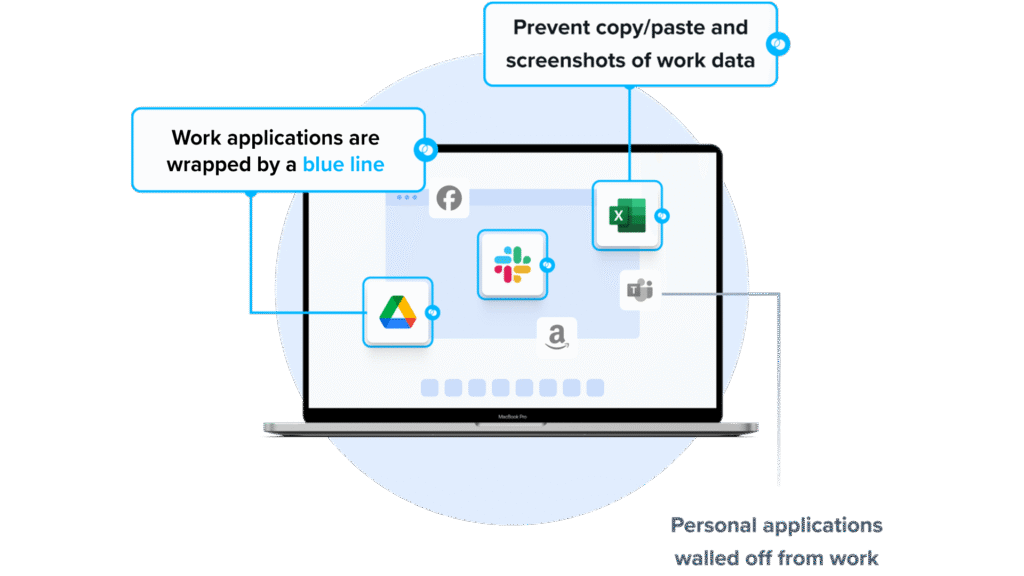
Blue Border secures work on remote employee and contractor devices by installing a company-controlled secure enclave on the user’s own PC or Mac. Work applications run locally inside the enclave, where company data is encrypted, access is governed by IT, and business activity is isolated from any personal use on the same computer. Work apps are visually marked by a blue line around those application windows.
Unlike an enterprise browser, Venn protects both browser-based and locally installed applications, and it does not require virtual desktops, device virtualization, or full device enrollment. Personal activity outside Blue Border is not visible to the company. Blue Border secures full-time employees, contractors, consultants, and BPO users on company-issued, third-party, or personal devices.
Key Features Include:
- Secure Enclave with local execution: Installing Blue Border on a Mac or PC creates a company-controlled secure enclave on that device. Work apps, data, storage, networking, and actions run inside the enclave and are isolated from other use on the same computer, while applications run locally with native performance rather than being streamed or virtualized.
- Data loss prevention and clipboard controls: The enclave acts like a firewall around work applications, enforcing DLP and controlling what data can move in and out. IT can define policies for copy and paste, downloads, uploads, screenshots, screen sharing, and watermarking, and audit logs record user activity across all devices.
- AI tool governance: IT can define which AI tools are authorized to interact with company applications and data inside the enclave. AI tools outside Blue Border are blocked from accessing protected information even when running locally on the device, giving organizations a way to enable approved AI use while controlling data handling.
- Broad application support: Blue Border protects installed work applications including Chrome, Adobe, Slack, Microsoft Office, web conferencing tools such as Zoom and Teams, VOIP applications, CAD and design tools, SAP, and custom business applications, and users can toggle between work and personal use on the same device.
- Compliance and centralized administration: Venn is built to support SOC 2 Type II, HIPAA, SEC, FINRA, NAIC, NYS DFS, Mass 201 CMR 17.00, CMMC, and PCI. It requires no backend infrastructure, so IT can onboard and offboard users in minutes and gain real-time visibility into where, when, and from what device a user accessed an app or data.
- User privacy protection: Everything outside Blue Border remains private and cannot be seen, tracked, or monitored by the company or Venn. Venn Privacy Shield uses patented technologies to protect user privacy outside the enclave, which supports adoption in BYOD and contractor programs.
Limitations (as reported by users on G2):
- Performance on some devices: Some reviewers report that the secure enclave can feel slow or sluggish and that certain devices, even those above the stated hardware specs, run Venn less smoothly than expected.
- Stability during rollouts: A few users describe occasional stability issues during feature updates that affected devices across their organization.
- Feature and support requests: Some users would like faster delivery of new features and support responses to meet evolving business needs.
2. Parallels Secure Workspace
Best for: Browser-based access to legacy apps, desktops, and files
Strengths: Clientless HTML5 workspace deployed as a virtual appliance
Things to consider: Limited support for local peripherals in browser sessions
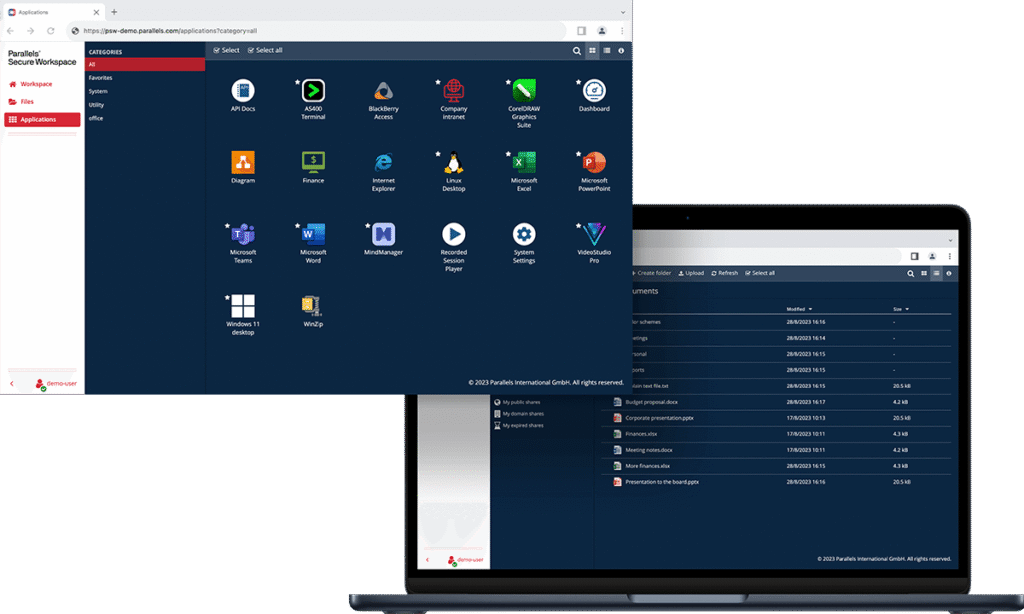
Parallels Secure Workspace, formerly Awingu, is a browser-based workspace that provides secure access to server-based applications and desktops, internal web apps, SaaS, and file shares. It is deployed as a virtual appliance on common hypervisors or public clouds and connects to existing IT assets using standard protocols such as RDP, WebDAV, and LDAP.
Users reach everything through any browser without installing agents or plug-ins. The gateway translates RDP and xRDP streams into HTML5, and it connects to Active Directory or LDAP for authentication and to external identity providers for single sign-on.
Key features include:
- Clientless browser access: Users access their workspace through any browser such as Chrome, Safari, or Firefox on any device, with no installation required. In-house RDP to HTML5 technology connects to RDP backends to deliver legacy Windows or Linux applications and desktops in the browser.
- Zero trust access controls: The platform supports secure authentication as the default, encrypts traffic, and eliminates local access to data. Administrators can set geographic or IP-based zones, enforce multi-factor authentication or block access outside those zones, and apply context-aware controls based on network.
- Built-in MFA and identity provider integration: Parallels Secure Workspace includes built-in multi-factor authentication supporting TOTP and HOTP, and it connects to external identity providers such as Azure AD, Okta, or Google Identity through SAML or OpenID to extend single sign-on to SaaS applications.
- Granular usage controls and auditing: Administrators can enable or disable features such as printing, downloading, and session sharing per user or group. Session recording, deep usage auditing, and anomaly detection track login activity, application usage, and file interactions, and audit data can be forwarded to SIEM platforms such as Splunk or Elastic.
- Application and file aggregation: The workspace aggregates legacy RDP apps and desktops, internal websites through a reverse proxy, SaaS via single sign-on, and file servers including SharePoint and OneDrive through a web-based file manager, with built-in app session sharing and file sharing for collaboration.
Limitations (as reported by users on Gartner Peer Insights):
- Peripheral support in the browser: Because the workspace is fully browser based, support for local devices such as scanners and readers is limited, and organizations may need additional development to enable specific peripherals.
- Occasional performance slowness: Some reviewers note occasional slowness during sessions, which can depend on the resources and storage allocated to the environment.
- Multi-monitor experience: In multi-monitor setups the full-desktop experience is less complete, and some users rely on app-based access across browser tabs instead.
Source: Parallels
3. Cameyo by Google
Best for: Delivering legacy Windows and internal apps to the browser
Strengths: Virtual App Delivery that publishes apps as progressive web apps
Things to consider: Local peripherals and graphics-heavy apps have limits
Cameyo by Google is a Virtual App Delivery (VAD) solution that brings client-based applications to the web without delivering a full virtual desktop. It takes legacy Windows or Linux applications and turns them into progressive web apps, which users access from an app shelf without VPNs or virtual desktops.
Cameyo is positioned as an alternative to VDI and DaaS, delivering only the applications users need rather than a full desktop. It integrates with Chrome Enterprise and ChromeOS so that legacy apps can run alongside modern web apps within a secure enterprise browser, and virtualized apps can access the device’s local file system or cloud storage providers.
Key features include:
- Virtual App Delivery: Cameyo streams legacy applications in the browser or delivers them as progressive web apps that behave like native apps in their own window. Users get the full desktop version of legacy apps on the web, without context switching between web and client-based applications.
- Zero trust security architecture: Cameyo’s zero-trust architecture separates apps from the device and devices from the network, which reduces the attack surface and protects against threats such as ransomware and brute force attacks.
- Chrome Enterprise and ChromeOS integration: With Chrome Enterprise, virtualization capabilities are built into the secure enterprise browser so users can access all their apps from any device. Integration with ChromeOS brings legacy apps to that operating system, and Gemini in Chrome can layer AI onto those apps.
- Local and cloud storage access: Virtualized apps can access the device’s local file system or popular cloud storage providers, so users can open, save, and edit files as they normally would, within the limits IT allows.
- Rapid deployment and management: Cameyo brings the management model of web-based apps to legacy applications, reducing infrastructure and licensing complexity. Deployments can be provisioned in minutes and administrators can configure permissions, device portability, and security governance from a central console.
Limitations (as reported by users on Gartner Peer Insights):
- Manual integration work: Some reviewers note that advanced configuration and certain integrations require additional manual effort and are not always as seamless as expected.
- Graphics and performance: The virtual machine graphics can feel slow in some cases, and performance can depend on the user’s network conditions.
- Peripheral support: Peripherals such as webcams and flash drives are not natively supported, which can affect workflows that depend on local devices.
Secure Enterprise Browsers and Platforms
4. Seraphic

Best for: Turning existing browsers into secure enterprise browsers
Strengths: JavaScript-engine agent that works across any browser
Things to consider: Some capabilities beyond browsers are still maturing
Seraphic is a browser security platform that deploys a JavaScript browser agent into an existing browser, turning it into a secure enterprise browser without requiring users to switch browsers. The agent creates an abstraction layer between incoming code and user actions and the browser’s JavaScript engine, which lets it intercept and control browser operations with execution context.
Seraphic runs across Chrome, Edge, Firefox, Safari, and other browsers, and it can be delivered through lightweight extensions, an enterprise browser, or a mobile browser app on both managed and unmanaged devices. Note that Seraphic is being acquired by CrowdStrike, with the two companies bringing browser-layer security into the Falcon platform.
Key features include:
- In-browser threat prevention: Seraphic detects and blocks web-based attacks in real time at the execution layer, including zero-day and unpatched N-day exploits, phishing, and web-based malware, without relying on signatures or threat feeds. Its prevention engine makes the JavaScript engine environment unpredictable to block memory corruption exploits.
- Data loss prevention and governance: The platform enforces identity-aware controls over copy and paste, downloads, screen sharing, and other actions based on user, device, and risk. It scans files transferred through the browser for malware and unauthorized data transfers and can mask or watermark sensitive content.
- AI usage security: Seraphic applies context-aware policies to GenAI tools, controlling what users can type, paste, upload, or download within those applications. It provides visibility into AI interactions and inline data protection that inspects prompts, pasted text, and uploads before data leaves the device.
- Browser extension and access control: Seraphic continuously monitors installed extensions for risky behavior, reputation, and permissions, and it applies granular access control and content filtering to web and SaaS applications based on identity, device posture, and session context.
- Secure remote access: Seraphic provides browser-native access to internal and SaaS applications without VPNs or VDI, applying zero trust access based on identity, device posture, and session context, and it extends protection to Electron-based applications such as desktop chat and collaboration apps.
Limitations (as reported by users on G2):
- Browser-focused scope: Reviewers note that Seraphic currently protects browsers, and some would like protection expanded to cover a wider range of applications.
- Features in development: Some functionality, such as hooking certain Electron-based thick client applications, has been described as still in development rather than production-ready.
- Ongoing tuning: Some users mention spending time tweaking and configuring the tool for their specific needs during rollout.
5. Prisma Browser

Best for: A secure browser integrated with the Prisma SASE platform
Strengths: Chromium browser with data controls and threat prevention
Things to consider: Positioned within the broader Prisma Access platform
Prisma Browser, from Palo Alto Networks, is a secure enterprise browser available as a browser, an extension, and a mobile app. It is built to secure work across managed and unmanaged devices and integrates with the Prisma Access SASE platform to extend zero trust controls to web, SaaS, and private applications.
The browser applies security to user activity across applications, including last-mile actions, and can isolate enterprise apps from unmanaged endpoints. It is positioned for use cases such as BYOD, third-party and contractor access, and reducing dependence on virtual desktops.
Key features include:
- Threat and malware prevention: Prisma Browser scans webpage components in real time to discover evasive and AI-powered phishing, and it uses sandboxing to neutralize web-borne threats and malicious file downloads before they reach the operating system.
- Data protection with classifiers: The browser applies data controls over user actions in SaaS, GenAI, and private apps, using directional context to block transfers between corporate apps and personal accounts. It draws on over 1,000 data classifiers to protect sensitive data in applications including GenAI tools.
- Zero trust policy enforcement: Dynamic zero trust policies are applied based on user risk score, location, and content sensitivity, and step-up authentication or just-in-time approvals can be required for high-risk activities such as printing or data exports.
- Access to any application: Prisma Browser provides a single workspace to reach web, SaaS, and private applications, including those with SSL certificate pinning, and it can secure work on managed and unmanaged devices by isolating enterprise apps from the endpoint.
- Extension control and forensics: The browser discovers extensions in use, monitors them for threats, and blocks risky or over-permissive ones. It also collects audit trails across web actions to support incident investigation and protection against insider risk.
Limitations (as reported by users on Gartner Peer Insights):
- Platform positioning: Reviewers note that the browser is closely tied to the broader Prisma Access platform, and procurement tends to favor customers already aligned with Palo Alto Networks.
- Management overhead: Some Prisma Access users describe management as bulky compared with other vendors and note that initial deployment and policy configuration can be complex in large or multi-location environments.
- Cost and complexity: Some reviewers cite operational cost and complexity, along with difficulty customizing for specific use cases, as trade-offs for the platform’s breadth.
6. LayerX

Best for: Adding security to existing browsers via an extension
Strengths: Agentless extension that works across any browser
Things to consider: Detailed policy options require setup time
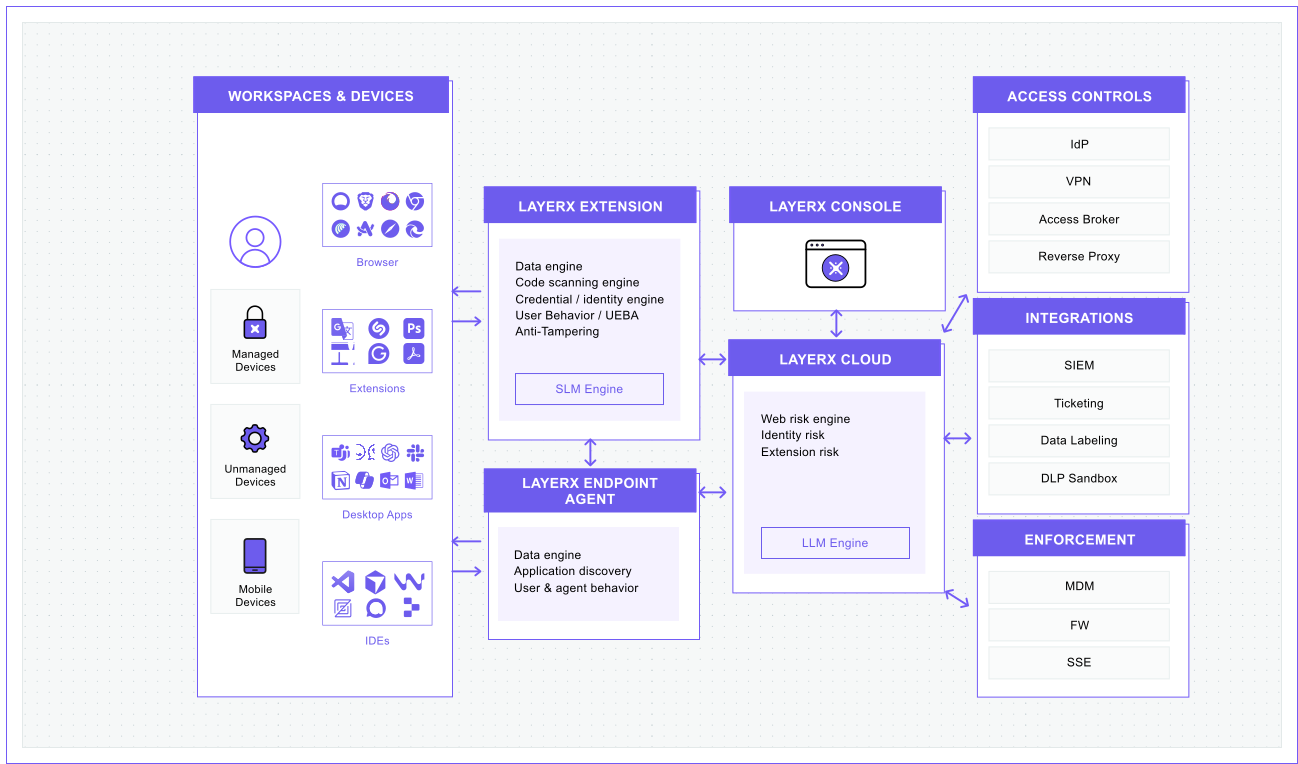
LayerX is an agentless AI and browser security platform delivered as an enterprise browser extension that integrates with any browser. Rather than replacing the browser, it secures last-mile user interactions with AI, SaaS, and web applications, and it can be deployed on both managed and unmanaged devices.
LayerX employs two correlating risk engines, one in the browser extension and one in the cloud, to monitor user activity and web page behavior. It is designed to preserve the native user experience and works without requiring network or architecture changes.
Key features include:
- GenAI security and DLP: LayerX maps GenAI usage across the organization, enforces governance over AI tools, and restricts the sharing of sensitive data with large language models. It also prevents data leakage across web and SaaS channels, including uploads to personal SaaS accounts and external sites.
- SaaS discovery and control: The platform audits all SaaS applications and users, identifies unsanctioned shadow SaaS, and applies risk-based guardrails over SaaS usage, including controls over file-sharing services and online drives to prevent accidental or malicious data leakage.
- Browser extension management: LayerX discovers all extensions across browsers, automatically classifies their risk using internal and external factors, and applies adaptive enforcement ranging from monitoring to warning users to disabling or blocking extensions.
- Safe browsing and identity protection: An AI-powered engine performs runtime code scanning of web page objects to block malicious code, phishing, and credential theft. LayerX also governs work and personal identities, detecting risks such as password reuse, shared accounts, and compromised passwords.
- Secure access for BYOD and contractors: LayerX can be deployed on managed or unmanaged devices to provide browser-based, last-mile control over SaaS access for employees and third parties, and it can serve as a lighter alternative to VDI and remote browser isolation for remote access.
Limitations (as reported by users on G2):
- Initial policy setup: Reviewers note that the platform’s policy options are detailed, so the initial setup requires attention and planning.
- Dashboard learning curve: Some users say the dashboard presents a large amount of information and takes time to learn before navigation feels comfortable.
- Reporting depth: A few reviewers would like more built-in reporting templates and deeper third-party integrations.
Source: LayerX
Zero Trust and Secure Web Gateways
7. Zscaler Zero Trust Exchange

Best for: Cloud-native zero trust access for users, workloads, and devices
Strengths: Proxy architecture with full TLS/SSL inspection at scale
Things to consider: Deployment and tuning can be complex for smaller teams
The Zscaler Zero Trust Exchange is a cloud-native platform that connects users, workloads, IoT and OT, and business partners to applications based on identity, context, and business policy rather than network location. It is built on the principle of least-privileged access, using a proxy architecture that enables full TLS/SSL inspection at scale.
Instead of extending network access, the platform brokers one-to-one connections between users and applications, hiding applications behind the exchange so they are not exposed to the internet. It verifies identity and context, assesses risk, and enforces policy on a per-session basis for each request.
Key features include:
- Attack surface reduction: Applications sit behind the Zero Trust Exchange and are invisible to the internet, so they cannot be discovered or attacked directly. This reduces the attack surface compared with firewall and VPN models that expose applications.
- Full traffic inspection: The proxy architecture terminates every connection in real time to inspect all traffic, including encrypted traffic, and blocks threats before they reach users. It applies threat protection, data protection, and sandboxing across channels.
- Zero trust connectivity: The platform connects users and devices to applications rather than to the network, which prevents lateral movement. Zscaler Private Access provides connectivity to private applications without exposing them to the internet, replacing traditional VPN access.
- Data protection: The Zero Trust Exchange identifies and protects sensitive data in motion, at rest, and in use, with data loss prevention, CASB, and cloud security posture capabilities delivered from the cloud so policies follow users.
- AI-driven risk assessment: The platform uses AI and machine learning across a large volume of daily signals to assess risk based on user behavior, device posture, destination, and content, and to inform real-time policy decisions.
Limitations (as reported by users on G2):
- Setup complexity and cost: Reviewers note that the platform can be complex to set up and that pricing is higher, which can be a consideration for smaller organizations.
- SSL inspection friction: Because the architecture inspects and decrypts most traffic, some teams report friction with custom applications and development workflows, and occasional over-blocking that is hard to diagnose.
- Integration and support: Some users cite limited integration with other security products, such as passing user identity to firewalls, and describe support quality as inconsistent.
8. Netskope One
Best for: Converged SASE and data security on one platform
Strengths: Unified engine, client, and private security cloud
Things to consider: Broad feature set brings a steeper learning curve
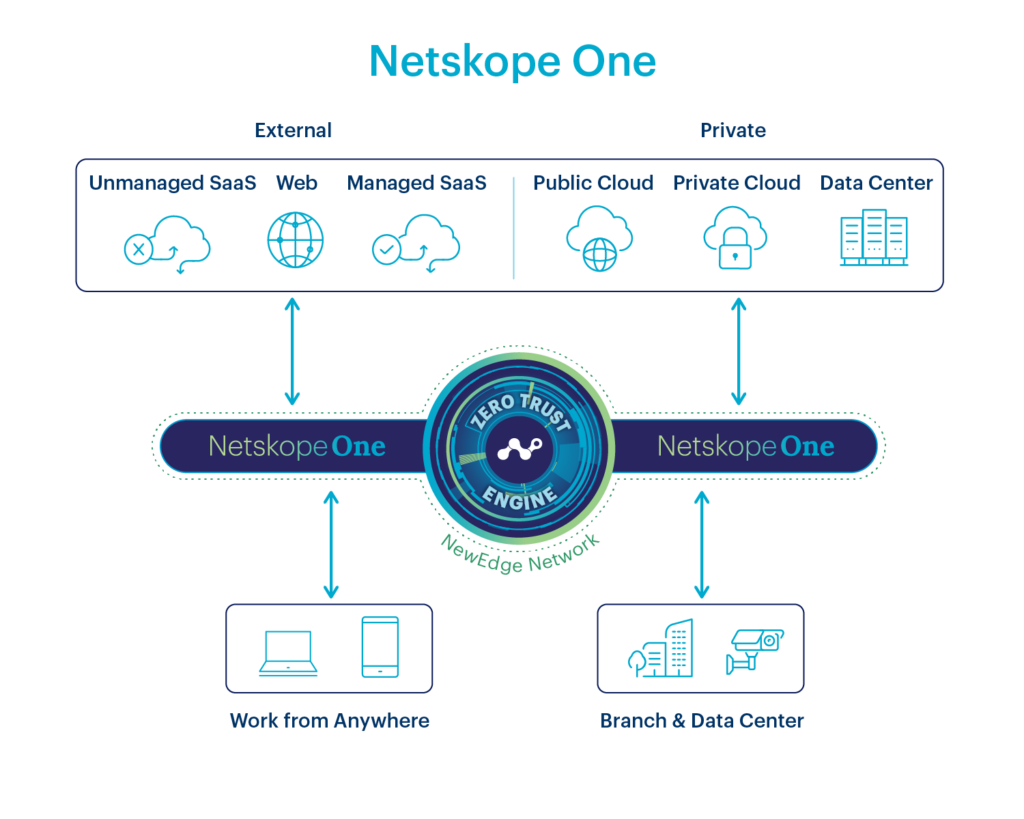
Netskope One is a cloud-native platform that converges security and networking services to support zero trust, data security, and AI security. It unifies core SASE components including secure web gateway, cloud access security broker, zero trust network access, firewall as a service, and SD-WAN under a single engine and policy framework.
The platform is powered by the Netskope Zero Trust Engine, the NewEdge private security cloud, and SkopeAI. It applies continuous, adaptive trust based on risk telemetry from users, data, devices, and applications, and provides an enterprise browser and remote browser isolation for unmanaged devices and contractors.
Key features include:
- Converged single-platform architecture: Netskope One combines SWG, CASB, ZTNA, firewall as a service, and SD-WAN with one engine, one client, one console, and one private cloud network, which replaces fragmented point products and applies consistent policy across channels.
- Zero Trust Engine: The Zero Trust Engine continuously gathers risk telemetry from users, data, AI models, devices, and applications to establish adaptive trust, moving policy beyond a binary block-or-allow decision. It performs single-pass inspection of traffic.
- Data loss prevention: Netskope One provides cloud-delivered DLP powered by thousands of data identifiers and AI and machine learning techniques, protecting sensitive data across web, cloud, SaaS, private apps, and interactions with AI chatbots and models.
- Enterprise browser and unmanaged device access: The Netskope One Enterprise Browser provides secure access for unmanaged devices and contractors without a full agent or corporate VPN, keeping work browsing separate from personal browsing and reducing reliance on virtual desktops.
- AI security: The platform includes an AI gateway and agentic broker that secure interactions with public SaaS AI, enterprise platforms, and private models, with AI guardrails to help prevent data leaks and AI red teaming to identify vulnerabilities.
Limitations (as reported by users on G2):
- Steep learning curve: Reviewers note that the breadth of features brings a learning curve, and new administrators may need training before they are comfortable creating policies and troubleshooting.
- Complex initial setup: Several users describe the initial deployment and policy configuration as complex and time-consuming, particularly in larger environments.
- Reporting and client behavior: Some reviewers mention that detailed reporting and log searches can be slow with large data volumes, and a few report occasional client sync or connectivity issues.
Source: Netskope
9. Cloudflare Access
Best for: Zero trust access to private apps as a VPN replacement
Strengths: Clientless and client-based access on a global network
Things to consider: Advanced configuration can have a learning curve
Cloudflare Access is a zero trust network access solution that provides identity-first access to self-hosted, SaaS, and non-web applications, eliminating the need for a traditional VPN. It is part of Cloudflare One, the company’s single-vendor SASE platform, and runs on Cloudflare’s global network.
Access verifies user identity and device posture for every request and enforces least-privilege, context-based policies for each resource. It supports both clientless access for web apps and browser-based SSH or VNC, and client-based access through Cloudflare’s device agent.
Key features include:
- Zero trust application access: Cloudflare Access provides granular, identity- and context-based access to internal self-hosted, SaaS, and non-web resources such as SSH, verifying identity and device posture on every request and connecting users to specific applications rather than the network.
- Clientless and third-party access: The solution offers clientless access for web applications and browser-based SSH and VNC, with authentication options for contractors and third-party users through social and enterprise identity providers, so external users can connect without end-user software.
- Identity provider integration: Access authenticates through enterprise and social identity providers, including multiple providers at once, and supports generic SAML and OIDC connectors, temporary authentication, purpose justification, and re-authentication intervals.
- Device posture and context: Policies can use identity provider groups, geolocation, device posture, and session duration, and device posture can be verified through third-party endpoint protection integrations before access is granted.
- Unified SASE controls: Access shares identity and device posture context with Cloudflare’s secure web gateway, CASB, and DLP, and remote browser isolation can be layered on to run browser code on Cloudflare’s network and apply data controls within isolated web pages.
Limitations (as reported by users on Gartner Peer Insights):
- Dashboard and policy management: Reviewers describe the policy dashboard as cumbersome for managing policies in large organizations, with some functionality missing from the technical view.
- Manual configuration steps: Some users note manual setup of routes and settings, such as static routes and reverse proxy grouping, which increases effort and the chance of error.
- Learning curve and add-ons: Advanced configurations can have a learning curve, documentation can be fragmented across products, and certain capabilities such as dedicated egress IPs are purchased separately.
Browser Isolation and DLP
10. Microsoft Purview Data Loss Prevention

Best for: Preventing data loss across Microsoft 365 and endpoints
Strengths: Unified DLP policies across apps, devices, and browsers
Things to consider: Value is closely tied to the Microsoft ecosystem
Microsoft Purview Data Loss Prevention is part of the Microsoft Purview data security suite. It helps organizations identify, monitor, and protect sensitive data across Microsoft 365, endpoint devices, browsers, networks, Microsoft Fabric, and Microsoft 365 Copilot, and it combines data and user context to balance protection and productivity.
Purview DLP is managed from the Microsoft Purview portal, where administrators create and enforce policies across the environment. It draws on shared classification and sensitivity labeling from Microsoft Purview Information Protection and can adapt protection levels to user risk through Insider Risk Management.
Key features include:
- Unified policy management: Administrators create, manage, and enforce DLP policies across cloud apps, email, devices, Microsoft Fabric, and AI from a single location in the Microsoft Purview portal, with policy templates to speed up policy creation.
- Endpoint data loss prevention: Endpoint DLP extends activity monitoring and protection to sensitive items stored on Windows and macOS devices, auditing and controlling actions such as copying to USB, uploading to cloud storage, printing, and transfers between applications.
- Classification and labeling: Purview DLP uses a common set of classifiers, exact data match, and sensitivity labeling from Information Protection to identify and protect sensitive data wherever it lives, and it can adapt protection to user risk with Insider Risk Management.
- Inline protection for browsers and networks: DLP policies can apply inline data protection to sharing with cloud apps in the browser and across the network, and can block chats and channel messages in Teams that contain sensitive information.
- Incident investigation: Administrators can configure, triage, and investigate DLP incidents in Microsoft Purview or incorporate DLP alerts into broader incident management in Microsoft Defender XDR and Microsoft Sentinel, with AI-assisted content analysis for investigations.
Limitations (as reported by users on G2):
- Complex setup: Reviewers describe the initial setup and configuration as complex and time-consuming, requiring careful planning for successful implementation.
- Rule and policy management: Some users note limitations such as the inability to update multiple rules through PowerShell and limited configuration options in Endpoint DLP policies.
- Ecosystem dependency and cost: Reviewers note that value is closely tied to the Microsoft ecosystem and higher license tiers, and some advanced capabilities such as auto-labeling require additional licenses.
11. Cisco Umbrella
Best for: DNS-layer security that blocks threats before connection
Strengths: Cloud-delivered protection that deploys in minutes
Things to consider: Advanced features can be complex to configure
Cisco Umbrella is a cloud-delivered security service built around DNS-layer security. It uses the internet’s infrastructure to block requests to malicious and unwanted domains, IP addresses, and cloud applications before a connection is established, and it delivers protection on and off the corporate network.
Umbrella combines DNS-layer security with a secure web gateway, cloud access security broker, cloud-delivered firewall, and more, and it draws on Cisco Talos threat intelligence. Cisco is evolving Umbrella into Cisco Secure Access, which builds on the same foundation and adds further capabilities.
Key features include:
- DNS-layer security: Umbrella uses DNS to stop threats over all ports and protocols, blocking malware earlier and preventing callbacks to attackers from infected machines, and it logs all DNS activity to simplify investigations.
- Selective proxy inspection: Requests to risky domains are routed to a selective proxy for deeper URL and file inspection, which allows Umbrella to inspect potentially malicious content without applying that inspection to all traffic.
- Cloud app discovery and blocking: Umbrella provides visibility into cloud applications used across the organization so administrators can identify risk and block specific applications, supporting shadow IT discovery.
- Flexible deployment: Umbrella deploys by pointing DNS from any network device, and it can leverage existing Cisco footprint such as Secure Client, SD-WAN, and Meraki to protect devices quickly, with roaming clients protecting off-network laptops and mobile devices.
- Threat intelligence and integrations: Backed by Cisco Talos, Umbrella uses statistical and machine learning models to uncover new attacks, and the Umbrella Investigate console and API provide real-time context on malware, phishing, and botnets for faster response.
Limitations (as reported by users on Gartner Peer Insights):
- Selective proxy consistency: Some reviewers report that the selective proxy behaved inconsistently, at times allowing and other times blocking the same URLs, with difficulty applying exceptions.
- Client and configuration complexity: Users note that customizing the Cisco Secure Client for mass deployment can be difficult and that some advanced features are complex to configure without extra guidance.
- Logging and troubleshooting: A few reviewers describe activity search and troubleshooting as harder to use, with some blocked sites not clearly reflected in the dashboard or logs.
12. Trellix Data Loss Prevention
Best for: Protecting sensitive data across endpoints, network, and cloud
Strengths: Discovery, classification, and enforcement from one console
Things to consider: Initial setup and policy configuration take time
Trellix Data Loss Prevention protects sensitive and proprietary information across endpoints, email, the web, networks, and cloud data storage. It provides discovery and classification for a wide range of content types, deploys policies across threat vectors from a single console, and manages events in real time.
Trellix DLP products include DLP Endpoint Complete, DLP Network Prevent and Monitor, and DLP Discover, which are available individually or bundled with complementary Trellix data security products. It also integrates with Skyhigh Security to extend protection across cloud applications.
Key features include:
- Discovery and classification: Trellix DLP provides discovery and classification for hundreds of content types, using techniques such as exact data matching to find and classify sensitive data across the environment and give a comprehensive view of where it resides.
- Data-in-use controls: The platform protects data in use by monitoring or blocking actions such as copying and pasting between applications, screen capture, and transfers to external devices like USB, and it supports watermarking and device control over connected peripherals.
- Network and endpoint protection: DLP Network Prevent enforces policies to block unauthorized data transfers through email, file sharing, or web browsing, DLP Network Monitor tracks sensitive data sharing across networks, and endpoint protection covers devices such as laptops and desktops.
- Centralized management and reporting: Policies are deployed and managed from a central console, with incident management, reporting, auditing, and forensics capabilities and out-of-the-box rules aligned to regulatory frameworks to support compliance.
- Cloud extension through Skyhigh Security: Trellix DLP integrates with Skyhigh Security to extend protection across cloud applications, applying policies and viewing cloud DLP events through the same central management console.
Limitations (as reported by users on Gartner Peer Insights):
- Setup and policy configuration: Reviewers note that the initial setup and policy configuration take time and require a proper understanding of the product to be effective.
- Rule creation and updates: Some users report that creating and updating DLP rules can be cumbersome, and that updating policies on clients is not always straightforward.
- System impact and false positives: A few reviewers mention false positives, limited web gateway control, and system performance impact on endpoints.
Conclusion
The rise of enterprise browsers and secure access platforms reflects a shift in how organizations approach endpoint and data security in distributed environments. These solutions embed security directly into the browsing experience or access layer, enabling granular control over user behavior, application usage, and data movement without relying on legacy perimeter defenses. When evaluating options, organizations should consider their existing infrastructure, risk profile, and operational needs to choose a solution that balances security, usability, and manageability in support of a zero trust strategy.

Any worker. Any laptop. Any AI workflow. Fully secured.
Schedule a demo to see how Blue Border® secures company data and apps without shipping laptops, running VDI, or managing personal endpoints.