
Mobile Device Management (MDM) Basics and Top 10 Solutions in 2026

See Venn first in Google Search
Add as a preferred source on Google
What Is Mobile Device Management (MDM)?
Mobile Device Management (MDM) is security software that lets companies monitor, manage, and secure employee smartphones, tablets, and laptops from one central console. Instead of configuring each device by hand, IT teams enforce passwords, encrypt data, deploy company apps, and can remotely lock or wipe company files if a device is lost or stolen.
Distributed work has quietly multiplied the number of devices touching company data. A decade ago, IT secured a fleet of company-owned desktops sitting inside the office. Today, the same data flows through smartphones, tablets, and a growing number of personal laptops that the business does not own and never issued. Every one of those endpoints is a place where sensitive information can leak, and most sit well outside the traditional perimeter, which is exactly the problem mobile device management set out to solve.
Device management is also shifting under IT teams’ feet. Platform vendors now ship management baselines of their own, Apple’s protocol is moving to a declarative model in which the device enforces its own state, and both major mobile platforms have added policy controls for AI assistants and agents. Cost expectations have moved with them, which makes it worth knowing what MDM covers, what it costs, and where it stops before shortlisting a platform.
How MDM works:
- Server and agent: an administrative server communicates over the air with a lightweight agent or built-in application programming interface (API) on the mobile device.
- Enrollment: devices are enrolled remotely using automated tools such as Apple Business, Android Enterprise, or QR codes, which opens a persistent management channel to the server.
- Policy enforcement: IT sets rules once, such as strong passcodes, Wi-Fi configurations, data encryption, and software updates, and pushes them over the air to every enrolled device.
- App management: IT deploys company apps directly to a device and removes unauthorized software.
Why organizations use MDM:
- Centralized control and faster setup: IT enrolls and configures devices in minutes and pushes security policies across the whole fleet.
- Data protection and remote actions: IT can track device location, lock the screen, or remotely wipe corporate data if a device is lost or stolen, while personal files stay untouched.
- Compliance and BYOD support: audit trails and real-time monitoring support frameworks like HIPAA and GDPR.
- App deployment: admins push approved business applications and updates in bulk without manual user intervention.
- Predictable cost: cloud-based platforms typically run from roughly $1.50 to $12 per device per month, depending on the advanced security and enterprise features included.
This is part of an extensive series of guides about cybersecurity.
Get Your BYOD Security Toolkit
Unlock the 4 essential assets you need to secure company data on unmanaged laptops – without VDI
In this article:
- What Is Mobile Device Management (MDM)?
- Why Organizations Use MDM
- How Mobile Device Management Works
- Core Capabilities of MDM Software
- MDM vs. MAM vs. EMM vs. UEM
- What MDM Can and Cannot See on a Personal Device
- Where MDM Falls Short for BYOD and Unmanaged Laptops
- How AI and Automation Are Changing Mobile Device Management
- Platform-Native Management Is Now the Baseline
- Top Mobile Device Management Solutions and Alternatives
- How Much Does MDM Cost?
- Considerations for Choosing Mobile Device Management Solutions
- A Modern Complement to MDM: Secure the Work, Not the Whole Device
- Frequently Asked Questions
- Conclusion
- See Additional Guides on Key Cybersecurity Topics
- IoT Networking
- Agentic AI
- Endpoint Security
Why Organizations Use MDM
For the devices it was designed to govern, MDM software solves a concrete set of operational problems. The value is rarely about a single feature; it’s about replacing manual, inconsistent device handling with centralized, repeatable control.
Centralized control, security, and faster setup
The biggest draw is doing more with less effort. IT can enroll and configure new devices in minutes rather than setting each one up by hand, push security policies fleet-wide, and remotely fix issues without dispatching staff or asking employees to bring devices in. When a device goes missing, remote lock and wipe keep company data from walking out the door with it.
Compliance and BYOD support
MDM also gives organizations a way to demonstrate control, which matters enormously in regulated industries. Real-time compliance monitoring and audit trails support frameworks like HIPAA and GDPR, and selective wipe lets IT remove corporate data from a personal device without touching personal files. That last capability is what made MDM a foundation for bring your own device (BYOD) programs in the first place. The regulatory bar keeps rising, too: newer frameworks such as the EU’s NIS2 directive now expect mobile endpoint controls and audit trails for organizations in critical sectors, pushing more of them toward formal device management.
The demand reflects how work has changed. According to Mordor Intelligence’s research on the MDM market, the share of organizations allowing employee-owned phones and tablets on corporate networks jumped sharply in recent years, and insurers increasingly treat endpoint control as a prerequisite for coverage. The pressure to manage every device that touches company data has never been higher. Recent industry research bears this out: the share of organizations allowing employee-owned phones and tablets on corporate networks has climbed to roughly 82 percent, up from about two-thirds just two years earlier.
How Mobile Device Management Works
Device Enrollment
MDM starts by enrolling a device with the organization’s management service. Enrollment creates the management relationship that allows IT to apply policies and receive device information. It can happen during initial setup, through an employee-installed profile, or through programs such as Apple Automated Device Enrollment and Android zero-touch enrollment.
Enrollment programs themselves have consolidated. Apple’s automated enrollment, app distribution, and identity workflows now run inside Apple Business, the unified platform that replaced Apple Business Manager and includes a management baseline at no cost, while Android Enterprise continues to support zero-touch and QR code enrollment. Smaller fleets often enroll a device by scanning a QR code, which points it at the management service without a manual profile install.
The enrollment method determines how much control the organization receives. A company-owned device can usually be placed under full management, while a personal device may use a lighter enrollment mode that limits access to personal data. During enrollment, the device also receives certificates, configuration profiles, or other credentials needed to communicate securely with the MDM platform.
Policy and Command Delivery
After enrollment, administrators use the MDM console to define and assign policies. These policies can require encryption, set password rules, configure Wi-Fi and VPN connections, install certificates, restrict operating system features, and deploy business applications. Policies can be assigned to individual devices, users, departments, or device groups.
Traditional MDM relies on a server-driven command model. The service sends a push notification telling the device to contact the server, and the device retrieves queued instructions. It then applies the requested change and reports the result. This gives IT a centralized way to manage thousands of devices without touching them directly.
Declarative Device Management
Newer management models are moving away from sending one command at a time. With declarative management, the server defines the state the device should maintain, such as required applications, security settings, or account configurations. The device is responsible for applying that state locally.
Apple’s declarative device management is a prominent example. Devices can evaluate changes and react without waiting for the server to issue another command. They can also report relevant status changes proactively. This reduces repeated polling and can make large device fleets more responsive when configurations or compliance requirements change.
This model is no longer optional. On the newest Apple operating system generation, the legacy management commands for software updates no longer function, so update enforcement depends entirely on how completely a platform implements declarative management. Network configuration and the controls for on-device intelligence features have moved into declarative configurations as well, which turns a vendor’s declarative coverage into a procurement question rather than a technical detail.
Device Controls and Personal Devices
The controls available through MDM depend on the operating system, ownership model, and enrollment method. On a fully managed corporate device, IT may be able to enforce encryption, disable selected features, install or remove apps, configure network settings, and remotely lock or erase the device. These controls are useful where the organization owns both the hardware and the data stored on it.
Personal devices are handled differently. Platforms such as Android work profiles and Apple’s user-focused enrollment options can separate company-managed data from personal apps and files. This lets IT control the work environment without gaining the same level of authority over the entire device. The trade-off is that some security settings and visibility may be unavailable.
That separation keeps tightening at the platform level. The newest Android release blocks apps from using local loopback connections to communicate across the work and personal profiles, and it excludes work profile data from the pipeline that supplies device information to assistant apps. Administrators can disable that pipeline entirely by policy.
Compliance and Access Control
MDM platforms continuously collect information about device posture. Depending on the platform, this can include operating system version, encryption status, screen-lock settings, installed managed apps, and whether required configurations are present. Administrators can use this information to define compliance rules and identify devices that no longer meet company requirements.
Compliance data can also feed into identity and access systems. For example, an organization can require a laptop or phone to be enrolled, encrypted, and running a supported operating system before allowing access to email or internal applications. If the device falls out of compliance, access can be blocked or limited until the issue is corrected.
Core Capabilities of MDM Software
1. Remote Device Actions
Remote device actions are a foundational capability of modern MDM platforms. These actions allow administrators to lock, wipe, or locate devices in the event of loss or theft, ensuring that sensitive information is protected from unauthorized access. For example, if a phone containing company data is lost, IT teams can remotely erase its content or disable it entirely to prevent data leaks.
Beyond security measures, remote actions facilitate device initialization and troubleshooting without requiring physical access to the hardware. Administrators can initiate device restarts, push configuration changes, or reset passwords remotely, reducing downtime and enhancing the organization’s ability to maintain a secure and consistent mobile environment.
2. Policy Enforcement
Policy enforcement is central to MDM solutions, enabling organizations to specify, deploy, and monitor compliance with device policies. Policies can dictate password requirements, data encryption, app installation restrictions, or network usage guidelines. MDM platforms ensure these rules are applied uniformly across all managed devices, reducing the likelihood of security gaps that could arise from inconsistent configurations or user behavior.
Continuous monitoring allows IT teams to detect and remediate policy violations in real time. Non-compliant devices can be quarantined, have restricted network access, or receive remediation prompts automatically. This proactive enforcement ensures that all devices maintain a prescribed security baseline, supporting regulatory compliance efforts and reinforcing the organization’s overall data protection posture. Operating systems are also beginning to bundle these controls into a single platform-level security baseline that IT can apply by policy rather than tuning dozens of separate restrictions.
Learn more in our detailed guide to BYOD policy
3. App Management
App management is another significant feature of MDM solutions, enabling administrators to control which applications can be installed, updated, or removed on managed devices. This includes distributing authorized business apps, blocking unapproved software, and patching vulnerabilities by ensuring apps are up to date. MDM solutions often include enterprise app stores, where users can find pre-approved applications tailored to their roles.
Deployment is largely hands-off: approved business applications and their updates are pushed in bulk without manual user intervention. Platform vendors have also begun bundling apps together with settings into reusable templates that IT applies to an employee group in one step, which cuts the number of individual policies a small team has to maintain.
Effective app management reduces the threat surface by restricting the introduction of potentially harmful or unvetted software. It also streamlines the user experience by centrally distributing productivity tools and automating app updates. By managing the app lifecycle, organizations minimize security risks and help users remain productive without jeopardizing sensitive business information.
4. Asset Management
Asset management capabilities within MDM solutions give organizations visibility into their device fleet. Administrators can access detailed inventories, view device status, operating system versions, and installed applications. This data is crucial for planning upgrades, tracking hardware refresh cycles, and ensuring that unsupported or outdated devices are identified and either updated or retired as needed.
In addition to managing hardware and software inventories, asset management features can monitor device usage statistics and network activity. These insights help organizations optimize resource allocation, enforce cost controls, and align their technology investments with evolving business needs. Asset tracking also supports compliance audits and loss prevention initiatives by ensuring every device is accounted for throughout its lifecycle. Newer platform releases also report hardware component health, covering items such as the camera, biometric sensors, and cellular baseband, directly to the management console, which helps separate a genuine hardware fault from a configuration problem before a device is replaced.
5. Remote Troubleshooting
Remote troubleshooting is a valuable MDM capability that allows IT teams to diagnose and resolve device issues without requiring in-person intervention. Through remote access tools, administrators can view device status, analyze logs, and initiate corrective actions such as rebooting or reconfiguring settings. These features are particularly useful in distributed organizations with a large number of remote or field employees.
Effective remote troubleshooting minimizes device downtime and user frustration, while also reducing support costs by minimizing the need for physical device handling or shipping. Quick problem resolution keeps employees productive and ensures critical devices remain operational.
MDM vs. MAM vs. EMM vs. UEM
These terms describe an evolution rather than four unrelated products, and most tools on the market blend them. The distinction that matters in practice is the scope of what each one controls.
| Model | What it controls | Typical use |
| MDM (mobile device management) | The device: configuration, security policy, remote actions | Company-owned phones, tablets, and laptops |
| MAM (mobile application management) | Individual apps and the data inside them, not the device | BYOD phones where full enrollment isn’t realistic |
| EMM (enterprise mobility management) | Device plus app, content, and identity management | Mixed fleets with meaningful BYOD |
| UEM (unified endpoint management) | Every endpoint type — mobile, desktop, IoT — in one console | Consolidating multiple management tools |
The labels matter less than the specific controls you need. A team running Apple hardware with a small BYOD population and a team running rugged Android in the field will both be sold “UEM,” and will need very different things from it. Our guide to unified endpoint management software covers how UEM extends these ideas across every endpoint type.
What MDM Can and Cannot See on a Personal Device
This is the question employees actually ask when IT sends an enrollment link, and vague answers are why enrollment stalls. The honest version depends on enrollment type, not vendor marketing.
On a corporate-owned, fully managed device, MDM visibility is broad: installed applications, device location, serial and hardware identifiers, network configuration, compliance state, and OS version. Administrators can wipe the whole device, restrict features, and in some configurations screen-share for support.
On a personally owned device enrolled through a BYOD or user-enrollment profile, the platforms deliberately restrict what IT can see. Apple’s User Enrollment and Android’s work profile both partition the device: IT sees managed apps and the work profile’s compliance state, but not personal apps, personal photos, SMS, call history, or personal browsing. IT can wipe the work container but not the personal side, and cannot remove personal data.
What MDM generally cannot do on either enrollment type is read the contents of messages inside third-party apps, see what a user types into a website, or inventory activity that never touches a managed app. That last gap is the one that matters most: an employee pasting client data into a personal AI account in a personal browser is invisible to MDM, because nothing about that action involves a managed app or the work profile.
Where MDM Falls Short for BYOD and Unmanaged Laptops
MDM is strong on devices the company owns. The model starts to strain the moment you apply it to devices the company doesn’t own — which, for most organizations today, is a growing share of the fleet.
The privacy standoff on personal devices
The hardest part of BYOD isn’t technical; it’s human. As a Hexnode analysis of BYOD privacy controls points out, workers sometimes resist enrolling personal devices because they fear IT will see their photos, messages, and off-hours activity. A Prey breakdown of the BYOD privacy standoff frames the tension plainly: manage too lightly and data leaks onto unmanaged devices; manage too heavily and you’ve created a privacy revolt and a compliance problem of your own making. When people refuse enrollment, they fall back on workarounds, and the organization loses visibility into its own data.
Device-centric, not data-centric
MDM secures the device, but the thing you actually care about is the data. Once corporate information lands on a personal machine, it becomes difficult to isolate and protect without disrupting how the person uses their own device. This is why some teams pursue BYOD security without traditional MDM, leaning on isolation and access controls rather than device-level management. For a closer look at these tradeoffs, our overview of MDM security challenges and alternatives digs into where device-centric control reaches its limits.
The same blind spot applies to AI. On a personal laptop, MDM has no way to see or control which AI tools an employee feeds company data into. A secure enclave can: IT governs which AI tools are allowed to reach company data inside the workspace — permitting sanctioned tools and blocking the rest — so sensitive information doesn’t leak into unapproved AI on a machine you don’t manage. That gap has widened fast as generative AI has spread through the workforce; recent breach research finds that regular AI use on corporate devices has roughly tripled in a single year, making unmonitored AI one of the fastest-growing ways sensitive data slips out of view.
The rise of shadow AI on unmanaged devices
Shadow AI has become the clearest example of why device-centric management struggles with laptops you don’t control. On a personal machine, MDM cannot see which chatbots, browser extensions, or coding assistants an employee pastes company data into. Recent breach research puts shadow AI among the most common non-malicious insider actions, with regular AI use on corporate devices rising sharply year over year and a majority of employees admitting they use AI tools even when they believe it breaks policy.
The cost is real: organizations with high levels of shadow AI have seen materially higher average breach costs, and much of that usage flows through personal accounts IT can neither inventory nor govern. Blanket bans tend to fail because people route around them, so the practical answer is visibility plus a governed place to work. A secure enclave provides exactly that on an unmanaged device: it lets IT permit sanctioned AI tools and block the rest inside the workspace, keeping company data out of ungoverned models without taking over the whole laptop.
Contractors and laptops you don’t own
The clearest breaking point is the contractor on a personal laptop. You can’t enroll a device you don’t control, and contractors rarely accept invasive management of their own machines. The instinct is often to issue company laptops instead — until the math arrives. In one case, a company facing compromised contractor accounts priced out issuing managed laptops and landed near a $200K capital expense once procurement, imaging, global shipping, replacements, and lifecycle support were tallied — before accounting for the weeks it would take to roll out. Rather than try to manage every personal device, the company secured the work environment on each laptop separately from the rest of the machine, maintaining business data security without taking over the contractor’s computer.
How AI and Automation Are Changing Mobile Device Management
The way mobile device management solutions operate is shifting faster than their feature lists suggest. Recent analyst research frames autonomous endpoint management as the next stage for these tools: intelligence-driven automation that carries out routine management work while administrators supervise rather than drive it. The practical effect is fewer manual policy pushes and more goal-based configuration.
Three changes account for most of this:
- Self-enforcing devices: Rather than a server issuing commands and polling for results, the device is given a desired state, applies it locally, and reports status proactively.
- AI-assisted operations: Management consoles increasingly summarize fleet health, surface likely root causes, and propose remediation, which shifts diagnostic effort away from IT teams.
- Managed AI on the endpoint: Device platforms have moved controls for on-device AI assistants, external AI services, and dictation into policy, so IT can decide which intelligence features are available for work.
- Policy for AI agents: Platforms now let IT disable AI agent automation on managed devices and block automated actions inside the work profile by default, so agents cannot act on company data unless they are explicitly allowed.
This matters when comparing platforms. Solutions differ in how completely they support the declarative model, how much of their automation is genuinely autonomous rather than scripted, and whether AI use is governed at the device, the application, or the data layer. In BYOD environments, where the device itself is out of scope, the last of those is usually the deciding factor.
Get Your BYOD Security Toolkit
Unlock the 4 essential assets you need to secure company data on unmanaged laptops – without VDI
Platform-Native Management Is Now the Baseline
Device makers have started shipping management themselves, which changes where an MDM evaluation begins. Apple consolidated Apple Business Manager, Business Essentials, and Business Connect into a single platform, Apple Business, and included device management in it at no cost across more than 200 countries and regions. Configuration bundles called Blueprints let a small team apply settings and apps to an employee group without standing up a separate console.
For Apple-only fleets with straightforward needs, that baseline is often enough. It stops being enough where an organization needs deep compliance reporting, coverage for Windows, Android, and Linux, granular scripting, or integration with identity and security tooling, which is where dedicated platforms still earn their license fee. The practical effect is a narrower question for buyers: not whether to manage devices, but which layer of management has to be bought.
None of this changes the position of devices you do not own. A management baseline, free or paid, still assumes an enrolled device, so personal laptops and contractor machines stay outside its reach. The choice there remains between issuing hardware and securing the work environment on the machine the person already uses.
Top Mobile Device Management Solutions and Alternatives
How we selected these tools: we shortlisted mobile device management solutions and BYOD alternatives based on device enrollment and provisioning, policy enforcement, app and content management, security controls, remote troubleshooting, platform coverage, and how they handle unmanaged and personal devices.
| Category | Solution | Best for | Key strengths | Things to consider |
| BYOD alternative | Blue Border by Venn | Securing work on BYOD or unmanaged PCs and Macs | Company-controlled secure enclave, DLP, native app speed, full user privacy | Not a phone/tablet fleet MDM; some device slowness |
| BYOD alternative | Cisco Duo Premier | Identity-first access and VPN-less remote access | Phishing-resistant MFA, device trust, zero trust access | Access layer, not device management; higher-tier cost |
| BYOD alternative | Zscaler Multimode CASB | Governing data and access across SaaS and IaaS | Inline and API scanning, DLP, shadow IT discovery | Cloud proxy latency; advanced features cost extra |
| Traditional MDM | IBM MaaS360 | Multi-OS unified endpoint management | UEM, containerization, Watson AI analytics, patching | Dated interface; setup learning curve |
| Traditional MDM | Microsoft Intune | Microsoft-standardized organizations | Entra ID conditional access, cloud-native, Copilot | Steep learning curve; weaker non-Windows parity |
| Traditional MDM | ManageEngine MDM Plus | Mixed fleets, cloud or on-premises | Enrollment, kiosk mode, containerization, content mgmt | Limited Apple controls; cluttered interface |
| Traditional MDM | Jamf Pro | Apple devices at scale | Zero-touch deployment, day-one OS support, DDM | Apple-only; scripting-heavy; premium pricing |
| Traditional MDM | LogMeIn Miradore | Small and mid-size cross-platform fleets | Simple setup, automation, security, multitenancy | Reporting and app deploy lag; fewer advanced features |
| Traditional MDM | Scalefusion | Broad multi-platform endpoint management | Kiosk mode, geofencing, remote control, conditional access | Learning curve; advanced settings less beginner-friendly |
| Traditional MDM | SOTI MobiControl | Rugged, IoT, and mixed field fleets | Lifecycle mgmt, IoT support, fast data delivery, geofencing | Limited iOS controls and reporting; support/pricing |
MDM Alternatives for BYOD Environments
1. Blue Border by Venn

Best for: Securing work on BYOD and unmanaged PCs and Macs without VDI
Strengths: Local secure enclave with DLP, no device takeover, full privacy
Things to consider: Focused on laptop/desktop work, not phone or tablet fleet MDM
Venn’s Blue Border is software that isolates and protects company data and applications locally on any PC or Mac. Installing it creates a company-controlled secure enclave directly on the device. Work happens inside the enclave, where company data is encrypted, access is governed by IT, and activity is isolated from any other use on the same computer.
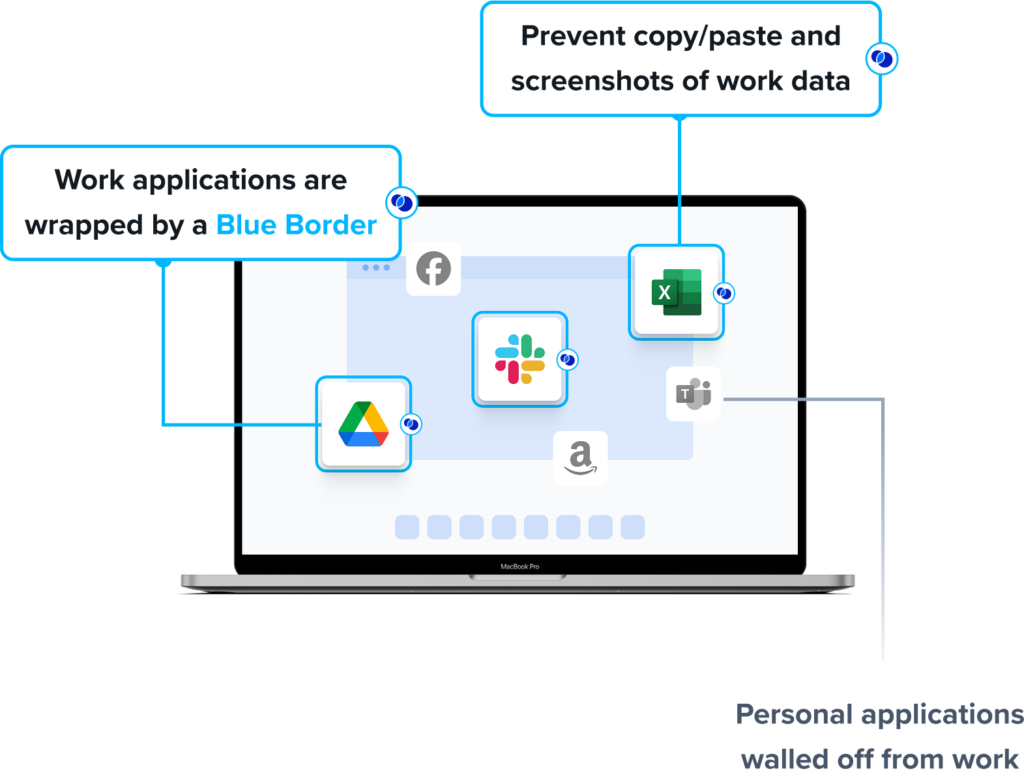
Work applications run inside the enclave, marked by a blue line around each application window. The enclave acts like a firewall around those apps, enforcing data loss prevention and controlling what data can move in and out. Anything outside Blue Border stays private and is not seen, tracked, or monitored by the company or Venn.
Key features include:
- Secure enclave on unmanaged devices: Blue Border installs a company-controlled enclave on the user’s PC or Mac. Work applications run locally inside the enclave, while the rest of the device is untouched, so the company protects data without managing or hosting the whole device.
- Data isolation and DLP controls: The enclave governs what data can move in and out of work applications, with policies for copy, paste, printing, downloads, screen capture, and screen sharing. Company data inside the enclave is encrypted and separated from personal activity on the same machine.
- Local application performance: Work-sanctioned applications run natively on the endpoint rather than being streamed or virtualized. Blue Border protects installed apps including Chrome, Microsoft Office applications, Adobe, Slack, Zoom, Teams, VOIP tools, CAD and design tools, SAP, and custom business applications.
- Centralized administration without backend infrastructure: Because no backend infrastructure is required, IT teams can onboard and offboard remote employees and contractors in minutes. Centralized administration gives visibility into where, when, and from what device a user accessed an application or sensitive data.
- AI governance controls: IT can define which AI tools are authorized to interact with company applications and data inside the enclave. AI tools outside Blue Border are blocked from reaching protected information, even when they run locally on the same device.
- Compliance and user privacy: Venn is built to support regulatory standards including SOC 2 Type II, HIPAA, SEC, FINRA, NAIC, NYS DFS, Mass 201 CMR 17.00, CMMC, and PCI. Personal activity outside the enclave remains fully private, so users can use one computer for both work and personal tasks.
Limitations (as reported by users on G2):
- Performance on some devices: Some users report that the secure enclave can feel slow or that work applications run less smoothly on certain machines, including devices that meet the stated hardware requirements.
- Reporting depth: A few users would like more detailed reporting and broader visibility features than the platform currently offers.
- Customization scope: Some users note that customization options are somewhat limited, though they still find the platform effective for organizing and launching work applications.
Source: Venn
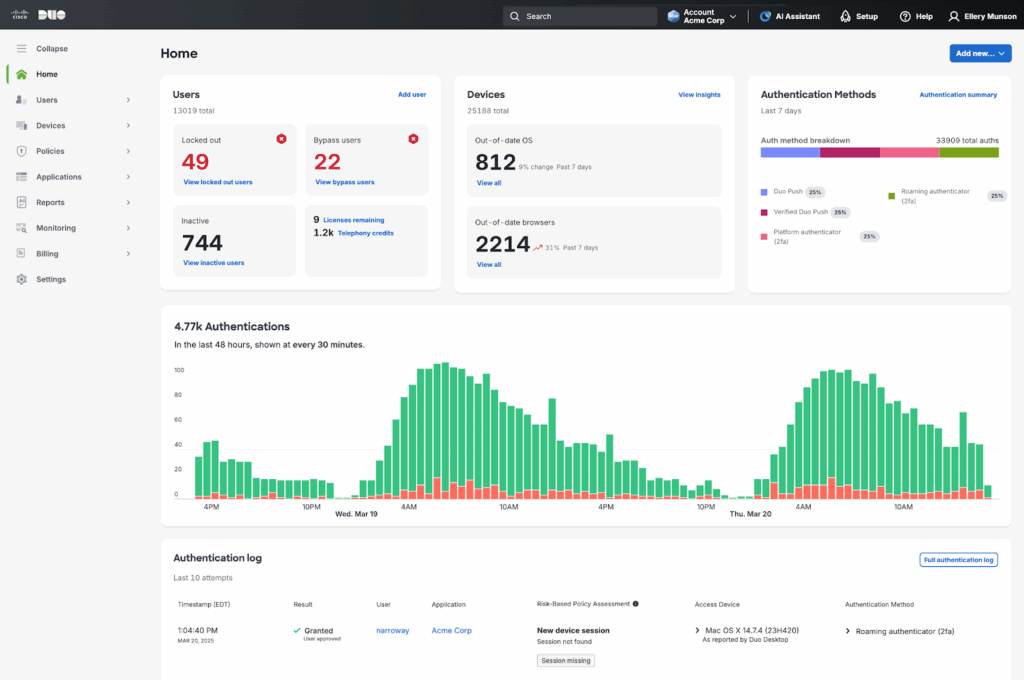
2. Cisco Duo Premier
Best for: Identity-first access and VPN-less remote access to private apps
Strengths: Phishing-resistant MFA, device trust, and Duo Network Gateway
Things to consider: Access and identity layer, not a full device management console
Cisco Duo Premier is the top edition of Cisco Duo’s identity and access security platform. It includes everything in Duo Essentials and Duo Advantage, plus VPN-less remote access through the Duo Network Gateway. It combines multi-factor authentication, adaptive access policies, and device checks to control who and what can reach applications.
Rather than managing the device itself, Duo verifies identity and device posture before granting access. Duo Network Gateway lets remote users reach specific private applications without exposing the network or the app to the public internet, applying zero trust policies so users reach only what they need.
Key features include:
- Phishing-resistant multi-factor authentication: Duo combines multiple authentication factors and supports FIDO2 authenticators and Verified Duo Push to resist phishing. Passwordless sign-in is available through Duo Mobile or FIDO2 authenticators, and Duo Passport removes repeated authentication prompts across devices.
- VPN-less remote access: Duo Network Gateway gives remote users access to private applications without a traditional VPN. Connections are brokered per application rather than to the whole network, and adaptive trust controls are applied to each connection.
- Device trust and health checks: Duo checks whether a device is registered or managed and verifies device health in real time before allowing access. Trusted endpoint policies can require that only known devices reach specific applications.
- Adaptive and risk-based access: Access requirements adjust based on role, device, and location, and can step up in real time in response to risk signals and device health. Policies are enforced consistently across cloud and on-premises applications.
- Single sign-on and directory: Duo provides single sign-on to federated cloud and on-premises applications, and Duo Directory acts as an identity store for users and non-human identities. Threat detection uses machine learning to flag ongoing attack attempts.
- Identity intelligence and agent controls: Cisco Identity Intelligence adds AI-assisted analysis across identity sources. Duo Agentic Identity, in early testing, extends visibility, governance, authentication, and authorization policies to non-human identities and AI agents.
Limitations (as reported by users on G2):
- Cost for smaller teams: Some users describe the platform as expensive compared with other MFA options, which can be a barrier for smaller organizations.
- Reporting depth on lower tiers: Some users note that reporting tools lack depth unless the organization is on a higher-priced edition.
- Internet dependency: Because Duo Push depends on a mobile device with internet access, some users find the reliance inconvenient, and offline access options are seen as limited.
- Push notification delays and fatigue: Some users report that push notifications can arrive late, especially on slow connections, and that frequent authentication prompts can become tiring over time.
- Policy configuration complexity: Setting up and tuning access policies can be involved, and some users find the configuration process complex.
Source: Duo
3. Zscaler Multimode CASB

Best for: Governing data and access across SaaS and IaaS from the cloud
Strengths: Inline and API scanning, DLP, shadow IT discovery, threat protection
Things to consider: Cloud proxy can add latency; part of a broader platform
Zscaler’s multimode Cloud Access Security Broker (CASB) governs how data and applications are used across SaaS apps and IaaS platforms such as Microsoft 365, Salesforce, and Amazon S3. It combines inline, real-time controls with out-of-band API scanning so admins can apply one set of policies across sanctioned and unsanctioned cloud services.
Inline security inspects data in motion through a proxy architecture with TLS/SSL inspection, while out-of-band security scans data at rest inside SaaS apps and cloud platforms through API integrations. The CASB is part of Zscaler’s security service edge (SSE) platform alongside secure web gateway, zero trust network access, and data loss prevention.
Key features include:
- Inline security for data in motion: A proxy architecture with TLS/SSL inspection applies real-time controls to cloud traffic. It can prevent uploads of sensitive data to sanctioned and unsanctioned apps with DLP and block known and unknown malware with threat protection.
- Out-of-band API security for data at rest: API integrations scan SaaS apps and public clouds such as AWS to identify sensitive data with DLP, crawl apps for risky file shares and revoke them by policy, and detect zero-day malware and ransomware in stored content.
- Shadow IT and app control: The CASB identifies unsanctioned apps used by employees and assigns a risk score. Access to specific apps, tenants, and app categories can be blocked, restricted, or set to read-only based on user group and device.
- Data loss prevention across cloud channels: Granular DLP policies apply across cloud apps to stop accidental or risky file shares and internal threats such as intellectual property theft, with consistent enforcement across SaaS and IaaS.
- Agentless BYOD security: Agentless cloud browser isolation secures BYOD and third-party devices that are not under IT management, allowing controlled access to cloud apps without installing software on the device.
- SaaS security posture and compliance: The platform surfaces and helps fix misconfigurations that put data at risk or jeopardize compliance, and consolidates visibility and reporting across SaaS apps and IaaS platforms in one console.
Limitations (as reported by users on G2):
- Performance and latency: Because traffic is routed through Zscaler’s cloud, some users report slower speeds and delays, particularly during peak hours or in certain regions.
- Initial setup and policy configuration: Some users find the platform complex to configure at first, especially around policy setup and management.
- Troubleshooting and log visibility: Determining why a specific site or application is blocked can be difficult, and some users would like deeper log visibility to build bypass or allowlist rules.
- Reporting customization: A few users report that the ability to customize reporting is limited, and occasional false positives require manual adjustments.
- Cost of advanced features: Pricing for more advanced capabilities may be a consideration for smaller organizations, and some advanced controls are add-ons.

Source: Zscaler
Traditional Mobile Device Management Solutions
4. IBM MaaS360
Best for: Multi-OS unified endpoint management with built-in threat defense
Strengths: UEM, containerization, Watson AI analytics, patch management
Things to consider: Interface feels dated; learning curve for new admins
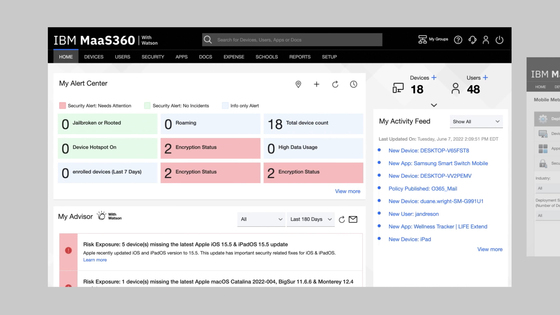
IBM MaaS360 is a cloud-based unified endpoint management (UEM) platform that manages and secures mobile devices, laptops, and other endpoints across multiple operating systems from a single console. It combines device management, application management, identity management, and threat protection, with analytics powered by Watson AI.
MaaS360 covers the full range from enrollment and policy enforcement to mobile threat defense and patching. A Fast Start option targets smaller businesses that need to onboard and secure phones and tablets quickly, while higher tiers add containerization, secure mail, content management, and an enterprise gateway.
Key features include:
- Unified endpoint management: MaaS360 manages smartphones, tablets, laptops, and desktops from one console, covering enrollment, configuration, and policy enforcement across operating systems for hybrid and frontline workforces.
- Mobile threat defense: Built-in threat detection protects users, devices, apps, and data from malware, man-in-the-middle attacks, and phishing, with on-device protection and automated responses to reduce exposure to zero-day threats.
- Containerization and data separation: An enterprise container separates corporate and personal data on a device, with secure mail, enterprise browser, and controls that keep business content within trusted apps and block third-party backup of distributed data.
- Watson AI analytics: Built-in Watson AI helps identify mobile threats and surfaces insights to guide endpoint security and management decisions, with policy recommendation and user risk management in higher tiers.
- Patch and app management: Granular patch management and application patching keep devices current, and app management lets IT distribute, configure, and control business applications across managed endpoints.
- Identity and access controls: Identity management, mobile expense management, and OS-level VPN and enterprise browser options extend control over how users reach corporate resources across the device fleet.
Limitations (as reported by users on G2):
- Dated interface: Several users describe the interface as feeling outdated or clunky in places, with some settings buried and requiring extra navigation.
- Setup and learning curve: New administrators can find the initial setup complex, and the breadth of settings and options can feel overwhelming at first.
- Reporting and customization: Some users note that reporting tools could be more flexible and that customization options are limited compared with other platforms.
- App deployment reliability: A few users report occasional glitches when packaging and deploying applications, with installs not always completing consistently.
- Support and battery use: Some users report occasional delays in support responses, and a few note higher battery consumption on smartphones running the agent.
Source: IBM
5. Microsoft Intune

Best for: Endpoint management for organizations standardized on Microsoft
Strengths: Entra ID conditional access, cloud-native, Copilot guidance
Things to consider: Steep learning curve; weaker parity on non-Windows platforms
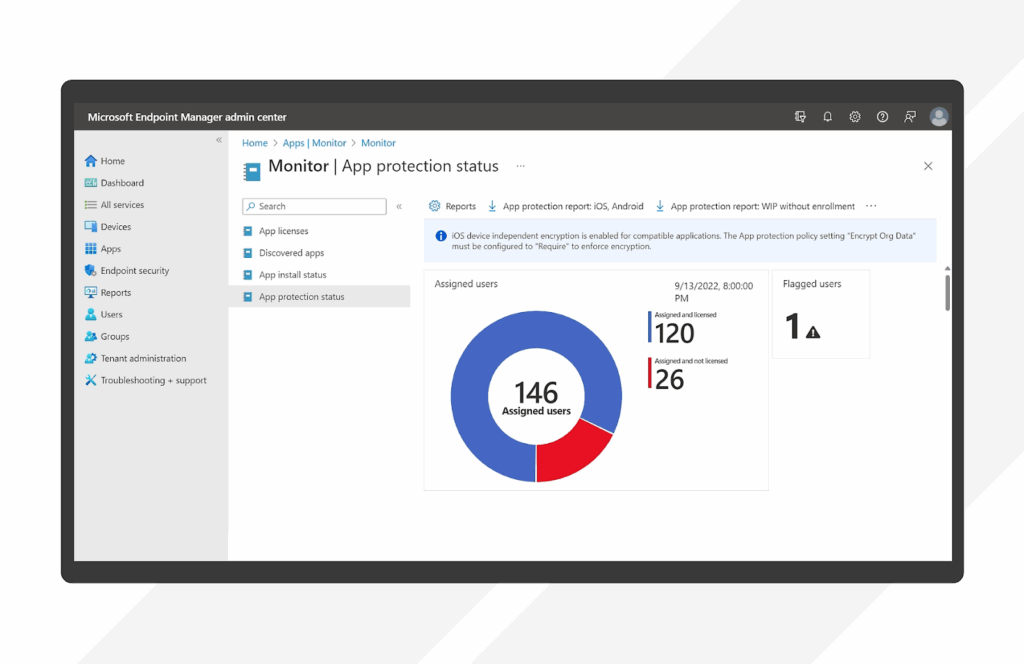
Microsoft Intune is a cloud-based endpoint management solution that manages and secures smartphones, tablets, laptops, and desktops across Windows, Android, macOS, iOS, and Linux. It applies a zero trust approach, continuously verifying device compliance and controlling access to corporate resources through Microsoft Entra ID.
Intune unifies device and application management in one console and integrates closely with Microsoft 365. Advanced capabilities such as Endpoint Privilege Management, Remote Help, Advanced Analytics, and Enterprise Application Management are available through the Intune Suite, and Security Copilot adds AI-assisted guidance.
Key features include:
- Cross-platform endpoint management: Intune manages and protects cloud-connected endpoints across Windows, Android, macOS, iOS, and Linux from one console, and Configuration Manager handles on-premises Windows PCs and servers.
- Conditional access with Entra ID: Integration with Microsoft Entra ID enforces conditional access so only compliant, secure devices reach corporate applications and data, with app protection policies that can require MFA and encryption on personal devices.
- Application and update management: Enterprise Application Management deploys and updates apps across platforms, and Intune patches vulnerabilities and keeps apps current, with app-based VPN access controls and firmware over-the-air updates in advanced mobility management.
- Security Copilot and automation: Security Copilot in Intune provides actionable recommendations and AI-powered guidance to speed up management decisions and issue resolution, while automation handles routine tasks.
- Advanced analytics and remote help: Advanced Analytics gives endpoint health visibility across the fleet with device query capabilities, and Remote Help enables secure, cloud-based helpdesk-to-user connections.
- Endpoint privilege and certificate management: Endpoint Privilege Management lets standard users perform only IT-approved elevated tasks, and Microsoft Cloud PKI automates cloud certificate management across managed devices.
Limitations (as reported by users on G2):
- Learning curve: Many users describe a steep learning curve, noting that it takes time and expertise to become comfortable with the platform and that setup can be daunting.
- Cross-platform parity: Some users feel support for Apple, Linux, and some Android controls is not as complete as for Windows, and that certain capabilities work best with Microsoft apps.
- Licensing and cost complexity: Some users find the differences between licensing tiers confusing and note that add-on costs for capabilities such as patch management can add up.
- Interface and deployment delays: A few users report that the web interface can feel slow or that settings move around, and that some app or policy deployments are slow to reflect accurate status.
- Reporting and multi-portal troubleshooting: Some users note that reporting could be more customizable and that resolving issues can require navigating across several administrative portals with vague error messages.
Source: Microsoft
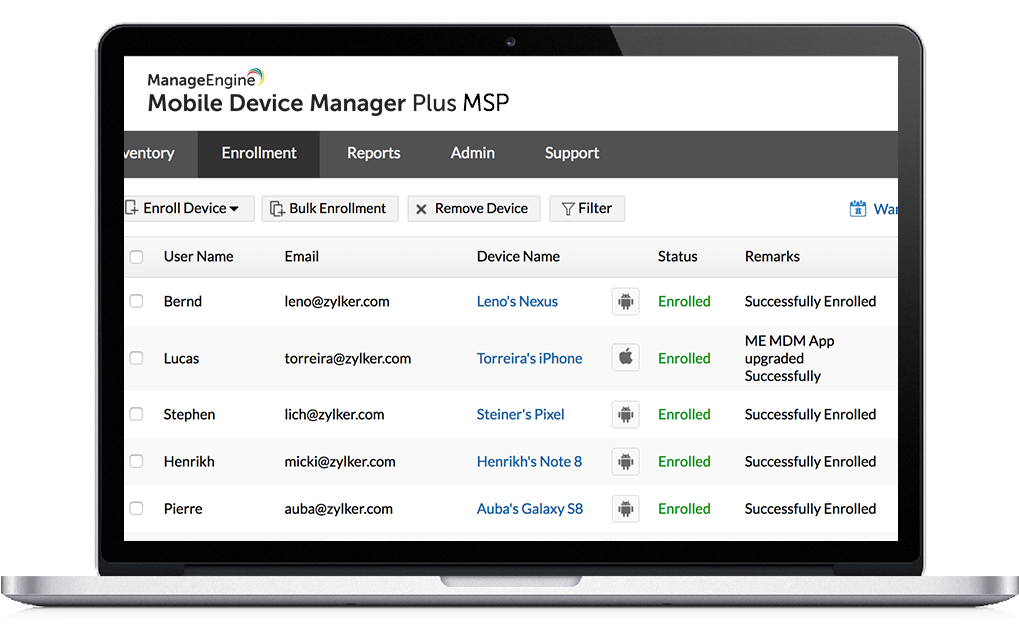
6. ManageEngine Mobile Device Manager Plus

Best for: Managing mixed fleets with cloud or on-premises deployment
Strengths: Enrollment, kiosk mode, containerization, geofencing, content mgmt
Things to consider: Limited Apple controls; interface can feel cluttered at first
ManageEngine Mobile Device Manager Plus is a device management solution that lets IT teams manage and secure smartphones, tablets, laptops, and desktops across Apple, Android, Windows, and Chrome OS from one interface. It is part of ManageEngine, the enterprise IT management division of Zoho Corporation, and supports both cloud and on-premises deployment.
The product covers the full mobile lifecycle from onboarding to retirement, including enrollment, configuration profiles, app distribution, security policy enforcement, and containerization that separates corporate and personal data. It also provides email management, content management, and remote troubleshooting.
Key features include:
- Enrollment and configuration: Devices are brought under management through enrollment and authentication for BYOD and corporate devices, and configuration profiles enforce policies for Wi-Fi, VPN, and other parameters across the fleet from a single dashboard.
- Application management and kiosk mode: IT can distribute and manage in-house and store apps for iOS, Android, macOS, Chrome OS, and Windows, fetch granular app details, manage licenses, and lock devices to a single app or a set of apps with Kiosk Mode.
- Security management: Administrators can monitor devices and issue remote lock and wipe commands on lost devices, detect jailbroken and rooted devices, and apply role-based device usage permissions and customizable access to corporate accounts.
- Containerization and email control: Corporate and personal data are separated on each device, with enterprise data stored in an encrypted container. Email access follows Conditional Exchange Access, and attachments open only through managed apps, with support for Office 365 and Microsoft Entra ID.
- Content management: Documents are distributed and managed on devices, viewed and saved only through trusted apps, updated automatically when newer versions are available, and protected from third-party cloud backup, with support for more than ten document formats.
- Remote troubleshooting and tracking: IT can remotely control and view devices to troubleshoot issues in real time, and higher tiers add geotracking, geofencing, remote control, and conditional access policies for the managed fleet.
Limitations (as reported by users on G2):
- Apple ecosystem controls: Some users report that functionality for macOS and iOS is limited, and that enrollment for Apple devices can be more cumbersome and occasionally fails.
- Interface organization: Some users find that the same task can be performed in multiple places, which can be confusing, and that parts of the interface feel cluttered.
- Initial setup complexity: New administrators can find the initial setup and configuration complex, with some important settings difficult to locate at first.
- Feature gaps: A few users note that capabilities such as nested group and sub-group structures are missing compared with some other MDM products.
- Remote support constraints: Some users mention limitations such as the inability to remotely operate devices without user consent, and occasional buggy behavior when the client pushes policies over managed Wi-Fi or LAN.
Source: ManageEngine
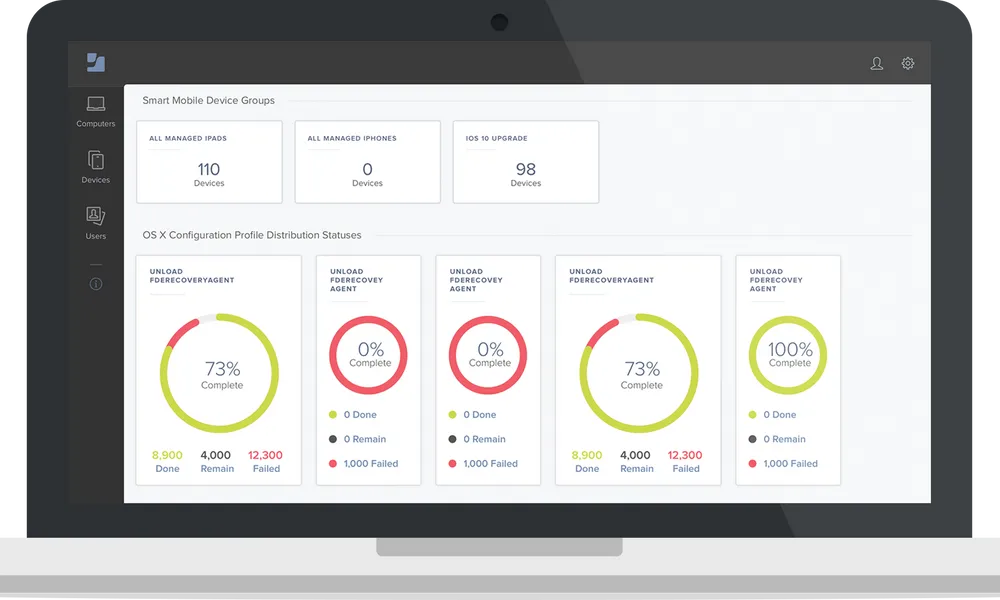
7. Jamf Pro

Best for: Managing and securing Apple devices at scale
Strengths: Zero-touch deployment, day-one OS support, deep Apple controls
Things to consider: Apple-only; scripting-heavy and priced at a premium
Jamf Pro is a device management solution focused on the Apple ecosystem, covering macOS, iOS, iPadOS, Apple TV, and Apple Watch. It provides configuration, security, and deployment using native Apple features, and it fits into Windows-centric environments while also supporting Android for mixed-fleet mobility.
Jamf Pro goes beyond configuration profiles with policies and scripts, and its management and security features work without user interaction. IT teams get automation, Apple endpoint telemetry, and continuous compliance monitoring, and support for new Apple features is typically available as Apple releases them.
Key features include:
- Zero-touch deployment: Mac, iPhone, iPad, and Apple TV can be provisioned hands-free through Automated Device Enrollment, including BYOD, so devices are configured and ready for users out of the box.
- Declarative device management: Device settings, commands, app installations, and restrictions are managed across Apple devices with Declarative Device Management, standardizing configuration at scale.
- Inventory management: Jamf Pro automatically collects hardware, software, and security configuration details from Apple devices, giving IT a detailed inventory and the ability to scope actions to specific groups.
- App lifecycle management and Self Service: Automated, secure app management delivers apps to users, and Self Service+ lets users install apps, update software, and maintain their own devices without direct IT involvement.
- Compliance benchmarks: Automated configurations apply device security baselines based on industry benchmarks, so IT can harden devices and enforce consistent compliance across the Apple fleet.
- Patching and integrations: Jamf Pro patches Apple devices and restricts malicious software without user interaction, and it integrates with existing identity and security tools to fit an organization’s technology stack.
Limitations (as reported by users on G2):
- Learning curve: Several users describe a steep learning curve and note that effective use often depends on training or a scripting background.
- Reliance on scripting: Some users find that standard tasks such as app auto-updates, self-service, and dock configuration can require scripts and workarounds.
- Pricing: Pricing is a frequently cited drawback, particularly for smaller organizations, and some point to add-on costs for related modules.
- Interface navigation: Some users report friction navigating the interface and difficulty locating settings without prior experience.
- Apple-only scope: Because Jamf Pro centers on Apple devices, organizations with mixed fleets need a separate solution for Windows and other non-Apple platforms.
Source: Jamf
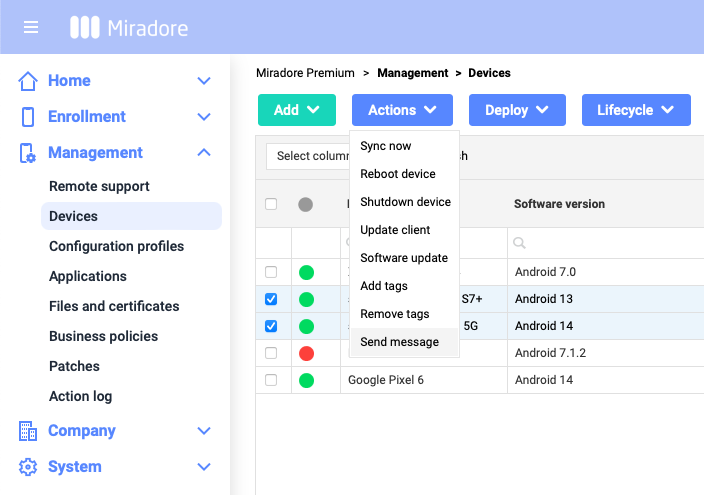
8. LogMeIn Miradore

Best for: Straightforward cross-platform MDM for small and mid-size teams
Strengths: Simple setup, automation, security, and multitenancy
Things to consider: Reporting and app deployment can lag; fewer advanced features
LogMeIn Miradore, offered by GoTo, is a cloud-based MDM solution that manages Android, Apple, and Windows devices from a single platform. It is aimed at IT admins and managed service providers who need to secure and control company-owned and personal devices, with a free tier and paid plans that unlock additional features.
Miradore covers security, device control, and automation. IT can encrypt confidential data, separate business and personal use, enforce passcodes and screen locks, and prevent unwanted applications, while automation features such as Business Policies speed up enrollment and configuration and reduce manual work.
Key features include:
- Security and compliance: Miradore encrypts confidential data, separates business and personal use, enforces passcodes and screen locks, and prevents the use of unwanted applications to help maintain device and data compliance across the organization.
- Device control and configuration: IT can install configuration profiles remotely, manage which applications are used, and enforce restrictions and kiosk mode across Android, iOS, macOS, and Windows devices from one console.
- Automation with Business Policies: Business Policies automatically apply settings, applications, and files to devices that meet predefined conditions, so enrollment and configuration happen faster and with fewer manual steps and errors.
- Application and patch management: The platform deploys, removes, and controls applications, manages software licenses, and includes patch management to keep devices current.
- Inventory, reporting, and dashboards: Customizable dashboards and reporting tools give visibility into the device fleet, with inventory information and the latest status of application and configuration deployments per device.
- Multitenancy and remote support: Multitenancy supports managed service providers overseeing multiple customer environments, and remote support is available through integration with GoTo Resolve or TeamViewer.
Limitations (as reported by users on G2):
- Reporting and analytics: Some users feel the reporting and analytics could be improved, citing room for better clarity and customization.
- Application deployment: A few users describe application deployment as laggy, with uncertainty about when a process has fully completed.
- Update and sync timing: Some users report that pushing software updates or syncing a device manually can take a long time, with limited visibility into progress.
- Advanced feature gaps: A few users note that some advanced options are missing compared with pricier competitors, and that Linux support is not available.
- Support hours: Some users report challenges reaching live support due to limited hours and time-zone differences.
Source: Miradore
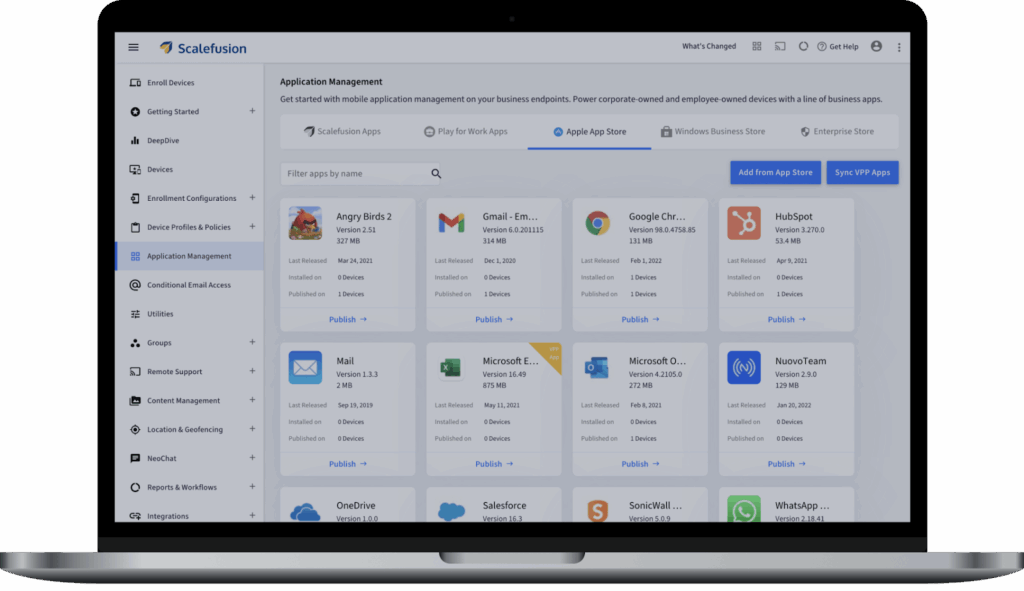
9. Scalefusion

Best for: Unified endpoint management across a broad range of platforms
Strengths: Kiosk mode, geofencing, remote control, conditional access
Things to consider: Learning curve; some advanced settings less beginner-friendly
Scalefusion is a device management solution that provides unified endpoint management across Android, iOS, iPadOS, macOS, Windows, Linux, and ChromeOS from a single console. IT teams can set policies, deploy apps, manage OS updates, and secure endpoints, including rugged devices and shared devices.
The platform combines device management with identity and access through Scalefusion OneIdP and endpoint security and compliance through Veltar. Policies defined once sync automatically to enrolled devices, and conditional access ties app and email access to real-time device compliance.
Key features include:
- Device enrollment and policy enforcement: Devices are enrolled with low or no end-user intervention across out-of-box protocols, and profiles enforce passcodes, app settings, and restrictions on BYOD or corporate-owned devices, including dynamic policies that change by time of day.
- Kiosk mode: Single-app and multi-app kiosk modes lock devices to approved apps, with a kiosk browser, website allow and block lists, role-based access, and the ability to disable hardware buttons for purpose-built devices.
- Location tracking and geofencing: Live location tracking with configurable frequency, circular and polygonal geofences, and route mapping let IT monitor mobile assets and switch policies based on whether a device is inside or outside a geofence.
- Application and content management: IT distributes, configures, installs, and updates apps for iOS, Android, macOS, Chrome OS, and Windows without end-user intervention, manages app licenses and inventory, and pushes content and media to endpoints.
- Remote control and shared devices: Screen mirroring and screen control allow remote troubleshooting and file transfer, support tickets can carry screenshots and recordings to ITSM platforms, and shared device mode gives each user their own policies on a common device.
- Conditional access and compliance: OneIdP adds a zero trust access layer with SSO, endpoint authentication, and conditional access based on device compliance, and automated compliance monitoring with remediation keeps devices aligned to policy.
Limitations (as reported by users on G2):
- Learning curve: Some users report a learning curve, noting that certain configurations are not straightforward at first and can extend the onboarding process.
- Finding settings: A few users find that locating a specific option or setting can be time-consuming and would like better search or indexing within the console.
- Advanced configuration: Some users note that advanced settings such as certificate deployment and VPN configuration could be more user-friendly for less technical administrators.
- Automation and customization limits: A few users feel that some advanced automation and customization options are restricted, which can slow certain operations.
- Blocklisting workflow: Some users find blocking a device cumbersome, since it can require moving the device between groups or profiles rather than a single action.
Source: Scalefusion
10. SOTI MobiControl

Best for: Rugged, IoT, and mixed fleets in field-heavy industries
Strengths: Lifecycle management, IoT support, fast data delivery, geofencing
Things to consider: iOS controls and reporting limited; support and pricing concerns
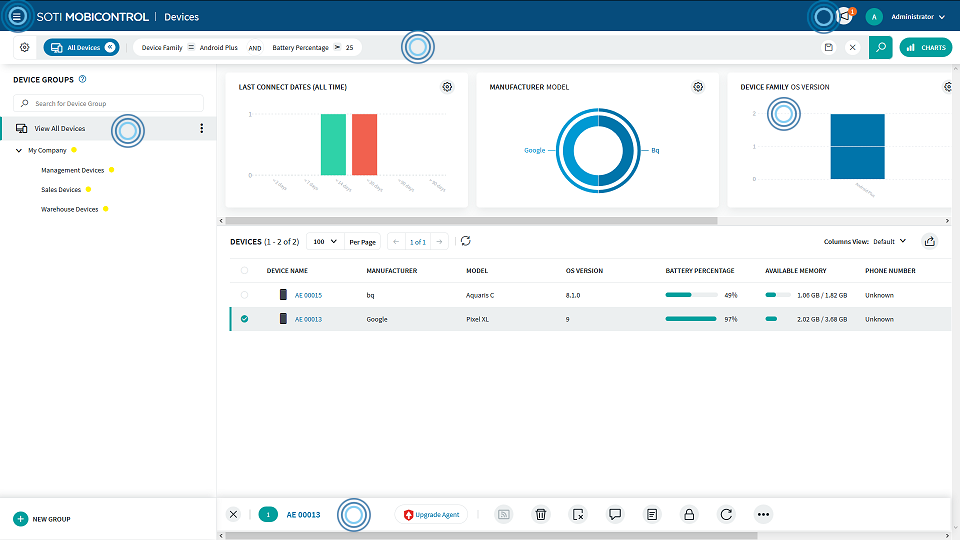
SOTI MobiControl is an enterprise mobility management (EMM) solution that provides visibility and control over where business-critical mobile devices are, what they are doing, how they are performing, and what security or compliance risks they face. It manages multi-vendor, multi-form-factor, and multi-OS devices, including rugged and IoT endpoints.
MobiControl covers the full device lifecycle across Android, Apple, Windows, and Linux, with rapid enrollment methods, geofencing, shared-device options, and secure content and application management. SOTI XTreme Technology optimizes data delivery to remote sites with limited bandwidth.
Key features include:
- Full lifecycle device management: MobiControl secures and manages devices and endpoints through their entire lifecycle, from enrollment and provisioning to ongoing configuration and eventual retirement, across a wide range of hardware.
- Express enrollment and provisioning: Multiple enrollment methods bring devices online quickly, including SOTI Stage, Apple DEP, Android Zero-Touch Enrollment, Samsung KME, Windows Autopilot, and Zebra StageNow.
- Geofencing and shared devices: IT can create geofences of any shape to track device location and deploy policies, apps, and content based on whether a device is inside or outside a fence, and shared-device configurations give each user a personalized experience on common hardware.
- IoT and OS management: MobiControl manages Linux-based mobile devices and IoT endpoints alongside phones and tablets, and handles OS and firmware management across Android, Apple, Windows, and Linux from one console.
- Content and application management: SOTI Hub and SOTI Surf provide secure content management and browsing, while flexible application management deploys and updates line-of-business apps across the multi-OS environment with the right versions for the right workers.
- Optimized data delivery: SOTI XTreme Technology and SOTI XTreme Hub optimize data communication for sites with limited bandwidth, reducing the time to distribute apps and data to large numbers of remote devices.
Limitations (as reported by users on G2):
- Performance at scale: Some users report that performance can lag in large environments, particularly when managing updates or pushing configurations across thousands of devices.
- iOS and macOS capabilities: A few users note that control and features for iOS and macOS are more limited compared with Android and Windows.
- Reporting flexibility: Some users find that reporting lacks adequate filtering or customization options.
- Application upgrades: A few users describe app upgrade workflows as cumbersome, and navigating deeper settings can be challenging.
- Pricing and support: Some users point to the pricing model and onboarding as limiting factors, including annual price increases, and a few report inconsistent support experiences.
Source: SOTI
How Much Does MDM Cost?
MDM is normally licensed per device or per user on a monthly subscription. Cloud-based solutions typically range from roughly $1.50 to $12 per device per month, and the spread is driven by advanced security and enterprise features rather than by basic enrollment and policy management. Entry tiers cover enrollment, policy enforcement, and app deployment, while higher tiers add threat defense, identity integration, patching, and analytics. Free tiers exist for small fleets, including a native baseline for Apple-only environments.
Licensing is rarely the whole bill. Administration time, enrollment support, and the hardware an organization issues because a device cannot be managed any other way often cost more than the subscription itself. That last item is why teams with contractors and personal laptops weigh the per-device fee against approaches that secure the work rather than the whole machine.
Considerations for Choosing Mobile Device Management Solutions
While MDM platforms are widely used, many of their foundational assumptions do not align with the needs of modern organizations, especially those embracing BYOD, hybrid work, and decentralized IT. Choosing an MDM solution often means accepting significant trade-offs in cost, complexity, privacy, and user experience:
Challenges in BYOD environments: MDM platforms rely on full-device control, which is intrusive for employees using personal devices. This model creates friction and privacy concerns, leading to low adoption and enforcement challenges. Attempting to manage both personal and corporate data on the same device introduces legal, technical, and ethical complications.
Operational overhead: Effective MDM requires continuous configuration, policy tuning, and maintenance of enrollment workflows, compliance settings, and device groups. IT teams must also deal with platform fragmentation—supporting varied operating systems, hardware types, and use cases—all while responding to updates from mobile OS vendors. This adds ongoing complexity and consumes valuable IT resources. Platform-level changes add to this, since management servers face stricter transport security requirements and workflows built on retired commands can fail quietly until they are rebuilt.
Inconsistent user experience: MDM policies can interfere with native device features, leading to degraded performance, blocked apps, or restrictions that frustrate users. Remote troubleshooting, while useful, often falls short in real-world scenarios due to limited diagnostic data or inconsistent support across device types and OS versions.
Scalability issues: As organizations scale, managing large fleets of devices through MDM becomes increasingly difficult. Enrollment processes break down, compliance gaps widen, and policy updates take longer to propagate across distributed teams. Even cloud-based MDM platforms require careful planning and monitoring to avoid bottlenecks and misconfigurations.
Poor fit for application-centric models: MDM tools are designed around securing devices—not applications or data directly. In environments where the focus is on secure access to business applications and services rather than managing the device itself, MDM adds unnecessary overhead. It does little to protect data movement across unmanaged applications or user actions outside corporate control.
Modern security models, such as workspace isolation, app-level controls, and zero trust access, offer more practical, scalable solutions for today’s workforce. Tools like Venn shift control away from the device and toward the data and applications, reducing administrative overhead while respecting user privacy and maintaining strong security controls. These alternatives better align with hybrid work, contractor access, and BYOD needs without the heavy footprint of traditional MDM platforms.
A Modern Complement to MDM: Secure the Work, Not the Whole Device
The takeaway isn’t that MDM is obsolete. It’s that one model can’t cover every device equally well. The most practical posture pairs MDM for the devices you own with a more targeted approach for the devices you don’t — which reduces how much of your fleet you have to fully manage in the first place.
How a secure enclave fits alongside MDM
Blue Border takes a different angle on unmanaged devices. Instead of managing the entire laptop, Blue Border™ creates a company-controlled secure enclave on the user’s PC or Mac. Work applications run locally inside that enclave — visually marked by a blue line wrapped around those windows — where data is encrypted and governed by company policy, while everything outside it stays personal and private to the end-user. The company controls the work; the user keeps their device. That separation dissolves the privacy standoff that stalls so many BYOD programs.
When to use MDM vs. a secure enclave
A simple way to think about it: company-owned phones and managed fleets are a natural fit for MDM, while unmanaged and BYOD laptops, especially contractor machines, are a natural fit for a secure enclave. Using each where it’s strongest shrinks the universe of devices you have to fully manage, lowering both cost and friction.
That distinction shows up clearly in regulated work. A healthcare organization with nurses spread across more than 100 facilities needed daily access to a HIPAA-regulated application on personal laptops, without taking over those devices or compromising privacy. By running work inside Blue Border’s secure workspace, the organization isolated protected health information — blocking downloads, copy/paste, and storage outside the workspace — and onboarded staff in minutes rather than days, all in a way that supports HIPAA compliance. For a fuller comparison of the options here, see our guide to ways to secure unmanaged devices, and our roundup of MDM solutions and alternatives.
Frequently Asked Questions
What’s the difference between MDM, EMM, and UEM?
These terms describe an evolution rather than three unrelated products. MDM manages the device, focusing on configuration, security policy, and remote actions. EMM widens the scope to include application and content management and stronger BYOD support. UEM is the modern consolidation that brings every endpoint — phones, tablets, laptops, desktops, and more — under one management platform. Most tools on the market today blend these capabilities, so the labels matter less than the specific controls you actually need.
Does MDM work for BYOD and personal laptops?
It can, but with real tradeoffs. MDM supports BYOD through features like containerization and selective wipe, which separate work data from personal data. The friction is adoption: employees often resist enrolling personal devices because they worry about being monitored, and you simply can’t enroll a contractor’s laptop that you don’t control. For company-owned devices, MDM works well. For personal and contractor laptops, organizations increasingly look for an approach that secures the work without managing the whole machine.
Can you secure company data without MDM?
Yes. MDM is one approach, not the only one. Because MDM is device-centric, it’s a strong fit when you own and control the hardware. When you don’t, methods built around isolation and access control can protect company data without enrolling or managing the personal device underneath. A secure enclave is one example: it governs the work environment directly, so the security travels with the work rather than depending on full control of the device.
MDM vs. a secure enclave: which is right for unmanaged devices?
For unmanaged and BYOD laptops, a secure enclave is usually the better fit. MDM was designed to manage devices an organization owns, and applying it to personal machines creates privacy friction and adoption problems. A secure enclave isolates business activity in a company-controlled space on the user’s own PC or Mac, protecting and governing the work while leaving personal activity private. The result is consistent security and compliance on devices you don’t manage, without the cost and overhead of issuing hardware.
Conclusion
Mobile device management remains a dependable way to secure and govern the devices an organization owns. For managed phones, tablets, and company laptops, MDM delivers centralized control, faster provisioning, and the compliance visibility modern businesses require. The limits show up at the edges of the fleet — on the personal laptops and contractor machines that you depend on but don’t control, where device-level management runs into privacy resistance and operational cost.
The smartest strategy isn’t choosing one model for everything. It’s matching the approach to the device: MDM where you own the hardware, and a secure enclave where you don’t. That pairing protects company data everywhere it lives while shrinking the footprint you have to fully manage.
Want to see how Blue Border secures work on any unmanaged PC or Mac — without VDI or fully managing the endpoint? Explore Blue Border™ and rethink what device security has to cost.
See Additional Guides on Key Cybersecurity Topics
Together with our content partners, we have authored in-depth guides on several other topics that can also be useful as you explore the world of cybersecurity.
IoT Networking
Authored by floLive
- [Guide] IoT Networking: Architecture & Top 9 Connectivity Methods in 2026
- [Guide] Connectivity Management Platform: 6 Key Features & CMP for IoT
- [Guide] IoT Roaming: How It Works, 5 Key Challenges & Top Alternatives
- [Product] floLive | Global IoT Connectivity with Seamless SIM Management
Agentic AI
Authored by Cequence
- [Guide] Understanding Agentic AI: Types, Examples, Risks & Best Practices
- [Guide] Top 7 Agentic AI Security Risks & 7 Ways to Mitigate Them
- [Guide] Agentic AI Governance: Risks, Components & 5 Emerging Frameworks
Endpoint Security
Authored by Venn

Any worker. Any laptop. Any AI workflow. Fully secured.
Schedule a demo to see how Blue Border™ secures company data and apps without shipping laptops, running VDI, or managing personal endpoints.