
See Venn first in Google Search
Add as a preferred source on Google
Zscaler alternatives span BYOD device enforcement, ZTNA, and SASE platforms. Best for: Venn Blue Border for BYOD data protection, Netskope One for data-centric DLP, Palo Alto Prisma Access for a unified cloud edge, and Cloudflare One for fast VPN-off access.
Top Zscaler alternatives include Netskope, Palo Alto Networks, and Cloudflare, along with BYOD-focused device enforcement solutions like Venn. When comparing these cloud-native security (SSE/SASE) platforms, the right choice depends on your specific needs, from data protection and zero trust access to secure web gateway and SD-WAN capabilities.
Organizations often evaluate these alternatives because of Zscaler limitations around cost, setup and troubleshooting complexity, and its lack of purpose-built BYOD support on unmanaged laptops.
Top cloud-native alternatives to compare:
- Netskope One: Best for data-centric security and advanced data loss prevention (DLP).
- Palo Alto Prisma Access: Best for enterprises unifying their cloud edge with existing Palo Alto firewalls and Cortex XDR.
- Cloudflare One: Best for remote-heavy workforces seeking fast, VPN-off internet access using a global anycast network.
Other leading options:
- dope.security: A lightweight, agent-based secure web gateway (SWG) that performs SSL inspection directly on the endpoint to bypass cloud-proxy latency.
- Microsoft Entra: Ideal if your infrastructure is highly integrated with Microsoft ecosystems and Conditional Access policies.
- Cato Networks: A converged SASE platform providing built-in SD-WAN and zero-trust security.
What Is Zscaler?
Zscaler is a cloud-delivered security platform that provides secure internet and private application access for users regardless of their location or device. It offers tools like secure web gateways (SWG), cloud firewall, zero trust network access (ZTNA), and cloud access security broker (CASB) capabilities.
Top Zscaler alternatives include device enforcement solutions like Venn, Citrix, and Workspace ONE, ZTNA solutions like Palo Alto Prisma Access, Twingate, Ericom, and Forcepoint, and secure access service edge (SASE) solutions like Check Point Harmony, Cloudflare, and FortiSASE, offering similar cloud-delivered security for secure internet/app access. Additional SSE and SASE options include Netskope, Microsoft Entra, dope.security, and Cato Networks.
Zscaler Alternatives at a Glance
The table below summarizes the key differences between these cloud-native security and BYOD solutions. We explore each of them in more detail below.
| Category | Solution | Best For | Key Strengths | Things to Consider |
| BYOD and Device Enforcement | 1. Blue Border | Securing company data on unmanaged and BYOD laptops | Local secure enclave with DLP and full app performance | Focused on the endpoint rather than network traffic |
| BYOD and Device Enforcement | 2. Citrix Workspace app | Access to virtual apps and desktops on existing Citrix | Backward compatibility and cross-platform client | Requires configured Citrix backend infrastructure |
| BYOD and Device Enforcement | 3. Omnissa Workspace ONE UEM | Unified endpoint management across many device types | Single-console management and automation across OSes | Third-party integration and post-acquisition support |
| ZTNA | 4. Palo Alto Networks Prisma Access | Enterprises unifying cloud edge with Palo Alto tools | Broad SASE stack with global points of presence | Complex setup and higher operational cost |
| ZTNA | 5. Twingate | Replacing VPNs with resource-level zero trust access | Fast deployment and direct peer-to-peer tunnels | Focused on private access, not a full SASE suite |
| ZTNA | 6. Ericom ZTEdge | Midsize enterprises adopting isolation-based SSE | Remote browser isolation and clientless app access | Now part of Cradlepoint; oriented to midsize firms |
| ZTNA | 7. Forcepoint ONE | Data-first SSE across web, cloud, and private apps | Single-agent SSE with deep DLP integration | Cloud-only delivery and configuration effort |
| SASE | 8. Check Point SASE | Hybrid SASE with fast, on-device internet security | Full-mesh private access and on-device inspection | Per-user licensing and on-premises rollout effort |
| SASE | 9. Cloudflare One | Remote-heavy teams wanting fast VPN-off access | Unified SASE on a large global network | Some newer features and a learning curve |
| SASE | 10. FortiSASE | Organizations with existing Fortinet infrastructure | Single-OS SASE with native SD-WAN integration | Setup complexity outside the Fortinet ecosystem |
| SASE | 11. Netskope One | Data-centric security and advanced DLP | Deep CASB visibility and single-pass architecture | Support responsiveness reported by some users |
| SASE | 12. dope.security | Teams wanting a lightweight SWG without cloud latency | On-device inspection and fly-direct architecture | Newer vendor with an expanding feature set |
| SASE | 13. Microsoft Entra | Organizations deeply integrated with Microsoft | Native Conditional Access and Microsoft integration | Licensing tiers and Entra join requirements |
| SASE | 14. Cato Networks | A fully converged SASE platform with SD-WAN | Single-pass cloud engine on a global backbone | Some advanced customization reported as limited |
Implement Zero Trust on Unmanaged Laptops – Without Zscaler
Discover how to protect company data on unmanaged laptops without Zscaler.
In this article:
Key Zscaler Limitations
While Zscaler offers security and cloud-native architecture, users have reported several limitations that can affect deployment, usability, and day-to-day management. Below are limitations that were reported by users on the G2 platform:
- Troubleshooting complexity: Diagnosing issues can be difficult, especially when it’s unclear whether the problem lies in connectivity, policy configuration, or the Zscaler client itself. The troubleshooting flow often requires familiarity with the platform and may frustrate less experienced users.
- Unclear error notifications: Zscaler does not consistently notify users when connections fail or the service goes down. Users are often left to manually open the client to discover issues.
- Setup and policy configuration challenges: Initial setup can be complex, particularly for teams new to Zscaler or zero trust principles. Defining correct access policies and configuring connectors requires trial and error, and documentation does not always provide clear guidance.
- Performance issues: Users report inconsistent performance, such as occasional slowdowns, dropped connections, and delays when switching networks.
- Overly aggressive filtering: The platform sometimes blocks legitimate sites unnecessarily. Users have noted that this can interfere with normal workflows and that policy tuning is needed to reduce false positives.
- Authentication delays: When multiple integrations are in use, authentication can lag, causing access delays. This is especially noticeable in environments with complex identity provider setups.
- Password management friction: Resetting or changing passwords in ZPA can be cumbersome. The process may require intervention from support.
- High cost for smaller organizations: The pricing model may be a barrier for small to mid-sized businesses. For some, the cost of implementing and managing Zscaler does not align well with their budget or scale.
- Limited dashboard customization: While Zscaler provides reporting capabilities, users have noted that dashboard customization is limited. Deeper visibility into access logs and policy enforcement would improve operational control.
- Mobile app reliability: Mobile performance can be inconsistent. Some users have reported that apps fail to load properly.
- Support and migration difficulties: Customer support responsiveness could be improved, and some organizations have found the migration from legacy systems to ZPA difficult, particularly in mapping traditional network access to application-based access models.
Related content: Read our guide to Zscaler pricing
Notable Zscaler Alternatives and Competitors
How we selected these tools: We shortlisted BYOD device enforcement, zero trust network access (ZTNA), and secure access service edge (SASE) solutions based on their core capabilities for securing users, devices, applications, and data, including secure web gateway, CASB, ZTNA, DLP, and endpoint data protection.
BYOD and Device Enforcement Solutions
1. Blue Border
Best for: Securing company data on unmanaged and BYOD laptops
Strengths: Local secure enclave with DLP and full app performance
Things to consider: Focused on the endpoint rather than network traffic
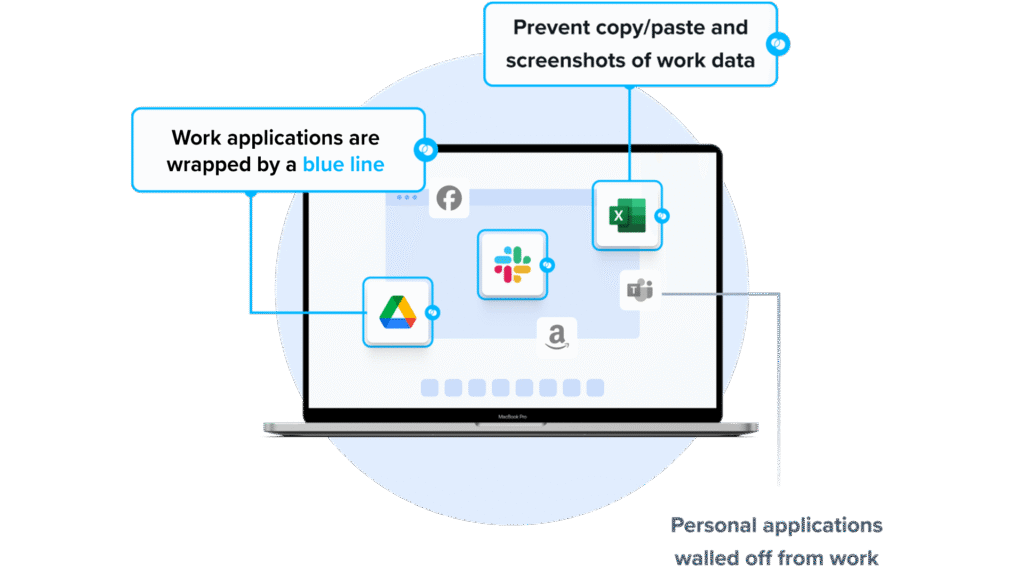
Blue Border is Venn’s software for securing work on unmanaged and BYOD laptops. Installing it on a Mac or PC creates a company-controlled secure enclave on that device, where work data is encrypted, access is governed by IT, and activity is isolated from any personal use on the same computer. Work applications run locally inside the enclave, marked by a blue line around each application window.
Similar to an MDM but built for laptops, Blue Border secures apps and data without enrolling or locking down the whole device. It requires no backend infrastructure, so remote employees and contractors can be onboarded and offboarded in minutes, and personal activity outside the enclave stays private and outside company visibility.
Key features include:
- Secure enclave technology: Creates a company-controlled secure enclave on a personal Mac or PC where work data lives and business apps run locally, acting like a firewall that controls what data moves in and out.
- Granular DLP controls: Lets IT define per-user restrictions for copy/paste, printing, downloads, uploads, screen capture, and screen sharing, and automatically routes downloaded files into a secure folder.
- Local application performance: Runs native installed applications such as Chrome, Adobe, Slack, Microsoft Office, Zoom, and Teams locally rather than from a remote server, avoiding the latency of virtual desktops.
- AI tool governance: Allows IT to define which AI tools can interact with company applications and data inside the enclave, while blocking outside AI tools from reaching protected information.
- Visual work/personal separation: Marks work applications with a blue line so users can tell governed work sessions apart from personal use, while keeping personal activity separate and private.
- Compliance support: Built to align with regulatory standards including SOC 2 Type II, HIPAA, SEC, FINRA, PCI, CMMC, and NYS DFS, with auditable controls for GRC teams.
Limitations (as reported by users on G2):
- Occasional performance lag: Some users report the secure enclave can feel slow or sluggish at times, with occasional decreased speed when accessing certain applications.
- Reporting depth: A few users would like more detailed reporting features and broader mobile accessibility.
- Feature request turnaround: Some users have asked for faster delivery of new features to match specific business needs.
2. Citrix Workspace app
Best for: Access to virtual apps and desktops on existing Citrix
Strengths: Backward compatibility and cross-platform client
Things to consider: Requires configured Citrix backend infrastructure
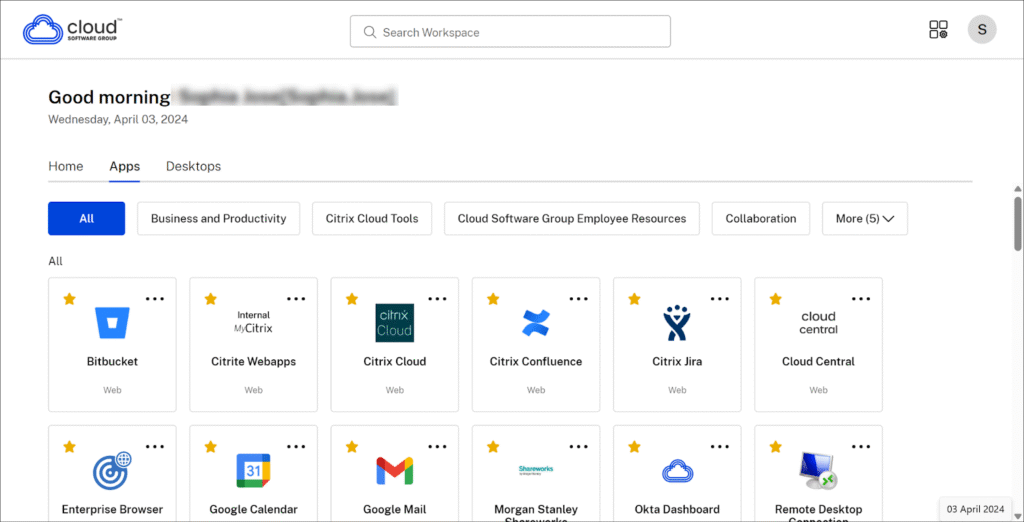
Citrix Workspace app is client software that provides access to applications, desktops, and files from a range of devices. It builds on the earlier Citrix Receiver client and is backward-compatible with an organization’s existing Citrix infrastructure, delivering virtual apps and desktops through Citrix protocol and HDX technology.
The client runs on Windows, macOS, Linux, iOS, and Android, and can also be accessed through a browser. It provides single sign-on and access to virtual desktops, virtual apps, and web and SaaS apps once the backend has been configured by IT.
Key features include:
- Virtual app and desktop delivery: Delivers virtual desktops and applications from cloud or on-premises Citrix deployments to end-user devices, with HDX technology handling the session experience.
- Backward compatibility: Replaces Citrix Receiver and older plug-ins while remaining compatible with an organization’s existing Citrix infrastructure.
- Cross-platform client: Runs on Windows, macOS, Linux, iOS, Android, and Chrome OS, and can also be accessed through a supported browser.
- Unified resource access: Provides a single point of access to virtual desktops, virtual apps, web apps, and SaaS apps, with single sign-on from any device.
- Administrator-managed configuration: Depends on IT administrators to configure the backend before use, with setup and support handled through Citrix Cloud and product documentation.
Limitations (as reported by users on G2):
- Complex initial setup: Users note that installation and initial configuration can be complicated in large environments, requiring correct setup of user profiles, access policies, and certificates.
- Performance and connectivity: Some users report slow loading, occasional freezes, session drops, and users being disconnected mid-session, particularly on weaker connections.
- Profile and printer consistency: Reviewers describe issues with user profile and printer settings not carrying over consistently when moving between machines.
- Support experience: Some users describe support interactions as slow or frustrating when resolving connection issues.
Source: Citrix
3. Omnissa Workspace ONE UEM

Best for: Unified endpoint management across many device types
Strengths: Single-console management and automation across OSes
Things to consider: Third-party integration and post-acquisition support
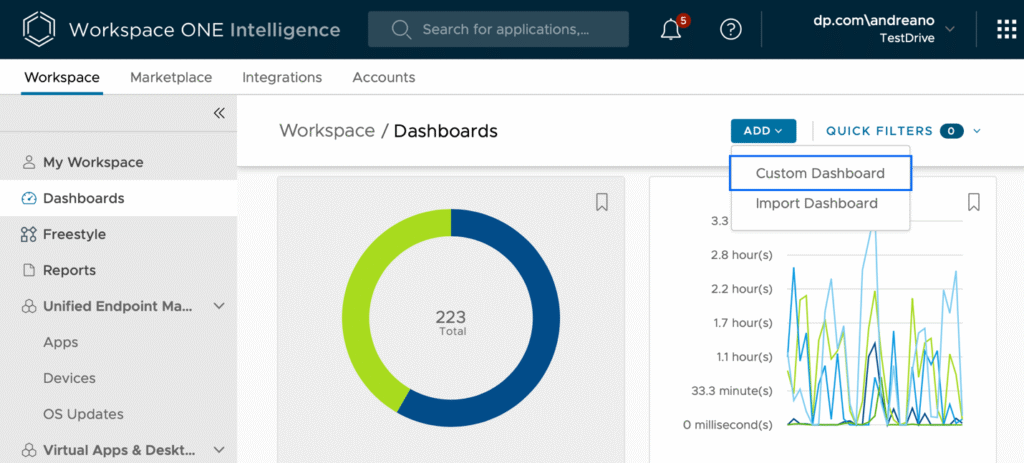
Omnissa Workspace ONE UEM (formerly VMware Workspace ONE) is a cloud-native unified endpoint management platform. It lets IT teams manage desktops, mobile, rugged, server, and specialty devices across Windows, macOS, iOS, Android, Linux, and ChromeOS from a single console, covering the full device lifecycle.
The platform combines device configuration, application management, and compliance monitoring, and supports bring-your-own, corporate-owned, shared, and specialty endpoints. A registered enrollment mode allows access to apps without full device-level management, which is a common configuration for BYOD scenarios.
Key features include:
- Unified endpoint management: Manages mobile, desktop, rugged, server, and specialty devices across all major operating systems from a single cloud-hosted console.
- Conditional access and compliance: Applies conditional access, compliance policies, and device posture checks so only compliant devices reach corporate resources, with automated remediation.
- IT orchestration and automation: Uses low-/no-code workflows to automate onboarding, app deployment, compliance checks, and routine remediation tasks.
- Application lifecycle management: Delivers and updates apps across device types through the Workspace ONE Intelligent Hub, which provides a self-service catalog with single sign-on.
- Per-app VPN and patching: Provides per-app VPN connectivity through Workspace ONE Tunnel and automated OS and app patch management to reduce vulnerability exposure.
- Multi-tenant, role-based control: Supports multi-tenant architecture with policy inheritance across business units and role-based access control for delegated administration.
Limitations (as reported by users on G2):
- Support after ownership changes: Users report weaker technical support and inconsistent account management following the transitions from VMware to Broadcom to Omnissa.
- Interface complexity: Some reviewers find the console confusing to navigate and describe the interface as clumsy.
- Policy inheritance side effects: The top-down inheritance of policies can make it tricky to avoid unintended impact when managing devices.
- Third-party integration effort: Integration with non-native or third-party solutions can require additional effort for some organizations.
Source: Omnissa
ZTNA Solutions
4. Palo Alto Networks Prisma Access

Best for: Enterprises unifying cloud edge with Palo Alto tools
Strengths: Broad SASE stack with global points of presence
Things to consider: Complex setup and higher operational cost
Palo Alto Networks Prisma Access is a cloud-delivered security platform that protects users, applications, and data across locations. It combines ZTNA, secure web gateway, cloud access security broker, firewall as a service, and remote browser isolation into a single solution, with security powered by Palo Alto’s Precision AI.
The platform is managed through the Prisma Access Cloud Management console or Panorama, giving a single point of policy control across remote users, branch offices, and cloud applications. It fits enterprises that want to extend existing Palo Alto firewall and Cortex investments to a cloud edge.
Key features include:
- Zero trust network access: Enforces least-privileged access to applications without traditional VPNs, reducing the attack surface and limiting lateral movement.
- Secure web gateway: Provides AI-based protection against web threats with real-time inspection of user web traffic.
- Cloud access security broker: Offers visibility and control over SaaS usage through inline and API-based protections and SaaS security posture management.
- Firewall as a service: Extends next-generation firewall protections, application control, and zero trust policies to users and branch locations without hardware.
- Remote browser isolation: Creates an isolation channel between users and risky web content to keep malware and web-based threats away from endpoints, useful for unmanaged devices.
- Unified agent and management: Uses the Prisma Access Agent for connectivity across SASE and firewall deployments, managed through a single console or Panorama.
Limitations (as reported by users on G2 and Gartner Peer Insights):
- Complex initial deployment: Users report that initial setup and policy configuration can be complex and time-consuming, especially for large or multi-location environments and those new to the Palo Alto ecosystem.
- Learning curve: Reviewers note the interface is powerful but not always intuitive at first, and troubleshooting can require experience with Palo Alto tools.
- Cost and licensing: Some users find the solution expensive and bandwidth-based pricing restrictive for certain branch or high-throughput use cases.
- Vendor lock-in: Deep integration with Palo Alto products can make migrating to another vendor resource-intensive.
Source: Prisma Cloud
5. Twingate
Best for: Replacing VPNs with resource-level zero trust access
Strengths: Fast deployment and direct peer-to-peer tunnels
Things to consider: Focused on private access, not a full SASE suite
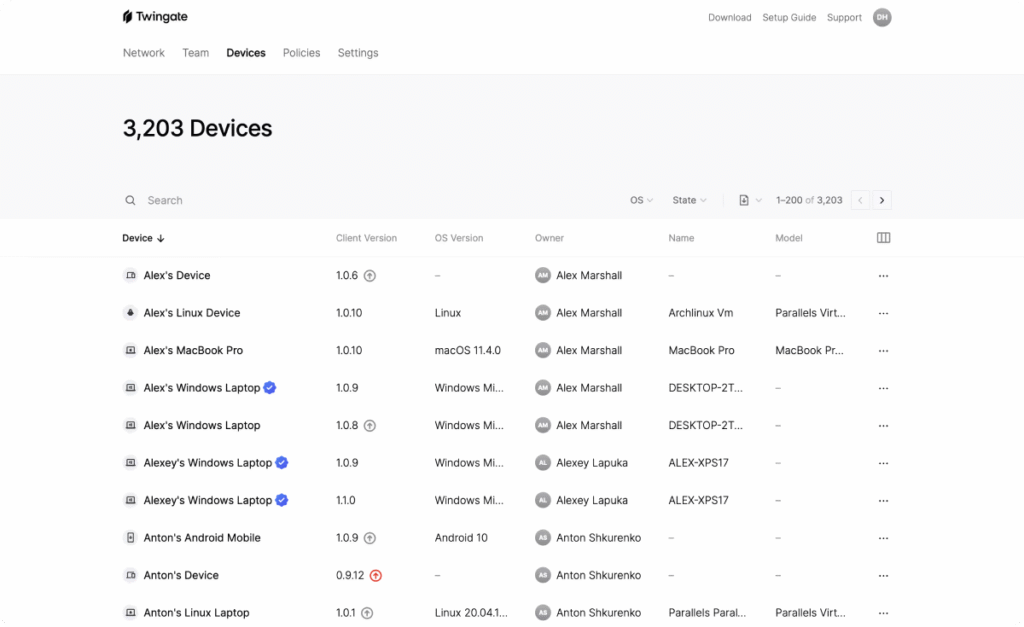
Twingate is a zero trust network access solution that replaces VPNs, jump hosts, and IP allowlists. Every connection is bound to a verified identity, scoped to a single resource, and closed when it should not exist, with nothing exposed to the public internet.
Twingate deploys as a software-only overlay that runs alongside existing infrastructure without network reconfiguration, using a lightweight Connector on a single host. Its architecture uses four components (Controller, Clients, Connectors, and Relays) so that no single component can independently allow traffic to flow.
Key features include:
- Identity-first access: Attaches a verified identity to every TCP/UDP connection and denies access by default, granting it only per resource rather than at the network level.
- Direct peer-to-peer tunnels: Establishes encrypted connections directly between users and resources rather than backhauling traffic through a central cloud, with no open inbound ports.
- Resource-level policies: Applies security policies per resource, per group, or network-wide, covering authentication frequency, MFA, device posture, location, and time or usage limits.
- Device posture enforcement: Verifies OS version, disk encryption, screen lock, and enrollment in MDM or EDR tools such as Intune, Jamf, and CrowdStrike before granting access.
- Identity provider integration: Delegates authentication to existing identity providers including Okta, Microsoft Entra ID, Google Workspace, JumpCloud, OneLogin, and Keycloak, with automatic access revocation on deactivation.
- Infrastructure-as-code management: Supports management through a Terraform provider, Pulumi, a Kubernetes operator, and a GraphQL admin API for version-controlled, automated deployment.
Limitations (as reported by users on G2):
- Enterprise management gaps: Some users describe complex configuration and tedious administration when deploying and managing across various MDMs at enterprise scale.
- Log export options: Reviewers note there is no straightforward way to stream logs into a SIEM, with export limited to Amazon S3.
- Partly implemented features: Some capabilities, such as auto-lock and request-access, are described as not fully implemented, and managing temporary external-user access can be challenging.
- Platform coverage gaps: Users mention a less polished mobile client and the absence of an official package for some Linux distributions.
Source: Twingate
6. Ericom ZTEdge
Best for: Midsize enterprises adopting isolation-based SSE
Strengths: Remote browser isolation and clientless app access
Things to consider: Now part of Cradlepoint; oriented to midsize firms
Ericom ZTEdge, now delivered by Ericom Security under Cradlepoint (part of Ericsson), is a cloud-native security service edge platform built around isolation technology. Remote browser isolation is the foundational component of its zero trust secure internet access approach.
The platform protects users, applications, networks, and data as they interact with the web, email, SaaS apps, and virtual meetings. It is delivered on the Ericom Global Cloud and was designed with midsize enterprises in mind, packaging security controls by use case such as ransomware and phishing prevention.
Key features include:
- Remote browser isolation: Runs web sessions in a remote, isolated container so zero-day malware, phishing, and credential theft do not reach endpoints or networks.
- Web and email security: Protects internet and email access against phishing, credential theft, and web-delivered malware without over-blocking legitimate sites.
- Clientless application access: Provides a clientless ZTNA option that gives contractors and third parties least-privilege access to web and cloud apps from unmanaged devices.
- Virtual meeting security: Applies controls to virtual meetings on web apps such as Zoom, Teams, and Google Meet to prevent data exposure through chats, screen shares, and video.
- Generative AI data loss prevention: Applies policy-based usage controls to generative AI websites to prevent data and IP exposure and reduce malware risk.
- Microsegmentation and access control: Includes microsegmentation and identity-based access controls delivered from the Ericom Global Cloud.
Limitations (based on publicly available sources):
- Midmarket orientation: Publicly available material positions the platform for midsize enterprises and small businesses delivered largely through MSSP partners, which may not suit every large-enterprise requirement.
- Ongoing brand and platform transition: Following the Cradlepoint and Ericsson acquisition, the product has been folded into Ericom Security by Cradlepoint, and integration work with the broader NetCloud portfolio is still developing.
- Limited independent review coverage: There is limited third-party review coverage of the current ZTEdge platform, which makes independent verification of day-to-day experience harder.
7. Forcepoint ONE
Best for: Data-first SSE across web, cloud, and private apps
Strengths: Single-agent SSE with deep DLP integration
Things to consider: Cloud-only delivery and configuration effort
Forcepoint ONE is a cloud-native security service edge platform that delivers secure access and data protection across web, cloud, and private applications through a single console. It unifies secure web gateway, cloud access security broker, and zero trust network access into one architecture with a single agent.
The platform is aimed at remote and hybrid workforces and integrates with Forcepoint’s data loss prevention technology so that one set of data policies can be applied consistently across channels. It supports both agent-based and agentless access, allowing coverage of unmanaged and BYOD devices.
Key features include:
- Unified SSE platform: Combines secure web gateway, CASB, and ZTNA into a single-agent, single-console architecture running on a cloud-native platform.
- Zero trust network access: Provides access to private applications without VPNs, including agentless access for HTTP/S apps on unmanaged devices.
- Cloud access security broker: Secures SaaS and IaaS with access controls, malware scanning, and data-at-rest protection across hundreds of thousands of cloud apps.
- Secure web gateway: Controls access to web content, blocks malware, and integrates remote browser isolation and content disarm and reconstruction for risky sites.
- Integrated data loss prevention: Applies DLP across uploads and downloads with a large library of pre-built policies and integration with Forcepoint Enterprise DLP.
- Consistent policy enforcement: Lets administrators define a data policy once and apply it everywhere across web, cloud, and private app channels from a single platform.
Limitations (as reported by users on G2 and Gartner Peer Insights):
- Learning curve for new users: Reviewers note the interface can be complicated for new administrators, with some screens described as busy and certain policy configurations requiring extra steps.
- Reporting flexibility: Users report that report customization is limited and that reporting and investigations could be faster and more flexible.
- Performance during updates: Some users observe occasional slow performance and longer-than-expected policy changes during policy or patch updates.
- Pricing predictability: Reviewers note that pricing and licensing could be simpler and more predictable, especially when add-ons are required.
SASE Solutions
8. Check Point SASE

Best for: Hybrid SASE with fast, on-device internet security
Strengths: Full-mesh private access and on-device inspection
Things to consider: Per-user licensing and on-premises rollout effort
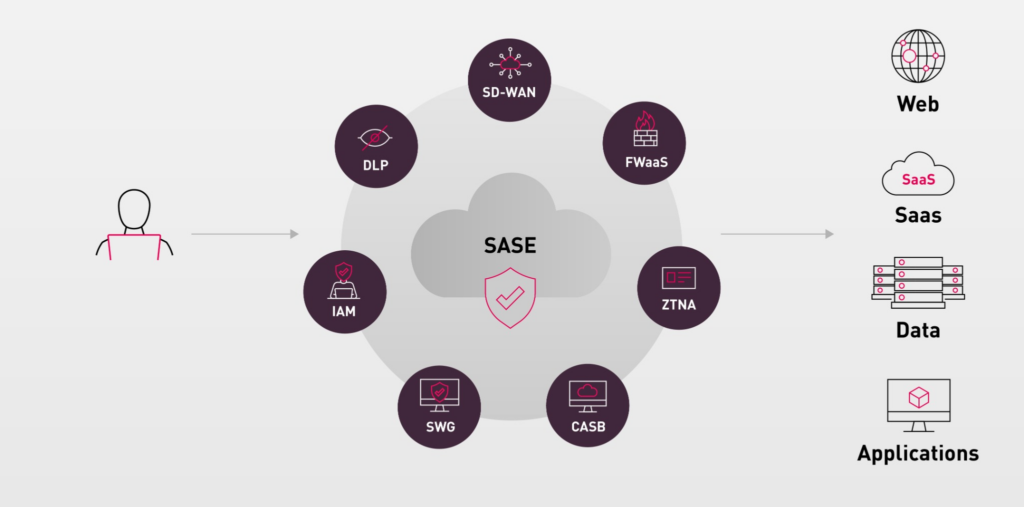
Check Point SASE, formerly Harmony SASE, is a hybrid secure access service edge platform that combines network security with high-performance access in a cloud-delivered service. It converges secure internet access, zero trust network access, and SaaS security into a single platform.
The platform uses a hybrid architecture that mixes on-device and cloud security inspection, and can integrate with existing on-premises infrastructure so organizations can adopt SASE at their own pace. It offers full-mesh connectivity and a global private backbone for distributed users, sites, and cloud resources.
Key features include:
- Full-mesh private access: Applies identity-centric zero trust access with full-mesh connectivity between users, sites, and resources, backed by a global private backbone.
- Hybrid internet access: Uses on-device inspection alongside in-browser and cloud protections so users can connect directly to the web, which the vendor reports as up to 10x faster than routing all traffic through the cloud.
- SaaS security: Provides inline and API-based enforcement with application control for thousands of cloud apps, tenant restrictions, AI-powered DLP, and posture management.
- GenAI monitoring: Monitors prompt-level generative AI usage to support secure AI adoption across the organization.
- Secure SD-WAN: Offers auto-optimized routing for over 10,000 applications with sub-second failover across WAN links, protected by ThreatCloud AI.
- Unified cloud dashboard: Manages users, resource access, and network configuration from a single cloud dashboard.
Limitations (as reported by users on Gartner Peer Insights):
- Per-user licensing cost: Reviewers note that per-user licensing can outpace comparable VPN solutions as user counts grow.
- On-premises rollout effort: Users report that on-premises deployments require extra networking work and deliver less value than a pure cloud deployment.
- Administrator licensing behavior: Some users note that adding external administrators can create additional user entries that consume licenses.
- Regional feature availability: Certain portal capabilities and integrations have rolled out on different timelines across regions.
Source: Check Point
9. Cloudflare One
Best for: Remote-heavy teams wanting fast VPN-off access
Strengths: Unified SASE on a large global network
Things to consider: Some newer features and a learning curve
Cloudflare One is a cloud-native SASE platform that unifies zero trust security and enterprise networking across Cloudflare’s global network. It delivers a single control plane, data plane, and infrastructure layer to replace a patchwork of appliances and point solutions.
The platform converges ZTNA, secure web gateway, cloud access security broker, network-as-a-service, and firewall-as-a-service, and also includes remote browser isolation, data loss prevention, email security, and digital experience monitoring. It is delivered from data centers in more than 300 cities.
Key features include:
- Zero trust access: Cloudflare Access verifies every user and device before granting identity-based, least-privileged access to applications, replacing legacy VPNs.
- Cloudflare Tunnel: Connects internal apps to the network through outbound-only tunnels without exposing public IP addresses.
- Secure web gateway: Filters DNS, HTTP, and network traffic to block threats and enforce acceptable use policies.
- Cloud access security broker: Scans SaaS apps and cloud environments for misconfigurations, data exposure, and insider risk, and inspects traffic for sensitive data through DLP.
- AI and MCP security: Provides visibility and control over generative AI usage, secures connections to Model Context Protocol servers, and can analyze prompt intent to block sensitive data leakage.
- Composable, programmable platform: Offers a composable architecture with API and Terraform support and custom code modules so deployments can be tailored and rolled out incrementally.
Limitations (as reported by users on G2 and Gartner Peer Insights):
- Feature maturity: Some users note that certain SSE and SASE features still feel newer and less mature than long-established competitors.
- Dashboard and policy setup: Reviewers describe the dashboard as confusing to learn and note that policy setup can take more steps than expected.
- Learning curve for advanced features: Advanced capabilities such as Zero Trust and WAF customization can require a good level of technical understanding.
- Manual configuration and add-ons: Users report manual setup of static routes and split tunneling, limited failover options, and egress IPs that must be purchased separately.
Related content: Read our guide to Zscaler DLP
10. FortiSASE
Best for: Organizations with existing Fortinet infrastructure
Strengths: Single-OS SASE with native SD-WAN integration
Things to consider: Setup complexity outside the Fortinet ecosystem
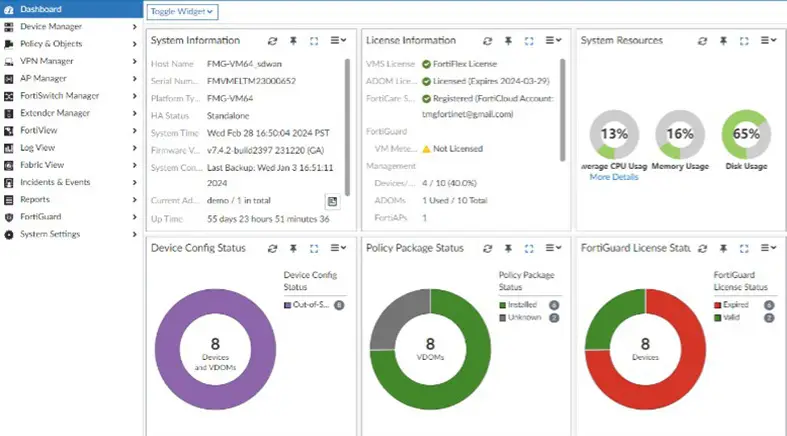
FortiSASE is Fortinet’s cloud-delivered secure access service edge platform that combines networking and security for hybrid and distributed workforces. It extends the convergence of networking and security from the network edge to remote users by pairing cloud-delivered security service edge with SD-WAN.
The platform runs on a single operating system (FortiOS) with a single agent (FortiClient) and a shared data lake, and is managed from a single console. It provides secure internet access, secure private access, and secure SaaS access across a global network of points of presence.
Key features include:
- Integrated networking and security: Combines SD-WAN with security service edge capabilities including SWG, ZTNA, CASB, FWaaS, and remote browser isolation.
- Single OS and agent: Runs on one operating system with a single agent and shared data lake, managed from one console for consistent enforcement.
- AI-driven threat intelligence: Uses FortiGuard Labs for real-time threat updates and the FortiAI-Assist assistant for troubleshooting and configuration.
- Flexible connectivity: Supports agent-based and agentless access, microbranches, thin edges, and non-traditional devices, with flexible point-of-presence selection.
- Native endpoint protection: Integrates endpoint protection and vulnerability management into FortiClient, reducing reliance on separate endpoint vendors.
- Data sovereignty option: FortiSASE Sovereign lets organizations deploy SWG, FWaaS, ZTNA, and CASB in their own data centers to meet data residency requirements.
Limitations (as reported by users on G2 and PeerSpot):
- Setup complexity: Users report that deployment can be complex and slower than competing products, particularly for those without prior Fortinet experience.
- Support responsiveness: Reviewers describe technical support as knowledgeable but sometimes slow, with mixed satisfaction during implementation.
- Cost for smaller teams: Some users find the cost high, which can be burdensome for smaller or budget-conscious organizations.
- Third-party integration and DLP depth: Users note that third-party integration support and the DLP feature set are areas that need further development.
Source: FortiSASE
11. Netskope One
Best for: Data-centric security and advanced DLP
Strengths: Deep CASB visibility and single-pass architecture
Things to consider: Support responsiveness reported by some users
Netskope One is a cloud-native security service edge platform built around a data-centric architecture, which makes it a strong option for organizations that prioritize data protection. It consolidates business-critical security services to enable secure access to web, cloud, and private apps for a hybrid workforce.
Rather than focusing only on securing the connection, Netskope focuses on securing the data itself, pairing deep cloud access security broker visibility with advanced data loss prevention. Its capabilities run on a single-pass architecture through one management console on the Netskope One platform and the NewEdge network.
Key features include:
- Advanced data loss prevention: Uses thousands of data identifiers, exact data matching, and machine learning classifiers to protect sensitive data across web, SaaS, and private apps.
- Deep CASB visibility: The Zero Trust Engine and Cloud XD provide activity-level visibility across thousands of cloud apps, distinguishing managed from personal app instances.
- Next-gen secure web gateway: Converges SWG and CASB into a next-gen secure web gateway that inspects and filters web and cloud traffic in real time.
- Zero trust network access: Netskope One Private Access replaces legacy VPNs with least-privilege access to private and legacy apps, combined with Endpoint SD-WAN.
- Single-pass architecture: Combines SWG, CASB, ZTNA, FWaaS, and RBI on one platform with a single-pass policy engine for consistent enforcement.
- Continuous adaptive trust: Uses continuous adaptive controls that verify user identity and device health, with user coaching for unauthorized access or data movement.
Limitations (as reported by users on Gartner Peer Insights):
- Support responsiveness: Some users report frustration with technical support responsiveness and difficulty getting timely responses.
- Install and performance issues: A few reviewers describe install failures and performance issues in specific situations.
- Non-standard protocol support: Users note challenges with support for certain non-standard protocols.
- Policy creation complexity: Some users would like the policy creation process simplified and certain reporting made more useful.
12. dope.security
Best for: Teams wanting a lightweight SWG without cloud latency
Strengths: On-device inspection and fly-direct architecture
Things to consider: Newer vendor with an expanding feature set
dope.security is a secure web gateway that takes a different approach from traditional cloud proxies. Its fly-direct architecture performs SSL inspection and filtering directly on the endpoint, so traffic goes straight to its destination instead of being routed through a cloud data center.
The agent installs on Mac and Windows and performs the full SWG function locally, including URL filtering, SSL inspection, anti-malware, cloud application control, and shadow IT discovery. Because inspection happens on the device, decrypted traffic never leaves the endpoint, and the vendor reports performance up to 4x faster than legacy cloud-proxy gateways.
Key features include:
- On-device SSL inspection: Breaks and inspects encrypted traffic on the laptop so plaintext never leaves the device, preserving both privacy and visibility.
- Fly-direct architecture: Sends traffic directly to its destination with no backhaul to a data center, which reduces latency and works across restricted geographies.
- URL filtering and cloud app control: Enforces web access and shadow IT policies locally on the endpoint, with instant policy push to devices.
- AI-powered endpoint DLP: Dopamine DLP inspects prompts and file uploads at the endpoint and classifies content to prevent data leakage, including to personal AI accounts.
- CASB Neural: An AI-driven cloud DLP scans Google and Microsoft 365 drives to categorize sensitive, publicly exposed files.
- Lightweight agent with fail-safe: Runs with a small resource footprint and provides fail-safe access to trusted sites if the cloud console is unreachable.
Limitations (based on publicly available sources):
- Expanding product scope: Publicly available material shows private access and some platform capabilities are described as coming soon, so the suite is still expanding beyond the secure web gateway.
- Endpoint-based coverage model: Because enforcement runs through the on-device agent, coverage depends on the agent being installed on each endpoint.
- Newer market entrant: As a more recent entrant to the secure web gateway market, the vendor has a shorter track record and smaller footprint than long-established competitors.
13. Microsoft Entra
Best for: Organizations deeply integrated with Microsoft
Strengths: Native Conditional Access and Microsoft integration
Things to consider: Licensing tiers and Entra join requirements
Microsoft Entra brings secure access into the Microsoft ecosystem through its Global Secure Access offering, which is Microsoft’s security service edge solution. Global Secure Access combines Microsoft Entra Internet Access, a secure web gateway, and Microsoft Entra Private Access, a zero trust network access service.
The two services are managed from a unified location in the Microsoft Entra admin center and are delivered from Microsoft’s global network spanning many regions and edge locations. They converge network access control with the identity, device posture, and session risk signals that Entra ID already collects, and are a natural fit for organizations built around Microsoft and Conditional Access.
Key features include:
- Entra Internet Access: An identity-based secure web gateway that protects internet and SaaS traffic, blocks threats and unsafe content, and applies web content filtering.
- Entra Private Access: A ZTNA service that provides identity-based access to private applications and resources without a VPN, using the Global Secure Access client.
- Conditional Access integration: Extends Entra Conditional Access controls, including MFA, device compliance, and risk-based policies, to network traffic rather than only cloud apps.
- Universal Tenant Restrictions: Applies tenant restrictions to reduce the risk of data exfiltration to unauthorized external tenants or personal accounts.
- Native Microsoft integration: Works with Microsoft 365, Azure, and Entra ID, with a Microsoft 365 traffic profile that routes traffic over Microsoft’s backbone.
- Traffic logging and dashboards: Provides detailed network traffic logs and dashboards showing relationships between users, devices, endpoints, and top destinations.
Limitations (based on publicly available sources):
- Licensing requirements: Users need Microsoft Entra ID P1 or P2 to use Internet Access and Private Access, and full capabilities are tied to the Entra Suite or higher Microsoft 365 tiers, so it is not a standalone purchase.
- Application Proxy gaps: According to Microsoft documentation, Private Access is not a drop-in replacement for every Application Proxy scenario, and some single sign-on and application-layer capabilities are not present.
- Compliant network and DNS limits: Compliant Network check is not supported for Private Access applications, and the Windows client does not support secure DNS such as DoH or DoT, which must be disabled.
- Device join requirements: Domain-joined-only devices cannot run the Global Secure Access client and require Hybrid Azure AD Join before Private Access can be deployed.
14. Cato Networks
Best for: A fully converged SASE platform with SD-WAN
Strengths: Single-pass cloud engine on a global backbone
Things to consider: Some advanced customization reported as limited
Cato Networks is a converged, cloud-native SASE platform that combines networking and security in a single architecture. Delivered from a global private backbone, it lets organizations consolidate multiple point products into one platform with a single management console and policy framework.
Cato connects sites, users, applications, and clouds into one cloud network and can be deployed gradually to replace security point solutions and legacy network services. Its security stack, SSE 360, is built on a Single Pass Cloud Engine that decrypts and inspects all traffic without appliances to size, patch, or upgrade.
Key features include:
- Converged SASE platform: Unifies SD-WAN, SSE, ZTNA, and security in a single cloud-native architecture managed from one console and policy framework.
- Global private backbone: Runs on a dense footprint of points of presence interconnected by multiple carriers, with SLA-backed connectivity and traffic optimization.
- SSE 360 security stack: Converges FWaaS, SWG, IPS, malware prevention, DNS security, RBI, CASB, DLP, and ZTNA on a single-pass engine that inspects all traffic.
- Universal ZTNA: Enforces risk-based, least-privilege access to applications through a client, enterprise browser, browser extension, or clientless portal.
- Endpoint protection and XDR: Extends protection to endpoints with an EPP/EDR engine and correlates network and endpoint data into a unified data lake for XDR.
- Single management application: Manages configuration, analytics, monitoring, and incident response through the Cato Management Application, with a universal API for integration.
Limitations (as reported by users on G2 and AWS Marketplace):
- Advanced customization limits: Users report that advanced customization and granular control options can be more limited than traditional firewalls.
- Reporting and analytics depth: Reviewers note that reporting and analytics could be more detailed and flexible, and policy updates sometimes take a few minutes to apply.
- Maturing enterprise features: Some users describe certain enterprise-level features as still maturing, with gaps in areas such as sandboxing and full DLP noted by some reviewers.
- Cost sizing: Total cost depends on bandwidth tiers, site counts, and enabled features, which some users note requires careful sizing.
Conclusion
Secure access service edge (SASE) and zero trust network access (ZTNA) solutions continue to evolve, offering organizations new ways to consolidate security controls and enforce least-privilege access across distributed environments. As the demand for secure, cloud-native access grows, evaluating platforms based on architecture, performance, scalability, and ease of integration is essential. Success often depends on aligning technical requirements, such as identity-driven policy enforcement, visibility, and data protection, with operational needs, including deployment simplicity, support responsiveness, and total cost of ownership.
Related content: Read our guide to Zscaler vpn