
Best BYOD Platforms: Key Features and Top 9 Options in 2026


What Is a BYOD Platform?
Bring Your Own Device (BYOD) platforms are software solutions that enable, manage, and secure employee-owned devices (smartphones, tablets, laptops) for professional use. These platforms enable the separation of work data from personal data, ensuring data protection, compliance, and user privacy.
Key features of BYOD platforms:
- Containerization: Separates work apps and data from personal data on the device, allowing for secure management without invading user privacy.
- Remote wipe: Allows IT to delete only corporate data from a device if it is lost, stolen, or when an employee leaves the company.
- Security policies: Enforces passcodes, encryption, and minimum operating system versions to ensure device compliance.
- App management: Allows organizations to push, update, or restrict access to specific enterprise applications.
- Network access control (NAC): Limits network access based on device health, user roles, or location.
Enable Remote Workers Without VDI or Issuing Devices
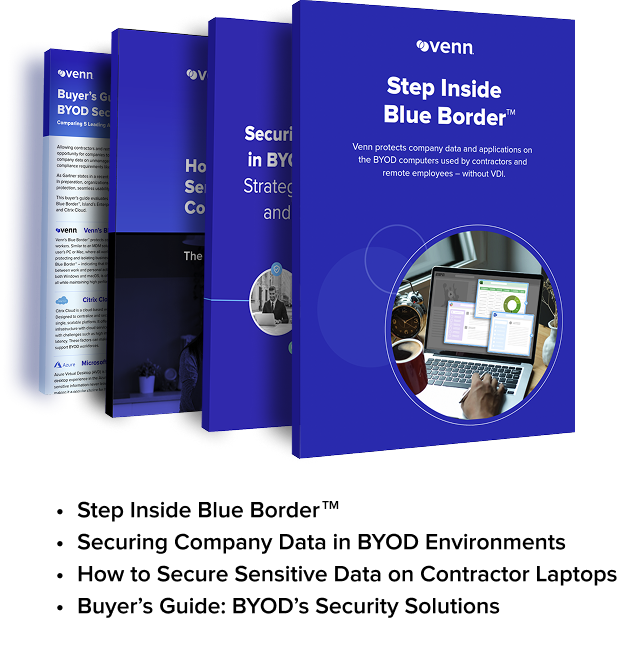
Unlock the 4 essential assets you need to secure company data on unmanaged laptops – without VDI.
The Need for BYOD Platforms
As more organizations allow employees to use personal devices for work, managing this trend, known as bring your own device (BYOD), has become critical. Without a structured platform, companies face challenges around security, compliance, and support. A BYOD platform helps IT teams manage and secure personal devices while enabling productivity.
Key reasons organizations need a BYOD platform include:
- Security and data protection: Personal devices often lack enterprise-grade security. A BYOD platform enforces security policies such as encryption, remote wipe, and app control to protect sensitive company data.
- Policy enforcement: With a centralized platform, IT can enforce usage policies across different devices and operating systems, ensuring compliance with internal and regulatory standards.
- Device and application management: BYOD platforms offer tools for mobile device management (MDM) and mobile application management (MAM), allowing administrators to control how corporate apps and data are accessed and used.
- Support for multiple platforms: Employees use a variety of devices—iOS, Android, Windows, and others. A good BYOD platform supports cross-platform management, reducing compatibility and support issues.
- Improved user experience: BYOD platforms balance control and convenience. They provide secure access to work resources without overly restricting personal use, helping to maintain employee satisfaction.
- Audit and compliance readiness: Built-in logging and monitoring features help organizations track device usage, flag policy violations, and prepare for audits.
- Scalability and centralized management: As organizations grow, managing devices manually becomes unfeasible. BYOD platforms scale with the company and offer centralized dashboards for easier oversight.
- Cost reduction: Supporting employee-owned devices reduces hardware costs for the organization, while a BYOD platform ensures this cost-saving measure doesn’t increase risk.
Key Features of BYOD Platforms
Containerization
Containerization is a method of isolating corporate data, apps, and configurations from the rest of a user’s personal device. BYOD platforms use containerization to create a secure workspace (usually encrypted) within the device. This workspace operates independently of the user’s personal environment, meaning data inside the container cannot be accessed or copied by personal apps.
IT administrators can enforce specific policies within the container, such as disabling screen captures, restricting file transfers, or controlling access to corporate data based on user roles. Containerization also simplifies data removal. If an employee leaves or a device is lost, the organization can wipe the container without affecting personal content like photos, messages, or personal apps.
Remote Wipe
Remote wipe is a critical security feature that allows IT to erase data from a device remotely. This can be triggered when a device is reported lost or stolen, when a user leaves the organization, or if a device becomes non-compliant with security policies.
BYOD platforms typically support two modes of wipe: selective and full. Selective wipe removes only the corporate data and applications, preserving personal files and settings. This ensures that users retain ownership of their personal data while allowing organizations to maintain control over business assets. Full wipe erases all data on the device and may be used in cases where corporate apps have full-device management rights or where stronger security controls are required.
Security Policies
Security policies in a BYOD platform define the rules and requirements devices must meet to access corporate resources. These policies are essential for enforcing security baselines and ensuring consistent protection across all personal devices connecting to the organization’s network.
Common security policies include mandatory device encryption, password complexity requirements, biometric authentication, automatic screen locks, and restrictions on rooted or jailbroken devices. Platforms may also enforce OS version minimums and block access from devices that don’t meet patch or update criteria. These policies are centrally managed and enforced at the device level.
App Management
App management allows IT teams to control how corporate applications are deployed, used, and maintained on personal devices. This includes both app-level security controls and distribution mechanisms. Through mobile application management (MAM), organizations can push required apps to users, manage licensing, and enforce restrictions such as preventing data sharing between managed and unmanaged apps.
Features like app wrapping and SDK-based controls enable fine-grained policies, including disabling clipboard use, enforcing VPN usage per app, or restricting app usage to specific geolocations. App management also includes the ability to update or revoke apps remotely, monitor usage, and set data access policies.
Network Access Control (NAC)
Network access control restricts device access to corporate networks based on security posture and compliance status. Before a device connects to internal resources) such as Wi-Fi, VPN, or cloud services) the NAC system verifies whether it meets predefined conditions. These conditions can include device enrollment in the BYOD platform, up-to-date antivirus protection, encryption enabled, and adherence to security policies.
Devices that fail the checks are either blocked or placed in a limited-access environment until they are brought into compliance. NAC solutions may integrate with identity and access management (IAM) systems to enforce role-based access, or use contextual data like geolocation and network type to apply conditional access policies.
Related content: Read our guide to BYOD tools
Notable BYOD Platforms
Remote Work Platforms
1. Venn
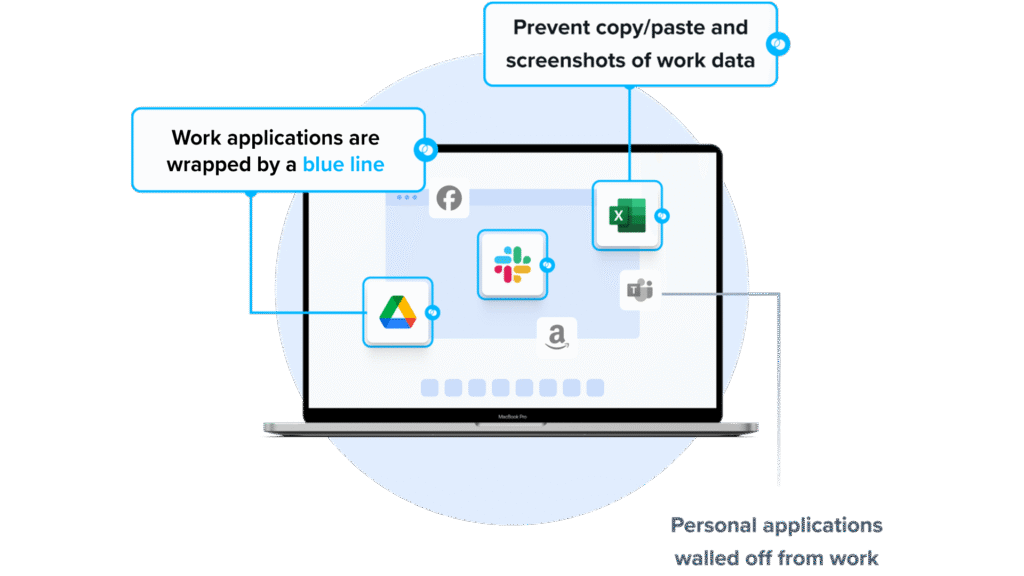
Venn’s Blue Border was purpose-built to protect company data and applications on BYOD computers used by contractors and remote employees.
Similar to an MDM solution but for laptops, work lives in a company-controlled Secure Enclave installed on the user’s PC or Mac, where all data is encrypted and access is managed. Work applications run locally within the enclave – visually indicated by a blue line around work applications – protecting and isolating business activity while ensuring end-user privacy. With Venn, you can eliminate the burden of purchasing and securing laptops and managing virtual desktops (VDI).
Key features include:
- Granular, customizable restrictions: IT teams can define restrictions for copy/paste, download, upload, screenshots, watermarks, and DLP per user.
- Secure Enclave technology: Encrypts and isolates work data on personal Mac or PC computers, both for browser-based and local applications.
- Zero trust architecture: Uses a zero trust approach to secure company data, limiting access based on validation of devices and users.
- Visual separation via Blue Border: Visual cue that distinguishes work vs. personal sessions for users.
- Supports turnkey compliance: Using Venn helps companies maintain compliance on unmanaged Macs with a range of regulatory mandates, including HIPAA, PCI, SOC, SEC, FINRA and more.
If you want to see Blue Border in action, book a demo here.
2. Parallels Secure Workspace

Parallels Secure Workspace is a browser-based secure access platform that enables employees and contractors to access applications, desktops, and files from any device without requiring local installations. It acts as a secure gateway for legacy applications, SaaS, and file systems, supporting BYOD and remote work scenarios with zero trust controls.
Key features include:
- Browser-based secure access: Delivers Windows and Linux applications and desktops through HTML5 without requiring client installations
- Zero trust architecture: Replaces traditional VPN access with encrypted traffic and secure authentication by default
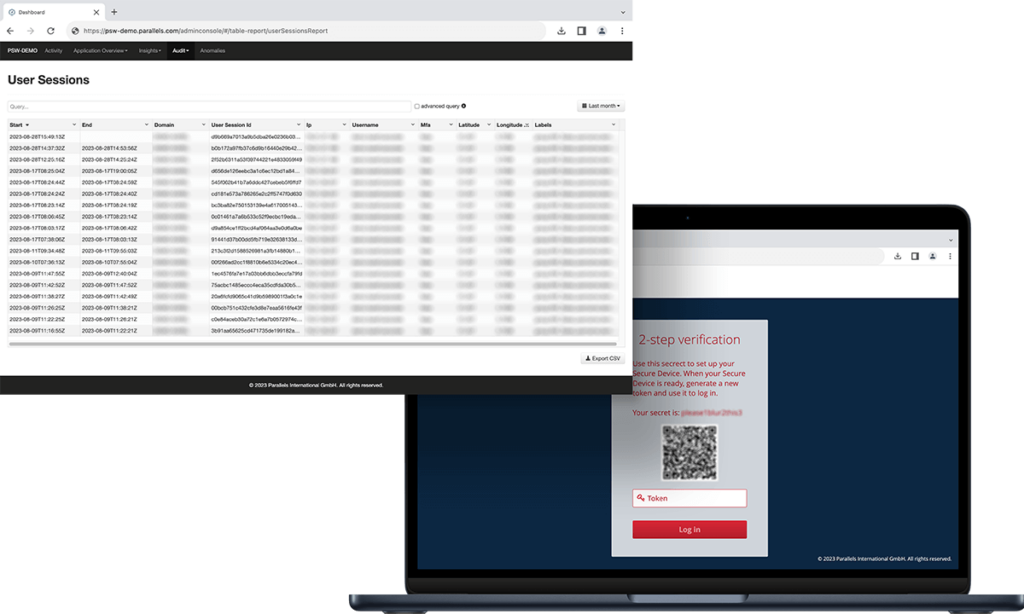
- Built-in multi-factor authentication: Supports TOTP and HOTP authentication and integrates with external identity providers
- Session recording and auditing: Provides deep usage audits, anomaly detection, and session recording for compliance and monitoring
- Granular usage controls: Enforces context-aware policies based on network, location, or user role
- Single sign-on integration: Aggregates SaaS, web apps, file servers, and legacy apps under a unified SSO experience
Source: Parallels
3. Thinfinity Workspace
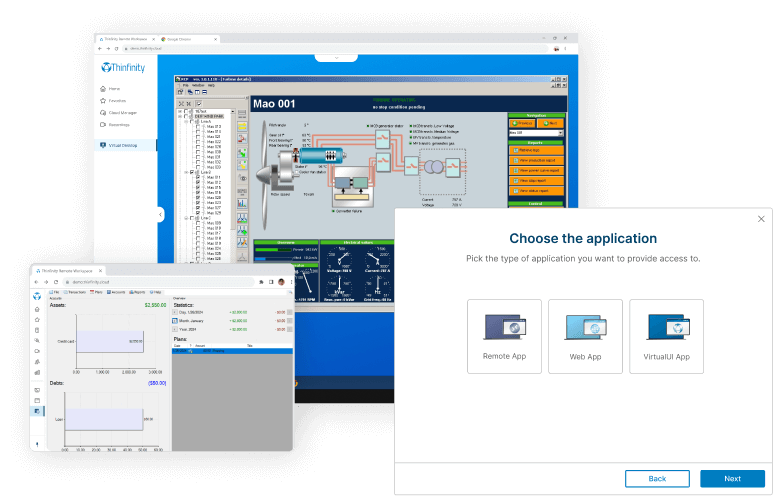
Thinfinity Workspace is a clientless zero trust network access (ZTNA) and virtual desktop infrastructure (VDI) platform that delivers remote desktops and applications through a secure browser-based interface. It supports on-premises and SaaS deployments and enables secure access to virtual resources without installing local agents.
Key features include:
- Zero trust network access: Uses ZTNA principles to enforce secure access to virtual desktops and applications
- RDP over SSL and proprietary protocols: Enables encrypted remote desktop connections using RDP over SSL or Thinfinity’s protocol
- Directory integration: Integrates with local directories and Active Directory for centralized identity management
- Role-based access control: Applies RBAC to manage user and resource permissions
- Web application gateway: Publishes web applications securely with TLS-encrypted browser access
- Identity provider integration: Supports SAML and OAuth2 integrations with providers such as Entra AD, Okta, and Google
- Multi-factor authentication: Compatible with common authenticator applications for additional login security
Source: Cyblesoft
Mobile Device Management (MDM)
4. Microsoft Intune
Microsoft Intune is a cloud-based endpoint management solution that helps organizations secure, manage, and support user devices and applications across platforms. It combines AI-driven insights, automation, and unified policy enforcement to reduce risk and simplify operations.
Key features include:
- Cross-platform endpoint management: Manage and secure cloud-connected devices across Windows, macOS, iOS, Android, and Linux from a single console.
- Zero trust security model: Continuously verify device compliance, apply conditional access, and mitigate threats using Microsoft Security signals and AI.
- AI-driven operations: Use Microsoft Security Copilot to automate routine tasks, investigate incidents, and gain actionable insights across the digital estate.
- Application management: Simplify app deployment and lifecycle management using Microsoft Intune Enterprise Application Management for Win32, mobile, and custom apps.
- Privileged task delegation: Allow non-admin users to perform approved admin tasks using Endpoint Privilege Management, reducing overprovisioning risks.
Source: Microsoft Intune
5. Scalefusion

Scalefusion is a unified mobile device management (MDM) solution that simplifies the control and security of diverse endpoints across Windows, Android, iOS, macOS, Linux, and ChromeOS. Supporting corporate and BYOD environments, it provides centralized control over device configuration, app deployment, content distribution, and security enforcement.
Key features include:
- Cross-platform device management: Supports comprehensive management for Windows, Android, iOS, macOS, Linux, and ChromeOS devices from a single dashboard.
- Seamless device enrollment: Offers low-touch enrollment options with support for OOB protocols, minimizing end-user setup effort.
- Policy enforcement: Enables strict control over device behavior with kiosk mode, usage restrictions, and compliance rules.
- Application management: Supports deployment and management of public, private, and enterprise apps across platforms.
- Content management: Allows secure sharing of documents and resources to distributed teams, supporting remote collaboration.
Source: ScaleFusion
6. IBM MaaS360
IBM MaaS360 is a UEM platform that helps organizations manage and protect devices across their mobile and hybrid workforce. With AI-powered automation and native threat defense, it provides a centralized solution for securing endpoints, enforcing compliance, and simplifying device management.
Key features include:
- Cross-platform endpoint management: Manage mobile devices, laptops, and desktops across Android, iOS, Windows, macOS, and more from a unified platform.
- AI-powered automation: Leverage IBM Watson AI to detect risks, automate responses, and gain actionable insights for improved security and operational efficiency.
- Fast, simplified setup: MaaS360 Fast Start enables small and medium businesses to secure devices quickly with automated setup and minimal configuration effort.
- Threat defense: Monitor device health and respond to threats in near real-time using native security features and AI-driven risk assessments.
- Policy-based management: Enforce compliance policies across devices with automated remediation and centralized control, reducing manual IT overhead.
Source: IBM MaaS360
Unified Endpoint Management (UEM)
7. Hexnode UEM
Hexnode UEM is a scalable, cross-platform unified endpoint management solution for enterprises managing a growing and diverse device fleet. It enables centralized management of endpoints across Windows, macOS, Android, iOS, Linux, ChromeOS, tvOS, FireOS, and visionOS, offering IT teams control, automation, and security from a single platform.
Key features include:
- Broad OS support: Manage endpoints across Windows, macOS, Android, iOS, tvOS, ChromeOS, FireOS, Linux, and visionOS from a unified platform.
- Automated enrollment and provisioning: Supports zero-touch enrollment methods including Android Enterprise, Apple Business Manager, and Windows Autopilot for simplified device onboarding.
- Kiosk mode: Lock devices into single or multi-app modes to create purpose-specific endpoints for frontline or customer-facing use cases.
- No-code workflow automation: Build and schedule policy-based actions with no-code automation to simplify routine device management tasks.
- Patch and update management: Deliver OS updates and application patches across platforms automatically to maintain security and compliance.
Source: Hexacode
8. Workspace ONE
Workspace ONE UEM is a unified endpoint management platform from VMware that consolidates the management of all device types (corporate-owned, BYOD, shared, or mission-critical) under a single cloud-native solution. It helps organizations simplify IT operations, secure endpoints with zero trust policies, and improve user experiences across devices and platforms.
Key features include:
- Cross-platform endpoint management: Manage Windows, macOS, Android, iOS, and specialty rugged devices in one unified console.
- Zero trust security model: Enforce conditional access and device compliance checks, with automatic remediation and device wipe when needed.
- Multi-tenant architecture: Configure policies across different business units with inheritance and override capabilities to match organizational structure.
- IT orchestration and automation: Use a low-/no-code interface to automate complex workflows, reducing repetitive manual tasks for IT teams.
- App lifecycle management: Manage the complete lifecycle of all app types and provide users with a unified app catalog through Intelligent Hub with SSO support.
Source: Workspace One
9. ManageEngine Endpoint Central
ManageEngine Endpoint Central is a unified endpoint management (UEM) solution that enables organizations to manage, secure, and support a range of endpoints from a single, centralized console. It helps IT teams automate software deployment, patch management, asset tracking, and policy enforcement across devices and platforms.
Key features include:
- Cross-platform device support: Manage desktops, laptops, mobile devices, servers, tablets, TVs, IoT, and rugged devices across Windows, macOS, Linux, Android, iOS, iPadOS, ChromeOS, and tvOS.
- Software deployment: Automate application distribution across endpoints, ensuring consistent software availability with minimal manual effort.
- Patch management: Detect and deploy security patches and updates across operating systems and third-party applications to reduce vulnerabilities.
- Asset management: Track hardware and software inventory, monitor usage, and gain visibility into the IT asset ecosystem from one place.
- Remote control: Troubleshoot devices remotely and resolve user issues without requiring physical access, improving support efficiency.
Source: ManageEngine
Conclusion
BYOD platforms allow organizations to support flexible work models without sacrificing security or compliance. By combining data isolation, policy enforcement, application control, and conditional access, these solutions reduce the risks associated with employee-owned devices. The right approach should align with security requirements, regulatory obligations, and user privacy expectations while remaining scalable as device fleets and remote work demands grow.
