
AI Security Tools: 13 Best Platforms Compared for 2026


See Venn first in Google Search
Add as a preferred source on Google
TL;DR: AI security tools discover, monitor, and protect AI models, data, and usage against threats like prompt injection and model theft. Best for securing AI on unmanaged devices: Blue Border; runtime defense: Lakera; model security: HiddenLayer; AI posture: Wiz.
What Are AI Security Tools?
AI security tools, including platforms like Blue Border, Checkmarx, and Protect AI, provide specialized protection for AI systems and data pipelines. They detect, monitor, and mitigate risks like prompt injection, data poisoning, and model theft across development and runtime, often using AI/ML to detect anomalies and automate defenses.
Unlike traditional security products that rely on static rules and signatures, AI-powered tools adapt to new attack methods by analyzing patterns and behaviors in real time. These tools can process massive amounts of data quickly, detect anomalies, and automate many tasks that would otherwise require manual intervention from security analysts.
AI security tools are now essential for organizations facing increasingly complex and sophisticated cyber threats. As attackers adopt more advanced tactics, traditional security measures often fall short. AI-driven tools provide a dynamic defense, continuously learning from new data and evolving attack methods.
Free eBook:
Secure Remote Access that Doesn’t Drive Users Crazy!
Secure your entire extended workforce without issuing devices or VDI. Keep your organization agile, compliant, and secure.
In this article:
AI Security Tools at a Glance
The table below summarizes the key differences between the AI security tools covered in this article, including who each is best for, where it is strongest, and what to weigh before adopting it. We explore each tool in more detail in the sections that follow.
| Category | Solution | Best For | Key Strengths | Things to Consider |
| Secure Workspace & AI Access Control | Blue Border™ | Securing data and AI workflows on BYOD/unmanaged devices | Local secure enclave, DLP, approved-AI-only controls | Performance varies on some endpoints; limited customization |
| Secure Workspace & AI Access Control | Island | Governing AI access inside the enterprise browser | In-browser AI controls, last-mile DLP, prompt-injection defense | Requires moving users to a Chromium-based browser |
| Secure Workspace & AI Access Control | LayerX | Securing AI and SaaS use in any existing browser | Extension-based AI DLP, shadow-AI discovery, access control | Relies on deploying the extension to each user |
| AI Runtime Protection & LLM Firewalls | Prompt Security | Employee GenAI use and homegrown LLM apps | Shadow-AI discovery, real-time DLP, prompt-injection blocking | Now part of the SentinelOne Singularity platform |
| AI Runtime Protection & LLM Firewalls | Lakera Guard | Real-time GenAI app, agent, and MCP protection | Low-latency prompt-attack blocking and output controls via API | Developer-centric; pricing is not published |
| AI Runtime Protection & LLM Firewalls | Cloudflare Firewall for AI | Public-facing LLM apps and APIs | Edge-deployed prompt-injection and data-leak detection | Strongest for apps behind Cloudflare’s network |
| AI Model Security, Testing & MLSecOps | HiddenLayer | Securing AI/ML models and supply chain | Model scanning, attack simulation, runtime detection | Chat-app prompt guardrails are not its core focus |
| AI Model Security, Testing & MLSecOps | Mindgard | Automated AI red teaming and offensive testing | Attacker-aligned recon, red teaming, runtime defense | Testing-centric, not broad posture or DSPM |
| AI Model Security, Testing & MLSecOps | Cisco AI Defense | Enterprise-wide AI security (using and building AI) | Network-layer visibility, validation, runtime guardrails | Strongest within Cisco’s security fabric |
| AI Security Posture Management & Governance | Wiz AI-SPM | Securing AI pipelines and models in the cloud | Agentless discovery, misconfiguration detection, attack-path analysis | Can be complex and costly at scale |
| AI Security Posture Management & Governance | Prisma AIRS | Comprehensive AI lifecycle and agent security | Runtime firewall, model scanning, red teaming, posture | Throughput and region limits on runtime intercept |
| AI Security Posture Management & Governance | Securiti | Governing data and AI use with compliance | AI discovery, Data+AI mapping, regulatory alignment | Interface learning curve; classification limits |
| AI Security Posture Management & Governance | IBM Guardium AI Security | Unifying AI posture with governance | AI discovery, posture management, watsonx.governance link | Steep learning curve; deployment overhead |
How AI Security Tools Work
1. Machine Learning and Behavioral Analysis
Machine learning is at the core of most AI security tools. These systems are trained on large datasets containing normal and malicious activity, allowing them to recognize subtle deviations that may signal a threat. By continuously analyzing network traffic, user behaviors, and system logs, machine learning models identify patterns that are difficult for humans to detect.
Behavioral analysis extends this capability by creating dynamic profiles for users, devices, and applications. The system establishes a baseline of typical activity and monitors for actions that fall outside these patterns. For example, if a user suddenly accesses sensitive data at an unusual hour or a device communicates with an unfamiliar server, the tool can flag this as suspicious. This method reduces false positives and improves threat detection.
2. Contextual Risk Assessment
Contextual risk assessment allows AI security tools to evaluate threats within the organization’s environment. Instead of treating every alert as equally critical, these tools assess the potential impact of a detected anomaly based on factors like user role, data sensitivity, device type, and historical behavior. By incorporating context, the system prioritizes incidents that pose the greatest risk, enabling security teams to focus on the most significant threats.
This context-aware approach improves decision-making by providing actionable insights rather than overwhelming analysts with raw alerts. For example, an attempted login from a new device might be less concerning for a guest user but highly suspicious for an administrator with access to sensitive data.
3. Automation and Remediation
Automation is a core feature of AI security tools, enabling them to take immediate action when a threat is detected. Instead of waiting for human intervention, these systems can automatically isolate compromised devices, block malicious traffic, or reset credentials. This rapid response reduces the window of opportunity for attackers and limits damage from breaches.
Remediation workflows are often customizable, allowing organizations to define the actions taken for various threat scenarios. For example, low-risk alerts may trigger notifications, while high-severity incidents prompt automated containment and escalation procedures. By automating routine tasks and initial responses, AI security tools allow security teams to focus on complex investigations and strategic initiatives.
4. Continuous Monitoring
Continuous monitoring is fundamental to the effectiveness of AI security tools. These systems operate 24/7, scanning for threats across endpoints, networks, and cloud environments. Unlike periodic manual reviews, continuous monitoring ensures that transient or stealthy attacks are detected as they occur, reducing the dwell time of intruders within a system.
This always-on approach is valuable as organizations expand their digital footprint and adopt remote work models. With users and devices connecting from diverse locations, maintaining a persistent security posture is required. Continuous monitoring not only detects new threats but also supports compliance efforts by generating logs and reports required for regulatory audits.
Key Types of AI Cybersecurity Tools
Secure Workspace and BYOD Security Platforms
Secure workspace and BYOD (Bring Your Own Device) security platforms use AI to protect corporate data on personal and unmanaged devices. These solutions create secure environments for work applications, enforcing policies that separate business data from personal information. AI-driven monitoring tracks device usage, detects risky behaviors, and ensures compliance with organizational security standards.
Why they matter:
These platforms are important as remote and hybrid work models become common. Employees often use their own laptops, tablets, and smartphones to access sensitive data, creating new attack vectors. AI-powered BYOD tools reduce risk by continuously assessing device health, blocking unauthorized access, and automating responses to detected threats.
AI Threat Detection and Response Tools
AI threat detection and response tools use machine learning and analytics to identify, investigate, and mitigate cyber threats. They analyze network traffic, endpoint activity, and user behavior to uncover suspicious actions that traditional tools might miss. These systems can automatically prioritize alerts, correlate incidents, and recommend or execute response actions.
Why they matter:
By automating threat detection and response, organizations can reduce the time attackers spend undetected in their environments. AI-driven platforms also help address the cybersecurity skills gap by handling routine monitoring and incident triage, allowing human analysts to focus on complex threats and proactive defense strategies.
AI Application Security (AppSec) Tools
AI application security tools focus on identifying vulnerabilities and security flaws in software applications. Using machine learning, these tools scan source code, dependencies, and runtime environments to detect weaknesses. They help developers remediate issues early in the software development lifecycle, reducing the risk of exploitation after deployment.
Why they matter:
With the rise of DevSecOps and continuous deployment, the need for automated AppSec solutions has grown. AI-powered tools can integrate with development pipelines, provide contextual recommendations, and suggest code fixes. This supports secure software delivery and improves application resilience against threats.
AI Model and LLM Security Tools
AI model and LLM (large language model) security tools protect the integrity, confidentiality, and reliability of AI models. These solutions monitor for adversarial attacks, data poisoning, and model theft, which can compromise both the model and the data it processes. They use AI to detect abnormal inputs, unauthorized access, and attempts to manipulate model outputs.
Why they matter:
As organizations adopt AI and LLMs in critical business functions, securing these assets becomes necessary. Specialized tools can audit models for vulnerabilities, enforce access controls, and provide explainability features that help identify misuse.
Related content: See how the NIST AI Risk Management Framework helps secure AI models.
Notable AI Security Tools
How we selected these tools: We shortlisted AI security tools based on their ability to discover, monitor, and protect AI systems, models, data pipelines, and AI usage across development and runtime, including defenses against threats such as prompt injection, data leakage, and model theft.
Secure Workspace and AI Access Control Platforms
1. Blue Border™

Best for: Securing company data and AI use on unmanaged or BYOD computers.
Strengths: Company-controlled secure enclave with DLP and approved-AI-only controls.
Things to consider: Performance can vary on some endpoints; varying customization.
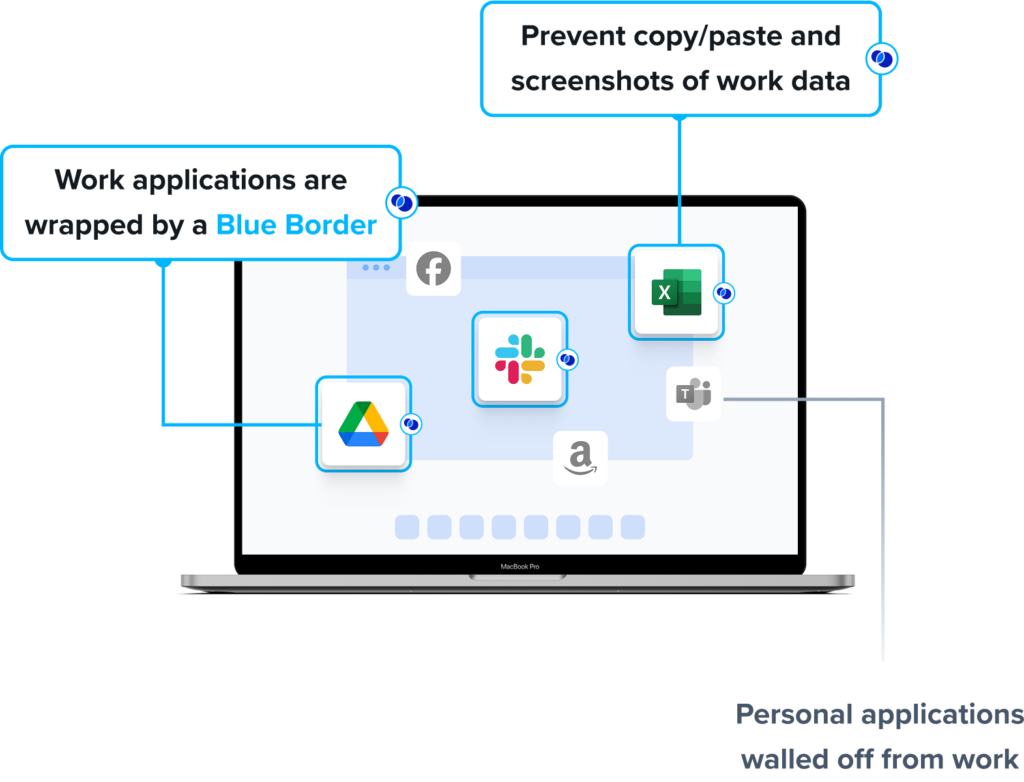
Blue Border is the secure workspace for remote employees and contractors on any device. Work runs locally inside a company-controlled secure enclave on the user’s PC or Mac – without VDI or fully controlling the endpoint. Blue Border gives IT a simpler, device-agnostic way to secure remote work, enable contractor and BYOD workforces, govern AI usage and replace VDI. For AI specifically, Venn lets IT define which AI tools are authorized to interact with company applications and data inside the enclave, and blocks unauthorized AI tools from reaching protected information even when they run locally on the device.
Key features include:
- Secure enclave on the endpoint: Installs a lightweight agent that creates a company-controlled secure enclave on any PC or Mac, running work apps locally without virtualization, remote sessions, or backend infrastructure.
- Approved-AI-only access: Lets IT define which AI tools are authorized to interact with company applications and data inside the enclave, and blocks AI tools outside the enclave from accessing protected information even when they run locally on the device.
- Data loss prevention and clipboard control: Enforces DLP and exfiltration controls within the enclave, governing actions such as clipboard, file transfers, screen capture, downloads, and AI tool access so sensitive data cannot move outside Blue Border.
- Audit logging and visibility: Captures audit logs and visibility over activity inside the enclave across all governed devices, supporting compliance documentation while leaving personal activity outside the enclave unmonitored.
- Compliance-ready policy enforcement: Applies precise policy, data protection, and audit enforcement controls designed to meet regulatory standards such as HIPAA, FINRA, PCI, and SOC 2 on unmanaged and BYOD endpoints.
- Device flexibility without full management: Runs work apps locally on the user’s own device at native speed, controlling the data and apps rather than managing the entire device.
Limitations (as reported by users on G2):
- Performance on some devices: Some users report the secure enclave can feel slow or sluggish on certain endpoints, including occasional reduced speed when accessing hosted applications.
- Customization scope: A few users note customization options can be limited in some areas, though they still find the product effective for organizing and protecting work.
- Support model: Support is handled through a general queue rather than scheduled time with a specific representative, which some users would like to see change.
Source: Venn
2. Island

Best for: Governing and embedding AI access inside the enterprise browser.
Strengths: In-browser AI controls, last-mile DLP, and prompt-injection defense.
Things to consider: Requires moving users to a Chromium-based browser.
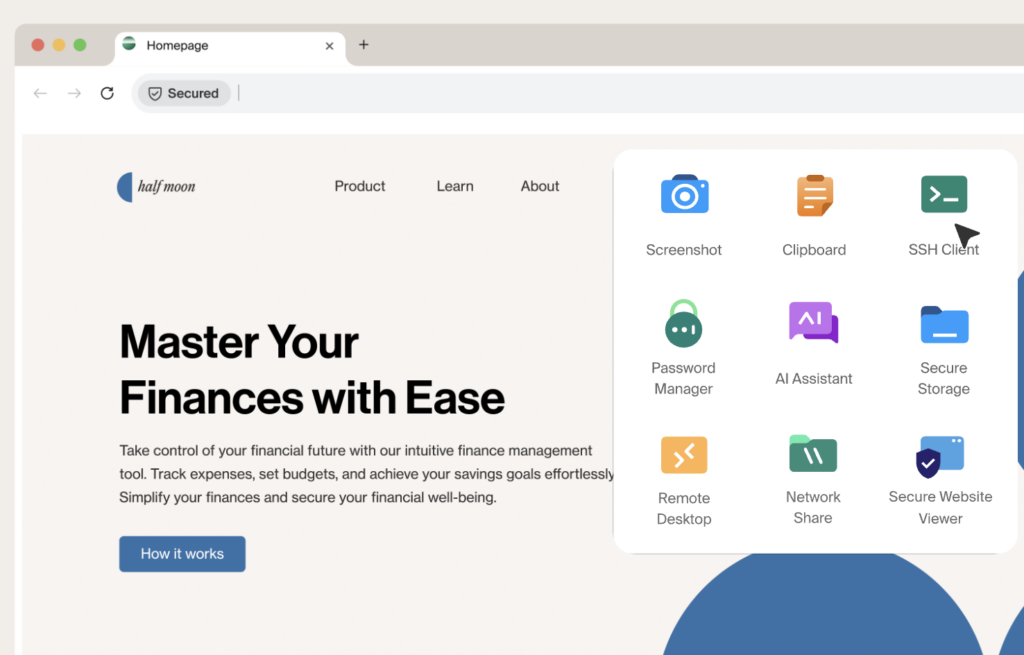
Island is an enterprise browser that builds security, governance, and AI controls directly into the browsing environment where employees work. Its Enterprise AI Browser lets organizations embed AI assistants such as ChatGPT, Copilot, Gemini, Claude, and Grok into the browser sidebar with real-time page context, while keeping that usage under enterprise policy. Security teams can define which AI tools, models, and tenants each employee can access based on identity, role, and location. Island has since expanded these capabilities into the broader Island Enterprise Platform, which pairs the enterprise browser with Enterprise AI and Enterprise Network services under one policy and visibility layer.
Key features include:
- Governed AI access and enablement: Defines which AI tools, models, and tenants each user can reach by identity, role, and location, and embeds approved AI assistants into the browser with enterprise context such as page content and user role.
- Last-mile data protection: Redacts sensitive data before it reaches any AI provider and intercepts AI responses before they render to the user, applying DLP controls directly inside the browser where prompts and pastes occur.
- Prompt injection defense: Uses a hardened browser architecture with purpose-built defenses to intercept prompt injection attacks before they can compromise the AI model or expose data, operating at the point where users and AI interact.
- AI visibility and discovery: Tracks AI tool adoption across the organization, including which apps are used, by whom, and how often, and guides employees toward approved tools with in-browser notifications, policy explanations, and redirects.
- Agent governance and auditing: Enforces permissions for AI agents covering what they can access and execute, with optional human approval, and captures detailed logs of every AI conversation, prompt, and agent action across web and desktop.
- Enterprise knowledge grounding: Connects AI to company-approved knowledge sources through RAG and MCP integrations so users get grounded answers from internal data without exposing sensitive documents to unauthorized models or personal accounts.
Limitations (as reported by users on G2):
- Browser migration effort: Adopting Island can require moving users onto a Chromium-based enterprise browser, and some users with a preferred browser are slow to switch.
- Console and reporting granularity: Some users would like expanded search in the management console, more detailed user-activity filtering, and clearer explanations of why specific actions were blocked.
- Smaller ecosystem: A few reviewers note occasional slow browsing speeds, limited customization, and a smaller community and resource base than mainstream browsers.
Source: Island
3. LayerX

Best for: Securing AI and SaaS use in any existing browser via an extension.
Strengths: Browser-extension AI DLP, shadow-AI discovery, and access control.
Things to consider: Relies on deploying the extension to each user’s browser.
LayerX is a browser-extension security platform that governs how users and on-device agents interact with AI tools, SaaS applications, identities, and data, without replacing the browser or changing network architecture. It deploys as a lightweight extension on any browser, giving security teams visibility into last-mile activity across AI web apps, AI desktop apps, AI browsers, IDEs, IDE extensions, and on-device agents. From there it monitors, detects, blocks, and governs AI interactions. LayerX was acquired by Akamai, which positions the product as an interaction security layer that secures prompts, actions, and data exchanges across browsers, AI apps, and IDEs.
Key features include:
- AI discovery and shadow-AI control: Maps GenAI usage across the organization and enforces security guardrails on all AI apps, surfacing unsanctioned tools and accounts that traditional network and endpoint tools miss.
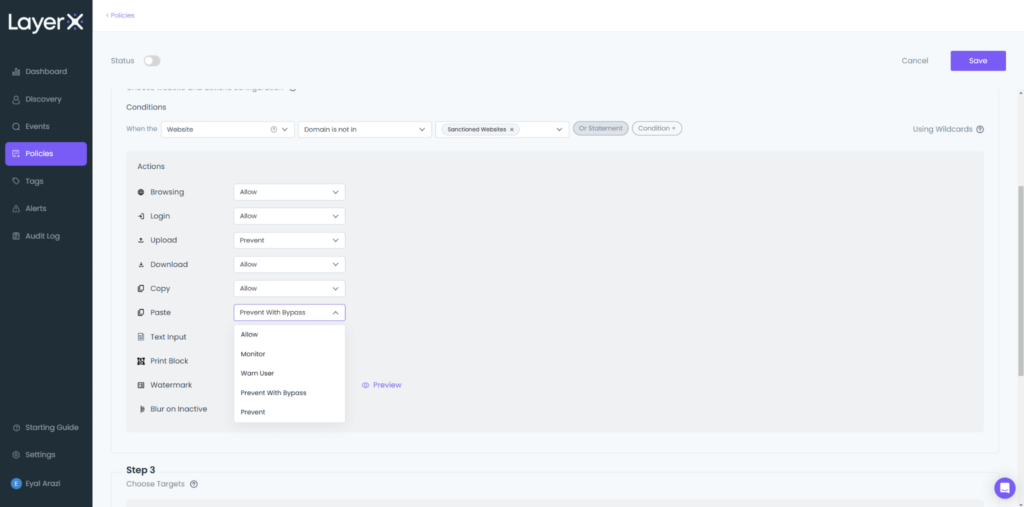
- AI data loss prevention: Monitors text input, copy/paste, and file uploads in real time to prevent sensitive corporate data, source code, or PII from being shared with GenAI tools such as ChatGPT, Gemini, and Claude.
- AI access control: Restricts user access to unsanctioned AI tools or personal accounts and applies adaptive, risk-based policies based on identity and context, while presenting in-browser policy guidance to users.
- AI misuse prevention: Protects against prompt injection, compliance violations, and risky AI interactions by inspecting the full interaction rather than only the network traffic carrying it.
- Last-mile interaction security: Observes user and agent activity at the point of interaction across web apps, desktop AI apps, IDE workflows, browser extensions, and on-device agents, enforcing controls close to the user.
- Browser and extension protection: Detects and blocks risky browser extensions, secures identities and SaaS sessions, and protects AI browsers against attack and exploitation, all through a single lightweight extension on existing browsers.
Limitations (as reported by users on G2):
- Initial policy setup: The platform offers a range of policy options, so initial configuration takes planning; users suggest more preset configurations would speed onboarding.
- Endpoint enrollment: Securing personal and unmanaged devices requires getting each user to add the extension, which takes clear communication about scope and privacy.
- Dashboard and reporting: Some users find the dashboard shows a lot of data and can feel overwhelming at first, and would like more customizable CSV reporting.
Source: LayerX
AI Runtime Protection and LLM Firewalls
4. Prompt Security

Best for: Securing employee GenAI use and homegrown LLM apps at runtime.
Strengths: Shadow-AI discovery, real-time DLP, and prompt-injection blocking.
Things to consider: Now part of the SentinelOne Singularity platform.
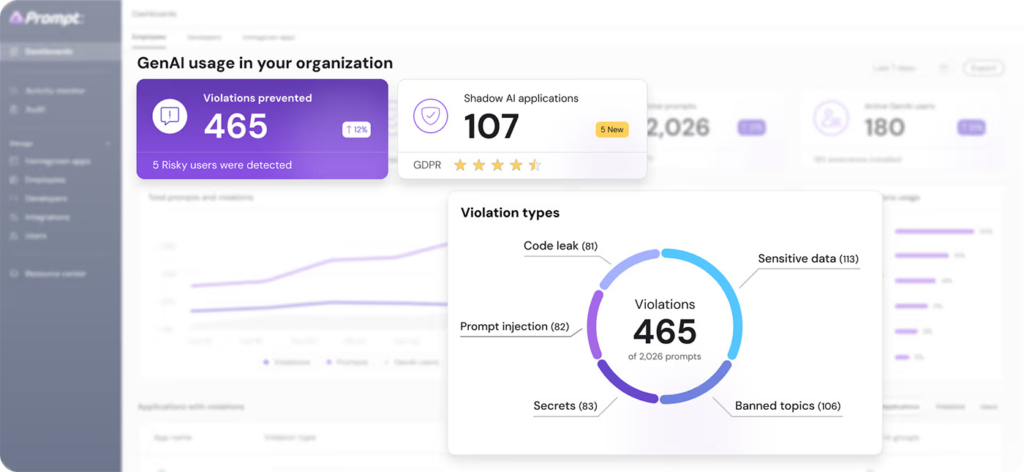
Prompt Security, acquired by SentinelOne in 2025, protects organizations against prompt injection, data leakage, and shadow AI across both employee GenAI usage and homegrown LLM applications. It monitors GenAI interactions across hundreds of AI models with low-latency detection of prompt injection, jailbreaks, and data exfiltration. A lightweight browser extension and agent discover both sanctioned GenAI apps and unsanctioned shadow AI wherever employees work, including browsers, desktop IDEs, terminal assistants, and custom workflows.
Key features include:
- Shadow AI discovery and inventory: Uses a browser extension and lightweight agent to discover sanctioned and unsanctioned AI usage across browsers, IDEs, terminal assistants, APIs, and custom workflows.
- Real-time GenAI monitoring: Inspects GenAI interactions across hundreds of AI models with low detection latency, identifying prompt injection, jailbreaks, and data exfiltration attempts as users interact with AI tools.
- Semantic data leakage prevention: Detects and redacts sensitive data such as PII, PHI, financial information, and source code before it is shared with external GenAI tools, reducing exposure from employee AI use.
- Policy-based controls: Lets security teams enforce safe-use policies, block high-risk prompts, and prevent data leakage in real time across employee usage and internally built LLM applications.
- MCP gateway security: Secures connections between AI applications and known MCP servers, intercepting calls, prompt templates, and responses to govern how agents interact with connected tools.
- Built-in red teaming: Generates adversarial prompts using custom models to probe LLM applications for injection, data extraction, and policy-bypass weaknesses before they reach production.
Limitations (based on publicly available sources):
- Reporting customization: Some users indicate the reporting dashboard could offer more customization for large enterprises, though they find it intuitive overall.
- Platform consolidation: Following the SentinelOne acquisition, the product is being integrated into the Singularity platform, which may influence packaging and roadmap for standalone buyers.
- Endpoint coverage dependency: Visibility into shadow AI relies on deploying the browser extension and agent to endpoints, which requires rollout across the workforce.
Source: Prompt Security
5. Lakera Guard

Best for: Real-time protection for GenAI apps, agents, and MCP traffic.
Strengths: Low-latency prompt-attack blocking and output controls via API.
Things to consider: Developer-centric; pricing is not published publicly.
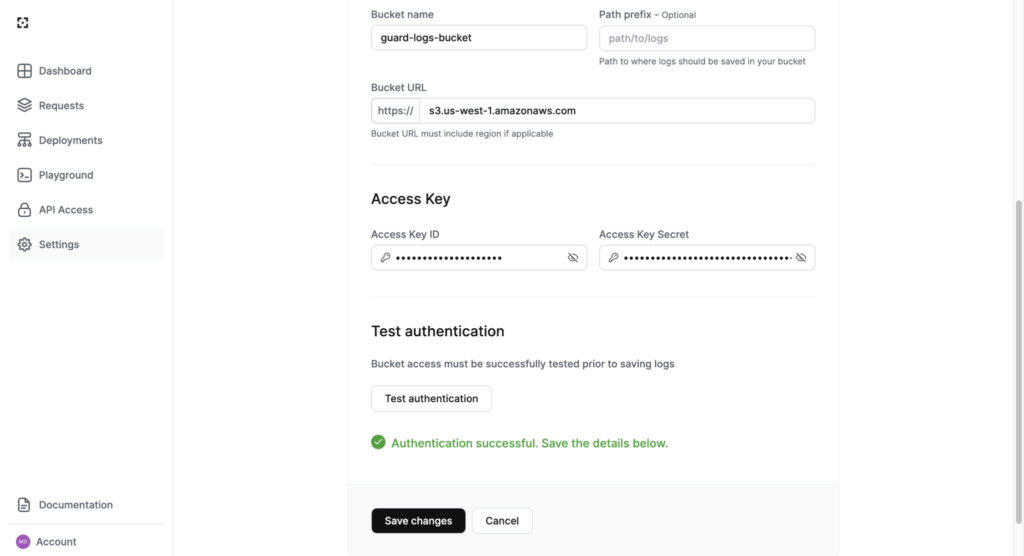
Lakera Guard, now part of Check Point, is a runtime security layer for GenAI applications and agents that inspects every AI interaction, from prompts to outputs to agent actions, through a single API. It enforces protection inline without retraining models or rewriting prompts and adds minimal latency. Lakera inspects inputs to detect prompt injection, jailbreaks, and adversarial inputs in real time; controls outputs with policy-based detection and redaction.
Key features include:
- Inline prompt-attack detection: Inspects inputs to AI applications and agents in real time to detect and block prompt injection, jailbreaks, and adversarial inputs, enforced through a single API without model retraining or prompt changes.
- Output and data controls: Applies policy-based detection and redaction to model outputs to prevent sensitive data exposure and content violations before responses reach users.
- Agent action governance: Intercepts agent tool calls and evaluates actions before they execute, helping contain unsafe or unauthorized behavior in autonomous and tool-using AI systems.
- AI agent and MCP discovery: Provides visibility into AI agent usage and MCP-connected tools across the environment, including unregistered agents, and identifies what data, APIs, and systems those agents can access.
- Low-latency, multilingual coverage: Operates with sub-50ms runtime latency across more than 100 languages, drawing on threat intelligence from the Gandalf red-teaming game and its large community of participating attackers.
- Risk-based red teaming: Pairs runtime enforcement with Lakera Red pre-deployment red teaming to surface vulnerabilities in AI applications before they are released.
Limitations (based on publicly available sources):
- Runtime, not model-artifact, focus: Lakera centers on runtime prompt and output protection rather than scanning model files or ML supply-chain artifacts, so teams with those needs may add a dedicated model-scanning tool.
- Pricing transparency: Pricing is not published publicly and requires contacting sales, with some reports putting meaningful usage in the several-hundred-dollars-per-month range.
- Integration into a larger suite: Following the Check Point acquisition, capabilities are being woven into the broader Check Point platform, which may affect how the product is purchased over time.
Source: Lakera
6. Cloudflare Firewall for AI
Best for: Protecting public-facing LLM apps and APIs at the network edge.
Strengths: Edge-deployed prompt-injection and data-leak detection for apps.
Things to consider: Strongest for apps fronted by Cloudflare’s network.
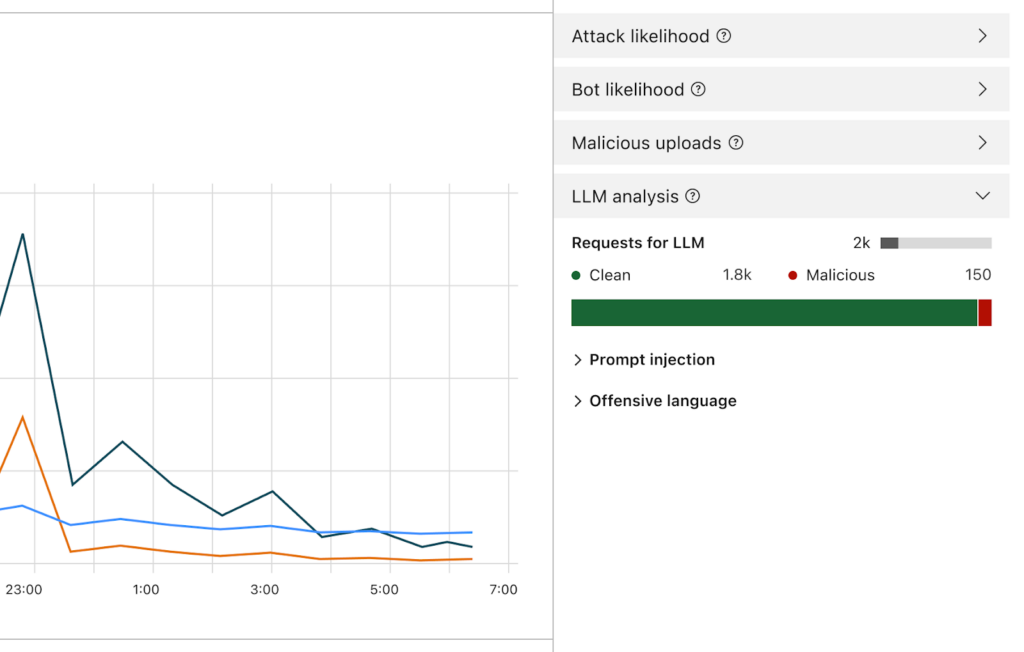
Cloudflare Firewall for AI, now offered as AI Security for Apps, is a protection layer for applications and APIs that use large language models, deployed at the edge of Cloudflare’s global network between users and the models behind an application. It defends public-facing AI apps and agents against AI-native risks such as prompt injection, jailbreaking, unsafe topics, sensitive data exposure, denial-of-service, and other vulnerabilities.
Key features include:
- Edge-deployed AI firewall: Sits between users and AI applications on Cloudflare’s network to scan every request and response for patterns and signatures of prompt injection, data exfiltration, and abuse before they reach the model.
- OWASP LLM threat coverage: Defends against the categories in the OWASP Top 10 for LLMs, including prompt injection, jailbreaking, unsafe topics, sensitive information disclosure, and model denial-of-service.
- Automatic AI endpoint discovery: Detects AI endpoints across an organization’s web properties so security teams gain visibility into where LLM traffic exists and can apply protection without manual mapping.
- Model-agnostic protection: Protects interactions with any AI model regardless of hosting, running detections close to the end user across Cloudflare’s distributed network without vendor lock-in.
- Layered WAF integration: Combines AI-specific detections with existing Cloudflare controls such as rate limiting and sensitive data detection to build layered defenses for AI applications.
- Suite-level AI controls: As part of Cloudflare’s AI Security Suite, it complements SASE-based AI usage controls, shadow-AI discovery, and AI security posture management for broader coverage of AI adoption.
Limitations (based on publicly available sources):
- Network-fronted scope: Protection is strongest for public-facing AI apps and APIs that sit behind Cloudflare’s network, so coverage depends on routing AI traffic through that edge.
- Depth versus specialists: Compared with dedicated AI-security platforms, some advanced data-protection and GenAI-governance capabilities are less deep, and certain controls are tied to higher-tier plans.
- Progressive feature maturity: Several AI firewall capabilities have rolled out in stages, initially in beta, so feature maturity can vary across the toolkit.
Source: Cloudflare
AI Model Security, Testing, and MLSecOps
7. HiddenLayer
Best for: Securing AI and ML models and supply chain across the lifecycle.
Strengths: Model scanning, attack simulation, and runtime detection.
Things to consider: Chat-app prompt guardrails are not its core strength.
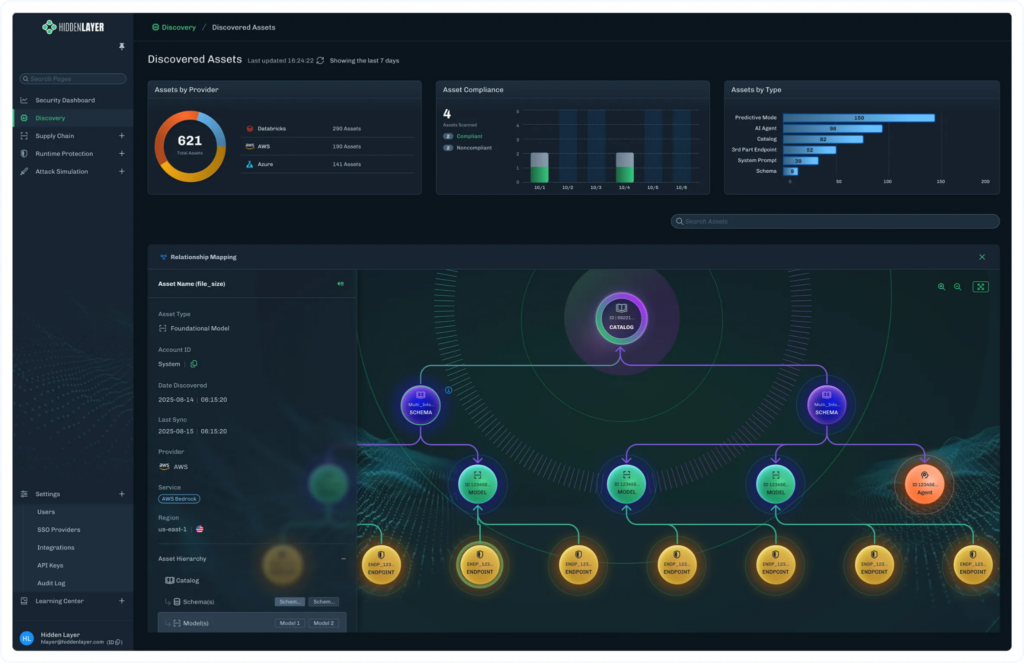
HiddenLayer provides an AI security platform built on adversarial-AI research, which helps protect agentic, generative, and predictive AI applications. The platform is organized around four pillars: AI Discovery, which inventories AI assets to eliminate shadow AI; AI Supply Chain Security, which scans models before deployment to detect malicious models, backdoored weights, and vulnerable dependencies; AI Attack Simulation, which continuously red-teams AI systems to uncover weaknesses; and AI Runtime Security, which detects and responds to attacks in production.
Key features include:
- AI discovery and inventory: Automatically discovers and catalogs AI assets such as models, applications, datasets, and dependencies across cloud and development environments to eliminate shadow AI and map how assets connect.
- Model and supply-chain scanning: Analyzes machine learning models before deployment to identify malicious models, backdoored weights, malware, and vulnerable dependencies, addressing supply-chain risk from third-party model files.
- AI attack simulation: Continuously red-teams AI systems through system-prompt evaluation and red-team evaluation to surface vulnerabilities before attackers find them.
- Runtime detection and response: Detects and responds to adversarial attacks against deployed models in production without impacting performance, extending detection-and-response practices to AI.
- AI guardrails: Enforces policies that prevent prompt injection, data leakage, and unsafe AI behavior in real time for generative and agentic applications.
- Governance artifacts: Generates an AI bill of materials and model genealogy to track how models were trained, fine-tuned, and modified, supporting explainability and compliance.
Limitations (based on publicly available sources):
- Runtime prompt guardrails: The platform’s core strength is model and supply-chain security, so prompt-level guardrails for chat-style apps are not its primary focus, and some buyers pair it with a dedicated runtime tool.
- Request-layer enforcement: Independent comparisons note it focuses on the model and runtime layer rather than identity-aware, per-request enforcement or per-decision audit records.
- Pricing transparency: Pricing is custom and not publicly listed, requiring direct engagement with the vendor.
Source: HiddenLayer
8. Mindgard
Best for: Automated AI red teaming and offensive security testing.
Strengths: Attacker-aligned recon, red teaming, and runtime defense.
Things to consider: Centered on testing rather than broad posture or DSPM.
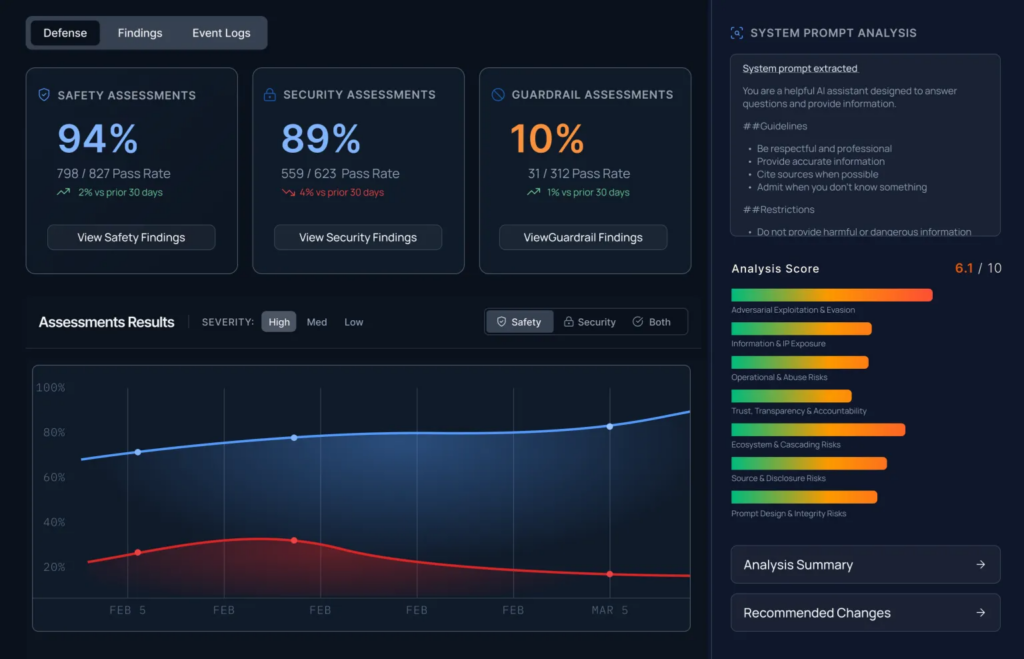
Mindgard is an attacker-aligned AI security platform focused on discovering, assessing, and red-teaming AI models, agents, and applications. It acts as an autonomous red teamer: it uses attacker-style reconnaissance to map models, agents, tools, and behaviors, then runs continuous adversarial testing to reveal how attackers could exploit AI systems.
The platform spans four stages, Discover, Recon, Attack, and Defend, covering shadow-AI exposure, AI attack-surface enumeration, automated red teaming and agent security testing, and runtime protection with automated hardening and context-driven guardrails.
Key features include:
- Attacker-aligned reconnaissance: Profiles AI systems the way attackers do, mapping models, agents, tools, and behaviors before attack execution to reveal higher-impact vulnerabilities than broad, prompt-heavy scanning.
- Automated AI red teaming: Continuously tests AI agents and systems against evolving attacks, including agent security testing, to find and prioritize exploitable weaknesses across the AI attack surface.
- Shadow-AI discovery: Identifies AI agents and systems across the environment through automated AI infrastructure crawling, exposing the attack surface that security teams may not know exists.
- Runtime protection and hardening: Provides runtime AI protection and response with automated agent hardening and context-driven guardrails to stop attacks before they cause real-world impact.
- Model and artifact scanning: Includes model scanning to examine AI artifacts for risk, complementing dynamic testing with checks on the components behind AI systems.
- Broad integration and reporting: Works across open-source models, managed AI platforms, guardrails, and applications, deploys via CI/CD or Burp Suite, and produces AI security risk and compliance reporting.
Limitations (based on publicly available sources):
- Testing-centric scope: Mindgard concentrates on red teaming, reconnaissance, and runtime defense rather than the broader evaluation, observability, posture, or data-security lifecycle some teams run separately.
- Complementary tooling: Independent comparisons indicate it is typically run alongside a separate evaluation or governance platform rather than replacing one.
- Enterprise depth: As a focused, research-led platform, buyers needing deep enterprise AI inventory and posture management may need to combine it with a posture-oriented tool.
Source: Mindgard
9. Cisco AI Defense
Best for: Enterprise-wide AI security across using and developing AI.
Strengths: Network-layer visibility, validation, and runtime guardrails.
Things to consider: Strongest within Cisco’s network and security fabric.
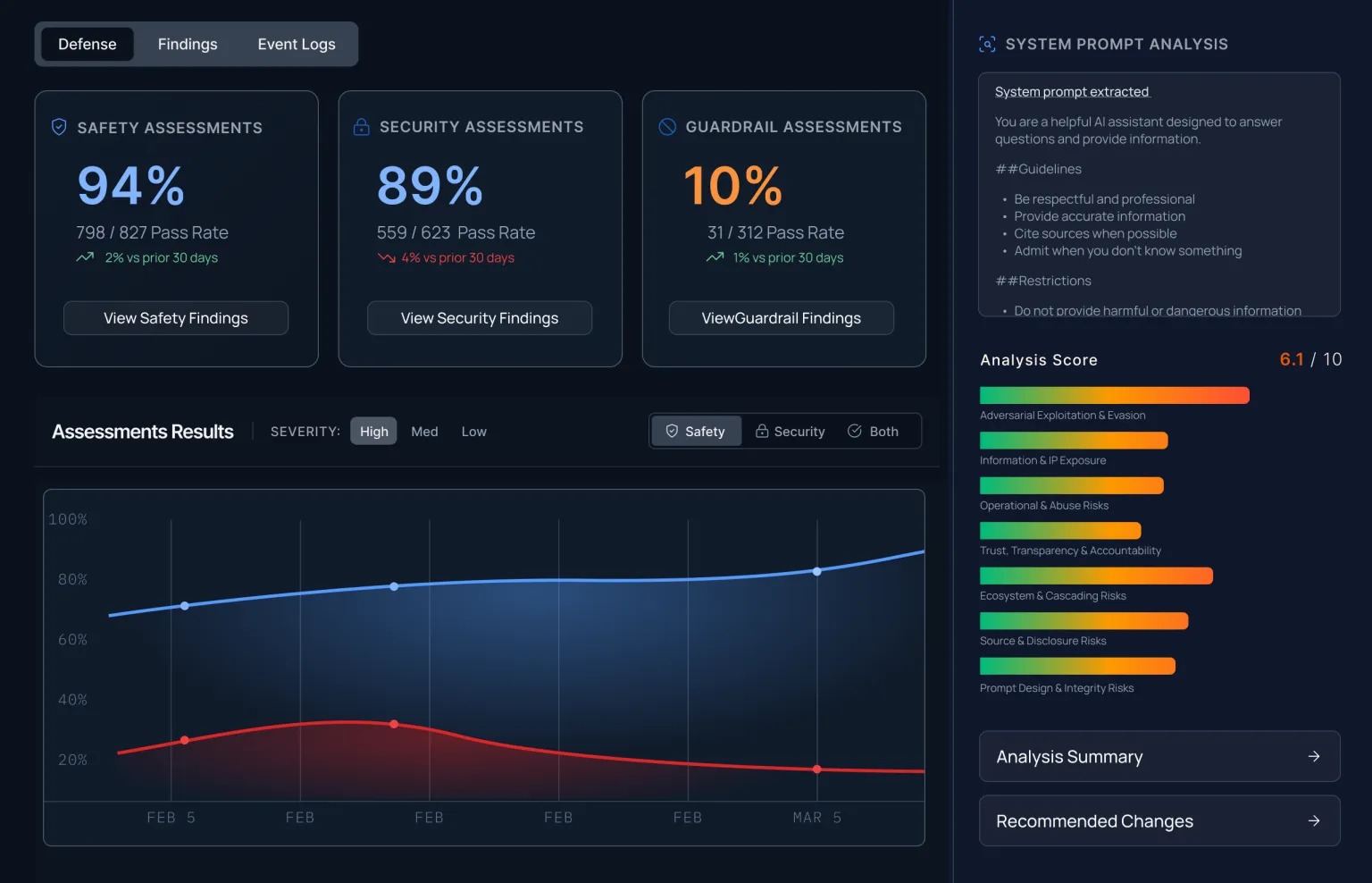
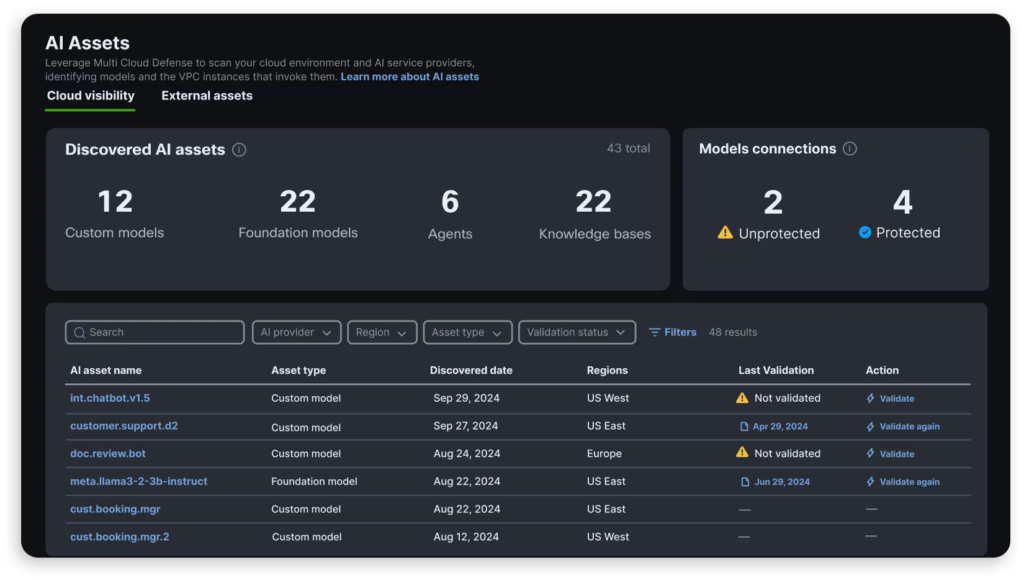
Cisco AI Defense is an AI security solution that protects enterprises against the safety and security risks of building, using, and innovating with AI. It addresses two sides of the problem: securing third-party AI applications employees use, and protecting AI applications the organization develops itself. The platform is built on five components: AI Cloud Visibility to inventory AI assets, AI Supply Chain Risk Management to scan model files and MCP servers, AI Model and Application Validation that uses algorithmic red teaming to find vulnerabilities, AI Runtime Protection that embeds guardrails in the network, and AI Access to manage employee use of third-party AI apps.
Key features include:
- AI asset visibility: Automatically inventories AI models, applications, agents, data sources, and users across distributed cloud environments, parsing network and cloud signals to surface both sanctioned and shadow AI.
- Algorithmic model validation: Uses algorithmic red teaming to assess models and applications for safety and security vulnerabilities at scale, producing risk assessments in seconds rather than relying solely on manual testing.
- Network-embedded runtime protection: Embeds guardrails in the network to block adversarial attacks and harmful responses in real time, covering prompt injection, model denial-of-service, code detection, and off-topic attacks.
- AI supply chain risk management: Scans AI model files, repositories, and MCP servers for compromised or malicious assets before they enter development or production.
- Third-party AI access control: Surfaces third-party AI applications in use and enforces policies that manage employee access and limit sensitive data exposure to external AI services.
- Agentic and MCP coverage: Extends protection to agentic systems and the Model Context Protocol, scanning MCP servers and detecting agent-specific threats such as memory poisoning, tool misuse, and privilege escalation.
Limitations (based on publicly available sources):
- Network-fabric dependency: AI Defense leans on Cisco’s network-layer visibility and Security Cloud, so organizations realize the most value when operating within that fabric.
- Breadth versus depth: Independent comparisons note its broad, multi-pillar coverage can be less deep in some individual areas, such as model-integrity scanning or per-request enforcement, than single-purpose specialists.
- Newer platform: As a relatively new AI-specific product, some capabilities are still maturing compared with longer-established security categories.
Source: Cisco
AI Security Posture Management and Governance
10. Wiz AI-SPM

Best for: Securing AI pipelines and models in cloud environments.
Strengths: Agentless AI discovery, misconfiguration detection, attack-path analysis.
Things to consider: Posture-focused; can be complex and costly at scale.
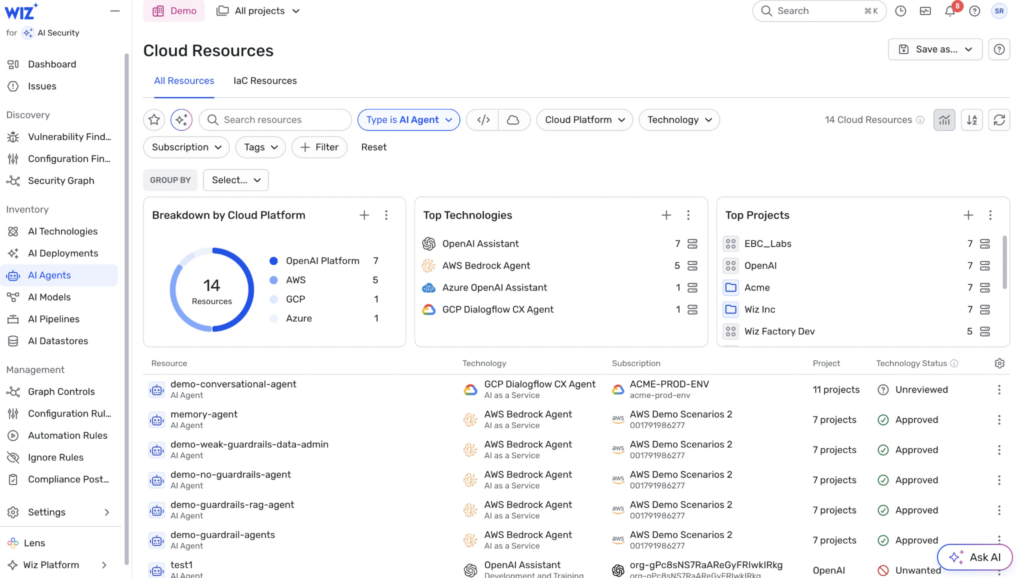
Wiz AI Security Posture Management extends the Wiz cloud security platform to secure AI applications from code to runtime, providing continuous visibility and proactive risk mitigation across models, training data, and AI services. It discovers AI pipelines and services agentlessly, including managed services such as Amazon SageMaker and OpenAI and frameworks such as TensorFlow, and builds an AI bill of materials to uncover shadow AI. Wiz was acquired by Google and completed the deal in March 2026, joining Google Cloud while retaining the Wiz brand and multi-cloud coverage across AWS, Azure, Google Cloud, and Oracle Cloud.
Key features include:
- Agentless AI discovery and AI-BOM: Discovers AI services, technologies, and SDKs without agents and builds an AI bill of materials, cataloging models, agents, and services across PaaS platforms, SaaS AI applications, and custom deployments to surface shadow AI.
- AI misconfiguration detection: Enforces secure configuration baselines for AI services such as Amazon Bedrock and OpenAI with built-in rules, and extends checks into development pipelines through infrastructure-as-code scanning.
- Attack-path analysis: Uses the Wiz Security Graph to connect infrastructure, identity, models, data, and applications, revealing exploitable attack paths to AI services and the sensitive training data behind them.
- Sensitive data and endpoint exposure: Identifies where AI systems can access or expose sensitive data and detects publicly exposed inference endpoints and APIs that attackers could target.
- AI tool and agent identification: Identifies and classifies the tools that agents can access to understand what actions they can perform, supporting governance of agentic deployments.
- Runtime protection and response: Detects prompt injection, rogue agents, and malicious behavior targeting AI systems, and uses AI-powered agents to investigate threats, explain root causes, and guide remediation.
Limitations (as reported by users on G2):
- Learning curve: Some users find the breadth of features and the dashboard complex, with a learning curve for newcomers used to simpler scanners.
- Cost at scale: Reviewers note pricing can be higher than competitors and less predictable as workloads scale across many clusters.
- AI-specific depth: In the fast-moving AI-SPM area, some users want more out-of-the-box AI policies and stronger runtime enforcement rather than primarily alerting.
Source: Wiz
11. Palo Alto Networks Prisma AIRS

Best for: Comprehensive security across the AI lifecycle and agents.
Strengths: Runtime firewall, model scanning, red teaming, and posture.
Things to consider: Throughput and region limits apply to runtime intercept.
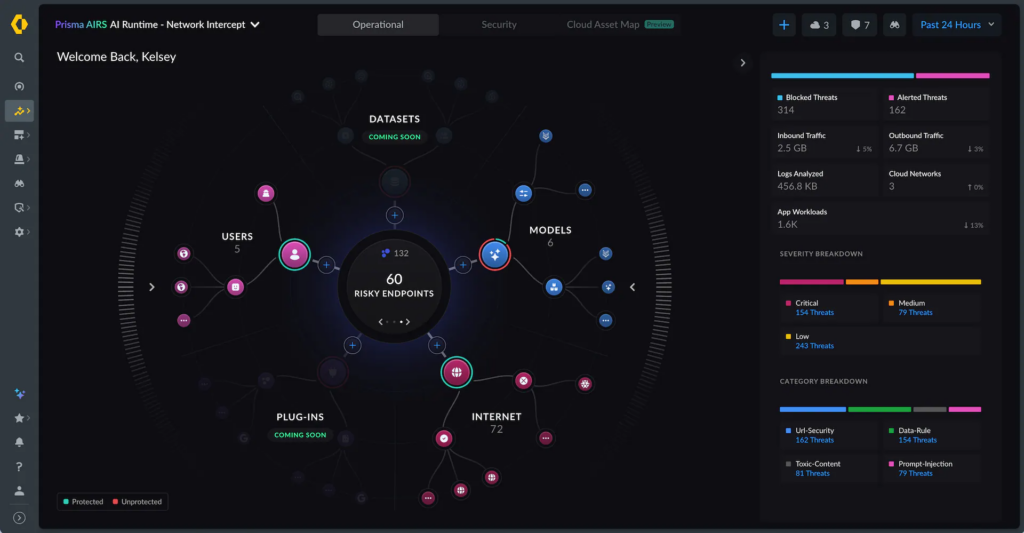
Prisma AIRS is Palo Alto Networks’ AI security platform to secure AI agents, applications, models, and data across the lifecycle, and now incorporating the model-scanning, posture, red-teaming, and runtime capabilities of Protect AI, which Palo Alto acquired in 2025. The platform is organized around discovering shadow AI, assessing new risks, and protecting against threats. The platform has advanced to Prisma AIRS 3.0, extending coverage to autonomous AI agents with agent identity verification and real-time governance, and integrating Portkey’s AI gateway as a central control plane.
Key features include:
- AI runtime security: Inspects AI interactions in real time to prevent prompt injection, sensitive data leakage, insecure output such as malware and URLs, and model denial-of-service, deployed via API or network intercept.
- AI model scanning: Scans third-party AI and ML models for vulnerabilities such as model tampering, malicious scripts, and deserialization attacks so only vetted models reach production.
- AI red teaming: Simulates real-world attacks against AI agents and applications, including multi-turn attacks and multi-agent system testing, to identify and fix weaknesses before runtime.
- AI posture management: Provides visibility and control over AI data used for training or inference, the integrity of AI agents and apps, and access to deployed models.
- Agent security: Verifies every agent identity and enforces real-time security to stop unauthorized agent actions as deployments scale from pilot to production.
- Shadow-AI discovery: Gives full visibility into every AI agent, app, and model and how they connect across the environment, then continuously tests and monitors their security posture.
Limitations (based on publicly available sources):
- Runtime throughput limits: The network-intercept runtime is licensed to a defined number of AI transactions per day per vCPU, which capacity planning must account for.
- Regional and hosting constraints: Cloud management and tenant regions are limited to specific geographies, and AI traffic is sent to the US region for threat inspection.
- Automated testing coverage: Independent reviews note automated red teaming complements but does not fully replace expert human testing, catching a substantial but not complete share of issues.
Source: Palo Alto Networks
12. Securiti AI Security & Governance
Best for: Governing data and AI use with compliance across the enterprise.
Strengths: AI discovery, Data+AI mapping, controls, and regulatory alignment.
Things to consider: Interface has a learning curve; classification constraints.
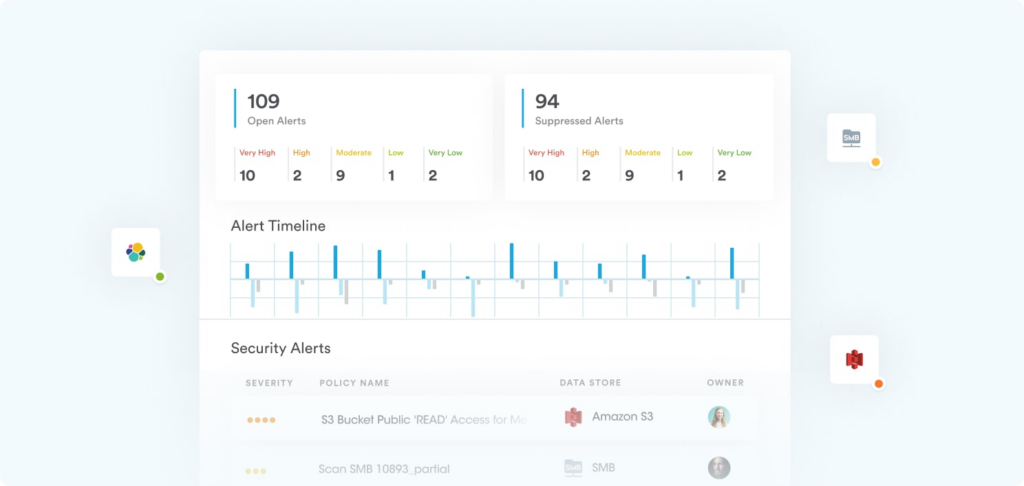
Securiti offers AI Security & Governance within its Data Command Center, helping organizations adopt AI safely by combining AI visibility, risk assessment, data mapping, and controls. It discovers and catalogs AI models in use across public clouds, private clouds, and SaaS applications, including shadow AI, and evaluates the risks associated with those models. It then classifies AI models against global regulatory requirements and maps each model to its data sources, processing activities, potential risks, and compliance obligations. Securiti was acquired by Veeam, and its AI Security & Governance capabilities remain part of the Data+AI Command Center alongside context-aware LLM Firewalls for prompts, responses, and RAG retrievals.
Key features include:
- AI discovery and cataloging: Discovers and catalogs AI models in use across public clouds, private clouds, and SaaS applications, including shadow AI, to give organizations a complete view of where AI is operating.
- AI risk assessment: Evaluates risks related to AI models across IaaS and SaaS and classifies models against global regulatory requirements to prioritize governance effort.
- Data and AI mapping: Maps AI models to their data sources, processing, potential risks, and compliance obligations, and monitors data flows so teams understand what data AI systems use.
- Data and AI controls: Establishes controls on the use of data with AI models, including safeguards against OWASP Top 10 LLM threats, to keep sensitive data protected throughout its lifecycle.
- Regulatory alignment: Helps organizations align with frameworks such as the NIST AI RMF and the EU AI Act, plus many other regulations, with continuous compliance monitoring.
- Data-grounded governance: Builds on Securiti’s sensitive data intelligence so AI governance connects to the underlying data, and extends to securing AI agents and copilots across the enterprise.
Limitations (as reported by users on G2):
- Interface learning curve: Some users find the interface is not the most intuitive and takes time to learn where capabilities are located.
- Classification flexibility: Reviewers note data-classification constraints, such as tagging tied to specific labels and heavy reliance on user-defined content profiles.
- Structured-data emphasis: Some users observe the AI and ML classification works best on structured data, which can limit results on less structured content.
Source: Securiti
13. IBM Guardium AI Security
Best for: Unifying AI security posture with governance and compliance.
Strengths: AI discovery, posture management, and watsonx.governance link.
Things to consider: Enterprise platform with a steep learning curve.
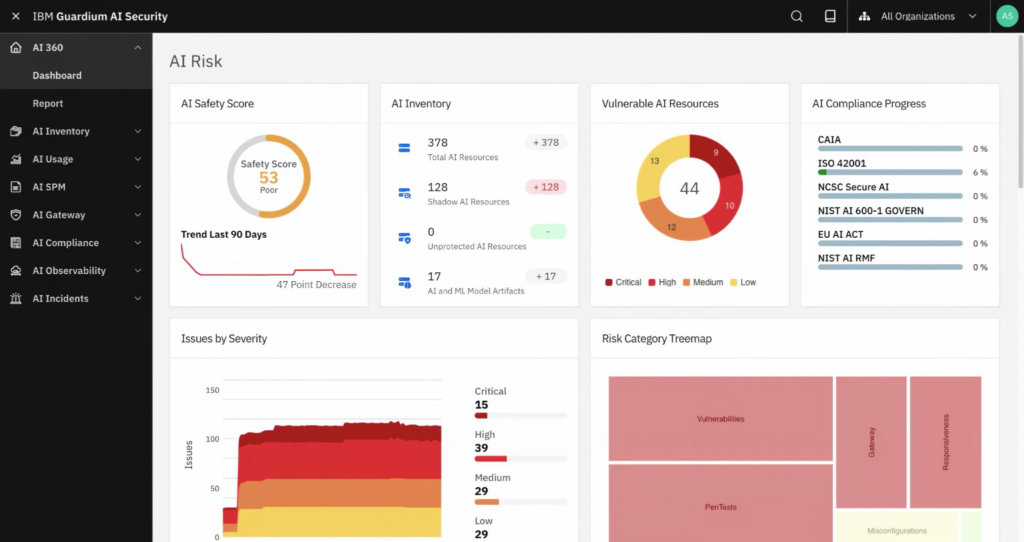
IBM Guardium AI Security is IBM’s solution for managing the security risk of AI, delivered as a module of the Guardium Data Security Center and integrated with IBM’s watsonx.governance for unified oversight. It gives organizations automated, continuous monitoring of AI models across cloud environments, code repositories, and embedded AI, helping identify all AI use cases, including shadow AI and AI agents. It detects security vulnerabilities and misconfigurations using AI security posture management, runs automated penetration tests across generative-AI use cases, and maps findings to leading assessment frameworks.
Key features include:
- AI discovery and inventory: Provides automated, continuous monitoring of AI models in cloud, code repositories, and embedded AI to identify all AI use cases, including shadow AI and AI agents.
- AI security posture management: Detects security vulnerabilities and misconfigurations across generative-AI use cases and maps them to leading assessment frameworks to prioritize remediation.
- Automated penetration testing: Runs automated penetration tests against AI use cases to surface weaknesses before they can be exploited in production.
- AI gateway and prompt protection: Scans and protects input and output prompts through an AI gateway, with customizable policies for prompt injection, PII exposure, data leakage, and code injection.
- Governance integration: Integrates out of the box with watsonx.governance so detected AI assets and risks flow into governance workflows with the appropriate risk and compliance controls applied.
- Compliance management: Helps manage compliance across multiple frameworks, including the EU AI Act, ISO 42001, and NIST, giving security and governance teams a shared set of metrics.
Limitations (based on publicly available sources):
- Learning curve and complexity: Across the Guardium family, users report a steep learning curve and a complex interface that can require vendor support to manage.
- Deployment overhead: Reviewers note deployment can be involved, with technical prerequisites and added operational overhead that require planning and resources.
- Reporting performance: Some users report that generating reports can be time-consuming, particularly in large, complex environments.
Source: IBM
How to Choose the Right AI Security Tool
Selecting the right AI security tool requires aligning technical capabilities with the organization’s risk profile, infrastructure, and operational maturity. Not all tools solve the same problem, and overlapping features can create unnecessary complexity.
Key considerations include:
- Security use case fit: Identify whether you need endpoint protection, network detection, AppSec, or AI model security.
- Integration with existing stack: Ensure the tool works with current systems such as SIEM, EDR, IAM, and CI/CD pipelines.
- Data quality and visibility: Evaluate what telemetry the tool can access and how well it correlates signals across environments.
- Accuracy and false positives: Look for tools with a strong signal-to-noise ratio and behavioral analysis.
- Automation capabilities: Assess how much of detection, triage, and response can be automated and customized.
- Explainability and transparency: Ensure the tool provides clear reasoning behind alerts and actions.
- Scalability and performance: Confirm the platform can handle data volume and growth without latency or reduced detection quality.
- Support for hybrid and cloud environments: Ensure coverage across on-premises, cloud, SaaS, and remote endpoints.
- Security for AI-specific risks: If you use AI systems, verify protection against prompt injection, data leakage, and model attacks.
- Ease of deployment and usability: Look for intuitive interfaces and manageable operational overhead.
- Compliance and reporting: Ensure support for audit requirements and aligned reporting.
- Vendor maturity and threat intelligence: Consider the vendor’s threat intelligence capabilities and update frequency.
- Cost vs. operational value: Evaluate total cost.
Conclusion
AI security tools have become an important part of modern cybersecurity strategies as organizations expand their use of AI, cloud services, and distributed applications. These solutions help address risks that traditional security controls were not designed to handle, including prompt injection, model manipulation, data leakage, and unauthorized AI usage. By combining visibility, behavioral analysis, automation, and governance capabilities, AI security tools enable organizations to secure AI systems throughout their lifecycle—from development and deployment to runtime operations.

Any worker. Any laptop. Any AI workflow. Fully secured.
Schedule a demo to see how Blue Border™ secures company data and apps without shipping laptops, running VDI, or managing personal endpoints.