
Unified Endpoint Management Software: Top 10 Solutions in 2026

See Venn first in Google Search
Add as a preferred source on Google
TL;DR: UEM software centrally manages and secures endpoints across operating systems. Best for BYOD security: Venn; best for broad cross-OS enterprise UEM: Omnissa Workspace ONE; best for all-Microsoft fleets: Microsoft Intune; best for high-assurance security: BlackBerry UEM.
What Is Unified Endpoint Management Software?
Unified Endpoint Management (UEM) software is a centralized platform that enables IT teams to monitor, secure, and manage diverse devices, including laptops, desktops, smartphones, tablets, and IoT, across various operating systems (Windows, macOS, iOS, Android, Linux) from a single console. It merges Mobile Device Management (MDM) and client management tools to enforce policies, deploy applications, and patch systems, enabling remote work and BYOD security.
Key features and capabilities:
- Centralized management: A single dashboard to monitor and manage all device types, reducing complexity.
- Device security and compliance: Enforces security policies, manages OS updates/patches, and enables remote troubleshooting.
- Application and content management: Distributes apps, manages app catalogs, and secures corporate data on user devices.
- Support for diverse deployments: Handles Bring Your Own Device (BYOD), Corporate-Owned Personally Enabled (COPE), and Kiosk modes.
- Automation and remote access: Utilizes AI-powered scripting for automation and allows remote device locking or wiping.
Why UEM matters:
- Cross-platform control: Manage Windows, macOS, iOS, Android, Linux, and ChromeOS from a single view.
- Tool sprawl reduction: Eliminates the need for separate tools for mobile device management (MDM) and traditional PC management.
- Life-cycle management: Automates device onboarding, remote software deployment, OS updates, patch management, and end-of-life retirement.
- Zero trust security: Enforces security policies, remote lock and wipe, and device compliance before allowing access to corporate networks.
Top UEM solutions and alternatives covered in this guide:
- Venn: Secures BYOD and unmanaged laptops used by contractors and remote workers without full device enrollment.
- Microsoft Intune: Deep integration with the Microsoft 365 ecosystem for cloud-based policy configuration and BYOD management.
- IBM MaaS360: AI-powered management of mobile and desktop devices from a single platform.
- ManageEngine Endpoint Central: Comprehensive endpoint management and security with both cloud and on-premises options.
- Hexnode UEM: Cross-platform control spanning laptops, mobile, IoT, and kiosk devices.
This is part of a series of articles about endpoint security
UEM Solutions and Alternatives at a Glance
The table below summarizes the key differences between the software covered in this guide, divided into modern UEM alternatives and traditional UEM software solutions. We explore each option in more detail in the sections that follow.
| Category | Solution | Best For | Key Strengths | Things to Consider |
| UEM Alternatives | Blue Border | Securing BYOD and contractor work on unmanaged PCs/Macs | Local secure enclave, no VDI, DLP, preserved user privacy | Mobile access and reporting depth still maturing |
| UEM Alternatives | Soliton Secure Workspace | Data-less secure workspace on unmanaged Windows BYOD PCs | Local isolated container, offline use, no VPN needed | Windows only; Mac needs the separate Secure Browser |
| UEM Alternatives | Parallels RAS | Delivering virtual apps and desktops to any device | Hybrid/multi-cloud, single console, concurrent licensing | Large-scale app publishing can get complex |
| Traditional UEM Software | Microsoft Intune | Cloud endpoint management for Microsoft 365 environments | Cross-platform MDM/MAM, Entra conditional access | Steep learning curve; opaque troubleshooting |
| Traditional UEM Software | IBM MaaS360 | AI-driven UEM across mobile, desktop and rugged devices | Single console, MDM, threat defense, broad OS support | Aging UI; variable support experience |
| Traditional UEM Software | ManageEngine Endpoint Central | Unified endpoint management plus built-in security | Patching, EDR, DLP, remote control in one console | Feature-dense UI; patch delays reported |
| Traditional UEM Software | Hexnode UEM | Multi-platform device management and kiosk lockdown | Zero-touch enrollment, single-policy, broad OS support | Unenrollment and MFA flexibility can improve |
| Traditional UEM Software | Omnissa Workspace ONE UEM | Enterprise UEM across every major OS and device type | Cloud-native, automation, conditional access, per-app VPN | High, complex pricing; support since transition |
| Traditional UEM Software | Citrix Endpoint Management | MDM and MAM within the Citrix Workspace ecosystem | MDX app containerization, micro VPN, 300+ policies | Setup complexity and higher cost |
| Traditional UEM Software | BlackBerry UEM | High-assurance, sovereign-grade device management | App-level encryption, containerization, gov certifications | Slow console; multi-step onboarding; L1 support |
Better Endpoint Security for Contractors – on Unmanaged Devices
Discover the top solutions for providing secure remote access to contractors on unmanaged laptops. No shipping hardware, no VDI.
In this article:
- What Is Unified Endpoint Management Software?
- UEM Solutions and Alternatives at a Glance
- Benefits of UEM Solutions
- Key Features and Capabilities of Unified Endpoint Management Tools
- Challenges of UEM in a BYOD Environment
- Notable UEM Software and Alternatives
- Criteria for Evaluating Unified Endpoint Management Software
Benefits of UEM Solutions
Unified Endpoint Management solutions offer a range of operational, security, and administrative benefits that help organizations manage a growing and diverse fleet of devices. Below are key advantages:
- Centralized management: Manage all endpoints (desktops, laptops, mobile devices, and IoT) from a single platform, reducing the need for multiple tools.
- Improved security posture: Apply consistent security policies, enforce encryption, and remotely wipe compromised devices, minimizing security risks.
- Enhanced compliance: Automate compliance with regulatory standards through policy enforcement, reporting, and audit trails.
- Operational efficiency: Simplify IT operations with automation for device provisioning, software updates, and patch management.
- Reduced Total Cost of Ownership (TCO): Consolidating management tools into a single solution reduces software licensing, infrastructure, and support costs.
- Lifecycle management: Oversee the entire device lifecycle, from onboarding to retirement, ensuring proper asset tracking and decommissioning.
- Learn more in our detailed guide to unified endpoint management
Key Features and Capabilities of Unified Endpoint Management Tools
Centralized Management
Centralized management enables the administration of a range of endpoint devices through a single management interface. This unified dashboard allows IT administrators to provision, update, and troubleshoot devices efficiently, regardless of the operating system or form factor. Features such as remote device enrollment, policy deployment, and real-time monitoring are simplified, minimizing the need for multiple tools or siloed workflows.
The benefits of centralized management extend to improved visibility and control. Administrators can quickly generate reports, track the health status of devices, and ensure compliance from one place. This holistic view simplifies large-scale management and allows for rapid response to incidents or compliance issues. By consolidating separate MDM and traditional PC management tools into a single console, UEM also reduces tool sprawl and lowers overall IT operational expenses.
Device Security and Compliance
Device security and compliance are fundamental capabilities of UEM solutions. These platforms provide a suite of security features such as device encryption, remote wipe, password enforcement, and vulnerability management to protect organizational data. Automated compliance checks and alerting mechanisms ensure devices meet regulatory or internal security policies, reducing the risk of data breaches or costly violations.
With more endpoints connecting from various locations, maintaining regulatory compliance becomes more challenging. UEM software addresses this by enforcing standardized security configurations and allowing administrators to monitor for deviations in real time. If a device is found to be non-compliant, actions can be automated, such as isolating the device from the network or triggering a security workflow. In a zero trust model, UEM enforces security policies and verifies device compliance before allowing access to corporate networks, with remote lock and wipe available for lost or compromised devices.
Application and Content Management
Application and content management within UEM platforms enables organizations to control what software and data can be accessed and distributed across endpoints. IT teams can push, update, or remove applications remotely, as well as configure permissions and restrictions according to user roles or device types. This prevents the proliferation of unauthorized or outdated software and maintains consistency in application versions across the organization.
Content management extends to securing corporate data on both company-owned and personal devices. UEM solutions offer features like containerization, data loss prevention, and secure content distribution, which allow sensitive business information to be accessed without risking exposure to personal apps or devices.
Support for Diverse Deployments
UEM platforms are engineered to support an array of deployment scenarios, including Windows, macOS, Android, iOS, Linux, and rugged or IoT devices. This flexibility is necessary for organizations with heterogeneous device landscapes and hybrid workforces that utilize various device types and operating systems.
Support for different deployment models, such as on-premises, cloud-based, or hybrid, further enhances adaptability. UEM platforms often integrate with existing IT infrastructure and services, supporting scalability as organizational needs change. This ensures businesses can adapt to evolving endpoint trends and workforce mobility without disrupting continuity or having to retool their management strategy.
Related content: Read our guide to unified endpoint management best practices
Automation and Remote Access
Automation in UEM reduces the manual workload for IT teams through features like automated patch management, policy enforcement, and scheduled compliance checks. These automation tools help ensure devices stay up to date with the latest security patches and software versions without requiring direct intervention. Automated workflows can also respond to security incidents, such as isolating compromised devices or running diagnostic scripts.
Remote access capabilities allow administrators to provide support and manage endpoints without physical contact. Whether deploying software, troubleshooting issues, or resetting credentials, IT staff can act swiftly across distributed environments. This accelerates response times and reduces downtime and is especially critical in supporting remote or hybrid work arrangements where users may be geographically dispersed and not regularly on-site. UEM also automates the full device life cycle, from onboarding and remote software deployment to OS updates and patch management through to end-of-life retirement.
Challenges of UEM in a BYOD Environment
While UEM provides tools to manage BYOD (Bring Your Own Device) environments, implementation comes with several technical and operational challenges. Managing personally owned devices alongside corporate assets introduces complexity around control, privacy, and security.
Key challenges include:
- Device diversity and OS fragmentation: BYOD environments involve a wide range of devices and operating systems, often with different versions and customizations. Ensuring consistent policy enforcement, application compatibility, and feature availability across this fragmented landscape is difficult and can lead to uneven user experiences or security gaps.
- Limited control over personal devices: UEM solutions must balance corporate control with user autonomy. Organizations cannot fully lock down or monitor personal devices the same way they would with corporate-owned hardware. This limits enforcement of certain policies (e.g., full device wipe, app restrictions) and may reduce overall control over sensitive corporate data.
- User privacy concerns: Monitoring or managing personal devices raises legal and ethical concerns around employee privacy. Users may resist device enrollment if they fear IT can access personal data or location information. UEM platforms must clearly separate corporate data from personal content and provide transparent policies to maintain trust.
- Data security and leakage risks: BYOD increases the risk of data leakage, especially when corporate apps or files coexist with personal ones. Without proper data segregation (e.g., containerization or app-level encryption), sensitive information can be unintentionally exposed through personal apps, cloud services, or unsecured networks.
- Enrollment and user compliance: Getting users to enroll their devices in the UEM system can be a hurdle. Some may opt out, delay updates, or disable management agents. Inconsistent participation undermines security coverage and reduces the effectiveness of the UEM strategy.
- Policy complexity and exceptions management: Applying uniform policies across all BYOD devices isn’t always feasible. Exceptions may be needed based on device type, OS version, or user role, which increases policy complexity and administrative overhead. IT must balance security needs with usability and minimize friction for end users.
- Application compatibility and support limitations: Certain business-critical apps may not function properly on older or non-standard personal devices. Supporting a wide range of devices also increases help desk load, as IT teams must troubleshoot problems across unfamiliar hardware and software combinations.
Notable UEM Software and Alternatives
How we selected these tools: We shortlisted UEM software and alternative BYOD and endpoint-security solutions based on device and operating-system coverage, security and compliance controls, application and patch management, and how each handles unmanaged or BYOD endpoints.
UEM Alternatives
1. Venn
Best for: Securing BYOD and contractor work on unmanaged PCs and Macs.
Strengths: A local secure enclave that isolates work without VDI or full device control.
Things to consider: Mobile access and reporting depth are still expanding.
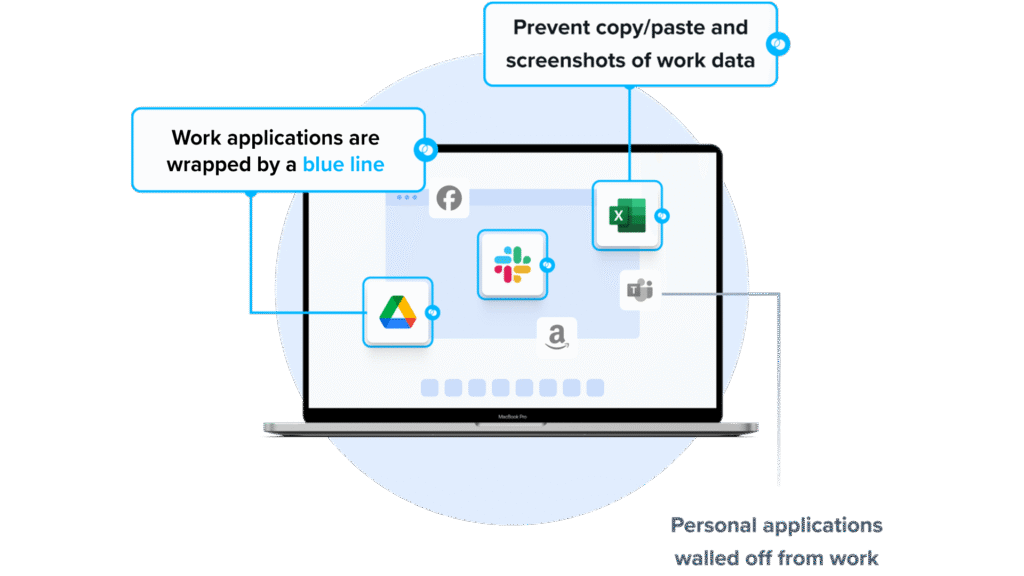
Venn takes a different approach from traditional UEM. Instead of managing the whole device, installing Venn on a Mac or PC creates a company-controlled Secure Enclave, called Blue Border, directly on that machine. Work applications run locally inside the enclave, where company data is encrypted and access is governed by IT.
All business activity inside Blue Border is isolated from any other use on the same computer, and each work application window is marked with a blue line. This lets organizations secure remote employees and contractors on any device they already own, without hosting virtual desktops or taking over the endpoint.
Key features include:
- Secure Enclave (Blue Border): A company-controlled secure enclave installed on the user’s PC or Mac, where work apps and data run isolated from personal use on the same machine.
- Local application performance: Native installed apps such as Chrome, Microsoft Office, Adobe, Slack, Zoom, Teams, SAP and CAD tools run locally inside the enclave rather than through virtualization.
- DLP and data controls: The enclave acts as a boundary that enforces data loss prevention and clipboard control, governing what data can move in and out, with policies for HIPAA, FINRA, SEC, PCI and more.
- AI governance: IT defines which AI tools are authorized to interact with company data inside the enclave, while AI tools outside Blue Border are blocked from reaching protected information.
- Built-in user privacy: Personal activity outside Blue Border is not tracked or visible to the company, keeping work and personal use separate on one device.
- Simplified administration: No backend infrastructure is required, so onboarding and offboarding take minutes, with real-time visibility into user activity and instant remote wipe of company data.
Limitations (as reported by users on G2):
- Mobile experience: Some users note that mobile access is more limited than the desktop experience and would like it expanded.
- Reporting depth: Reviewers mention that more detailed reporting would improve day-to-day visibility.
- Support response times: A few users report that resolving more complex issues can take longer than expected.
2. Soliton Secure Workspace

Best for: A data-less secure workspace on unmanaged Windows BYOD PCs.
Strengths: A locally run, isolated container that works offline without a VPN.
Things to consider: It runs on Windows only; Mac coverage uses a separate product.
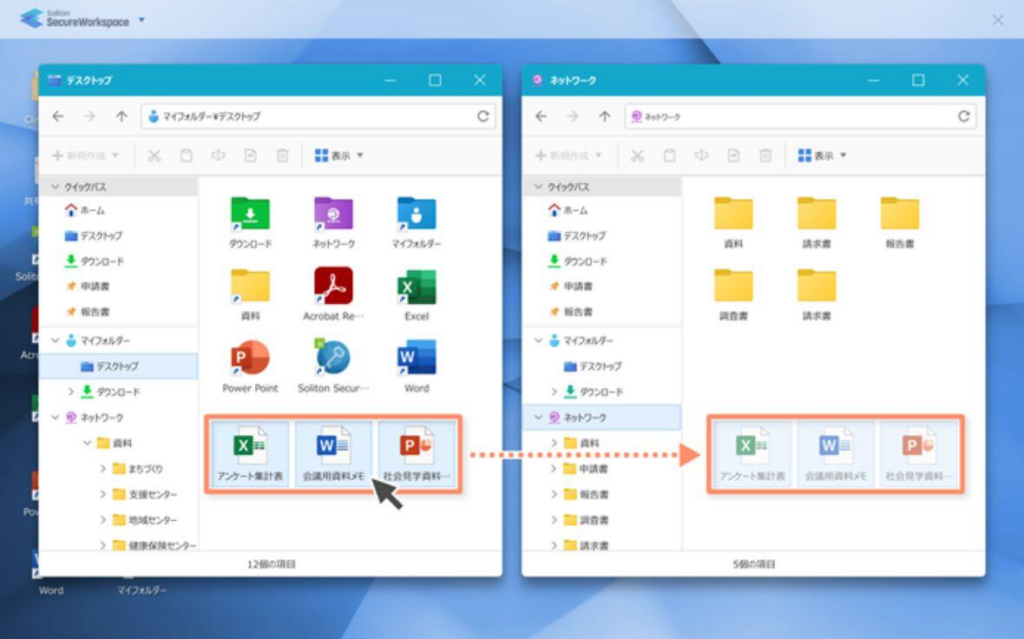
Soliton Secure Workspace creates an isolated environment on a Windows PC where business applications run locally. It is positioned as an alternative to VDI, terminal servers and VPN, running directly on the device to avoid network latency while keeping corporate data separated from the personal side of the machine.
Data inside the workspace is not written to the local drive, and files and cache in the isolated area are erased on logout. The software is part of the wider Soliton Secure family, which pairs it with Soliton Secure Browser for web apps and MailZen for mobile.
Key features include:
- Local isolated workspace: A contained environment on Windows PCs where installed desktop applications run locally, keeping the usual interface and performance.
- Secure application wrapping: Application entry and exit points are monitored at the kernel level to control processes that could leak data, including calls made between applications through COM.
- No local storage of data: Sensitive files cannot be saved to the local drive, and files and cache inside the isolated area are automatically purged on logout.
- Offline access with encryption: Users can work offline, with business data kept encrypted inside the workspace and cleared when the session ends.
- Secure gateway without VPN: A dedicated gateway provides access to on-premises file and application servers without requiring VPN configuration.
- Multi-factor authentication: Sign-in supports IC card, facial recognition and Soliton’s OneGate passwordless MFA, and Microsoft 365 apps run inside the workspace using existing licenses.
Limitations (based on publicly available sources):
- Windows-only workspace: Secure Workspace runs on Windows PCs, so Mac users rely on the separate Soliton Secure Browser rather than the same workspace.
- Data-less by design: Because files cannot be saved locally and isolated data is purged at logout, workflows that depend on retaining local files need adjustment.
- Split product family: Full coverage across PC, web and mobile requires combining Secure Workspace with Secure Browser and MailZen rather than a single product.
- Limited independent reviews: Public third-party review coverage is limited, which makes external benchmarking harder.
Source: Soliton
3. Parallels RAS

Best for: Delivering virtual applications and desktops to any device.
Strengths: Hybrid and multi-cloud delivery managed from a single console.
Things to consider: Large-scale, multi-organization app publishing can get complex.
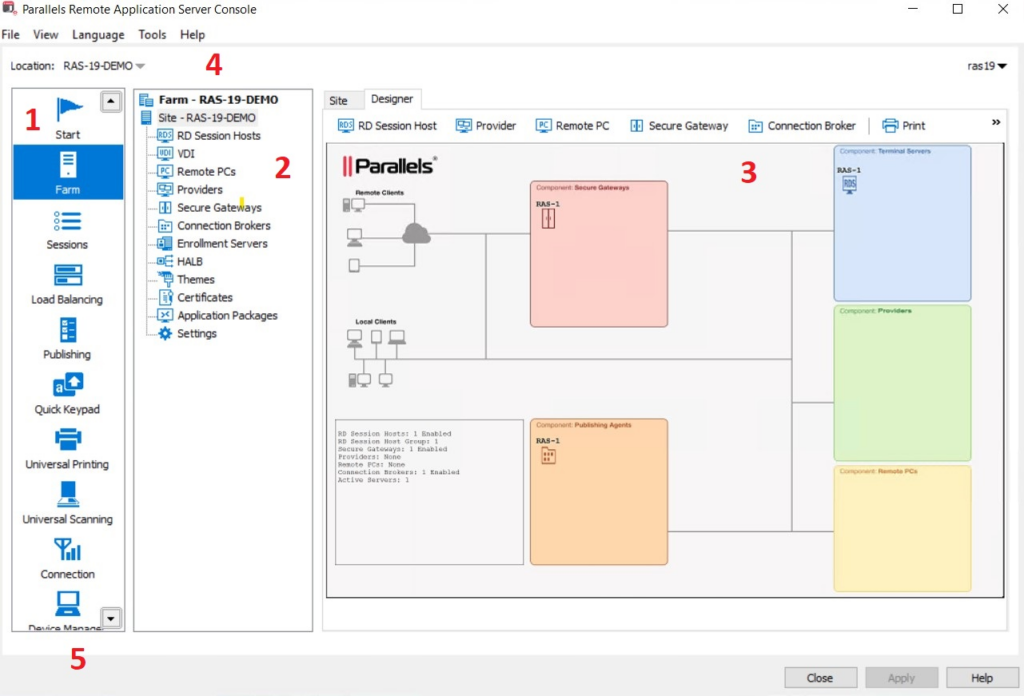
Parallels RAS (Remote Application Server) is a virtual application and desktop delivery solution. It publishes Windows apps and desktops from RDSH, VDI and remote PCs, and integrates with Azure Virtual Desktop, so users can reach their work from a range of devices and operating systems.
Administrators can deploy components across on-premises, private cloud and public cloud, and the platform is hypervisor-agnostic. Management, image handling, gateway, load balancing and access control are handled from one console, and licensing is based on concurrent users.
Key features include:
- Virtual app and desktop delivery: Publishes applications and desktops using RDSH, VDI, remote PC and Azure Virtual Desktop, with multi-session Windows support.
- Deployment and hypervisor flexibility: Runs on hybrid, on-premises, private and public cloud, and supports hypervisors including Hyper-V, VMware ESX, Nutanix, Scale, Proxmox, KVM and Xen.
- Single management console: One console covers app and desktop management, image handling, reporting, gateway, load balancing, access control and authentication, with built-in multi-tenancy.
- Broad client support: The Parallels Client runs on Windows, macOS, Linux, iOS, Android, Chromebook, Raspberry Pi and HTML5 browsers, with peripheral pass-through and multi-monitor options.
- Security controls: Includes SSL/TLS 1.3 with FIPS 140-2 support, built-in and third-party MFA, rule-based contextual access, and auditing and logging of admin and user actions.
- Simplified licensing and deployment: A single concurrent-user license includes the Secure Gateway and High Availability Load Balancer, plus FSLogix, MSIX App Attach and App-V support.
Limitations (as reported by users on G2):
- Complex publishing at scale: Users report that very large or multi-organization application publishing can become unstable, with connections sometimes denied.
- Occasional session hangs: Some reviewers note the application occasionally hangs and needs to be closed and reopened.
- Re-authentication and learning curve: A few users mention being logged out periodically and say the interface can be hard to use without training.
- Resource use: Running sessions can be demanding on older hardware.
Source: Parallels
Traditional UEM Software Solutions
Here are some popular options for traditional unified endpoint management. Other widely cited market solutions include NinjaOne, Omnissa Workspace ONE, and Scalefusion.
4. Microsoft Intune
Best for: Cloud endpoint management within Microsoft 365 environments.
Strengths: Cross-platform MDM and MAM tied to Entra conditional access.
Things to consider: A steep learning curve and troubleshooting that can feel opaque.
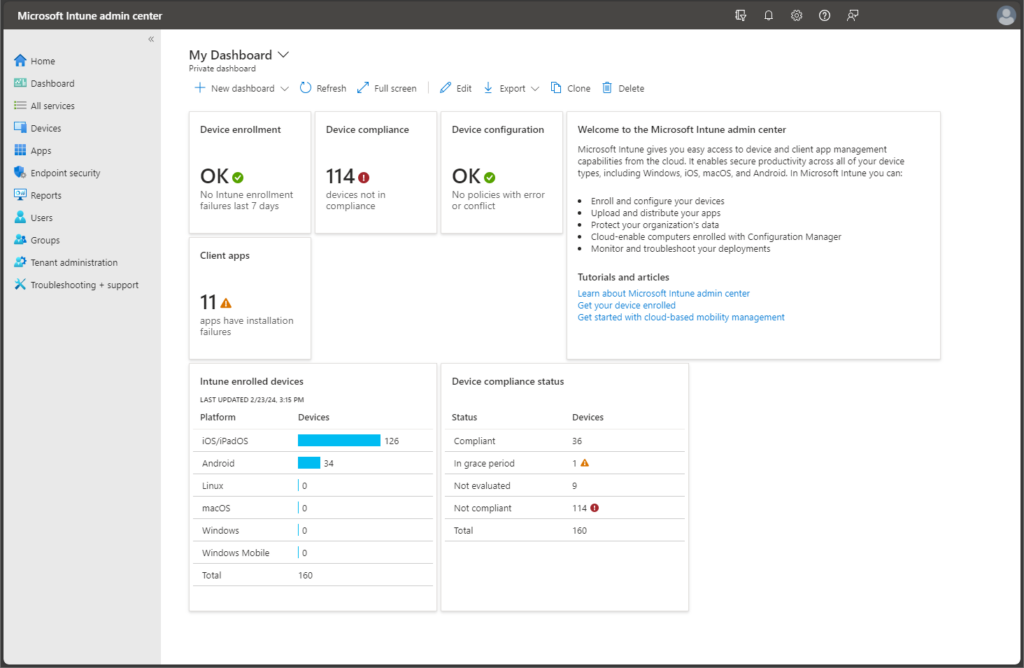
Microsoft Intune is a cloud-based UEM platform for managing and protecting endpoints across Windows, Android, macOS, iOS and Linux. It supports both full device management and app-level management, and connects device compliance to conditional access through Microsoft Entra ID.
Intune fits closely with the wider Microsoft ecosystem, adding Configuration Manager for on-premises Windows PCs and servers and a set of advanced add-ons for privilege management, analytics, remote help and certificate management.
Key features include:
- Cross-platform endpoint management: Manages and protects cloud-connected endpoints across Windows, Android, macOS, iOS and Linux from one console.
- MDM and MAM modes: Supports full enrollment through Windows Autopilot, Apple Automated Device Enrollment and Android Enterprise, or app-only management for BYOD with selective wipe of organization data.
- Conditional access via Entra ID: Device compliance state feeds Entra conditional access decisions so only compliant devices reach corporate resources.
- Configuration Manager co-management: Manages on-premises Windows PCs and servers, with tenant attach bringing those devices into the Intune admin center.
- Advanced add-on modules: Endpoint Privilege Management, Enterprise Application Management, Advanced Analytics, Remote Help, Microsoft Cloud PKI and Security Copilot in Intune extend the core service.
- Patch and app management: Patches vulnerabilities, keeps apps current across platforms, and deploys and manages applications from a single console.
Limitations (as reported by users on G2):
- Steep learning curve: Reviewers describe a demanding learning curve and setup that can feel daunting at first.
- Opaque troubleshooting: Error messages can be vague, so admins spend time checking logs or testing devices individually.
- Windows enrollment friction: The Windows enrollment process can be confusing, particularly with on-premises Active Directory and hybrid join.
- Reporting limits: Some reports are slow to update and offer limited customization.
Source: Microsoft Intune
5. IBM MaaS360
Best for: AI-driven UEM across mobile, desktop and rugged devices.
Strengths: A single console with MDM, threat defense and broad OS support.
Things to consider: An aging interface and a variable support experience.
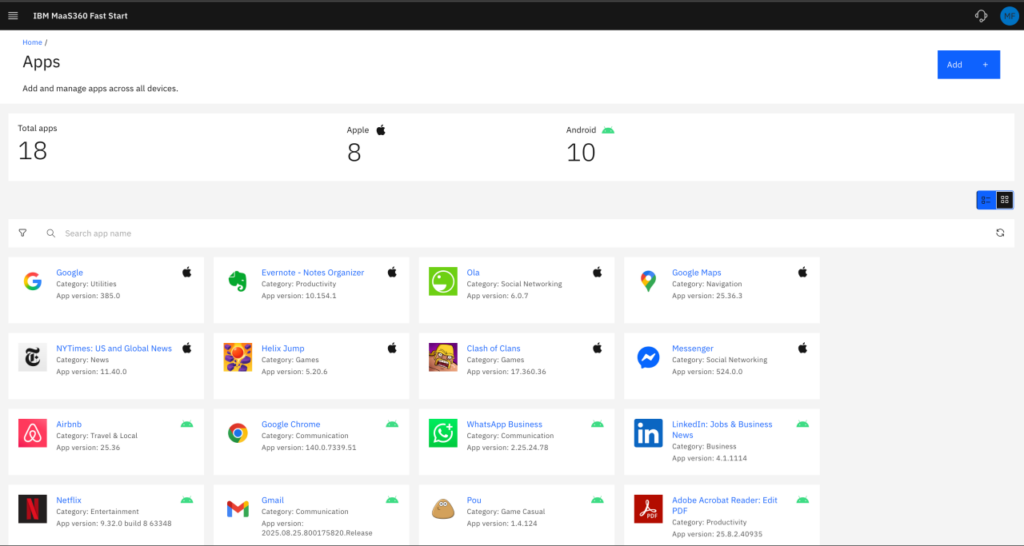
IBM MaaS360 is a SaaS UEM solution that manages smartphones, tablets, laptops, desktops, IoT and purpose-built devices from one console. It layers threat defense, analytics and identity onto a mobile device management foundation, and uses Watson AI to surface risk insights.
The platform covers iOS, iPadOS, macOS, Android, Windows and ChromeOS, and supports co-existence with existing client management tools alongside a path to fuller modern management across all endpoints.
Key features include:
- Single-console UEM: Manages mobile, desktop, IoT, rugged and purpose-built devices across operating systems from one console.
- Windows management: Applies Microsoft MDM-API policies, patch distribution and management, an app catalog and real-time actions for remote help desk support.
- Threat defense with AI: Watson-based analytics provide risk insights, with native malware detection and mobile threat defense responding to network, user, device, app and data threats.
- MDM foundation: Provides API-based policy, compliance rules, automation and app distribution across iOS, Android, iPadOS and ChromeOS.
- BYOD and containers: Supports native containers, user enrollment, Android Enterprise and remote lock and wipe for personal-device programs.
- Identity and integration: Delivers SSO and MFA through MaaS360 Identity, with the Cloud Extender connecting to behind-the-firewall resources.
Limitations (as reported by users on AWS Marketplace):
- Aging interface: Reviewers describe the UI as dated compared with some rivals and note fewer payloads for building profiles and compliance policies.
- Support experience: Some users report that support quality has declined and that resolutions can take several days.
- Pricing: Cost is cited as high, with requests for more region- or size-based pricing options.
- App packaging: Creating application packages is described as involved, with occasional inconsistencies where install scripts fail during deployment.
Source: IBM MaaS360
6. ManageEngine Endpoint Central
Best for: Unified endpoint management combined with built-in security.
Strengths: Patching, EDR, DLP and remote control in a single console.
Things to consider: A feature-dense interface and reported patch delays.
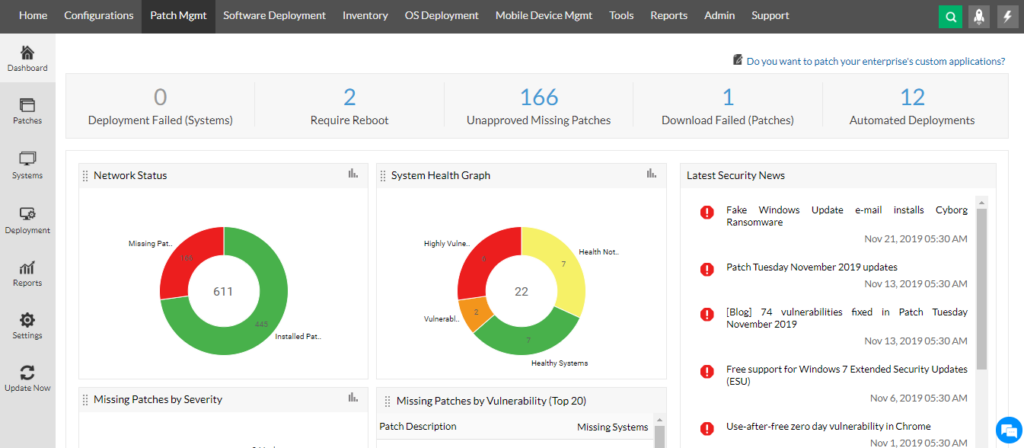
ManageEngine Endpoint Central is a unified endpoint management and security platform that manages servers, desktops, laptops and mobile devices from one console. It combines device management with a broad set of security modules, from patching to endpoint detection and response to data loss prevention.
The platform automates routine tasks such as patching, software deployment, OS imaging and configuration, and adds remote troubleshooting, asset management and digital employee experience monitoring in the same interface.
Key features include:
- Patch and update management: Automates patching for Windows, Mac, Linux and more than 1,100 third-party applications, with testing, approval and the ability to decline specific patches.
- Endpoint detection and response: Monitors endpoint activity, detects threats using behavioral analytics and MITRE ATT&CK mapping, and supports incident response and threat hunting across recorded activity.
- Application control and privilege management: Applies allowlists and blocklists, role-based application privileges and control over child processes.
- Data security: Provides sensitive-data discovery and classification, data loss prevention, BYOD containerization, remote wipe and BitLocker and FileVault encryption.
- Software distribution and asset management: Deploys MSI, EXE and mobile apps using templates and a self-service portal, and tracks hardware, software, licenses, warranties and USB usage.
- Remote access and OS deployment: Includes remote control with session recording, OS imaging and deployment, mobile device management, and Secure Private Access as an application-level VPN alternative.
Limitations (as reported by users on G2):
- Cluttered interface: Because the platform is so feature-rich, users find the interface crowded and say specific settings or reports can be hard to locate.
- Patch timing: Some reviewers report patch deployment taking several days and note occasional patch misconfigurations.
- Remote session reliability: A recurring complaint is remote sessions failing to connect on the first attempt and needing a retry.
- Update side effects and DLP scope: Product updates can occasionally break features such as remote control, and the DLP module is seen as comparatively basic.
Source: ManageEngine
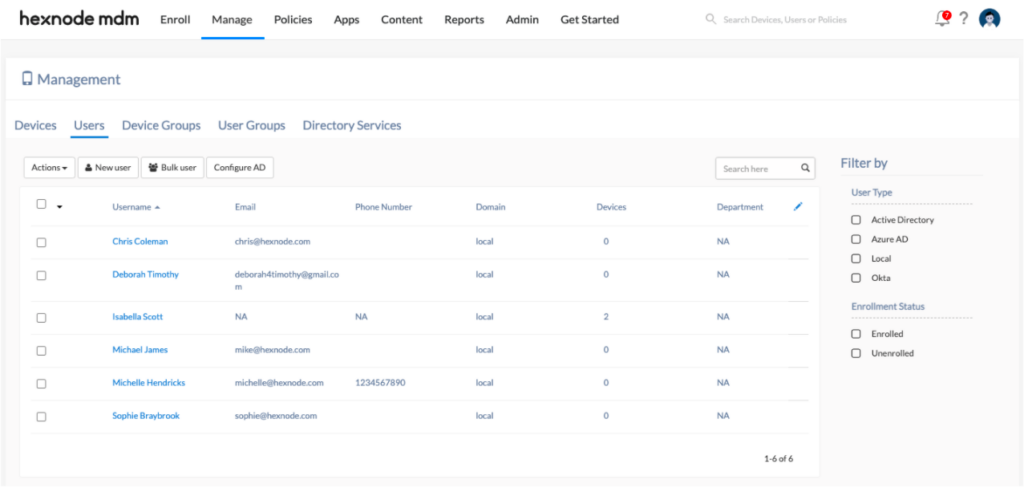
7. Hexnode UEM

Best for: Multi-platform device management and kiosk lockdown.
Strengths: Zero-touch enrollment and single-policy management across OSs.
Things to consider: Device unenrollment and MFA flexibility can improve.
Hexnode UEM manages devices across Windows, macOS, Android, Apple, Linux, ChromeOS, tvOS, Fire OS and visionOS from a single console. It covers enrollment, security, application and content management, and kiosk lockdown, with a single policy applying across multiple platforms.
The platform emphasizes automation, offering zero-touch enrollment, workflow automation and scripting, along with remote control and patch management to handle the device lifecycle from onboarding to retirement.
Key features include:
- Multi-platform management: Manages Windows, macOS, Android, Apple, Linux, ChromeOS, tvOS, Fire OS and visionOS devices from one console.
- Enrollment options: Provides zero-touch enrollment, the Hexnode Gateway for Windows and macOS onboarding, and directory integration for user provisioning.
- Security management: Applies restrictions across platforms through a single policy, with encryption, web content filtering, device tracking and geofencing.
- App and content management: Supports silent app installation, allowlists and blocklists, app catalogs, encrypted content push and content containerization.
- Kiosk lockdown: Locks devices to approved apps and websites for single-purpose and shared-device use.
- Automation and remote control: Offers workflow automation, advanced scripting, OS and patch management, the Hexnode Genie AI scripting assistant, and remote control of unattended devices.
Limitations (as reported by users on G2):
- Unenrollment process: Reviewers say device unenrollment can be cumbersome and that devices sometimes remain partially enrolled, complicating offboarding.
- MFA flexibility: Some users find MFA settings inflexible, with no option to exempt bulk actions.
- API coverage: Certain device details are available only in the web console and not through the API, which limits automation.
- Usability: A few reviewers report occasional difficulty finding help or using specific features.
Source: Hexcode
8. Omnissa Workspace ONE UEM
Best for: Enterprise UEM across every major operating system and device type.
Strengths: Cloud-native management with automation and conditional access.
Things to consider: High, complex pricing and support since the ownership change.
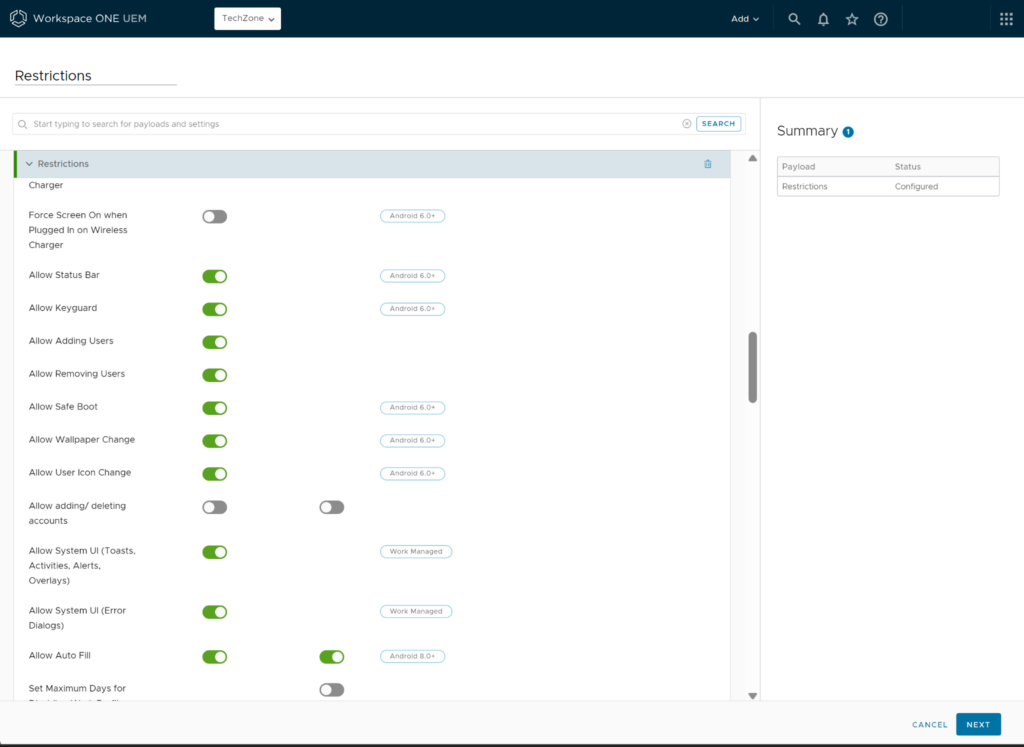
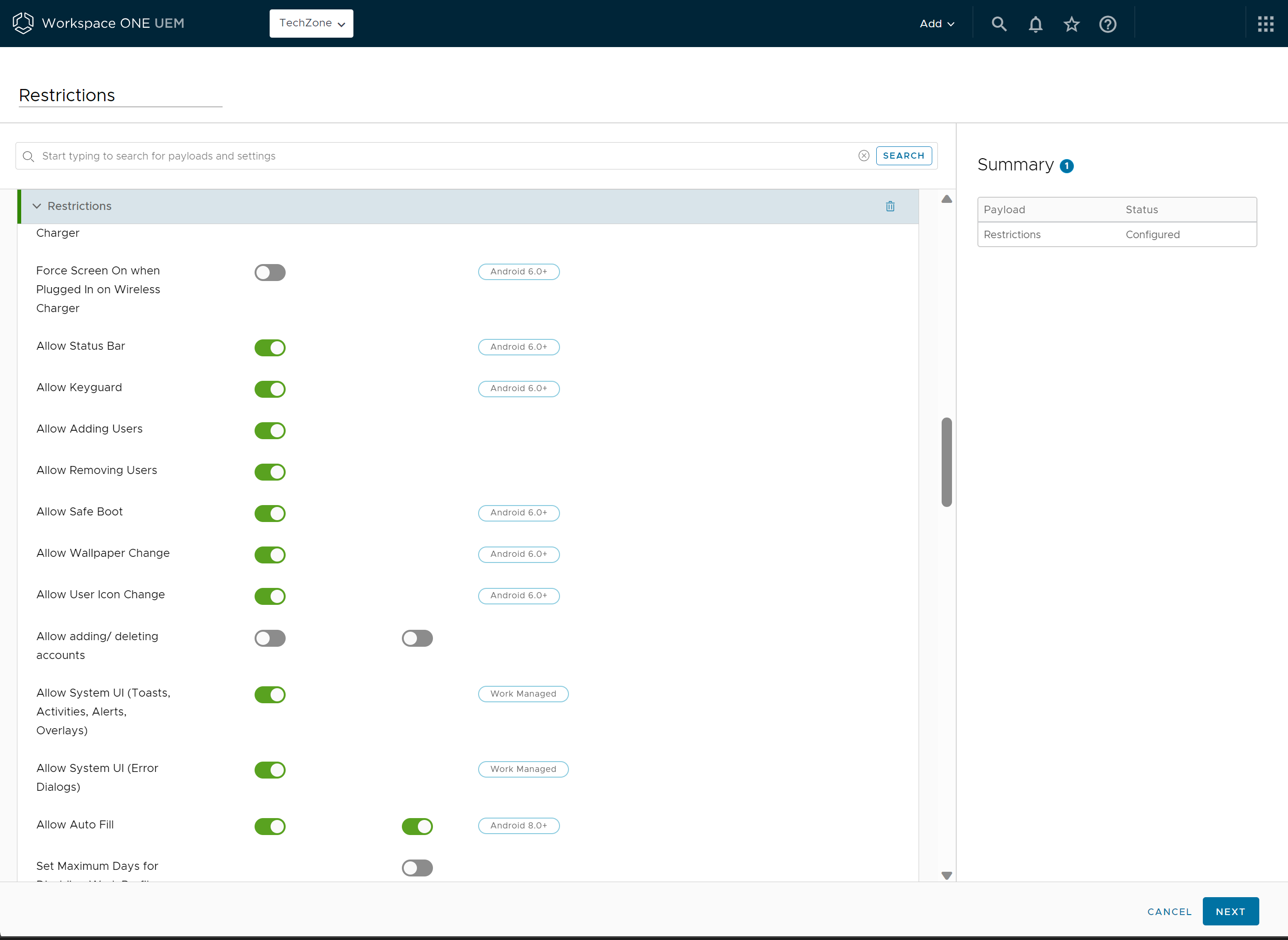
Omnissa Workspace ONE UEM, formerly part of VMware, is a cloud-native unified endpoint management platform. It manages desktops, mobile, rugged, servers and specialty devices across Windows, macOS, iOS, Android, Linux and ChromeOS from a single console.
The platform combines multi-tenant administration, automation and application lifecycle management with security controls such as conditional access, compliance policies and per-app VPN, and integrates with other products in the Omnissa portfolio.
Key features include:
- Cloud-native cross-OS management: Manages the full device lifecycle across Windows, macOS, iOS, Android, Linux and ChromeOS, including rugged, server and specialty devices.
- Multi-tenant architecture: Uses organization groups to localize policy and access across business units or geographies and to delegate administration.
- Orchestration and automation: Freestyle Orchestrator provides low- and no-code workflows for onboarding, app deployment and remediation.
- Application lifecycle and self-service: The Intelligent Hub delivers a unified self-service app catalog with single sign-on, including Office 365.
- Security controls: Includes conditional access, compliance policies, device posture checks and automated patch management for Windows, macOS and mobile.
- Secure access: Workspace ONE Tunnel provides per-app VPN, and Omnissa Access adds single sign-on to web, mobile, SaaS and legacy applications.
Limitations (as reported by users on PeerSpot):
- Pricing and licensing: Reviewers describe pricing and licensing as high and complex, which can be a barrier for smaller organizations.
- Support since transition: Several users say support has weakened since the move from VMware, with some cases taking a few days.
- Setup complexity: Initial and on-premises setup is considered complex, and documentation can be confusing.
- Bugs and reporting: Users note occasional bugs on version releases, sync inconsistencies, and room to improve reporting and the interface.
Source: Omnissa
9. Citrix Endpoint Management

Best for: MDM and MAM within the Citrix Workspace ecosystem.
Strengths: MDX app containerization and micro VPN with extensive policies.
Things to consider: Setup complexity and higher cost.
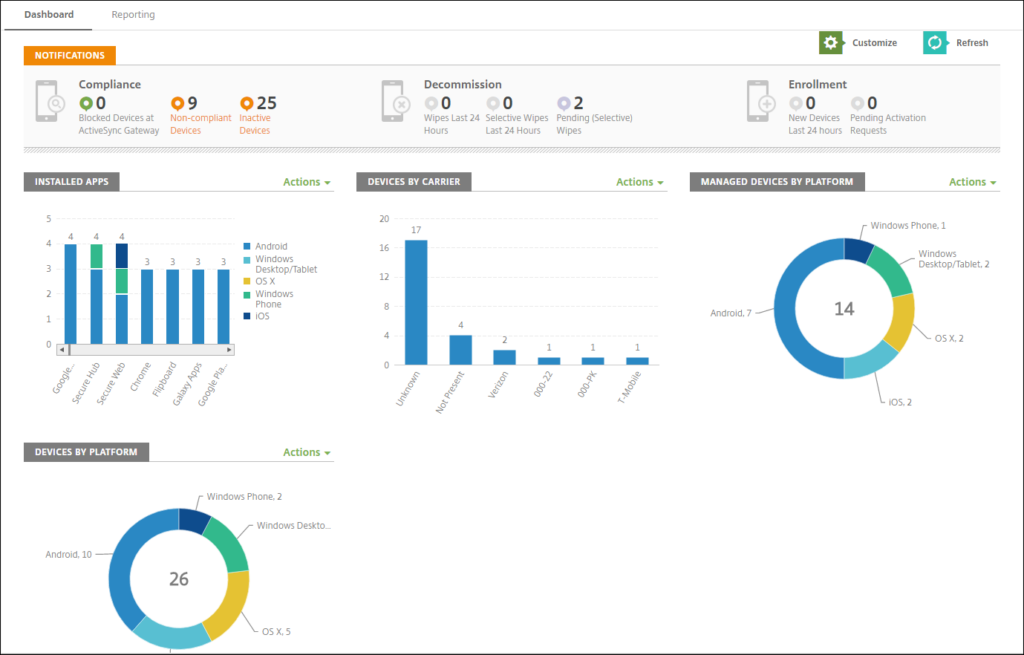
Citrix Endpoint Management is a unified endpoint management solution that brings apps and endpoints into one view. It provides Mobile Device Management and Mobile Application Management, letting administrators deploy device policies and apps, retrieve asset inventories and carry out actions such as device wipe.
Delivered as a service through Citrix Cloud, it secures apps and data on BYO devices using MDX containerization and micro VPN, and integrates with identity providers and with Microsoft Endpoint Manager.
Key features include:
- MDM and MAM: Deploys device policies and apps, retrieves asset inventories and performs device wipes, while securing and delivering apps on BYO devices.
- MDX app containerization: Separates corporate and personal data with app-level encryption that is distinct from device-level encryption.
- Micro VPN: Provides per-app secure access through an on-premises NetScaler Gateway.
- Identity and authentication: Supports Azure AD, Okta, LDAP, certificate-based authentication, SAML single sign-on and nFactor authentication.
- Platform coverage: Manages Android Enterprise, iOS and macOS (including Apple Deployment Programs and shared iPads) and Windows devices.
- Productivity apps and integration: Includes Secure Mail, Secure Web and Secure Hub, ShareFile integration, and integration with Microsoft Endpoint Manager for Intune-aware apps.
Limitations (as reported by users on Gartner Peer Insights):
- Setup complexity: Reviewers note a learning curve and a setup process that can be complex.
- Containerized apps: Some users find the containerized (MDX) apps less useful and mention work and personal environments mixing when using streamed apps.
- Cost and licensing: Users cite the end of perpetual licenses and describe the product as somewhat expensive.
- Browser handling: One noted limitation is how the product handles Google Chrome consumption.
Source: Citrix
10. BlackBerry UEM

Best for: High-assurance, sovereign-grade device management.
Strengths: App-level encryption and containerization with government certifications.
Things to consider: A slow console, multi-step onboarding and entry-level support.
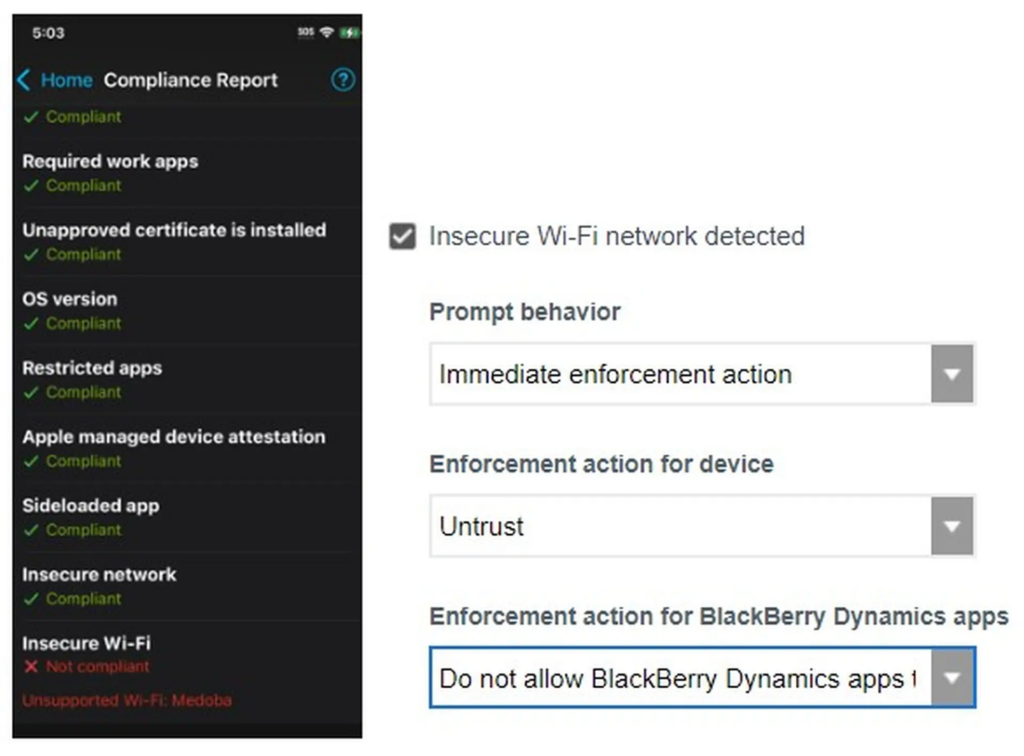
BlackBerry UEM is a unified endpoint management and security solution aimed at organizations with strict security and compliance requirements. It enforces device compliance, verifies users and devices before granting access, and protects apps, data and communications within controlled boundaries.
The platform is designed for deployment in environments the organization controls, including on-premises, air-gapped and sovereign cloud, and holds a broad set of government and defense certifications.
Key features include:
- Compliance and access control: Confirms that both user and device meet security requirements before granting access, and blocks or removes access automatically when either fails.
- App-level encryption and containerization: Cryptographically separates work data at the application level so it stays protected even if the host device is compromised.
- Sovereign deployment: Installs on-premises, in air-gapped networks or in sovereign-managed clouds, keeping data, infrastructure and keys under the organization’s control.
- Certifications: Meets requirements including FIPS 140-2, NIAP EAL4+, Common Criteria, DoD IL2, CSfC, German BSI, DISA STIG and NATO Restricted.
- Secure productivity tools: Work Smart Tools support document review and annotation, Microsoft Office editing and sync, and DRM-based file sharing inside the secure container.
- Identity and custom apps: Integrates with CAC/PIV and government identity frameworks, and allows custom mission apps to be built with embedded containerization and encryption.
Limitations (as reported by users on PeerSpot):
- Console performance: Reviewers note the management web interface can be slow to load in both production and test environments.
- Onboarding steps: Enrolling existing users through Apple DEP or Samsung Knox can require a factory wipe, and users describe enrollment as having many steps.
- Entry-level support: Level 1 support is cited as an area needing improvement for organizations without premium support.
- Administration and coverage: Users request better Active Directory integration, note on-premises database maintenance overhead, and ask for wider Chromebook support.
Source: Blackberry
%3Aquality(100)&w=3840&q=75)
Criteria for Evaluating Unified Endpoint Management Software
When selecting a unified endpoint management (UEM) solution, organizations must consider a range of functional, operational, and strategic factors. A good UEM platform should not only meet current needs but also scale with evolving device environments, security threats, and compliance requirements.
Below are key and unique considerations when evaluating UEM software:
- Platform and device coverage: Ensure the solution supports all major operating systems and device types used within your organization, including desktops, laptops, mobile devices, rugged endpoints, and IoT. Broad platform coverage reduces management silos and future retooling.
- Security and compliance capabilities: Look for built-in support for data encryption, remote wipe, threat detection, and compliance reporting. Check if the platform integrates with enterprise security tools (SIEM, CASB, etc.) and supports compliance mandates relevant to your industry.
- Deployment flexibility (cloud, on-premises, hybrid): Some UEM tools are cloud-native, while others support on-prem or hybrid deployments. Choose based on your IT strategy, data sovereignty needs, and existing infrastructure.
- Integration with identity and access management (IAM): Evaluate whether the UEM integrates with identity providers (e.g., Azure AD, Okta, Google Workspace) to enforce user-based policies, support conditional access, and enable Zero Trust security models.
- Automation and policy enforcement: Advanced automation features can simplify routine tasks like patching, onboarding, and remediation. Assess how easily policies can be created, scheduled, and enforced across device types and user groups.
- Remote support and troubleshooting tools: Consider whether the UEM includes real-time remote control, diagnostics, and self-healing capabilities. These are critical for managing distributed or remote workforces without user disruption.
- Scalability and performance: The solution should scale to support thousands of endpoints with minimal performance degradation. Look for architecture designed for high availability and load distribution.
- User experience and non-intrusiveness: Assess how the tool impacts end-user experience, especially in BYOD environments. Features like app containerization, role-based access, and user privacy controls help maintain a balance between security and usability.
- Reporting, analytics, and dashboards: Strong reporting tools enable compliance tracking, asset visibility, and operational decision-making. Look for customizable dashboards and automated report generation.
- Vendor support and ecosystem integration: Evaluate the vendor’s support model, documentation, and training resources. Check for integrations with other enterprise systems such as ITSM, EMM, endpoint detection and response (EDR), and configuration management databases (CMDBs).
These criteria provide a framework for comparing UEM products and aligning them with organizational goals, technical requirements, and regulatory landscape. To compare detailed user reviews and expert insights across the industry, consult resources such as the Gartner Endpoint Management Tools reviews to find the right fit for your organization’s device ecosystem and IT team size.
Securely enable your BYOD workforce with Venn.

Any worker. Any laptop. Any AI workflow. Fully secured.
Schedule a demo to see how Blue Border® secures company data and apps without shipping laptops, running VDI, or managing personal endpoints.