

Use Cases
Eliminate corporate laptop programs
Stop buying, shipping, and managing company hardware. Secure work on any device the employee or contractor already has.
Trusted by 700+ security- and compliance-driven organizations, including Fidelity, Guardian, StoneX, Whatnot, and the IMF.
Every company laptop is a lifecycle. Not a simple line item.
For years, securing work meant issuing a company-controlled laptop to everyone. It was the default answer. But the workforce is now remote, hybrid, contractor-heavy, global, and handing every one of those people a corporate laptop has quietly become a heavy, expensive program.
A laptop fleet isn’t a one-time purchase, it’s a lifecycle. You procure and carry the CapEx, image and configure each machine, ship it (slow and costly across borders), track it as an asset, manage and patch it, refresh it every few years, then recover and wipe it at the end. Every step is cost, logistics, and IT effort multiplied by headcount and by churn.
Meanwhile, people already own perfectly capable Macs and PCs. The only real reason to issue a company laptop was control: you couldn’t secure a device you didn’t own. Remove that constraint and the entire program becomes optional. The business wants people equipped and productive without a hardware program; security still needs company data protected on whatever device they use. The goal is to secure the work on the device they already have and retire the fleet.
Buying and refreshing a laptop fleet is pure CapEx
Procuring laptops and cycling them every few years is a recurring capital cost that grows with every hire. Money spent on hardware before anyone does a day of work.
Shipping and tracking is a logistics nightmare
Imaging, shipping, retrieving, and inventorying every device as an asset is constant overhead that scales with the workforce.
Managing and recovering corporate laptops never ends
Patching, break/fix support, and then chasing down, wiping, and refurbishing laptops at offboarding is ongoing work that never fully clears.
Corporate Laptop Program vs. Blue Border™
There’s a way to secure remote work: with Blue Border, work apps run inside a company-controlled secure enclave on the device an employee or contractor already owns — without VDI or fully managing their endpoint. With Blue Border, you provision by software, not hardware – and keep company data secure without a laptop program behind it.
| Corporate Laptop Program |

|
|
|---|---|---|
Hardware
Corporate Laptop Program
Buy a laptop for every employee and contractor — a capital cost per head.
Venn Blue Border
Use the Mac or PC the person already owns — nothing to buy.
|
Buy a laptop for every employee and contractor — a capital cost per head. | Use the Mac or PC the person already owns — nothing to buy. |
Procurement & refresh
Corporate Laptop Program
Purchase and cycle the fleet on a multi-year refresh schedule.
Venn Blue Border
No fleet to buy or refresh.
|
Purchase and cycle the fleet on a multi-year refresh schedule. | No fleet to buy or refresh. |
Imaging & setup
Corporate Laptop Program
Image and configure each machine before it ships.
Venn Blue Border
A single lightweight software install.
|
Image and configure each machine before it ships. | A single lightweight software install. |
Shipping
Corporate Laptop Program
Ship a device to every user — slow and costly for contractors and across borders.
Venn Blue Border
Nothing to ship, anywhere.
|
Ship a device to every user — slow and costly for contractors and across borders. | Nothing to ship, anywhere. |
Asset tracking
Corporate Laptop Program
Inventory and track every device through its life.
Venn Blue Border
No company hardware to track.
|
Inventory and track every device through its life. | No company hardware to track. |
Management
Corporate Laptop Program
MDM, patching, and break/fix for the whole fleet.
Venn Blue Border
Manage only the enclave, never the device itself.
|
MDM, patching, and break/fix for the whole fleet. | Manage only the enclave, never the device itself. |
Onboarding
Corporate Laptop Program
Procure, image, and ship before day one — days to weeks.
Venn Blue Border
Install on the device they have — productive in minutes.
|
Procure, image, and ship before day one — days to weeks. | Install on the device they have — productive in minutes. |
Offboarding
Corporate Laptop Program
Recover, wipe, and refurbish the returned laptop.
Venn Blue Border
A remote wipe removes the enclave — no device to reclaim.
|
Recover, wipe, and refurbish the returned laptop. | A remote wipe removes the enclave — no device to reclaim. |
Personal privacy
Corporate Laptop Program
Any personal action on a managed devices is subject to monitoring – which can lead to shadow IT
Venn Blue Border
Blue Border separates work from personal activity – personal activity is never monitored.
|
Any personal action on a managed devices is subject to monitoring – which can lead to shadow IT | Blue Border separates work from personal activity – personal activity is never monitored. |
Data security
Corporate Laptop Program
Depends on managing the company-owned device.
Venn Blue Border
Company data encrypted and isolated in the enclave, on any device.
|
Depends on managing the company-owned device. | Company data encrypted and isolated in the enclave, on any device. |
How Blue Border™ Works
Installing Blue Border on a Mac or PC creates a company-controlled secure enclave directly on the device. Work data, apps, networking, and AI all run locally inside it.
- Network. Work traffic routes through Venn’s built-in VPN gateway or your existing private network.
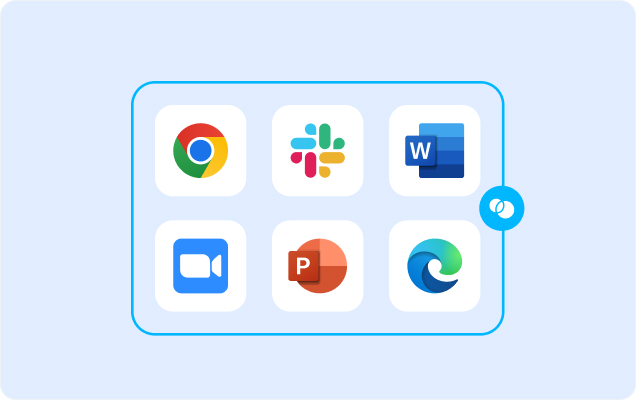
- Applications. Every app (installed, browser-based or AI) is wrapped by a blue line, creating a virtual firewall and enforcing DLP at the app level.
- Files. Users save only to work-sanctioned file systems inside Venn Disk that are isolated, encrypted and remote wipeable.
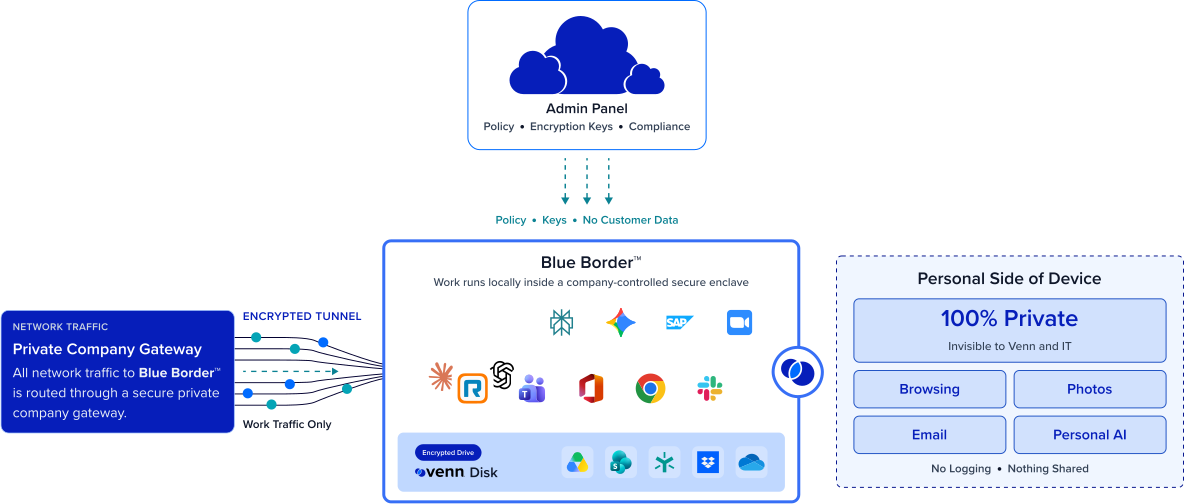
Any worker. Any device. Any application. Any AI workflow.

No laptop fleet to buy or refresh
Work apps and data run locally on devices people already own, so the corporate laptop line item doesn’t just shrink, it disappears. You stop spending on hardware before anyone starts working, and the spend no longer grows with every hire.
Nothing to ship, image, or track
With Blue Border, provisioning becomes a lightweight software install instead of an entire hardware operation. There’s no imaging, no shipping, and no asset inventory to maintain. The logistics program behind the fleet goes away.

No device to manage or recover
IT manages the applications inside the enclave, not the machine, so there’s no full-device enrollment of a user’s personal device. Personal privacy is always maintained. And off-boarding is a remote wipe of the enclave. No laptop to chase down, wipe, and refurbish at the end of every engagement.
Work data and apps stay secure on a BYOD laptop
Eliminating managed hardware doesn’t mean eliminating control. Company data is encrypted and isolated inside the enclave on any Mac or PC. Access is governed by IT and DLP is enforced across every work app. You retire the laptop fleet and keep the security.







Frequently Asked Questions
You install Blue Border on the Mac or PC the person already owns (BYOD), which creates a company-controlled secure enclave. Company work runs inside it — encrypted, access-governed, and DLP-protected — while everything else on the device stays theirs. Eliminating the corporate laptop program becomes possible because security no longer depends on owning the hardware.
The savings come from removing the whole lifecycle: hardware CapEx and refresh, imaging, shipping, asset tracking, full-device management, and end-of-life recovery. Instead of a per-device cost that recurs and grows with headcount, provisioning is a software install. The exact figure depends on your fleet size and refresh cycle — model it against your current hardware TCO. Typically resulting in hundreds of dollars of savings, per person, per year.
With Blue Border it is — in minutes. The secure enclave installs on the device they already have, with nothing to ship and no VDI session to stand up, so a contractor can be productive the same day they’re engaged rather than waiting on provisioning.
No. Personal privacy is built into Blue Border. IT has visibility and control only inside Blue Border. Everything outside the enclave — your personal browsing, apps, files, and accounts — stays 100% private, with no company visibility. If you leave, a remote wipe removes only the contents of the enclave. Your personal data is never touched.
Most people already have a capable Mac or PC, so BYOD covers the majority. For the few who don’t, you can still issue a device and secure it with Blue Border exactly the same way — the point is that you’re no longer required to run a full laptop program for everyone, just to equip the exceptions.

Retire the laptop fleet. Keep the security.
Blue Border is the secure workspace for remote employees and contractors on any device — without VDI or fully managing the endpoint. Secure work data and apps in a company-controlled secure enclave on the device your people already own — so you stop buying, shipping, tracking, managing, and recovering laptops, without giving up control of company data.