

Use Cases
Insider Threat Prevention
Isolate work from personal use at the application and data level. Prevent data leakage at the source on any managed or unmanaged device.
Trusted by 700+ security- and compliance-driven organizations, including Fidelity, Guardian, StoneX, WhatNot, and the IMF.
Most data leaks aren’t malicious. They happen from ineffective controls.
Insider threat detection focuses on the malicious employee — the one copying files on their way out the door. That risk is real, and it matters. But most company data doesn’t leave through theft. It leaves by accident.
A well-meaning employee pastes a customer list into a personal Claude or ChatGPT account to move faster. Someone downloads a report to a personal external drive to finish at home. Another uploads a file to personal cloud storage. No bad intent, but the data’s gone all the same.
Watching for data leaks after the fact doesn’t stop them — policy controls that focus on real-time prevention do. What prevents exfiltration is DLP controls that decide, in the moment, what data can and can’t move. And on the unmanaged devices where so much work now happens, traditional device management can’t even be installed due to their invasive nature.
The off-boarding employee is the biggest source of data leakage
The classic insider threat: someone on their way out copies files, emails data to a personal account, or holds onto a device full of company information. Orphaned accounts can leave this threat window open indefinitely.
Productivity: The well-meaning data leak
No malice, just convenience. Pasting into a personal AI account, saving to a personal drive, uploading to personal cloud. The data still lands somewhere you don’t control. Often created by remote and hybrid work. Users wanting to use preferred tools.
Security and DLP policy that can’t reach the device
Traditional DLP enforces its controls only where its agent is installed — never on the personal, contractor, and BYOD machines where work now happens. That would be far too invasive.
Traditional DLP vs. Blue Border™ for Insider Threat Prevention
There’s a better way to prevent data leaks from insider threats: Blue Border enforces DLP inside a company-controlled secure enclave on any device — managed or not — so it blocks leaks at the source and covers the unmanaged endpoints where conventional DLP can’t go.
| Traditional DLP |

|
|
|---|---|---|
Where it runs
Traditional DLP
An agent installed on a company-managed device that enrolls the entire device.
Venn Blue Border
A lightweight agent that creates a secure enclave on any device – only focusing DLP on company data and apps – nothing personal.
|
An agent installed on a company-managed device that enrolls the entire device. | A lightweight agent that creates a secure enclave on any device – only focusing DLP on company data and apps – nothing personal. |
Unmanaged & BYOD devices
Traditional DLP
Can’t install on devices IT doesn’t own due to user privacy.
Venn Blue Border
Enforces DLP on contractor, personal, and BYOD machines – enforcement only on work-related assets.
|
Can’t install on devices IT doesn’t own due to user privacy. | Enforces DLP on contractor, personal, and BYOD machines – enforcement only on work-related assets. |
How leaks are stopped
Traditional DLP
Policy enforced on all activity – personal or professional
Venn Blue Border
Policy-based controls block the action at the source, for work data and apps
|
Policy enforced on all activity – personal or professional | Policy-based controls block the action at the source, for work data and apps |
Controls enforced
Traditional DLP
Varies by agent and policy complexity
Venn Blue Border
Copy/paste, download, upload, screenshot, print, and AI, out of the box
|
Varies by agent and policy complexity | Copy/paste, download, upload, screenshot, print, and AI, out of the box |
Inadvertent AI leaks
Traditional DLP
Little visibility into personal AI accounts – zero tenant restrictions
Venn Blue Border
Governs which AI tools reach company data — browser and desktop
|
Little visibility into personal AI accounts – zero tenant restrictions | Governs which AI tools reach company data — browser and desktop |
Work vs. personal separation
Traditional DLP
Monitors the whole device, blurring work and personal
Venn Blue Border
Isolates work from personal at the app and data level; personal stays private
|
Monitors the whole device, blurring work and personal | Isolates work from personal at the app and data level; personal stays private |
Departing-employee risk
Traditional DLP
Revoke access, then hope the data isn’t already copied. Then you need to get your device back
Venn Blue Border
One remote wipe purges all company data instantly. No impact to the user and their personal files.
|
Revoke access, then hope the data isn’t already copied. Then you need to get your device back | One remote wipe purges all company data instantly. No impact to the user and their personal files. |
Unmanaged coverage gap
Traditional DLP
Leaves unmanaged endpoints uncovered
Venn Blue Border
Fills the gap where DLP can’t go — and coexists with DLP on managed devices
|
Leaves unmanaged endpoints uncovered | Fills the gap where DLP can’t go — and coexists with DLP on managed devices |
Deployment
Traditional DLP
Agent rollout, tuning, and ongoing policy management
Venn Blue Border
Install in minutes; set policy once, apply everywhere
|
Agent rollout, tuning, and ongoing policy management | Install in minutes; set policy once, apply everywhere |
Compliance
Traditional DLP
Partial on unmanaged devices
Venn Blue Border
Turnkey controls across every app — HIPAA, FINRA, SEC, SOC 2, PCI, GDPR
|
Partial on unmanaged devices | Turnkey controls across every app — HIPAA, FINRA, SEC, SOC 2, PCI, GDPR |
How Blue Border™ Works
Installing Blue Border on a Mac or PC creates a company-controlled secure enclave directly on the device. Work data, apps, networking, and AI all run locally inside it.
- Network. Work traffic routes through Venn’s built-in VPN gateway or your existing private network.
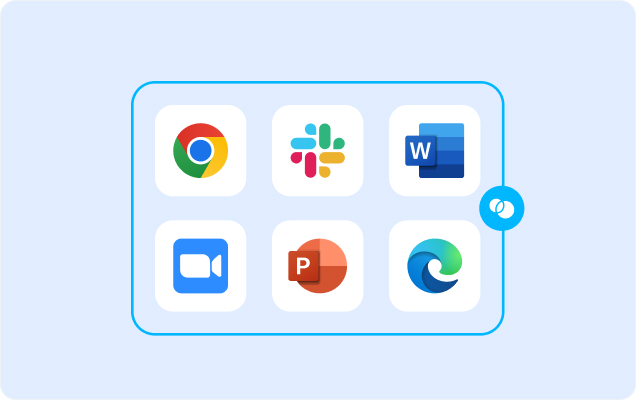
- Applications. Every app (installed, browser-based or AI) is wrapped by a blue line, creating a virtual firewall and enforcing DLP at the app level.
- Files. Users save only to work-sanctioned file systems inside Venn Disk that are isolated, encrypted and remote wipeable.
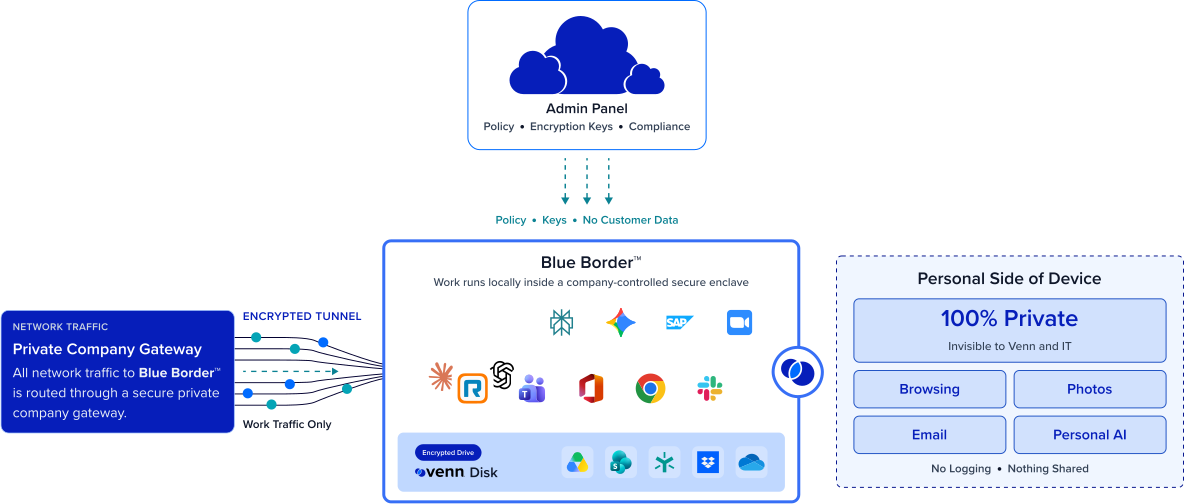
Any worker. Any network. Any device. Any application.

Prevent leaks at the source with policy
IT sets DLP policy once, and Blue Border enforces it in the moment — blocking the exfiltrating action across copy, download, upload, screenshot, and print before data can move.
Stop data leaks to personal AI accounts
IT governs which AI tools can reach company data, across browser and desktop. An employee can’t paste sensitive data into a personal AI account, even with the best intentions.

Purge every trace of your data when an employee leaves
One remote wipe removes the enclave and all company data in seconds, from anywhere. The departing-employee exfiltration window closes instantly — no device to recover, nothing left behind.
Enforce DLP on devices you don’t manage
Copy/paste, download, upload, screenshot, print, and AI controls run inside the enclave on contractor, personal, and BYOD machines. Turnkey controls satisfy HIPAA, FINRA, SEC, SOC 2, PCI, and GDPR.







Frequently Asked Questions
Blue Border runs work inside a company-controlled secure enclave and enforces DLP across copy/paste, download, upload, screenshot, print, and AI. Company data can’t move to a personal app, drive, or AI account, so policy blocks the leak the moment it’s attempted. It works whether the leak is malicious or accidental.
Traditional DLP needs an agent on a company-managed device because the entire device is enrolled – users on personal devices immediately push back due to privacy concerns. Blue Border enforces policy-based DLP inside a secure enclave (only) on any device — including contractor, personal, and BYOD machines — and blocks the exfiltrating action before it completes. It covers the unmanaged endpoints conventional DLP can’t reach, and coexists with DLP you already run on managed devices.
Yes. Blue Border governs which AI tools can reach company data, across both browser-based and desktop AI apps. An employee can’t paste or upload sensitive data into a personal AI account, even without any bad intent. That closes one of the fastest-growing and least-intentional exfiltration paths.
Blue Border shifts the focus from insider threat detection to policy-based prevention — blocking leaks at the source with enclave-based DLP controls and AI governance. Turnkey controls satisfy HIPAA, FINRA, SEC, SOC 2, PCI, and GDPR on devices you don’t manage. You enforce policy that prevents the leak, not just records it.
You trigger a remote wipe, and the enclave — with all company data — is purged in seconds, from anywhere. There’s no hardware to recover and no access to manually revoke. The departing-employee exfiltration window that worries most security teams simply closes.

Ready to stop data from leaking. On purpose or by accident?
Isolate work in a secure enclave, enforce DLP across copy, paste, download, upload, screenshot, print, and AI, and purge every trace with one remote wipe when someone leaves.