

Use Cases
Migrate off Citrix, VMware, or AVD
Get ahead of a Citrix, VMware Horizon, or Azure Virtual Desktop renewal. Replace it with Blue Border before the contract forces a decision.
Save up to 60% vs. VDI.
Trusted by 700+ security- and compliance-driven organizations, including Fidelity, Guardian, StoneX, Whatnot, and the IMF.
The renewal is the moment to rethink VDI
Virtual desktops were the default answer for a decade: put the desktop in the cloud and keep the data off the endpoint. But the ground has shifted. Workforces are more remote, more distributed, and device usage is more diverse. Voice and video became a daily operations problem the moment remote work scaled. AI is adding pressure from the top.
The VDI market itself is in flux: Broadcom’s acquisition of VMware restructured licensing overnight, Citrix has repriced, and renewal numbers are now significantly higher.
A Citrix, VMware Horizon, or Azure Virtual Desktop renewal forces all of that into one decision. Usually under a deadline, and usually at a higher number than last time. That renewal is a forcing function, not a foregone conclusion. A Citrix, VMware, and AVD migration doesn’t have to mean another virtual-desktop contract. There’s a lighter, device-agnostic way to get the same data isolation without the backend of VDI.
Licensing terms that changed under you
Broadcom’s VMware acquisition and Citrix’s repackaging moved the goalposts mid-contract for thousands of customers.
Voice and video that always freezes
Teams calls drop, Zoom sessions lag, screen recording fails. These are not edge cases on VDI, they are daily occurrences.
Every new region means more infrastructure
Adding a remote team or geography means capacity planning and build-out, not a software install.
Citrix, VMware Horizon, and AVD vs. Blue Border™
There’s a better way to secure remote work: with Blue Border, work applications run locally inside a company-controlled secure enclave on the user’s own device. You get VDI-grade data isolation with native compute performance and no backend to host or maintain.
| VDI: Citrix / VMware Horizon / AVD |

|
|
|---|---|---|
Where work runs
VDI: Citrix / VMware Horizon / AVD
A desktop or apps host from a data center or cloud; nothing runs on the user’s device.
Venn Blue Border
Work applications run locally on the user’s own Mac or PC, inside a company-controlled secure enclave.
|
A desktop or apps host from a data center or cloud; nothing runs on the user’s device. | Work applications run locally on the user’s own Mac or PC, inside a company-controlled secure enclave. |
Performance & latency
VDI: Citrix / VMware Horizon / AVD
Every session traverses the network, adding lag and latency — and a Mac never feels like a Mac.
Venn Blue Border
Locally installed apps run at full native speed, with no remote desktop or virtualization. A Mac feels like a Mac; Windows feels like Windows.
|
Every session traverses the network, adding lag and latency — and a Mac never feels like a Mac. | Locally installed apps run at full native speed, with no remote desktop or virtualization. A Mac feels like a Mac; Windows feels like Windows. |
Infrastructure & backend
VDI: Citrix / VMware Horizon / AVD
Brokers, gateways, host pools, images, and capacity planning to stand up and maintain.
Venn Blue Border
A single lightweight software install — no backend, no hosting, no virtualization.
|
Brokers, gateways, host pools, images, and capacity planning to stand up and maintain. | A single lightweight software install — no backend, no hosting, no virtualization. |
Cost model
VDI: Citrix / VMware Horizon / AVD
Per-seat licensing plus hosting, compute, and ongoing support that scale with every user.
Venn Blue Border
No VDI infrastructure and no hardware to ship — save up to 60% vs. VDI.
|
Per-seat licensing plus hosting, compute, and ongoing support that scale with every user. | No VDI infrastructure and no hardware to ship — save up to 60% vs. VDI. |
Migration effort
VDI: Citrix / VMware Horizon / AVD
Re-platforming, image builds, and profile migration — a project measured in months.
Venn Blue Border
No backend to stand up; provision any user on a device they already have in minutes.
|
Re-platforming, image builds, and profile migration — a project measured in months. | No backend to stand up; provision any user on a device they already have in minutes. |
Device & ownership
VDI: Citrix / VMware Horizon / AVD
Typically paired with managed or company-issued endpoints and a connection client. BYOD scenarios add complexity and support tickets.
Venn Blue Border
Company-issued, third-party, or personal / BYOD, managed or unmanaged — with native support for Mac and Windows.
|
Typically paired with managed or company-issued endpoints and a connection client. BYOD scenarios add complexity and support tickets. | Company-issued, third-party, or personal / BYOD, managed or unmanaged — with native support for Mac and Windows. |
Renewal & lock-in
VDI: Citrix / VMware Horizon / AVD
Multi-year contracts that renew on the vendor’s terms and pricing.
Venn Blue Border
Lightweight software you deploy on your own timeline — get ahead of the renewal instead of extending it.
|
Multi-year contracts that renew on the vendor’s terms and pricing. | Lightweight software you deploy on your own timeline — get ahead of the renewal instead of extending it. |
Data protection / DLP
VDI: Citrix / VMware Horizon / AVD
Controls apply inside the hosted session only – any data on the endpoint isn’t protected.
Venn Blue Border
DLP across copy/paste, download, upload, screenshot, print, and AI, enforced inside the enclave on devices IT doesn’t own.
|
Controls apply inside the hosted session only – any data on the endpoint isn’t protected. | DLP across copy/paste, download, upload, screenshot, print, and AI, enforced inside the enclave on devices IT doesn’t own. |
AI governance
VDI: Citrix / VMware Horizon / AVD
No native control over which AI tools reach company data on the device.
Venn Blue Border
IT governs which AI tools can access company data — company-sanctioned tools only, blocking the rest.
|
No native control over which AI tools reach company data on the device. | IT governs which AI tools can access company data — company-sanctioned tools only, blocking the rest. |
User privacy
VDI: Citrix / VMware Horizon / AVD
Session-based; personal use of a BYOD device isn’t cleanly separated.
Venn Blue Border
Outside Blue Border, personal activity stays private with no company visibility — making BYOD viable.
|
Session-based; personal use of a BYOD device isn’t cleanly separated. | Outside Blue Border, personal activity stays private with no company visibility — making BYOD viable. |
How Blue Border™ Works
Installing Blue Border on a Mac or PC creates a company-controlled secure enclave directly on the device. Work data, apps, networking, and AI all run locally inside it.
- Network. Work traffic routes through Venn’s built-in VPN gateway or your existing private network.
- Applications. Every app (installed, browser-based or AI) is wrapped by a blue line, creating a virtual firewall and enforcing DLP at the app level.
- Files. Users save only to work-sanctioned file systems inside Venn Disk that are isolated, encrypted and remote wipeable.
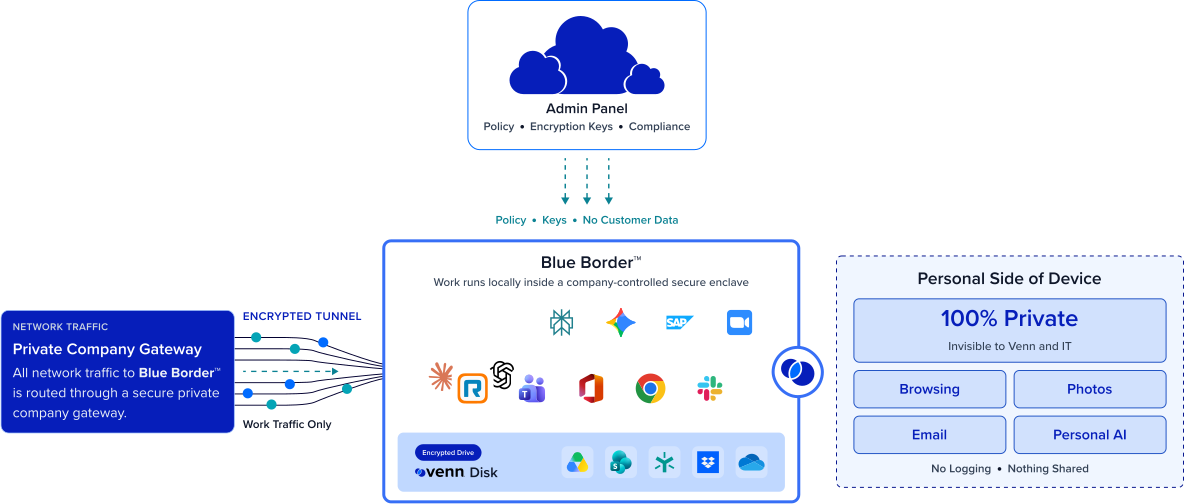
Any worker. Any device. Any application. Any AI workflow.

Take VDI off your books
Blue Border eliminates two of the largest cost centers in remote workforce IT: VDI infrastructure and corporate laptop programs. With Blue Border, there are no fees for cloud hosting and no backend infrastructure to maintain. Users can work securely from their personal BYOD laptops – which is how organizations save up to 60% vs. VDI.
Native app performance without latency
VDI’s fundamental tradeoff is security at the cost of user experience. Blue Border keeps all applications local, running at full native speed on the user’s own PC or Mac. Video calls, AI tools, and data-heavy apps perform naturally, not like they are fighting a slow connection.


Give IT their time back
VDI is an ongoing operations program: brokers, gateways, images, capacity planning, patching, and performance monitoring. Blue Border replaces that with a single lightweight software deployment. Onboard and off-board any user remotely, enforce policy centrally, and manage the work environment across any device without the backend overhead.
Migrate users from VDI to Venn quickly
Because there is no backend to stand up, migration isn’t a months-long re-platforming project. Any worker can be provisioned on a computer they already have in minutes, managed or unmanaged, Mac or Windows, it is streamlined and simple.







Frequently Asked Questions
You use Blue Border to create a company-controlled secure enclave on each user’s laptop. Work applications run locally inside the enclave where data is encrypted, access is governed by IT, and DLP is enforced. Delivering the same data isolation without VDI or fully managing the endpoint. A Citrix, VMware, or AVD migration can be successfully accomplished.
Citrix, VMware Horizon, and AVD host a virtual desktop from a data center, which adds latency and requires a backend to host and maintain. Blue Border keeps apps local in a secure enclave, so they run at full native speed with no infrastructure to stand up. Blue Border provides VDI-grade isolation and data controls while removing the hosting and latency of VDI.
With Blue Border, there is no backend to stand up and no images to build, so migration isn’t a months-long re-platforming project. Any user is provisioned and onboarded on a computer they already have – in minutes (managed or unmanaged, Mac or Windows.) Most IT teams can move users in waves and get ahead of a renewal deadline rather than being forced into another term.
Yes. Applications that install and run locally on Windows or Mac run inside Blue Border. Workloads that genuinely require server-side hosting are scoped individually, but for most distributed teams the apps delivered through VDI run locally without a virtual desktop.
Blue Border isolates and encrypts company data inside the secure enclave and enforces policy centrally, helping organizations meet standards like HIPAA, FINRA, SEC, SOC 2, PCI, and GDPR on devices they don’t own. Controls apply consistently across every user’s device, managed or unmanaged, so isolation isn’t tied to hosted infrastructure. (Confirm scope with your compliance team.)

Get ahead of your VDI renewal.
Blue Border is the secure workspace for remote employees and contractors on any device — without VDI or fully managing the endpoint. Move off Citrix, VMware Horizon, or AVD to native performance, no backend, and up to 60% lower cost — on the timeline you choose, not the vendor’s.