

Use Cases
Secure work from home on any device
Keep work from home employees secure without shipping hardware, installing MDM on personal devices, or relying on complex and expensive virtual desktops.
Trusted by 700+ security- and compliance-driven organizations, including Fidelity, Guardian, StoneX, Whatnot, and the IMF.
The home office has no built-in IT help desk
A work from home (WFH) employee isn’t in the office and usually isn’t especially technical. There’s no IT desk down the hall, no company image on the machine. Often, it’s simply their own home computer. Whatever secures their work has to be something they can set up and live with on their own, because help is a support ticket away, not a walk down the hall.
The usual answers for providing secure remote access create friction for the user. A VDI to launch and they immediately experience latency. A VPN to configure and reconnect when it drops. Every bit of that complexity turns into a support ticket a WFH user can’t easily resolve — and a reason to work around the tools altogether. Change management is hardest where IT is least present.
And the home computer is often shared. A partner, kids, or roommates use the same machine, so company data can end up sitting on a device non-employees can reach. The business wants people productive from home with minimal friction; security still owns protecting company data on a personal, shared computer. The goal is a setup simple enough to run without IT and strong enough to keep company data isolated on a shared device.
Complex remote work security setups need IT help
VDI and VPN configuration create friction and support tickets for users who have no IT desk to turn to — so tools go unused or get worked around.
The home computer is shared
Partners, kids, and roommates use the same machine, so company data can sit on a device that people who don’t work for the company are able to reach.
Change is where support is weakest
The more a security tool changes how someone works, the more help they need — and working from home is exactly where that help is hardest to get.
VDI / VPN vs. Blue Border™ for Securing Work for Home
There’s a simpler way to secure work from home: Blue Border is a single, lightweight software install that creates a company-controlled secure enclave on the employee’s own computer — without VDI or fully managing the endpoint. Remote employees and contractors keep working in their normal apps, inside Blue Border, and company data stays isolated from personal use on their local device. Zero impact or visibility to the personal side of their machine.
| VDI / VPN Remote Access |

|
|
|---|---|---|
Setup for the user
VDI / VPN Remote Access
Typical configuration that immediately comes with change management.
Venn Blue Border
One lightweight install (takes minutes) — they log in to their designated app launcher and they work as normal
|
Typical configuration that immediately comes with change management. | One lightweight install (takes minutes) — they log in to their designated app launcher and they work as normal |
Change to how they work
VDI / VPN Remote Access
A separate remote desktop or connection to work through. Latency created by hosting feels unnatural.
Venn Blue Border
The same apps they already use at 100% performance, marked by a blue line; work happens locally.
|
A separate remote desktop or connection to work through. Latency created by hosting feels unnatural. | The same apps they already use at 100% performance, marked by a blue line; work happens locally. |
Ongoing complexity
VDI / VPN Remote Access
Reconnects, latency, and prompts the user has to manage themselves.
Venn Blue Border
Runs quietly in the background — little for the user to manage or break.
|
Reconnects, latency, and prompts the user has to manage themselves. | Runs quietly in the background — little for the user to manage or break. |
Needs IT help
VDI / VPN Remote Access
Frequently — setup and troubleshooting generate tickets.
Venn Blue Border
Minimal — a self-service install with almost nothing to configure.
|
Frequently — setup and troubleshooting generate tickets. | Minimal — a self-service install with almost nothing to configure. |
Performance
VDI / VPN Remote Access
Hosting adds lag on a home connection.
Venn Blue Border
Apps run locally at full native speed. Users only need an internet connection for initial sign-in then they can work offline.
|
Hosting adds lag on a home connection. | Apps run locally at full native speed. Users only need an internet connection for initial sign-in then they can work offline. |
On a shared home computer
VDI / VPN Remote Access
VPN leaves company data on the shared machine; VDI keeps it remote but is only focused on securing sessions.
Venn Blue Border
Company data is encrypted and isolated in the secure enclave, separate from everyone else’s use.
|
VPN leaves company data on the shared machine; VDI keeps it remote but is only focused on securing sessions. | Company data is encrypted and isolated in the secure enclave, separate from everyone else’s use. |
Household members’ use
VDI / VPN Remote Access
Not isolated from company data on the same device (VPN).
Venn Blue Border
Cannot reach the enclave — authentication is required. Their personal use stays private from the company.
|
Not isolated from company data on the same device (VPN). | Cannot reach the enclave — authentication is required. Their personal use stays private from the company. |
Data protection / DLP
VDI / VPN Remote Access
Varies by setup and often absent on the endpoint.
Venn Blue Border
DLP across copy/paste, download, upload, screenshot, print, and AI inside the enclave.
|
Varies by setup and often absent on the endpoint. | DLP across copy/paste, download, upload, screenshot, print, and AI inside the enclave. |
Compliance on a personal device
VDI / VPN Remote Access
Hard to enforce or evidence on a home machine.
Venn Blue Border
Consistent controls on the enclave, even on a shared, unmanaged device (validate specifics).
|
Hard to enforce or evidence on a home machine. | Consistent controls on the enclave, even on a shared, unmanaged device (validate specifics). |
Offboarding
VDI / VPN Remote Access
Reclaim access or reset the machine.
Venn Blue Border
A remote wipe removes the enclave only — nothing else on the family computer is touched.
|
Reclaim access or reset the machine. | A remote wipe removes the enclave only — nothing else on the family computer is touched. |
How Blue Border™ Works
Installing Blue Border on a Mac or PC creates a company-controlled secure enclave directly on the device. Work data, apps, networking, and AI all run locally inside it.
- Network. Work traffic routes through Venn’s built-in VPN gateway or your existing private network.
- Applications. Every app (installed, browser-based or AI) is wrapped by a blue line, creating a virtual firewall and enforcing DLP at the app level.
- Files. Users save only to work-sanctioned file systems inside Venn Disk that are isolated, encrypted and remote wipeable.
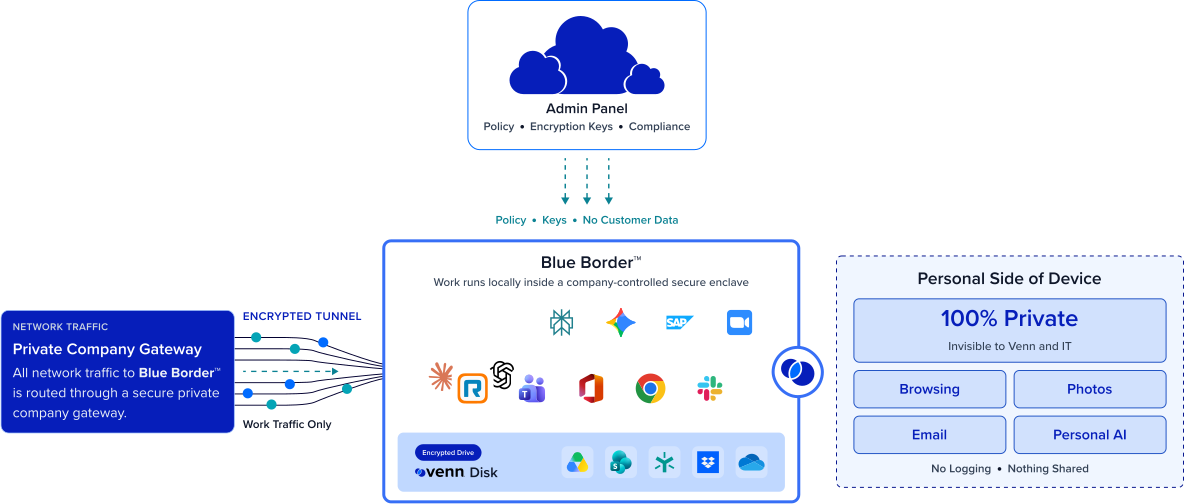
Any worker. Any device. Any application. Any AI workflow.

Install once, then work as normal
There’s one lightweight software install and almost nothing to configure. After that, employees work in the same apps they already know, marked by a blue line around the app window — no VDI client to launch. It’s a small enough change that a non-technical user working from home can set it up and run it easily.
Company data isolated on a shared home computer
Work lives inside the secure enclave, isolated from every other use of the same machine. A partner, child, or roommate on the family computer can’t reach company data, which stays encrypted and DLP-protected inside Blue Border.


Privacy for the whole household
The isolation runs both ways. Everything outside the enclave — the family’s browsing, apps, and files on the shared computer — stays private, with no company visibility or control. Employees can bring their home computer into work without inviting their employer into their household.
Low support burden, clean off-boarding
Because there’s little for the user to manage, there’s little to break — which keeps tickets down for a workforce IT can’t reach in person. And when someone leaves, a single remote wipe removes the enclave and all company data, without touching the rest of the family computer or needing it back.







Frequently Asked Questions
You install Blue Border once on the home computer, which creates a company-controlled secure enclave. Work happens inside it — encrypted, access-governed, and DLP-protected — while everything else on the machine is untouched. Secure work from home no longer depends on owning or fully managing the device, and there’s almost nothing for the employee to configure.
Not usually. It’s a single lightweight install with almost nothing to configure, and afterward people work in the same apps they already use, marked by a blue line. That’s the point — a work-from-home user with no IT desk nearby can get running on their own, which keeps change management and support tickets low.
Yes. Company data lives only inside the secure enclave, isolated from every other use of the machine. A partner, child, or roommate using the shared computer cannot reach it, and it stays encrypted and DLP-protected — what happens in Blue Border stays in Blue Border, even on a shared household device.
No. IT has visibility and control only inside the enclave. Everything outside it — the household’s browsing, apps, and files — stays private, similar to what MDM does with a personal mobile device. Bringing a home computer into work doesn’t bring the employer into the household.
They can secure access, but they put complexity on the user — connections to reconnect, latency to tolerate — which is a lot to ask of a non-technical person with no IT desk. And a VPN still leaves company data on a shared home machine. Blue Border is simpler to run and isolates company data locally, even when the computer is shared.
It applies consistent controls — encryption, access governance, and DLP — to company data inside the enclave, even on a personal, shared, and unmanaged home computer. That helps address standards that expect data protection on the devices accessing regulated information; confirm the specific mappings with your compliance team.

Simple for the user. Safe on a home computer.
Blue Border is the secure workspace for remote employees and contractors on any device — without VDI or fully managing the endpoint. Let work-from-home employees install once on the computer they already have and just work, with company data isolated in a secure enclave — simple enough to run without IT, and safe even when the machine is shared.