

Use Cases
BYOD Security
Secure work apps and data on any personal laptop without VDI, full device management or infringing on personal privacy. BYOD security for modern distributed workforces.
Trusted by 700+ security- and compliance-driven organizations, including Fidelity, Guardian, StoneX, Whatnot, and the IMF.
With BYOD, you don’t own the device. You still own the risk.
People work on their own devices. Remote employees, contractors, and the extended workforce increasingly use BYOD Macs and PCs. Why? Because it’s faster, cheaper, and simply what users prefer. In a remote work environment, BYOD is the reality, not the exception. AI only puts more company data and tools onto those personal machines.
But a personal device is one the company doesn’t own, can’t manage, and can’t see. Company data on it like files, apps, and credentials are exposed, mixed with personal use, and can’t be cleanly removed when the person leaves. That is the BYOD security gap.
Lastly, since you can’t manage a personal device, the usual answer for security is to keep company data off it entirely with VDI. Host a virtual desktop so nothing lands locally. It works to an extent, but it’s laggy, costly, complex, and comes with a generally poor experience. The alternatives are worse: ship a corporate laptop (no longer BYOD and expensive) or allow BYOD with no real controls.
The real goal is to secure company data on a personal device without VDI and without managing the device.
MDM needs a device you fully own
MDM assumes a managed, company-owned machine. On a personal device, they don’t fit, so the controls simply aren’t there.
The legacy approach to BYOD security is VDI, which has major drawbacks
Keeping data off the device usually means hosting a virtual desktop, which adds latency and cost and turns the user’s own fast machine into a laggy remote session they’ll work around.
Company data stays on their device after they leave
At offboarding, company data lingers on a personal device with no clean way to remove it — short of wiping the person’s own files along with it.
VDI vs. Blue Border™ for BYOD Security
There’s a better way to manage BYOD security: instead of hosting a virtual desktop to keep data off the device, Blue Border secures the work locally inside a company-controlled secure enclave on the employee’s own Mac or PC — without VDI or fully managing the endpoint. Native performance, with company data isolated and the rest of the device untouched.
| VDI / Virtual Desktops |

|
|
|---|---|---|
Where work runs
VDI / Virtual Desktops
A desktop and apps remotely hosted from a data center; nothing runs on the personal device.
Venn Blue Border
Work applications run locally on the employee’s own Mac or PC, inside a company-controlled secure enclave.
|
A desktop and apps remotely hosted from a data center; nothing runs on the personal device. | Work applications run locally on the employee’s own Mac or PC, inside a company-controlled secure enclave. |
Performance
VDI / Virtual Desktops
Hosting adds latency and lag — a personal machine ends up feeling slower, not faster.
Venn Blue Border
Apps run locally at full native speed; a Mac feels like a Mac, Windows like Windows.
|
Hosting adds latency and lag — a personal machine ends up feeling slower, not faster. | Apps run locally at full native speed; a Mac feels like a Mac, Windows like Windows. |
Personal / unmanaged devices
VDI / Virtual Desktops
Reaches them only through a remote session.
Venn Blue Border
Runs natively on any personal or unmanaged Mac or PC — no company ownership required.
|
Reaches them only through a remote session. | Runs natively on any personal or unmanaged Mac or PC — no company ownership required. |
User privacy
VDI / Virtual Desktops
Session-based; the user’s own use of the personal device isn’t cleanly separated.
Venn Blue Border
App-based. Outside Blue Border, personal activity stays private with no company visibility.
|
Session-based; the user’s own use of the personal device isn’t cleanly separated. | App-based. Outside Blue Border, personal activity stays private with no company visibility. |
Data isolation
VDI / Virtual Desktops
Keeps company data off the device by hosting it in the remote session.
Venn Blue Border
Company data is encrypted and isolated inside the enclave, locally on the device.
|
Keeps company data off the device by hosting it in the remote session. | Company data is encrypted and isolated inside the enclave, locally on the device. |
Data protection / DLP
VDI / Virtual Desktops
Controls apply inside the hosted session only.
Venn Blue Border
DLP inside the enclave — copy/paste, download, upload, screenshot, print, and AI.
|
Controls apply inside the hosted session only. | DLP inside the enclave — copy/paste, download, upload, screenshot, print, and AI. |
Cost model
VDI / Virtual Desktops
Per-seat licensing plus hosting and compute for every user. Heavy reliance on expensive infrastructure
Venn Blue Border
No VDI infrastructure and no hardware to ship — save up to 60% vs. VDI.
|
Per-seat licensing plus hosting and compute for every user. Heavy reliance on expensive infrastructure | No VDI infrastructure and no hardware to ship — save up to 60% vs. VDI. |
Onboarding
VDI / Virtual Desktops
Provision a session and profile before the user can start. Then there’s the change management and help desk tickets.
Venn Blue Border
A single lightweight install — working in minutes on the device they already have. They log in and work normally at 100% performance.
|
Provision a session and profile before the user can start. Then there’s the change management and help desk tickets. | A single lightweight install — working in minutes on the device they already have. They log in and work normally at 100% performance. |
Offboarding
VDI / Virtual Desktops
Tear down the session and deprovision access.
Venn Blue Border
A remote wipe removes the enclave and all company data — personal data untouched. Takes minutes.
|
Tear down the session and deprovision access. | A remote wipe removes the enclave and all company data — personal data untouched. Takes minutes. |
Experience
VDI / Virtual Desktops
A remote desktop or extra session to work through.
Venn Blue Border
The same apps they already use, marked by a blue line; work happens locally.
|
A remote desktop or extra session to work through. | The same apps they already use, marked by a blue line; work happens locally. |
How Blue Border™ Works
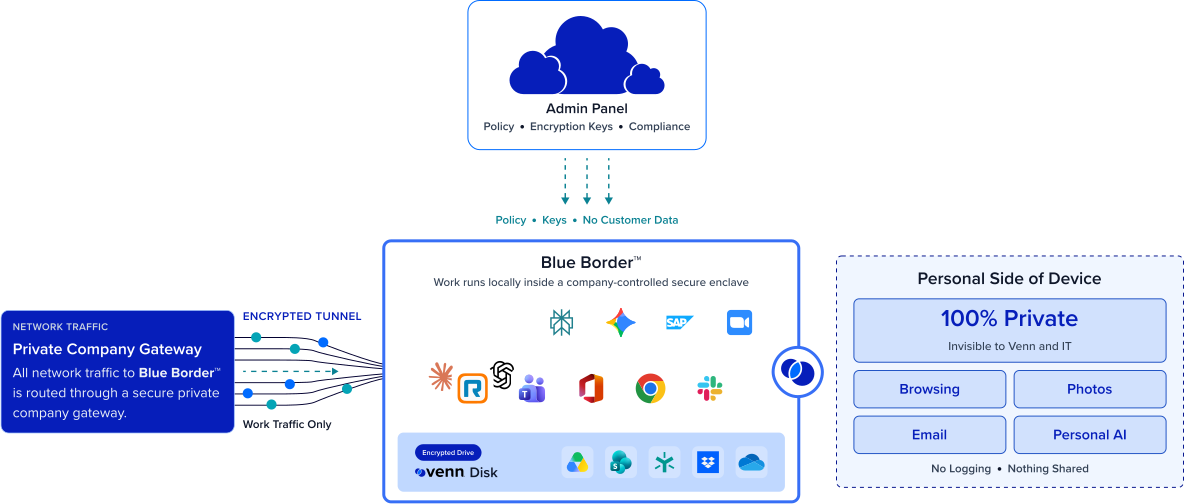
Installing Blue Border on a Mac or PC creates a company-controlled secure enclave directly on the device. Work data, apps, networking, and AI all run locally inside it.
- Network. Work traffic routes through Venn’s built-in VPN gateway or your existing private network.
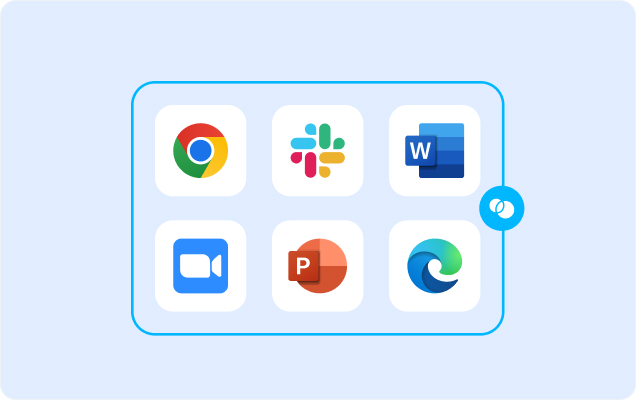
- Applications. Every app (installed, browser-based or AI) is wrapped by a blue line, creating a virtual firewall and enforcing DLP at the app level.
- Files. Users save only to work-sanctioned file systems inside Venn Disk that are isolated, encrypted and remote wipeable.
Any worker. Any device. Any application. Any AI workflow.

Company data secured on a personal device
Inside the secure enclave, company data is encrypted, access is governed by IT, and DLP is enforced across copy/paste, download, upload, screenshot, print, and AI — all without owning or fully managing the device.
Work stays isolated. Personal stays personal
Everything outside Blue Border like the employee’s browsing, apps, and files stays private, with no company visibility or control. That hard privacy boundary is what makes BYOD acceptable to the people whose devices they are.

Native app performance, no virtual desktop
The secure way to do BYOD shouldn’t feel like a downgrade. Because work runs locally in the enclave rather than hosting from a data center, apps perform at full native speed on the user’s own device — no VDI latency, no remote session, and no reason for people to work around the tool.
Clean offboarding on any device
When someone leaves, a single remote wipe removes the secure enclave and all company data — without touching their personal files and with no device to reclaim. Offboarding a personal device becomes as clean and provable as offboarding a company-owned one.







Frequently Asked Questions
You install Blue Border on the personal Mac or PC, which creates a company-controlled secure enclave. Company data and apps live only inside it — encrypted, access-governed, and DLP-protected — while everything outside stays the user’s own. BYOD security no longer depends on owning the device, streaming a virtual desktop, or managing the machine.
No on both. You don’t manage a personal device — that would defeat the point of BYOD — and you don’t need VDI either. Blue Border applies controls to the enclave, not the whole machine, and runs apps locally rather than streaming a desktop, so you get encryption, access governance, DLP, and clean offboarding without MDM enrollment or a virtual desktop.
No. IT has visibility and control only inside the enclave. Everything outside it — personal browsing, apps, and files — stays private, similar to what MDM does with a personal mobile device but designed for laptops. The company controls the work and never sees the personal side.
Inside the enclave, company data is encrypted and isolated from the rest of the machine, access is governed by IT policy, and DLP is enforced across copy/paste, download, upload, screenshot, print, and AI. Because the data lives only in the enclave, it can’t leak into the user’s personal environment.
A remote wipe action instantly removes the secure enclave and purges all company data without touching anything else on the device. There’s nothing to reclaim and no personal data affected — offboarding a personal device is as clean as offboarding a company-owned one.
Yes. Blue Border runs on any personal or unmanaged Mac or PC, so employees, contractors, and the extended workforce all get the same secure workspace on the devices they already have — without the company owning or managing any of them. Blue Border is ideal for contractor engagements because they can onboard quickly and be offboarded just as fast.

Let people use their own devices for work — safely.
Blue Border is the secure workspace for remote employees and contractors on any device — without VDI or fully managing the endpoint. Secure company data inside an enclave on the personal Mac or PC an employee already uses — fully controlled by the company, completely private outside it, and native to run. Full control of the work; none of the personal device.