

Use Cases
DLP on Unmanaged Endpoints
Enforce DLP controls: copy/paste, download, upload, screenshot, print, and AI. Across any application and on any device.
Trusted by 700+ security- and compliance-driven organizations, including Fidelity, Guardian, StoneX, Whatnot, and the IMF.
DLP doesn’t have to stop at an unmanaged device
Sensitive company data no longer exclusively stays on company hardware. It flows to contractors, BYOD employees, offshore and BPO teams, and third-party specialists on devices IT doesn’t own and can’t manage. Traditional data loss prevention was built for the opposite world: a managed, locked down, company-owned endpoint. And AI has opened a brand-new exfiltration path, as company data gets pasted into whatever tool the user prefers.
You can’t install a traditional endpoint DLP agent on a device you don’t own. It’s invasive and it’s resisted. So the moment sensitive data reaches an unmanaged endpoint, your DLP coverage ends. That is the DLP gap on unmanaged endpoints: your controls protect the devices you manage and go dark on the ones you don’t, which are often where the riskiest sharing happens.
The business needs to share data with contractors, vendors, and BYOD workers to get work done. Security still owns preventing data loss on every one of those devices. The usual answers each cost something: force full management (you can’t on personal machines), route everything through VDI (latency and cost), limit access to only browser-based apps (enterprise browser) or accept the risk.
Endpoint DLP needs a device you own
Traditional DLP assumes a managed, company-owned endpoint. It can’t be deployed on contractor, BYOD, or personal machines.
Enterprise browsers are only a partial solution
Enterprise browsers restrict controls to only cloud apps and do not support DLP on any desktop or locally installed application.
New exfiltration paths, especially AI
Copy/paste, uploads, downloads, screenshots, printing, and now pasting company data into unsanctioned AI tools (browser and desktop) are all uncontrolled the moment work happens on an unmanaged endpoint.
Traditional Endpoint DLP vs. Blue Border™
There’s a better way to close the gap: instead of installing an agent that fully enrolls a device you don’t own, Blue Border enforces DLP inside a company-controlled secure enclave on any Mac or PC — without VDI or fully managing the endpoint. Company data is isolated in the enclave, and the controls travel with it onto managed and unmanaged devices alike.
| Traditional Endpoint DLP |

|
|
|---|---|---|
Unmanaged / BYOD devices
Traditional Endpoint DLP
Not covered — requires a managed, company-owned endpoint. Immediate privacy concerns.
Venn Blue Border
Fully covered — DLP is enforced in the enclave on personal, BYOD, contractor, and unmanaged devices.
|
Not covered — requires a managed, company-owned endpoint. Immediate privacy concerns. | Fully covered — DLP is enforced in the enclave on personal, BYOD, contractor, and unmanaged devices. |
Deployment model
Traditional Endpoint DLP
A DLP agent installed and maintained on each managed device.
Venn Blue Border
A secure enclave that installs on any device in minutes; DLP applies inside it.
|
A DLP agent installed and maintained on each managed device. | A secure enclave that installs on any device in minutes; DLP applies inside it. |
Controls enforced
Traditional Endpoint DLP
Varies by device and agent coverage.
Venn Blue Border
Copy/paste, download, upload, screenshot, print, and AI — enforced at the enclave boundary.
|
Varies by device and agent coverage. | Copy/paste, download, upload, screenshot, print, and AI — enforced at the enclave boundary. |
AI / GenAI data paths
Traditional Endpoint DLP
Often a blind spot on the endpoint.
Venn Blue Border
Governed — IT allows company-sanctioned AI tools only and DLP applies to what leaves the enclave.
|
Often a blind spot on the endpoint. | Governed — IT allows company-sanctioned AI tools only and DLP applies to what leaves the enclave. |
Device management required
Traditional Endpoint DLP
Yes — full device management or a persistent endpoint agent.
Venn Blue Border
No — only the company-controlled secure enclave is managed, not the whole device.
|
Yes — full device management or a persistent endpoint agent. | No — only the company-controlled secure enclave is managed, not the whole device. |
Data isolation
Traditional Endpoint DLP
Relies on device-level controls around data that lives on the endpoint.
Venn Blue Border
Company data is encrypted and isolated inside the enclave, separate from everything else on the device.
|
Relies on device-level controls around data that lives on the endpoint. | Company data is encrypted and isolated inside the enclave, separate from everything else on the device. |
Contractors & third parties
Traditional Endpoint DLP
Hard — you can’t require an agent on machines you don’t control.
Venn Blue Border
Designed for it — extend the same DLP to workers whose devices you’ll never own.
|
Hard — you can’t require an agent on machines you don’t control. | Designed for it — extend the same DLP to workers whose devices you’ll never own. |
Onboarding
Traditional Endpoint DLP
Agent rollout and device enrollment.
Venn Blue Border
Deploy the enclave on a device the worker already has in minutes.
|
Agent rollout and device enrollment. | Deploy the enclave on a device the worker already has in minutes. |
Offboarding
Traditional Endpoint DLP
Remove the agent or wipe the managed device.
Venn Blue Border
A remote wipe removes the enclave and purges company data — nothing else touched.
|
Remove the agent or wipe the managed device. | A remote wipe removes the enclave and purges company data — nothing else touched. |
User privacy
Traditional Endpoint DLP
An endpoint agent can see activity across the whole device.
Venn Blue Border
Outside Blue Border, personal activity stays private with no company visibility.
|
An endpoint agent can see activity across the whole device. | Outside Blue Border, personal activity stays private with no company visibility. |
How Blue Border™ Works
Installing Blue Border on a Mac or PC creates a company-controlled secure enclave directly on the device. Work data, apps, networking, and AI all run locally inside it.
- Network. Work traffic routes through Venn’s built-in VPN gateway or your existing private network.
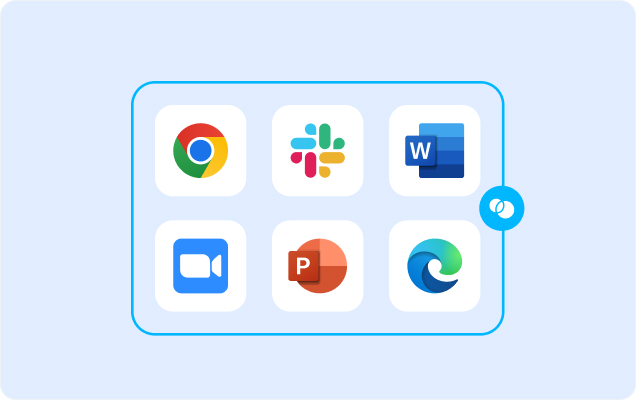
- Applications. Every app (installed, browser-based or AI) is wrapped by a blue line, creating a virtual firewall and enforcing DLP at the app level.
- Files. Users save only to work-sanctioned file systems inside Venn Disk that are isolated, encrypted and remote wipeable.
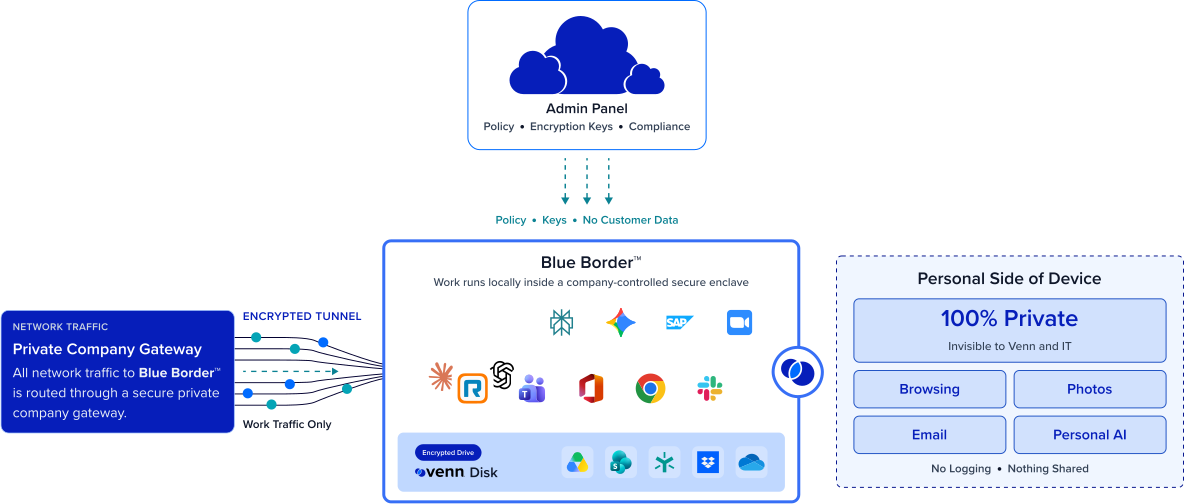
Any worker. Any device. Any application. Any AI workflow.

DLP on any device, managed or not
Blue Border enforces data loss prevention inside the secure enclave, so the same controls apply on contractor, BYOD, and personal machines you’ll never own or fully manage. There is no full-device agent to install — the enclave carries the policy onto the endpoint.
Cover every data path, including AI
Copy/paste, download, upload, screenshot, print, and AI are all governed at the enclave boundary. IT allows company-sanctioned AI tools only and blocks the rest, so the newest exfiltration path — pasting company data into an unsanctioned model.
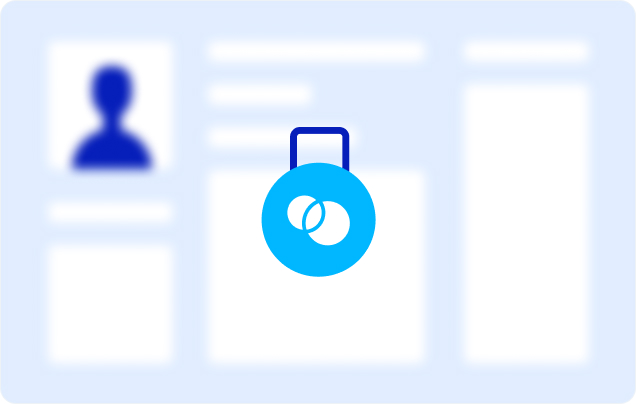

Protect data without invading privacy
Because DLP applies only to what happens inside Blue Border, everything outside the enclave stays private to the user — with no company visibility or control. That boundary is what makes DLP acceptable on a personal or contractor device: you protect company data without monitoring someone’s personal life.
Deploy without managing the device
There is no agent rollout or device enrollment to stand up. The enclave installs on an existing Mac or PC in minutes, and offboarding is a single remote wipe that removes it and purges all company data. You extend DLP to unmanaged endpoints without taking over the device or shipping hardware.







Frequently Asked Questions
You install Blue Border on the device, which creates a company-controlled secure enclave, and DLP is enforced inside that enclave. Because company data lives only in the enclave, DLP on unmanaged endpoints works on contractor, BYOD, and personal machines without owning or fully managing them.
Traditional endpoint DLP fully enrolls the device – and does not differentiate between work activity and personal activity. It’s meant for company-owned devices, so it can’t cover the unmanaged and BYOD endpoints where much of today’s risk lives. Blue Border enforces DLP inside a secure enclave on any device, managed or not, extending coverage to contractors and personal machines.
Inside the enclave, Blue Border governs copy/paste, download, upload, screenshot, print, and AI governance. Company data is encrypted and isolated from the rest of the device, and a remote wipe removes it instantly when access ends — so the controls hold on any endpoint, not just managed ones.
Yes. IT governs which AI tools (browser or locally installed desktop) can access company data — allowing company-sanctioned tools only and blocking the rest — and DLP applies to what leaves the enclave. That closes the newest exfiltration path, where a worker pastes sensitive company data into an unsanctioned AI model on a device you don’t manage.
No. DLP applies only to activity inside Blue Border (the secure enclave.) Everything outside the enclave — personal browsing, apps, and files — stays private with no company visibility or control. That is what makes DLP workable on a personal or contractor device: company data is protected without reaching into someone’s personal life.
Blue Border isolates and encrypts company data inside the enclave and enforces DLP centrally across every device, which helps organizations meet standards like PCI, HIPAA, and GDPR on endpoints they don’t own. Confirm specific control mappings with your compliance team.

Extend DLP to every device — managed or not.
Blue Border is the secure workspace for remote employees and contractors on any device — without VDI or fully managing the endpoint. Enforce data loss prevention inside a secure enclave on contractor, BYOD, and personal machines: copy/paste, upload, print, screenshot, and AI. All without a full-device management and without touching personal use.