

Use Cases
Secure every app. Even on devices you don’t manage
Secure your critical apps when the device is unmanaged and the network isn’t yours to control. Application security for remote teams without VDI or full endpoint management.
Trusted by 700+ security- and compliance-driven organizations, including Fidelity, Guardian, StoneX, WhatNot, and the IMF.
Secure your apps without controlling their device
Work routinely runs on devices you don’t own: personal laptops, contractor machines, and BYOD. Connected over home Wi-Fi, coffee shops, and networks you’ll never see. The old assumption, that you control the device and the network around it, is gone. The threat surface that can attack your critical applications is bigger than you might realize. This becomes a challenge when work includes locally-installed applications.
That leaves your apps exposed on two fronts. The device may carry malware or other software that can reach your work. The network may be hostile, monitored, or wide open. Application security now means protecting the app itself, not just the machine or the connection around it.
For contractors, offshore teams and many remote employees, you can’t lock down a device you don’t own, and you can’t police a network you don’t run. But the business still runs on those apps, and you’re still accountable for the data inside them.
The unmanaged device is a black box
It’s not yours to manage. Personal software, malware, and other apps share the same machine as your work — and any of them could reach in.
The network is out of your hands
Home Wi-Fi, public hotspots, airport networks, hotel networks. You can’t see the traffic, trust the connection, or stop whatever else is listening on it. And even if you use VPN or VDI, you have no control over data and apps local to the machine.
MDM and VDI are far from ideal
The traditional fix is shipping managed devices with MDM which is costly and time-consuming or VDI that pushes every app into cloud hosting – creating lag, latency and friction. It secures work by making it slow, costly, and painful to use.
VDI vs. Blue Border™ for Application Security on Unmanaged Devices
There’s a better way to secure business applications on unmanaged devices: instead of hosting your apps in a data center, Blue Border secures them locally — isolated in a company-controlled secure enclave on the device, with all network traffic routed through a private company gateway.
| Virtual Desktops (VDI / DaaS) |

|
|
|---|---|---|
How work is secured
Virtual Desktops (VDI / DaaS)
The entire desktop and all apps are hosted in the cloud. Isolating data from the endpoint.
Venn Blue Border
By isolating the app locally in a secure enclave on the device
|
The entire desktop and all apps are hosted in the cloud. Isolating data from the endpoint. | By isolating the app locally in a secure enclave on the device |
Protection from an unmanaged device
Virtual Desktops (VDI / DaaS)
Keeps work off the device entirely
Venn Blue Border
Keeps work off the device entirely
|
Keeps work off the device entirely | Keeps work off the device entirely |
Performance
Virtual Desktops (VDI / DaaS)
Latency and lag — every action round-trips to a data center
Venn Blue Border
100% native, zero-latency local performance
|
Latency and lag — every action round-trips to a data center | 100% native, zero-latency local performance |
Where work runs
Virtual Desktops (VDI / DaaS)
Remote desktop hosted in a data center or cloud
Venn Blue Border
Locally, in a secure enclave on the user’s PC or Mac
|
Remote desktop hosted in a data center or cloud | Locally, in a secure enclave on the user’s PC or Mac |
Infrastructure & cost
Virtual Desktops (VDI / DaaS)
Servers, brokers, images, and per-seat licensing
Venn Blue Border
No infrastructure — customers save up to 60% vs. VDI
|
Servers, brokers, images, and per-seat licensing | No infrastructure — customers save up to 60% vs. VDI |
App coverage
Virtual Desktops (VDI / DaaS)
Whatever’s published to the virtual desktop
Venn Blue Border
Any app the worker runs — desktop and browser — inside the enclave
|
Whatever’s published to the virtual desktop | Any app the worker runs — desktop and browser — inside the enclave |
Data protection
Virtual Desktops (VDI / DaaS)
Data stays in the data center
Venn Blue Border
Encrypted, isolated enclave with built-in DLP on the device
|
Data stays in the data center | Encrypted, isolated enclave with built-in DLP on the device |
AI governance
Virtual Desktops (VDI / DaaS)
Only inside the virtual desktop
Venn Blue Border
Policy control across the worker’s apps — browser and desktop
|
Only inside the virtual desktop | Policy control across the worker’s apps — browser and desktop |
Compliance
Virtual Desktops (VDI / DaaS)
Achievable, with heavy infrastructure overhead
Venn Blue Border
Turnkey controls enforced automatically — HIPAA, FINRA, SEC, SOC 2, PCI, GDPR
|
Achievable, with heavy infrastructure overhead | Turnkey controls enforced automatically — HIPAA, FINRA, SEC, SOC 2, PCI, GDPR |
How Blue Border™ Works
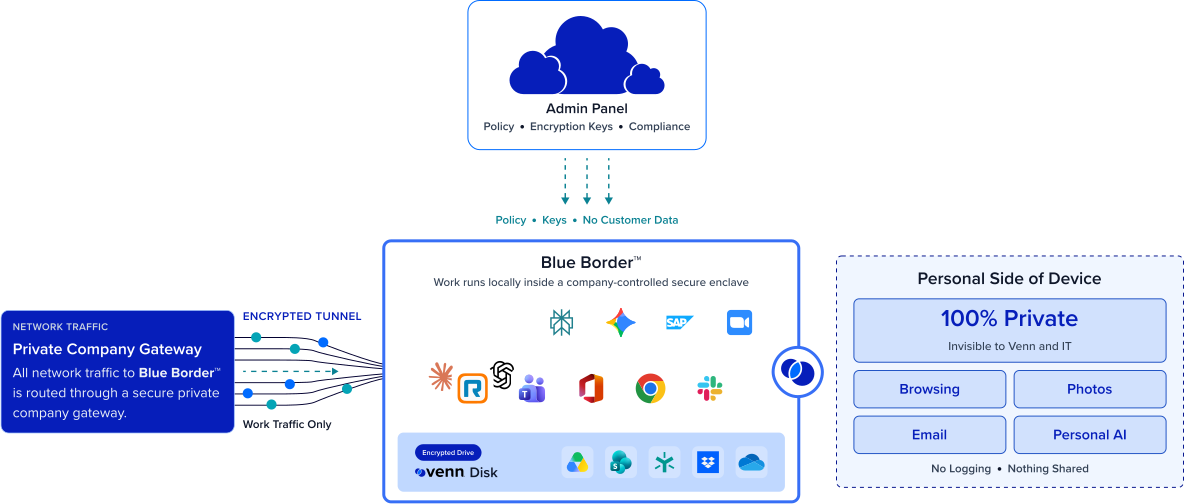
Installing Blue Border on a Mac or PC creates a company-controlled secure enclave directly on the device. Work data, apps, networking, and AI all run locally inside it.
- Network. Work traffic routes through Venn’s built-in VPN gateway or your existing private network.
- Applications. Every app (installed, browser-based or AI) is wrapped by a blue line, creating a virtual firewall and enforcing DLP at the app level.
- Files. Users save only to work-sanctioned file systems inside Venn Disk that are isolated, encrypted and remote wipeable.
Any worker. Any network. Any device. Any application.

Secure all your apps on devices you don’t manage
Every work app runs inside the enclave, isolated from everything else on the unmanaged device. A compromised machine, personal software, or a hostile app can’t reach your work.
Protect work on networks you don’t control
All Blue Border traffic routes through a private company gateway instead of the open internet. Home Wi-Fi, hotspots, and untrusted connections get no path to your apps.


Keep native app performance. No cloud hosting in the middle.
Apps run locally at 100% native speed, with none of VDI’s latency. You secure the app without moving it off the device, and customers save up to 60% versus VDI.
Prove compliance across every app
Built-in DLP, AI governance, and gateway-secured traffic give you application security you can evidence. Turnkey controls satisfy HIPAA, FINRA, SEC, SOC 2, PCI, and GDPR.







Frequently Asked Questions
Blue Border delivers application security through enclave isolation, built-in DLP, AI governance, and gateway-secured traffic. Turnkey controls satisfy HIPAA, FINRA, SEC, SOC 2, PCI, and GDPR — on devices you don’t manage and networks you don’t control, without moving work into a data center.
The enclave isolates your apps from the device and everything on it, so a compromised machine or hostile app outside the enclave can’t reach what’s inside. Traffic still flows only through the private gateway. That containment is the core of application security when you don’t control the device or the network.
Blue Border runs your apps inside a company-controlled secure enclave on the Mac or PC. The enclave isolates each app from the device and everything on it, so malware or other software on the unmanaged machine can’t reach your work. All traffic routes through a private company gateway, protecting apps even on networks you don’t control.
VDI secures work by moving every app off the device into a remote data center, which adds latency, infrastructure, and per-seat cost. Blue Border secures the app where it runs — isolated in an enclave on the device, with traffic routed through a private gateway. You get the same protection at native speed, with no data center and up to 60% lower cost.
All Blue Border traffic routes through a private company gateway rather than the open internet. Business connections never cross an untrusted network unprotected, so a hostile hotspot, monitored Wi-Fi, or open connection has no path to your apps. The protection travels with the enclave, wherever the worker connects.
Minutes. A worker installs Blue Border on the Mac or PC they already have, and every work app runs inside the enclave from the start. There’s no infrastructure to build and no virtual desktop to provision, so protection is in place on day one.

Ready to secure your critical apps on any device?
Run every app inside a company-controlled secure enclave, isolated from the unmanaged device, with all traffic routed through a private company gateway — no VDI, no data center, no managed hardware.