

Use Cases
Secure Contact Center Agents on
Any Device
Contact center agent security enforced on any Mac or PC. Compliant with HIPAA, PCI, and FINRA, fast to deploy, no hardware to ship
Trusted by 700+ security- and compliance-driven organizations, including Fidelity, Guardian, StoneX, Whatnot, Comtech and the IMF.
The contact center went remote. VDI wasn’t prepared.
A contact center used to be a room. Agents sat on a managed floor, behind the corporate firewalls, on hardware IT owned and managed. That floor has scattered to home offices, hybrid schedules, BPO and outsourced teams, offshore partners, and seasonal staff hired for a single peak. AI adds pressure from the top, pushing new tools into agent workflows faster than IT can vet them.
However, the obligations didn’t go away when agents went remote. Contact center agents still handle PCI-DSS cardholder data, customer PII, and ePHI. Increasingly, they do it on personal or unmanaged laptops. That is the contact center security gap: regulated data flowing through a messaging, video or VoIP app, and a CRM on a laptop IT has no control over.
The business demands maximum flexibility: staff a surge in days, onboard a BPO team overnight, support any device an agent already has. IT is still accountable for the security and compliance risk on every one of those endpoints.
VDI adds lag and latency to contact center calls
VDI is the usual answer for locking down agents. But hosting a desktop puts a virtual environment between the agent and the caller — adding latency and freezing that degrade voice and video quality.
Regulated data on devices IT doesn’t own
Cardholder data, PII, and PHI move through agent laptops the company doesn’t manage. Traditional endpoint controls and DLP can’t be installed on machines IT doesn’t own.
High churn makes managed devices and provisioning VDI slow and costly
Contact centers turn over fast and spike seasonally. Buying, shipping, and imaging hardware or standing up VDI sessions can’t keep pace.
VDI vs. Blue Border™ for Securing Contact Center Agents
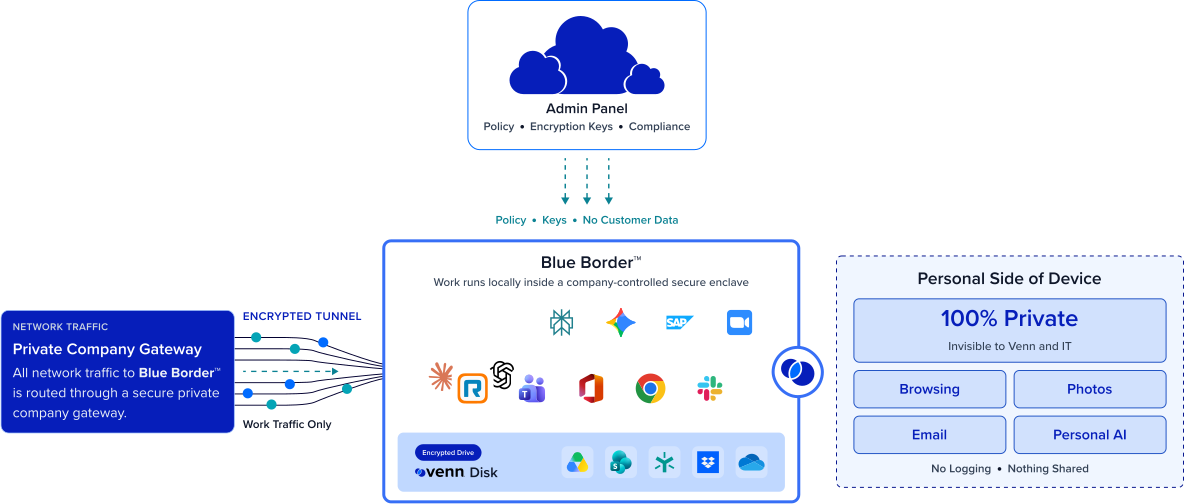
There’s a better way than VDI: with Blue Border, work runs locally inside a company-controlled secure enclave on the worker’s own device. Data is encrypted, access governed by IT — isolated from any other use on the same computer. All without VDI or fully managing the endpoint.
| VDI / Virtual Desktop |

|
|
|---|---|---|
Where work runs
VDI / Virtual Desktop
Apps are hosted from a remote data center or cloud host; nothing runs on the agent’s device.
Venn Blue Border
Softphone, VoIP and video apps run locally on the agent’s own Mac or PC, inside a company-controlled secure enclave.
|
Apps are hosted from a remote data center or cloud host; nothing runs on the agent’s device. | Softphone, VoIP and video apps run locally on the agent’s own Mac or PC, inside a company-controlled secure enclave. |
Voice & call quality
VDI / Virtual Desktop
Audio and video traverse the virtual session, adding latency and lag that degrade live calls — and a Mac never feels like a Mac.
Venn Blue Border
Voice, video, and softphone run at full native speed — no virtual session between the agent and the caller. A Mac feels like a Mac; Windows feels like Windows.
|
Audio and video traverse the virtual session, adding latency and lag that degrade live calls — and a Mac never feels like a Mac. | Voice, video, and softphone run at full native speed — no virtual session between the agent and the caller. A Mac feels like a Mac; Windows feels like Windows. |
Infrastructure & IT burden
VDI / Virtual Desktop
A backend to host, license, capacity-plan, monitor, and support.
Venn Blue Border
A single lightweight software install — no backend to stand up or maintain.
|
A backend to host, license, capacity-plan, monitor, and support. | A single lightweight software install — no backend to stand up or maintain. |
Cost model
VDI / Virtual Desktop
Per-seat licensing plus hosting and compute that scale up with every agent and every seasonal spike.
Venn Blue Border
No additional infrastructure and no hardware to buy or ship — save up to 60% vs. VDI.
|
Per-seat licensing plus hosting and compute that scale up with every agent and every seasonal spike. | No additional infrastructure and no hardware to buy or ship — save up to 60% vs. VDI. |
Onboarding / offboarding
VDI / Virtual Desktop
Standing up sessions and profiles takes days to weeks; deprovisioning is manual.
Venn Blue Border
Onboard any agent on a device they already have in minutes; offboard with an instant remote wipe.
|
Standing up sessions and profiles takes days to weeks; deprovisioning is manual. | Onboard any agent on a device they already have in minutes; offboard with an instant remote wipe. |
Device & ownership
VDI / Virtual Desktop
Typically still paired with managed or company-issued endpoints.
Venn Blue Border
Company-issued, third-party, or personal / BYOD, managed or unmanaged — with native support for Mac and Windows.
|
Typically still paired with managed or company-issued endpoints. | Company-issued, third-party, or personal / BYOD, managed or unmanaged — with native support for Mac and Windows. |
AI governance
VDI / Virtual Desktop
No native control over which AI tools touch company data on the device.
Venn Blue Border
IT governs which AI tools can access company data — company-sanctioned tools only, blocking the rest.
|
No native control over which AI tools touch company data on the device. | IT governs which AI tools can access company data — company-sanctioned tools only, blocking the rest. |
Data protection / DLP
VDI / Virtual Desktop
Controls apply inside the hosted session only.
Venn Blue Border
DLP across copy/paste, download, upload, screenshot, print, and AI, enforced inside the enclave on devices IT doesn’t own.
|
Controls apply inside the hosted session only. | DLP across copy/paste, download, upload, screenshot, print, and AI, enforced inside the enclave on devices IT doesn’t own. |
Compliance
VDI / Virtual Desktop
Achievable, but tied to hosted infrastructure and managed devices.
Venn Blue Border
Isolate and encrypt cardholder data, PII, and PHI inside the enclave to help meet PCI, HIPAA, and FINRA on any device.
|
Achievable, but tied to hosted infrastructure and managed devices. | Isolate and encrypt cardholder data, PII, and PHI inside the enclave to help meet PCI, HIPAA, and FINRA on any device. |
User privacy
VDI / Virtual Desktop
Not applicable on personal devices — VDI doesn’t reach BYOD without management.
Venn Blue Border
Outside Blue Border, personal activity stays private with no company visibility — making agent BYOD viable.
|
Not applicable on personal devices — VDI doesn’t reach BYOD without management. | Outside Blue Border, personal activity stays private with no company visibility — making agent BYOD viable. |
How Blue Border™ Works
Installing Blue Border on a Mac or PC creates a company-controlled secure enclave directly on the device. Work data, apps, networking, and AI all run locally inside it.
- Network. Work traffic routes through Venn’s built-in VPN gateway or your existing private network.
- Applications. Every app (installed, browser-based or AI) is wrapped by a blue line, creating a virtual firewall and enforcing DLP at the app level.
- Files. Users save only to work-sanctioned file systems inside Venn Disk that are isolated, encrypted and remote wipeable.
Any worker. Any device. Any application. Any AI workflow.

Crystal-clear voice and video, with no VDI latency
Softphone, voice, and video run locally at full native speed on the agent’s own hardware. There is no remote desktop or application streaming introducing delay. Live calls stay clean and data-heavy CRM screens stay responsive, so agents fight the queue, not a slow connection.
PCI, PHI, and PII protected on any device
Blue Border creates a company-controlled secure enclave on the agent’s device without owning or fully managing it. Inside, cardholder data and customer records are encrypted, access is governed by IT policy, and DLP is enforced across copy/paste, upload, download, screenshot, print, and AI tool uploads.


Onboard seasonal and BPO agents in minutes
Hardware is no longer the bottleneck to staffing. Any agent whether home-based, offshore, BPO, or seasonal can be provisioned on a computer they already have in minutes. When the contract ends, a single remote wipe removes the enclave and purges all company data.
BYOD that contact center agents actually accept
Personal activity outside Blue Border is never tracked, logged, or visible to the company or to Venn. This is by design, not just by policy. That hard boundary is what makes BYOD work for high-turnover agent populations and lets you extend the same approach to offshore and outsourced teams without pushback.







Frequently Asked Questions
Call centers secure agents by installing Blue Border on the agent’s own Mac or PC, which creates a company-controlled secure enclave on that device. Softphone, VoIP, video, and contact center apps run inside the enclave, where data is encrypted, access is governed by IT, and DLP is enforced — delivering contact center security without VDI or fully managing the endpoint.
VDI hosts a remote desktop from the cloud, adding latency and lag that degrade softphone and video on live calls. Blue Border keeps apps local, so voice and video runs at full native speed with no backend to host. Blue Border delivers VDI-like isolation and data controls while reducing VDI cost and infrastructure — a lighter path to contact center security.
Yes. Inside the secure enclave, cardholder data is encrypted, access is governed by IT, and DLP controls apply across copy/paste, download, upload, screenshot, print, and AI — on unmanaged and BYOD laptops. Outside the enclave, personal activity stays private, similar to what MDM does with a personal mobile device.
Blue Border helps call centers meet PCI DSS, HIPAA, GDPR, and FINRA on devices they don’t own by isolating and encrypting company data inside the secure enclave and enforcing policy centrally. Controls apply consistently across every agent’s device, managed or unmanaged, closing the compliance gap most tools were never designed to address on unmanaged endpoints.
In minutes. There is no backend to stand up and no hardware to ship. Any agent — home-based, offshore, BPO, or seasonal — is provisioned on a computer they already have, and offboarding is a single remote wipe that instantly removes the secure enclave and purges all company data without touching anything else.
A remote wipe action instantly removes the secure enclave and purges all company data without touching anything else on the device. Because company data lives only inside the enclave, there is nothing to claw back and no personal data affected — which is what makes fast offboarding practical for high-churn agent populations.

Ready to secure every contact center agent — on any device?
Blue Border is the secure workspace for remote employees and contractors on any device — without VDI or fully managing the endpoint. Give contact center and call center agents fast onboarding, native-speed voice, and PCI, PHI, and PII protection on the laptop they already use.