

Use Cases
Accelerate onboarding and off-boarding
Get new users productive faster. Provision any worker in minutes from any location. Instantly remote wipe the moment they off-board, with no data left behind.
Trusted by 700+ security- and compliance-driven organizations, including Fidelity, Guardian, StoneX, WhatNot, and the IMF.
Your workforce moves fast. Managed devices and VDI slow you down.
Hiring changed. Your workforce now spans full-time staff, contractors, offshore teams, and short-term specialists. Most of them remote, many working on unmanaged devices. The business expects each one to be productive on day one.
Managed laptops can’t keep that pace. You order the hardware, image it, ship it, and wait. A new hire loses their first week following a tracking number. A contractor on a three-month engagement rarely justifies the effort at all. Securing remote work with VDI is a similar story – support and help desk tickets, provisioning systems and change management.
Off-boarding is just as bad. A successful employee and contractor off-boarding shouldn’t depend on a shipping label, but with managed devices, it does. You can’t wipe what you can’t reach, and a share of those laptops never come back with the data still on them.
Every hire starts with a hardware bill
You buy the laptop, image it, ship it, track it, then refresh or replace it later. Each new worker adds cost before they’ve done a single day of work.
Day one becomes day seven
New hires and contractors wait on a device in transit. Productivity stalls behind logistics you don’t control, and the bottleneck gets worse the faster you hire.
Some laptops never come home – especially temp contractor devices
When a worker leaves, you’re chasing a device across the country or globde. Return shipping is slow, some hardware never returns, and company data sits on all of it until it does.
Managed Devices vs. Blue Border™ for Accelerating Onboarding and Off-boarding
There’s a better way to get new employees productive: with Blue Border, work runs inside a company-controlled secure enclave on the worker’s own PC or Mac. Onboarding takes minutes and off-boarding is a single remote wipe. No delays, no change management, no residual data.
| Managed Devices (Corporate Laptops) |

|
|
|---|---|---|
Onboarding speed
Managed Devices (Corporate Laptops)
Order, image, and ship a laptop; days to weeks before day one
Venn Blue Border
Install and enroll on a device the worker already has, in minutes
|
Order, image, and ship a laptop; days to weeks before day one | Install and enroll on a device the worker already has, in minutes |
Off-boarding speed
Managed Devices (Corporate Laptops)
Wait for the device to ship back before you can clear it
Venn Blue Border
One remote wipe removes the enclave instantly, from anywhere
|
Wait for the device to ship back before you can clear it | One remote wipe removes the enclave instantly, from anywhere |
Devices that never return
Managed Devices (Corporate Laptops)
A share of laptops are never sent back — each still holds company data
Venn Blue Border
Nothing to return; the wipe works whether or not you ever see the device
|
A share of laptops are never sent back — each still holds company data | Nothing to return; the wipe works whether or not you ever see the device |
Cost model
Managed Devices (Corporate Laptops)
Buy, image, ship, track, refresh, and replace lost hardware
Venn Blue Border
No hardware to buy or ship — runs on the device the worker already owns
|
Buy, image, ship, track, refresh, and replace lost hardware | No hardware to buy or ship — runs on the device the worker already owns |
Where work runs
Managed Devices (Corporate Laptops)
On a company-owned laptop the worker waits to receive
Venn Blue Border
Locally, in a secure enclave on any Mac or PC
|
On a company-owned laptop the worker waits to receive | Locally, in a secure enclave on any Mac or PC |
Contractors & short-term workers
Managed Devices (Corporate Laptops)
Shipping a laptop for a 90-day contract rarely pays off
Venn Blue Border
Onboard on their own device in minutes; wipe at contract end
|
Shipping a laptop for a 90-day contract rarely pays off | Onboard on their own device in minutes; wipe at contract end |
Data protection
Managed Devices (Corporate Laptops)
Data lives on the laptop; protection ends when the device leaves your reach
Venn Blue Border
Encrypted, isolated enclave with built-in DLP; wipe on demand
|
Data lives on the laptop; protection ends when the device leaves your reach | Encrypted, isolated enclave with built-in DLP; wipe on demand |
AI governance
Managed Devices (Corporate Laptops)
No control over which AI tools run on the device
Venn Blue Border
Policy-enforced control over which AI tools reach company data
|
No control over which AI tools run on the device | Policy-enforced control over which AI tools reach company data |
Compliance
Managed Devices (Corporate Laptops)
Tied to physical custody — you must recover the device to prove control
Venn Blue Border
Turnkey controls with instant-wipe offboarding evidence — HIPAA, FINRA, SEC, SOC 2, PCI, GDPR
|
Tied to physical custody — you must recover the device to prove control | Turnkey controls with instant-wipe offboarding evidence — HIPAA, FINRA, SEC, SOC 2, PCI, GDPR |
User privacy
Managed Devices (Corporate Laptops)
Company owns the whole machine, including personal use
Venn Blue Border
Personal activity stays private by design — the enclave only governs work
|
Company owns the whole machine, including personal use | Personal activity stays private by design — the enclave only governs work |
How Blue Border™ Works
Installing Blue Border on a Mac or PC creates a company-controlled secure enclave directly on the device. Work data, apps, networking, and AI all run locally inside it.
- Network. Work traffic routes through Venn’s built-in VPN gateway or your existing private network.
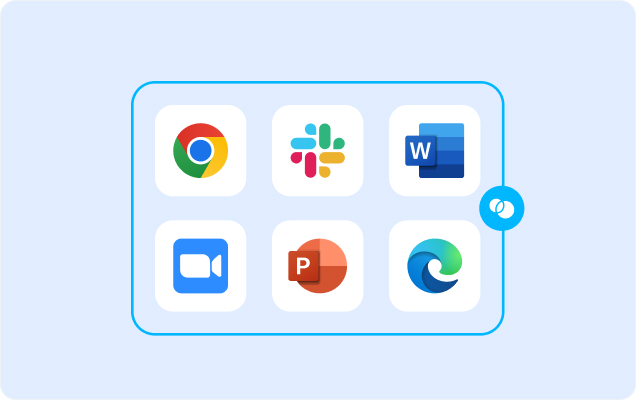
- Applications. Every app (installed, browser-based or AI) is wrapped by a blue line, creating a virtual firewall and enforcing DLP at the app level.
- Files. Users save only to work-sanctioned file systems inside Venn Disk that are isolated, encrypted and remote wipeable.
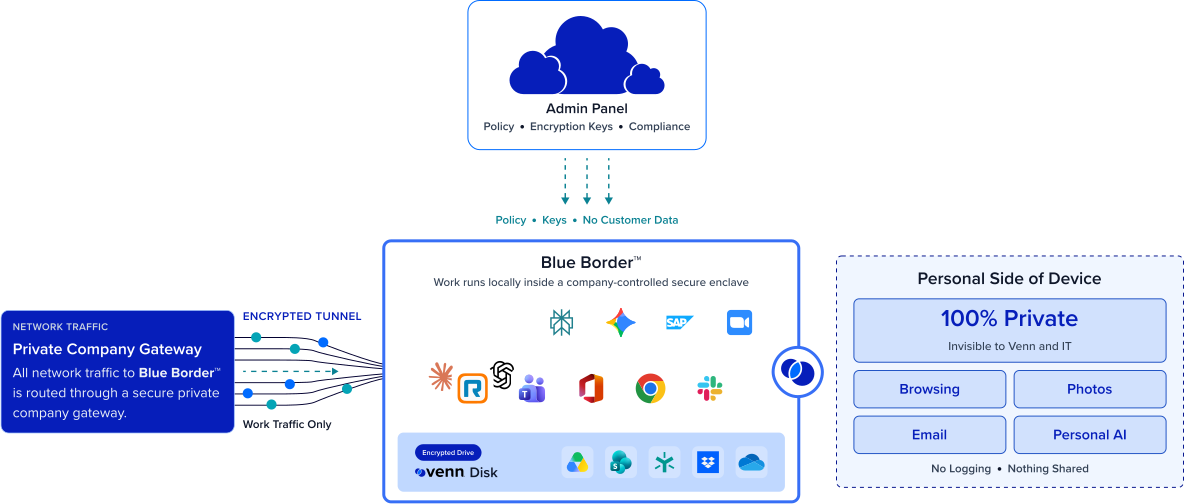
Any worker. Any network. Any device. Any application.

Onboard any worker in minutes, anywhere
A new hire or contractor installs Blue Border on the device they already own and starts working the same day. No procurement queue, no imaging, no tracking number standing between them and day one.
Cut the hardware you buy, ship, and chase
You stop paying to buy, image, ship, track, and replace laptops for every worker. Blue Border runs on devices your people already have, which also eliminates VDI infrastructure — customers save up to 60% versus VDI.

Off-board instantly, with nothing left behind
When a worker leaves, one remote wipe clears the enclave and all company data in seconds. It works whether the device is across town or across the world, so employee offboarding security no longer depends on getting hardware back
Take laptop logistics off your plate
No shipping, no returns, no recovery calls, no refresh cycles. Your team stops managing hardware in transit and gets back to work that actually moves the business forward.







Frequently Asked Questions
A worker installs Blue Border on their own Mac or PC, which creates a company-controlled secure enclave in minutes. Work data and apps run isolated from personal use, with built-in DLP. When the worker leaves, one remote wipe removes the enclave and all company data instantly, without touching personal files.
With managed laptops, you buy, image, ship, track, and eventually recover hardware — and day one waits on delivery. Blue Border runs on the device the worker already owns, so onboarding takes minutes. Offboarding is a remote wipe, not a return shipment, so you’re never chasing a device to close out access.
VDI can keep data off the device, sure – but it forces every worker through a laggy and latency prone user experience. Blue Border keeps work local and native instead. A virtual desktop fundamentally changes how the user works which creates change management whereas Blue Border is designed to make interacting with your data and apps seamless and natural.
Yes. Blue Border enforces turnkey controls for HIPAA, FINRA, SEC, SOC 2, PCI, and GDPR, and the instant remote wipe gives you clean employee offboarding security evidence. Because control lives in the enclave rather than the personal side of the hardware, you prove data was removed without needing to physically recover the device.
Minutes. There’s no procurement queue, no imaging, and no shipping. The worker installs Blue Border on a device they already have and starts working the same day, which removes the hardware bottleneck that turns day one into day seven.
You trigger a remote wipe and the enclave — with all company data — is gone in seconds. It works whether or not the device ever returns, so a laptop that’s lost, kept, or stranded in shipping is no longer a data risk. So, you can use Blue Border with a managed or unmanaged device.
Ready to onboard fast and off-board clean?
Put new hires and contractors to work on day one, then clear every trace of company data with a single remote wipe — no laptops to ship, track, or chase down.