

Use Cases
Secure hybrid work across any device
One consistent security posture whether employees are in the office, at home, or anywhere in between. No gaps and no exceptions.
Trusted by 700+ security- and compliance-driven organizations, including Fidelity, Guardian, StoneX, Whatnot, and the IMF.
Two locations shouldn’t mean two devices.
Hybrid is how most teams work now, and enabling should be the goal. But the legacy way to get there is to hand every employee more hardware. A managed desktop at the office and a managed laptop for the remote days. That’s two devices to buy, image, manage, and refresh for every person, and it still leaves out the personal machine they already reach for at home.
The result is that workforce flexibility gets stuck behind a managed hardware program. Onboarding a new hire, supporting a role change, or letting someone work remotely all wait on provisioning and shipping a device. The more you want to enable people to work anywhere, the more devices IT has to procure and maintain. The cost and logistics scale with headcount.
The reason it works this way, of course, is control: company data ends up on machines outside the office, so IT locks down the device to keep it protected. The opportunity is to keep that protection while dropping the two-device tax. To enable hybrid work on the device people already have, without compromising security.
Two managed devices for every employee
A managed desktop in the office and a managed laptop for remote means buying, imaging, managing, and refreshing two devices per person. Hardware cost and logistics grow with every hire.
Work on personal devices requires enablement beyond traditional MDM
Personal machines stay out of bounds for traditional endpoint management and MDM solutions due to their invasive nature.
Productivity suffers when it depends on managed devices
When every new hire, role change, or shift to remote depends on imaging and shipping a device – flexibility moves at the speed of the hardware delivery instead of the speed of the actual business.
Managed Devices (MDM) vs. Blue Border™ for Enabling Hybrid Work
Most hybrid teams end up fully managing every device: a managed desktop in the office and a managed laptop for remote. Blue Border lets employees work on the device they already have by securing work data and apps only inside a company-controlled secure enclave. You can enable workforce flexibility without buying and managing a second device, and without fully managing a user’s personal endpoint.
| Managed Devices (MDM / UEM) |

|
|
|---|---|---|
Devices per employee
Managed Devices (MDM / UEM)
Often a managed device per person and place — a managed desktop in the office and a managed laptop for remote.
Venn Blue Border
One secure enclave that travels with the employee across whatever BYOD device they already use.
|
Often a managed device per person and place — a managed desktop in the office and a managed laptop for remote. | One secure enclave that travels with the employee across whatever BYOD device they already use. |
The device they use
Managed Devices (MDM / UEM)
Enrolling a personal laptop is invasive and often resisted; usually requires a company-owned device.
Venn Blue Border
Runs on personal / BYOD, managed or unmanaged — with native support for Mac and Windows, no company ownership required.
|
Enrolling a personal laptop is invasive and often resisted; usually requires a company-owned device. | Runs on personal / BYOD, managed or unmanaged — with native support for Mac and Windows, no company ownership required. |
Onboarding speed
Managed Devices (MDM / UEM)
Enroll, image, and configure each device before a user can start — days to weeks.
Venn Blue Border
Deploy the enclave on a device the employee already has in minutes.
|
Enroll, image, and configure each device before a user can start — days to weeks. | Deploy the enclave on a device the employee already has in minutes. |
Onboarding speed
Managed Devices (MDM / UEM)
Enroll, image, and configure each device before a user can start — days to weeks.
Venn Blue Border
Deploy the enclave on a device the employee already has in minutes.
|
Enroll, image, and configure each device before a user can start — days to weeks. | Deploy the enclave on a device the employee already has in minutes. |
Cost & logistics
Managed Devices (MDM / UEM)
Buy, ship, manage, and refresh a managed device for every person and place.
Venn Blue Border
No extra managed device to buy or ship — enable work on the device the employee already uses.
|
Buy, ship, manage, and refresh a managed device for every person and place. | No extra managed device to buy or ship — enable work on the device the employee already uses. |
Offboarding
Managed Devices (MDM / UEM)
Retrieve or remotely wipe the whole managed device; there is hardware to recover.
Venn Blue Border
A remote wipe removes the enclave and purges company data — nothing to recover, personal data untouched.
|
Retrieve or remotely wipe the whole managed device; there is hardware to recover. | A remote wipe removes the enclave and purges company data — nothing to recover, personal data untouched. |
Consistency across locations
Managed Devices (MDM / UEM)
Separate managed devices can drift into different postures and configurations.
Venn Blue Border
The same enclave and the same experience apply whether the employee is in the office or at home.
|
Separate managed devices can drift into different postures and configurations. | The same enclave and the same experience apply whether the employee is in the office or at home. |
What’s managed
Managed Devices (MDM / UEM)
The entire device is enrolled and controlled — OS, apps, settings, and personal use included.
Venn Blue Border
Only the company-controlled secure enclave is managed; the rest of the device is left untouched.
|
The entire device is enrolled and controlled — OS, apps, settings, and personal use included. | Only the company-controlled secure enclave is managed; the rest of the device is left untouched. |
User privacy
Managed Devices (MDM / UEM)
IT can see and control the whole device, including the employee’s personal activity.
Venn Blue Border
Outside Blue Border, personal activity stays private with no company visibility.
|
IT can see and control the whole device, including the employee’s personal activity. | Outside Blue Border, personal activity stays private with no company visibility. |
Data protection / DLP
Managed Devices (MDM / UEM)
Device-level policy; controls stop at the managed device and don’t extend to unmanaged ones.
Venn Blue Border
DLP across copy/paste, download, upload, screenshot, print, and AI, enforced in the enclave on any device.
|
Device-level policy; controls stop at the managed device and don’t extend to unmanaged ones. | DLP across copy/paste, download, upload, screenshot, print, and AI, enforced in the enclave on any device. |
AI governance
Managed Devices (MDM / UEM)
Limited native control over which AI tools reach company data.
Venn Blue Border
IT governs which AI tools can access company data — company-sanctioned tools only, blocking the rest.
|
Limited native control over which AI tools reach company data. | IT governs which AI tools can access company data — company-sanctioned tools only, blocking the rest. |
How Blue Border™ Works
Installing Blue Border on a Mac or PC creates a company-controlled secure enclave directly on the device. Work data, apps, networking, and AI all run locally inside it.
- Network. Work traffic routes through Venn’s built-in VPN gateway or your existing private network.
- Applications. Every app (installed, browser-based or AI) is wrapped by a blue line, creating a virtual firewall and enforcing DLP at the app level.
- Files. Users save only to work-sanctioned file systems inside Venn Disk that are isolated, encrypted and remote wipeable.
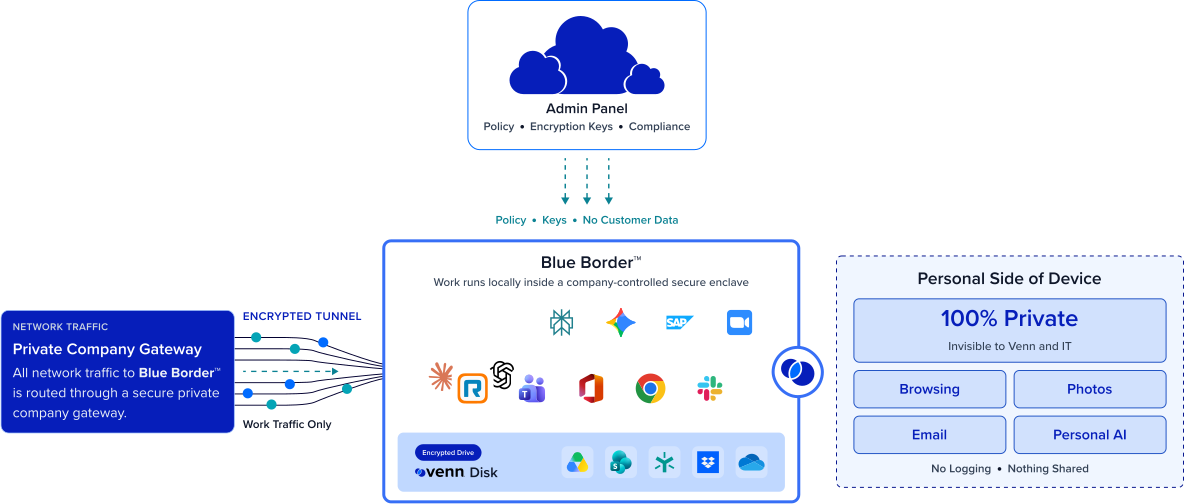
Any worker. Any device. Any application. Any AI workflow.
Skip the second device entirely
Hybrid employees work office and home on the Mac or PC they already have. No managed desktop plus a separate managed laptop to buy, image, manage, and refresh. And because the work lives inside the secure enclave, company data stays protected even on a personal or unmanaged machine, so dropping the second device never means dropping control.
Let people use the device they prefer
Personal or company-owned, managed or unmanaged, Mac or Windows — employees use what works best for them. Blue Border secures only the enclave rather than taking over the whole endpoint, which is what makes personal devices viable: IT enables the flexibility without invasive management.

Onboard in minutes, not days
Enabling someone no longer means they have to wait on hardware. There is no enrollment or imaging to get started. Blue Border creates a secure enclave on an existing device in minutes. New hires, role changes, and shifts to remote work happen at the speed of the business. Off-boarding is a single remote wipe, with no managed hardware to chase down.
One consistent experience, office or home
Whether an employee is at their office or working from their kitchen, the workspace, apps, and access are the same. The same protections travel with them, with corporate firewall coverage extended to business activity in every location. The experience no longer changes based on which device they picked up or where they’re working.







Frequently Asked Questions
Blue Border installs a company-controlled secure enclave on any Mac or PC, and that enclave travels with the employee between the office and home. Work applications run inside it on whatever device they already have, so you can enable hybrid work without provisioning a separate managed device for each location.
No. Because the work is secured inside an enclave on any Mac or PC, employees can use a device they already have. That removes the cost and logistics of buying, imaging, managing, and refreshing a separate managed device (or any managed device) for the office and another for remote.
Yes. Blue Border creates a secure enclave on a personal Mac or PC without owning or fully managing the device. Company data and apps are isolated inside the enclave, while everything outside it stays private to the employee — which is what makes using a personal device practical without invasive management like MDM.
MDM and UEM enroll and control the entire device, which usually means owning and managing one per person and place. Blue Border manages only the secure enclave on whatever device the employee uses, including personal and unmanaged ones, so you enable the work without taking over the device or buying a managed one for every location.
With Blue Border, yes — this is where hybrid work security holds up. Inside the enclave, company data is encrypted, access is governed by IT, and DLP is enforced across copy/paste, download, upload, screenshot, print, and AI. Nothing crosses into the employee’s personal environment, and a remote wipe removes it all instantly when access ends.
A remote wipe action instantly removes the secure enclave and purges all company data without touching anything else on the device. Because company data lives only inside the enclave, there is nothing to recover and no personal data affected — whether the device is a managed corporate laptop or the employee’s own.
Enable secure hybrid work without the second device
Blue Border is the secure workspace for remote employees and contractors on any device — without VDI or fully managing the endpoint. Let hybrid employees work office and home on the Mac or PC they already have, with company data protected in a secure enclave — so you enable flexibility without buying and managing a device for every place the work happens.