

Use Cases
SOC 2 for BYOD
Demonstrate SOC 2 security controls when the work is on BYOD laptops. Enable secure BYOD for contractors and remote employees without VDI or managing their endpoints.
Trusted by 700+ security- and compliance-driven organizations, including Fidelity, Guardian, StoneX, Whatnot, and the IMF.
Always keep SOC 2 compliance in scope. Even for BYOD.
SOC 2 has become table stakes for earning customer trust. The Security Trust Services Criteria expect audit-ready controls over how company data is accessed and protected: access governance, encryption, data separation, DLP, endpoint protection, and clean removal of data when people leave. Meanwhile, the workforce has gone remote and contractor-heavy — working on BYOD and unmanaged devices.
Those personal devices are in scope for SOC 2, because they access company data, but those devices are the hardest to enforce. You can’t reliably prove governance, encryption, or data separation on a machine you don’t own. So BYOD quietly becomes the weakest part of the SOC 2 story.
Your organization wants BYOD flexibility, but how do you maintain data security and compliance?
The legacy answers each cost something: ban BYOD (kills flexibility), force MDM onto personal devices (privacy pushback), route everything through VDI (latency and cost), or leave BYOD out of scope — which is not a credible option. The goal is audit-ready SOC 2 controls without those tradeoffs.
For SOC 2, the BYOD device is always in scope
Personal and unmanaged devices access company data, so they belong in scope for SOC 2. This reality comes up in audits and can lead to fire drills if not dealt with proactively.
Virtual desktops are the legacy default, but far from ideal
While VDI may seem appealing on the surface — the cost, complexity and poor user experience typically leads to buyer’s remorse.
Audit-ready SOC 2 for the BYOD workforce
Blue Border enables secure BYOD by isolating and protecting data locally on any laptop. There is no hosting or virtualization, so apps run at 100% performance while users always know their privacy is maintained. Your SOC 2 controls are strong and audit-ready.
Mapping SOC 2 to BYOD
Blue Border is best way to bring BYOD into your SOC 2 story. All business activity inside the enclave is protected and isolated from any other use on the same computer. Work applications run locally, visually marked by a blue line wrapped around those application windows.
| SOC 2 Control Area | The BYOD Control Gap |

|
|---|---|---|
Access control
The BYOD Control Gap
No reliable way to enforce or prove who can reach company data on an unmanaged device without a proper solution.
Venn Blue Border
Access to the secure enclave is governed by IT policy and enforced centrally on every device.
|
No reliable way to enforce or prove who can reach company data on an unmanaged device without a proper solution. | Access to the secure enclave is governed by IT policy and enforced centrally on every device. |
Encryption
The BYOD Control Gap
Encryption of company data isn’t enforced on a personal machine you don’t control.
Venn Blue Border
Company data (only) is encrypted and isolated inside the secure enclave.
|
Encryption of company data isn’t enforced on a personal machine you don’t control. | Company data (only) is encrypted and isolated inside the secure enclave. |
Data separation
The BYOD Control Gap
Company and personal data are commingled on the same BYOD device.
Venn Blue Border
Company data lives only in the enclave, separated from all personal use on the device.
|
Company and personal data are commingled on the same BYOD device. | Company data lives only in the enclave, separated from all personal use on the device. |
Data loss prevention
The BYOD Control Gap
No control over copy/paste, download, upload, screenshot, print, or AI exfiltration.
Venn Blue Border
DLP and policy-based access controls are enforced inside the enclave across all of those paths.
|
No control over copy/paste, download, upload, screenshot, print, or AI exfiltration. | DLP and policy-based access controls are enforced inside the enclave across all of those paths. |
Workspace / endpoint protection
The BYOD Control Gap
IT can’t secure a device it doesn’t own or manage.
Venn Blue Border
A company-controlled secure enclave provides a secure workspace without managing the whole device.
|
IT can’t secure a device it doesn’t own or manage. | A company-controlled secure enclave provides a secure workspace without managing the whole device. |
Access removal (offboarding)
The BYOD Control Gap
Hard to remove — or prove removal of — company data and access from a personal device.
Venn Blue Border
A remote wipe instantly removes the enclave and purges all company data, leaving personal data untouched.
|
Hard to remove — or prove removal of — company data and access from a personal device. | A remote wipe instantly removes the enclave and purges all company data, leaving personal data untouched. |
Consistency across devices
The BYOD Control Gap
Controls vary by device; unmanaged and BYOD machines fall outside them.
Venn Blue Border
The same controls apply on managed and unmanaged devices alike.
|
Controls vary by device; unmanaged and BYOD machines fall outside them. | The same controls apply on managed and unmanaged devices alike. |
Evidence for assessors
The BYOD Control Gap
Little demonstrable control over BYOD to show an assessor.
Venn Blue Border
Consistent, centrally enforced controls you can point to as evidence (confirm with your auditor).
|
Little demonstrable control over BYOD to show an assessor. | Consistent, centrally enforced controls you can point to as evidence (confirm with your auditor). |
Privacy of personal data
The BYOD Control Gap
Enrolling or monitoring a personal device raises privacy concerns.
Venn Blue Border
Only the enclave is governed; personal activity outside it stays private with no company visibility.
|
Enrolling or monitoring a personal device raises privacy concerns. | Only the enclave is governed; personal activity outside it stays private with no company visibility. |
How Blue Border™ Works
Installing Blue Border on a Mac or PC creates a company-controlled secure enclave directly on the device. Work data, apps, networking, and AI all run locally inside it.
- Network. Work traffic routes through Venn’s built-in VPN gateway or your existing private network.
- Applications. Every app (installed, browser-based or AI) is wrapped by a blue line, creating a virtual firewall and enforcing DLP at the app level.
- Files. Users save only to work-sanctioned file systems inside Venn Disk that are isolated, encrypted and remote wipeable.
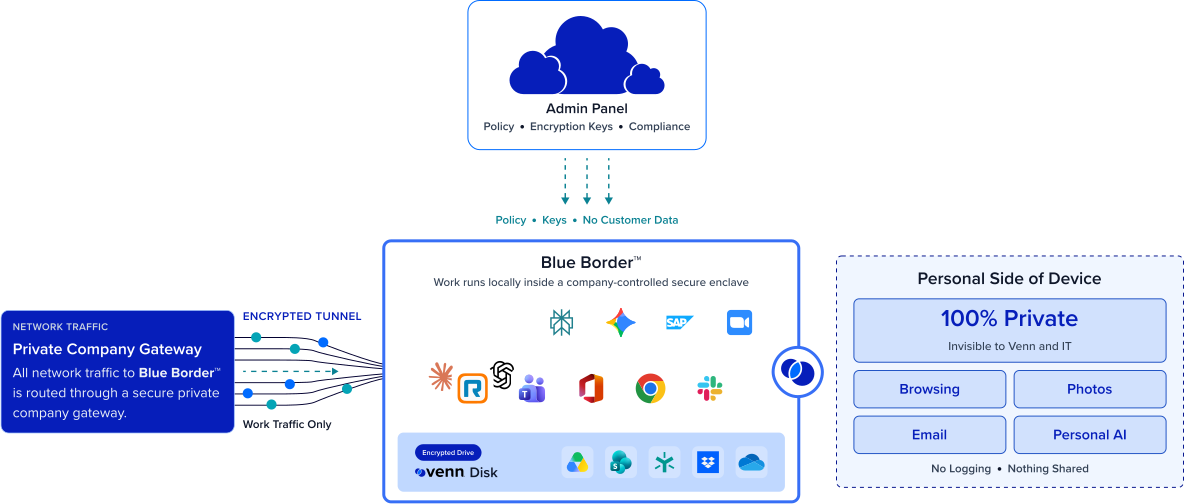
Any worker. Any device. Any application. Any AI workflow.

SOC 2 controls across all devices
Encryption, access governance, DLP, and data isolation apply inside the secure enclave on any BYOD or unmanaged device. The controls an auditor expects no longer depend on owning or managing the machine, so BYOD stops being the gap in your SOC 2 story and starts being covered like everything else.
Keep BYOD in scope without banning it
Rather than excluding personal devices or forcing managed hardware on everyone, Blue Border brings BYOD under demonstrable controls. You keep the flexibility employees and contractors expect while giving compliance a consistent boundary it can stand behind during an audit.


Simple, compliant off-boarding
Removing access at termination is a control assessors look for. With Blue Border, a single remote wipe removes the enclave and purges all company data from the device instantly — a clear, repeatable off-boarding action.
Comprehensive controls without invading privacy
Only the data in the secure enclave is governed — everything outside it stays private to the user, with no company visibility or control. That boundary is what makes bringing a personal device into SOC 2 scope acceptable to the person who owns it.







Frequently Asked Questions
Blue Border creates a company-controlled secure enclave on the device, and the controls an auditor expects — access governance, encryption, data separation, DLP, and access removal — apply inside that enclave. Because the controls don’t depend on owning or managing the entire device, you can extend consistent, audit-ready controls to BYOD and unmanaged devices in your SOC 2 scope.
If a device accesses company data or systems, it generally falls in scope regardless of who owns it — which is why personal devices are so often the weak point. Blue Border lets you bring those devices under the same controls as managed ones, so being in scope no longer means being uncontrolled. Your auditor determines final scope.
No. Blue Border applies controls to the secure enclave rather than the whole device, so you get access governance, encryption, DLP, and clean offboarding without full device management or MDM enrollment on a personal machine. That is what makes BYOD workable for both compliance and the employee.
Inside the enclave: IT-governed access, encryption and isolation of company data, DLP across copy/paste, download, upload, screenshot, print, and AI, and instant removal via remote wipe. These map to common Security and Confidentiality control themes and can serve as evidence — the exact mapping to your criteria should be confirmed with your assessor.
A remote wipe action instantly removes the secure enclave and purges all company data without touching anything else on the device. Because company data lives only inside the enclave, offboarding is a clean, repeatable control you can demonstrate — even when the device belongs to the employee or contractor.
No tool can do that on its own. SOC 2 compliance depends on your full control environment and your auditor’s assessment. What Blue Border does is provide controls that map to the Trust Services Criteria and help you demonstrate them on BYOD and unmanaged devices — closing a gap that’s otherwise hard to cover. Always validate with your auditor.

Bring BYOD into your SOC 2 story.
Blue Border is the secure workspace for remote employees and contractors on any device — without VDI or fully managing the endpoint. Give compliance consistent, audit-ready controls on the BYOD and unmanaged devices in your SOC 2 scope, without VDI or managing the entire endpoint