

Use Cases
Secure Remote Contractor Access
Fast, secure access for external contractors on any device they already own — without onboarding them onto virtual desktops or requiring company-managed hardware.
Trusted by 700+ security- and compliance-driven organizations, including Fidelity, Guardian, StoneX, Whatnot, and the IMF.
Contractors want to work, not fight a virtual desktop
Contractors and freelancers are how teams flex capacity. They come on for a project, need access to your systems, and roll off when the work is done. They are usually working on their own devices, and often for a short or uncertain duration. Speed matters: a contractor who can’t start isn’t billing value yet.
But giving them secure access is usually slow and clunky. Standing up a VDI session, shipping a locked-down laptop, or wiring VPN and credentials takes days. Then, the contractor feels the friction every day: latency on a streamed virtual desktop, extra logins, tools that fight them. People hired to move fast get stuck at setup, and IT absorbs the support load that comes with it.
Meanwhile you still own the risk. Company data ends up on a device you don’t control, and access has to be cut cleanly the moment the engagement ends, which is easy to forget or half-finish, leaving credentials and data lingering. The business wants contractors productive on day one and gone cleanly on the last; security owns both ends. The goal is fast, low-friction, secure access that’s just as fast to revoke.
VDI setup slows contractors down
Spinning up a virtual desktop or shipping hardware takes days, and then adds daily latency. A contractor hired to move fast is stuck fighting the setup instead of working.
Company data on a device you don’t control
Contractors work on their own machines. Without isolation, your data sits on hardware you don’t own or manage, outside the controls you’d apply to an employee.
Access that lingers after the engagement
When a contract ends, VDI sessions, credentials, and data are easy to leave half-revoked. This keeps risk and cost on the books long after the work is done.
VDI vs. Blue Border™ for Secure Remote Contractor Access
There’s a faster, cleaner way to give contractors access: with Blue Border, contractors work inside a company-controlled secure enclave on their own device — without VDI or fully managing the endpoint. Productive in minutes, native app performance instead of a hosted desktop.
| VDI / Virtual Desktops |

|
|
|---|---|---|
Time to first productive day
VDI / Virtual Desktops
Provision a session and profile before the contractor can start — days.
Venn Blue Border
Install the enclave via a lightweight agent on their own device — working in minutes.
|
Provision a session and profile before the contractor can start — days. | Install the enclave via a lightweight agent on their own device — working in minutes. |
Setup friction
VDI / Virtual Desktops
Launch and log into a virtual desktop, then tolerate its quirks.
Venn Blue Border
Install once, then work in normal apps — no separate desktop to navigate.
|
Launch and log into a virtual desktop, then tolerate its quirks. | Install once, then work in normal apps — no separate desktop to navigate. |
Performance
VDI / Virtual Desktops
A hosted desktop adds latency and lag to everything.
Venn Blue Border
Apps run locally at full native speed.
|
A hosted desktop adds latency and lag to everything. | Apps run locally at full native speed. |
Device
VDI / Virtual Desktops
A managed endpoint or BYOD. Using personal devices creates variability that can be complex to manage.
Venn Blue Border
The contractor’s own device, managed or unmanaged, Mac or Windows.
|
A managed endpoint or BYOD. Using personal devices creates variability that can be complex to manage. | The contractor’s own device, managed or unmanaged, Mac or Windows. |
Cost per contractor
VDI / Virtual Desktops
Per-seat licensing plus hosting and compute for every user. Heavy reliance on expensive infrastructure
Venn Blue Border
No VDI infrastructure and no hardware to ship — save up to 60% vs. VDI.
|
Per-seat licensing plus hosting and compute for every user. Heavy reliance on expensive infrastructure | No VDI infrastructure and no hardware to ship — save up to 60% vs. VDI. |
Onboarding
VDI / Virtual Desktops
Stand up a session and configure access per contractor.
Venn Blue Border
A single lightweight install — access granted in minutes.
|
Stand up a session and configure access per contractor. | A single lightweight install — access granted in minutes. |
Offboarding / revoke
VDI / Virtual Desktops
Tear down the session and deprovision across systems.
Venn Blue Border
One remote wipe removes the enclave and all company data instantly.
|
Tear down the session and deprovision across systems. | One remote wipe removes the enclave and all company data instantly. |
Data on their device
VDI / Virtual Desktops
Kept remote, but at the cost of a heavy, laggy session.
Venn Blue Border
Isolated and encrypted locally inside the enclave.
|
Kept remote, but at the cost of a heavy, laggy session. | Isolated and encrypted locally inside the enclave. |
Data protection / DLP
VDI / Virtual Desktops
Controls apply inside the hosted session only.
Venn Blue Border
DLP across copy/paste, download, upload, screenshot, print, and AI, in the enclave.
|
Controls apply inside the hosted session only. | DLP across copy/paste, download, upload, screenshot, print, and AI, in the enclave. |
Contractor experience
VDI / Virtual Desktops
Friction and latency they feel all day.
Venn Blue Border
Frictionless and native — work is simply marked by a blue line.
|
Friction and latency they feel all day. | Frictionless and native — work is simply marked by a blue line. |
How Blue Border™ Works
Installing Blue Border on a Mac or PC creates a company-controlled secure enclave directly on the device. Work data, apps, networking, and AI all run locally inside it.
- Network. Work traffic routes through Venn’s built-in VPN gateway or your existing private network.
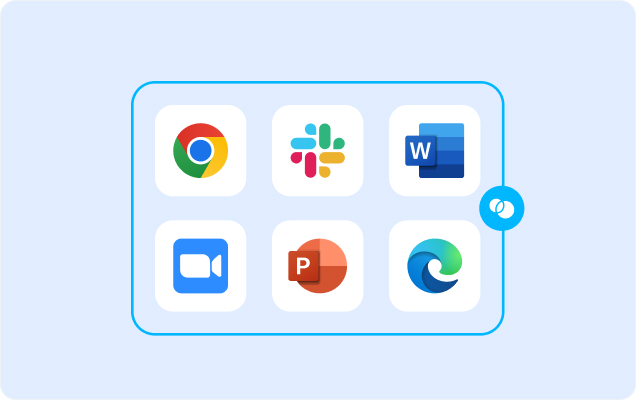
- Applications. Every app (installed, browser-based or AI) is wrapped by a blue line, creating a virtual firewall and enforcing DLP at the app level.
- Files. Users save only to work-sanctioned file systems inside Venn Disk that are isolated, encrypted and remote wipeable.
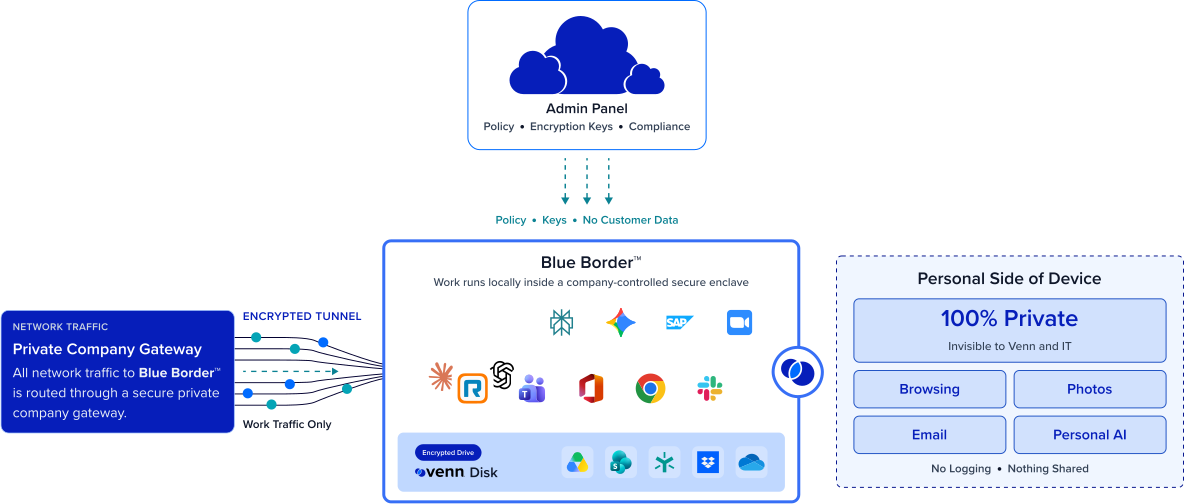
Any worker. Any device. Any application. Any AI workflow.

Contractors are productive in minutes
Onboarding a contractor using the quick install of a lightweight agent on the Mac or PC they already have with no virtual desktop to provision. Their company-controlled secure enclave is ready in minutes, so a contractor hired to move fast actually can.
Frictionless for the contractor
There’s no hosted session to fight with no latency. Contractors work in their assigned apps with 100% app performance. Less friction means faster ramp and fewer support tickets.

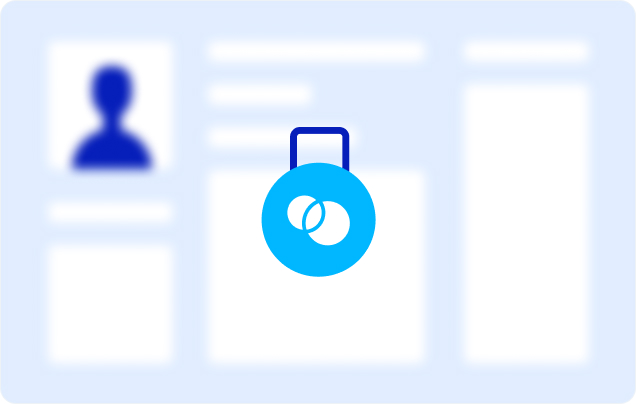
Secure access on a device you don’t own
Inside Blue Border™, company data and apps are encrypted and isolated. Access is governed by IT, and DLP is enforced. All without owning or managing the contractor’s machine. You get MDM-grade control over the work while the rest of their device stays entirely their own.
Revoke instantly when the engagement ends
When the contract is done, a single remote wipe removes the secure enclave and purges all company data from the device. Access ends cleanly with zero company data still lingering on their machine.







Frequently Asked Questions
You install Blue Border on the contractor’s own device, which creates a company-controlled secure enclave in minutes. They work inside it — company data encrypted, access governed by IT, and DLP enforced — with no virtual desktop to provision or hardware to ship. Remote contractor access becomes fast to grant, secure by default, and just as fast to revoke.
A virtual desktop hosts the desktop from a data center, so it takes time to provision, adds latency the contractor feels all day, and costs per seat. Blue Border keeps apps local on the contractor’s own device — productive in minutes, native performance, no backend — delivering the data isolation of VDI while reducing its cost, latency, and friction.
In minutes. The secure enclave installs on the device they already have, with nothing to ship and no session to stand up, so a contractor can be productive the same day they’re engaged rather than waiting on provisioning.
A single remote wipe removes the secure enclave and purges all company data from the device instantly, without touching anything else. Because company data lives only inside the enclave, offboarding is clean and provable — nothing lingers and there’s no hardware to recover.
No. Blue Border runs on the contractor’s own Mac or PC, managed or unmanaged, so there’s no hardware to buy, ship, or reclaim. They use the device they already have, and you still control the work inside the enclave.
Yes – in Blue Border. Company data and apps are isolated and encrypted inside the enclave, with DLP across copy/paste, download, upload, screenshot, print, and AI. Everything outside Blue Border stays private to the contractor, and a remote wipe removes all company data the moment access should end.

Onboard contractors fast. Offboard them clean.
Blue Border is the secure workspace for remote employees and contractors on any device — without VDI or fully managing the endpoint. Give remote contractors fast, low-friction access on the device they already have, secured inside an enclave — and revoke it with a single wipe when the engagement ends. No VDI, no hardware, no lingering access.