
Third-Party Risk Management Software: 12 Top Tools by Category

See Venn first in Google Search
Add as a preferred source on Google
TL;DR: Third-party risk management software helps teams assess, monitor, and control risks from vendors and other external parties. Best for: Venn for securing third-party access on unmanaged devices, ProcessUnity for full-lifecycle TPRM, Bitsight for validating vendors with external data, and BeyondTrust for privileged vendor access.
What Is Third-Party Risk Management Software?
Third-party risk management (TPRM) software helps organizations identify, assess, monitor, and mitigate security, operational, and compliance risks posed by external vendors, suppliers, and partners. These risks can include cybersecurity vulnerabilities, data breaches, regulatory noncompliance, operational disruptions, and financial instability. TPRM platforms centralize vendor risk information and automate processes that would otherwise require manual questionnaires, spreadsheets, and periodic reviews.
Key features of third-party risk management software:
- Vendor inventory and automated assessments: Centralize vendor records, distribute questionnaires, and collect supporting security and compliance evidence.
- Security ratings and continuous monitoring: Track vendor security posture, emerging vulnerabilities, and reported security incidents.
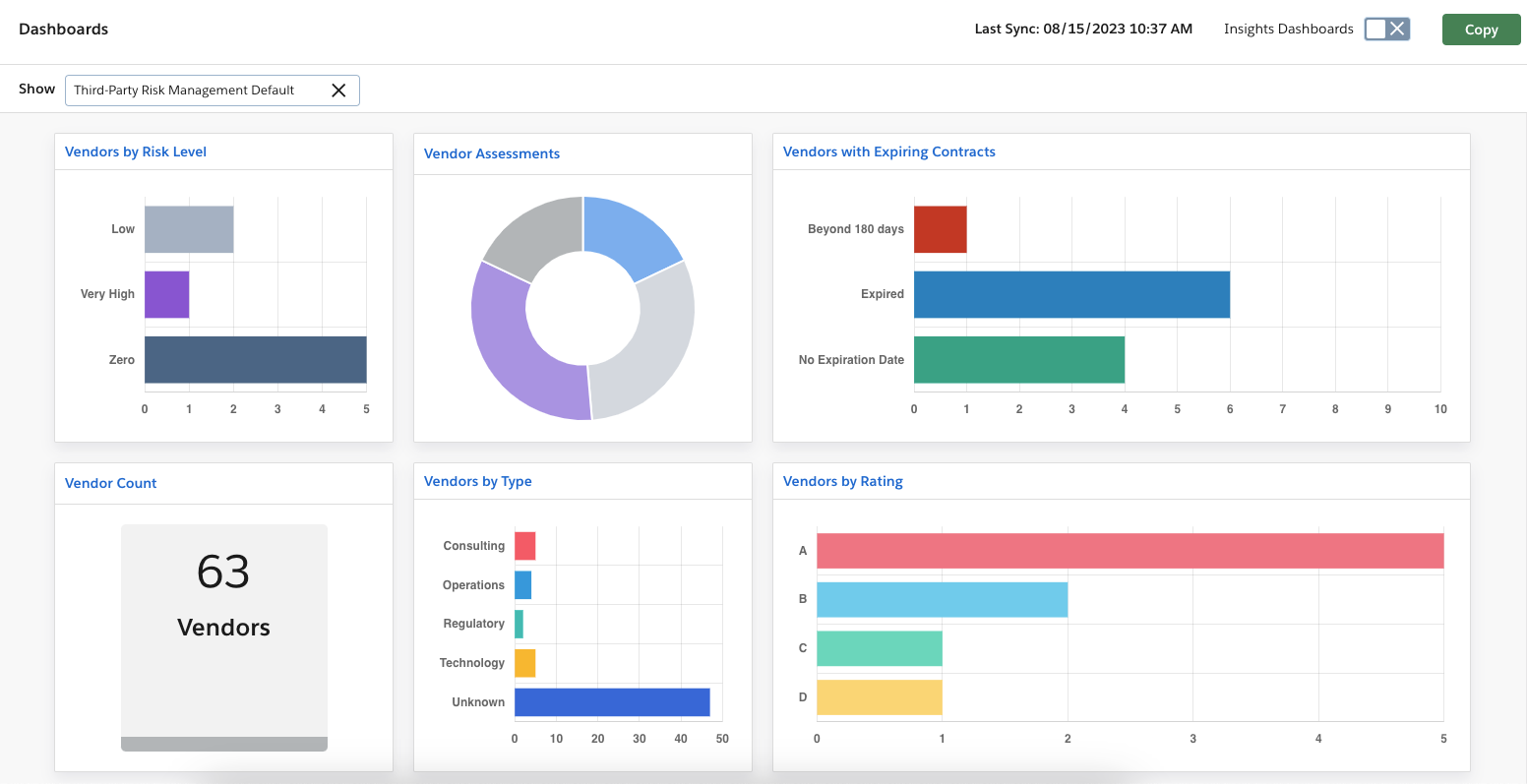
- Risk scoring and remediation: Classify vendors by risk level, prioritize findings, and track corrective actions.
- AI-assisted document review: Analyze SOC 2 reports, security policies, and questionnaire responses to identify control gaps.
- Enterprise integrations: Connect vendor risk workflows with GRC, procurement, identity management, and ticketing systems.
- Access controls and data loss prevention: Integrate security controls to restrict third-party access and prevent unauthorized transfers of sensitive data.
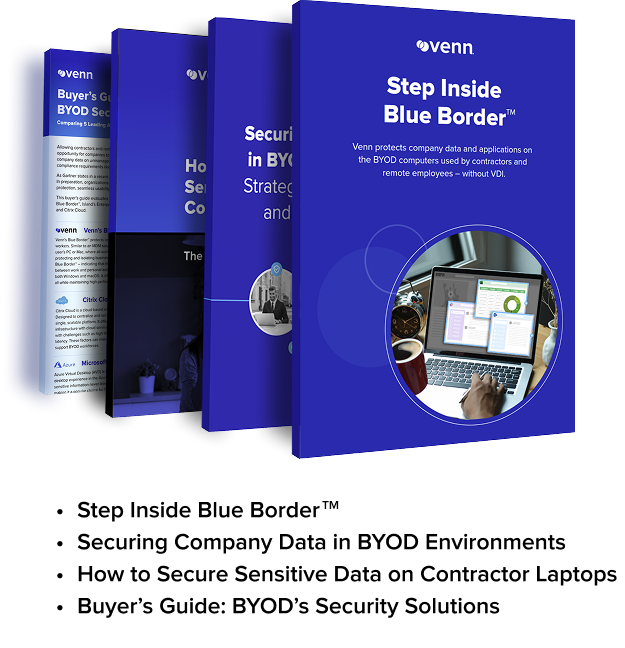
Secure Company Data on BYOD Laptops
Unlock the 4 essential assets you need to secure company data on unmanaged laptops – without VDI.
In this article:
- What Is Third-Party Risk Management Software?
- Third-Party Risk Management Software at a Glance
- Why Organizations Need Third-Party Risk Management Software
- Third-Party Risk Management vs. Vendor Risk Management
- Stages of the Third-Party Risk Lifecycle Managed by TPRM Software
- Key Features of Third-Party Risk Management Software
- Notable Third-Party Risk Management Solutions
- Third-Party Risk Management Best Practices
- Conclusion
Third-Party Risk Management Software at a Glance
The table below summarizes the key differences between the solutions covered in this guide. We explore each solution in more detail in the sections that follow.
| Category | Solution | Best For | Key Strengths | Things to Consider |
| Third-party access security and data protection | Venn Blue Border | Securing vendor and contractor access on unmanaged Macs and PCs | Isolated, encrypted enclave with DLP and one-step remote wipe | Some users report limited customization options |
| Third-party access security and data protection | Imprivata Vendor Privileged Access Management | Monitored, zero trust vendor access to privileged assets | Credential vaulting, session recording, vendor self-registration | Some users report browser issues and slow access |
| Third-party access security and data protection | BeyondTrust Privileged Remote Access | Just-in-time vendor access to IT, cloud, and OT systems | VPN-free access with session recording and credential injection | Complex configuration and a learning curve |
| Third-party access security and data protection | Island Enterprise Browser | Browser-based contractor access to web apps on any device | In-browser data controls and activity logging to SIEM | Some users report slower browsing and limited customization |
| TPRM and vendor lifecycle platforms | ProcessUnity | Purpose-built TPRM across the full vendor lifecycle | AI agents, Assessment Autofill, and Evidence Evaluator | Limited contract lifecycle management |
| TPRM and vendor lifecycle platforms | Mitratech Prevalent | End-to-end vendor risk with managed services options | 800+ assessment templates and broad risk monitoring | Onboarding can require significant effort |
| TPRM and vendor lifecycle platforms | OneTrust Third-Party Management | Third-party risk tied to privacy, ethics, and compliance | Built-in cyber ratings and Dow Jones screening | Admin learning curve and limited role-based access |
| TPRM and vendor lifecycle platforms | Vanta Third Party Risk Management | Agentic vendor reviews tied to a compliance program | Vendor discovery, evidence retrieval, and monitoring | Default vendor questions fit SaaS vendors best |
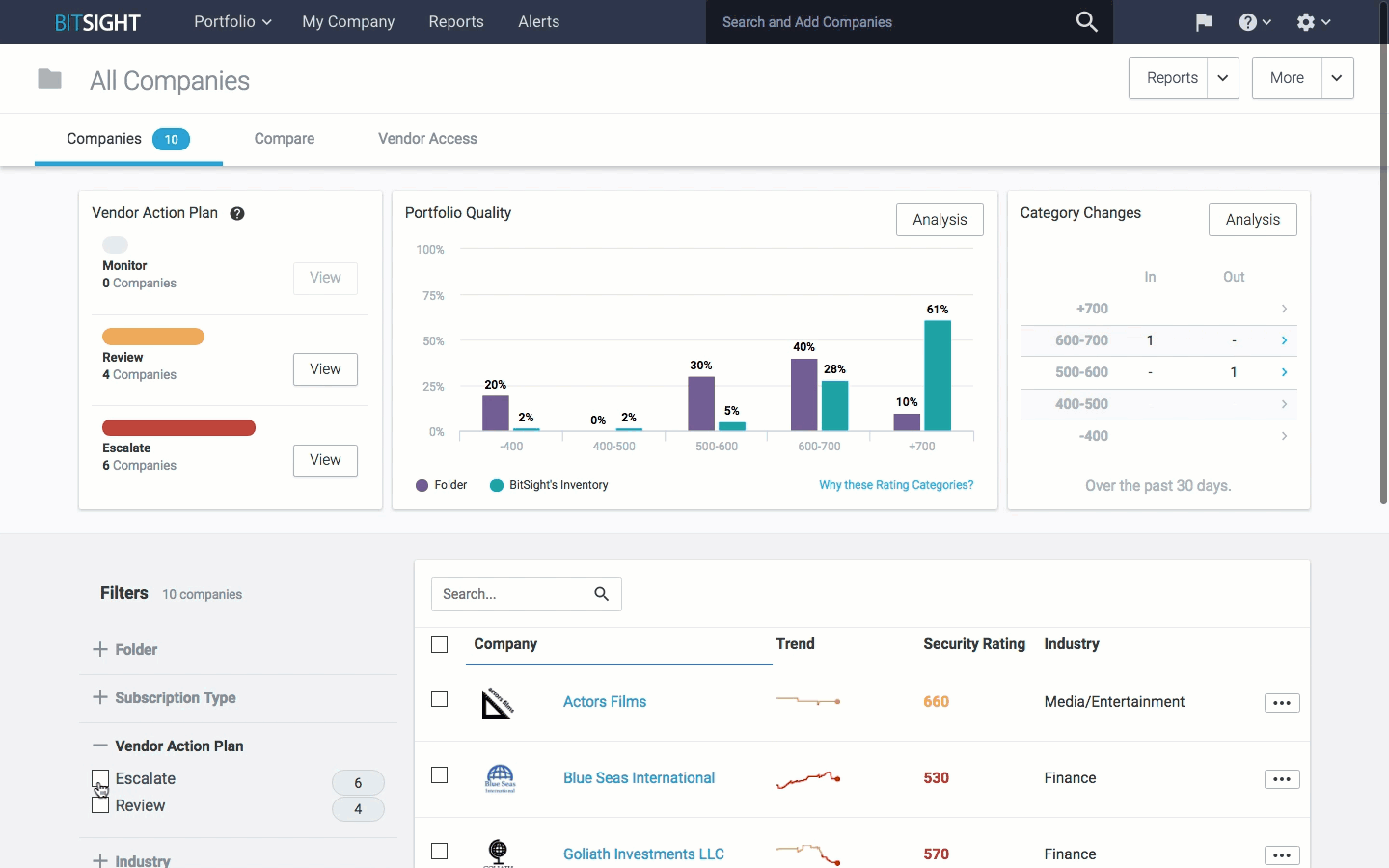
| Security ratings and third-party cyber risk monitoring | Bitsight Vendor Risk Management | Assessments validated with external security data | 75,000+ vendor profiles, AI SOC 2 summaries, risk scores | Alert configuration and licensing can be complex |
| Security ratings and third-party cyber risk monitoring | SecurityScorecard | Threat-informed vendor monitoring with AI assessments | TITAN AI document review and fourth-party discovery | Users report occasional misattributed findings |
| Security ratings and third-party cyber risk monitoring | UpGuard Vendor Risk | Security ratings plus AI vendor assessments | Daily scanning, AI document analysis, questionnaire library | Remediation guidance can be unclear; cost |
| Security ratings and third-party cyber risk monitoring | Panorays | Third-party cyber risk with business-impact ratings | AI-mapped nth-party relationships and automated remediation | Limited report and dashboard customization |
Why Organizations Need Third-Party Risk Management Software
Organizations increasingly rely on external providers for cloud infrastructure, software applications, data processing, IT services, and critical business operations. While these relationships improve efficiency and enable access to specialized capabilities, they also expand the organization’s attack surface and introduce risks that are difficult to manage through internal security controls alone. A security incident affecting a vendor can expose sensitive information, interrupt operations, or create regulatory and financial consequences for its customers.
Third-party risk management software enables organizations to systematically evaluate these dependencies and maintain visibility into vendor risks as they evolve. Rather than relying exclusively on point-in-time assessments, organizations can monitor changes in vendor security posture, identify emerging threats, and take corrective action before vulnerabilities lead to incidents.
Key reasons organizations need TPRM software include:
- Expanded third-party attack surface: Every vendor with access to corporate systems, networks, or sensitive data introduces potential entry points for attackers. TPRM software helps organizations identify these relationships, classify vendors by criticality, and assess the risks associated with their access.
- Growing supply chain cyber threats: Attackers can compromise software suppliers, managed service providers, and other trusted partners to reach downstream organizations. TPRM platforms help detect weaknesses in vendor security practices and prioritize high-risk dependencies.
- Regulatory and compliance requirements: Regulations and frameworks such as GDPR, DORA, HIPAA, and NIST guidance impose or inform requirements for managing third-party risks in applicable environments. TPRM software helps document due diligence, track compliance obligations, and maintain evidence for audits.
- Limited visibility into vendor security practices: Organizations often have little direct control over how external providers secure their infrastructure and handle customer information. TPRM solutions consolidate security assessments, certifications, audit reports, and external risk intelligence to improve visibility.
- Inefficient manual assessment processes: Managing hundreds or thousands of vendors through spreadsheets, email questionnaires, and disconnected systems creates administrative overhead. Automated assessment workflows, document collection, and risk scoring help security teams evaluate vendors more efficiently.
- Constantly changing vendor risk profiles: A vendor considered secure during onboarding may later experience a breach, lose a security certification, or introduce new subcontractors. Continuous monitoring helps organizations identify material changes and reassess their exposure.
- Fourth-party and supply chain dependencies: Critical vendors often rely on their own technology providers and subcontractors, creating indirect risks. TPRM software can help map these dependencies and identify concentrations of risk across the extended supply chain.
- Business continuity and operational resilience: Outages, financial failures, or cybersecurity incidents affecting critical suppliers can disrupt essential operations. TPRM platforms help organizations identify high-impact dependencies, evaluate contingency plans, and prioritize resilience measures.
Third-Party Risk Management vs. Vendor Risk Management
Third-party risk management (TPRM) and vendor risk management (VRM) are closely related approaches to identifying and mitigating risks introduced by external business relationships. Although the terms are often used interchangeably, third-party risk management typically has a broader scope, covering all external entities that may affect an organization’s security, compliance, operations, or reputation. Vendor risk management focuses more specifically on risks associated with suppliers and service providers that deliver products or services to the organization.
TPRM encompasses vendors as well as contractors, consultants, business partners, affiliates, and other external organizations. It may also address fourth-party risks arising from subcontractors and service providers used by direct third parties. VRM, in comparison, generally concentrates on vendor selection, due diligence, security assessments, contractual obligations, ongoing performance, and compliance with organizational requirements.
The following table highlights the key differences:
| Aspect | Third-Party Risk Management (TPRM) | Vendor Risk Management (VRM) |
| Scope | Covers a broad range of external relationships and dependencies | Focuses primarily on vendors and suppliers |
| Risk categories | Cybersecurity, compliance, operational, financial, reputational, and supply chain risks | Vendor security, compliance, financial stability, and service delivery risks |
| External entities | Vendors, contractors, consultants, partners, affiliates, and other third parties | Suppliers, technology providers, and outsourced service providers |
| Fourth-party risk | Often includes visibility into subcontractors and indirect dependencies | May address subcontractor risks associated with individual vendors |
| Primary objective | Manage risks across the organization’s external ecosystem | Ensure vendors meet security, compliance, and operational requirements |
| Lifecycle management | Covers onboarding, continuous monitoring, relationship changes, and termination across third-party relationships | Covers vendor selection, due diligence, onboarding, monitoring, renewal, and offboarding |
| Organizational ownership | Typically involves security, enterprise risk, compliance, procurement, and legal teams | Commonly involves procurement, vendor management, security, and compliance teams |
Stages of the Third-Party Risk Lifecycle Managed by TPRM Software
Vendor Intake, Risk Tiering, and Due Diligence
The third-party risk lifecycle begins when a business unit requests a new vendor, supplier, or external service provider. TPRM software centralizes these requests and collects information about the vendor’s services, data handling practices, system access requirements, and potential impact on business operations. Organizations use this information to assign an initial risk tier based on factors such as:
- Data sensitivity
- Access privileges
- Service criticality
- Regulatory exposure
Once vendors are classified, the platform supports risk-based due diligence. High-risk vendors may undergo detailed security questionnaires, compliance reviews, financial assessments, and evaluations of certifications such as SOC 2 and ISO 27001. Lower-risk vendors may require less extensive reviews. TPRM software automates questionnaire distribution, collects supporting evidence, identifies gaps in vendor controls, and routes findings to the appropriate stakeholders for review and approval.
Contracting and Access Provisioning
After due diligence, organizations establish contractual requirements that address identified third-party risks. These may include:
- Data protection obligations
- Security control requirements
- Breach notification timelines
- Audit rights
- Subcontractor restrictions
- Service-level agreements
TPRM software helps track these requirements, document accepted risks, and maintain records of approvals before a vendor relationship becomes operational. During onboarding, vendors may also require access to corporate applications, infrastructure, or sensitive data. TPRM platforms can integrate with identity and access management (IAM), governance, and procurement systems to coordinate access provisioning.
Related content: Read our guide to third-party access management
Continuous Monitoring and Reassessment
Third-party risk profiles change over time as vendors adopt new technologies, experience security incidents, modify their operations, or introduce additional subcontractors. Continuous monitoring helps organizations detect these changes without relying exclusively on annual assessments. To maintain an updated view of third-party exposure, TPRM software aggregates information from:
- Vendor questionnaires
- External security ratings
- Threat intelligence
- Compliance documentation
- Other relevant sources
Platforms can trigger reassessments when a vendor experiences a data breach, its security posture deteriorates, a certification expires, or its access to sensitive systems expands. Automated alerts and risk scoring help teams prioritize emerging issues, while remediation workflows assign corrective actions, establish deadlines, and track vendor responses. Organizations can also conduct scheduled reviews based on risk tier, with critical vendors typically requiring more frequent oversight than low-risk providers.
Offboarding and Access Revocation
The third-party risk lifecycle concludes when a vendor contract expires, a service is replaced, or a business relationship is terminated. Improper offboarding can leave behind active user accounts, API credentials, remote access permissions, and retained sensitive data, creating security risks even after the relationship has ended. TPRM software helps coordinate offboarding activities across security, IT, procurement, legal, and business teams.
Offboarding workflows typically include:
- Revoking vendor access
- Disabling accounts
- Rotating shared credentials
- Terminating integrations
- Verifying that organizational data has been returned or securely deleted according to contractual and regulatory requirements
TPRM platforms can integrate with IAM and IT service management systems to initiate these actions and track their completion. They also maintain evidence of access revocation, data disposition, and contract termination, providing an audit trail that demonstrates the relationship was closed in accordance with organizational policies.
Key Features of Third-Party Risk Management Software
Centralized Vendor Inventory with Automated Questionnaires and Evidence Collection
A centralized vendor inventory provides a single source of information about an organization’s third-party relationships, including vendor ownership, services provided, data access requirements, contract status, and risk classifications. TPRM software helps organizations maintain this inventory while reducing reliance on disconnected spreadsheets and manually maintained records.
Automated assessment workflows enable security and compliance teams to distribute standardized or customized questionnaires based on vendor risk levels. Platforms can collect supporting evidence, such as:
- SOC 2 reports
- ISO 27001 certificates
- Penetration testing summaries
- Security policies
Advanced solutions support reusable vendor profiles, automated reminders, document expiration tracking, and centralized evidence repositories, reducing repetitive requests and accelerating due diligence.
Security Ratings and Continuous Monitoring
Security ratings provide an external assessment of a vendor’s cybersecurity posture based on observable signals such as exposed services, known vulnerabilities, security configurations, and indicators of compromise. TPRM platforms may integrate with security rating providers to supplement questionnaire-based assessments and identify potential weaknesses that vendors have not disclosed.
Continuous monitoring capabilities track changes in vendor risk exposure between formal assessment cycles. These tools can generate alerts when a vendor:
- Experiences a publicly reported security incident
- Develops new external vulnerabilities
- Exhibits a significant deterioration in its security rating
Because external ratings do not provide complete visibility into internal security controls, organizations should combine them with vendor-provided evidence and risk assessments.
Risk Scoring, Tiering, and Remediation Workflows
Risk scoring and tiering capabilities help organizations prioritize third-party relationships according to their potential business impact. TPRM software evaluates factors such as:
- Data sensitivity
- System access privileges
- Regulatory exposure
- Operational criticality
- Identified security weaknesses
It can then assign risk scores or classifications. Many platforms distinguish between inherent risk, which exists before controls are considered, and residual risk, which remains after mitigating controls are applied.
Remediation workflows help organizations address identified weaknesses through structured corrective actions. Platforms can assign remediation tasks to internal stakeholders or vendor contacts, establish deadlines, request supporting evidence, and track progress toward resolution. Escalation rules and risk acceptance workflows ensure that unresolved high-risk findings receive appropriate management attention rather than remaining indefinitely open.
AI-Assisted Review of SOC 2 Reports, Policies, and Questionnaire Answers
AI-assisted document analysis helps security teams process large volumes of third-party assessment materials without manually reviewing every page. TPRM platforms can use natural language processing and large language models to extract relevant information from:
- SOC 2 reports
- Security policies
- Certifications
- Completed questionnaires
These capabilities help identify control gaps, summarize audit findings, and compare vendor responses against organizational security requirements. Advanced solutions can highlight exceptions in SOC 2 reports, identify inconsistencies between questionnaire answers and supporting documentation, and generate follow-up questions for vendors.
Integrations with GRC, Procurement, Identity, and Ticketing Systems
TPRM software integrates with existing enterprise systems to incorporate third-party risk management into broader business and security workflows. Governance, risk, and compliance (GRC) integrations connect vendor assessments with:
- Enterprise risk registers
- Compliance obligations
- Audit processes
Procurement integrations help initiate security reviews during vendor selection and prevent high-risk relationships from proceeding without required approvals. Identity and access management integrations provide visibility into third-party accounts and access permissions, while IT service management and ticketing integrations enable teams to create, assign, and track remediation tasks.
Access Controls and Data Loss Prevention for Third-Party Users
Third-party users, including contractors, consultants, and external support personnel, may require access to corporate applications, files, and sensitive information. Traditional vendor assessments cannot fully address the risks introduced by these users after access has been granted. TPRM programs can incorporate identity security and data loss prevention (DLP) capabilities to help organizations enforce access restrictions and monitor how external users interact with corporate resources.
Relevant capabilities include:
- Granular access policies
- Multifactor authentication
- Session monitoring
- Restrictions on downloading, copying, printing, or transferring sensitive data
Organizations may use browser-based isolation, application-level controls, or secure workspace technologies to separate business information from unmanaged personal devices. Integrating these protections with third-party risk processes helps organizations apply controls based on vendor risk levels, limit unauthorized data movement, and revoke access when relationships change or terminate.
Notable Third-Party Risk Management Solutions
How we selected these solutions: We shortlisted third-party risk management solutions based on vendor inventory and lifecycle management, risk assessments and scoring, continuous monitoring, remediation workflows, and controls over third-party access to systems and data.
Third-Party Access Security and Data Protection
1. Venn Blue Border

Best for: Securing vendor and contractor access on unmanaged Macs and PCs
Strengths: Isolated, encrypted enclave with DLP and one-step remote wipe
Things to consider: Some users report limited customization options
Venn Blue Border secures third-party and vendor access to company data and applications on devices the organization does not own or manage. Installing Blue Border on a Mac or PC creates a company-controlled secure enclave on the vendor’s own machine, where work data, apps, networking, and AI tools run locally.
Inside the enclave, company data is encrypted and isolated from the vendor’s other clients and personal activity. IT manages only the enclave, not the device, so vendors can be onboarded without shipping a managed laptop or setting up VDI. When an engagement ends, a remote wipe removes the enclave and purges company data.
Key features include:
- Company-controlled secure enclave: Creates an isolated, encrypted workspace on the vendor’s own managed or unmanaged Mac or Windows device. Activity outside the enclave stays private to the vendor.
- Data loss prevention inside the enclave: Enforces DLP on copy and paste, download, upload, screenshots, printing, and AI tools. Every installed, browser-based, or AI app in the enclave is wrapped by a blue line that marks the controlled area.
- Encrypted Venn Disk: Limits users to saving files in work-sanctioned file systems inside Venn Disk, which are isolated, encrypted, and remotely wipeable.
- Network routing: Routes work traffic through Venn’s built-in VPN gateway or the organization’s existing private network.
- AI governance: Lets IT decide which AI tools can access company data, allowing only company-sanctioned tools and blocking the rest.
- Onboarding and offboarding: Provisions vendors on the devices they already have in minutes. A single remote wipe revokes access and purges company data from the enclave, leaving an audit-ready offboarding record.
- Local app performance: Runs apps locally at native speed instead of through a remote desktop, with access to apps and data governed by policy.
Limitations (as reported by users on G2):
- Limited customization: Some users note that customization options are limited, although the product meets their core requirements.
- Occasional slowdowns: Some users report that the secure enclave can feel slower at times when accessing applications.
- Support routing: Users cannot schedule time with a specific support representative and are connected to the next available team member instead.
2. Imprivata Vendor Privileged Access Management
Best for: Monitored, zero trust vendor access to privileged assets
Strengths: Credential vaulting, session recording, vendor self-registration
Things to consider: Some users report browser issues and slow access
Imprivata Vendor Privileged Access Management (VPAM), formerly SecureLink Enterprise Access, gives vendors monitored, zero trust access to an organization’s internal privileged assets as an alternative to VPNs and shared credentials. Teams manage all vendors through a single platform, with access limited to defined hosts, ports, and schedules.
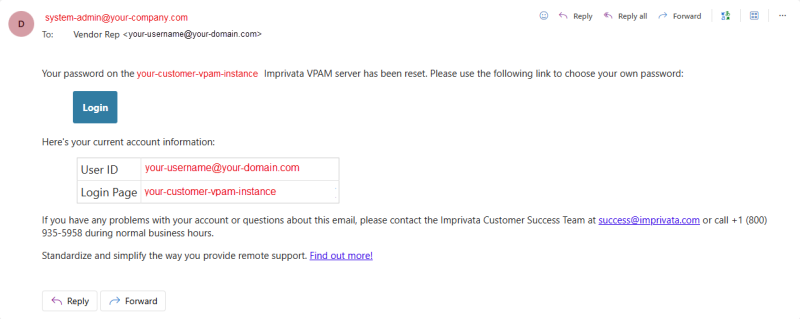
The platform stores credentials in a vault and injects them into sessions, records vendor activity, and lets new vendors self-register for identity verification. It also connects to vendors that use Imprivata Customer Privileged Access Management through the Nexus, which brokers connections between both parties.
Key features include:
- Granular zero trust access controls: Sets access schedules and limits individual vendor representatives to specified hosts and ports.
- Credential vault and injection: Stores usernames and passwords in a secure vault with credential rotation and injects them directly into sessions, so passwords are not shared with vendors.
- Audit logs and session recordings: Captures detailed audit logs and session recordings of vendor activity.
- Vendor self-registration: Lets new vendors register themselves and lets internal teams verify their identities before access is granted.
- Protocol support: Supports a wide range of TCP- and UDP-based protocols to meet vendors’ connectivity requirements.
- Nexus vendor network: Brokers connections with vendors that use Imprivata Customer Privileged Access Management, so neither side has to change how it manages remote connections.
Limitations (as reported by users on G2):
- Browser compatibility: Some users report issues when using the product in certain browsers, such as Firefox.
- Vendor list navigation: Users note that it can be difficult to identify vendors and their users within vendor lists.
- Access speed: Some users report that remote access sessions occasionally run slowly.
Source: Imprivata
3. BeyondTrust Privileged Remote Access
Best for: Just-in-time vendor access to IT, cloud, and OT systems
Strengths: VPN-free access with session recording and credential injection
Things to consider: Complex configuration and a learning curve
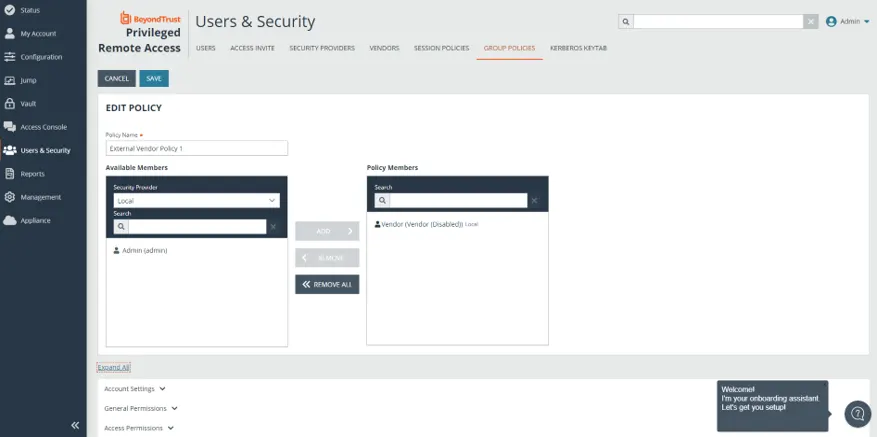
BeyondTrust Privileged Remote Access (PRA) brokers remote access for employees, third-party vendors, and non-human identities to IT systems, cloud applications, and OT environments without a VPN. Every session is authenticated, authorized, and auditable, and access is granted just in time based on least-privilege policies.
Admins define which endpoints users can reach, when they can reach them, and which applications are allowed during a session. PRA is part of the BeyondTrust Pathfinder platform and can be bundled with BeyondTrust Password Safe for privileged account and session management.
Key features include:
- Just-in-time, least-privilege access: Grants users and non-human identities only the access they need, when they need it, across cloud, on-premises, and OT environments.
- Session monitoring and recording: Controls and monitors sessions through a secure agent or standard protocols, including RDP, VNC, HTTPS, SSH, and SQL, and captures session data for real-time or post-session review.
- Credential vaulting and injection: Discovers, rotates, and injects privileged credentials into sessions without exposing plain-text passwords, using an in-appliance vault or BeyondTrust Password Safe.
- Vendor onboarding: Lets admins delegate management of vendor users to trusted vendor admins or internal users and manage them through Group Policy, removing the need for shared accounts.
- Single access pathway: Brokers all connections through one secure pathway and applies application-level microsegmentation to prevent lateral movement.
- Authentication and compliance reporting: Supports MFA, passwordless, and SAML authentication, with audit trails, session forensics, and attestation reports.
Limitations (as reported by users on G2):
- Approval friction: Some users note that required approval workflows can slow down vendor access, including urgent requests.
- Complex configuration: Users report a learning curve due to the large number of configuration options and the documentation needed to set correct policies.
- Interface and navigation: Some users find the interface dated and note that some settings take more clicks than expected.
- Linux and web SSH gaps: Users report that Jumpoints for Linux do not always work as expected and that the web-based SSH client is slow and lacks copy and paste.
- Reporting: Some users find report layouts and data export options limited.
Source: BeyondTrust
4. Island Enterprise Browser

Best for: Browser-based contractor access to web apps on any device
Strengths: In-browser data controls and activity logging to SIEM
Things to consider: Some users report slower browsing and limited customization
The Island Enterprise Browser gives contractors and other third parties access to the applications and resources they need through a browser installed on any device. Contractors install the browser, authenticate through the organization’s identity provider, and see a homepage with only the apps and resources provisioned to them.
Granular policy controls inside the browser limit how sensitive data can move, and work activity is logged and shared with SIEM and analytics tools for auditing. Contractor access is delivered without imaging devices, provisioning virtual desktops, or backhauling traffic.
Key features include:
- Deployment on any device: Installs and deploys on contractor devices in minutes.
- Granular data controls: Applies policy controls inside the browser to prevent sensitive data leakage.
- Identity provider integration: Integrates with the organization’s identity provider for authentication.
- Activity logging: Shares all web activity with SIEM and analytics platforms for forensic auditing.
- Hidden shared credentials: Gives contractors access to shared accounts without disclosing the underlying passwords.
- Provisioned app homepage: Shows all provisioned apps and resources on a single homepage to simplify onboarding.
Limitations (as reported by users on G2):
- Browsing speed and customization: Some users occasionally notice slower browsing and limited customization options.
- Component dependency: Users note that Island Desktop requires the Island Browser to be installed.
- User adoption: Some users find it challenging to move team members who have a preferred browser to a new Chromium-based browser.
Source: Island
TPRM and Vendor Lifecycle Platforms
5. ProcessUnity

Best for: Purpose-built TPRM across the full vendor lifecycle
Strengths: AI agents, Assessment Autofill, and Evidence Evaluator
Things to consider: Limited contract lifecycle management
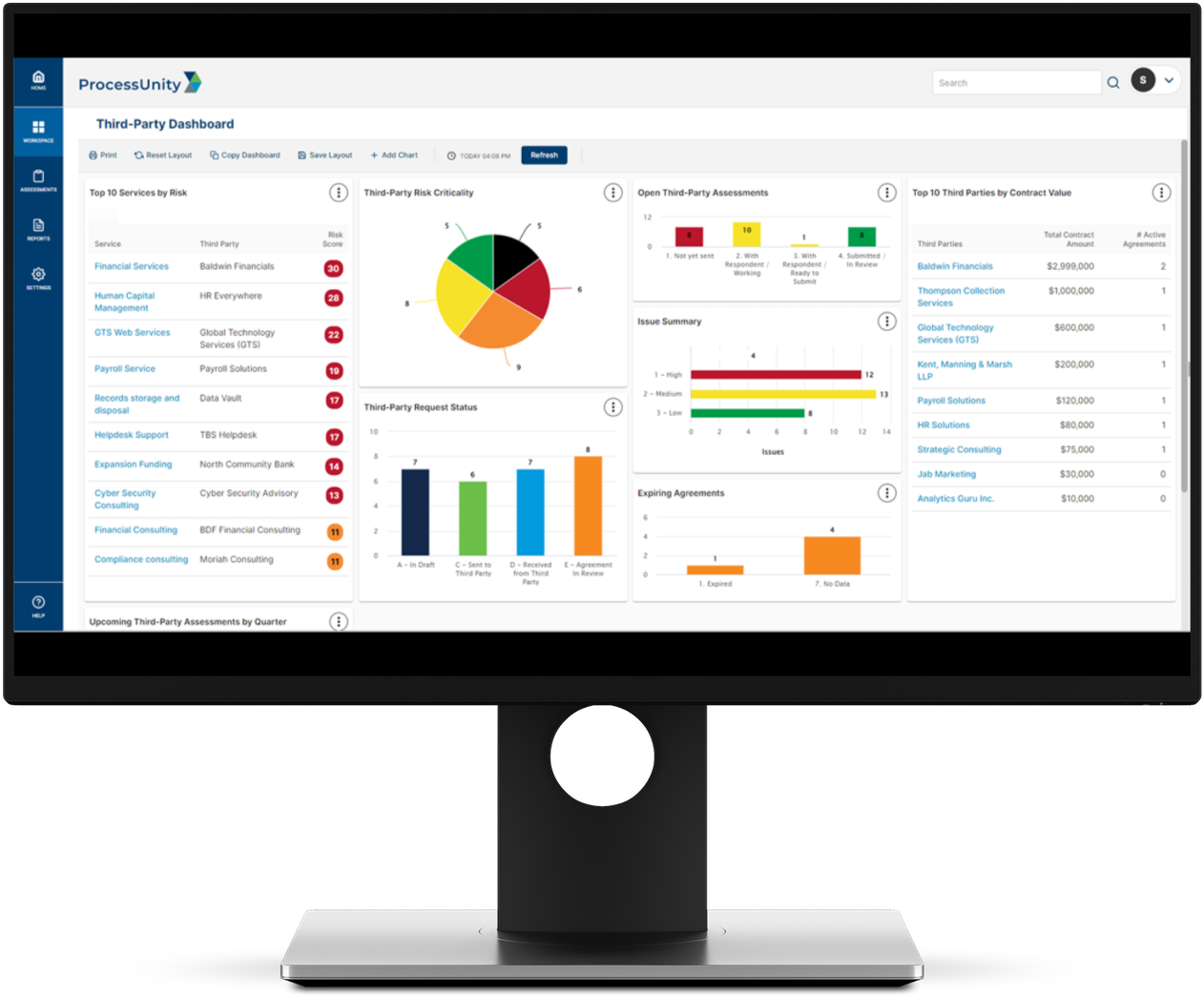
ProcessUnity is a third-party risk management platform that covers the vendor lifecycle from intake and onboarding through assessment, monitoring, reporting, and offboarding. AI agents handle defined tasks, Assessment Autofill pre-populates questionnaires, and Evidence Evaluator maps vendor documentation to controls.
The platform draws on the ProcessUnity Global Risk Exchange and the ProcessUnity Risk Index, which combines controls data with external threat intelligence to score vendors. Assessments, workflows, risk models, approvals, and reporting are configurable, and connectors link the platform to procurement, ERP, GRC, ITSM, and other enterprise systems.
Key features include:
- AI agents: Pre-screen vendors, identify duplicates, validate documentation, research vendors, analyze SOC 2 reports, summarize portfolio data, and draft vendor communications and remediation steps. Results are evidence-cited, with judgment calls left to the team.
- Assessment Autofill: Uses validated data to pre-populate questionnaire responses for internal teams and third parties.
- Evidence Evaluator: Analyzes vendor documents, maps evidence to controls and questions, flags gaps and inconsistencies, and points analysts to the page and section where support is found.
- ProcessUnity Risk Index: Scores vendors across the portfolio by combining controls data with external threat intelligence, without waiting for a full assessment cycle.
- Configurable workflows and risk models: Lets teams configure assessments, workflows, approval paths, risk models, scoring, and reporting.
- Multi-domain coverage: Includes assessment, scoring, and monitoring workflows for cybersecurity, AI, privacy, and resiliency, and extends to other domains through prebuilt integrations and the Connect-Anything framework.
- Enterprise integrations: Connects with procurement, ERP, GRC, ITSM, CRM, and HCM systems and incorporates data from more than 40 risk-data providers.
Limitations (as reported by users on G2):
- Contract management: Some users note that contract lifecycle management capabilities are limited.
- Vendor contact reporting: Users report difficulty running reports that extract contacts when a vendor has multiple contacts.
- Speed and module structure: Some users would like faster performance and for separate vendor and contractor modules or instances to be combined.
- Contact requirements: Users note that specific personnel contact information is required to share assessment results.
Source: ProcessUnity
6. Mitratech Prevalent
Best for: End-to-end vendor risk with managed services options
Strengths: 800+ assessment templates and broad risk monitoring
Things to consider: Onboarding can require significant effort
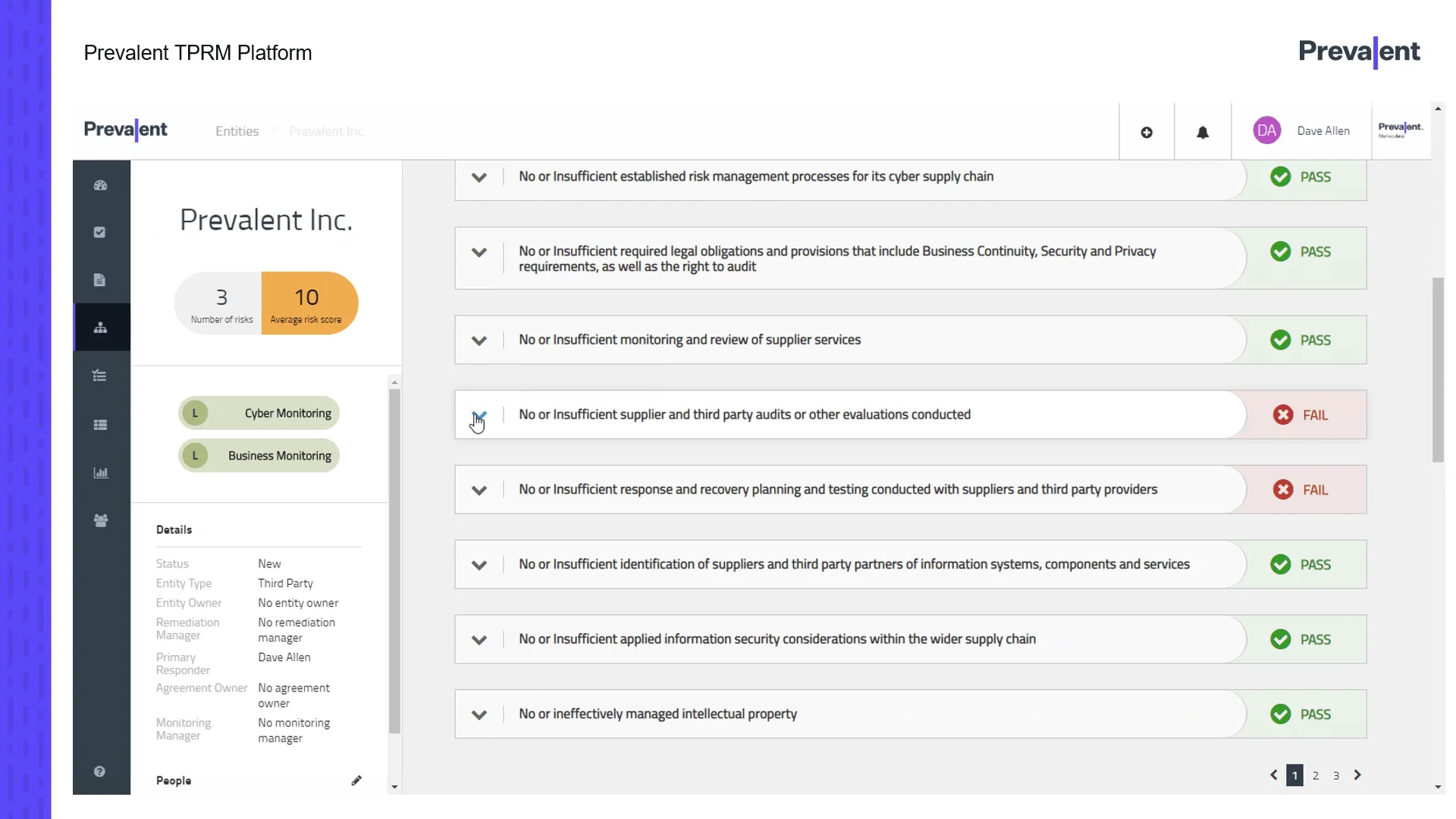
Mitratech Prevalent is a third-party risk management solution that combines AI-powered risk assessments with continuous monitoring and remediation across the vendor lifecycle, from sourcing and onboarding to offboarding. It is built specifically for TPRM rather than as a module within a broader GRC suite.
The solution includes a library of more than 800 assessment templates, AI that completes new assessments from prior vendor documents, and Vendor Threat Monitor for continuous monitoring. Mitratech also provides vendor intelligence networks with standardized risk reports and managed services that run parts of the TPRM lifecycle.
Key features include:
- Lifecycle coverage: Supports sourcing and selection with RFPs and RFIs, intake and onboarding, SLA and performance management, inherent risk scoring, monitoring, assessment and remediation, and offboarding.
- AI FastTrack Assessment: Accepts up to 15 previously completed vendor assessments in any format, populates a new questionnaire, maps responses across formats, and generates recommended answers.
- Survey automation with ARIES: Handles questionnaire distribution, follow-up, and evidence collection workflows.
- Vendor Threat Monitor: Draws on more than 30,000 adverse media and news sources, over 1.8 million politically exposed person profiles, and more than 1,000 enforcement and sanctions lists. AI filters out low-confidence events.
- Technology Tags: Identifies which vendors are exposed to a supply chain incident by cross-referencing vendor technology dependencies against live incident data, then starts remediation workflows.
- Contract Essentials: Provides contract lifecycle management with AI-assisted contract risk analysis, DocuSign integration, and storage of executed contracts against vendor records.
- Inherent and residual risk scoring: Tiers vendors based on the likelihood and impact of security, compliance, and operational incidents.
- Vendor portal and messaging: Gives vendors a portal to submit documentation and track progress, with built-in messaging for questions and status updates.
Limitations (as reported by users on Capterra):
- Onboarding effort: Users note that the level of customization can make initial onboarding overwhelming and that implementation requires a commitment of time.
- Interface: Several users feel the user interface could be more intuitive.
- Bulk scheduling: Users report that complex survey schedules with multiple questionnaires must be added one at a time.
- Licensing for prospective vendors: Some users would like to run a quick review of a potential vendor without assigning a full license.
Source: Mitratech
7. OneTrust Third-Party Management

Best for: Third-party risk tied to privacy, ethics, and compliance
Strengths: Built-in cyber ratings and Dow Jones screening
Things to consider: Admin learning curve and limited role-based access
OneTrust Third-Party Management automates third-party onboarding, assessment, risk treatment, reporting, monitoring, and offboarding. It screens third parties at intake against risk rating and compliance databases, tiers them to set assessment depth, and moves low-risk third parties through auto-approval workflows.
The solution assesses third parties across security, privacy, ethics, compliance, and other domains. It includes cybersecurity ratings and breach notifications from RiskRecon, SecurityScorecard, and HackNotice, plus ethics and compliance screening through Dow Jones Risk & Compliance databases.
Key features include:
- Automated intake and tiering: Screens new third parties against risk rating and compliance databases and tiers them to guide workflow priority and assessment depth.
- AI-assisted assessments: Uses AI to ingest external risk evidence and generate questionnaire responses, with user-configurable workflows and automation rules triggered by critical events.
- Issue and risk tracking: Assigns owners to issues, risks, and tasks across internal and external teams and supports collaborative risk acceptance.
- Cyber ratings and breach monitoring: Screens and monitors third parties with ratings and breach activity from RiskRecon, SecurityScorecard, and HackNotice, and uses external data to inform inherent and residual risk scores.
- Ethics and compliance due diligence: Provides PEP, sanctions, and watchlist screening, adverse media monitoring, and in-app enhanced due diligence research through Dow Jones databases.
- Risk insights for procurement: Surfaces inherent and domain-specific risk insights to guide onboarding, approvals, and sourcing decisions.
- Trust Profiles: Provides access to a vendor risk register with thousands of third-party Trust Profiles.
Limitations (as reported by users on G2):
- Learning curve: Users note that the tool covers many areas, which makes the learning curve steep for administrators.
- Role-based access controls: Some users report limited RBAC options when creating users with specific access and find the interface not very user-friendly.
- Bulk data import: Users note that engagement attributes are created manually, without a bulk import template for engagement inventory items.
- Environment management: Users report that there is no sync from UAT to production environments.
Source: OneTrust
8. Vanta Third Party Risk Management

Best for: Agentic vendor reviews tied to a compliance program
Strengths: Vendor discovery, evidence retrieval, and monitoring
Things to consider: Default vendor questions fit SaaS vendors best
Vanta Third Party Risk Management uses a TPRM Agent to discover vendors, run assessments, and monitor third-party risk. The agent pulls findings from vendors’ SOC 2 reports, DPAs, and questionnaires, manages document requests and follow-ups, and applies the organization’s risk tiers and scoring logic to each assessment.
Vendor findings feed into Vanta’s risk register and compliance posture, giving teams one view of risk. Third Party Risk Management is available as a standalone product or as an add-on to an existing Vanta plan.
Key features include:
- Vendor discovery: Identifies newly adopted vendors, including shadow IT and AI tools, and integrates with procurement systems.
- Evidence retrieval: Retrieves documentation directly from first- and third-party Trust Centers.
- Risk extraction: Identifies SLAs, DPAs, and custom security terms in SOC 2 reports.
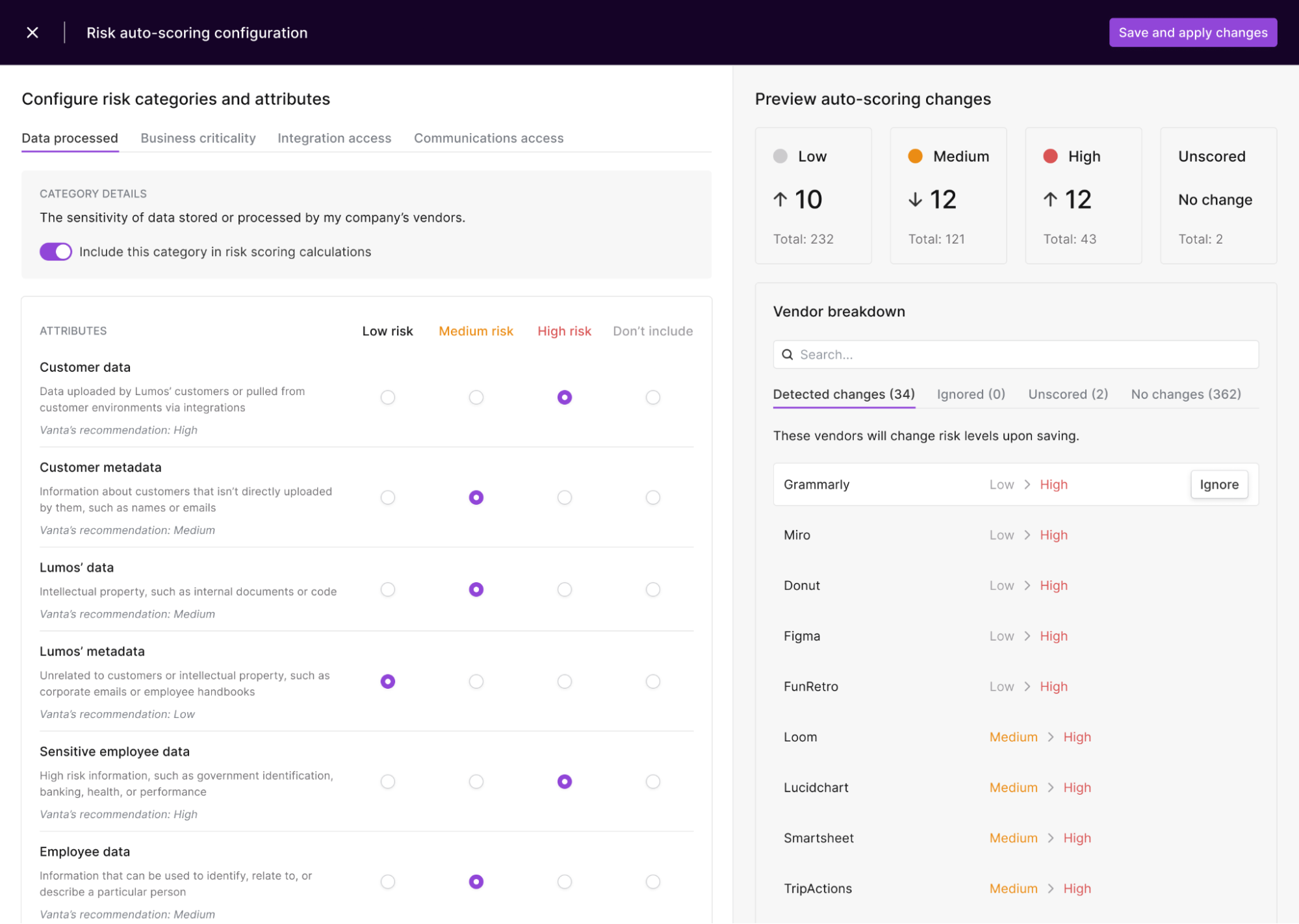
- Custom risk scoring: Offers customizable risk rubrics with pre-configured categories such as data types, business criticality, integration access, and communication scope, and scores vendors automatically.
- Automated follow-ups: Manages document requests and sends persistent reminders to vendors.
- Continuous monitoring: Scans the vendor landscape for breaches, emerging threats, and material changes, and drafts tailored remediation plans.
- Procurement intake: Provides customizable intake forms, automated risk scoring at request, and procurement workflows that guide approvals.
Limitations (as reported by users on G2):
- SaaS-oriented questions: Users note that out-of-the-box vendor questions assume SaaS vendors, which can be awkward for other vendor types, such as MSPs.
- Vendor templates: Some users report that vendor templates need updates.
- AI in vendor risk: Some users feel the AI capabilities in the vendor risk module could be improved.
- Pricing: Users find pricing expensive, especially for smaller teams.
Source: Vanta
Security Ratings and Third-Party Cyber Risk Monitoring
9. Bitsight Vendor Risk Management

Best for: Assessments validated with external security data
Strengths: 75,000+ vendor profiles, AI SOC 2 summaries, risk scores
Things to consider: Alert configuration and licensing can be complex
Bitsight Vendor Risk Management (VRM) automates vendor onboarding, document collection, and assessments, and combines questionnaire responses with Bitsight’s external security data. Teams build their third-party inventory by inviting vendors to the platform and review SOC 2 reports, ISO 27001 certifications, SIG questionnaires, insurance documents, and audits in one dashboard.
Bitsight AI summarizes SOC 2 reports and maps vendor documents to frameworks such as SIG Lite, NIST CSF 2.0, and ISO 27001. A three-part scoring model measures inherent risk, vendor trustworthiness, and residual risk, and the platform draws on more than 75,000 profiles in the Bitsight Vendor Network.
Key features include:
- Tiered questionnaires: Builds SIG, NIST CSF, ISO 27001, and CAIQ questionnaire sets for different vendor criticality levels and triggers documentation requests based on tiering.
- AI document analysis: SOC 2 Instant Insights summarizes SOC 2 reports, and Bitsight AI maps SOC 2 reports, audit reports, and questionnaires to SIG Lite, NIST CSF 2.0, and ISO 27001.
- Response validation: Checks vendor responses against Bitsight risk vectors and external evidence, with data feeds on financial, geopolitical, and credential exposure risk.
- Impact, Trust, and Risk scores: Measures inherent risk, vendor trustworthiness based on security posture attributes, and residual risk after controls.
- Monitoring and alerts: Monitors portfolio changes that affect risk tolerance, sends alerts when a vendor’s security rating changes, and issues reassessment reminders.
- Bitsight Vendor Network: Provides access to more than 75,000 mapped vendor profiles.
- Integrations and MCP: Syncs data with GRC and reporting tools, including Archer, ServiceNow, and LogicManager, through an open API, and brings assessment data into AI assistants through Bitsight MCP.
Limitations (as reported by users on G2):
- Alert configuration: Some users report limitations in how alert emails can be configured.
- Licensing: Users describe the licensing model as complicated and expensive.
- Vendor collaboration: Users note that getting third parties to address issues and score deficiencies can be difficult, and some find the vendor collaboration process cumbersome.
- Rating changes: Some users find frequent changes to the rating algorithm difficult to keep up with.
- Finding resolution: Users report that findings take time to resolve automatically after remediation.
Source: Bitsight
10. SecurityScorecard
Best for: Threat-informed vendor monitoring with AI assessments
Strengths: TITAN AI document review and fourth-party discovery
Things to consider: Users report occasional misattributed findings
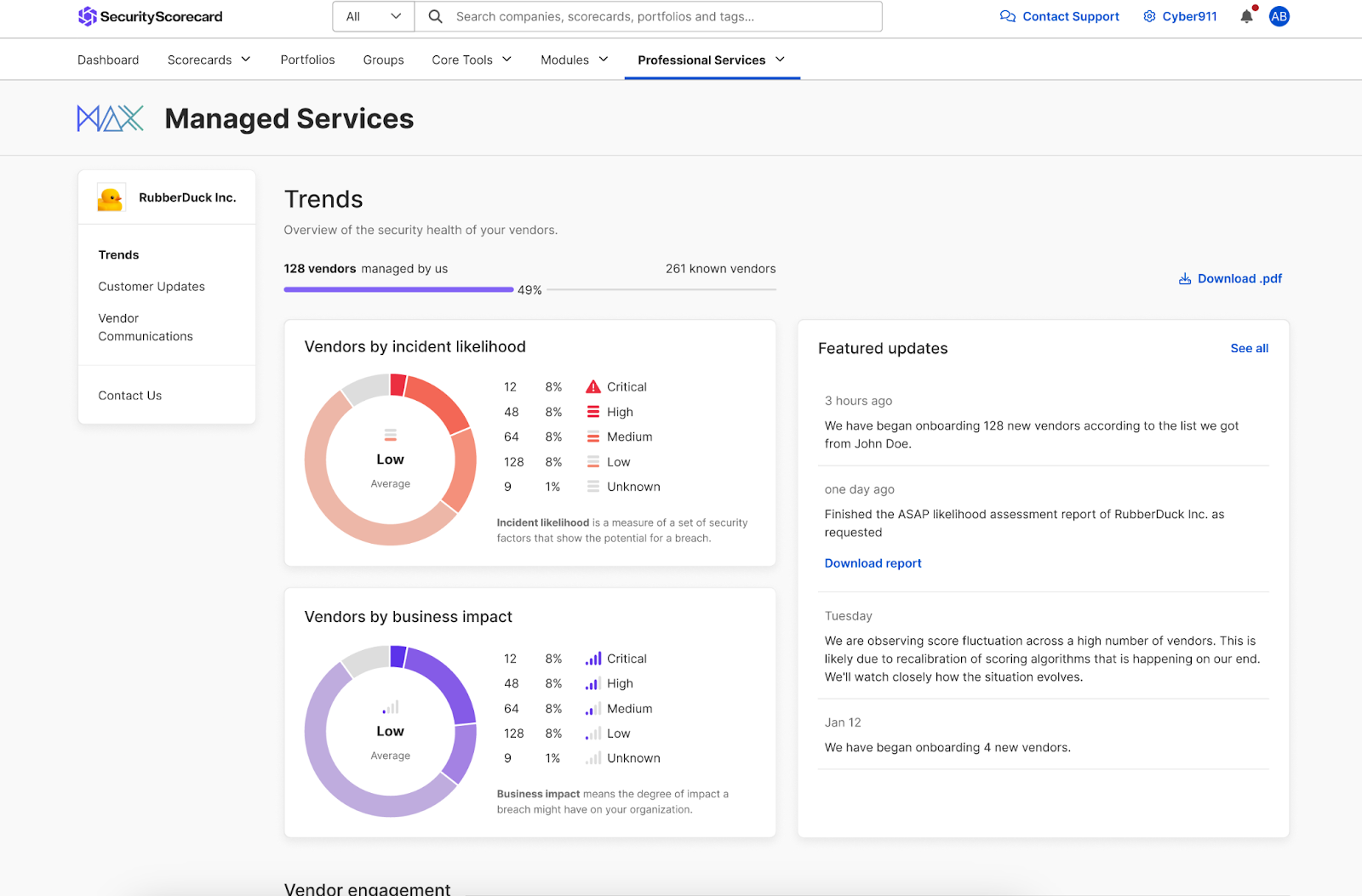
SecurityScorecard’s third-party risk management platform combines security ratings, threat intelligence, and TITAN AI to automate vendor assessments and continuous monitoring. TITAN AI performs gap analysis on questionnaires and SOC 2 reports and compares vendors’ answers with their observed technical security behavior to flag discrepancies.
The platform discovers third- and fourth-party connections, monitors score changes and known exploited vulnerabilities, and shows whether vendors’ own vendors have had recent breaches. It also drafts vendor-facing emails and remediation plans and keeps a centralized record of manual and automated assessments.
Key features include:
- AI document review: TITAN AI analyzes questionnaires and SOC 2 reports and highlights deviations.
- Questionnaire validation: Compares vendors’ answers against observed technical security behavior to identify discrepancies and prioritize follow-ups.
- Continuous monitoring: Provides 24/7 visibility into score changes and known exploited vulnerabilities (KEVs) between audits.
- Third- and fourth-party discovery: Discovers unseen third- and fourth-party connections and shows recent breaches affecting vendors’ vendors.
- Automated risk tiering: Tiers vendors automatically to prioritize assessment work.
- Remediation communication: Drafts vendor-facing emails and remediation plans in stakeholder-friendly language.
- System of record and reporting: Combines manual assessments with automated scanning to support regulatory and insurance audits, and expresses supply chain resilience in financial terms for board reporting.
Limitations (as reported by users on G2):
- Misattributed findings: Some users report being flagged for security issues that are not on their own assets, along with false positives.
- Score clarity: Users note a lack of clarity about why scores change.
- Information density: Some users find the amount of data overwhelming without a strong background in cybersecurity metrics.
- Integration effort: Users report that initial integration can be challenging with legacy systems.
Source: SecurityScorecard
11. UpGuard Vendor Risk

Best for: Security ratings plus AI vendor assessments
Strengths: Daily scanning, AI document analysis, questionnaire library
Things to consider: Remediation guidance can be unclear; cost
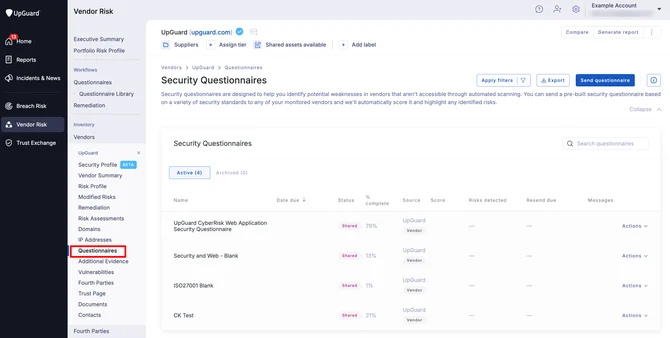
UpGuard Vendor Risk is a third-party cyber risk management solution that combines continuous monitoring, security ratings, AI-powered document analysis, and security questionnaire automation. Ratings are updated multiple times per day, and daily scanning alerts teams to critical shifts in vendor security posture between assessments.
UpGuard AI analyzes vendor documentation to show which controls are met or failed, the risks present, and the remediation steps needed. The platform also generates point-in-time risk assessment reports, consolidates vendor communications, and connects to GRC tools through pre-built integrations and an API.
Key features include:
- Security ratings and monitoring: Monitors all vendors with daily scanning and ratings updated multiple times per day, with alerts for critical posture changes.
- AI-powered assessments: Analyzes vendor documentation to identify met and failed controls, present risks, and required remediation steps.
- Security Profiles: Combines continuous scanning with AI document analysis to surface third-party control gaps.
- Questionnaire automation: Provides a library of pre-configured questionnaires, including NIST, ISO, SIG, and regional regulations.
- Centralized vendor workflows: Consolidates vendor communications and team actions from onboarding through assessment, remediation, and monitoring.
- Reporting: Generates point-in-time risk assessment reports with AI and supports instant and scheduled stakeholder reporting.
- Integrations: Connects with GRC tools and pushes notifications to teams through pre-built integrations and an API.
Limitations (as reported by users on G2):
- Remediation guidance: Users find remediation recommendations unclear at times, requiring additional guidance to implement.
- Asset attribution: Some users report that domains or IP addresses are sometimes associated with organizations they do not belong to.
- Cost: Users find the product expensive, including required upgrades and add-on packages.
- Reporting flexibility: Some users find reporting views rigid and dashboard customization limited.
- Alert volume: Users note that alerts can feel overwhelming when each one requires investigation.
Source: UpGuard
12. Panorays
Best for: Third-party cyber risk with business-impact ratings
Strengths: AI-mapped nth-party relationships and automated remediation
Things to consider: Limited report and dashboard customization
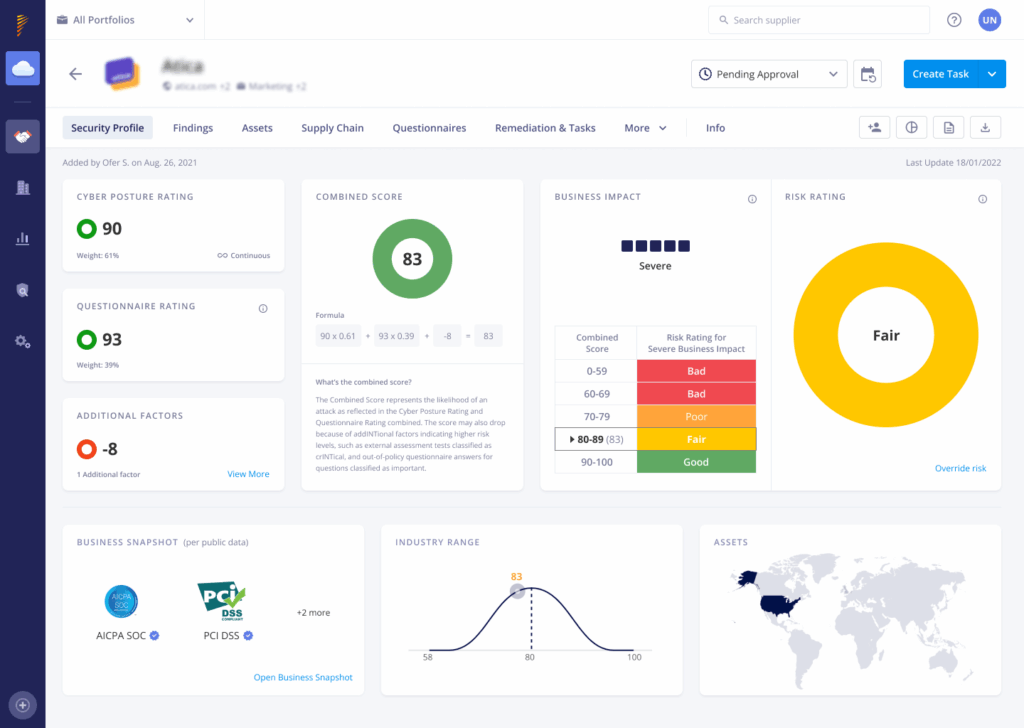
Panorays is a third-party cyber risk management platform that combines AI-powered questionnaires, external attack surface assessments, inherent risk analysis, and the organization’s risk policies into a single risk rating. Panorays AI uncovers third-, fourth-, and nth-party relationships and tiers vendors automatically with AI agents.
The platform monitors the external attack surface of the supply chain, sends alerts on security gaps and breaches, and ranks vulnerabilities against the organization’s KPIs and KRIs. It generates remediation tasks automatically and lets teams collaborate with third parties inside the platform.
Key features include:
- Supply chain discovery: Panorays AI maps and ranks third-, fourth-, and nth-party relationships in one consolidated view.
- AI-based tiering: Tiers vendors automatically with AI agents and sets assessment frequencies.
- Combined risk rating: Merges a cyber posture rating, a questionnaire rating, and additional factors into a combined score weighted by business impact.
- AI-powered questionnaires: Runs assessments through zero-touch workflow automation with AI agents built into the platform.
- Monitoring and threat alerts: Detects vulnerabilities across the external attack surface, ranks them against the organization’s KPIs and KRIs, and tracks tasks in an Incident Response Portal.
- Automated remediation: Generates remediation tasks from questionnaire responses and external assessments using preconfigured rules, and advances vendors through their lifecycle as plans are resolved.
- Compliance and quantification: Supports DORA and NIS2 compliance with auditable assessments and evidence, and quantifies third-party cyber risk in financial terms.
Limitations (as reported by users on G2):
- Customization: Users find options to tailor reports and dashboards limited.
- False positives: Some users report false positives and cumbersome steps in the assessment process.
- Learning curve: Users note that some workflows have a learning curve, especially when customizing them for different vendor types.
- Cost: Some users find the platform expensive.
Source: Panorays
Third-Party Risk Management Best Practices
Here are some of the ways that organizations can better manage risks posed by third parties.
1. Tier Vendors by Data Access and Business Criticality
Not every third-party relationship presents the same level of risk. A vendor processing sensitive customer records or supporting critical infrastructure requires more rigorous oversight than a supplier with no access to internal systems. Organizations should establish risk tiers based on the potential impact of a vendor compromise, rather than applying identical assessment requirements to every external provider.
Best practices include:
- Classify vendors by data sensitivity: Identify whether vendors access public, internal, confidential, or regulated information, including personally identifiable information (PII) and financial records.
- Evaluate operational dependencies: Determine whether a vendor outage or security incident could disrupt essential services, revenue-generating operations, or regulatory obligations.
- Consider access privileges: Assign higher inherent risk to vendors with administrative access, production environment connectivity, or permissions to modify sensitive information.
- Align assessments with risk tiers: Require more extensive security reviews, supporting evidence, and approval procedures for high-risk vendors while simplifying assessments for low-risk relationships.
- Update classifications when relationships change: Reassess risk tiers when vendors gain additional access, begin processing new data categories, or become critical to business operations.
2. Apply Least-Privilege Access to Every Contractor and Vendor
Third-party personnel frequently require access to corporate applications, cloud environments, and sensitive information to perform contracted services. Excessive permissions increase the potential impact of compromised vendor accounts, malicious insiders, and accidental data exposure. Organizations should grant external users only the resources and capabilities necessary to complete their assigned responsibilities.
Best practices include:
- Use role-based and attribute-based access controls: Restrict permissions according to job responsibilities, vendor affiliation, device posture, and other relevant contextual attributes.
- Enforce strong authentication: Require phishing-resistant multifactor authentication where supported, particularly for privileged accounts and access to sensitive systems.
- Establish time-limited access: Assign expiration dates to temporary accounts and use just-in-time access for administrative operations instead of maintaining permanent elevated privileges.
- Restrict data movement: Apply DLP policies that limit unauthorized file downloads, clipboard transfers, printing, and uploads to personal storage or AI services.
- Secure access from unmanaged devices: Use application-level isolation, secure browser environments, or other controls to protect corporate data without requiring full device management.
- Review permissions regularly: Identify inactive accounts, excessive privileges, and access rights that are no longer justified by the vendor’s current responsibilities.
3. Monitor Vendors Continuously Between Annual Assessments
Annual vendor assessments provide a snapshot of security and compliance practices but cannot capture every change in a vendor’s risk profile. Security vulnerabilities, infrastructure changes, data breaches, and subcontractor relationships can introduce new risks shortly after an assessment is completed. Organizations should supplement scheduled reviews with continuous monitoring and event-driven reassessments.
Best practices include:
- Monitor external security indicators: Track exposed services, publicly disclosed vulnerabilities, compromised credentials, and changes in security ratings to identify potential deterioration in vendor security posture.
- Subscribe to relevant threat intelligence: Use breach notifications, vulnerability intelligence, and industry-specific threat feeds to identify incidents affecting critical third parties.
- Define reassessment triggers: Initiate additional reviews when vendors report security incidents, introduce new subprocessors, change infrastructure, or expand access to sensitive data.
- Establish risk-based monitoring frequencies: Apply more intensive oversight to critical and high-risk vendors while using proportionate monitoring for lower-risk relationships.
- Validate remediation progress: Require evidence that identified weaknesses have been corrected rather than relying exclusively on vendor assurances.
- Assign ownership for alerts: Ensure significant findings are routed to designated risk owners with clear response deadlines and escalation procedures.
4. Track Which AI Tools Vendors Use with Your Data
Third-party providers increasingly use generative AI assistants, automated analytics platforms, and AI agents to perform business activities. These tools can introduce additional risks when vendors submit customer information, source code, proprietary documents, or regulated data to external AI services without appropriate authorization. Organizations need visibility into how vendors use AI and whether these activities introduce additional data processing relationships.
Best practices include:
- Require AI usage disclosures: Ask vendors to identify AI services used to process organizational data, including generative AI platforms, embedded AI features, and external model providers.
- Review data retention and model training policies: Determine whether AI providers store submitted information, use it for model training, or share it with additional processors.
- Establish contractual AI restrictions: Define which data categories may be processed by AI systems, approved use cases, permitted subprocessors, and requirements for notifying customers about material changes.
- Evaluate AI agent permissions: Assess whether vendor-operated agents can access corporate systems, retrieve sensitive records, execute transactions, or perform actions without human approval.
- Control unauthorized AI data transfers: Use DLP, application access controls, and monitoring capabilities to detect or restrict sensitive information being transferred to unapproved AI services where technically feasible.
- Reassess AI-related risks: Update vendor evaluations when providers adopt new AI models, introduce autonomous capabilities, or change how customer information is processed.
5. Revoke Access and Remove Company Data on the Day a Contract Ends
Terminated vendor relationships can leave behind active accounts, API tokens, shared credentials, and copies of sensitive business information. These residual assets create security exposure because former vendors may retain access to resources they no longer have a legitimate reason to use. Organizations should coordinate contract termination with identity security, IT, and data governance processes to ensure access is revoked promptly.
Best practices include:
- Define termination requirements in advance: Include contractual obligations covering access revocation, data return, secure deletion, and evidence of completion.
- Automate account deprovisioning: Integrate vendor lifecycle systems with IAM and IT service management platforms to disable third-party identities when authorization expires.
- Revoke non-human access: Disable API keys, service accounts, OAuth grants, integration tokens, and other credentials associated with the terminated relationship.
- Remove corporate data from vendor environments: Require vendors to delete or return organizational information from authorized systems, including cloud storage, collaboration platforms, and AI services, subject to legitimate retention requirements.
- Verify data disposition: Obtain deletion confirmations or other appropriate evidence, and document any information that must be retained for legal, regulatory, or contractual reasons.
- Audit remaining access paths: Check for shared accounts, delegated permissions, active sessions, and indirect access through subcontractors or connected applications.
Organizations should aim to complete access revocation no later than the effective termination date, with immediate revocation for high-risk or involuntary terminations. Where data deletion requires additional time because of backup retention or legal obligations, enforce agreed dea
Conclusion
Effective third-party risk management requires a combination of risk assessments, continuous monitoring, and technical security controls throughout the vendor lifecycle. Organizations should select software based on their vendor portfolio, regulatory obligations, and requirements for protecting sensitive data. Beyond evaluating vendor security posture, teams must enforce least-privilege access, control data movement across unmanaged devices, and monitor third-party AI usage. Integrating these capabilities with procurement, identity management, and offboarding workflows helps reduce exposure while maintaining accountability across external business relationships.

Any worker. Any laptop. Any AI workflow. Fully secured.
Schedule a demo to see how Blue Border® secures company data and apps without shipping laptops, running VDI, or managing personal endpoints.