

Use Cases
PCI DSS controls on unmanaged devices
Enforce PCI DSS controls across remote employees and contractors handling payment data — on any device, any location.
Trusted by 700+ security- and compliance-driven organizations, including Fidelity, Guardian, StoneX, Whatnot, and the IMF.
Your PCI scope followed everyone home
The people who handle cardholder data used to sit on a controlled floor, on hardware IT owned. Now they work from home on unmanaged and personal devices. Machines the company doesn’t issue, control, or manage. Every device that stores, processes, or transmits cardholder data falls into PCI DSS scope, along with the systems it connects to. And AI has opened a new path for card data to leak, as staff paste it into whatever tool is open.
For unmanaged devices, PCI mandates: restricting access to cardholder data, encrypting it, protecting the endpoint, restricting how data moves, and removing access cleanly are the hardest to enforce. Because the device touches cardholder data, the whole endpoint can be pulled into scope.
The business wants people to work remotely on the devices they already have – security and compliance own the assessment. The usual answers each cost something: route card data through VDI (latency and cost), issue and lock down a managed device (expensive and slow), or accept a bigger, riskier scope. The goal should be to isolate the cardholder data environment on an unmanaged device and apply controls consistently.
Credit card data on devices you don’t own
Remote employees handle cardholder data on unmanaged and personal machines, with none of the PCI controls you can enforce on a managed endpoint. This includes access, encryption, and endpoint protection all become hard to guarantee.
Every touchpoint expands scope
Each unmanaged remote device that touches cardholder data, plus the systems it connects to, widens the cardholder data environment. Plus the regulatory mandates that come with it.
Segmentation is hard when work is everywhere
Isolating the cardholder data environment from everything else is straightforward in a data center and difficult on a personal laptop at a kitchen table.
Distributed devices is not the only way to achieve PCI DSS
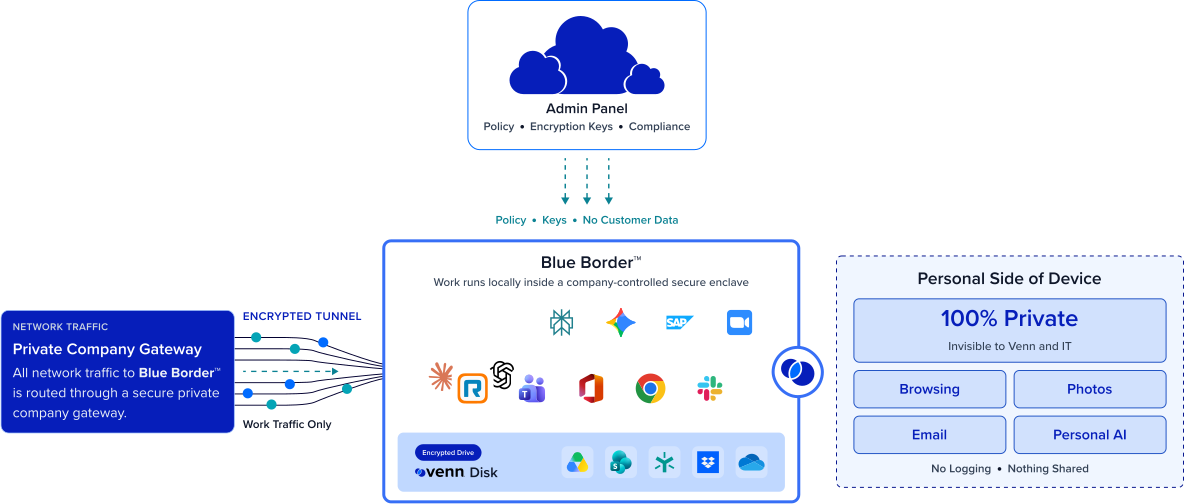
There’s a better way to handle cardholder data across a distributed team: Blue Border isolates cardholder data and the apps that touch it inside a company-controlled secure enclave — without VDI or fully managing the endpoint. PCI controls apply consistently because the enclave, not the entire personal device, is where cardholder data is accessed and stored.
| PCI DSS Area | The Distributed (BYOD) Gap |

|
|---|---|---|
Scope & segmentation
The Distributed (BYOD) Gap
Cardholder data on a remote or BYOD device can pull the whole endpoint into PCI scope.
Venn Blue Border
Cardholder data and the apps that handle it are isolated to the enclave, segmenting them from the rest of the device (can support scope reduction — validate with your QSA).
|
Cardholder data on a remote or BYOD device can pull the whole endpoint into PCI scope. | Cardholder data and the apps that handle it are isolated to the enclave, segmenting them from the rest of the device (can support scope reduction — validate with your QSA). |
Restrict access
The Distributed (BYOD) Gap
Enforcing least-privilege access to cardholder data is hard on a device you don’t manage.
Venn Blue Border
Access to the enclave and the data in it is governed by IT policy and enforced centrally.
|
Enforcing least-privilege access to cardholder data is hard on a device you don’t manage. | Access to the enclave and the data in it is governed by IT policy and enforced centrally. |
Protect stored data
The Distributed (BYOD) Gap
Cardholder data can be cached or stored unencrypted on a personal machine.
Venn Blue Border
Company data is encrypted and isolated inside the secure enclave.
|
Cardholder data can be cached or stored unencrypted on a personal machine. | Company data is encrypted and isolated inside the secure enclave. |
Restrict data movement
The Distributed (BYOD) Gap
Card data can be copied, downloaded, printed, screenshotted, or pasted elsewhere.
Venn Blue Border
DLP is enforced inside the enclave across copy/paste, download, upload, screenshot, print, and AI.
|
Card data can be copied, downloaded, printed, screenshotted, or pasted elsewhere. | DLP is enforced inside the enclave across copy/paste, download, upload, screenshot, print, and AI. |
Protect the endpoint
The Distributed (BYOD) Gap
You can’t enforce endpoint protection or secure configuration on a device you don’t own.
Venn Blue Border
Work runs in a controlled enclave isolated from the rest of the device, managed or not.
|
You can’t enforce endpoint protection or secure configuration on a device you don’t own. | Work runs in a controlled enclave isolated from the rest of the device, managed or not. |
Remove access
The Distributed (BYOD) Gap
Removing cardholder data and access from a personal device at termination is hard to guarantee.
Venn Blue Border
A remote wipe instantly removes the enclave and purges all company data, including any card data.
|
Removing cardholder data and access from a personal device at termination is hard to guarantee. | A remote wipe instantly removes the enclave and purges all company data, including any card data. |
Consistency across devices
The Distributed (BYOD) Gap
Controls vary across remote and unmanaged devices, and personal machines fall outside them.
Venn Blue Border
The same controls apply on every device, managed or unmanaged.
|
Controls vary across remote and unmanaged devices, and personal machines fall outside them. | The same controls apply on every device, managed or unmanaged. |
Cardholder data and AI
The Distributed (BYOD) Gap
Staff can paste card data into unsanctioned AI tools.
Venn Blue Border
IT allows company-sanctioned AI tools only and blocks the rest; DLP applies to what leaves the enclave.
|
Staff can paste card data into unsanctioned AI tools. | IT allows company-sanctioned AI tools only and blocks the rest; DLP applies to what leaves the enclave. |
Personal use
The Distributed (BYOD) Gap
Bringing a personal device into a card-data workflow raises privacy concerns.
Venn Blue Border
Only the enclave handles card data; personal activity outside it stays private and separate.
|
Bringing a personal device into a card-data workflow raises privacy concerns. | Only the enclave handles card data; personal activity outside it stays private and separate. |
How Blue Border™ Works
Installing Blue Border on a Mac or PC creates a company-controlled secure enclave directly on the device. Work data, apps, networking, and AI all run locally inside it.
- Network. Work traffic routes through Venn’s built-in VPN gateway or your existing private network.
- Applications. Every app (installed, browser-based or AI) is wrapped by a blue line, creating a virtual firewall and enforcing DLP at the app level.
- Files. Users save only to work-sanctioned file systems inside Venn Disk that are isolated, encrypted and remote wipeable.
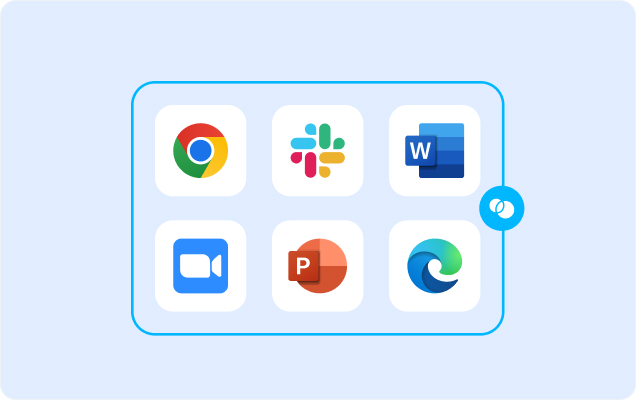
Any worker. Any device. Any application. Any AI workflow.

Isolate cardholder data on an unmanaged device
Cardholder data and the applications that handle it live only inside the secure enclave, isolated from the rest of the device. That containment is what lets you segment the cardholder data environment even on a remote or BYOD machine.
Consistent PCI controls, even on BYOD
Access governance, encryption, and DLP apply inside the enclave on remote, personal, and unmanaged devices — the same way they would on a managed one. The controls PCI expects no longer depend on owning the machine. Remote staff on their own devices stop being the weakest link in the assessment.


Let people work remotely on their own devices
Let employees work remotely on the unmanaged and personal devices they already have and still contain cardholder data. There is no VDI to route card data through, and no mandate that everyone use company-issued hardware. You keep the flexibility the business wants while compliance keeps a boundary it can stand behind.
Clean off-boarding with no card data left behind
When someone off-boards, a single remote wipe removes the enclave and purges all company data from the device instantly. It’s a clear, repeatable removal control, whether the device is company-owned or the worker’s own.







Frequently Asked Questions
Blue Border installs a company-controlled secure enclave on the device, and cardholder data plus the apps that handle it run only inside it. The PCI-relevant controls — access governance, encryption, DLP, and clean removal — apply in the enclave, so PCI DSS on unmanaged devices no longer depends on owning or managing the machine. Confirm control mappings and scope with your QSA.
It can help. Because cardholder data is isolated to the enclave and segmented from the rest of the device, the enclave — rather than the whole personal endpoint — is what handles card data, which is the basis many teams use to argue for a narrower scope. Whether and how that reduces your scope is a determination only your QSA can make; validate it with them.
No. Blue Border isolates cardholder data inside an enclave on any Mac or PC, managed or unmanaged, so you get consistent controls without routing card data and voice through VDI or mandating company hardware for every distributed worker. It delivers the data isolation of VDI while reducing its cost and latency.
Inside the enclave: IT-governed access to cardholder data, encryption and isolation of that data, DLP across copy/paste, download, upload, screenshot, print, and AI, and instant removal via remote wipe. These map to common PCI control themes and work alongside your other PCI controls — confirm the exact mapping to the requirements with your QSA.
No. Only the enclave handles cardholder data, and everything outside it — personal apps, files, and browsing — stays private with no company visibility. That separation is what makes it acceptable to bring a personal or unmanaged device into a card-data workflow without monitoring the person’s own activity.
No tool can do that on its own. PCI DSS compliance is assessed against your full cardholder data environment by a QSA or through a SAQ. What Blue Border does is provide and help evidence PCI-relevant controls, and help isolate and segment the cardholder data environment on distributed and BYOD devices — closing a gap that’s otherwise hard to cover. Always validate with your QSA.

Contain cardholder data on remote, unmanaged devices.
Blue Border is the secure workspace for remote employees and contractors on any device — without VDI or fully managing the endpoint. Isolate cardholder data and the apps that handle it inside a secure enclave on your remote employees’ unmanaged and personal devices, so PCI controls apply consistently and card data stays contained — without managing the whole machine. Validate scope with your QSA.