

Use Cases
Extend ZTNA with Endpoint Data Protection
ZTNA secures who can reach which apps and connects them with least privilege. But data still lands on an endpoint. Blue Border extends zero trust access with endpoint data protection across any device, whether managed or unmanaged.
Trusted by 700+ security- and compliance-driven organizations, including Fidelity, Guardian, StoneX, Whatnot, and the IMF.
Zero trust ends where the data lands.
ZTNA changed remote access for the better. It replaced broad VPN tunnels with identity-driven, least privilege access that verifies every request before connecting a user to an app. For controlling who reaches what, it’s a genuine advance and a core part of zero trust and least privilege strategies.
But access is only the first half. Once ZTNA grants a connection and data flows, that data lands and is used on an endpoint. ZTNA doesn’t govern what happens to data. On a managed device, you’d pair ZTNA with endpoint controls like EDR, a DLP agent, or MDM. On the unmanaged and BYOD devices your remote workers and contractors actually use, you can’t. That is the ZTNA endpoint gap.
You verified the connection to a high standard, and the endpoint where the data now lives, is the piece zero trust leaves open. Especially on managed hardware. The goal isn’t to replace ZTNA — it’s to extend it, so the data it delivers lands somewhere isolated and governed. Blue Border does exactly that, alongside your ZTNA.
ZTNA governs access, not the data on the endpoint
Least privilege connections control who reaches which app. The data itself and the device are different layers that ZTNA doesn’t cover.
Endpoint controls need a managed device
Pairing ZTNA with EDR, a DLP agent, or MDM works on company hardware, but not on the unmanaged and BYOD laptops remote workers and contractors use.
Zero trust access, untrusted destination
You verify every connection, then deliver company data to an endpoint you can’t trust, isolate, or remote wipe. This leaves zero trust unfinished.
ZTNA and Blue Border™: Complementary Layers. Extend Data Protection
ZTNA and Blue Border aren’t alternatives — they secure different halves of zero trust. ZTNA verifies and controls access to your apps, while Blue Border protects the data once it lands on the endpoint. Together they extend zero trust from the connection all the way to the data.
| ZTNA (Network Access) |

|
|
|---|---|---|
What it governs
ZTNA (Network Access)
Who can access which apps, with least privilege.
Venn Blue Border
What happens to company data once it’s inside the secure enclave.
|
Who can access which apps, with least privilege. | What happens to company data once it’s inside the secure enclave. |
Identity & connection
ZTNA (Network Access)
Verifies every access request before connecting.
Venn Blue Border
Isolates and protects the data the connection delivers.
|
Verifies every access request before connecting. | Isolates and protects the data the connection delivers. |
The endpoint itself
ZTNA (Network Access)
Trusts the access, not the device the data lands on.
Venn Blue Border
Puts a company-controlled secure enclave on the device.
|
Trusts the access, not the device the data lands on. | Puts a company-controlled secure enclave on the device. |
Unmanaged / BYOD devices
ZTNA (Network Access)
Grants access to them, but can’t protect data on them.
Venn Blue Border
Secures the workspace and data on unmanaged and BYOD devices without managing them.
|
Grants access to them, but can’t protect data on them. | Secures the workspace and data on unmanaged and BYOD devices without managing them. |
Data at rest on the device
ZTNA (Network Access)
Not addressed.
Venn Blue Border
Encrypted and isolated inside the enclave.
|
Not addressed. | Encrypted and isolated inside the enclave. |
Endpoint DLP
ZTNA (Network Access)
Governs the connection, not data movement on the device.
Venn Blue Border
DLP on the device: copy/paste, download, upload, screenshot, print, and AI.
|
Governs the connection, not data movement on the device. | DLP on the device: copy/paste, download, upload, screenshot, print, and AI. |
Data after access
ZTNA (Network Access)
Once delivered, it’s outside ZTNA’s scope.
Venn Blue Border
Stays contained in the enclave, governed and revocable.
|
Once delivered, it’s outside ZTNA’s scope. | Stays contained in the enclave, governed and revocable. |
Removing data
ZTNA (Network Access)
Revoke access; data already on the device remains.
Venn Blue Border
A remote wipe purges the enclave and all company data.
|
Revoke access; data already on the device remains. | A remote wipe purges the enclave and all company data. |
AI governance
ZTNA (Network Access)
Can gate access to AI apps.
Venn Blue Border
Governs which AI tools reach company data in the enclave, on any device.
|
Can gate access to AI apps. | Governs which AI tools reach company data in the enclave, on any device. |
How Blue Border™ Works
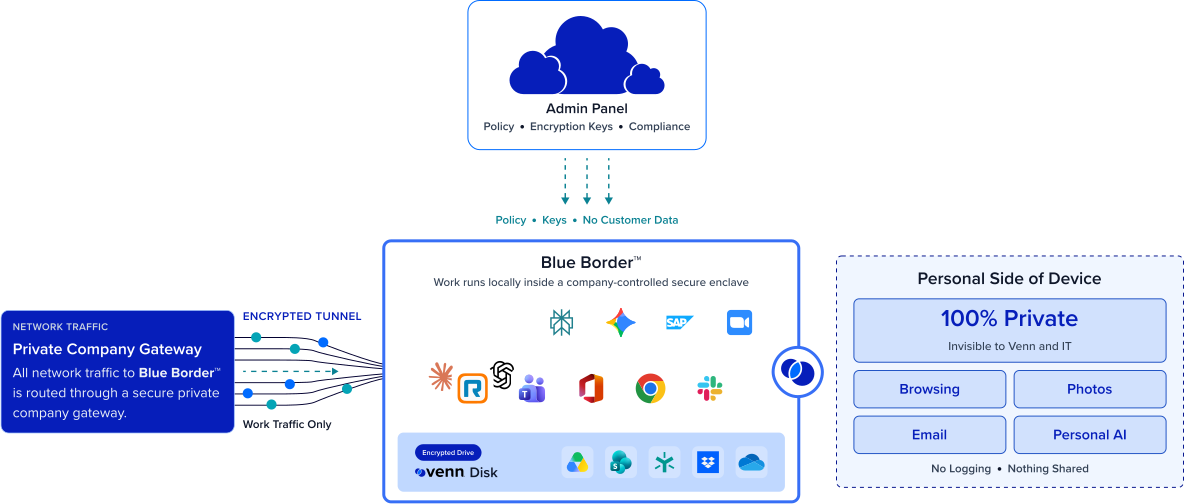
Installing Blue Border on a Mac or PC creates a company-controlled secure enclave directly on the device. Work data, apps, networking, and AI all run locally inside it.
- Network. Work traffic routes through Venn’s built-in VPN gateway or your existing private network.
- Applications. Every app (installed, browser-based or AI) is wrapped by a blue line, creating a virtual firewall and enforcing DLP at the app level.
- Files. Users save only to work-sanctioned file systems inside Venn Disk that are isolated, encrypted and remote wipeable.
Any worker. Any device. Any application. Any AI workflow.

Extend zero trust to the data and unmanaged devices
The data your ZTNA delivers lands in a company-controlled secure enclave — encrypted, isolated, and DLP-governed. Zero trust no longer stops at the connection. It now covers both the access layer and the data layer.
Protect data on unmanaged and BYOD devices
This is exactly where invasive endpoint management agents can’t go. Blue Border secures the workspace and the data on any laptop without owning or fully managing the device. The endpoints your ZTNA connects to but can’t protect finally get a controlled place for company data.


Complete your zero trust architecture, don’t replace it
Keep your ZTNA for identity-driven, least privilege access. Add Blue Border for the endpoint and data layer it doesn’t cover. The two run alongside each other, each doing the part it’s built for, with no need to unwind an investment you’ve already made.
Data you can revoke, not just access you can cut
ZTNA can cut off future access, but data already delivered to the endpoint stays there. Because company data lives only inside Blue Border’s secure enclave, a single remote wipe removes it entirely — so zero trust extends through to off-boarding.







Frequently Asked Questions
ZTNA verifies and controls access to your apps, but it only governs the connection — not the endpoint the data lands on. Once data reaches a device, especially an unmanaged or BYOD one, ZTNA can’t isolate, control, or wipe that data. That space between a zero trust connection and an untrusted endpoint is what Blue Border fills.
They secure different halves of zero trust and run alongside each other. Your ZTNA keeps handling identity-driven, least privilege access, while Blue Border adds a company-controlled secure enclave on the endpoint. The data ZTNA delivers lands somewhere isolated, governed, and revocable.
ZTNA secures how endpoints connect. This includes who can reach which app, verified each time — not the endpoint surface where data is then stored and used. On managed devices you’d add endpoint controls to cover that; on unmanaged and BYOD devices you can’t, which is precisely where the gap lives and where Blue Border fits.
Blue Border creates a secure enclave on the device without owning or fully managing it, so company data is encrypted, isolated, and DLP-governed even on a personal or contractor machine. It gives your ZTNA-connected, but otherwise unprotected, endpoints a controlled place for company data.
No. Blue Border is complementary. It extends zero trust to the endpoint and data layer that ZTNA leaves open, rather than competing with it. You keep the access layer you’ve invested in and add the data protection it doesn’t provide.
Zero trust means never trust identity by default – verify access and minimize exposure. ZTNA applies that to the connection – Blue Border applies the same principle to the data, keeping it isolated in a company-controlled secure enclave, controlled by policy, and removable on demand. Together they carry zero trust from the request all the way to the data at rest.

Extend zero trust to the endpoint and data layers.
Blue Border is the secure workspace for remote employees and contractors on any device — without VDI or fully managing the endpoint. Keep your ZTNA for access, and add Blue Border to protect the data it delivers — isolated and governed in a secure enclave on any device, even unmanaged devices. Extend zero trust from the connection all the way to the data.