

Use Cases
Third Party and Vendor Access
Secure access for partners, supply chain vendors, and outside agencies on any device. Your company data and apps stay isolated inside a company-controlled secure enclave on their own device. Isolated from their other work or personal activity.
Trusted by 700+ security- and compliance-driven organizations, including Fidelity, Guardian, StoneX, Whatnot, and the IMF.
Third parties and vendors need access. You need to maintain control.
Modern work runs on outside parties like vendors, partners, agencies, MSPs, systems integrators, consultants, and auditors. To do their jobs they need access to your data and applications. Typically, while they are using personal hardware or hardware that you personally do not manage.
Legacy approaches for securing third party and vendor access are slow and expensive: shipping a managed laptop or standing up VDI. The pressure is always on to just grant access fast so they can get to work. However, if you allow vendors to use unmanaged hardware visibility and control become an immediate challenge. Third-party access is one of the most common and damaging breach vectors for exactly that reason. So you’re caught between enabling vendors quickly and controlling the risk that comes with them.
Every legacy approach forces the tradeoff. The goal is to enable vendors while keeping your data isolated and protected.
Enabling a vendor with managed devices or VDI is slow and costly
Shipping a managed laptop or standing up VDI for every third party takes time and money — so the work waits on IT.
Your data can land on a device you can’t see
Vendors often work from their own hardware, typically serving their other clients on the same machine, so you don’t set its security posture or control where.
Access lingers after the work ends
Engagements are time-bound, but VDI credentials and shared access linger — and getting your data off a vendor’s device when the work ends is difficult to execute and prove.
VDI vs. Blue Border™ for Securing Third Party and Vendor Access
There’s a better way to give third parties secure access to your critical apps and data: with Blue Border, company data and apps run inside a company-controlled secure enclave on the vendor’s own device — without VDI or fully managing the endpoint. You grant secure, policy-based access in minutes. Your data stays isolated and instantly revocable.
| VDI / Virtual Desktops |

|
|
|---|---|---|
Where data lives
VDI / Virtual Desktops
Hosted from a data center – access requires a session and client.
Venn Blue Border
In a company-controlled secure enclave on the vendor’s own device — isolated and encrypted.
|
Hosted from a data center – access requires a session and client. | In a company-controlled secure enclave on the vendor’s own device — isolated and encrypted. |
Whose device
VDI / Virtual Desktops
Often still paired with a managed or company-issued endpoint plus a connection client.
Venn Blue Border
The vendor’s own machine, managed or unmanaged, Mac or Windows — nothing to ship.
|
Often still paired with a managed or company-issued endpoint plus a connection client. | The vendor’s own machine, managed or unmanaged, Mac or Windows — nothing to ship. |
Isolation from other clients
VDI / Virtual Desktops
Session-based; doesn’t address what else lives on the vendor’s endpoint.
Venn Blue Border
Your data and apps are isolated inside the enclave, separate from the vendor’s other clients and personal use. DLP is enforced.
|
Session-based; doesn’t address what else lives on the vendor’s endpoint. | Your data and apps are isolated inside the enclave, separate from the vendor’s other clients and personal use. DLP is enforced. |
Managing their device
VDI / Virtual Desktops
Frequently assumes a managed endpoint at the other end.
Venn Blue Border
You manage only the enclave, never the vendor’s device configurations or their other work.
|
Frequently assumes a managed endpoint at the other end. | You manage only the enclave, never the vendor’s device configurations or their other work. |
Cost model
VDI / Virtual Desktops
Per-seat licensing plus hosting for every external user — costly to scale to vendors.
Venn Blue Border
No VDI infrastructure and no hardware to ship — save up to 60% vs. VDI due to lack of infrastructure required.
|
Per-seat licensing plus hosting for every external user — costly to scale to vendors. | No VDI infrastructure and no hardware to ship — save up to 60% vs. VDI due to lack of infrastructure required. |
Grant & revoke
VDI / Virtual Desktops
Standing up and deprovisioning profiles per vendor takes time and support tickets.
Venn Blue Border
Grant access in minutes; a remote wipe revokes it instantly and purges your data from the enclave.
|
Standing up and deprovisioning profiles per vendor takes time and support tickets. | Grant access in minutes; a remote wipe revokes it instantly and purges your data from the enclave. |
Performance
VDI / Virtual Desktops
Every session traverses the network, adding latency and friction.
Venn Blue Border
Apps run locally at native speed — no remote desktop between the vendor and their screen.
|
Every session traverses the network, adding latency and friction. | Apps run locally at native speed — no remote desktop between the vendor and their screen. |
Data protection / DLP
VDI / Virtual Desktops
Controls apply inside the hosted session only.
Venn Blue Border
DLP across copy/paste, download, upload, screenshot, print, and AI, enforced inside the enclave.
|
Controls apply inside the hosted session only. | DLP across copy/paste, download, upload, screenshot, print, and AI, enforced inside the enclave. |
AI governance
VDI / Virtual Desktops
No native control over which AI tools reach your data on the device.
Venn Blue Border
IT governs which AI tools can access company data — company-sanctioned tools only, blocking the rest.
|
No native control over which AI tools reach your data on the device. | IT governs which AI tools can access company data — company-sanctioned tools only, blocking the rest. |
The vendor’s own data
VDI / Virtual Desktops
Not applicable — the vendor works in your hosted environment.
Venn Blue Border
Untouched — everything outside the enclave stays private to the vendor, which is why they accept it.
|
Not applicable — the vendor works in your hosted environment. | Untouched — everything outside the enclave stays private to the vendor, which is why they accept it. |
How Blue Border™ Works
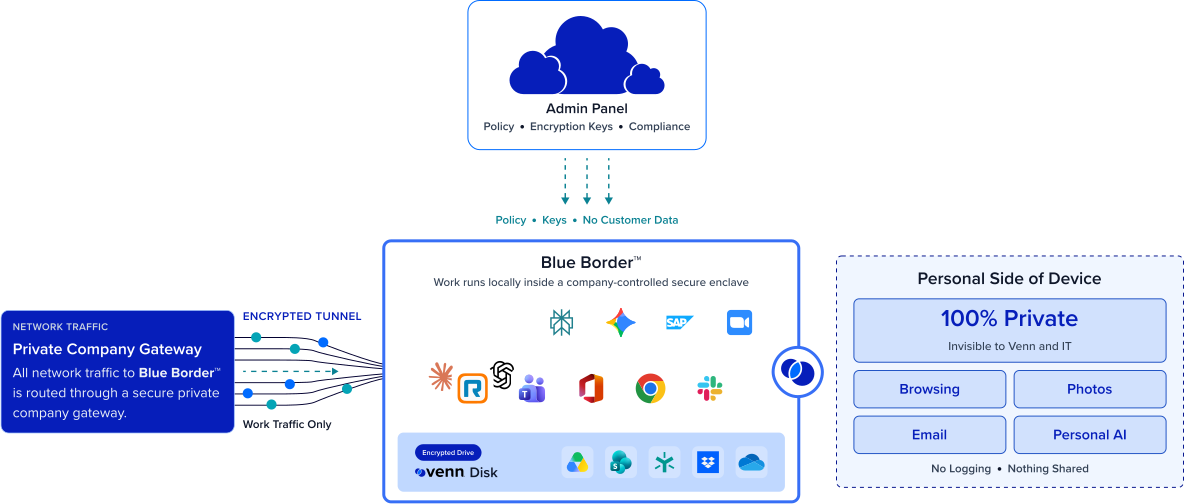
Installing Blue Border on a Mac or PC creates a company-controlled secure enclave directly on the device. Work data, apps, networking, and AI all run locally inside it.
- Network. Work traffic routes through Venn’s built-in VPN gateway or your existing private network.
- Applications. Every app (installed, browser-based or AI) is wrapped by a blue line, creating a virtual firewall and enforcing DLP at the app level.
- Files. Users save only to work-sanctioned file systems inside Venn Disk that are isolated, encrypted and remote wipeable.
Secure Any worker. Any device. Any application. Any AI workflow.

Onboard a vendor in minutes. Off-board in one wipe
There is no hardware to ship and no VDI session to stand up. A vendor is provisioned on the device they already have in minutes, so work starts now instead of waiting on IT. When the engagement ends, a single remote wipe removes the enclave and purges all your data.
Your data, isolated on their device
Blue Border creates a company-controlled secure enclave on the vendor’s own machine, where your data and apps are encrypted and isolated. Everything remains separate from the vendor’s other clients, their other work, and their personal use. DLP is enforced inside the enclave, so what you share with a vendor stays where you put it.


No managing their machine
You control only the enclave, never the vendor’s device. Their hardware, their other clients’ work, and their personal use are untouched and invisible to you.
Shrink your third party attack surface
Instead of your data sitting on an endpoint you can’t manage, it lives in an isolated, governed, instantly wipeable secure enclave. Access is managed based on policy, DLP and AI governance apply, and off-boarding is audit-ready







Frequently Asked Questions
You install Blue Border on the vendor’s own device in minutes, which creates a company-controlled secure enclave. Your data and apps run inside it — encrypted, access-governed, and protected by DLP. You enable secure third-party access fast, without owning or managing their machine, and everything outside the enclave stays theirs.
VPN focuses on network access. VPN still allows data onto an unmanaged device with no endpoint control, and VDI hosts a desktop that adds latency for every external user. Blue Border keeps apps local inside an isolated enclave on the vendor’s own device — delivering the data isolation that VDI achieves virtually, without the infrastructure and latency.
Yes. Your company data and apps live inside the secure enclave, isolated from everything else on the device — including the vendor’s other clients, their other engagements, and their personal use. When vendors work with you they are always working inside the enclave. What you share stays contained in the enclave and can be wiped without affecting anything else on the device.
A remote wipe action instantly removes the secure enclave and purges all company data from the device without touching anything else. Because your data lives only inside the enclave, offboarding a vendor is clean and provable — there is nothing left behind on a machine you don’t control.
Typically yes, because you manage only the enclave, not their machine. The vendor’s hardware, their other clients’ work, and their personal use are untouched and invisible to you. The separation runs both ways — your data is protected, and their environment stays entirely their own. A distinct blue line around the app window indicates work inside the enclave, so there is rarely push-back of any kind.
It directly addresses the endpoint side of third-party risk: your data lives in an isolated, encrypted, governed enclave with DLP and instant revocation, rather than loose on a device you can’t see. Map this to your specific vendor-risk requirements with your security and compliance teams.

Onboard vendors fast. Keep your data protected.
Blue Border is the secure workspace for remote employees and contractors on any device — without VDI or fully managing the endpoint. Provision vendors, partners, and service providers in minutes on their own device, with your data isolated in a wipeable secure enclave.