

Use Cases
FINRA & SEC controls for remote teams
Meet SEC and FINRA requirements on any laptop a remote financial services professional already uses. Without shipping managed devices, or without slowing down hiring.
Trusted by 700+ security- and compliance-driven organizations, including Fidelity, Guardian, StoneX, Whatnot, and the IMF.
Maintain FINRA and SEC for remote financial teams
Financial teams: advisors, traders, back-office staff, and the contractors who support them increasingly work remotely and on personal, BYOD laptops. But FINRA and SEC compliance doesn’t relax with location. Safeguarding customer information, keeping records, supervising business activity, and securing systems apply the same whether someone is in an onsite or home office.
On an unmanaged device, controls for FINRA and SEC compliance are the hardest to enforce. Let alone demonstrate effectiveness in an audit. Customer data can sit on a machine the firm doesn’t own. Business can drift onto personal apps and off the supervised channels that regulators expect. AI adds a new way for customer data to leak, as firms are slow to establish AI governance policies.
Firm leadership wants the flexibility and talent that remote and hybrid work bring, but compliance owns the regulatory exposure. Legacy responses to this challenge are costly: route everything through VDI (latency and cost), lock everyone to managed firm hardware (expensive, and still leaves BYOD gaps), or restrict remote work (lose the flexibility). The goal is to keep firm data and business activity in a controlled, audit-ready workspace on any device.
Customer data on devices the firm doesn’t control
Advisors and back-office handle customer NPI and PII on remote and BYOD machines with none of the safeguards the firm applies in the office.
Business drifts off supervised channels
Remote work pushes activity onto personal apps and away from the sanctioned, supervised, audit-ready channels that regulators expect firms to use.
Harder to show supervision and control
Demonstrating consistent supervision and control over business conducted on uncontrolled remote devices is difficult.
Blue Border™ Supports Strong Controls for FINRA & SEC Compliance
There’s a better way to support remote financial work: Blue Border keeps firm data and business activity inside a company-controlled secure enclave on any device without VDI or fully managing the endpoint. Blue Border enables the FINRA and SEC controls to be applied consistently. Whether in the office or at home.
| Regulatory Area | The Remote / BYOD Gap |

|
|---|---|---|
Safeguard customer info (Reg S-P)
The Remote / BYOD Gap
Customer NPI/PII can sit on a remote or BYOD device the firm doesn’t control.
Venn Blue Border
Firm data is encrypted and isolated in a secure enclave, DLP-protected, on any device.
|
Customer NPI/PII can sit on a remote or BYOD device the firm doesn’t control. | Firm data is encrypted and isolated in a secure enclave, DLP-protected, on any device. |
Recordkeeping (17a-4 / 204-2)
The Remote / BYOD Gap
Business on a personal device can escape the firm’s controlled, records-capable environment.
Venn Blue Border
Keeps business in a firm-controlled, sanctioned workspace so records and archiving policies apply.
|
Business on a personal device can escape the firm’s controlled, records-capable environment. | Keeps business in a firm-controlled, sanctioned workspace so records and archiving policies apply. |
Business communications
The Remote / BYOD Gap
Advisors use personal messaging and apps for business, off supervised channels.
Venn Blue Border
Restricts business to sanctioned apps and blocks unsanctioned ones, helping keep communications in supervised channels.
|
Advisors use personal messaging and apps for business, off supervised channels. | Restricts business to sanctioned apps and blocks unsanctioned ones, helping keep communications in supervised channels. |
Supervision (FINRA Rule 3110)
The Remote / BYOD Gap
Hard to supervise and control business conducted on uncontrolled remote devices.
Venn Blue Border
Business runs in a firm-controlled enclave with consistent, centrally set controls, remote or in office.
|
Hard to supervise and control business conducted on uncontrolled remote devices. | Business runs in a firm-controlled enclave with consistent, centrally set controls, remote or in office. |
Data loss prevention
The Remote / BYOD Gap
Firm and customer data can be copied, downloaded, printed, screenshotted, or pasted into AI.
Venn Blue Border
DLP inside the enclave across copy/paste, download, upload, screenshot, print, and AI.
|
Firm and customer data can be copied, downloaded, printed, screenshotted, or pasted into AI. | DLP inside the enclave across copy/paste, download, upload, screenshot, print, and AI. |
Access control
The Remote / BYOD Gap
Enforcing least-privilege access to firm data on an unmanaged device is hard.
Venn Blue Border
Access to the enclave and its data is governed by IT policy, centrally.
|
Enforcing least-privilege access to firm data on an unmanaged device is hard. | Access to the enclave and its data is governed by IT policy, centrally. |
Device & cybersecurity
The Remote / BYOD Gap
The firm can’t secure a device it doesn’t own or manage.
Venn Blue Border
A controlled workspace isolated from the rest of the device, managed or not.
|
The firm can’t secure a device it doesn’t own or manage. | A controlled workspace isolated from the rest of the device, managed or not. |
AI governance
The Remote / BYOD Gap
Staff can paste customer or firm data into unsanctioned AI tools.
Venn Blue Border
IT allows company-sanctioned AI only and blocks the rest; DLP applies to AI.
|
Staff can paste customer or firm data into unsanctioned AI tools. | IT allows company-sanctioned AI only and blocks the rest; DLP applies to AI. |
Access removal (offboarding)
The Remote / BYOD Gap
Removing firm data and access from an advisor’s personal device at departure is hard to guarantee.
Venn Blue Border
A remote wipe removes the enclave and purges all firm data instantly.
|
Removing firm data and access from an advisor’s personal device at departure is hard to guarantee. | A remote wipe removes the enclave and purges all firm data instantly. |
How Blue Border™ Works
Installing Blue Border on a Mac or PC creates a company-controlled secure enclave directly on the device. Work data, apps, networking, and AI all run locally inside it.
- Network. Work traffic routes through Venn’s built-in VPN gateway or your existing private network.
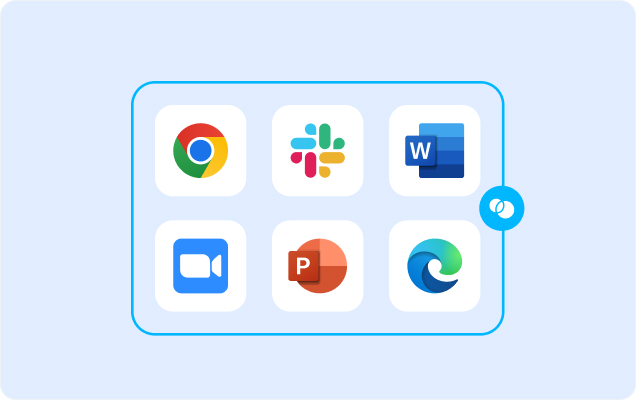
- Applications. Every app (installed, browser-based or AI) is wrapped by a blue line, creating a virtual firewall and enforcing DLP at the app level.
- Files. Users save only to work-sanctioned file systems inside Venn Disk that are isolated, encrypted and remote wipeable.
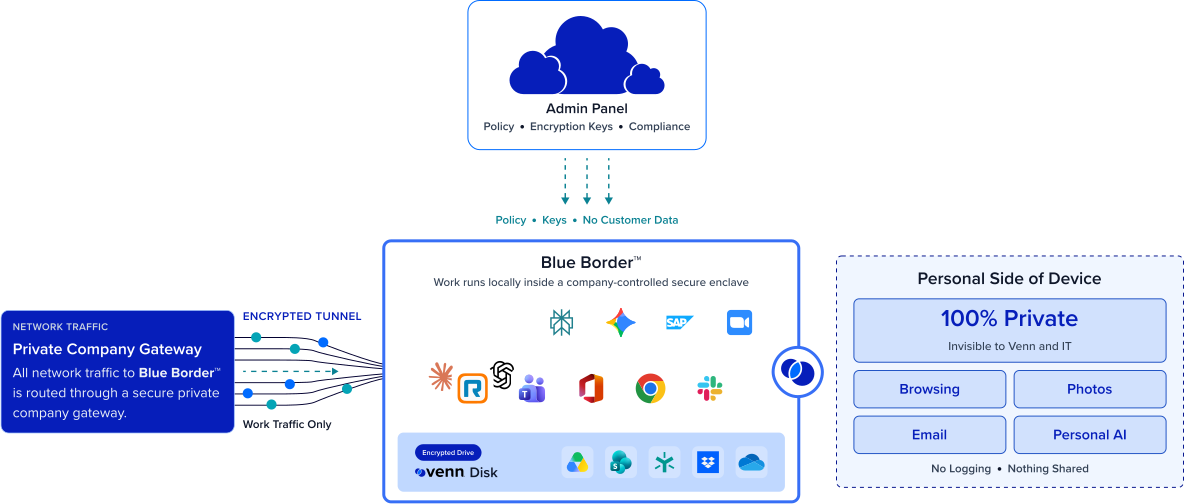
Any worker. Any device. Any application. Any AI workflow.

Keep customer data controlled on any device
Customer information and firm data are encrypted, isolated, and DLP-protected inside the secure enclave on any Mac or PC. The safeguards the firm applies in the office (the kind Reg S-P expects) no longer depend on owning the machine. A personal laptop stops being the weak point in protecting customer NPI.
Keep business in sanctioned, supervised channels
Business runs inside a firm-controlled workspace using the sanctioned apps IT approves, and unsanctioned tools are blocked from firm data. This helps keep activity on supervised channels and reduces off-channel risk.

Consistent FINRA and SEC controls for office or home
The same centrally-managed policies apply wherever an advisor or trader works, so the firm can show consistent control over remote business. Remote work stops being a gap between what happens in the office versus outside the office.
Enable remote financial work without the exposure
Advisors, traders, and back-office teams, and the contractors supporting them, work remotely on their own devices while the firm keeps its regulatory controls. No VDI to route work through and no mandate that everyone use managed firm hardware. Zero friction.







Frequently Asked Questions
Blue Border keeps firm data and business activity inside a company-controlled secure enclave on any device — encrypted, access-governed, and DLP-protected — so the controls regulators expect apply consistently, remote or in office. It supports obligations like safeguarding customer information and demonstrating supervision and control.
Customer NPI and firm data live only inside the enclave, where they’re encrypted, isolated from the rest of the device, and protected by DLP across actions like: copy/paste, download, upload, screenshot, print, and AI upload. Because the data never sits unprotected on the personal machine, the safeguards Reg S-P expects extend to devices the firm doesn’t own.
It helps by keeping firm data inside a firm-controlled workspace and restricting it to sanctioned apps, while blocking unsanctioned tools. This reduces the pull toward personal, unsupervised messaging channels.
Yes. Business runs in a firm-controlled enclave with the same centrally set controls in every location, which supports showing consistent supervision and control over remote activity rather than a different posture per device or location. How that maps to your supervisory obligations is a determination for your compliance team.
No. Blue Border secures the workspace and keeps business in a controlled, sanctioned environment — it does not capture or archive communications or records. It’s designed to work alongside your recordkeeping and archiving tools, making sure business happens where those controls apply rather than on an uncontrolled personal device.
No tool can do that on its own. Compliance depends on your firm’s full program and your regulators’ assessment. What Blue Border does is provide controls that support your obligations — safeguarding customer data, keeping business in supervised channels, and applying consistent controls — on the remote and BYOD devices that are otherwise hardest to cover. Always validate with your compliance and legal teams.

Let financial teams work remotely. Maintain FINRA and SEC compliance.
Blue Border is the secure workspace for remote employees and contractors on any device — without VDI or fully managing the endpoint. Keep customer data and business activity controlled inside a secure enclave on any device, so advisors, traders, and back-office teams work remotely while the firm keeps the controls FINRA and SEC expect.