

Use Cases
Deploy a Secure Workspace Without VDI
Establish a company-controlled secure workspace on any device without VDI, without device ownership, and without forcing users to change how they work.
Trusted by 700+ security- and compliance-driven organizations, including Fidelity, Guardian, StoneX, Whatnot, and the IMF.
A secure workspace doesn’t require a virtual desktop
Securing remote and distributed work has usually meant a virtual desktop (VDI): host a desktop from the cloud so company data never lands on the endpoint. It delivers security and control through virtual isolation. But getting a virtual desktop in place and maintaining it is heavy work.
Standing up VDI is a project, not just a deployment. You build the infrastructure like brokers, gateways, and provision it. Then create a session and profile for every user: new hires, contractors, and new regions all wait on that provisioning. It’s measured in weeks, not minutes. While onboarding users, the help desk tickets flood in as the various devices and network connections wreak havoc on creating a consistent and natural workspace. The latency users experience never goes away.
And taking a user off is its own cleanup: de-provision the session, reclaim licenses, and make sure no company data lingers anywhere. Both ends of the workspace lifecycle are slow and manual.
With Blue Border, you can deploy a secure workspace in minutes and off-board a user in a single step. All, with the same data isolation as VDI, minus the backend, the latency, and the cost.
Standing up VDI is a significant project
Build the infrastructure and provision a user before any work gets done. New users wait weeks.
VDI requires constant maintenance
Brokers, gateways, and capacity planning that require dedicated headcount to patch, monitor, and scale. Infrastructure overhead that never gets less complicated.
Users pay in latency while you pay in cost and complexity
Hosted desktops experience latency and the backend runs the bill up steadily as the workforce grows.
VDI vs. Blue Border™ for Creating a Secure Workspace
There’s a better way than VDI to create a secure workspace: Using a lightweight software install, Blue Border creates a company-controlled secure enclave on any Mac or PC. Data and applications run locally and natively in the enclave without hosting or virtualization. Same data isolation as VDI, none of the latency or backend.
| VDI / Virtual Desktops |

|
|
|---|---|---|
Time to deploy
VDI / Virtual Desktops
Build infrastructure and provision sessions before anyone can work. This takes weeks at best.
Venn Blue Border
A single lightweight install. The user is ready to work in minutes.
|
Build infrastructure and provision sessions before anyone can work. This takes weeks at best. | A single lightweight install. The user is ready to work in minutes. |
Infrastructure to stand up
VDI / Virtual Desktops
Brokers, gateways, and images to build and size.
Venn Blue Border
None. There is no backend to stand up at all.
|
Brokers, gateways, and images to build and size. | None. There is no backend to stand up at all. |
Per-user provisioning
VDI / Virtual Desktops
Create a session and profile for each user.
Venn Blue Border
Software-based approach to install the enclave on the device.
|
Create a session and profile for each user. | Software-based approach to install the enclave on the device. |
Offboarding
VDI / Virtual Desktops
Deprovision the session, reclaim licenses, and capacity
Venn Blue Border
One remote wipe removes the enclave and all company data and apps.
|
Deprovision the session, reclaim licenses, and capacity | One remote wipe removes the enclave and all company data and apps. |
Data left behind
VDI / Virtual Desktops
Cleanup required to confirm nothing lingers.
Venn Blue Border
Company data lives only in the enclave and is purged entirely. Data storage is aligned to company-sanctioned file systems so nothing is left behind on the personal side of the device.
|
Cleanup required to confirm nothing lingers. | Company data lives only in the enclave and is purged entirely. Data storage is aligned to company-sanctioned file systems so nothing is left behind on the personal side of the device. |
Performance
VDI / Virtual Desktops
A cloud-hosted desktop adds latency to every action.
Venn Blue Border
Apps run locally at full native speed. 100% performance.
|
A cloud-hosted desktop adds latency to every action. | Apps run locally at full native speed. 100% performance. |
Cost
VDI / Virtual Desktops
Infrastructure, capacity, and compute that scale with every seat.
Venn Blue Border
No infrastructure and no hardware to ship. Reduces costs up to 60% vs. VDI.
|
Infrastructure, capacity, and compute that scale with every seat. | No infrastructure and no hardware to ship. Reduces costs up to 60% vs. VDI. |
Device & ownership
VDI / Virtual Desktops
Can be either a managed or unmanaged endpoint. Mac is particularly challenging in a VDI environment.
Venn Blue Border
Any device, managed or unmanaged, Mac or Windows.
|
Can be either a managed or unmanaged endpoint. Mac is particularly challenging in a VDI environment. | Any device, managed or unmanaged, Mac or Windows. |
Data isolation / security
VDI / Virtual Desktops
Company data stays in the hosted session.
Venn Blue Border
Company data is encrypted and isolated in the enclave.
|
Company data stays in the hosted session. | Company data is encrypted and isolated in the enclave. |
Scaling / new regions
VDI / Virtual Desktops
Add capacity and infrastructure to grow.
Venn Blue Border
Just install on more devices. There is nothing to scale on the back end.
|
Add capacity and infrastructure to grow. | Just install on more devices. There is nothing to scale on the back end. |
How Blue Border™ Works
Installing Blue Border on a Mac or PC creates a company-controlled secure enclave directly on the device. Work data, apps, networking, and AI all run locally inside it.
- Network. Work traffic routes through Venn’s built-in VPN gateway or your existing private network.
- Applications. Every app (installed, browser-based or AI) is wrapped by a blue line, creating a virtual firewall and enforcing DLP at the app level.
- Files. Users save only to work-sanctioned file systems inside Venn Disk that are isolated, encrypted and remote wipeable.
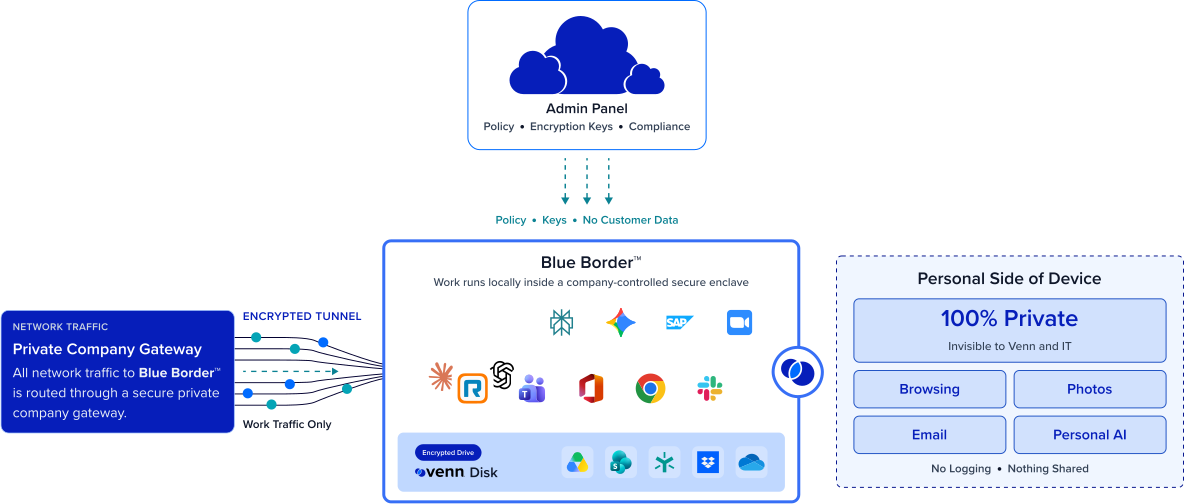
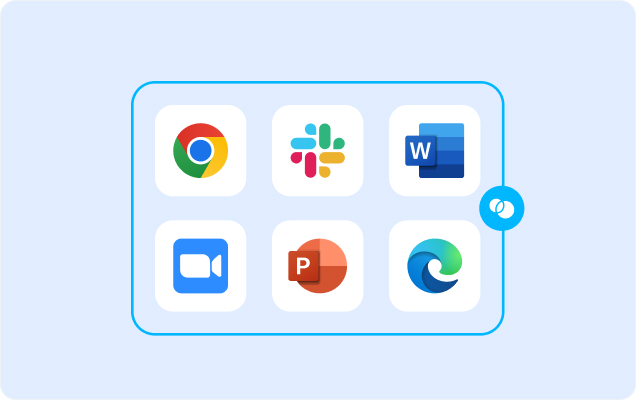
Any worker. Any device. Any application. Any AI workflow.

Deploy a secure workspace in minutes, not weeks
Because there’s no infrastructure to build and no session to provision, deploying a secure workspace is a single lightweight install on the device someone already has. A new hire, a contractor, or an entire new region can be productive the same day. This is the foundational difference from VDI, where the workspace has to be stood up before anyone can touch it.
Off-board in one wipe
Removing the secure enclave is just as light as deploying it. A single remote wipe removes the enclave and purges all company data instantly with no session to de-provision, no licenses to reclaim, and no data to chase down.


The data isolation of VDI, without the backend
You don’t trade security for simplicity. Company data is encrypted and isolated inside the enclave, access is governed by IT, and DLP is enforced across every work app — the same isolation that justified VDI, with no host pools, gateways, or images to run behind it.
Native performance and lower cost
Apps run locally, so there’s no cloud-hosted latency between a user and their work. Organizations save up to 60% vs. VDI. The typical VDI tradeoffs of lag and spend simply go away.







Frequently Asked Questions
You install Blue Border on the device a user already has, which creates a company-controlled secure enclave in minutes. No infrastructure to build and no session to provision. Work runs locally inside the enclave, encrypted and isolated, so you get a secure workspace without VDI or fully managing the endpoint.
Minutes per user, because it’s a single lightweight install rather than a build-out. There are no brokers, gateways, host pools, or images to stand up first, so a new hire, contractor, or region doesn’t wait on provisioning the way they would with VDI.
No — and blocking it entirely tends to backfire. Blue Border is built to enable AI safely: sanction the tools you trust, block the rest, and let people be productive with approved AI inside the workspace instead of pushing them to personal devices where you have no visibility.
A single remote wipe removes the secure enclave and purges all company data instantly, without touching anything else on the device. There’s no session to deprovision, no license to reclaim, and no data cleanup to verify.
Yes. Company data is encrypted and isolated inside the enclave, access is governed by IT, and DLP is enforced across every work app. You keep the data isolation that made VDI worth it — the difference is that it runs locally on the device instead of streaming from a backend you have to maintain.
On both counts. Apps run locally at native speed, so there’s no streaming latency, and because there’s no infrastructure or per-seat virtual-desktop licensing, organizations save up to 60% vs. VDI. You remove the latency users feel and the backend cost IT carries.

A secure workspace that is easy to deploy and easy to remove. No VDI.
Blue Border is the secure workspace for remote employees and contractors on any device — without VDI or fully managing the endpoint. Stand up a secure workspace in minutes with a single install, and remove it in one remote wipe. All with the data isolation of VDI and none of the backend or latency.