
Top 8 Solutions and 6 Best Practices for Managing Access to AI Tools


See Venn first in Google Search
Add as a preferred source on Google
TL;DR: AI tool access control governs who can use AI tools and what data those tools reach. Venn fits BYOD and unmanaged devices, Island the browser and desktop, Palo Alto Networks broad GenAI app discovery, and Netskope instance-level policy.
What Is AI Tool Access Control?
Managing access controls for AI tools requires a mix of identity governance for human/non-human agents, runtime monitoring, and platform-native security suites. Organizations must control which AI applications can be used, what data users and agents can access, which actions they are permitted to perform, and how interactions with AI systems are monitored and audited.
Effective AI tool access control also includes enforcing least-privilege permissions, protecting sensitive data, restricting access to approved AI services, and continuously reviewing access as user roles, AI capabilities, and business requirements change.
Best practices for AI access control:
- Maintain an approved AI application catalog: Maintain a list of approved AI tools that meet the organization’s security, privacy, and compliance requirements.
- Treat AI agents as privileged users: Apply strong authentication, monitoring, and strict access controls to AI agents with elevated permissions.
- Enforce least privilege and scoped access: Grant users and AI agents only the minimum access required for their assigned tasks.
- Implement time-bound credentials: Use temporary credentials and automatically expire access when it is no longer needed.
- Control public AI tool access: Restrict the use of public AI services and monitor interactions with approved external AI platforms.
- Train employees on permitted AI use: Educate employees on approved AI tools, acceptable use policies, and secure data handling practices.
This is part of a series of articles about AI security
Achieve SOC2 Compliance on Unmanaged Laptops
Learn how to keep sensitive data secure and SOC2 compliant when contractors and remote workers use personal laptops.
In this article:
Why Is It Challenging to Manage Access to AI Tools in Organizations?
AI tools create access control challenges because they interact with users, data sources, applications, and external services at the same time. Their permissions can also change as models, integrations, and use cases evolve. This makes traditional role-based controls insufficient on their own:
- Broad data access: AI tools often need access to large datasets to produce useful results. Without strict limits, they may retrieve confidential, regulated, or irrelevant information.
- Unpredictable user requests: Users can submit prompts that cause an AI tool to access data or perform actions outside the intended workflow. Access rules must apply to the resulting action, not only to the initial prompt.
- Autonomous AI agents: AI agents can call APIs, modify records, send messages, or trigger workflows without direct human approval. Each action requires clear permissions and defined limits.
- Complex integrations: AI tools may connect to cloud platforms, databases, collaboration tools, and third-party services. Every integration creates another path through which data or privileges can be exposed.
- Shared accounts and credentials: Some AI systems rely on service accounts or shared API keys. This makes it harder to identify which user initiated an action and to enforce individual permissions.
- Changing roles and use cases: Employee responsibilities, AI capabilities, and business requirements change over time. Permissions that were appropriate during deployment may later become excessive.
- Limited visibility: Organizations may not have complete logs showing which prompts were submitted, which data was accessed, or which actions an AI tool performed. This limits auditing and incident investigation.
- Shadow AI usage: Employees may use unapproved AI tools without security review. These tools can process sensitive information outside the organization’s access control and monitoring systems.
- Inconsistent policy enforcement: Access restrictions may differ across AI tools, departments, and environments. Without centralized governance, users can receive conflicting or excessive permissions.
Solutions for Managing AI Tool Access at a Glance
The table below summarizes the main differences between the solutions covered in this guide, including where each one enforces controls and what limits users report. Each solution is explored in more detail in the sections that follow.
| Category | Solution | Best For | Key Strengths | Things to Consider |
| Endpoint and Browser-Level Controls | Venn | Governing AI use on unmanaged and BYOD computers | Local secure enclave with OS-level AI access control | Agent installs on every user device |
| Endpoint and Browser-Level Controls | Island | AI use across browsers, desktop apps, extensions | Unified AI policy, governed agents, embedded models | Users may need to switch browsers |
| Endpoint and Browser-Level Controls | Chrome Enterprise Premium | Adding AI data controls to existing Chrome fleets | DLP, URL filtering, context-aware access in Chrome | Per-user fee above the no-cost Core tier |
| Network-Delivered AI Access Security | Palo Alto Networks AI Access Security | Discovering and classifying GenAI app usage at scale | 4,000+ app dictionary with granular action controls | Delivered as part of Prisma SASE |
| Network-Delivered AI Access Security | Zscaler AI Access Security | Controlling AI access for large distributed workforces | User-based app controls, inline DLP, isolation | Traffic routes through the Zscaler cloud |
| Network-Delivered AI Access Security | Netskope One AI Security | Instance-aware control across public and private AI | Separates corporate and personal AI accounts | Policy tuning needs dedicated expertise |
| Network-Delivered AI Access Security | Cisco Secure Access (AI Access) | Cisco SSE users adding third-party GenAI controls | Shadow AI discovery with risk scores and guardrails | Tied to the Secure Access SSE product |
| Network-Delivered AI Access Security | Cato Networks AI Security | Governing GenAI use inside an existing SASE rollout | One policy engine for AI, network, and data | Less granularity than on-premises gear |
Related content: See our full comparison of AI security tools.
Notable Solutions for Managing Access to AI Tools
How we selected these tools: We shortlisted solutions for managing access to AI tools based on AI application discovery, identity-based access policy, prompt and data controls, coverage of browser, desktop, and network activity, and audit logging.
Endpoint and Browser-Level Controls
1. Blue Border by Venn

Best for: Governing AI tool use on unmanaged and BYOD computers
Strengths: Local secure enclave with AI access control at the OS level
Things to consider: An agent must be installed on every user device
Venn’s Blue Border creates an isolated, IT-controlled work environment that runs locally on any PC or Mac, including managed, unmanaged, BYOD, and contractor-owned machines. It is not a virtual desktop, and no hosting or virtualization is involved. Work applications run natively inside the secure enclave, separated from personal use on the same computer.
AI tools used inside the enclave are governed by company policy. AI tools outside it, whether browser-based, native, or locally installed, are restricted from interacting with company data through direct upload or through copy and paste. IT defines which AI tools are permitted inside the work environment, while personal AI use outside the boundary stays untouched.
Key features include:
- AI access control at the OS level: Administrators define which AI tools are permitted inside the work environment. Unauthorized AI tools, browser-based or natively installed, are blocked from accessing company data, with no VPN or enterprise browser required.
- Local secure enclave: Work applications run locally in a company-controlled environment on any PC or Mac, where data is encrypted and access is managed, without virtual desktops or backend infrastructure.
- Tenant restrictions: Restrict AI sign-ins to corporate accounts only. Sign-in attempts to [ersonal accounts are blocked.
- DLP and clipboard controls: Exfiltration controls prevent company data from being copied, pasted, uploaded, or shared with AI tools running outside the enclave, including personal accounts. Enforcement happens at the application level rather than on network traffic.
- Coverage of native and desktop AI: Controls apply to AI that operates outside the browser, such as Copilot inside a Microsoft Office application, Claude, Claude Cowork, Claude Code, ChatGPT, and other local LLMs installed on the device.
- Corporate account enforcement: Usage can be restricted to approved LLMs and corporate credentials, which addresses shadow AI and use of personal AI accounts for work.
- Session-level visibility and audit logs: IT sees which AI apps are active inside the enclave across managed laptops, personal devices, BPO-managed machines, and offshore endpoints, with audit-ready logs for SOC 2, HIPAA, PCI, and FINRA.
- Deployment on user-owned hardware: Remote workers and contractors install Blue Border on their existing device in minutes, with no MDM enrollment, VDI, or shipped hardware.
Limitations (as reported by users on G2):
- Performance on some machines: Reviewers report the secure enclave can feel slow on certain devices, including some that meet the stated hardware requirements.
- Customization scope: Some reviewers describe the available configuration options as limited for their needs.
- Support scheduling: Support is reached by ticket and the next available representative rather than by booking time with a specific engineer.
2. Island

Best for: Governing AI use across browsers, desktop apps, and extensions
Strengths: Unified AI policy plus governed agents and embedded models
Things to consider: Users may need to move to a Chromium-based browser
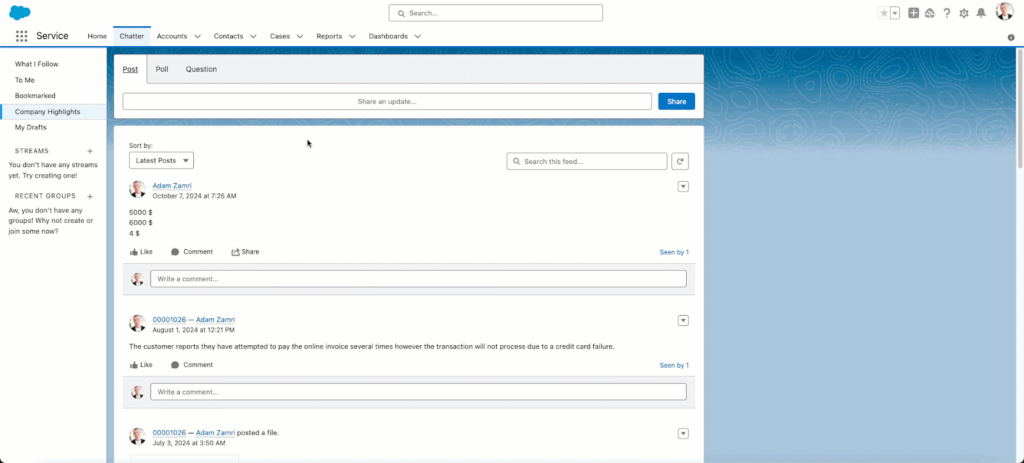
Island delivers enterprise AI services on top of its Enterprise Browser platform. AI Protect handles visibility and control of AI usage across the browser, desktop, extensions, and network. AI Browser embeds AI providers into user workflows with enterprise context, and AI Automate is used to build and run governed agents.
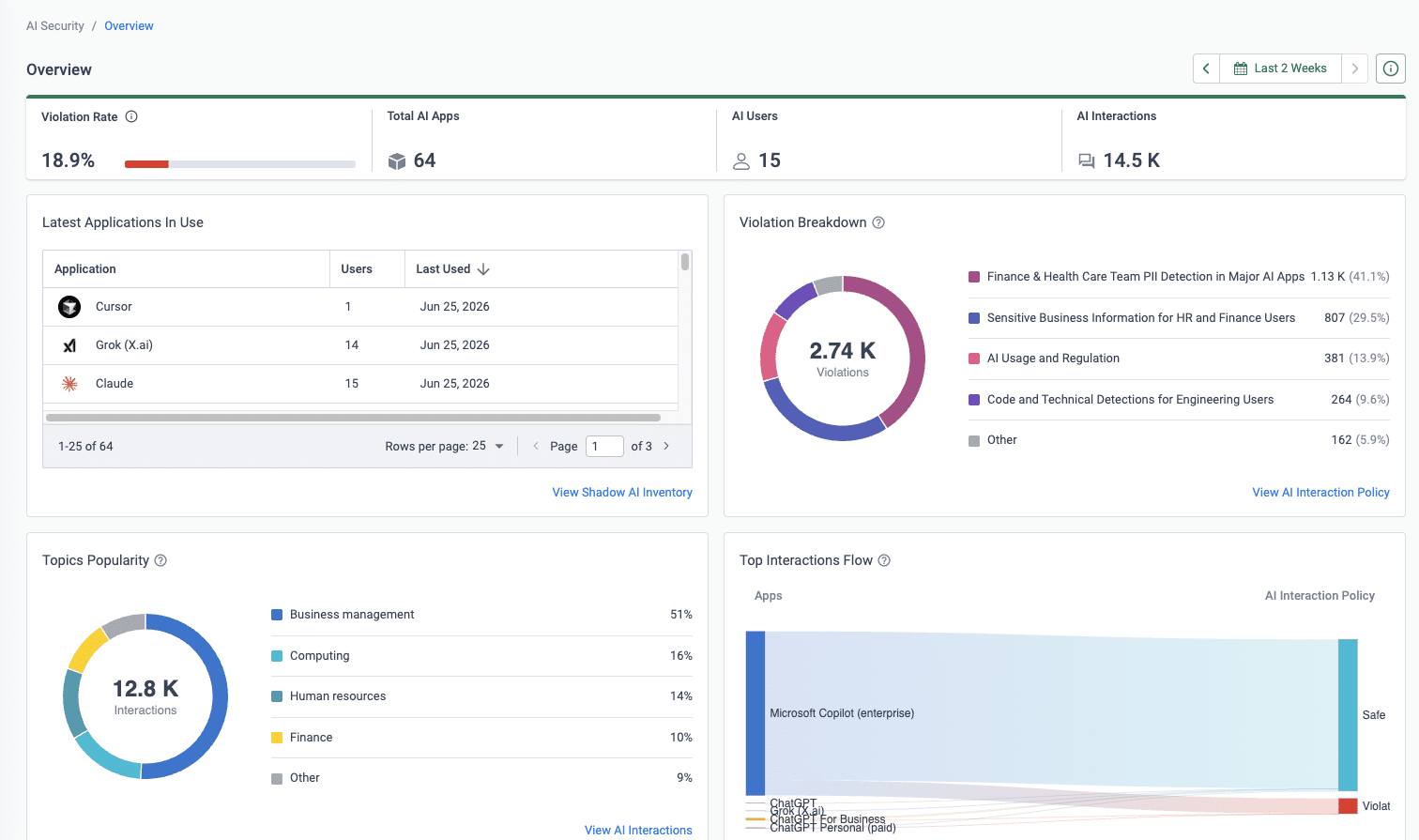
Controls apply at the point of interaction rather than through traffic interception. Island tracks which AI applications and LLMs employees reach, which extensions are active, whether accounts are corporate or personal, and what data moves in and out of AI tools, with dashboards and policy audit trails in a single console.
Key features include:
- Cross-surface AI visibility: Captures AI usage in the browser and in desktop apps, distinguishes corporate from personal accounts, and records whether an AI app is reaching internal tools, with actions performed by AI agents included in the same view.
- Corporate and personal tenant separation: Policy keeps corporate data out of personal AI accounts on the same platform, so teams can tell which account an employee used.
- Extension risk monitoring: Monitors more than 200,000 extensions with real-time risk scoring, covering AI-enabled browser extensions.
- Data boundaries instead of binary blocking: Data boundaries and DLP prevent corporate data from entering unsanctioned AI apps, and users can be redirected to sanctioned alternatives rather than blocked outright.
- Model-agnostic AI browser: Any provider, including ChatGPT, Copilot, Claude, or internal models, can be embedded into workflows, enriched with approved enterprise context such as user role and page content.
- Governed agents: A no-code builder creates agents with defined workflows and scoped permissions, an MCP Gateway provides governed access to 500+ integrations, agents run on the organization’s own LLM API keys, and human-in-the-loop approval applies to sensitive actions.
- Publishing of internal AI apps: AI apps built inside the organization inherit identity, security, and compliance requirements and sit alongside existing applications.
- Usage and cost tracking: Tracks adoption, usage, and cost per AI interaction, and routes models to users based on task and role.
Limitations (as reported by users on G2):
- Restrictive day-to-day controls: Reviewers note that copy and paste, screen sharing, and quick data transfers can become inconvenient, with requests for more role-based flexibility.
- Performance and compatibility: Some reviewers report lag, slow tab switching, and occasional compatibility issues during daily workflows.
- Extension support: Reviewers say fewer extensions are supported than in Chrome or Edge, which disrupts existing habits.
- Policy management: Conflicting policies that look similar can be hard to manage, and priority is based on rule order, which reviewers find confusing.
- Administrative effort: Ongoing administration takes more clicks than reviewers would like, and bulk actions are requested.
- Repeated authentication: Some users report having to authenticate multiple times through the day.
Source: Island

3. Chrome Enterprise Premium

Best for: Adding AI data controls to an existing Chrome deployment
Strengths: DLP, URL filtering, and context-aware access inside Chrome
Things to consider: Per-user fee on top of the no-cost Core tier
Chrome Enterprise Premium adds advanced security protections on top of the management features in Chrome Enterprise Core. It applies data loss prevention, threat protection, and zero trust access controls inside the browser across desktop and mobile devices, all administered from a cloud-based console alongside browser policies and extension settings.
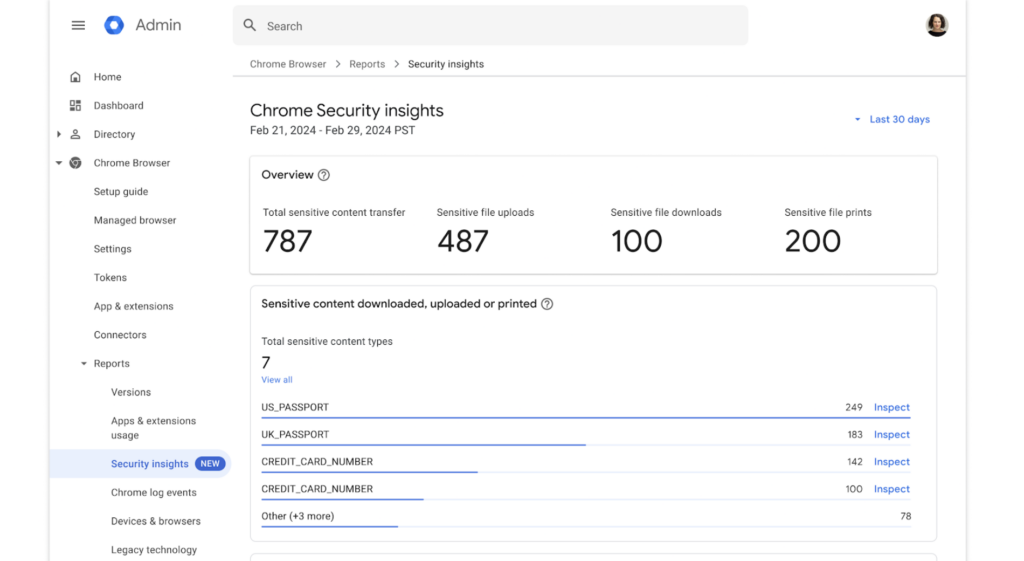
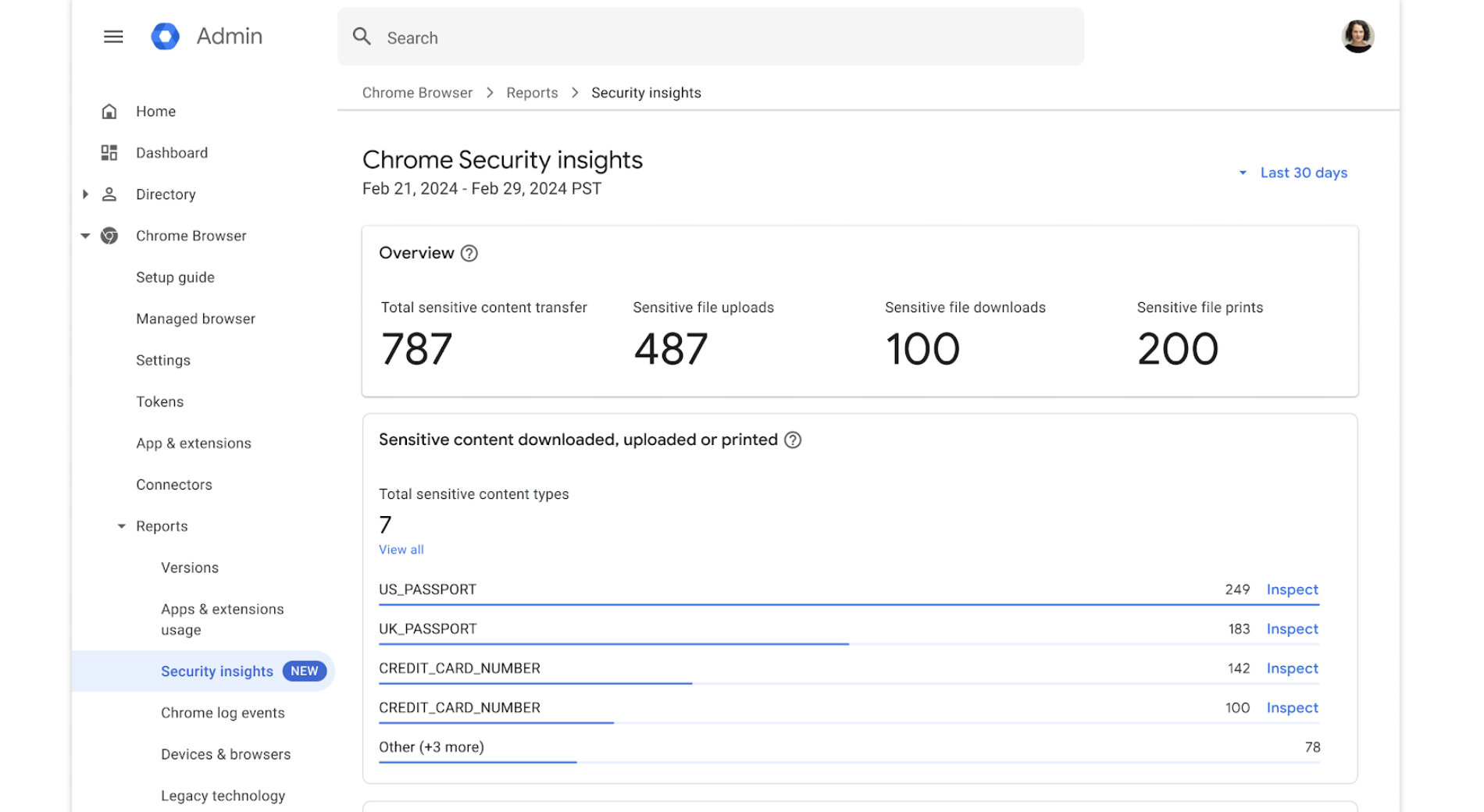
For AI specifically, the product works on two fronts. Generative AI policies manage the availability of AI capabilities in Chrome and how company data is used by Google’s models, while DLP policies include controls for unsanctioned AI tools. Security insights report on shadow AI activity next to other security events. Premium is priced at $6 per user per month, with Core available at no cost.
Key features include:
- DLP controls for unsanctioned AI tools: Granular policies prevent accidental and intentional exfiltration of company-sensitive data, including controls covering unsanctioned AI tools, and can apply restrictions or warnings when sensitive information is shared.
- Generative AI policies: Administrators manage the availability of generative AI capabilities and define how company data is used by Google’s models.
- Security insights with shadow AI reporting: Provides visibility into risky users, sensitive data transfers, and shadow AI activity, with the ability to take action rather than only report on it.
- Context-aware access: Restricts access to SaaS apps, Google Cloud, and private web apps based on user, location, and device security status, enforced through Chrome for remote and extended workforces.
- URL filtering and page-level controls: Restricts access to URLs by category and applies page-specific controls based on website category.
- Threat protections: Real-time Safe Browsing malware and phishing protection, deep scanning of unknown or high-risk files, and prevention of corporate password reuse.
- Evidence locker: Stores files and incidents for later investigation.
- Extension and store controls: Manages extension requests and permissions, with the option of a branded Chrome Web Store that limits which extensions users can reach.
Limitations (as reported by users on G2, where reviews cover the wider Chrome Enterprise product):
- Resource consumption: Reviewers frequently cite high RAM and CPU usage, which slows performance on older or lower-specification hardware.
- Policy configuration complexity: Initial setup and policy configuration are described as complex for new administrators, and precedence between organization-level and group-level policies can be opaque.
- Reporting depth: Several reviewers ask for more detailed reporting and analytics for monitoring usage and security events.
- Legacy application compatibility: Occasional issues are reported with legacy internal applications and tools needing full desktop support.
- Premium pricing: The per-user fee for the Premium tier is raised as a barrier for organizations with smaller budgets.
- Update disruption: Frequent automatic updates require browser restarts that interrupt active work, and policy changes can take time to propagate to every device.
Source: Google
Network-Delivered AI Access Security
4. Palo Alto Networks AI Access Security

Best for: Discovering and classifying GenAI app usage across a workforce
Strengths: Large GenAI app dictionary with granular action controls
Things to consider: Delivered as part of the Prisma SASE platform
AI Access Security is a Prisma SASE product that governs employee use of generative AI applications. It discovers which GenAI apps are in use and by whom, then applies access and data controls to that traffic. The app dictionary covers more than 4,000 GenAI applications, with 80 or more GenAI-specific attributes and over 300 machine learning data classifiers.
Administrators classify applications as sanctioned, tolerated, or unsanctioned and enforce policy against those categories instead of handling risk one app at a time. Controls extend to individual actions inside applications and to the content of prompts and responses, with notifications shown to users who attempt to reach an unsanctioned app.
Key features include:
- GenAI app discovery and categorization: An up-to-date dictionary of over 4,000 GenAI applications, agents, and marketplace plugins supports discovery and categorization, with real-time visibility into which apps are used and by which users.
- Sanctioned, tolerated, and unsanctioned classification: Applications are classified into policy categories so access controls follow a codified GenAI strategy rather than reactive app-by-app decisions.
- Granular action controls: Administrators can revoke access based on scope of privileges and risk factors, and apply fine-grained control over actions such as upload and download.
- Policy recommendations: Strata Copilot recommends user access, data, and security policies based on real-time traffic, with contextual insights tied to security best practices.
- User coaching: Notifications reach employees who attempt to access unsanctioned GenAI apps or are about to violate AI usage policy.
- LLM-powered data classification: LLM-based classification and context-aware machine learning models supplement traditional DLP techniques for sensitive data discovery.
- Inline data detection: Inspection blocks sensitive text-based and file-based data transfers to GenAI apps in line with regulatory requirements.
- Response protection: Precision AI security services screen GenAI responses for malicious URLs and malware.
Limitations (as reported by users on G2, where reviews cover the Prisma Access platform this feature set runs on):
- Setup complexity: Initial setup and configuration are widely described as complex and time-consuming, often needing Palo Alto Networks support or partner help.
- Learning curve: Reviewers new to the Palo Alto ecosystem report a steep learning curve around policy configuration and routing.
- Cost: Pricing is repeatedly raised as high, particularly for smaller organizations.
- Troubleshooting and documentation: Logs and diagnostics are said to lack depth for quick resolution, and documentation is described as thin for advanced use cases.
- Policy customization: Some reviewers find certain policy and configuration options restrictive.
- Support responsiveness: Response times on complex or urgent issues are reported as slower than expected.
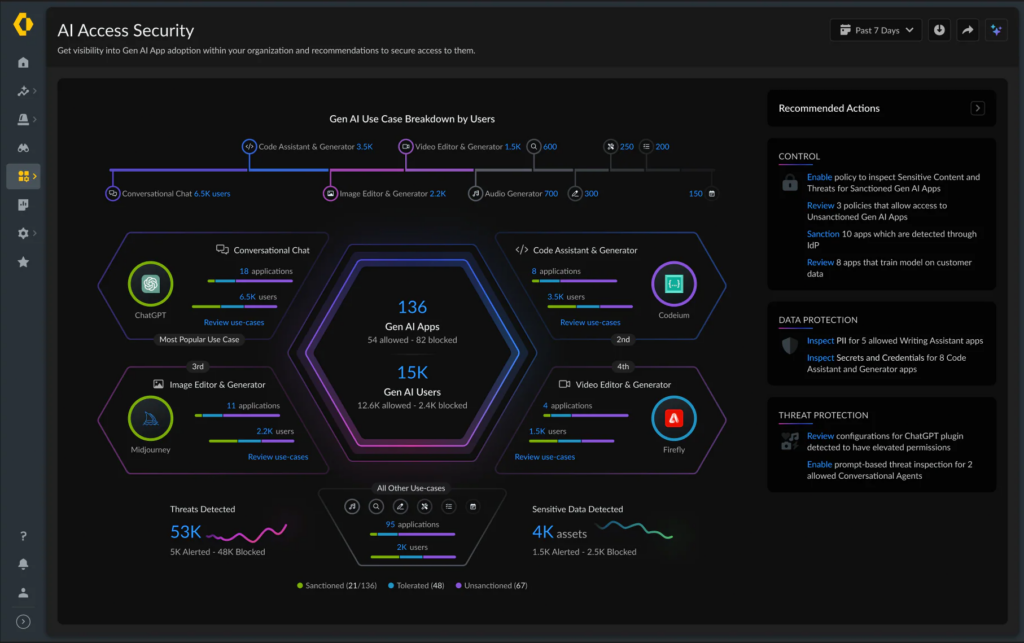
Source: Palo Alto Networks
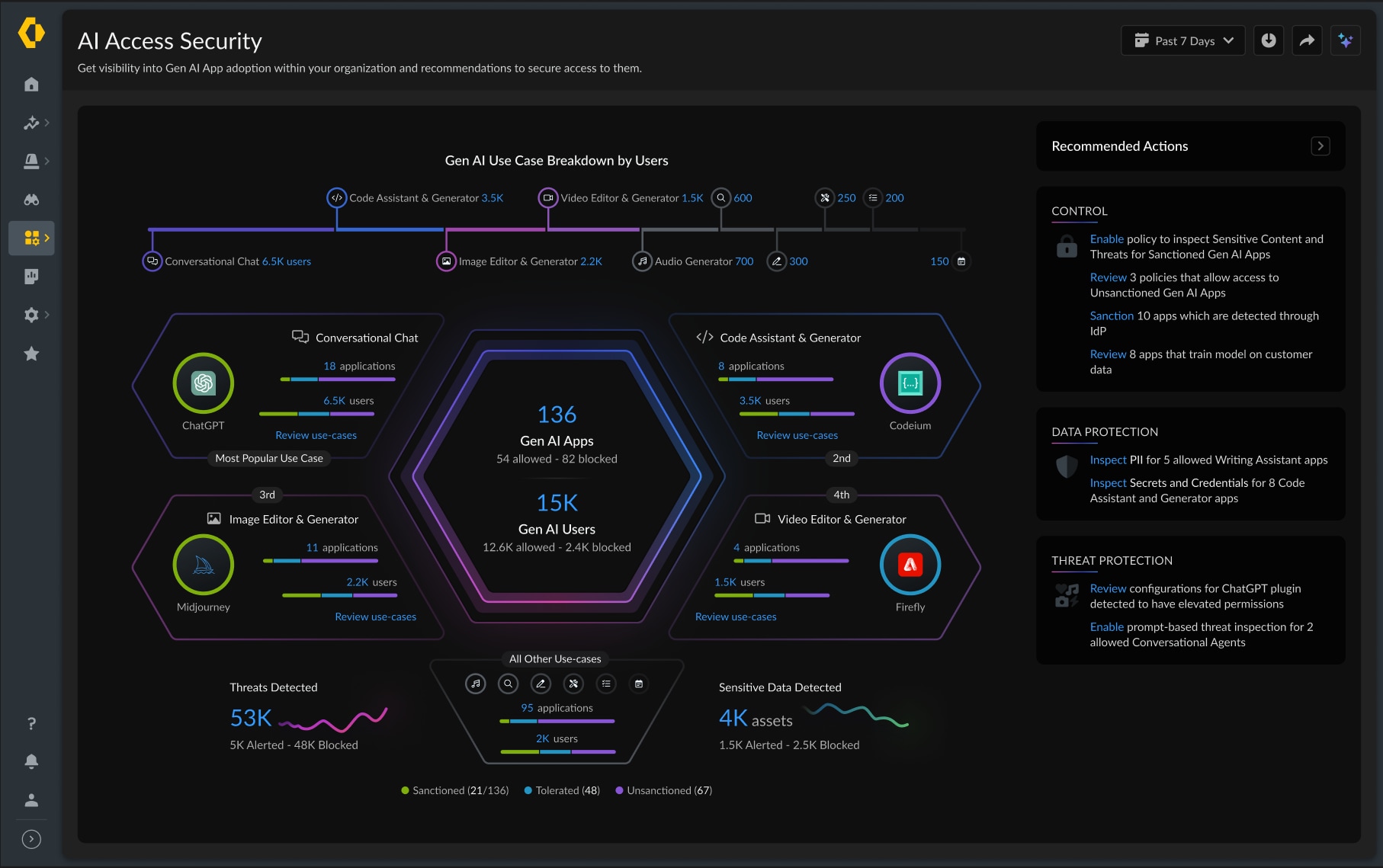
5. Zscaler AI Access Security

Best for: Controlling AI access for large, distributed workforces
Strengths: User-based AI app controls with inline DLP and isolation
Things to consider: All inspected traffic routes through Zscaler’s cloud
Zscaler’s AI Access Security applies zero trust access controls, content moderation, and guardrails to AI use across popular GenAI apps, AI embedded in SaaS applications, agents, and developer tools. It detects and classifies thousands of AI applications and presents usage by user, department, application trend, and at-risk data through interactive dashboards.
Access decisions are made per user or user group, with the options to allow, block, or coach. Policies can also warn users or force browser isolation, which gives control over copy and paste inside AI applications. Prompt and response content is extracted and classified so teams can see how users interact with the apps rather than only which apps were reached.
Key features include:
- User and group-based access controls: Teams discover which AI apps are in use and by which users, then allow, block, or coach access by user or user group, and define which AI tools users can and cannot reach.
- Shadow AI discovery: Detection and classification covers thousands of AI apps, including AI embedded in widely used SaaS applications, with dashboards showing users, departments, and application trends.
- Browser isolation for AI sessions: Policies can enforce isolation, which gives full control over copy-and-paste actions within AI applications.
- Inline DLP for prompts: Sensitive data in prompts is blocked using more than 100 DLP dictionaries covering source code, PII, PCI, and PHI, and controls can allow prompts while preventing bulk uploads.
- Prompt and response visibility: Prompt and response extraction and classification show how users interact with AI apps, and specific actions can be disabled.
- Content moderation: Analysis of prompts and responses detects off-topic or policy-violating use, including toxic, restricted, or competitive topics, with inline enforcement.
- Developer environment controls: Developers get zero trust access with inline controls for AI IDEs and tools that connect to AI infrastructure.
Limitations (as reported by users on G2, where reviews cover Zscaler Internet Access, the platform this solution is delivered on):
- Latency: Routing all traffic through cloud inspection points introduces slowdowns for some users, particularly during peak hours or when far from a point of presence.
- Policy complexity: Setting up and fine-tuning policies is described as complex, and overlapping or conflicting rules are easy to create at scale.
- Troubleshooting visibility: Reviewers report difficulty identifying why a specific site or app was blocked, with block messages and logs seen as too high level.
- SSL inspection side effects: Certificate deployment is described as difficult, and inspection can break applications and developer tooling that use their own trust stores.
- Over-blocking: Legitimate sites and applications are sometimes blocked, requiring manual exceptions, and whitelisting behavior is reported as inconsistent.
- Cost: The per-user licensing model, especially with advanced features enabled, is described as expensive relative to alternatives.
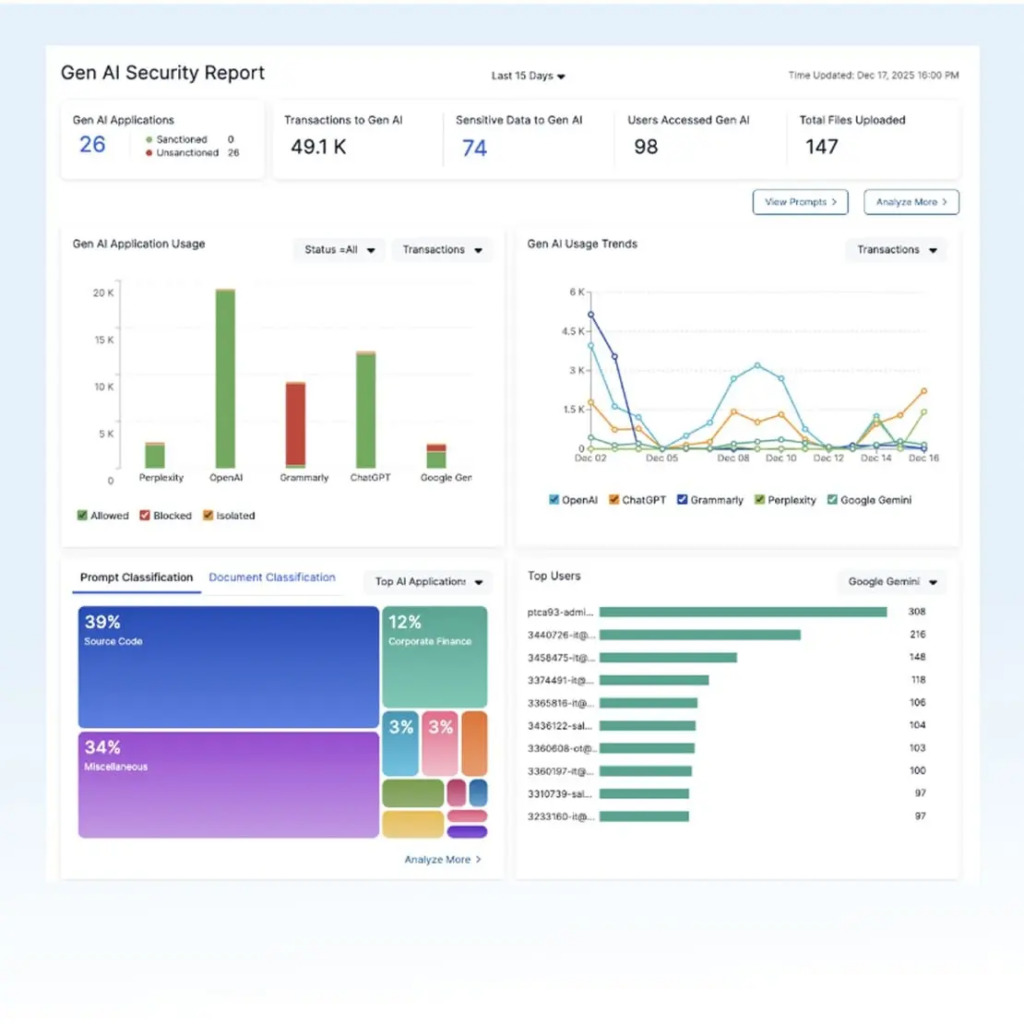
Source: Zscaler

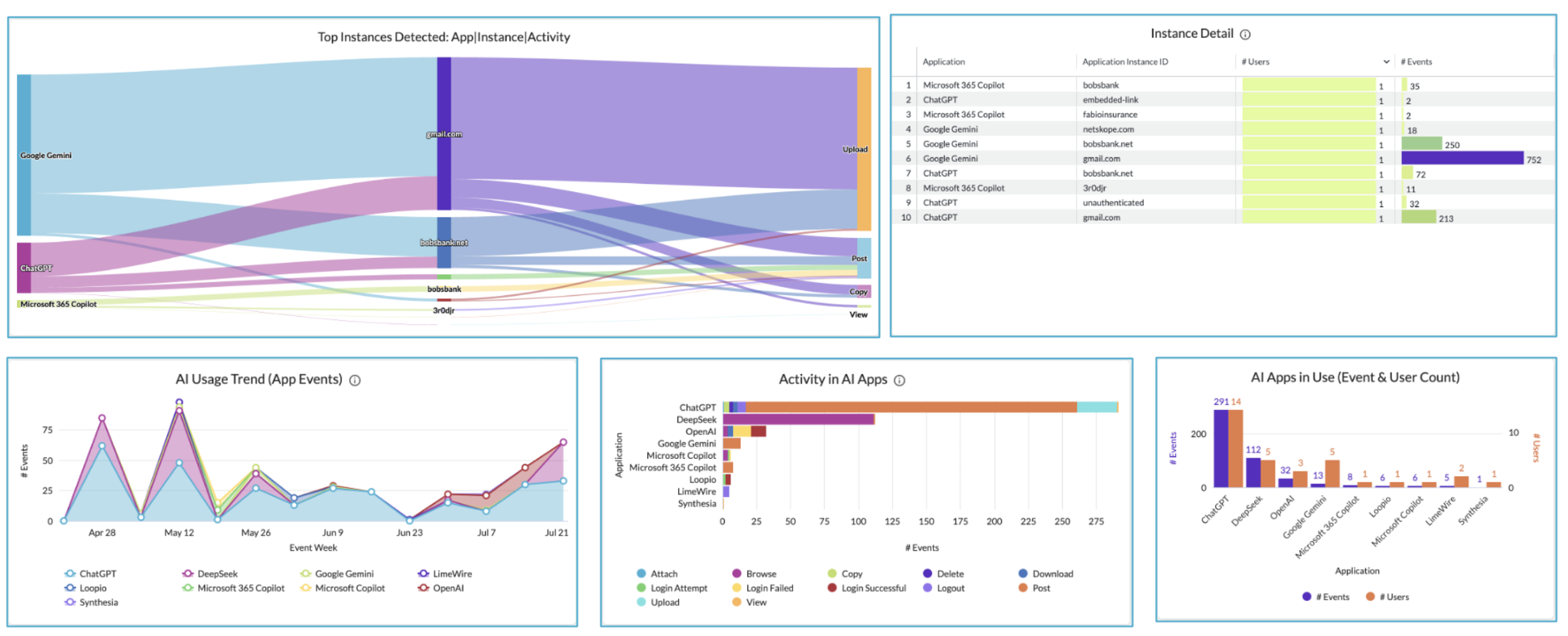
6. Netskope One AI Security

Best for: Instance-aware control across shadow, public, and private AI
Strengths: Separates corporate and personal AI accounts in policy
Things to consider: Deployment and policy tuning need dedicated expertise
Netskope One AI Security covers AI use across shadow consumer AI, enterprise public AI, private AI applications, and agentic AI on one platform. The AI Command Center provides visibility that runs from genAI apps and AI embedded inside SaaS through to the MCP servers behind autonomous agents, with connected risk insights used to govern and control that activity.
Policy goes beyond allow or block. Fine-grained rules are based on user behavior and data sensitivity, and specific actions such as upload, download, copy, and print can be controlled inside AI applications. Real-time coaching guides users on safe data handling or redirects them toward sanctioned enterprise tools such as corporate Copilot and ChatGPT tenants.
Key features include:
- Instance awareness: Policies distinguish between instances of the same application, so a corporate tenant can be fully allowed while the personal instance of the same AI service is restricted.
- Shadow AI discovery and app risk scoring: An AI dashboard shows the applications used, the instance type, and actions taken such as login, post, upload, and download, while the Cloud Confidence Index covers 370 or more genAI apps and 82,000 SaaS apps with detail on model training and third-party sharing behavior.
- Adaptive access controls: The Zero Trust Engine applies continuous access controls based on user, device, risk, and AI app behavior.
- Real-time user coaching: Pop-up guidance educates users who attempt to share sensitive data or reach unauthorized AI apps and steers them to approved tools.
- Prompt and response inspection: DLP and AI Guardrails inspect prompts and responses in real time, using semantic inspection that evaluates intent and context rather than pattern matching alone.
- Agent and MCP controls: The Agentic Broker manages visibility and access control for MCP implementations running locally, in containers, or on remote servers, while the AI Gateway centralizes authentication, traffic management, rate limits, and content inspection for app-to-LLM API calls.
- Behavior analytics: UEBA-driven monitoring detects anomalies and misuse of AI tools on a continuous basis.
- Performance routing: NewEdge AI Fast Path optimizes network paths to AI destinations across public and private clouds.
Limitations (as reported by users on G2, where reviews cover the Netskope One platform):
- Deployment effort: Initial deployment and policy configuration are described as time-consuming and dependent on expertise or professional services.
- Console usability: Reviewers describe the interface as cluttered or dated, with multiple portals to manage different functions.
- Cost: Licensing is reported as expensive, with the value case resting on consolidating several existing tools.
- Integration clarity: Some reviewers say it is unclear what telemetry flows between Netskope and other security tools such as endpoint platforms.
- Reporting performance: Detailed reporting and log searches can feel slow when handling large data volumes.
- Over-blocking and agent behavior: Legitimate sites are occasionally blocked, and reviewers report client disconnections and weaker agent behavior on macOS.
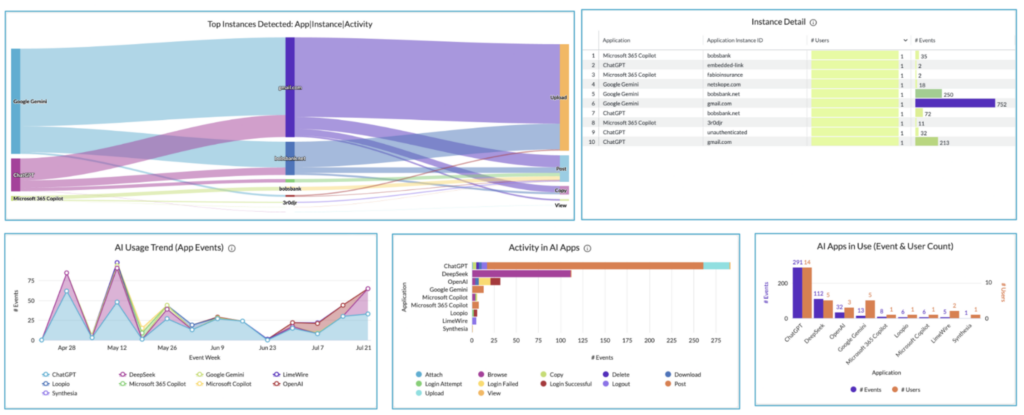
Source: Netskope
7. Cisco Secure Access (AI Access)
Best for: Cisco SSE users adding third-party GenAI app controls
Strengths: Shadow AI discovery with risk scores and prompt guardrails
Things to consider: Feature set is tied to the Secure Access SSE product
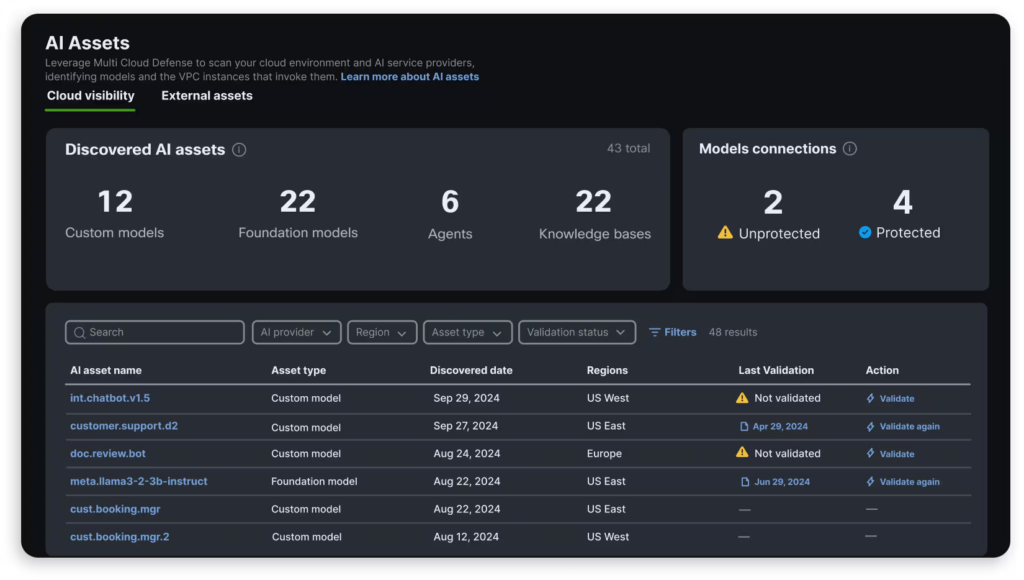
AI Access is a fully integrated feature set within Cisco Secure Access, Cisco’s security service edge product. It inspects web traffic to identify use of generative AI across the organization, including traditional applications that have added AI functionality, and produces a list of the AI-powered services in use along with the specific API calls made to AI models.
A dashboard adds the usage context needed to judge third-party app exposure, covering usage, devices, location, and network data, with risk scores and recommendations that highlight the riskiest applications. Policy controls then block or redirect requests to approved services, and guardrails inspect prompts and responses at the point of use.
Key features include:
- Shadow AI discovery: Web traffic inspection identifies AI-powered services in use across the organization, including specific API calls made to AI models by AI-enhanced applications.
- Risk assessment for AI apps: A dashboard provides usage context including usage, devices, location, and network data, with risk scores and recommendations to guide decisions on third-party app exposure.
- Granular access and policy controls: Requests can be blocked or redirected to approved services, so employees use sanctioned AI apps rather than unmanaged alternatives.
- Prompt and response guardrails: Guardrails discern context and infer intent, blocking prompts with privacy, safety, or security concerns and intercepting malicious responses that could spread threats.
- Data loss prevention: DLP enforcement runs alongside access control for employee use of third-party GenAI applications.
- Multiple enforcement points: As part of Cisco Secure Access, controls draw on full visibility of network traffic and multiple enforcement points to detect and block unwanted AI traffic.
- Machine learning detection: Cisco’s proprietary machine learning models handle threat detection for data exposure and novel attack vectors in AI traffic.
Limitations (as reported by users on PeerSpot):
- Licensing clarity: Reviewers describe the licensing model as confusing, making it hard to know what to purchase and what support is included.
- Cost: Pricing is reported as high and less accessible for mid-size and smaller organizations than competing products.
- Support experience: Delays and complexity in reaching technical support are raised repeatedly, including handovers at the end of engineer shifts.
- Performance with SSL decryption: One reviewer reports unpredictable performance once SSL decryption was enabled.
- Feature maturity: Reviewers note that Cisco’s newer AI offerings are still developing, and one describes a URL filtering issue that took months to resolve.
- Migration friction: Moving between Cisco platforms, such as from Umbrella to Secure Access, adds setup and integration work for some teams.
Source: Cisco

8. Cato Networks AI Security (AISEC)

Best for: Governing GenAI use inside an existing SASE deployment
Strengths: Single policy engine for AI, network, and data security
Things to consider: Cloud service is less granular than on-premises gear
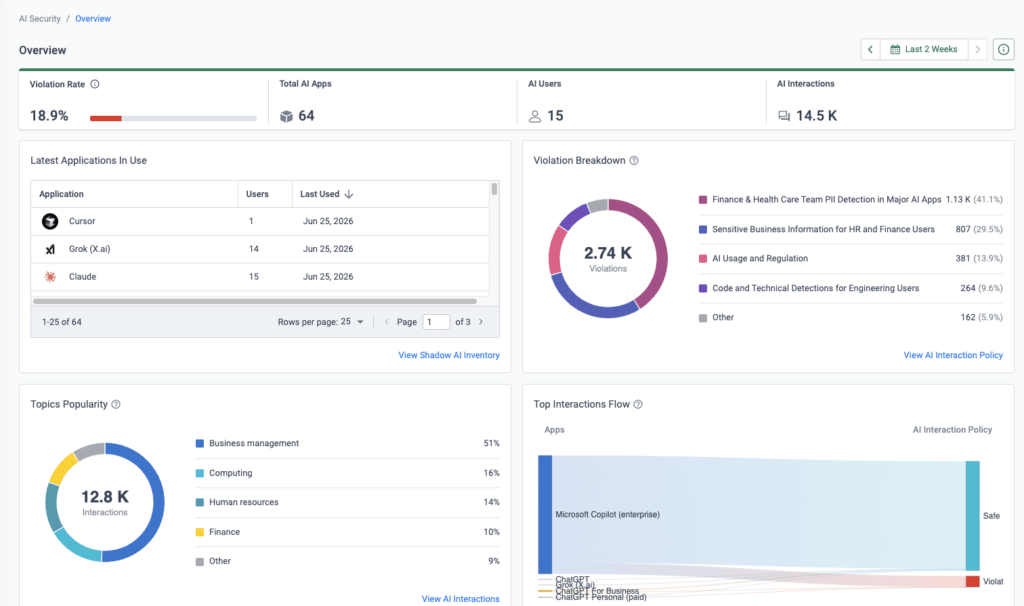
Cato’s AI Security is delivered as part of the Cato SASE Cloud platform. It covers governance of public GenAI usage by employees, monitoring and testing of private AI models and agents, and management of overall AI security posture. Teams get visibility into which GenAI apps are used and what data is shared with the models behind them.
Granular access controls are enforced alongside real-time detection of unauthorized data exchange with public AI services. Prompt and response monitoring runs inline, through APIs, or through a browser extension, so policy applies to the content of AI interactions rather than only to the connection. AI security is managed in the same console as network and data security.
Key features include:
- GenAI usage visibility and access control: Full visibility into which GenAI apps are used, including unsanctioned shadow AI, with granular access controls and real-time detection of unauthorized data exchange with public AI services.
- Prompt and response governance: Monitoring and governance of prompts and responses runs inline, via APIs, or through a browser extension, to prevent data leakage and limit misuse.
- AI agent monitoring: Purpose-built software discovers and analyzes AI agent activity, monitoring every interaction between agents, models, and MCP servers.
- Runtime protection for private AI: Proprietary models trained to detect runtime AI attacks and compliance violations protect homegrown AI applications and agents, with deployment on premises, in the cloud, or at the edge.
- AI security posture management: Continuous discovery, detection, and remediation of AI risks in development and production, including model misconfigurations, vulnerabilities, and licensing and usage violations.
- Regulatory and framework testing: AI environments can be tested against the EU AI Act and ISO 42001, as well as MITRE ATLAS and NIST RMF risk frameworks.
- Single policy engine: AI security is managed alongside network and data security through one policy engine, one data lake, and one management application, with consistent enforcement from data centers down to individual user devices.
Limitations (as reported by users on G2, where reviews cover the Cato SASE Cloud platform):
- Configuration granularity: As a cloud service, it offers less extreme customization than on-premises equipment, which reviewers notice on specific routing and firewall rules.
- Feature gaps: Reviewers report missing or maturing capabilities compared with larger vendor suites, including areas such as browser isolation, sandboxing, and full DLP.
- Licensing model: Bandwidth-tier licensing is described as complex or costly, particularly for smaller organizations and for bandwidth upgrades.
- Reporting depth: Reporting and analytics are described as limited and less flexible than reviewers would like.
- Policy propagation: Policy updates can take a few minutes to apply, and reviewers ask for a policy conflict checker.
- Connectivity and throughput: Occasional disconnections are reported, along with throughput that varies with connection quality and distance from a point of presence.
Source: Cato Networks
Best Practices for Managing AI Tool Access
Here are some useful practices for managing access controls to AI tools.
1. Maintain an Approved AI Application Catalog
Organizations should maintain a catalog of approved AI tools, listing only those that meet internal security and compliance standards. This catalog serves as a reference for both IT and end users, helping to prevent the use of unvetted or insecure applications. By centralizing approval, organizations can better:
- Evaluate risks
- Ensure licensing compliance
- Apply consistent monitoring across the AI tool landscape
Updating this catalog regularly is critical as new AI tools emerge and existing tools evolve. IT teams should review the catalog periodically, removing obsolete or non-compliant applications and adding new, vetted solutions. Training users to consult this catalog before adopting AI tools reduces the prevalence of shadow IT and strengthens the organization’s overall security posture.
2. Treat AI Agents as Privileged Users
AI agents often perform automated actions on behalf of users or systems, sometimes with broad access to data and resources. Organizations should treat these agents as privileged users, subjecting them to the same security scrutiny as human administrators. This means:
- Applying strong authentication
- Monitoring their activity
- Limiting their permissions to only those necessary for their assigned tasks
Treating AI agents as privileged users also involves regularly reviewing and updating their access rights. As AI agents’ roles change or expand, organizations must ensure that permissions do not accumulate unnecessarily, which can create vulnerabilities. Proactive management of AI agent credentials, session durations, and audit logs helps prevent misuse and supports compliance with industry regulations.
3. Enforce Least Privilege and Scoped Access
Enforcing least privilege means granting users and AI agents only the minimum permissions necessary to perform their tasks. This reduces the attack surface and limits the impact of compromised accounts or misconfigured tools. Organizations should implement role-based access controls (RBAC) to define and manage permissions for different user groups and AI agents.
Scoped access further refines least privilege by constraining permissions to specified:
- Datasets
- Environments
- Tool functionalities
For example, an AI agent may need access only to anonymized data for training purposes but not to production systems. Regularly reviewing and adjusting scopes ensures that access remains tightly aligned with operational needs and minimizes the risk of data exposure.
4. Implement Time-Bound Credentials
Time-bound credentials restrict access to AI tools and data for a limited duration, reducing the risk of long-term credential exposure. Organizations can issue temporary tokens or session-based permissions that expire automatically after a set period. This approach is particularly useful for:
- Contractors
- Project-based work
- AI agents performing time-limited tasks
Regularly expiring credentials encourage users and administrators to re-evaluate access needs, preventing the accumulation of unnecessary permissions. Automated systems for credential rotation and expiration also make it easier to revoke access promptly when users leave the organization or roles change. Time-bound access helps maintain a secure environment while supporting flexible, project-driven use of AI tools.
5. Control Public AI Tool Access
Public AI tools, such as generative AI chatbots or cloud-based APIs, present unique risks due to their accessibility and potential for data leakage. Organizations should control access to these tools by blocking or restricting usage from corporate networks and requiring users to obtain approval before connecting to external AI services. Security controls can help enforce these policies, including:
- Firewall rules
- Cloud access security brokers (CASBs)
Monitoring and logging public AI tool usage is also essential for detecting unauthorized activity and ensuring compliance with data protection regulations. Organizations should establish clear guidelines on what data can be shared with public AI tools and educate employees about the risks of exposing sensitive information. Proactive management of public AI tool access helps prevent inadvertent data breaches and protects organizational assets.
6. Train Employees on Permitted AI Use
Employee training is critical for effective AI tool access control. Users must understand which AI tools are approved, how to use them securely, and what constitutes acceptable use. Training programs should cover:
- Company policies
- Data handling procedures
- Examples of risky behaviors (i.e., inputting confidential data into unapproved AI services)
Regular training updates are necessary to keep pace with changes in the AI landscape and organizational policies. Interactive modules, phishing simulations, and real-world case studies can reinforce best practices and help employees recognize emerging threats. Well-informed users are less likely to inadvertently compromise security and more likely to report suspicious activity, supporting a strong overall access control strategy.
Conclusion
Managing access to AI tools requires more than granting or denying permissions. Organizations should combine identity-based access controls, least-privilege principles, continuous monitoring, user education, and regular permission reviews to ensure AI systems can access only the data and functions required for their intended purpose. A structured access control strategy reduces security risks, supports regulatory compliance, and enables employees to use AI safely and responsibly.

Any worker. Any laptop. Any AI workflow. Fully secured.
Schedule a demo to see how Blue Border® secures company data and apps without shipping laptops, running VDI, or managing personal endpoints.