
Best AI Governance Tools: Top 12 Platforms in 2026


See Venn first in Google Search
Add as a preferred source on Google
TL;DR: AI governance tools help organizations discover, control, and secure AI use and sensitive data across the enterprise. Best for BYOD/unmanaged devices: Blue Border; shadow AI detection: Microsoft Purview; model risk: IBM OpenPages; data classification: Varonis.
What Are AI Governance Tools?
AI governance tools are software solutions that help organizations monitor, control, and enforce policies around how AI systems are developed, deployed, and used. As AI becomes embedded across business workflows, from productivity tools to internal copilots to third-party SaaS platforms, governance tools provide the oversight layer that ensures AI activity stays aligned with security requirements, regulatory obligations, and internal policy.
Key features of AI governance tools:
- Policy enforcement: Defines and enforces rules around which AI tools are permitted, how they can be used, and what data they can access.
- Shadow AI detection: Identifies unsanctioned AI tool usage across the network, SaaS layer, and endpoints before it becomes a breach vector.
- Data classification and DLP integration: Classifies sensitive data and enforces controls that prevent it from entering unauthorized AI systems.
- Audit trails and compliance reporting: Generates the documentation required for regulatory frameworks including the EU AI Act, ISO/IEC 42001, and NIST AI RMF.
- Endpoint enforcement: Controls which AI tools can interact with company data at the device layer, including on personal and unmanaged devices.
- Model risk management: Tracks AI models across their lifecycle, monitoring for drift, bias, and compliance with internal standards.
Free eBook:
Secure Remote Access that Doesn’t Drive Users Crazy!
Secure your entire extended workforce without issuing devices or VDI. Keep your organization agile, compliant, and secure.
Table of contents
The Four Major Categories of AI Governance Platforms
Unmanaged Devices and BYOD
Endpoint enforcement is where AI governance policy becomes technically real; where controls are attached to the environment where AI tools actually run, not just to the network or the SaaS layer above it. For organizations with distributed workforces on personal or unmanaged devices, this is the critical layer. It’s also the least developed category in the AI governance market, because most platforms were built for managed device environments where IT already controls the endpoint.
AI Governance Tools at a Glance
The table below summarizes the key differences between these tools. We explore each of them in more detail in the sections that follow.
| Category | Solution | Best For | Key Strengths | Things to Consider |
| Unmanaged Devices & BYOD | Blue Border | Securing company data and AI use on unmanaged or BYOD laptops | Local secure enclave with AI tool controls, DLP, and no VDI | Performance can vary on lower-spec or older devices |
| Unmanaged Devices & BYOD | Island | Governing enterprise AI use inside a Chromium enterprise browser | In-browser AI access control, prompt redaction, and audit logs | Requires adopting a dedicated browser or extension |
| Unmanaged Devices & BYOD | LayerX | Controlling AI use on any browser across managed and BYOD devices | Agentless browser extension, shadow AI discovery, GenAI DLP | Coverage is delivered through the browser and extensions |
| Shadow AI Detection | Microsoft Purview | Securing sensitive data across Microsoft 365 and generative AI apps | Unified classification, DLP, and data posture management | Advanced features and full value depend on Microsoft licensing |
| Shadow AI Detection | Knostic | Discovering and governing unsanctioned AI use across an organization | Shadow AI discovery, usage mapping, and risk-based guardrails | Newer, focused platform that complements existing security tools |
| Shadow AI Detection | Netskope | Discovering and controlling shadow AI across cloud and SaaS | App risk scoring, inline DLP, and instance awareness | Initial deployment and tuning can be complex |
| Model Risk & Compliance | IBM OpenPages | Managing model risk and enterprise GRC in one platform | Modular GRC with model risk governance and AI automation | Enterprise scale can mean cost and a learning curve |
| Model Risk & Compliance | OneTrust AI Governance | Governing the AI lifecycle from intake to runtime control | AI inventory, framework-based risk assessment, runtime guardrails | Broad platform that can require significant setup effort |
| Model Risk & Compliance | Credo AI | Governing the AI lifecycle against major regulations and standards | AI registry, policy packs, and runtime governance | Enterprise-focused with limited public pricing |
| Data Classification & DLP | Varonis | Discovering, classifying, and protecting sensitive data at scale | Automated classification, exposure remediation, exfiltration alerts | Full rollout can be resource-intensive to deploy and tune |
| Data Classification & DLP | Nightfall AI | Preventing sensitive data leaks across SaaS, endpoints, and AI apps | AI-based classification, data lineage, and shadow AI controls | Cloud and SaaS focused, without on-premises coverage |
| Data Classification & DLP | BigID | Classifying and governing sensitive data across data and AI | ML classification, DSPM, DLP, and AI data governance | Enterprise scale can mean higher cost and setup effort |
Shadow AI Detection and SaaS Monitoring
Shadow AI detection platforms monitor network traffic, API activity, and SaaS usage to surface unsanctioned AI tools in use across an organization. They’re a useful starting point for understanding the scope of unauthorized AI adoption. Research from CloudEagle found that 63% of enterprises have no shadow AI policy — which means most organizations are operating without even basic visibility into what tools employees are using.
The limitation of network-level detection is that it reveals but doesn’t enforce. It can show that traffic is flowing to AI services, but it cannot prevent sensitive data from entering those tools on a personal device operating outside corporate network infrastructure.
Model Risk and Compliance Tools
These platforms focus on the development side of AI: managing model registries, tracking training data provenance, detecting bias, and generating documentation for regulatory audits. They’re built for data science teams and AI product organizations managing the lifecycle of AI models. They’re essential for organizations building or deploying AI systems — and largely irrelevant to the problem of governing how employees use AI tools day-to-day.
Data Classification and DLP platforms
Data classification tools identify, tag, and protect sensitive information — personal data, financial records, intellectual property — before it can be shared with AI systems. Integrated with endpoint DLP for unmanaged devices, these tools can enforce policies on what data moves where. The challenge is reach: DLP solutions built for managed endpoints don’t operate on devices the organization doesn’t own or control.
The Need for AI Governance Tools
AI adoption has outpaced the ability to govern it. Most organizations now have employees using ChatGPT, Claude, and dozens of other AI tools — often through personal accounts, on personal devices, with no visibility from IT. Research on AI data leakage shows that nearly half of organizations have experienced breaches tied to unsecured personal devices, and shadow AI events carry an average of $670,000 in additional costs above standard breach incidents.
Key reasons organizations need AI governance tools:
- Regulatory compliance: Frameworks like the EU AI Act, NIST AI RMF, and ISO/IEC 42001 impose concrete documentation, risk assessment, and monitoring requirements. Without governance tooling, meeting those obligations at scale is effectively impossible.
- Shadow AI control: Employees are using AI tools whether IT approves them or not. Governance tools create visibility into what’s actually happening — and enforcement mechanisms to limit exposure.
- Data protection: Sensitive data (customer records, financial information, intellectual property) is routinely submitted to AI tools without oversight. Governance tools enforce controls on what data can reach which systems.
- Endpoint coverage: For organizations with remote employees or contractors on personal laptops, governance frameworks need enforcement reach beyond the corporate perimeter. Most traditional tools stop there. The right endpoint solution doesn’t.
- Audit readiness: As regulatory scrutiny of AI increases, organizations need documented evidence of oversight, access controls, and incident response. AI governance tools generate and maintain that audit trail automatically.
What Does It Cost to Leave AI Governance Unaddressed?
Market growth signals urgency, not optional investment
The global AI governance market is valued at roughly $308 million and is projected to grow at a compound annual rate of 36% through 2033, reaching approximately $3.6 billion. That growth is being driven by three converging forces: regulatory pressure including the EU AI Act, rapid AI integration into high-stakes industries, and the emergence of generative AI systems that require governance frameworks traditional GRC tools were never designed to handle.
Gartner has noted that organizations deploying AI governance platforms are 3.4 times more likely to achieve high effectiveness in governance than those that don’t. That’s not a marginal advantage — it reflects a structural gap between organizations that have moved from policy to enforcement and those still operating on intention alone.
The shadow AI breach premium
The financial case for AI governance is increasingly concrete. IBM’s research places the cost premium of a shadow AI breach at $650,000 or more above a standard data breach — and one in five organizations has already experienced a breach tied to unsanctioned AI use. When a remote employee or contractor pastes sensitive company data into an unmanaged AI tool on their personal laptop, that data exits with no log, no recovery path, and no organizational awareness until after the damage is done.
The risk is structural, not behavioral. Employees aren’t circumventing governance out of carelessness — they’re using the tools that help them work faster. The challenge is that the governance infrastructure most organizations have built doesn’t extend to where that work is actually happening.
Regulatory exposure under the EU AI Act and NIST AI RMF
The regulatory environment is moving from design to enforcement. The EU AI Act is phasing in substantive obligations, U.S. federal agencies implemented 59 AI-related regulations in 2024 alone (up from 29 the prior year), and industry-specific frameworks including NIST’s AI Risk Management Framework are establishing governance expectations across sectors. Organizations that can’t demonstrate a working governance program — not just a policy — face both legal and reputational exposure.
According to research from Diligent, 60% of compliance and legal leaders now cite technology as their top organizational risk. Only 29% of organizations have comprehensive governance plans in place. That gap is where liability lives.
Where AI Governance Platforms Fall Short for Distributed Teams
The enforcement gap on personal and unmanaged devices
Most AI governance platforms were designed around a managed device assumption: IT owns the endpoint, can deploy agents, enforce policies at the OS level, and monitor what’s happening on the machine. That assumption doesn’t hold for remote employees on personal laptops, contractors working from their own devices, or BYOD programs where the organization has deliberately chosen not to manage the full endpoint.
As Venn’s AI governance solutions guide explains, the coverage gap isn’t a product gap in most platforms — it’s an architectural one. Tools built for managed devices or corporate infrastructure don’t have enforcement reach on unmanaged endpoints. The result is a policy layer that exists on paper and a technical layer that stops at the corporate perimeter.
Why network-level and SaaS-level controls don’t reach the endpoint
Network monitoring can flag traffic to AI services. CASB tools can identify which SaaS-based AI applications employees access. Browser-level DLP can enforce policies on web activity — when users are on a managed browser. None of these controls can prevent AI data leakage on personal devices from locally installed AI tools, OS-level AI integrations, or desktop applications that operate outside a corporate browser environment.
For organizations with contractors or remote employees using their own laptops, the gap is not theoretical. It’s the daily operating condition. Every time a contractor opens a desktop AI tool on their personal machine, the governance framework has no reach.
How the problem compounds with contractors and BYOD workforces
Contractors amplify the challenge in two ways. First, organizations typically have less leverage over contractor device behavior — MDM enrollment is often off the table for legal or practical reasons, and shipping laptops introduces cost and delay that defeats the operational point of using contractors. Second, contractors work across multiple clients and environments, making them more likely to use personal AI tools habitually.
A hyper-growth AI platform that needed to onboard hundreds of global contractors quickly found that VDI introduced lag, latency, and limited access to essential tools — creating a user experience that undermined productivity before governance controls even became the issue. The structural question is how to govern AI use on devices the organization doesn’t own, without either shipping hardware to every contractor or forcing everyone into a virtual desktop.
Notable AI Governance Tools
How we selected these tools: We shortlisted AI governance tools based on their ability to discover and control AI usage, classify and protect sensitive data, enforce policies and guardrails, and support model risk and regulatory compliance.
AI Governance Tools for Unmanaged Devices and BYOD
1. Venn’s Blue Border®
Best for: Securing company data and AI use on unmanaged or BYOD laptops
Strengths: Local secure enclave with AI tool controls, DLP, and no VDI
Things to consider: Performance can vary on lower-spec or older devices
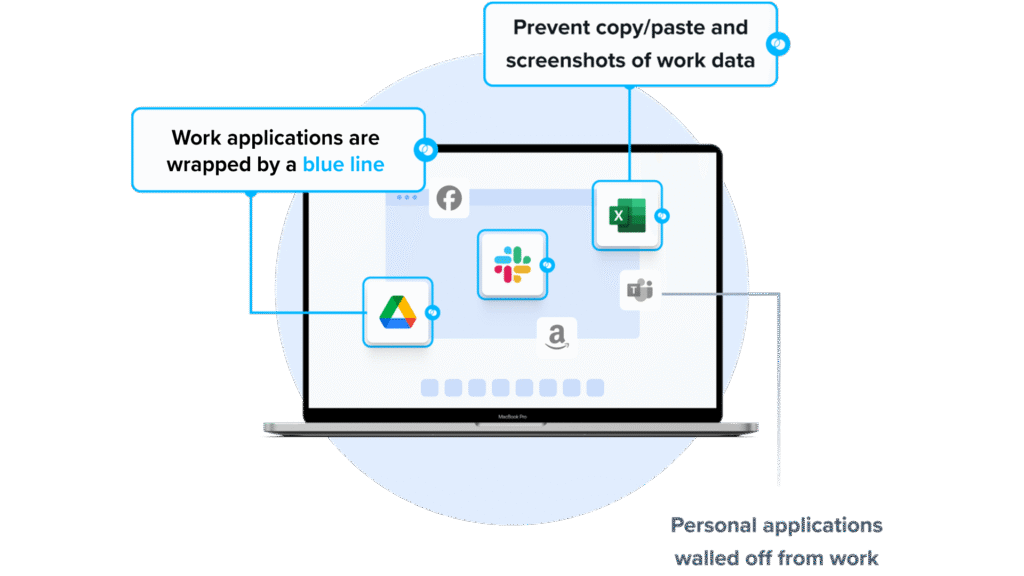
Venn secures company data and applications on unmanaged and BYOD computers through Blue Border, a company-controlled secure enclave installed on a user’s PC or Mac. Work applications run locally inside the enclave, marked by a blue line around each application window, while company data is encrypted and access is governed by IT.
Business activity inside the enclave is isolated from any personal use on the same device, and everything outside it stays private to the user. For AI governance, Venn lets IT define which AI tools are allowed to interact with company applications and data inside the enclave, and blocks AI tools outside Blue Border from reaching protected information even when they run locally on the device.
Key features include:
- AI tool access control: IT defines which AI tools can interact with company apps and data inside the enclave, and unauthorized AI tools are blocked from protected information even when running locally. This covers browser-based and desktop AI such as Claude, ChatGPT, Gemini, and Copilot.
- Secure enclave isolation: Work apps and data run inside a company-controlled Secure Enclave. The blue line around an app window signals it is inside the enclave, which acts like a firewall enforcing policy on what data enters and leaves.
- Data loss prevention and clipboard control: DLP policies govern actions such as copy and paste, printing, downloading, screen capture, and screen sharing within the workspace.
- Local application performance: Work-sanctioned apps run natively on the device, including Chrome, Adobe, Slack, Microsoft Office, Zoom, Teams, VOIP, CAD, and SAP, without virtualization.
- Audit logs and visibility: Centralized administration provides real-time insight into where, when, and from what device a user accessed an app or sensitive data.
- Compliance enforcement: Corporate policies for standards including SOC 2 Type II, HIPAA, SEC, FINRA, PCI, NAIC, and CMMC are enforced inside the enclave.
- User privacy separation: Activity outside Blue Border cannot be seen, tracked, or monitored by the company.
Limitations (as reported by users on G2):
- Performance on some hardware: Some users report the secure enclave can feel slow on certain devices, occasionally affecting speed when accessing applications.
- Customization scope: A few users note customization options are limited for tailoring the workspace to specific needs.
- Support access model: Some users would like the ability to schedule time with a specific support contact rather than reaching the next available representative.
2. Island

Best for: Governing enterprise AI use inside a Chromium enterprise browser
Strengths: In-browser AI access control, prompt redaction, and full audit logs
Things to consider: Requires users to adopt a dedicated browser or extension
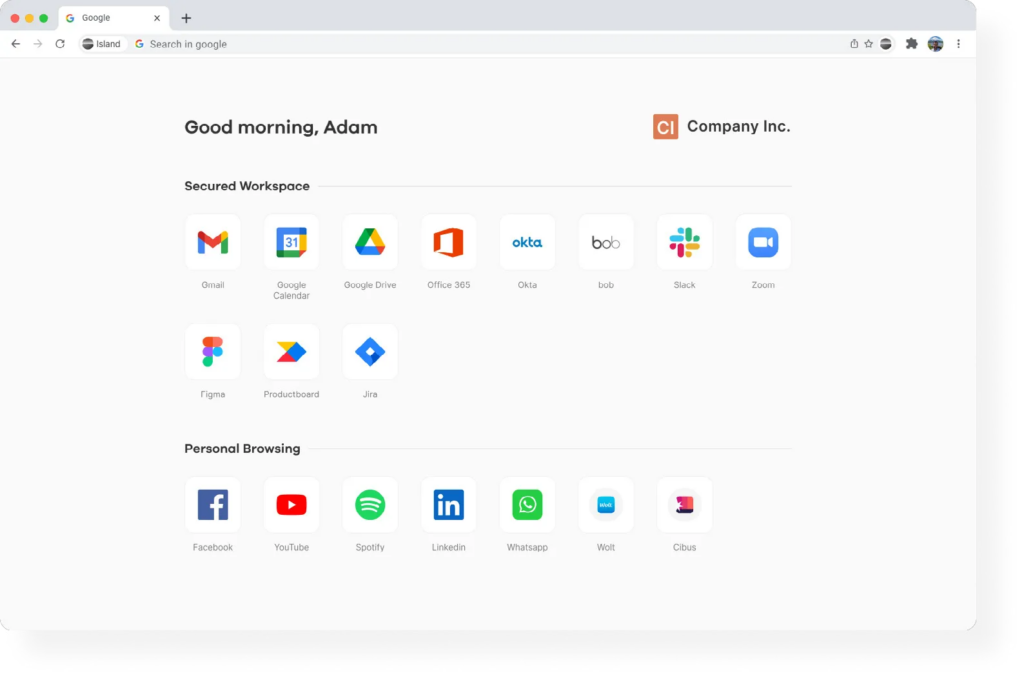
Island is a Chromium-based enterprise browser that embeds AI access and controls into the environment where employees already work. Organizations can place AI chatbots such as ChatGPT, Copilot, Gemini, and Claude in the browser sidebar with real-time page context, and connect AI to company-approved knowledge sources through RAG and MCP integrations.
For governance, administrators define which AI tools, models, and tenants each employee can access based on identity, role, and location, and enforce that policy across web, extensions, desktop, and network from a single platform. Island runs on managed and unmanaged or BYOD devices, applying last-mile controls without managing the whole device. It also applies data protection at the point of interaction, redacting sensitive data before it reaches a provider and intercepting AI responses before they render.
Key features include:
- AI access control: Define which AI tools, models, and tenants each employee can use based on identity, role, and location, enforced across web, extensions, desktop, and network from one platform.
- Prompt and response protection: Redact sensitive data and mask PII before it reaches any AI provider, and intercept AI responses before they render to the user, with controls operating inside the browser.
- Prompt injection defense: The hardened browser architecture intercepts prompt injection attempts at the point where AI and users interact.
- AI audit logging: Capture detailed logs of every AI conversation, prompt, and agent action across web and desktop for compliance and security teams.
- Agent governance: Define permissions for each AI agent, including what it can access, execute, and when human approval is required, with agents running via Island-hosted MCP servers or locally in the browser.
- AI usage visibility: Track AI tool adoption across the organization, including which apps are used and by whom, and guide employees to approved tools with in-browser notifications and redirects.
- BYOD and contractor coverage: Deliver policy-controlled, audited access on personal and unmanaged devices without requiring full device management.
Limitations (as reported by users on G2):
- Performance on some devices: Some users report slow loading, lag, and slower tab switching that can affect daily workflows.
- Compatibility issues: A few users note occasional compatibility problems with certain sites or applications.
- Customization and feature gaps: Some users find customization options limited and note missing features in areas such as the built-in RDP client.
Source: Island

3. LayerX

Best for: Controlling AI use on any browser across managed and BYOD devices
Strengths: Agentless browser extension, shadow AI discovery, and GenAI DLP
Things to consider: Coverage is delivered through the browser and extensions
LayerX is an agentless browser security platform delivered as an extension that works across existing browsers such as Chrome, Edge, Safari, and Firefox, on managed and unmanaged or BYOD devices. It gives security teams visibility and control over how users and on-device agents interact with AI tools, SaaS applications, identities, and data at the last mile, focusing on the interaction itself (the prompt, action, and data exchange) rather than network traffic.
Because it runs as an extension, LayerX does not require network changes, VPNs, or browser replacement, and an endpoint agent extends coverage to desktop AI apps, IDEs, and on-device agents. For AI governance, it maps GenAI usage, discovers sanctioned and unsanctioned AI apps, and enforces guardrails based on user identity and login type, restricting actions such as text input, copy and paste, and file uploads or downloads to AI tools.
Key features include:
- Shadow AI discovery: Detect and catalog AI applications, browser extensions, and embedded AI across the organization, including personal and corporate accounts.
- GenAI DLP: Prevent leakage of sensitive data such as PII, source code, and financial data through prompts, copy/paste, and file uploads to AI tools, with classification and redaction that go beyond regex.
- AI access control: Restrict user access to unsanctioned AI tools or accounts, and apply adaptive, risk-based enforcement ranging from monitoring to warnings to blocking.
- AI misuse prevention: Protect against prompt injection, compliance violations, and other AI-specific risks, and validate AI responses.
- User guidance: Present configurable warning messages linking to AI policies when users access GenAI sites, educating them during use.
- Browser extension and SaaS controls: Discover and classify risky browser extensions, discover shadow SaaS, and enforce data protection across web and SaaS channels.
- BYOD and contractor access: Deploy on managed or unmanaged devices to apply browser-based last-mile control over SaaS and AI access by any user.
Limitations (as reported by users on G2):
- Initial policy setup: Some users note the platform offers many detailed policy options, so initial configuration takes planning, and would like more preset configurations to speed onboarding.
- Learning curve: A few users report the feature-rich dashboard takes time to explore before it becomes easy to navigate.
- Automation and policy handling: Some users find the API limited for automation and note that policies cannot be prioritized, which can complicate policy setup.
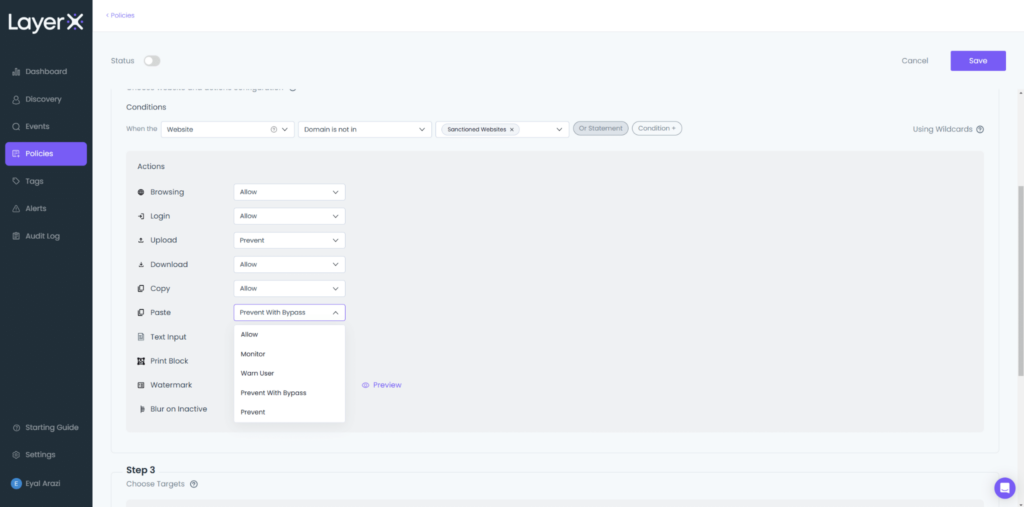
Image: LayerX
AI Governance Tools for Shadow AI Detection
4. Microsoft Purview

Best for: Securing sensitive data across Microsoft 365 and generative AI apps
Strengths: Unified classification, DLP, and data posture management
Things to consider: Advanced features and full value depend on Microsoft licensing
Microsoft Purview is a data security solution that combines data and user context to discover, classify, and protect sensitive information across Microsoft 365, endpoints, cloud services, and generative AI applications. It brings several capabilities together in one portal, including data security posture management, information protection, data loss prevention, insider risk management, and data security investigations.
For organizations focused on AI use, Purview extends its controls to generative AI applications and agents. It monitors how sensitive data is shared with AI apps, applies data loss prevention and sensitivity labeling to AI interactions, and secures data as employees browse and interact with SaaS and generative AI apps in Edge for Business. It also connects with Microsoft Defender XDR, Sentinel, and Security Copilot to bring data and user risk context into wider security workflows.
Key features include:
- Data security posture management: Discovers sensitive data across the digital estate, surfaces data vulnerabilities, and reports on the location of sensitive assets and risky user activities through analytics and trends.
- Information protection and classification: Identifies, classifies, and labels sensitive data using intelligent classifiers and exact data match, with labeling built into Microsoft 365 apps and services.
- Data loss prevention: Creates and enforces policies across Microsoft 365, endpoints, browsers, networks, Fabric, and Microsoft 365 Copilot from a single location.
- Generative AI coverage: Detects sensitive data shared with AI tools, applies labels and DLP to AI interactions, and extends controls to Copilot and agents to reduce oversharing.
- Insider risk management: Identifies potential risks across a range of user activities and feeds alerts into investigation workflows.
- Data security investigations: Uses AI to categorize evidence and run vector searches, and maps correlations between affected data, users, and activities with a data risk graph.
Limitations (as reported by users on G2):
- Setup complexity: Users describe a steep learning curve and a difficult initial setup, including naming labels and rolling out policies across the organization.
- Licensing costs: Some users note that auto-labeling and advanced automated features require additional or higher-tier licenses.
- Limited outside the Microsoft ecosystem: Users report reduced compatibility and integration when working outside Microsoft 365, including with non-Microsoft tools and Mac.
- Reporting and documentation gaps: A few users find reporting and training materials lacking for getting the most out of the product.
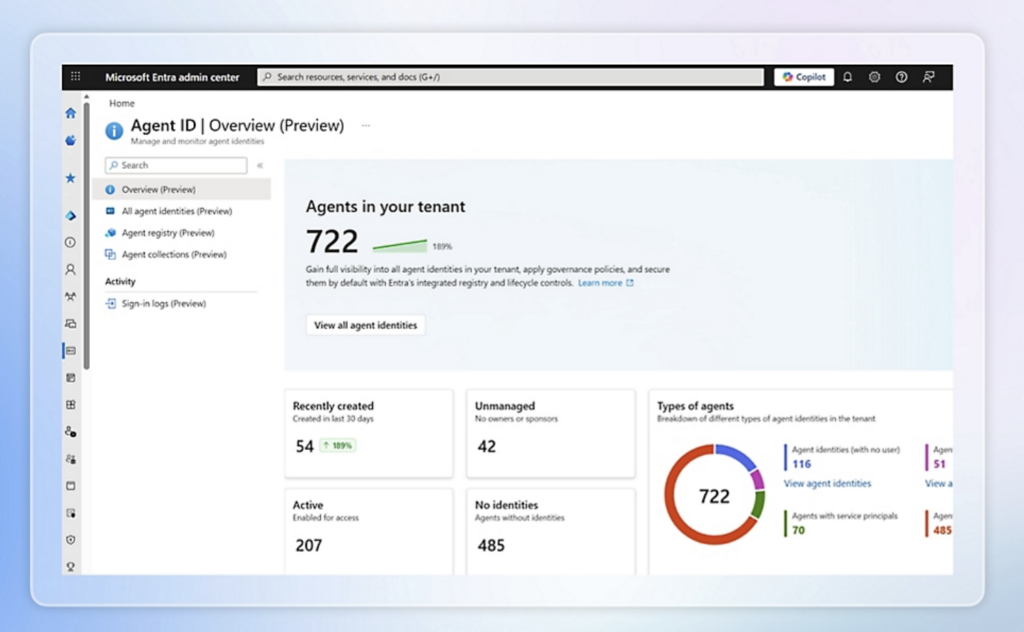
Source: Microsoft
5. Knostic

Best for: Discovering and governing unsanctioned AI use across an organization
Strengths: Shadow AI discovery, usage mapping, and risk-based guardrails
Things to consider: Newer, focused platform that complements existing security tools
Knostic is a governance platform focused on discovering and controlling unsanctioned AI use, often called shadow AI. It scans logs, APIs, and integration points to identify AI tools in use across an environment, including tools that have not been formally approved, and shows which teams and individuals are using them. From this data, Knostic builds an inventory of AI usage by team and department and maps the data exposure and compliance risks associated with each group.
Knostic then applies guardrails so security teams can set organization-wide policies on AI use. It scores and prioritizes the most critical exposures and compliance gaps, and continues to monitor the environment, alerting teams as new AI tools and services appear.
Key features include:
- Shadow AI discovery: Detects sanctioned and unsanctioned AI tools by analyzing logs, API traffic, and integration points across the environment.
- Department and role mapping: Identifies which teams and individuals are using AI and what data those tools can access.
- Risk scoring and prioritization: Highlights the most critical exposures and compliance gaps so teams can address high-impact issues first.
- Policy enforcement: Applies organization-wide guardrails that run in the background to manage AI usage without blocking legitimate experimentation.
- Continuous monitoring: Provides ongoing discovery and alerts as new AI tools or services appear in the environment.
Limitations (based on publicly available sources):
- Emerging vendor: Knostic is a relatively new company with limited public deployment data and few independent benchmarks or case studies.
- Complementary scope: The platform focuses on the AI and knowledge layer and is designed to work alongside existing security tooling rather than replace broader DLP or CASB systems.
- Expanding coverage: Support for some environments and coding assistant integrations is still being rolled out, and certain capabilities are described as early stage.
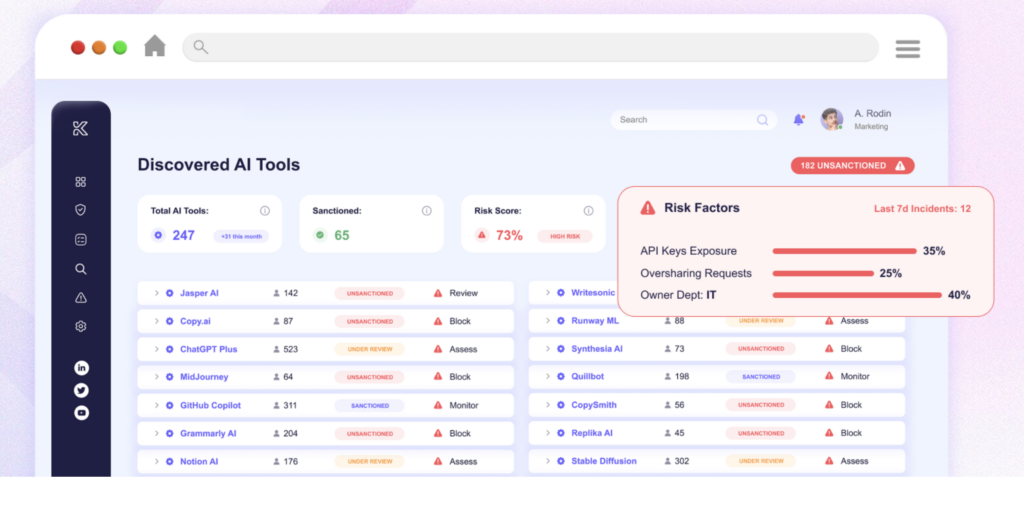
Source: Knostic.ai
6. Netskope

Best for: Discovering and controlling shadow AI across cloud and SaaS apps
Strengths: App risk scoring, inline DLP, and instance awareness
Things to consider: Initial deployment and tuning can be complex
Netskope One is a cloud security platform that provides visibility into and control over how employees use generative AI applications. It identifies AI use across managed and unmanaged SaaS applications and shows, on an AI dashboard, which applications are used, the instance type, and what actions were taken, such as login, upload, or download.
Its Cloud Confidence Index rates risk for more than 82,000 public and private apps, including over 370 genAI apps, with detail on whether an app uses customer data for training, shares data with third parties, or meets compliance requirements. Teams can guide users away from unsanctioned tools toward approved ones such as enterprise ChatGPT and Copilot. Its DLP uses a catalog of over 3,000 data classifiers and 1,800 file types to control sensitive data in prompts and uploads, and its DSPM flags at-risk data across SaaS, IaaS, PaaS, and on-premises sources.
Key features include:
- Shadow AI visibility: Identify AI use across managed and unmanaged SaaS apps, with an AI dashboard showing applications, instance types, and user actions.
- App risk scoring: Use the Cloud Confidence Index to assess risk for genAI and SaaS apps, including data training, third-party sharing, and compliance characteristics.
- Data loss prevention: Apply DLP with a large catalog of data classifiers and file types to protect sensitive data moving into AI tools, including AI-generated responses.
- Instance awareness: Distinguish between personal and corporate instances of the same app and apply different policies to each.
- Real-time coaching: Guide users toward sanctioned AI tools and safe data handling with real-time prompts.
- Behavior analytics: Detect anomalies or misuse of AI tools through user and entity behavior analytics.
- Adaptive access: Apply continuous, risk-based access controls based on user, device, and AI app behavior, and control actions such as upload, download, copy, and print within AI apps.
Limitations (as reported by users on G2):
- Setup complexity: Users report the initial deployment and policy configuration can be complex and time-consuming, particularly in large environments.
- Learning curve: Some users note new administrators face a learning curve, and that the interface is not always intuitive.
- Reporting speed: A few users find detailed reporting and log searches slow with large data volumes and would like more built-in templates.
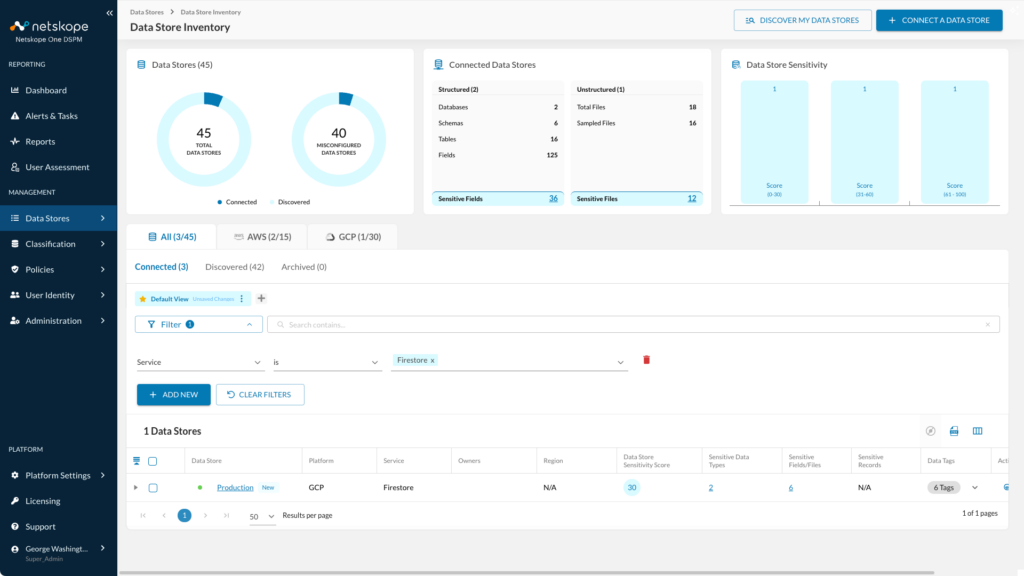
Source: Netskope

AI Governance Tools for Model Risk and Compliance
7. IBM OpenPages
Best for: Managing model risk and enterprise GRC in one platform
Strengths: Modular GRC with model risk governance and AI automation
Things to consider: Enterprise scale can mean cost and a learning curve
IBM OpenPages is a governance, risk, and compliance (GRC) platform that brings risk, compliance, and audit functions into one integrated system. It runs on any cloud or on premises and uses a modular design, so organizations can deploy only the components they need across domains such as operational risk, regulatory compliance, third-party risk, IT governance, policy management, and model risk governance.
For AI and model oversight, the Model Risk Governance module helps organizations centralize their model inventory and apply traceable workflows, integrated reporting, and oversight across the model lifecycle. It can connect to watsonx.governance and AI Factsheets to extend governance to AI models, and it embeds AI to automate tasks such as classification and issue creation.
Key features include:
- Model risk governance: Centralizes the model inventory and applies traceable workflows, integrated reporting, and oversight across the model lifecycle to meet regulatory expectations.
- Risk and control visualization: The GRC Canvas provides an interactive workspace to model processes, risks, and controls with live data.
- AI automation: Embedded AI automates classification and issue creation across governance, risk, and compliance activities.
- Bring your own AI models: An API-based architecture connects watsonx.ai or third-party and custom models to support AI capabilities.
- Agent-based automation: The OpenPages MCP Server lets AI agents create, query, and update GRC objects and integrate with agent frameworks.
- Enterprise scalability: A configurable platform builds workflows, dashboards, and views without custom code and scales across large organizations.
- Enterprise integrations: Open APIs connect BI tools, data platforms, and external systems to export and analyze GRC data.
Limitations (as reported by users on G2):
- Cost: Users describe OpenPages as expensive compared with other GRC tools.
- Learning curve: Several users note a steep learning curve and a platform that can feel complex, especially for new or occasional users.
- Customization effort: Making changes to fields, workflows, or reports often requires admin support and careful planning.
- Reporting usability: Users find the built-in Cognos reporting difficult to use and note the interface can feel dated.
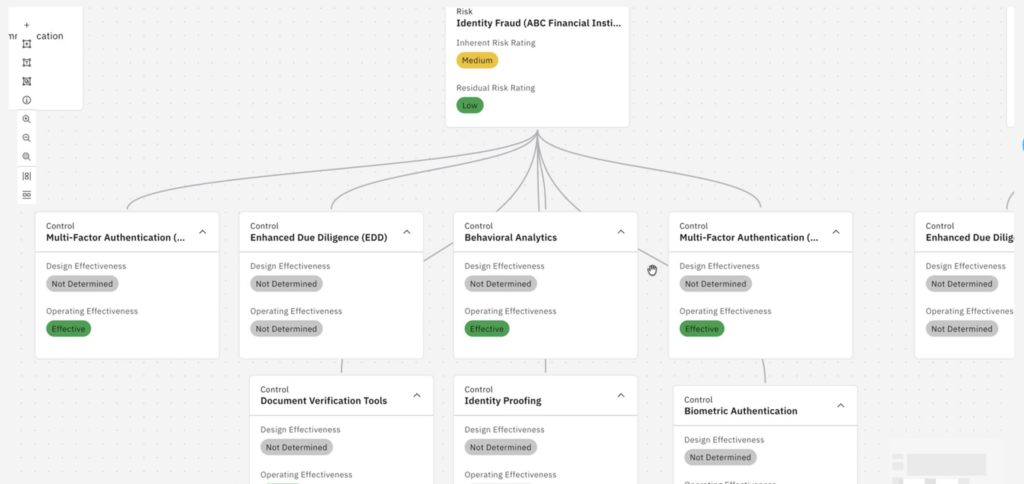
Source: IBM
8. OneTrust AI Governance
Best for: Governing the AI lifecycle from intake to runtime control
Strengths: AI inventory, framework-based risk assessment, and runtime guardrails
Things to consider: Broad platform that can require significant setup effort
OneTrust AI Governance is software for managing risk and compliance across the AI lifecycle, from cataloging AI systems through to runtime enforcement. It maintains a central inventory of models, datasets, agents, and vendors, assigns ownership and lifecycle status, and maps dependencies between components. Teams can standardize how they identify AI risk using templates aligned to frameworks such as the EU AI Act, NIST, and ISO 42001.
Beyond assessment, OneTrust automates approval workflows, attestations, and audit-ready reporting, and monitors AI systems in production for drift, quality, safety, and performance. It can enforce controls programmatically, applying runtime guardrails, data masking, and policy checks across AI platforms and agent environments, and it integrates with services such as Amazon Bedrock, Azure OpenAI, and Databricks Unity Catalog.
Key features include:
- AI inventory and risk assessment: Tracks models, datasets, agents, and vendors in a central inventory with ownership, lifecycle status, and dependency mapping.
- Framework-based risk workflows: Uses EU AI Act, NIST, and ISO 42001 templates to automate risk tiering by use case, system, or component.
- Compliance automation: Provides configurable intake and approval workflows, attestation and signoff tracking, and automated evidence and audit outputs.
- Posture monitoring: Ingests telemetry across AI platforms and continuously observes models and agents for drift, quality, safety, and performance signals.
- Policy violation detection: Detects and logs AI policy violations in real time and identifies PII and sensitive attributes.
- Runtime guardrails: Applies prompt and output filtering, blocks or allows actions by policy, and masks or redacts sensitive data across data and pipelines.
- Agent and MCP governance: Registers agents with a defined purpose, enforces permissions and allowed actions, and applies MCP policy enforcement with audit logs.
Limitations (based on publicly available sources):
- Implementation complexity: Reports commonly describe deployment as complex and time-consuming, with some organizations using professional services and multi-month rollouts.
- Pricing and scope: The platform carries a higher minimum spend, and larger deployments across multiple modules can become costly.
- Occasional bugs: Some users report encountering unexpected bugs during use.
- Learning curve: Navigation and configuration can take time to understand for new users.
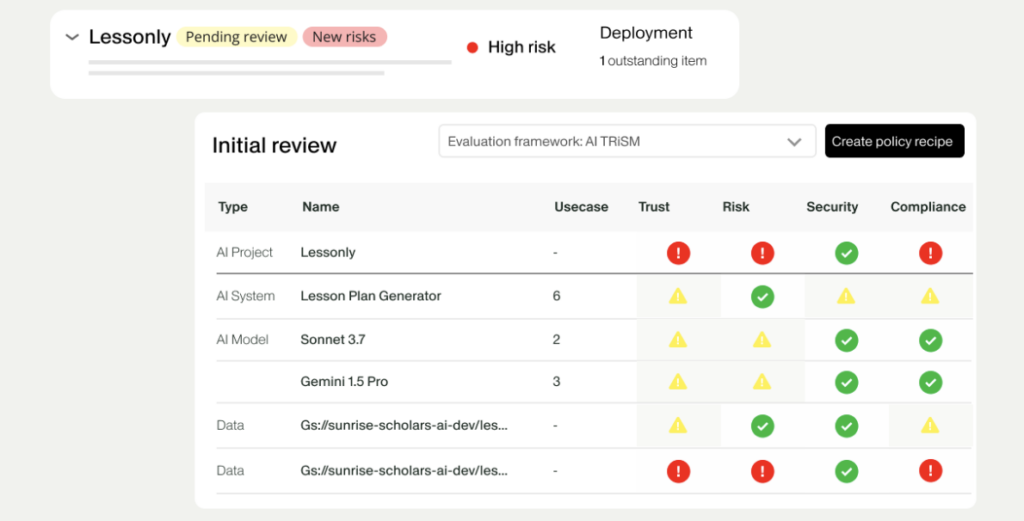
Source: OneTrust
9. Credo AI

Best for: Governing the AI lifecycle against major regulations and standards
Strengths: AI registry, policy packs, and runtime governance
Things to consider: Enterprise-focused platform with limited public pricing
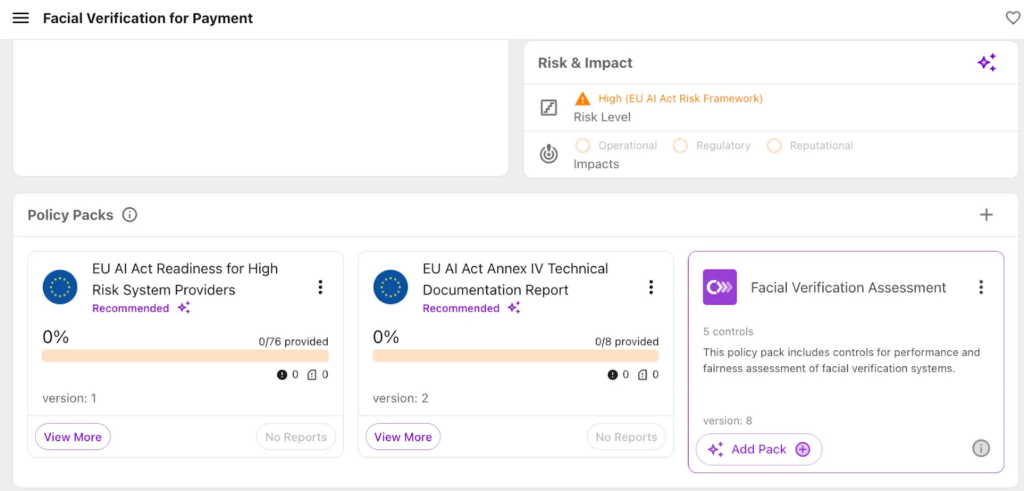
Credo AI is an AI governance platform for tracking, assessing, and managing AI systems across their lifecycle. It maintains a centralized inventory of AI systems, including models, applications, agents, and vendors, with auto-discovery of shadow AI, agent cards that record purpose, tools, data sources, and guardrails, and dependency mapping across connected components.
A governance knowledge graph connects regulations, business context, and system configurations, so the platform can apply different controls to, for example, a model used in EU healthcare versus one in US financial services. For risk and compliance, Credo AI identifies AI-specific risks with a library of risk scenarios and mapped controls, and provides pre-built policy packs for the EU AI Act, NIST AI RMF, ISO 42001, and SOC 2 with governance workflows, approval gates, and automated evidence. Its runtime governance ingests agent traces for continuous evaluation of policy violations, drift, and unsafe behavior, with human-in-the-loop escalation.
Key features include:
- AI registry and discovery: Maintain a central inventory of models, apps, agents, and vendors with shadow AI discovery, agent cards, and dependency graphs.
- Risk intelligence: Assess AI-specific risks continuously using a risk scenario library with mapped controls, policy inheritance, aggregate risk scoring, and automated red-teaming and drift detection.
- Policy packs: Apply pre-built regulatory policy packs for the EU AI Act, NIST AI RMF, ISO 42001, and SOC 2, with custom guardrails and compliance mapping.
- Governance workflows: Run intake, approval gates, attestations, and automated evidence generation with audit trails.
- Runtime governance: Ingest agent traces for continuous evaluation, real-time compliance monitoring, and human-in-the-loop escalation.
- Agent governance: Register agents, assess agentic risk with a control library, apply governance workflows, and monitor agents in production.
- Integrations: Connect to cloud and AI ops, agent platforms, GRC and InfoSec tools, and dev and MLOps systems through built-in integrations.
Limitations (based on publicly available sources):
- Enforcement through integrations: Some enforcement is delivered through planned integrations with CI/CD, CASBs, and API gateways rather than native runtime controls, so the platform centers on governance, policy, and documentation workflows.
- Documentation for advanced use: Publicly reported feedback points to limited documentation and training resources for more advanced configurations.
- Pricing transparency: The platform does not publish pricing publicly and uses a tiered subscription model aimed at enterprises, so buyers must contact sales for a quote.
Source: Credo AI

AI Governance Tools for Data Classification and DLP
10. Varonis
Best for: Discovering, classifying, and protecting sensitive data at scale
Strengths: Automated classification, exposure remediation, and exfiltration alerts
Things to consider: Full rollout can be resource-intensive to deploy and tune
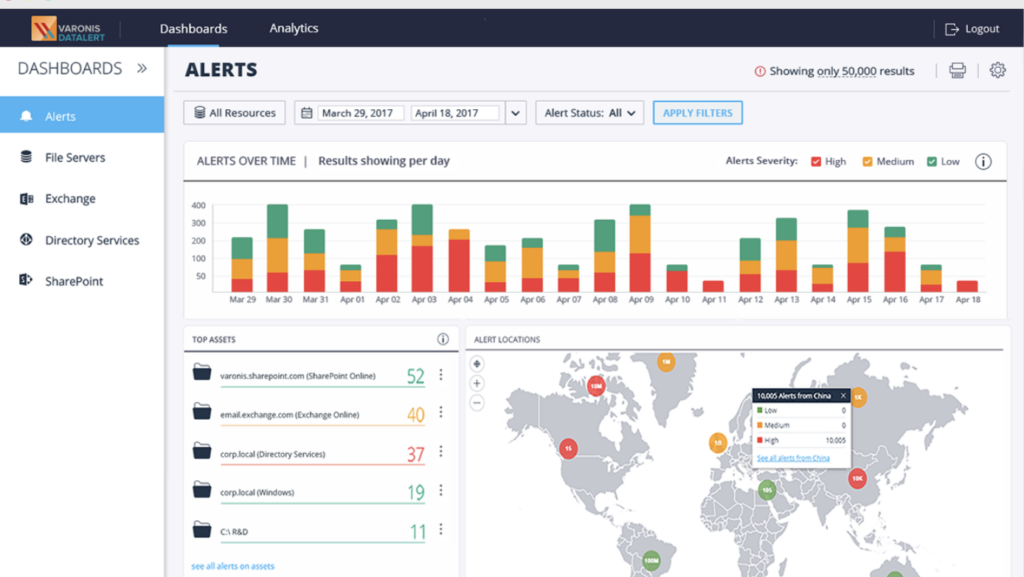
Varonis is a data security platform that discovers, classifies, and protects sensitive data across cloud, SaaS, and on-premises stores. Its data discovery and classification combines AI with pattern matching to find and label sensitive information such as PII, PCI, PHI, passwords, secrets, and tokens, and it builds a file-level inventory of where sensitive data lives and how exposed it is.
Its data loss prevention is agentless and cloud-native, using API-based analysis to monitor data activity and stop exfiltration. Varonis detects public exposure and misconfigurations, alerts on abnormal behavior, and can automate responses and remediation. It also integrates with Microsoft Purview Information Protection to enhance labeling, which feeds downstream DLP controls, and connects to AI tools such as Microsoft Copilot and ChatGPT.
Key features include:
- Data discovery and classification: Combines AI and pattern matching to classify sensitive data at scale across structured, unstructured, and semi-structured sources, with out-of-the-box policies.
- Agentless DLP: Uses API-based analysis to discover and classify data at rest, monitor activity, and stop exfiltration without endpoint agents.
- Exposure remediation: Detects public exposure and misconfigurations, reduces the blast radius, and automatically fixes risky posture.
- Threat detection and response: Alerts on abnormal behavior, automates responses, and offers 24×7 managed data detection and response.
- Labeling and Microsoft integration: Automatically applies and corrects labels and integrates with Microsoft Purview Information Protection to strengthen downstream DLP.
- Comprehensive data inventory: Builds a file-level record of sensitive data by type, prioritized by exposure, activity, and staleness.
- Scalable and local scanning: Uses incremental scanning to stay current and can run AI models on local compute to keep data within the environment.
Limitations (as reported by users on G2):
- Complex deployment: Users report the platform can be complex to implement, particularly for smaller organizations.
- Cost: Several users describe Varonis as expensive.
- Resource requirements: Users note it can require significant resources, and updates or integrations sometimes need additional technical support.
- Interface and reporting: Some users find the interface and reporting could be more intuitive, especially in large or cloud-heavy environments, with an initial learning curve.
Source: Varonis
11. Nightfall AI

Best for: Preventing sensitive data leaks across SaaS, endpoints, and AI apps
Strengths: AI-based classification, data lineage, and shadow AI controls
Things to consider: Cloud and SaaS focused, without on-premises coverage
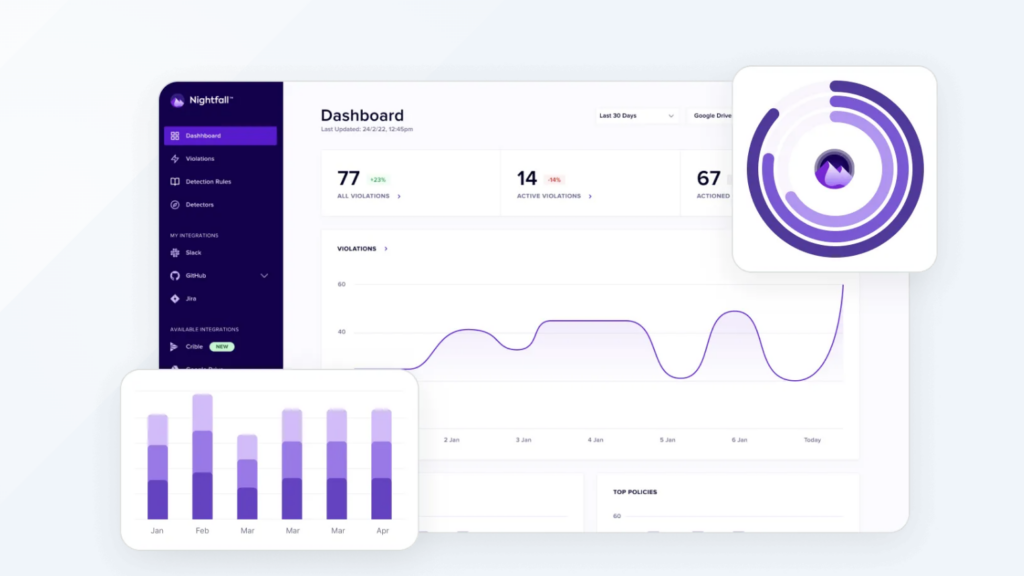
Nightfall AI is a data loss prevention platform built around AI-based detection. It uses more than 100 machine learning models, LLM-based file classifiers, and computer vision models to classify sensitive content, and it pairs content inspection with data lineage tracking that follows information from source to destination. Coverage spans SaaS apps, endpoints, email, browsers, and AI applications.
For AI use, Nightfall monitors interactions with tools such as ChatGPT, Copilot, Gemini, and Claude through browser plugins and endpoint agents, and intercepts sensitive data in prompts, file uploads, or clipboard actions before it reaches those tools. It also secures AI agents and MCP environments by intercepting tool calls, blocking prompt injection attempts, and inventorying MCP servers. Deployment is API-based for SaaS, with lightweight agents for endpoints.
Key features include:
- AI-based detection and classification: Uses over 100 ML models, LLM file classifiers, and computer vision to classify content such as PII, PHI, PCI, secrets, and credentials.
- Data lineage tracking: Traces information from source to destination, maintaining visibility even when data is copied, renamed, or transformed.
- Shadow AI controls: Monitors AI interactions in real time and blocks sensitive data in prompts, file uploads, or clipboard actions before it reaches AI tools.
- AI agent and MCP security: Intercepts agent tool calls, blocks prompt injection attempts, classifies responses, and inventories MCP servers running across endpoints.
- Data detection and response: Scans in real time, quarantines exposed data such as API keys in Slack, and blocks sensitive content in outbound email.
- Insider risk detection: Identifies unusual download patterns and gradual exfiltration using data lineage and LLM-based risk scoring.
- Broad integrations: Connects via API to Microsoft 365, Google Workspace, Slack, Salesforce, Atlassian, and Notion, with agents for macOS and Windows.
Limitations (as reported by users on G2):
- On-premises coverage: The platform focuses on cloud, SaaS, endpoint, and browser environments and does not cover on-premises infrastructure.
- Integration gaps: Some users note that certain features are missing for specific integrations, with items still on the product roadmap.
- Reporting depth: Users want more customizable reporting and issue-specific views, as dashboards can lack drill-down granularity.
- Support response times: Some users report inconsistent post-deployment support response times.
Source: Nightfall
12. BigID
Best for: Classifying and governing sensitive data across data stores and AI
Strengths: ML classification, DSPM, DLP, and AI data governance
Things to consider: Enterprise scale can mean higher cost and setup effort
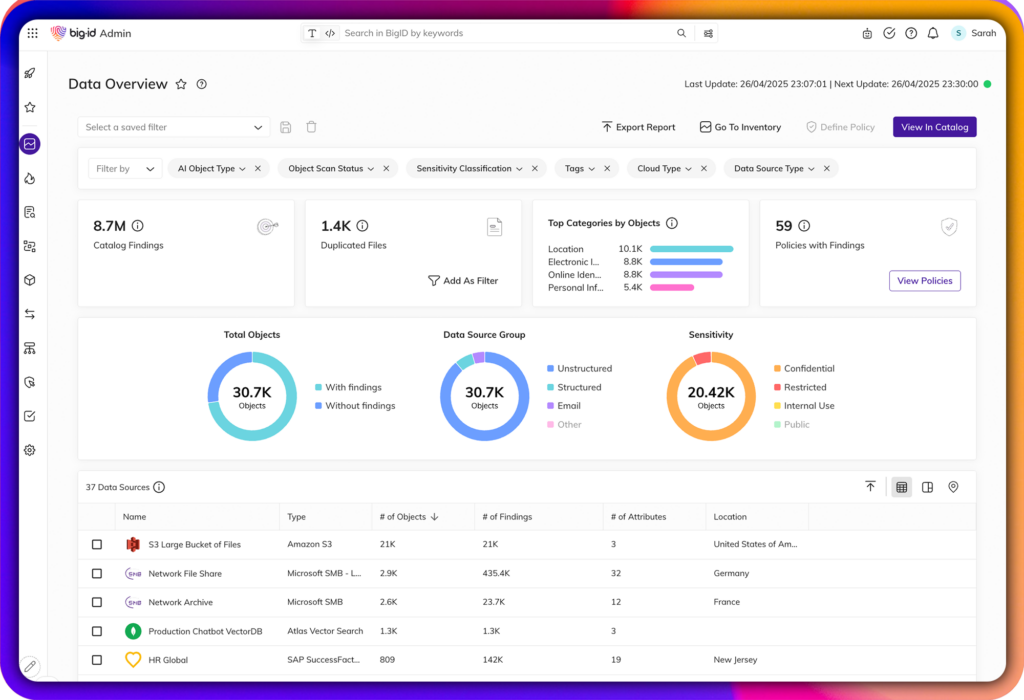
BigID is a data security platform that discovers, classifies, and governs sensitive data across cloud, SaaS, on-premises, hybrid, and AI environments. It brings data discovery, classification, DSPM, DLP, access intelligence, remediation, and AI data security into one platform, and uses patented classification with over 1,000 pre-trained classifiers across more than 100 languages, applying ML, NLP, and pattern matching rather than static rules alone. Deployment is agentless and can run locally without backhauling or copying data to the cloud.
BigID classifies data by sensitivity, type, policy, residency, ownership, and business context, then connects that classification to action. It can strengthen DLP by enriching existing tools with classification and sensitivity context, and it governs data used by AI models, prompts, RAG pipelines, and training sets, flagging over-exposed records and shadow AI and triggering labeling, masking, redaction, retention, and deletion.
Key features include:
- Data discovery: Find sensitive, regulated, critical, dark, and shadow data across cloud, SaaS, on-prem, hybrid, and AI environments across hundreds of sources.
- Patented classification: Classify data with over 1,000 ML, NLP, and pattern-based classifiers across 100+ languages, with custom, tunable classifiers to reduce false positives.
- Security posture management: Assign risk scores based on sensitivity, access, and exposure, and continuously monitor to surface the highest-risk data.
- DLP enrichment: Strengthen DLP enforcement by adding accurate data classification and sensitivity context, including DSPM-augmented DLP.
- AI data governance: Classify and govern data used by models, agents, copilots, prompts, RAG, and training sets, and flag over-exposed records and shadow AI.
- Access intelligence: Identify over-privileged access, overexposed data, insider risk, and access control violations.
- Automated remediation: Take action with workflows for labeling, masking, redaction, access reduction, retention, and deletion.
Limitations (as reported by users on G2):
- Cost: Some users describe BigID as expensive, which can be a barrier for mid-sized organizations.
- Interface and detail views: A few users find the interface slow at times and note that drilling into file-level detail can be cumbersome, with some data requiring export to view fully.
- Classification tuning: Some users report false positives in classification that require manual effort, along with a learning curve for new users.
Source: BigID
-1.webp)
How to Choose the Right AI Governance Solution for Your Organization
The right AI governance solution depends less on feature sets and more on where in your environment the governance gap actually lives. For securing AI across remote workforces, the questions below surface what matters most.
Four Questions to Ask Before Evaluating Vendors
1. Where does your workforce actually use AI? If most AI activity is browser-based and on managed devices, an enterprise browser or cloud-based DLP tool may cover the majority of risk. If your workforce uses personal or contractor-owned laptops, you need a solution with enforcement reach at the device level.
2. Do you own the endpoints you’re trying to govern? If not, MDM, endpoint agents, and network monitoring are impractical or privacy-violating. The solution needs to work on a device it doesn’t manage.
3. Are you governing AI model development or AI tool access? These are distinct problems. Model risk platforms address the former. Shadow AI detection and endpoint enforcement address the latter. Most distributed workforce AI governance challenges are the latter.
4. Does your current solution cover desktop AI and OS-embedded AI, or only browser-based tools? This is the question that exposes the gap for most organizations. If the answer is browser-only, the enforcement surface doesn’t match the actual threat surface.
AI Governance in 2026
AI governance tools span a wide range of capabilities — from model risk and compliance documentation to shadow AI detection, data classification, and endpoint enforcement. Most platforms provide meaningful coverage within managed, corporate environments. The gap that consistently goes unaddressed is the unmanaged endpoint: where contractors, remote employees, and BYOD workers operate every day, on personal devices that traditional governance tools can’t reach.
For IT and security leaders managing distributed workforces, securing AI for remote workforces requires governance controls that follow the work rather than the device. Blue Border® provides that enforcement layer; a company-controlled work environment on any PC or Mac, deployed in minutes, with no hardware to ship and no VDI to maintain.
See how Blue Border® governs AI on unmanaged devices →

Any worker. Any laptop. Any AI workflow. Fully secured.
Schedule a demo to see how Blue Border® secures company data and apps without shipping laptops, running VDI, or managing personal endpoints.