
Most Reliable Data Protection Providers for AI Applications: 8 Solutions Compared


See Venn first in Google Search
Add as a preferred source on Google
TL;DR: Data protection providers for AI applications control what sensitive data reaches AI tools through prompts, uploads, and transfers. Venn Blue Border is best for BYOD and desktop AI on unmanaged devices, Island and Prisma Browser fit browser-centric controls, and Microsoft Purview fits Microsoft 365 and Copilot environments.
What Are Data Protection Providers for AI Applications?
Data protection providers for AI applications are tools and platforms that secure sensitive data as it moves through AI systems. They help protect prompts, model responses, training data, retrieved documents, and other information processed by large language models (LLMs) and machine learning applications.
These providers typically inspect data before it reaches a model and after the model produces a response. They can detect and block personally identifiable information (PII), credentials, financial records, protected health information, and other sensitive content. Some also provide data masking, tokenization, encryption, access controls, and configurable policies.
This is part of a series of articles about AI data security
Free eBook:
Secure Remote Access that Doesn’t Drive Users Crazy!
Secure your entire extended workforce without issuing devices or VDI. Keep your organization agile, compliant, and secure.
In this article:
- What Are Data Protection Providers for AI Applications?
- Data Protection Providers for AI Applications at a Glance
- Why AI Applications Require Specialized Data Protection
- Key Capabilities to Look for in an Reliable AI Data Protection Provider
- What Makes a Data Protection Provider Reliable?
- Notable Data Protection Providers for AI Applications
- Conclusion
Data Protection Providers for AI Applications at a Glance
The table below summarizes the key differences between the data protection providers covered in this article. We explore each provider in more detail in the sections that follow.
| Category | Solution | Best For | Key Strengths | Things to Consider |
| Secure Workspace and Enterprise Browser Providers | Venn Blue Border | Securing company data and AI use on BYOD and unmanaged Macs and PCs | Governs browser, desktop, and OS-level AI from a local secure enclave | Requires installing an enclave app on each user’s Mac or PC |
| Secure Workspace and Enterprise Browser Providers | Island AI Protect | Governing AI apps, agents, and MCP servers across browser and endpoint | Inline prompt, file, and tool call inspection with PII redaction | Island Desktop requires the Island Browser to be installed |
| Secure Workspace and Enterprise Browser Providers | Prisma Browser | Browser-based GenAI controls within a Palo Alto Networks stack | Prompt redaction and 1,000+ DLP classifiers inside the browser | Extension version is not recommended for unmanaged devices |
| AI Data Security and DLP Platforms | Microsoft Purview Data Security | Protecting data in Microsoft 365, Copilot, and Edge for Business | Shared classifiers and sensitivity labels across DLP and AI controls | Requires Microsoft 365 E3 or equivalent licensing |
| AI Data Security and DLP Platforms | Netskope Skylight AI Security | Inline AI app control and data protection across cloud and endpoint | Instance-level controls separate corporate and personal AI accounts | Policy design and tuning can take significant time |
| AI Data Security and DLP Platforms | Cyberhaven AI Security | Tracing sensitive data into AI tools and endpoint agents | Data lineage plus AI risk scoring across five dimensions | Relies on an endpoint agent for AI tool discovery |
| AI Data Security and DLP Platforms | Nightfall AI | Inline DLP for AI agents, MCP servers, endpoints, and SaaS | Pre-trained detectors for secrets, code, and PII without tuning | Alert and dashboard customization options are limited |
| AI Data Security and DLP Platforms | Harmonic Security | Classifying and governing employee AI usage by business use case | Intent-based prompt classification with block, warn, or log | Few independent user reviews and no public pricing |
Why AI Applications Require Specialized Data Protection
Sensitive Data Can Be Exposed Through Prompts and File Uploads
Employees may paste source code, customer records, credentials, financial information, or internal business data directly into prompts. This is difficult to control because sensitive data can appear inside otherwise legitimate requests. A user might also expose information unintentionally when asking an AI tool to summarize, translate, or analyze content.
File uploads increase the potential impact because one document can contain thousands of sensitive records or several types of protected information. Data protection tools can inspect prompts and uploaded files before submission. Depending on policy, they can warn the user, redact sensitive fields, block the transfer, or allow approved data to reach AI services.
AI Tools May Retain or Process Data Outside Corporate Environments
When employees submit information to an external AI service, the data can leave infrastructure controlled by their organization. It may be processed in another cloud environment, stored in logs, retained for a defined period, or handled by subprocessors. The exact behavior depends on the provider, product tier, region, and configuration.
This creates governance and compliance concerns even when the AI service itself has strong security controls. Organizations need to determine which data categories can be shared with each provider and under what conditions. Data protection systems can enforce these rules before transmission rather than relying only on the AI provider’s retention and privacy settings.
Shadow AI Creates Unmanaged Data Flows
Employees can start using public AI services without going through procurement, security review, or IT deployment. This creates shadow AI: AI applications that the organization does not formally manage. Security teams may have limited visibility into which services are being used, which employees use them, and what corporate information is submitted.
The problem extends beyond well-known chatbots. Users may access AI writing tools, coding assistants, meeting applications, browser extensions, and specialized SaaS products with embedded AI features. AI-focused data protection can identify these services, assess their use, and apply different policies to approved, restricted, and unknown applications.
Desktop AI Applications Can Bypass Browser-Based Controls
Organizations often monitor AI usage through browser extensions, secure web gateways, proxies, or controls applied to web sessions. Native desktop applications can create a visibility gap because their traffic and user interactions do not necessarily pass through browser-level inspection. As a result, policies that work for an AI service’s website may not cover its desktop client.
Desktop applications can also interact more directly with local resources. Depending on their permissions, they may receive pasted clipboard data, open local files, or integrate with development and productivity tools. Endpoint-level data protection can inspect these interactions closer to their source and apply consistent controls across browser and native AI applications.
Key Capabilities to Look for in an Reliable AI Data Protection Provider
1. AI Application Discovery and Visibility
Organizations need an accurate inventory of the AI applications employees actually use. Discovery should identify approved services as well as shadow AI, including:
- Chatbots
- Coding assistants
- AI search tools
- Browser extensions
- Meeting assistants
- SaaS products with embedded AI functionality
Useful visibility goes beyond detecting an application. Security teams should be able to see which users and devices access it, how often it is used, and whether employees use corporate or personal accounts. Application risk information can also help teams distinguish enterprise services with appropriate controls from consumer tools with unsuitable data-handling practices.
Continuous discovery is important because the AI application landscape changes quickly. Employees can adopt a new service without installing software or requesting IT approval. Automatic detection reduces reliance on manually maintained lists of AI domains and applications.
2. Granular AI Application Access Controls
Organizations often need more flexibility than simply allowing or blocking generative AI. Granular controls should make it possible to permit approved enterprise AI applications while restricting consumer, unknown, or high-risk services. Policies can consider factors such as:
- User identity
- Department
- Device status
- Application
- Account type
A development team, for example, could receive access to an approved coding assistant while employees handling regulated customer information receive more restrictive policies. Controls should also operate at the feature level when possible. An organization may permit employees to use an AI application’s chat functionality but disable file uploads or prevent access through personal accounts. This approach preserves useful AI capabilities without granting unrestricted data access.
Related content: Read our article about the top options for managing access controls to AI tools
3. Application-Level Data Loss Prevention
Application-level data loss prevention (DLP) evaluates sensitive information in the context of the application receiving it. This is important because the same data transfer may be acceptable when sent to an approved enterprise AI service but prohibited when sent to a public chatbot. The provider should identify relevant data categories, such as:
- PII
- Payment information
- Health records
- Credentials
- Source code
- Trade secrets
- Internal documents
Detection can use predefined classifiers, regular expressions, document labels, fingerprints, or organization-specific rules. Policies should support different responses according to the sensitivity and destination. Low-risk activity might generate a warning, while transfers containing credentials or regulated records can be blocked entirely. This reduces unnecessary restrictions on legitimate AI use.
Related content: Read our article about AI DLP
4. Prompt and File Upload Protection
Prompts are a direct path for sensitive information to enter an AI system. Employees can intentionally or accidentally include customer records, proprietary code, internal strategy, authentication information, or other confidential data while asking a model to analyze or rewrite content.
Protection should inspect prompts before they are submitted rather than discovering the exposure afterward. Depending on policy, the system can:
- Block the prompt
- Remove sensitive values
- Warn the user
- Allow the submission when the destination is approved
File uploads require equally detailed inspection. A file that appears harmless based on its name can contain thousands of sensitive records. Providers should inspect supported file contents and metadata and apply policies based on classification, sensitivity labels, or detected information rather than relying only on file extensions.
5. Clipboard and Data Transfer Controls
Copy and paste can bypass security policies focused only on uploads or network traffic. Employees can copy customer information, source code, or internal documents from a corporate application and paste the content directly into an external AI interface.
Clipboard controls should consider both the source and destination of the data. For example, copying text between approved corporate applications may be permitted while pasting the same content into a personal AI account is blocked. Protection should also cover other transfer mechanisms where relevant. These include:
- Drag and drop
- File uploads
- Downloads
- Printing
- Moving data between managed and unmanaged applications
Controlling multiple channels closes gaps that users could otherwise exploit intentionally or accidentally.
6. Protection for Browser-Based and Desktop AI Applications
Many AI controls initially focus on websites because browser traffic is relatively straightforward to identify and manage. However, major AI services increasingly provide native desktop clients that can interact directly with:
- Local files
- Clipboard contents
- Operating system features
A provider should therefore protect both browser-based and desktop AI usage. Policies should remain consistent when an employee switches from a service’s website to its native application rather than creating an enforcement gap.
This capability may require controls at multiple layers, including the browser and endpoint. Organizations should verify exactly which operating systems, browsers, desktop clients, and application versions are covered, since support can differ significantly between providers.
7. Secure Separation Between Work and Personal Data
Employees frequently use corporate and personal accounts on the same device. An AI application may therefore be approved for business use while a personal account on the same service remains unsuitable for confidential corporate information.
Data protection should distinguish between these contexts where technically possible. Organizations can allow sensitive information to move into an enterprise AI tenant governed by contractual and administrative controls while preventing the same information from reaching a personal account.
Separation should also apply in the opposite direction when necessary. Security controls should protect corporate resources without collecting or controlling unrelated personal activity. This is especially important for:
- Shared devices
- Contractor devices
- Employee-owned devices
8. Support for BYOD and Contractor Devices
Bring-your-own-device (BYOD) programs and contractor environments reduce the organization’s control over endpoints. Traditional security approaches may require full device enrollment or endpoint agents, which employees and external contractors may be unable or unwilling to install.
AI data protection should provide ways to secure corporate information without requiring complete management of the underlying device. Options can include:
- Browser-based controls
- Protected workspaces
- Application-specific policies
- Isolation between corporate and personal environments
Organizations should also evaluate what happens when an unmanaged device accesses sensitive corporate resources and then attempts to transfer that information to an AI service. Controls should follow the corporate data closely enough to prevent obvious exfiltration paths without unnecessarily monitoring personal activity.
9. Real-Time Data Exfiltration Prevention
AI interactions happen quickly, so detecting a policy violation minutes or hours later may be too late. Once confidential information has been submitted to an external model, the organization may have limited ability to retrieve it or control subsequent processing.
Real-time prevention evaluates an action before the data transfer completes. Before deciding whether to allow or block the interaction, the provider can consider the:
- Content
- Destination application
- Account
- User identity
- Device
- Corporate policy
Enforcement does not always need to be binary. Providers can redact sensitive values, warn users, require confirmation, redirect employees toward an approved AI application, or block only the sensitive portion of an action. These options help balance security with usability.
Related content: Read our article about data exfiltration prevention
10. AI Usage Monitoring and Audit Logging
Organizations need a reliable record of AI activity to understand adoption, investigate incidents, and demonstrate that security policies are working. Monitoring should capture relevant events across approved and unapproved AI applications rather than focusing only on one model provider. Audit logs can include the:
- Application
- User
- Device
- Timestamp
- Action
- Policy triggered
- Data classification
- Enforcement result
Security teams should be able to determine whether an event involved a prompt, file upload, clipboard transfer, or another action and why it was allowed or blocked. Providers should also offer practical ways to use this information. Searchable logs, dashboards, alerts, reports, and integrations with SIEM or security operations platforms make AI activity easier to incorporate into existing workflows. Retention and access controls for the logs themselves are also important because audit records can contain sensitive security context.
What Makes a Data Protection Provider Reliable?
A reliable data protection provider for AI applications should consistently prevent unauthorized data transfers without disrupting legitimate work. Reliability depends on more than detection accuracy. Organizations should evaluate how well a provider enforces policies across different applications, devices, and data transfer methods, how it handles failures, and whether its controls remain effective as AI tools change. Key factors include:
- Consistent policy enforcement: Applies the same data protection rules across supported AI applications, accounts, and transfer channels without leaving enforcement gaps.
- Accurate sensitive data detection: Identifies confidential information with low false-positive and false-negative rates, including in prompts, documents, and source code.
- Real-time protection: Inspects and blocks unauthorized transfers before sensitive data reaches external AI services, rather than relying only on alerts after exposure.
- Broad application coverage: Protects browser-based AI, desktop applications, and agent workflows, with clearly documented limitations for unsupported tools.
- Resilience during failures: Defines whether sensitive transfers are blocked or allowed when inspection services, endpoint agents, or network connections become unavailable.
- Reliable updates and maintenance: Maintains detection capabilities and application compatibility as AI services introduce new interfaces, features, and data transfer methods.
- Transparent audit records: Records policy decisions, affected applications, users, and enforcement actions so security teams can investigate incidents and verify protection.
- Proven operational performance: Provides evidence of detection accuracy, enforcement latency, endpoint resource consumption, and stability under realistic workloads.
- Independent validation: Offers customer references, third-party assessments, or documented test results that help organizations verify security claims before deployment.
Notable Data Protection Providers for AI Applications
How we selected these providers: We shortlisted data protection providers for AI applications based on AI application discovery, granular access controls, DLP for prompts and file uploads, clipboard and data transfer controls, coverage for browser and desktop AI, and AI usage audit logging.
Secure Workspace and Enterprise Browser Providers
1. Venn Blue Border

Best for: Securing company data and AI use on BYOD and unmanaged Macs and PCs
Strengths: Governs browser, desktop, and OS-level AI from a local secure enclave
Things to consider: Requires installing an enclave app on each user’s Mac or PC
Venn Blue Border is a secure workspace that creates a company-controlled enclave directly on a Mac or PC. It runs on company-issued, third-party, and personal BYOD devices, whether managed or unmanaged. Work applications, data, networking, and AI tools run locally inside the enclave, marked by a blue line around their windows.
For AI data protection, Blue Border controls which AI tools can reach company data, which tenants they connect to, and what data can move into them. These controls cover browser-based AI, desktop AI applications, and OS-level assistants. Activity outside the enclave, including personal AI use, is not visible to the company or to Venn.
Key features include:
- AI tool sanctioning across browser, desktop, and OS: IT allows company-sanctioned AI tools and blocks the rest, either as individual tools or as whole categories of AI service. Desktop copilots and OS assistants such as Windows Copilot and Apple Intelligence cannot reach company data unless they are sanctioned.
- Native desktop AI inside the enclave: Approved desktop AI applications, including Claude Chat, Claude Cowork, and Claude Code, run natively inside Blue Border with DLP coverage applied to them.
- Company accounts and tenants only: IT can permit company-provided AI accounts while blocking personal logins entirely. Only dedicated IPs access corporate AI inside Blue Border, so company AI tools work only within the enclave.
- DLP on prompts, uploads, and transfers: DLP applies to everything that leaves the enclave, including AI prompts, file uploads, copy and paste, downloads, screenshots, and printing. Applications that are not running in Blue Border cannot access company data.
- Separation of work and personal data: Only company data inside the enclave is governed. Personal apps, files, browsing, and personal AI tenants outside Blue Border are not seen, tracked, or monitored.
- BYOD and contractor support without VDI: Blue Border does not manage the device itself, and management or removal of data is limited to the enclave contents. Users save files only to Venn Disk, which is isolated, encrypted, and remotely wipeable.
- AI usage audit logging: Every AI interaction inside the enclave is logged, giving IT visibility into which AI tools are used across the company and by whom.
- Network controls for work traffic: Work traffic from inside the enclave routes through Venn’s built-in VPN gateway or through the organization’s existing private network.
Limitations (as reported by users on G2):
- Performance on some devices: Some users report that the secure enclave can feel slower on certain machines, even when hardware meets the stated requirements.
- Support scheduling: Users cannot book time with a specific support engineer and are routed to the next available team member.
- Guidance for less common features: Some users would like more contextual guidance when using less frequently accessed options for the first time.
2. Island AI Protect

Best for: Governing AI apps, agents, and MCP servers across browser and endpoint
Strengths: Inline prompt, file, and tool call inspection with PII redaction
Things to consider: Island Desktop requires the Island Browser to be installed
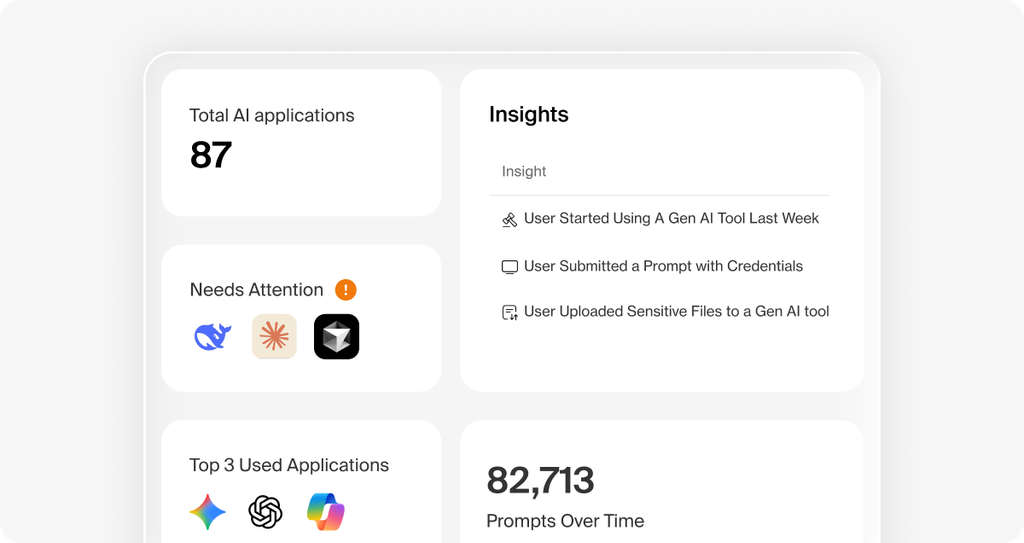
Island provides AI governance controls that operate where AI is used: in the browser, on the endpoint, on the network, and at each tool call. One policy framework applies to both human users and non-human identities such as AI agents. Island inspects interactions at the presentation layer, including prompts, responses, files, tool calls, and tool responses.
Island governs browser-based tools such as ChatGPT, Claude, Gemini, Copilot, and Perplexity, as well as coding agents such as Cursor, Windsurf, and Cline. Coverage also extends to desktop agents, autonomous agents, MCP servers, Bash commands, and homegrown AI applications built on LangChain, LangGraph, or vendor SDKs.
Key features include:
- AI discovery and inventory: Island discovers AI tools, agents, non-human identities, MCP servers, and Bash commands in use. It also scans installed browser extensions and code packages and assigns risk scores to MCP servers, coding agents, skills, and models.
- DLP and redaction for prompts and files: Island enforces DLP and content moderation on each AI interaction. It detects and redacts PII in prompts, files, and tool calls.
- Prompt injection and threat detection: A dedicated prompt injection detector runs inline, paired with an LLM-as-a-judge evaluator and DLP on egress. Island also blocks jailbreaks, malicious URLs, compromised MCP servers, and unauthorized Bash execution.
- Agent and MCP controls: A central MCP gateway applies per-source policy, identity, and audit, and can block a compromised MCP server. Admins can restrict action types per tool to read, write, or execute and issue time-boxed credentials to agents.
- Content-level audit trail: Island audits prompts, responses, tool calls, and tool responses. Audit records are tied to user, device, agent, and policy and can be exported for SOC 2, ISO 27001, and internal review.
- Coverage for BYOD and third parties: The same AI governance policies apply to unmanaged devices, contractors, and partners without MDM, VDI, or heavy endpoint agents.
- AI usage and cost tracking: Island tracks AI token spend per user, team, and project, flags underused tools, and identifies tasks running on premium models that lighter models could handle.
Limitations (as reported by users on G2):
- Restrictive controls for daily work: Some users find that copy and paste, screen sharing, and quick data transfers become inconvenient under strict policies and would prefer more role-based flexibility.
- Dependency between components: Island Desktop requires Island Browser to be installed.
- Policy priority management: Policy priority is based on order, which can make conflicting policies with small differences harder to manage.
- Browser performance and compatibility: Some users report lag, slower tab switching, and occasional compatibility issues with certain sites.
- Extension support: Fewer browser extensions are supported compared with Chrome or Edge, which can limit a full transition for work tasks.
- Policy violation details: Users would like more detailed explanations of why an action was blocked when troubleshooting violations.
Source: Island
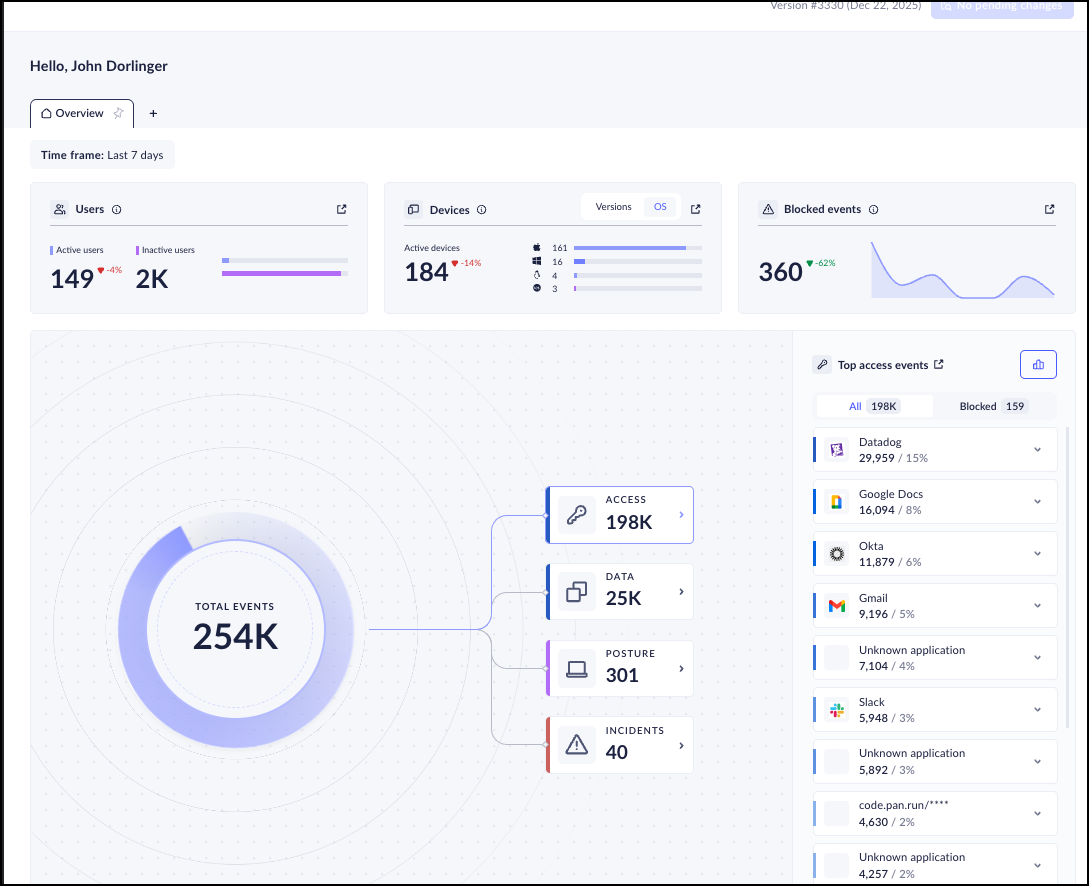
3. Prisma Browser

Best for: Browser-based GenAI controls within a Palo Alto Networks stack
Strengths: Prompt redaction and 1,000+ DLP classifiers inside the browser
Things to consider: Extension version is not recommended for unmanaged devices
Prisma Browser is an enterprise browser from Palo Alto Networks, built on Chromium and integrated with Palo Alto Networks security engines. It is available as a dedicated desktop browser, as an extension for existing consumer browsers, and as a mobile app. It applies access controls, threat prevention, AI governance, and data protection within the browser.
For GenAI tools such as ChatGPT, Prisma Browser provides visibility and last-mile data controls. It can redact sensitive data in prompts before they leave the enterprise environment and restrict copy and paste or file uploads to unsanctioned AI apps. The browser can be deployed through an email link without admin privileges.
Key features include:
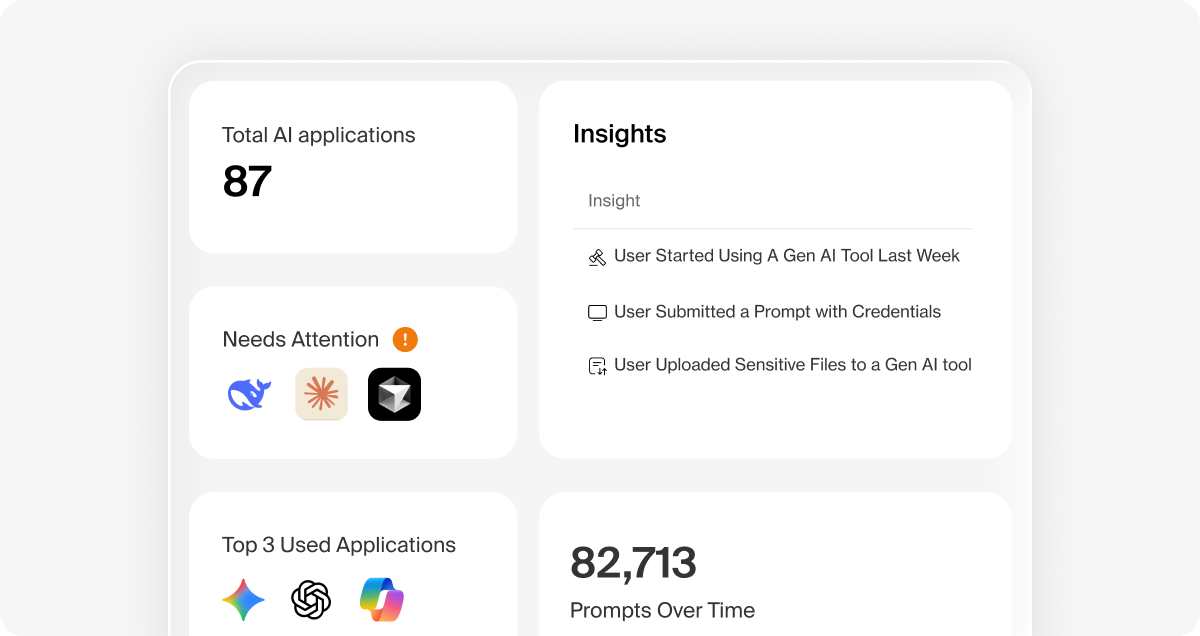
- GenAI and shadow AI visibility: Prisma Browser provides visibility into GenAI apps and agentic workflows. It discovers the SaaS apps, AI apps, and browser extensions in use, including non-SSO accounts.
- Prompt redaction and upload controls: Sensitive data in prompts can be redacted automatically before submission. Copy and paste and file uploads to unsanctioned AI apps can be restricted.
- Enterprise DLP in the browser: Native DLP includes over 1,000 AI-driven classifiers and 22+ compliance profiles such as HIPAA and GDPR. Last-mile controls can block screenshots, printing, and unauthorized file saving.
- Directional data controls: Policies use directional context to block data transfers from sanctioned corporate apps to personal accounts.
- Risk-based access policies: Zero-trust policies adapt to user risk score, location, and content sensitivity. Step-up authentication and just-in-time approvals apply to high-risk actions such as printing or data exports.
- Extension security: Prisma Browser discovers extensions in use, monitors them for threats, and blocks risky or over-permissioned extensions.
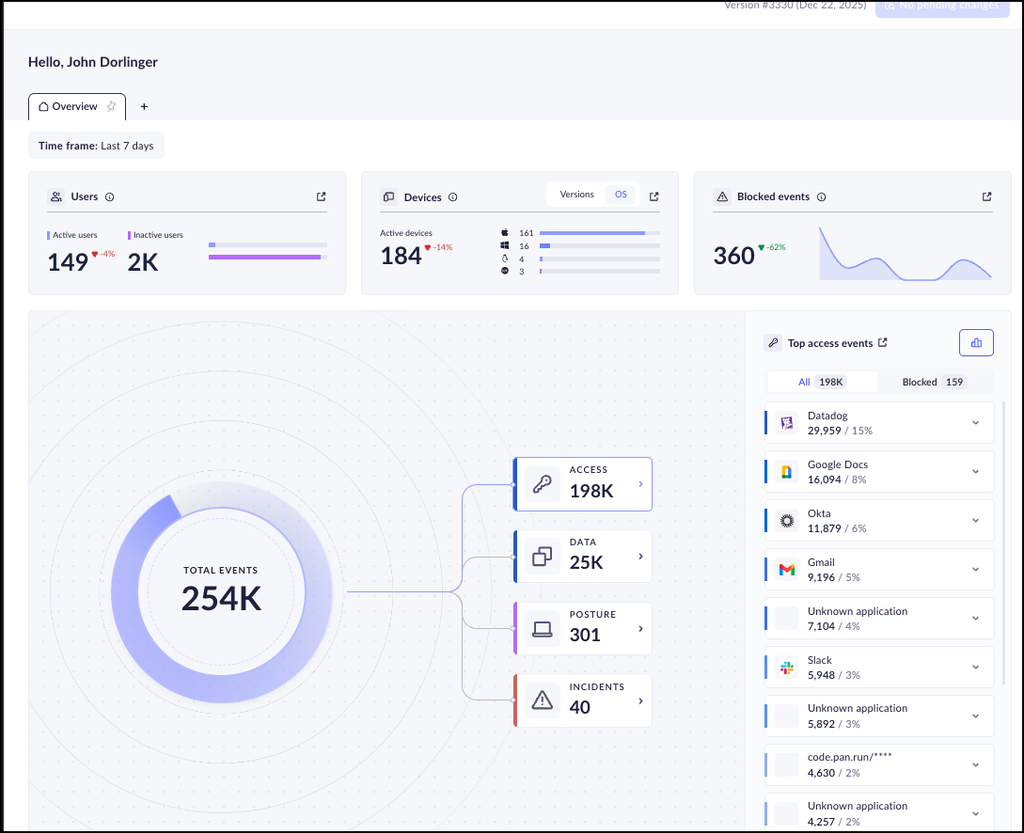
- Audit trails and forensics: The browser collects audit trails across web actions and provides browser forensics and session replay for investigations.
- Isolation on unmanaged devices: Enterprise apps are isolated from untrusted endpoints, so work can be enabled on both managed and unmanaged devices.
Limitations (as reported by users on G2):
- Complex initial configuration: Users report that initial setup and policy tuning can be complex and often require familiarity with the Palo Alto Networks ecosystem.
- Performance under load: Some users notice slower loading of data-heavy pages and higher memory and CPU use due to continuous security checks.
- Restrictive data controls: Blocking copy and paste, file transfers, or certain browser components can interfere with normal workflows.
- Compatibility with legacy apps and extensions: Some legacy web applications, custom workflows, and Chrome extensions do not behave correctly.
- Cost: Several users describe pricing as high, particularly for smaller organizations.
- Documentation and support: Some users would like more detailed documentation for complex integrations and faster support responses.
Source: Palo Alto Networks
AI Data Security and DLP Platforms
4. Microsoft Purview Data Security

Best for: Protecting data in Microsoft 365, Copilot, and Edge for Business
Strengths: Shared classifiers and sensitivity labels across DLP and AI controls
Things to consider: Requires Microsoft 365 E3 or equivalent licensing
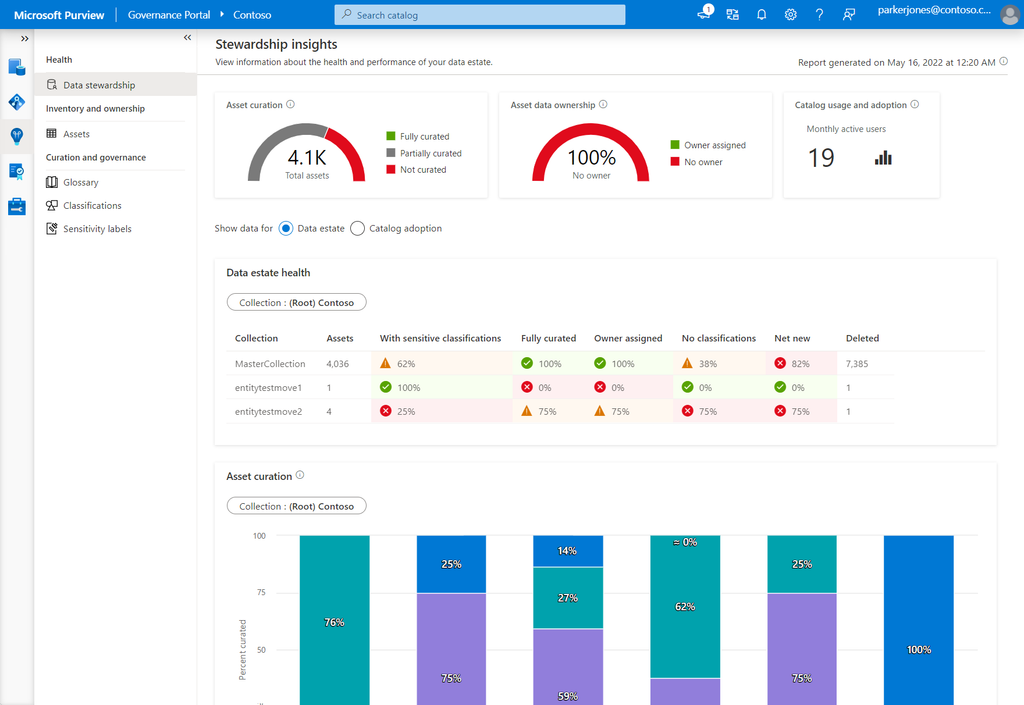
Microsoft Purview data security is a set of integrated capabilities, including Data Loss Prevention, Information Protection, and Insider Risk Management, that discover and protect data across clouds, devices, and generative AI applications. Policies are managed from the Microsoft Purview portal and combine data context with user context.
Purview extends its data security controls to Microsoft 365 Copilot and agents, and to SaaS and generative AI apps accessed through Microsoft Edge for Business. The capabilities are offered as part of the Purview Suite, which requires Microsoft 365 E3, or Office 365 E3 with Enterprise Mobility + Security E3.
Key features include:
- Unified DLP policies: Admins create, manage, and enforce DLP policies across cloud apps, email, devices, Microsoft Fabric, and AI from one portal. Policy templates and built-in controls for cloud workloads and Windows devices are available.
- Classification and sensitivity labeling: A common set of classifiers, exact data match, and other classification methods identify sensitive data. Sensitivity labeling and document protection are built into Microsoft 365 apps and services.
- Copilot and generative AI controls: Purview data security controls extend to Microsoft 365 Copilot and agents to address oversharing and data leaks. Edge for Business protects data as employees interact with SaaS and generative AI apps.
- Risk-adaptive protection: Protection levels adjust dynamically to user risk through Insider Risk Management, which is built into Data Loss Prevention.
- Data risk visibility: Analytics reports show where sensitive assets are located and which user activities are risky. Purview also identifies coverage gaps and provides policy recommendations.
- AI-assisted investigations: Investigators can search Microsoft 365 data, including Copilot prompts and responses, emails, and Teams messages. AI categorizes evidence, and data risk graphs show correlations between affected data, users, and activities.
- Security operations integration: DLP alerts can be configured and triaged in Purview and integrated into Microsoft Defender and Microsoft Sentinel workflows.
Limitations (as reported by users on G2):
- Setup complexity: Several users report that implementation is difficult and requires careful planning before moving to production.
- Bulk rule management: There is no option to update multiple rules through PowerShell after complex builder logic is used, which lengthens maintenance.
- Export limits: Activity explorer allows extraction of up to 10,000 activities at a time.
- False positives with custom types: Sensitive information types built with regular expressions can generate false positives.
- Endpoint DLP configuration: Users report limited configuration options in endpoint DLP policies.
- Cost and resource use: Some users describe the product as costly, and one reports high memory consumption.
Source: Microsoft

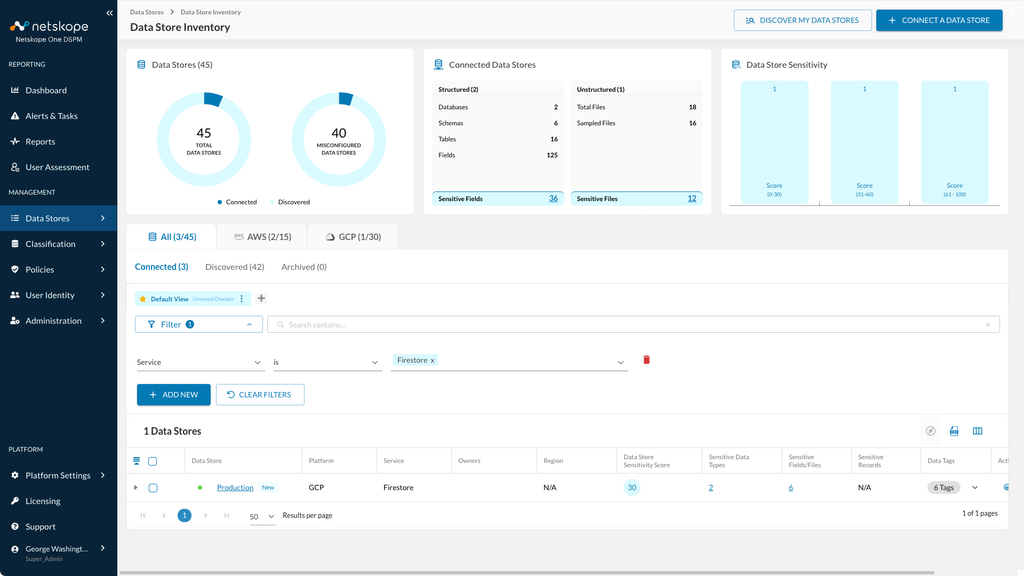
5. Netskope Skylight AI Security

Best for: Inline AI app control and data protection across cloud and endpoint
Strengths: Instance-level controls separate corporate and personal AI accounts
Things to consider: Policy design and tuning can take significant time
Netskope Skylight is Netskope’s AI security offering for discovering, governing, and protecting AI use across people, data, self-hosted models, and agents. Inline inspection covers more than 1,800 AI apps and distinguishes corporate accounts from personal and shadow AI. Endpoint visibility identifies AI running locally, including known AI agents, LLMs, and MCP servers.
Enforcement runs at runtime on Netskope’s NewEdge network, which spans more than 120 data centers across 80+ regions. Redaction and blocking stop sensitive data before it reaches a model, and automated adversarial testing runs against models an organization hosts itself.
Key features include:
- Continuous AI inventory: Users, apps, agents, models, and AI interactions are discovered and inventoried continuously across cloud, endpoint, and network.
- Instance-level access control: Control operates at the account instance level, so approving an AI tool company-wide does not approve personal logins to the same tool.
- Real-time user coaching: When a user takes a risky action, Netskope explains the risk at that moment and points the user to the approved option instead of applying an unexplained block.
- Data protection for prompts and AI pipelines: One classification standard extends from endpoint, email, and SaaS into prompts, training exports, and retrieval pipelines. A match redacts the sensitive detail and allows the task to continue.
- Data discovery for AI stores: Continuous discovery classifies sensitive data across every data store that feeds a model before training takes place.
- Agent and MCP controls: Netskope risk-assesses MCP servers based on their security posture and classifies agent actions by risk level. High-risk actions, such as deleting a repository, are blocked before they execute.
- Self-hosted model security: Automated red teaming tests self-hosted models with malicious prompts. Model access is authenticated, rate-limited, and logged, with guardrails moderating prompts.
Limitations (as reported by users on G2):
- Lengthy deployment and tuning: Users report that tuning DLP, CASB, and zero-trust policies to production level can take months and may require professional services.
- Learning curve and console usability: The management console can feel cluttered or unintuitive, and new administrators need training on advanced features.
- Policy troubleshooting: Diagnosing why a specific rule blocked or allowed traffic can be difficult with complex rule chains and exceptions.
- Pricing: Several users describe pricing as high, especially for mid-sized organizations.
- Blocking of legitimate sites: Some users report that genuine websites are occasionally blocked, disrupting work.
- Agent reliability: Some users report client disconnects or the agent entering fail-closed mode without admin changes, and issues on Mac devices.
Source: Netskope

6. Cyberhaven AI Security

Best for: Tracing sensitive data into AI tools and endpoint agents
Strengths: Data lineage plus AI risk scoring across five dimensions
Things to consider: Relies on an endpoint agent for AI tool discovery
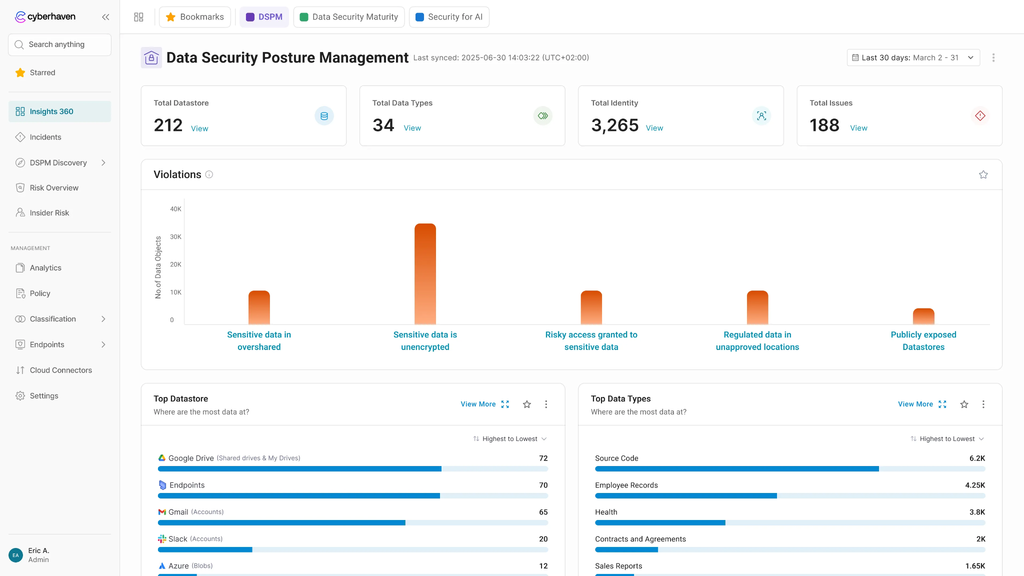
Cyberhaven AI Security is part of Cyberhaven’s platform, which manages DLP, insider risk management, data security posture management, and AI security from one console. An endpoint agent inventories AI tools as they appear, including SaaS generative AI apps, coding assistants in IDEs and CLIs, open-source agent frameworks, and MCP servers.
Cyberhaven applies policies at the data level using data lineage, which traces where sensitive data originated and how it has moved. Block, warn, and redact decisions consider this data context together with the risk score of the AI tool involved.
Key features include:
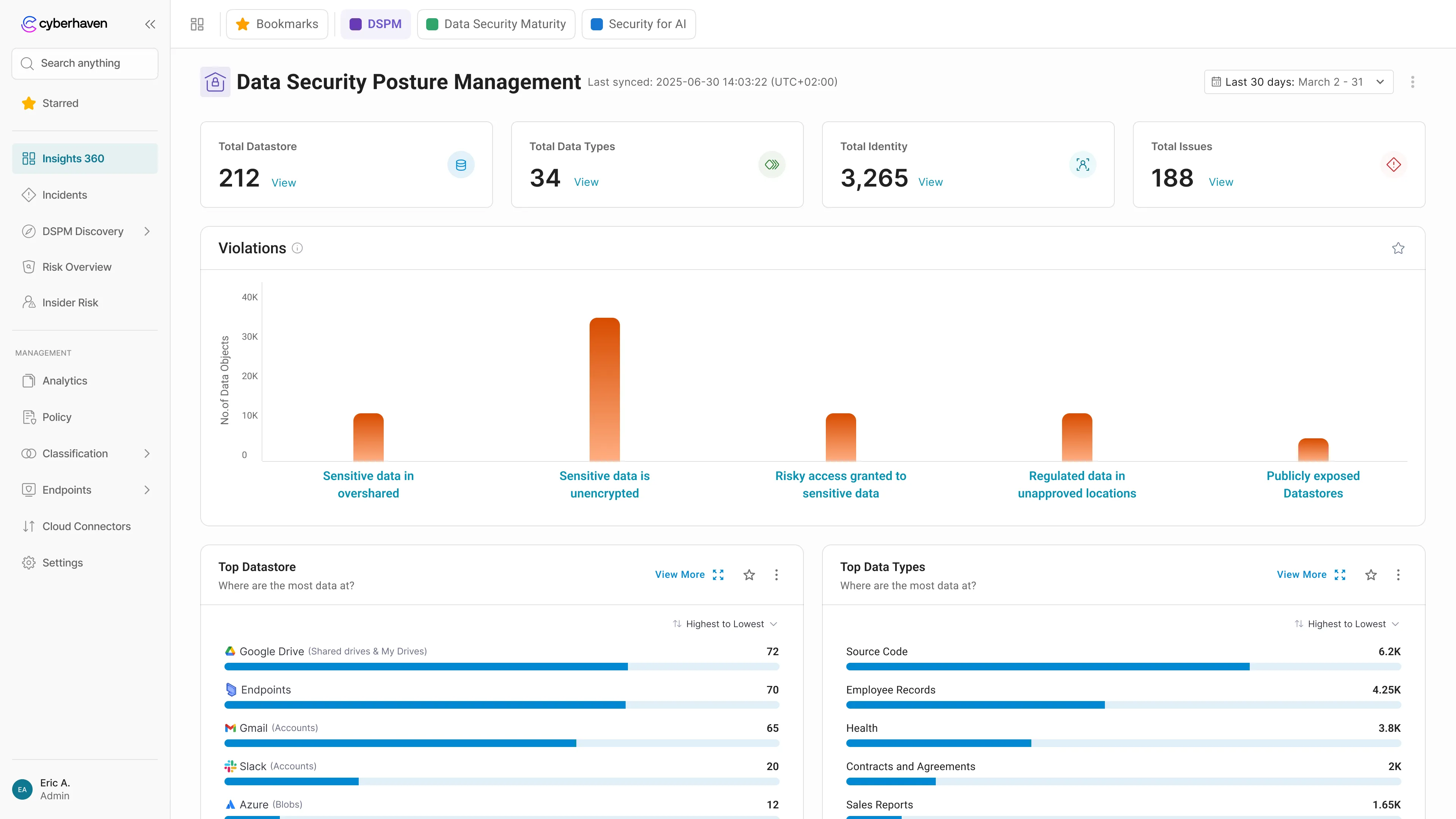
- Shadow AI discovery: Cyberhaven continuously inventories AI apps and agents across endpoints, browsers, CLIs, and IDEs without manual cataloging. Applications are categorized as Sanctioned, Unsanctioned, Tolerated, or Restricted.
- AI Risk IQ scoring: Each AI application and agent receives a risk score across data sensitivity, model integrity, compliance adherence, user access controls, and security infrastructure. Cyberhaven maintains the scores quarterly.
- AI data flow control: Runtime guardrails at the prompt and response level block high-risk data movement and redirect users to sanctioned tools. Employees receive plain-language explanations of the relevant policy.
- Data lineage for AI interactions: Each agent action is linked to the data it touched, showing where that data came from and where it went next.
- Agentic AI visibility: Cyberhaven reconstructs the execution lifecycle of agent interactions, including tool calls, data access, and multi-turn conversation context. It also discovers and monitors MCP servers and AI connectors.
- Compliance audit records: The platform keeps a record of AI agent activity, data access, and policy enforcement actions for audit workflows and regulatory reporting.
- Unified console: AI security policies, alerts, and reporting are managed in the same console used for DLP and insider risk management.
Limitations (as reported by users on G2):
- Custom policy creation: Users report that policies with multiple conditions and overlapping exception lists can be difficult to configure.
- Tuning effort: Tuning the platform for large organizations takes dedicated attention.
- Endpoint performance: One user reports sign-in issues and slower computers, and another notes performance can be affected during peak traffic.
- Alert behavior: Alerts are not cumulative across policies, and URL detection can sometimes attribute activity to the last active URL.
- Reporting formats: Automated reports are delivered only as PDF files.
- Interface usability: Some users find the interface less intuitive at first.
Source: Cyberhaven
7. Nightfall AI

Best for: Inline DLP for AI agents, MCP servers, endpoints, and SaaS
Strengths: Pre-trained detectors for secrets, code, and PII without tuning
Things to consider: Alert and dashboard customization options are limited
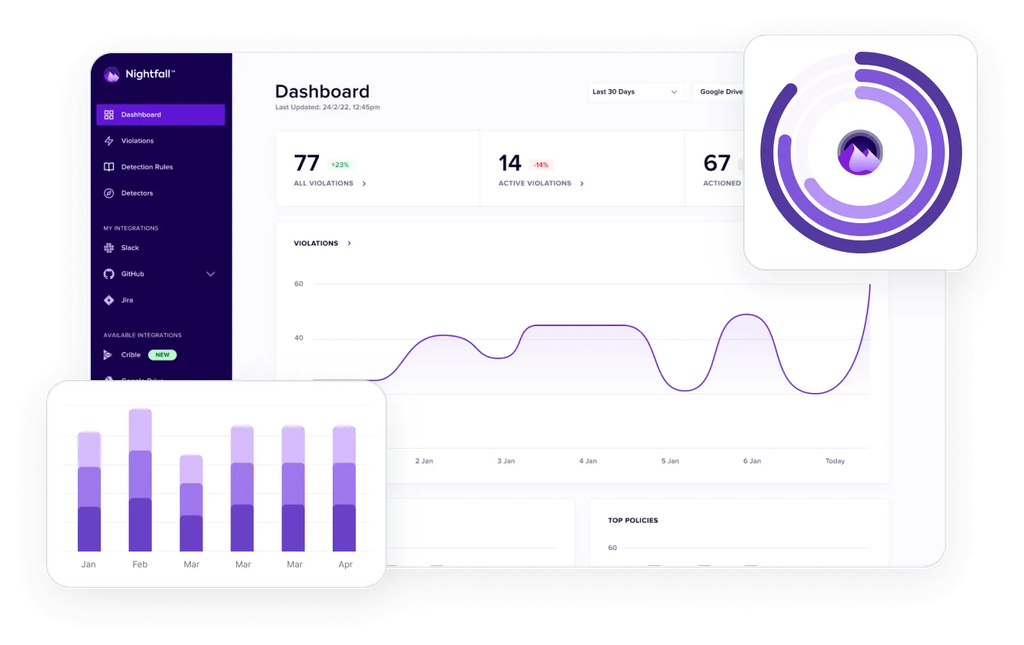
Nightfall is an AI data security and data loss prevention platform that covers AI agents, MCP servers, endpoints, SaaS applications, and email. It enforces policy inline at the point of action, on the device and inside agent workflows, before data leaves the organization.
Coverage includes local egress, unmanaged web, clipboard, USB, AI agent tool calls, and local IDEs. Detection relies on pre-trained ML detectors and LLM classifiers and deploys without a rule tuning cycle.
Key features include:
- Shadow AI prevention: Nightfall stops corporate data from leaving through personal ChatGPT accounts, unmanaged copilots, and browser AI tools.
- AI agent and MCP governance: Admins approve required MCP servers and block the rest by default, with policy enforced on every tool call. Tool call responses are classified in flight before the agent uses them.
- Prompt injection interception: Nightfall detects and blocks malicious instructions hidden in prompts, files, and tool responses before they reach the model or redirect an agent.
- Exfiltration prevention with lineage: Data movement is blocked across channels, with traceability from origin to destination retained for investigation.
- Pre-trained detection: ML detectors and LLM classifiers identify secrets, code, and customer PII. Dynamic risk scoring correlates insider and agentic risk across multi-step activity.
- Discovery and classification: Nightfall finds sensitive data already exposed across SaaS applications.
- Investigation context: Each event includes who acted, their role, data lineage, and prior behavior. AI copilots provide recommendations and help with alert triage.
Limitations (as reported by users on G2):
- Alert configuration: Users would like more configuration options for alerts, including how sensitive content is displayed to security teams and how alerts are classified.
- Reporting customization: Dashboards and reports have limited customization options.
- Support response times: Some users report that support tickets have waited several days for updates.
- Browser and agent requirements: The browser extension requires end users to log in via Chrome, and some advanced capabilities require an agent.
- Detection tuning: Fine-tuning detectors to reduce false positives takes effort, and creating custom keyword detectors requires uploading a text file.
- Bulk actions: Bulk actions are not available in the UI.
Source: Nightfall AI

8. Harmonic Security

Best for: Classifying and governing employee AI usage by business use case
Strengths: Intent-based prompt classification with block, warn, or log
Things to consider: Few independent user reviews and no public pricing
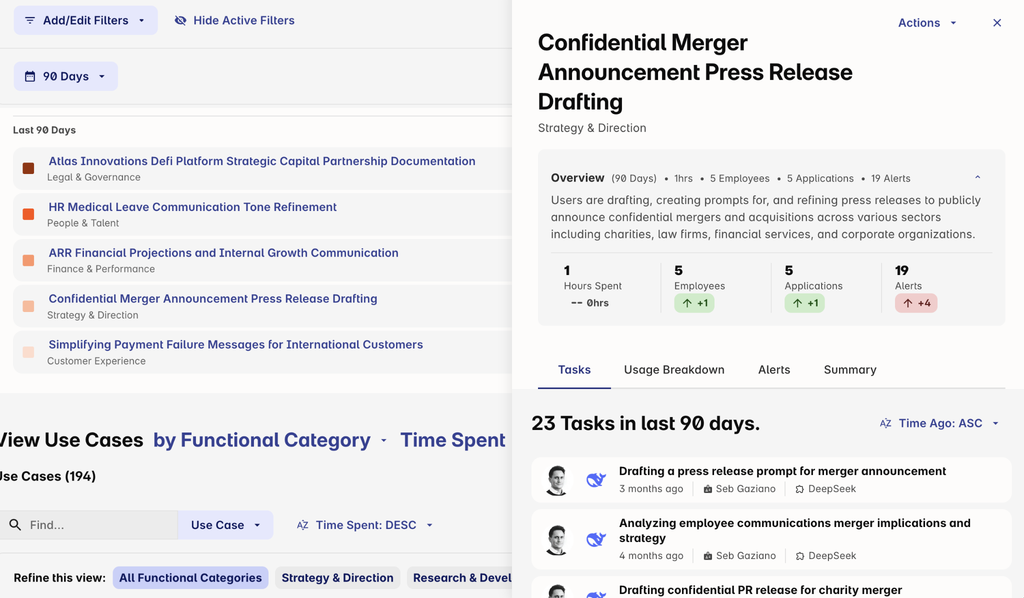
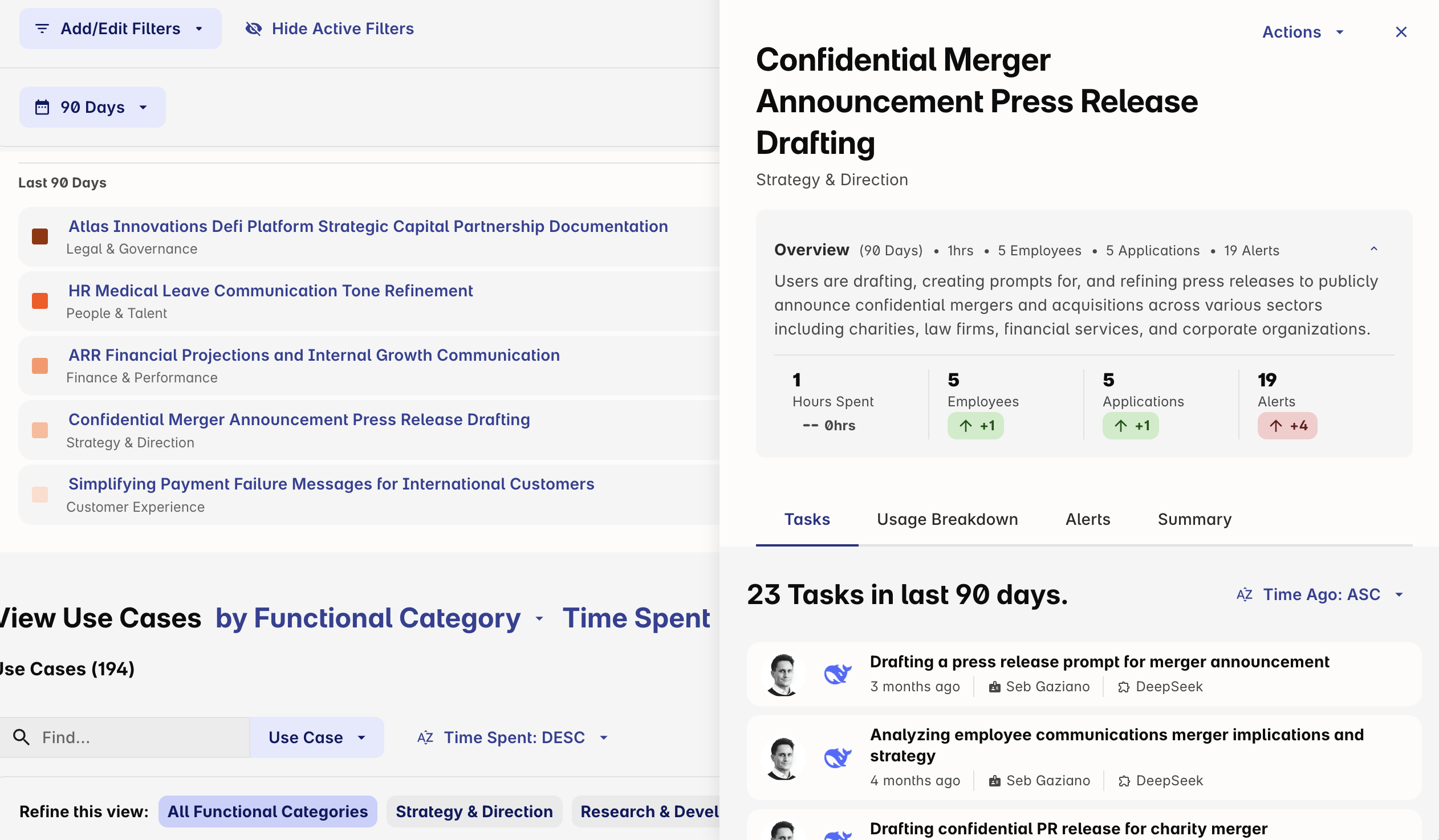
Harmonic Security provides an AI governance and control platform that collects AI activity at the source, categorizes it by business use case, and applies controls in real time across the browser and desktop. The platform includes Harmonic Explore for usage analysis, Harmonic Guide for browser and desktop controls, and Harmonic Command for governing both humans and agents.
Instead of pattern matching, Harmonic classifies the meaning of the work in each prompt. It runs on the device and inside the AI surface, covering desktop tools such as Claude Desktop and Cursor, local MCP servers, AI embedded in SaaS products, and free-tier accounts.
Key features include:
- AI usage discovery and categorization: Harmonic provides an inventory of AI tools in use across the organization from the first day of deployment and categorizes usage by business use case.
- Context-aware prompt classification: Prompts are classified by the meaning of the content rather than by string patterns, so policies can distinguish between types of documents and tasks.
- Configurable enforcement: Security teams can block an action in real time, warn the employee with context about the risk, or log the event silently for review.
- Desktop, CLI, and agent coverage: Harmonic provides discovery, monitoring, and inline guardrails for ChatGPT and Codex on the web, desktop, and command line. It also governs agentic workflows at the MCP layer and tool surface.
- API usage discovery: Calls to OpenAI APIs from scripts or other applications are discovered and monitored.
- Privacy safeguards: HR, Finance, Ops, and Founders are excluded from reporting by default, and employee names can be masked in the portal. EU hosting is available on request.
- Deployment through existing tools: Rollout uses Intune, JAMF, Kandji, or Group Policy. The browser extension covers all browsers, and the MCP gateway runs on Windows, macOS, and Linux.
Limitations (based on publicly available sources):
- Limited independent reviews: Few user reviews are available on major review platforms, which makes independent validation harder.
- Pricing transparency: Pricing is not published and is provided through quotes.
- Validation of detection claims: Accuracy and latency claims for its classification models need to be validated during evaluation.
- Dependence on device management: Deployment relies on device management tools such as Intune, JAMF, Kandji, or Group Policy, which may affect coverage on devices outside IT management.
Source: Harmonic Security
Conclusion
Effective AI data protection requires controls that follow sensitive information across prompts, file uploads, clipboard transfers, browser sessions, desktop applications, and agent workflows. Organizations should evaluate providers based on application discovery, granular access controls, real-time DLP, work and personal data separation, BYOD coverage, and audit logging. The right approach should protect sensitive data before it reaches unauthorized AI services while allowing approved AI use with policies matched to the organization’s users, devices, applications, and data risks.

Any worker. Any laptop. Any AI workflow. Fully secured.
Schedule a demo to see how Blue Border™ secures company data and apps without shipping laptops, running VDI, or managing personal endpoints.