
Best Enterprise Solutions for AI Monitoring and Defense: Top 8 In 2027


See Venn first in Google Search
Add as a preferred source on Google
TL;DR: Real-time AI monitoring and defense solutions discover AI use, inspect prompts and agent actions, and block data leaks and attacks as they happen. Best for governing AI on any laptop: Venn; for inline workforce AI control: Zscaler; for AI apps and agents across the lifecycle: Prisma AIRS; for agent runtime response: Noma Security.
What Are Enterprise Solutions for Real-Time AI Monitoring and Defense?
Enterprise solutions for real-time AI monitoring and defense combine continuous telemetry analysis, behavior-based anomaly detection, and automated policy enforcement to protect models, agents, and data flows. These solutions help organizations detect unauthorized AI usage, prevent sensitive data exposure, identify suspicious activities, and enforce security policies as employees and AI systems interact with corporate resources.
Unlike traditional security tools that primarily monitor network traffic or stored data, real-time AI security solutions address risks arising during active AI interactions. They can inspect prompts, file uploads, model outputs, and agent activities to identify potential threats before they result in security incidents.
Core capabilities of real-time AI defense:
- Real-time data loss prevention (DLP) for AI interactions: Inspects prompts, file uploads, and clipboard activity to prevent sensitive corporate data from reaching unauthorized AI services.
- AI application access control and tenant restrictions: Restricts unapproved AI tools and enforces corporate account and tenant policies.
- Endpoint-level security and isolation of AI workflows: Protects AI workflows on managed, unmanaged, and BYOD devices without requiring full device management.
- Protection against unauthorized AI data sharing and exfiltration: Blocks unauthorized transfers of confidential information to external AI applications and services.
- Monitoring and governance of desktop and browser-based AI tools: Monitors and controls AI assistants, native applications, browser extensions, and embedded AI features.
- AI agent activity monitoring and runtime threat detection: Detects prompt injection, suspicious tool calls, excessive permissions, and unauthorized agent actions.
Say ‘Yes’ to AI on BYOD Laptops
Unlock the 4 essential assets you need to secure company data on unmanaged laptops – without VDI.
Table of contents
- What Are Enterprise Solutions for Real-Time AI Monitoring and Defense?
- Real-Time AI Monitoring and Defense Solutions at a Glance
- Why Enterprises Need Real-Time AI Monitoring and Defense
- How Real-Time AI Monitoring and Defense Solutions Work
- Key Capabilities of Enterprise AI Monitoring and Defense Solutions
- Notable Enterprise Solutions for Real-Time AI Monitoring and Defense
- Conclusion
Real-Time AI Monitoring and Defense Solutions at a Glance
The table below summarizes the key differences between the enterprise solutions covered in this guide. We explore each of them in more detail in the sections that follow.
| Category | Solution | Best For | Key Strengths | Things to Consider |
| Workforce and Endpoint AI Monitoring and Defense | Venn Blue Border | Governing AI on managed, unmanaged, and BYOD laptops | Local secure enclave with AI tool control, tenant limits, and DLP | Performance and customization vary by environment |
| Workforce and Endpoint AI Monitoring and Defense | Zscaler AI Security | Inline AI access control and DLP on a zero trust platform | AI asset discovery, inline DLP, MCP and A2A brokering | Complex setup; latency and premium pricing reported |
| Workforce and Endpoint AI Monitoring and Defense | Netskope Skylight AI Security | Unified AI visibility for users, apps, and agents | Inline inspection of 1,800+ AI apps, agent action control | Complex configuration, learning curve, cost |
| Workforce and Endpoint AI Monitoring and Defense | WitnessAI | Governing employee and agent AI use from one policy layer | Intent-based classification, MCP tool control, runtime defense | Cost, tuning time, legacy integration effort |
| AI Application and Agent Runtime Defense | Palo Alto Networks Prisma AIRS | Securing AI apps, agents, and models across the lifecycle | AI Gateway, runtime security, supply chain scanning | Some features maturing; tuning and documentation gaps |
| AI Application and Agent Runtime Defense | Cisco AI Defense | Securing employee AI use and in-house AI development | Network-embedded guardrails, algorithmic red teaming | Documentation complexity; usage-based pricing |
| AI Application and Agent Runtime Defense | CrowdStrike Falcon Guardian | Runtime security for AI agents on endpoints, cloud, and SaaS | Links AI prompts to endpoint telemetry | Newly launched; AI gateway not yet available |
| AI Application and Agent Runtime Defense | Noma Security AI-DR | Runtime detection and response for AI agents | Context-based enforcement with masking and killswitch | Usage-based pricing; limited peer reviews |
Why Enterprises Need Real-Time AI Monitoring and Defense
Shadow AI and Unapproved AI Tools Increase Data Exposure Risks
Shadow AI refers to the use of artificial intelligence applications without formal approval or oversight from an organization’s IT and security teams. Employees may independently adopt generative AI assistants, coding tools, meeting transcription services, or browser extensions to improve productivity. However, these applications may not comply with corporate data handling requirements or provide adequate security controls.
Unapproved AI tools can introduce risks when employees submit internal documents, source code, or confidential business information to external services. Security teams may have limited visibility into which applications are being used, what information is being shared, and whether the services retain or process corporate data.
Real-time AI monitoring solutions help organizations discover unauthorized AI usage, restrict access to unapproved tools, and enforce policies governing which applications can interact with corporate data. Controls that extend beyond web browsers are particularly important for addressing desktop AI applications and operating-system-level assistants.
Sensitive Corporate Data Can Leak Through AI Prompts and File Uploads
AI applications create additional channels through which sensitive information can leave corporate environments. Employees may unintentionally include customer records, financial information, proprietary source code, or confidential business strategies in prompts submitted to external AI services. Uploading documents for summarization or analysis can expose entire files to third-party processing environments.
These activities may bypass traditional data protection mechanisms, particularly when employees use personal AI accounts or applications outside approved corporate workflows. Even legitimate AI services can introduce data governance concerns if organizations cannot control what information users submit or how that information is processed.
Real-time AI data loss prevention (DLP) solutions can inspect or restrict prompts, clipboard transfers, and file uploads before sensitive information reaches unauthorized AI services. Additional controls, including data classification, approved AI account enforcement, and application-level isolation, help organizations maintain control over confidential information while supporting approved AI use cases.
Related content: Read our guide to AI data leakage
AI Agents and Automated Workflows Introduce New Security Threats
AI agents introduce security risks beyond those associated with conventional generative AI applications because they can independently interact with enterprise systems, retrieve information, execute commands, and perform actions through connected tools and APIs. Depending on their permissions, agents may access sensitive databases, modify business records, communicate with external services, or trigger automated workflows.
These capabilities create opportunities for attackers to exploit prompt injection vulnerabilities, excessive permissions, insecure tool integrations, and compromised data sources. For example, an attacker could insert malicious instructions into a document retrieved by an AI agent, potentially causing the agent to disclose confidential information or execute unauthorized actions.
Real-time AI defense solutions help organizations monitor agent behavior, enforce least-privilege access, inspect tool calls, and identify suspicious actions during execution. Security teams should also implement human approval requirements for high-risk operations and maintain detailed activity logs to support investigations and accountability.
Remote Work and BYOD Create Gaps in AI Security Visibility
Remote work and bring your own device (BYOD) policies make enterprise AI security more challenging because employees access corporate applications from personal laptops, unmanaged endpoints, and networks outside direct organizational control. Traditional endpoint management and network-based monitoring solutions may not cover these environments consistently, creating gaps in security visibility and policy enforcement.
Employees may also use corporate and personal AI applications on the same device, increasing the risk of accidental data transfers between business and personal environments. Browser-based security controls may not adequately protect information accessed through locally installed AI clients, desktop productivity applications, or operating-system-integrated assistants.
Enterprise security solutions can address these challenges by isolating corporate applications and data within controlled workspaces and enforcing AI access policies at the application or data layer. This approach enables organizations to restrict unauthorized AI interactions, apply DLP controls, and monitor business activity across managed and unmanaged devices while preserving employee privacy outside the corporate workspace.
How Real-Time AI Monitoring and Defense Solutions Work
Continuous Discovery and Monitoring of Enterprise AI Usage
Enterprise AI monitoring begins with identifying the AI applications, services, models, and agents operating across the organization. Discovery capabilities can analyze network connections, application activity, API requests, and endpoint telemetry to identify both approved AI services and unauthorized shadow AI tools. This provides security teams with a more complete understanding of how employees and automated systems interact with AI.
Continuous monitoring tracks changes in AI usage, including newly adopted applications, connections to external AI services, and interactions involving sensitive business information. Depending on the solution, monitoring can extend to browser-based assistants, native desktop applications, and AI tools running on unmanaged devices.
The resulting visibility helps organizations maintain an up-to-date inventory of AI activity, assess application risks, and identify gaps in existing security controls.
Real-Time Detection of Suspicious AI Activity and Data Transfers
Real-time detection mechanisms analyze AI interactions to identify activities that may indicate unauthorized access, data exposure, or malicious behavior. Security platforms can inspect prompts, file uploads, API requests, and AI agent actions, comparing observed activity against established security policies, behavioral patterns, and data classification rules.
For example, a monitoring solution may detect an employee attempting to upload confidential financial documents to an unapproved AI assistant. Other systems can identify suspicious agent behavior, unusual API activity, prompt injection attempts, or unexpected transfers of sensitive information to external services.
Advanced detection capabilities can combine contextual analysis, predefined rules, and behavioral analytics to distinguish legitimate AI usage from potentially harmful activity. Inline inspection is particularly important because it allows security controls to evaluate risky interactions before data leaves the protected environment.
Policy-Based Access Controls for AI Applications and Services
Policy-based access controls determine which AI applications employees and automated systems can access, what information they can share, and which activities are permitted. Administrators define policies based on factors such as user identity, department, device status, application category, and data sensitivity.
For example, an organization might allow employees to use an approved enterprise AI assistant while preventing access to personal AI accounts from corporate applications. Policies can also restrict file uploads, clipboard transfers, or connections to specific AI services without blocking all AI functionality.
Identity-aware access controls and application-level isolation help organizations enforce these restrictions consistently across corporate and personal devices. In secure workspace environments, corporate applications and data can remain isolated from unauthorized AI tools, even when employees use the same device for personal activities.
Automated Threat Prevention and Data Loss Protection
Automated threat prevention enables security solutions to intervene immediately when AI activity violates corporate policies or presents a potential security risk. Rather than generating alerts for later investigation, enforcement mechanisms can block unauthorized connections, prevent sensitive file uploads, restrict clipboard operations, or terminate risky AI interactions.
Data loss prevention capabilities examine information moving between corporate applications and AI services. Depending on the platform, they may identify personally identifiable information, financial records, intellectual property, source code, and other sensitive content using classification rules and contextual inspection.
Automated enforcement can include blocking, redacting sensitive information, warning users, or redirecting activity to approved AI services. Endpoint-level controls can also prevent corporate information from being transferred to unauthorized desktop AI applications or personal environments through copy-and-paste and other data movement channels.
Centralized Logging, Alerting, and Security Investigations
Centralized logging consolidates AI-related security events into a unified record, giving security teams visibility into application usage, policy violations, attempted data transfers, and enforcement actions. Depending on the solution, logs may capture user identities, application names, timestamps, device information, data classifications, and the outcomes of security decisions.
Security platforms can generate alerts when suspicious activities occur, allowing analysts to prioritize incidents based on severity, affected resources, and potential business impact. Integrations with security information and event management (SIEM) and security operations platforms can help correlate AI-related events with other enterprise security signals.
Audit trails and searchable activity logs support incident investigations, regulatory compliance, and continuous policy improvement. By analyzing recurring violations and emerging AI usage patterns, organizations can refine their security controls while maintaining visibility into how AI technologies are used across the enterprise.
Key Capabilities of Enterprise AI Monitoring and Defense Solutions
Real-Time Data Loss Prevention (DLP) for AI Interactions
Real-time data loss prevention (DLP) protects sensitive corporate information by monitoring and controlling how data moves into AI applications. Unlike traditional DLP solutions focused primarily on email, file transfers, and cloud storage, AI-aware DLP controls can inspect:
- Prompts
- Document uploads
- Clipboard operations
- Other interactions involving generative AI services
These solutions use content inspection, data classification, and contextual security policies to identify information that should not be shared with external AI systems. Depending on the platform, organizations can automatically block sensitive uploads, prevent unauthorized copy-and-paste operations, or warn employees when their actions violate corporate policies.
Effective AI DLP should protect data at the point of interaction, including when employees access AI applications from unmanaged devices. Security teams should also be able to distinguish approved enterprise AI environments from personal accounts to enforce appropriate data-sharing restrictions.
AI Application Access Control and Tenant Restrictions
AI application access controls enable organizations to determine which AI services employees can use and under what conditions. Administrators can:
- Establish allowlists and blocklists
- Restrict access based on user identity or device context
- Enforce different policies for approved and unauthorized AI applications
Tenant restrictions provide additional protection by distinguishing between corporate-approved AI accounts and personal or external accounts within the same service. For example, an organization may permit employees to use its managed enterprise AI tenant while preventing corporate information from being transferred into personal accounts that lack equivalent security and governance controls.
Access policies should combine application-level restrictions with identity-aware enforcement to support legitimate AI usage without granting unrestricted access to external services. Where supported, controls should apply consistently across browsers, native applications, and remote working environments.
Endpoint-Level Security and Isolation of AI Workflows
Endpoint-level security protects AI interactions directly on the devices employees use, rather than relying exclusively on corporate network monitoring or cloud security gateways. This approach is particularly important for remote workers, contractors, and employees using personal devices, where traditional endpoint management may be unavailable or undesirable.
Application-level isolation creates a controlled boundary around corporate applications and data, separating business activity from personal applications and operating-system resources. These boundaries can prevent unauthorized data movement through:
- Clipboard transfers
- File sharing
- Screen capture
- Other mechanisms that could expose sensitive information to AI tools
Secure workspace technologies can enforce corporate AI security policies without requiring full management of the employee’s personal device. This enables organizations to protect business information while maintaining separation between corporate security monitoring and private user activity.
Protection Against Unauthorized AI Data Sharing and Exfiltration
Unauthorized AI data sharing occurs when sensitive corporate information is transferred to AI services without appropriate authorization or security controls. These transfers may be intentional, such as an employee uploading proprietary source code to an unapproved assistant, or accidental, such as including confidential customer information in a prompt.
Enterprise AI defense solutions help prevent these incidents by monitoring data movement and enforcing restrictions across:
- Applications
- Files
- Communication channels
Depending on their deployment architecture, they can block uploads to unauthorized AI services, restrict clipboard transfers, prevent files from leaving protected environments, and detect suspicious attempts to move sensitive information.
Context-aware protection is particularly valuable because it considers both the sensitivity of corporate information and the destination receiving it. This allows organizations to support approved AI workflows while preventing data transfers to personal applications, untrusted services, or unauthorized external environments.
Monitoring and Governance of Desktop and Browser-Based AI Tools
AI applications operate through multiple interfaces, including web browsers, native desktop clients, browser extensions, and AI capabilities embedded within productivity software. Security controls limited to browser traffic may provide incomplete coverage when employees use locally installed AI assistants or applications that interact directly with operating-system resources.
Enterprise AI governance solutions help organizations:
- Identify permitted and unauthorized AI tools
- Monitor their interactions with corporate resources
- Enforce consistent usage policies
Depending on the technology, monitoring can include application launches, access to business files, clipboard activity, and connections between corporate applications and AI services.
Organizations should prioritize solutions that extend AI governance beyond browser-based tools and provide visibility into desktop applications and embedded AI features. Endpoint-level controls and isolated corporate workspaces can help address these risks by restricting how AI applications access protected business information.
AI Agent Activity Monitoring and Runtime Threat Detection
AI agent monitoring focuses on observing automated systems that can retrieve information, interact with enterprise applications, execute commands, and perform actions through APIs or connected tools. Unlike traditional AI assistants that primarily generate responses, autonomous agents can initiate workflows and modify business resources, introducing additional security risks.
Runtime threat detection capabilities analyze agent activity to identify:
- Suspicious tool calls
- Abnormal behavior
- Unauthorized data access
- Potential prompt injection attacks
Monitoring systems can correlate agent identities, assigned permissions, execution context, and attempted operations to determine whether actions comply with organizational security policies.
Effective AI agent defense combines behavioral monitoring with least-privilege access controls, tool-level authorization, and human approval for high-risk actions. Organizations should also maintain auditable records of agent decisions and activities to support investigations, accountability, and ongoing security policy improvements.
Notable Enterprise Solutions for Real-Time AI Monitoring and Defense
How we selected these solutions: We shortlisted enterprise solutions for real-time AI monitoring and defense based on their ability to discover sanctioned and shadow AI tools and agents, inspect prompts, uploads, and agent actions as they happen, enforce DLP and access policies on AI interactions, and block runtime threats such as prompt injection, data leakage, and unsafe agent behavior.
Workforce and Endpoint AI Monitoring and Defense
1. Venn Blue Border

Best for: Governing AI use on managed, unmanaged, and BYOD laptops
Strengths: Local secure enclave with AI tool control, tenant limits, and DLP
Things to consider: Performance and customization options vary by environment
Venn Blue Border is a secure workspace that installs a company-controlled, encrypted enclave on any Mac or PC. Work apps, files, network traffic, and AI tools run locally inside the enclave under IT policy and DLP, and each work application window is marked by a blue line. It is not a virtual desktop and does not require full management of the device.
For AI monitoring and defense, IT decides which browser, desktop, and OS-level AI tools can reach company data inside the enclave and blocks the rest. Activity outside Blue Border, including personal AI use, stays private to the user.
Key features include:
- AI tool governance at the data layer: IT sanctions specific AI tools, whether browser-based or desktop, and blocks individual tools or whole AI categories from accessing company data. Desktop copilots and OS-level assistants are covered alongside web-based AI.
- Native desktop AI inside the enclave: Approved desktop AI applications, including Claude, Claude Cowork, and Claude Code, run natively inside Blue Border with no hosting or virtualization and with full DLP coverage.
- Tenant restrictions: Sign-ins to approved AI services are permitted only from company-provided accounts, and personal logins inside Blue Border are blocked.
- Trusted-location access: Blue Border traffic comes from IP addresses dedicated to each customer, so existing conditional access policies can reject sign-ins to company AI accounts from untrusted locations.
- DLP on AI prompts and uploads: Policies govern copy/paste, upload, download, screenshot, print, and AI prompts for data leaving the enclave, so company data cannot be moved into an unsanctioned AI tool.
- AI usage audit logging: Every AI interaction inside the enclave is logged, showing IT which AI tools are used and by whom.
- Enforcement on any device: Policy is enforced in the enclave rather than on the network, so the same AI rules apply on company-issued, third-party, BYOD, and unmanaged devices.
- Privacy separation: Governance applies only to company data inside Blue Border. Personal apps, files, browsing, and AI accounts outside it cannot be seen by the company or by Venn.
Limitations (as reported by users on G2):
- Performance on some setups: Some users report that the secure enclave can feel slow at times, particularly when accessing hosted applications.
- Customization options: Reviewers mention that customization options are more limited than they would like in some areas.
- Support scheduling: A reviewer notes that support requests are routed to the next available team member rather than to a specific contact.
2. Zscaler AI Security

Best for: Inline AI access control and DLP across a zero trust platform
Strengths: AI asset discovery, inline DLP, MCP and A2A brokering, red teaming
Things to consider: Complex setup; latency and premium pricing reported
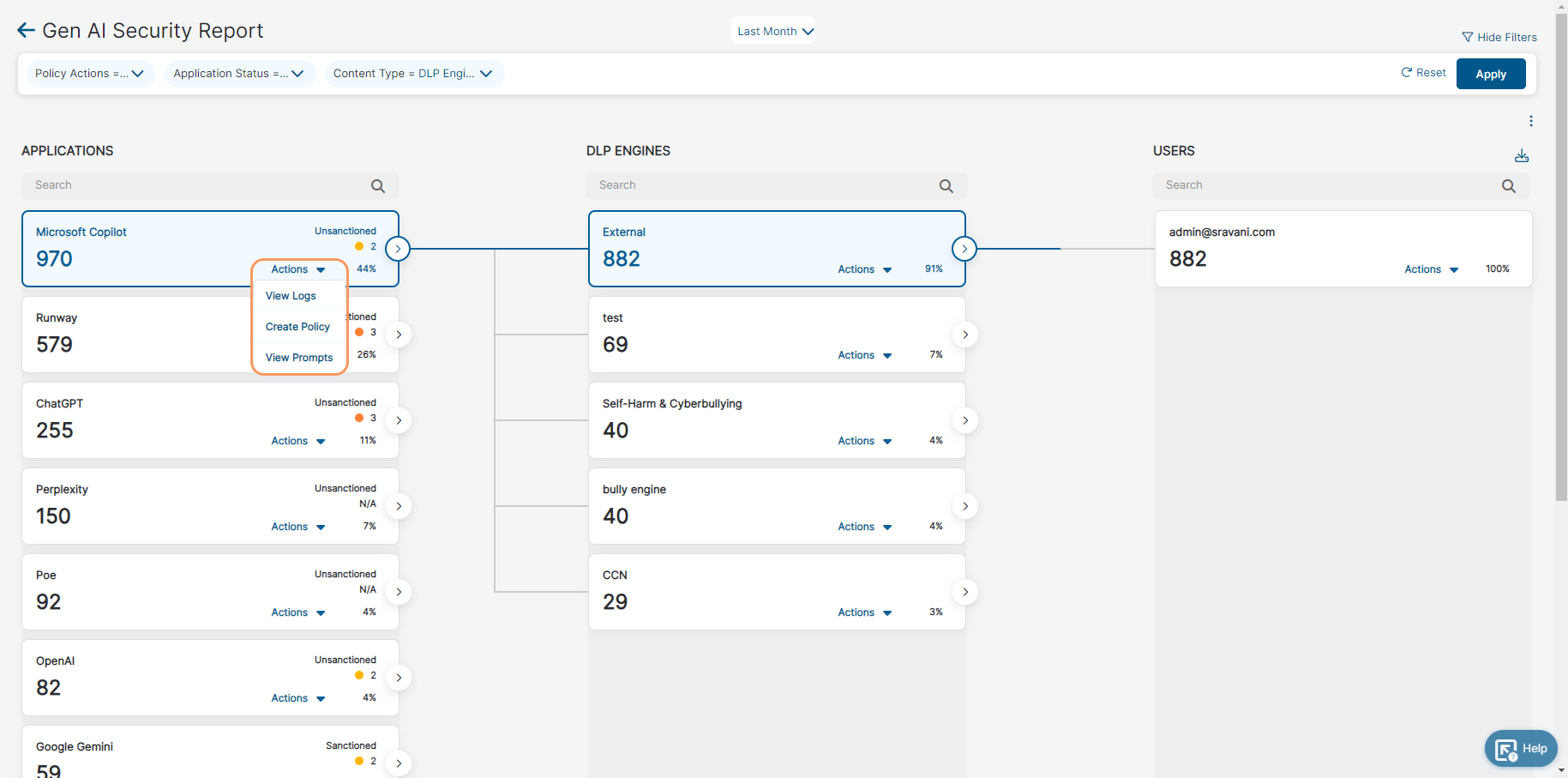
Zscaler AI Security is a set of AI controls delivered through the Zscaler Zero Trust Exchange, which sits inline across the AI workflow and applies policy to users, devices, and API calls in real time. It covers four areas: AI asset management, secure access to AI, testing and protection of AI apps and infrastructure, and an AI gateway for model and agent traffic.
Key features include:
- AI asset management: Discovers AI assets including models, agents, MCP servers, and shadow AI, and traces data-to-AI lineage across more than 2,900 apps in one view.
- Secure access to AI: Controls who can use AI tools and how, blocking access by role in real time and filtering sensitive data before it reaches LLMs.
- AI Gateway: Routes and governs AI transactions from a central control plane, applying inline DLP and zero trust policy to model, agent, and API calls. MCP and A2A brokers apply fine-grained access policies to enterprise AI agents.
- Endpoint AI Security: Finds and stops AI threats on employee devices, including in browsers, extensions, and plugins.
- AI Access Graph: Shows how AI agents use data and identities in real time, tracks data lineage across channels, and highlights unnecessary access.
- AI app and infrastructure testing: Runs more than 5,000 attack scenarios across text, image, voice, and documents, with findings mapped to MITRE ATLAS, NIST, and the EU AI Act.
- Guardrails and prompt hardening: Combines automated red teaming, dynamic risk assessment, and guardrails to block exploits such as prompt injection and data leakage.
Limitations (as reported by users on G2):
G2 lists reviews for Zscaler Internet Access, the platform service that delivers these controls, rather than for the AI modules separately.
- Performance and latency: Some users report slowdowns with certain applications or websites, along with latency issues.
- Setup complexity: Reviewers describe initial setup and policy tuning as complex and time-consuming.
- Cost and packaging: Users note the product is expensive and that many features sit behind separate subscription tiers.
- Legacy application compatibility: Some legacy applications need extra configuration and exceptions to work smoothly.
- Connection stability: A reviewer reports disconnections during brief internet fluctuations.
Source: Zscaler
3. Netskope Skylight AI Security
Best for: Unified AI visibility and data control for users, apps, and agents
Strengths: Inline inspection of 1,800+ AI apps, agent action control, DLP
Things to consider: Complex configuration, learning curve, and cost
Netskope Skylight AI Security (formerly Netskope One AI Security) covers four areas of AI use: the people using AI tools, the data feeding them, self-hosted models, and AI agents. It runs on the Netskope One platform with a single console and policy engine, integrated with Netskope’s data security capabilities.
Inspection happens inline and on the endpoint, so the platform can separate corporate AI accounts from personal and shadow AI, redact sensitive data before it reaches a model, and stop high-risk agent actions before they execute.
Key features include:
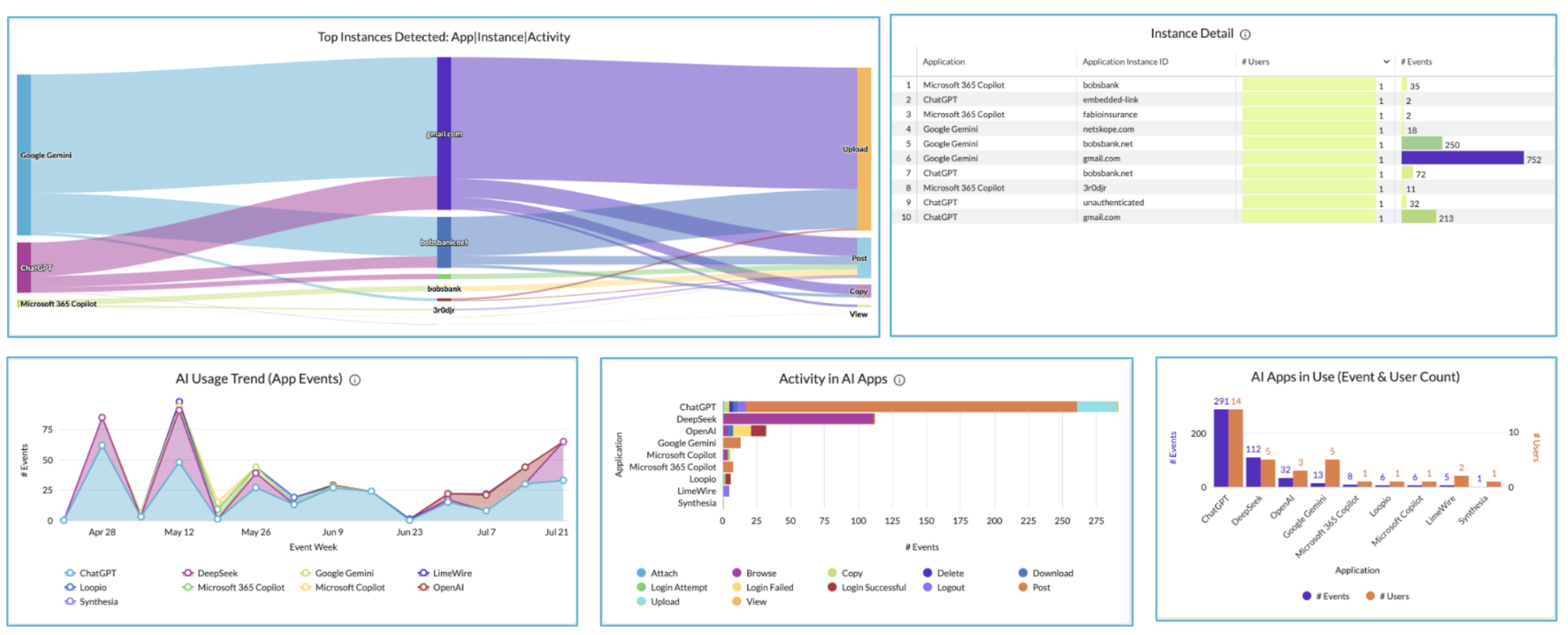
- AI Command Center: Discovers and inventories users, apps, agents, models, and AI interactions across cloud, endpoint, and network in one view.
- GenAI app security: Inline inspection across more than 1,800 AI apps distinguishes corporate accounts from personal and shadow AI, with policies applied at the account instance level.
- Endpoint AI visibility: Identifies AI running locally on endpoints, including known AI agents, LLMs, and MCP servers.
- AI Guardrails: Applies guardrails and threat and data protection at runtime, redacting or blocking sensitive data before it reaches a model.
- Agentic Broker: Provides visibility into AI agents and public MCP servers and assesses MCP server risk based on security posture.
- Agent Action Control: Classifies attempted agent actions by risk level and blocks high-risk actions, such as deleting a repository, before they execute.
- AI Gateway and AI Red Teaming: Authenticates, rate-limits, and logs calls to self-hosted models, and runs thousands of malicious prompts against them before and after launch.
- Real-time user coaching: Explains the risk to the user at the point of action and points to the approved tool instead of applying an unexplained block.
Limitations (as reported by users on G2):
G2 lists reviews for the Netskope One Platform that delivers these AI capabilities.
- Configuration complexity: Reviewers describe some configuration tasks as complex.
- Performance impact: Some users report performance fluctuations during high traffic and occasional client disconnections.
- Cost: Pricing is listed among the drawbacks by some reviewers.
- Reporting usability: Reviewers note the reporting interface could be more intuitive for extracting cross-platform analytics.
- Integration clarity: A user reports uncertainty about what telemetry is shared in integrations with third-party endpoint tools.
Source: Netskope
4. WitnessAI

Best for: Governing employee and agent AI use from a single policy layer
Strengths: Intent-based classification, MCP tool control, runtime defense
Things to consider: Higher cost, tuning time, and legacy integration effort
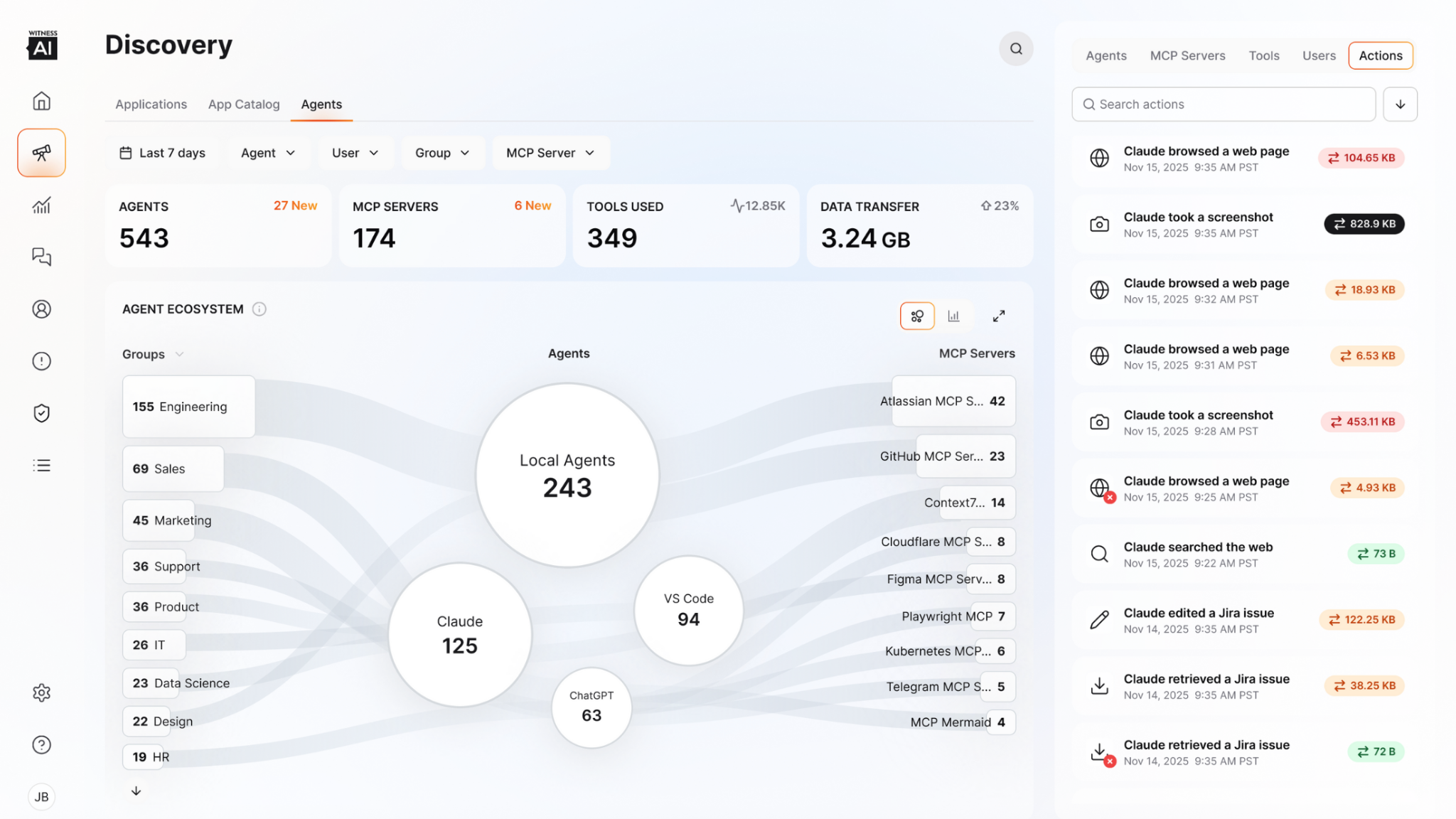
WitnessAI is a security and governance platform covering both employees using AI and the AI agents acting on their behalf. It is organized into Observe, Control, Protect, and Attack modules, and uses intent-based machine learning engines that classify interactions by context rather than keywords.
Key features include:
- AI discovery and inventory: Catalogs thousands of AI applications, agents, and MCP servers, and shows which external tools running agents connect to.
- Real-time conversation visibility: Displays prompts, responses, and agentic activity as they happen, classified by type and intent.
- Policy-based governance: Policies by department, role, intent, or workforce type apply consistently to employees and agents, with audit trails and reports for all AI activity.
- MCP and tool control: Enforces an approved list of MCP servers and tools across agents, IDEs, and agentic apps.
- Sensitive data redaction: Detects and redacts sensitive data in real time across employee and agent activity.
- Bidirectional runtime defense: Blocks prompt injection and jailbreak attempts before they reach models and agents, and filters outputs before users see them or agents act on them.
- Model routing: Routes prompts to models based on risk, cost, or purpose, including sending sensitive prompts to internal models.
- Agent attribution and deployment options: Traces agent actions to human identities for audit, with a single-tenant environment for data sovereignty.
Limitations (as reported by users on Gartner Peer Insights):
- Cost: A reviewer describes the product as high cost.
- Tuning time: Reviewers note it can take time to tune because the platform ingests large volumes of data.
- Legacy integration: Integrating with legacy systems can require custom development and extra testing.
- Complexity: Some users find the platform somewhat complex to work with.
Source: WitnessAI
AI Application and Agent Runtime Defense
5. Palo Alto Networks Prisma AIRS
Best for: Securing AI apps, agents, and models across the AI lifecycle
Strengths: AI Gateway, runtime security, supply chain scanning, red teaming
Things to consider: Some features still maturing; tuning and documentation gaps
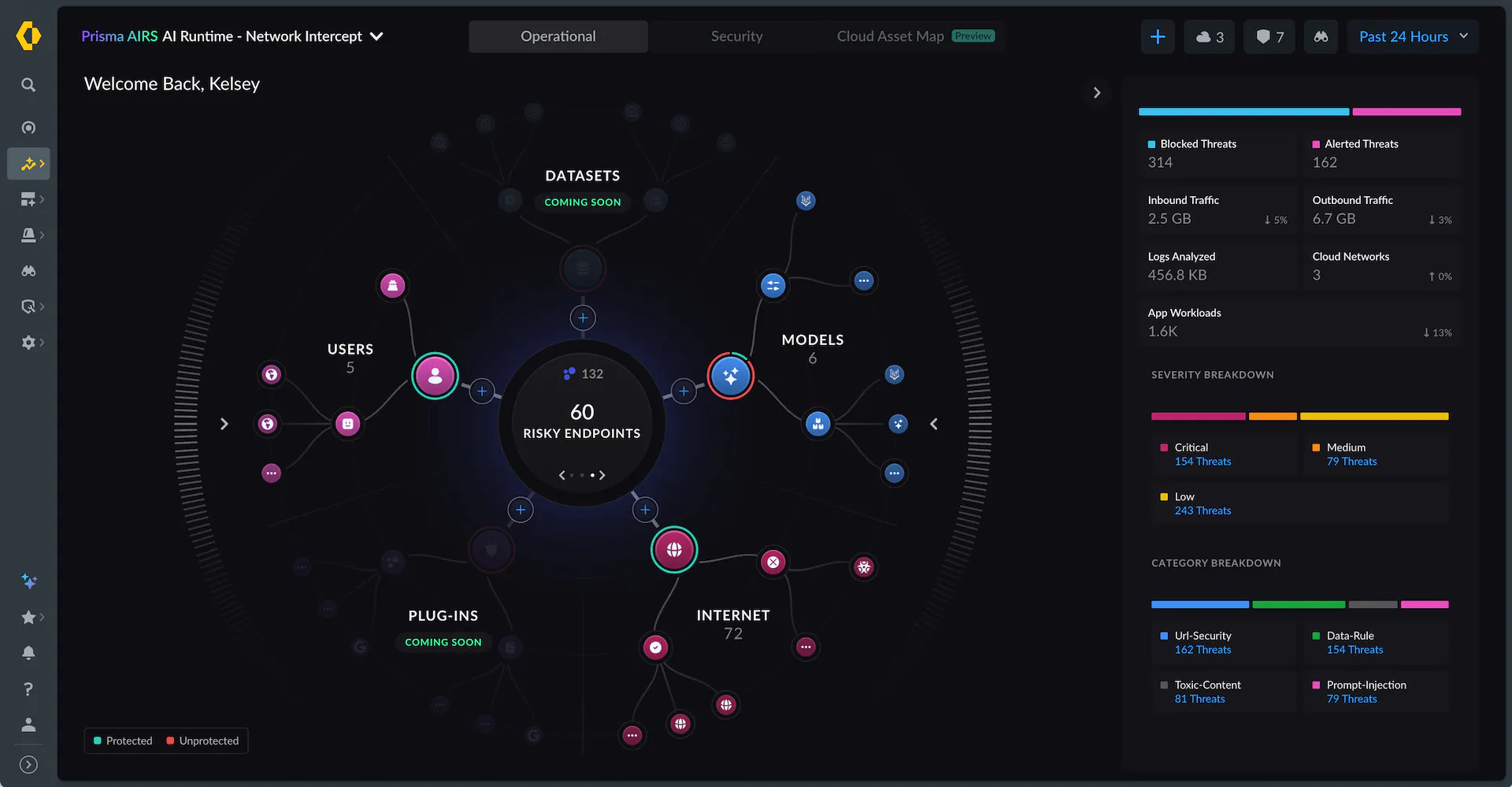
Prisma AIRS is Palo Alto Networks’ platform for discovering, assessing, protecting, and governing AI apps, agents, models, and data from development to deployment. It uses the Precision AI engine to monitor AI traffic for prompt injection, sensitive data exposure, malicious URLs, and toxic content, and deploys in Network Intercept or API Intercept modes.
Key features include:
- AI Gateway: A control plane for discovering, governing, and securing enterprise AI activity from one point.
- AI Runtime Security: Monitors AI behavior and enforces real-time safeguards against manipulation, data exposure, and unsafe actions during live interactions.
- Agent security and identity: Applies identity controls to AI agent deployments and protects agents against risks such as memory manipulation and tool misuse.
- Agentic Endpoint Security: Governs autonomous AI agents running on endpoints in real time.
- AI Supply Chain Security: Scans third-party models for model tampering, malicious scripts, and deserialization attacks before adoption. This module was formerly called AI Model Security.
- AI Posture Management: Provides visibility and control over data used for training or inference, the integrity of agents and apps, and access to deployed models.
- AI Red Teaming: Simulates real-world attacks against AI agents and applications to find weaknesses before runtime.
Limitations (as reported by users on Gartner Peer Insights):
- Feature maturity: Reviewers describe some features as underdeveloped.
- Integrations and customization: Users note the platform feels immature in these areas.
- Tuning effort: Some features require tuning to fit specific workflows.
- Documentation depth: Reviewers say documentation for advanced use cases should be expanded.
Source: Palo Alto Networks
6. Cisco AI Defense
Best for: Securing both employee AI use and in-house AI app development
Strengths: Network-embedded guardrails, algorithmic red teaming, AI inventory
Things to consider: Documentation complexity; usage-based pricing
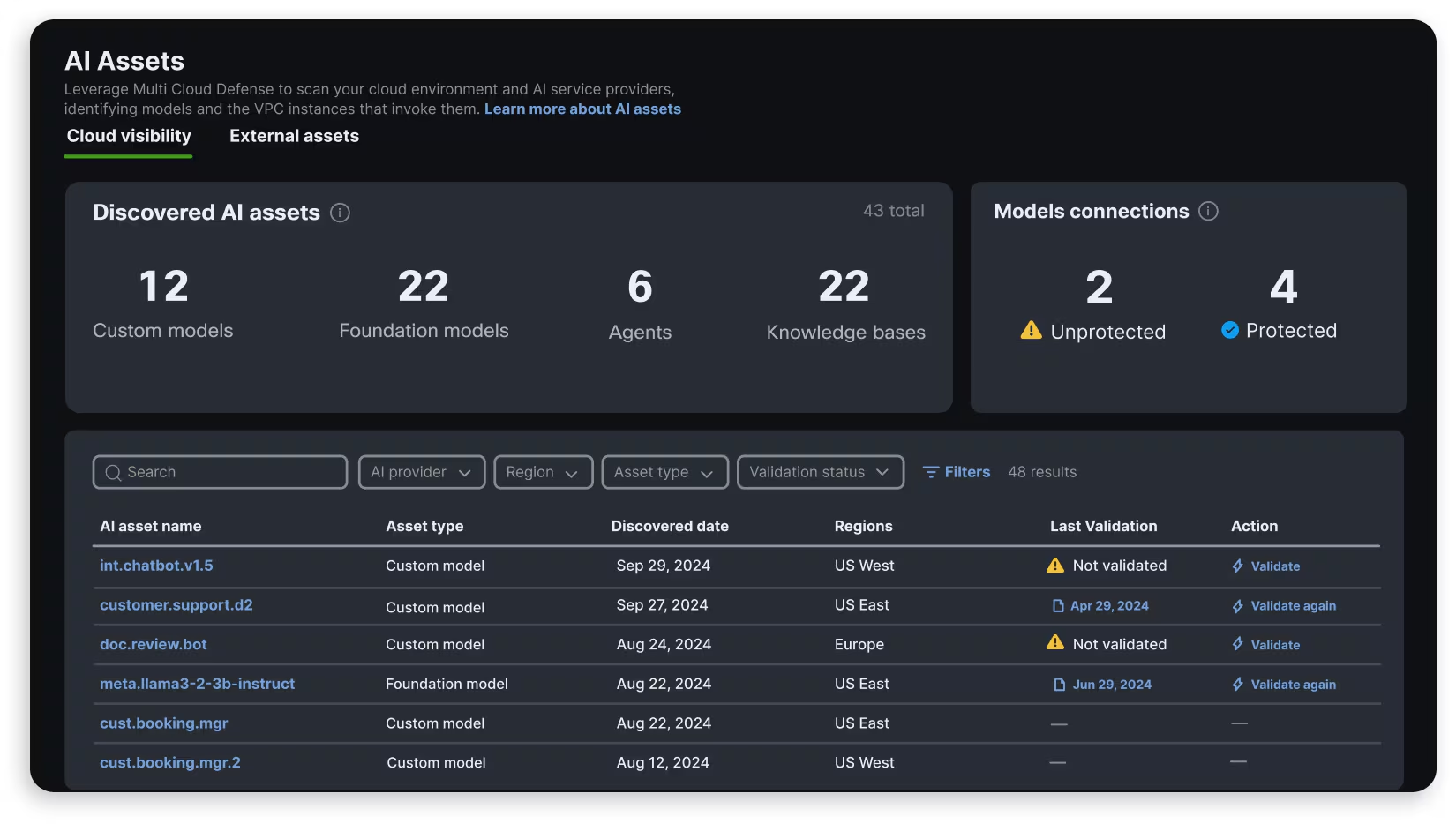
Cisco AI Defense covers two scenarios: employees using third-party AI applications, and teams building their own AI apps and agents. For AI usage, it surfaces third-party AI apps in use and applies access, threat, and data loss policies. For development, it detects AI assets, tests models for vulnerabilities, and deploys runtime guardrails.
Enforcement is applied at the network level without agents or libraries in AI workloads, and detections draw on threat intelligence from Cisco’s AI research lab and Talos.
Key features include:
- AI Access: Monitors and manages access to third-party AI applications and enforces policies that limit sensitive data exposure.
- AI Cloud Visibility: Inventories AI models and connected data sources across distributed cloud environments.
- AI Runtime Protection: Guardrails embedded in the network block prompt injection, denial of service, data leakage, and harmful responses in production AI applications.
- AI Model and Application Validation: Uses algorithmic red teaming to identify safety and security vulnerabilities across models, with results returned in seconds.
- AI Supply Chain Risk Management: Applies governance and security controls to AI models and files entering the environment.
- Extended detection categories: Guardrails cover model denial of service, code detection, and off-topic attacks in addition to prompt injection and malicious URLs.
- Standards mapping: A single integration maps detections to NIST, MITRE ATLAS, and the OWASP LLM Top 10.
Limitations (based on publicly available sources):
- Documentation usability: A Gartner Peer Insights reviewer describes the documentation and some features as difficult to apply correctly.
- Usage-based pricing: Pricing depends on the number of AI applications protected, usage, and deployment model, so costs scale with AI adoption.
- Network-path dependency: Enforcement is applied at the network layer, so coverage depends on AI traffic passing through the inspected path.
Source: Cisco
7. CrowdStrike Falcon Guardian
Best for: Runtime security for AI agents on endpoints, cloud, and SaaS
Strengths: Links AI prompts to endpoint telemetry for detection and response
Things to consider: Newly launched; AI gateway capability not yet available
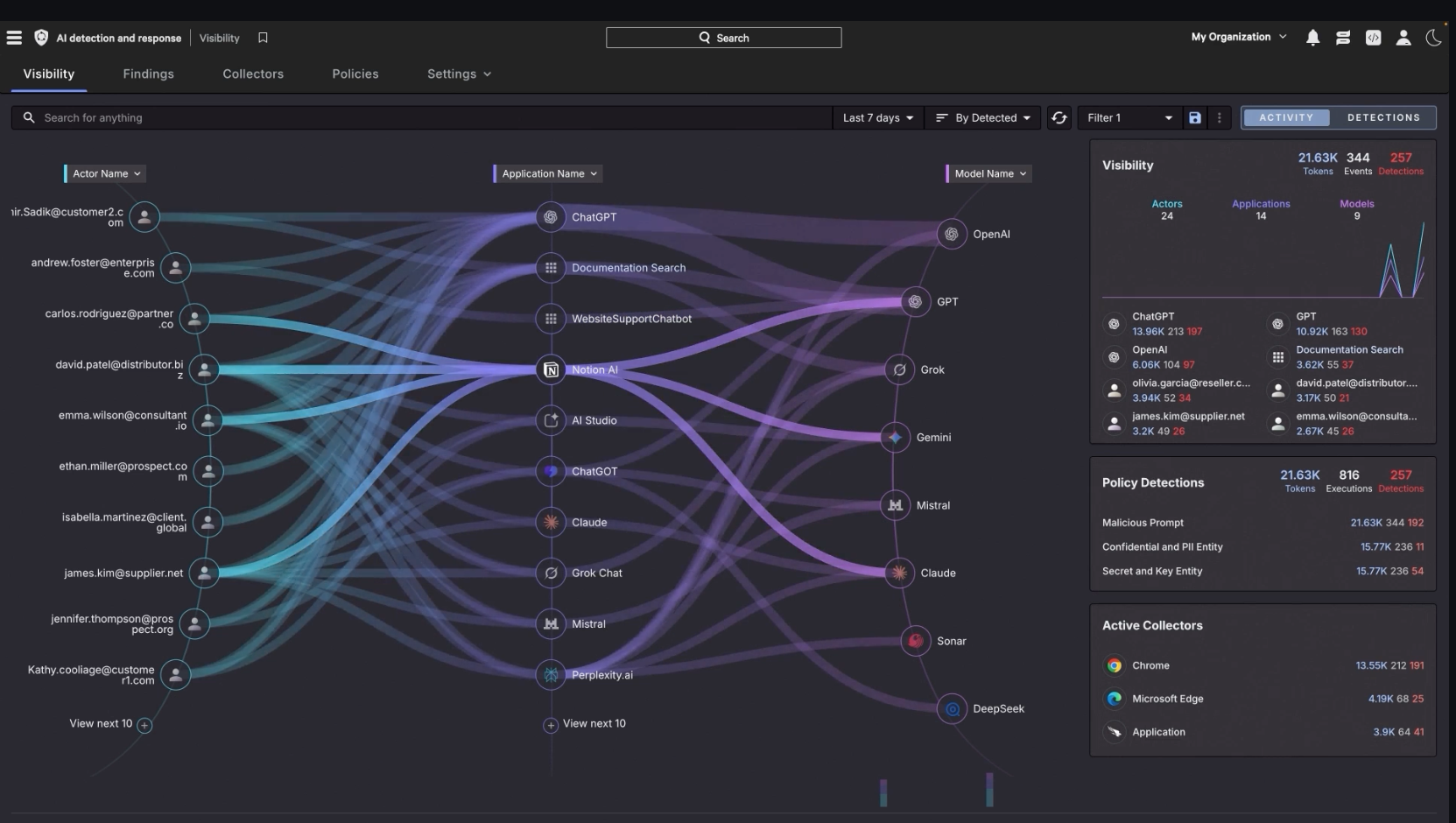
CrowdStrike Falcon Guardian is CrowdStrike’s AI detection and response (AIDR) solution, introduced at Fal.Con 2026 as the evolution of Falcon AIDR. It discovers and governs AI use, secures AI agents at runtime, protects sensitive data in AI interactions, and detects and responds to AI threats across endpoint, cloud, and SaaS environments.
It correlates AI agent activity with Falcon endpoint telemetry, connecting user prompts to the downstream processes and system actions that agents execute.
Key features include:
- Shadow AI and agent discovery: Provides visibility into workforce AI use and endpoint agents, including who uses them, token consumption, and where unmanaged risk exists.
- Agent action tracing: Traces how user prompts lead to downstream processes and system actions on the endpoint.
- AI usage and agent governance: Turns AI policies into enforceable controls over how users interact with AI tools and which agents are permitted to run.
- Prompt and data protection: Identifies sensitive data in AI interactions and redacts, encrypts, or blocks it at runtime.
- Prompt injection detection: Inspects AI interactions for direct and indirect prompt injection spanning more than 200 techniques.
- Runtime detection and containment: Detects compromised agents, reconstructs what happened, maps the blast radius across agents and systems, and applies containment actions.
- Homegrown AI protection: Secures enterprise-built agents and AI workloads against runtime threats.
Limitations (based on publicly available sources):
- Newly launched: Falcon Guardian was introduced in September 2026, and independent peer reviews are not yet available.
- AI gateway not yet available: The AI gateway capability for managing application and agent access to AI models is listed as coming soon.
- Endpoint platform dependency: Endpoint agent coverage builds on Falcon endpoint telemetry, so it fits organizations running CrowdStrike on managed endpoints.
- Contract transition: Existing Falcon AIDR customers need to confirm how current contracts map to Falcon Guardian.
- Benchmark sourcing: Published detection efficacy and latency figures come from internal benchmark testing.
Source: CrowdStrike
8. Noma Security AI-DR
Best for: Runtime detection and response for AI agents across environments
Strengths: Context-based enforcement with masking, steering, and killswitch
Things to consider: Usage-based pricing; limited peer review coverage
Noma AI-DR (AI Detection and Response) is the runtime layer of the Noma Agent Security and Governance Platform. It monitors what AI agents do across endpoint, SaaS, and cloud environments and stops risky behavior at runtime, evaluating each action against the session, the identity behind the agent, the data within reach, and the agent’s baseline behavior.
Key features include:
- Runtime Context Engine: Inspects each event together with the full session, agent identity, accessible data, and behavior over time to separate real risks from normal work.
- Threat detection coverage: Detects prompt injection, including encoded and indirect injection through tool responses, sensitive data leakage, tool poisoning, scope violations, and malicious intent.
- Rogue agent detection: Analyzes agent intent and baseline behavior to identify agents drifting from their intended purpose.
- Graduated response actions: Policies can monitor, alert, block an action, mask sensitive data inline, steer the agent to a different path, route to human approval, or trigger a killswitch.
- Agent activity trail: Records every prompt, tool call, response, and interaction across endpoint, SaaS, and cloud, with explanations of incidents.
- Deployment through existing infrastructure: Deploys through agent hooks, AI and MCP gateways, EDR/MDM, and direct APIs, with hundreds of prebuilt policies and protection profiles.
- Agent access control: Approves, reviews, or blocks agents, MCP servers, and skills, with actions scoped by user, team, or tool sensitivity.
Limitations (based on publicly available sources):
- Usage-based pricing: Pricing varies by protected endpoints, enabled features, and support level, and is not published.
- Limited peer reviews: Noma has no reviews yet on Gartner Peer Insights or G2.
- Platform dependency: Runtime decisions draw on context from Noma’s posture, identity, and access control modules, so full functionality depends on adopting the broader platform.
Conclusion
Choosing an enterprise solution for real-time AI monitoring and defense requires evaluating visibility into AI usage, data protection, access controls, and runtime threat prevention. Workforce-focused solutions help govern employee interactions with browser-based and desktop AI tools, while application and agent security platforms protect models, connected systems, and automated workflows. Organizations should prioritize inline DLP, approved AI account enforcement, agent activity monitoring, and controls that can block unsafe actions before they execute. The right approach should provide consistent protection across managed and unmanaged devices while supporting authorized AI adoption, employee privacy, and effective security investigations.

Any worker. Any laptop. Any AI workflow. Fully secured.
Schedule a demo to see how Blue Border® secures company data and apps without shipping laptops, running VDI, or managing personal endpoints.